


Looking for a Ryzen desktop? Here’s over a dozen good places to start
The launch of a new desktop processor means the launch of new desktops, and the smaller manufacturers are often the first to jump on board. That’s certainly the case with Ryzen. Virtually every enthusiast PC builder has hoped on the Ryzen bandwagon, and many came to the launch event packing a sleek, fast desktop.
As you can see in the gallery above, tempered glass is in. A majority of the desktops we saw had a tempered glass panel, and many of them used glass on multiple panels. Glass is certainly easier to break then other materials, and it’s quite heavy, so we’re not sure it makes sense for most people. But boy, it sure looks good, doesn’t it?
Most: Check out our favorite desktop PCs
Aside from the extensive use of glass, there were a few standouts. We quite liked the entry from PC Specialist, an enthusiast builder that’s popular in the UK. It brought a glass case with an impressive front panel that appeared infinitely filled with light, particularly when viewed a bit off-angle. We thought it a clever use of tempered glass, which was a good move. Otherwise, the system would’ve blurred into the rest.
And then there was the Ipason Wuhan, which was…well, just look at its. Its UFO-inspired design made it hard to even tell how it functioned. Where’s the graphics card, exactly? Clearly, it’s not the kind of case that’s going to sell to most buyers, but it is the kind of case that draws plenty of attention.
Ryzen is now available for pre-order, both by itself, and in pre-built systems from the companies featured in this gallery — and many more. Pricing starts at $329 for the Ryzen 7 1700, and goes up to $499 for the Ryzen 7 1800X. The product line is slated for full launch on March 2, and pre-ordered Ryzen computers should ship on that date.
Take team productivity to the next level with the best collaboration apps for iOS and Android
Whether you have a small team or a large business, one of the main challenges is bringing people together to collaborate and get things done. Thankfully, technology can help with the task. You can accomplish quite a bit using a combination of mobile and web apps, even if your team members are in different locations. After all, you don’t want multiple pieces of info scattered across a host of apps, or your team emailing back and forth until the end of time. These apps are just a few of the better collaboration tools out there.
More: Multitasking backfires, leads to less, not more productivity, study finds
Dropbox Paper

Dropbox is getting into the collaboration and sharing game with Dropbox Paper. This app is very clean and simple, just like Dropbox. You, as the creator of the document, simply send a link to your team and let them edit. If you highlight a word, it will give you an option to ask a question, or to comment on it. You can also type the @ sign, and the list of names of people who are working on the document will pop up, so that you can choose to directly send a comment to someone. Paper is straightforward, yet so effective that it’s already a must-have if you frequently work on notes with your team.
Download now for:
Android iOS
Box

Box recently launched revamped web and Windows apps to better tackle online collaboration. The app is simple, and it works just like other collaboration apps, allowing you to send a link to those you want to have working on a document. Box takes things a step further, however, by offering an overhauled web app that you can access through any browser by logging into box.com. You can also download the standalone app for Windows or MacOS, which provides access to all your notes and enables you to work with them offline. All these features, combined with Box’s secured encryption, make the app an excellent choice for individuals and businesses alike.
Download now for:
Android iOS
iOS Notes

In iOS, the Notes app provides native support for collaboration. If you and your team are working with iOS devices, and you need a simple way to collaborate, then there’s no need to download anything. If you have iOS 10, you will see an Add People icon in the upper-right corner when you create a new Note. Just like other collaboration apps, it will allow you to send a link via iMessage, or any other app that you have installed on your iPhone or iPad. Once your team receives the link, they can open the note and start editing. The note will appear in everyone’s Notes app, and if you choose to stop sharing the note or remove someone from the note, then it will disappear from their device. It’s a simple solution, but it may be what you and your team need.
iWork

If you bought or registered an iOS device on or after September 1, 2013, then you get iWork for free. This includes Pages, Numbers, and Keynote. Collaboration is live now as a beta, and it’s very simple to use. If you’re working on a document, you can now tap on the More menu in the upper-right corner, and you will see an option that says Collaborate with Others. This works in a similar fashion to the Notes app, in that you can share the link to your document with others. Anyone who has access to the link will then be able to edit the document in question, which makes iWork another great option if you’re an iOS user looking to collaborate on documents that are a bit more complex.
Download now for:
iOS
Google Docs

So many of us rely on Google services so much that having the Google Docs apps on your device seems like a no-brainer. Once you create a document, you can add people to it so that they can collaborate. Once they accept the invitation, you can create a multitude of documents — similar to what you can do with Microsoft Office — and have your team collaborate on those documents in real time. Combined with Google Drive, this is an excellent choice for collaboration, especially given how feature-rich the mobile and web apps are.
Download now for:
Android iOS
Take team productivity to the next level with the best collaboration apps for iOS and Android
Whether you have a small team or a large business, one of the main challenges is bringing people together to collaborate and get things done. Thankfully, technology can help with the task. You can accomplish quite a bit using a combination of mobile and web apps, even if your team members are in different locations. After all, you don’t want multiple pieces of info scattered across a host of apps, or your team emailing back and forth until the end of time. These apps are just a few of the better collaboration tools out there.
More: Multitasking backfires, leads to less, not more productivity, study finds
Dropbox Paper
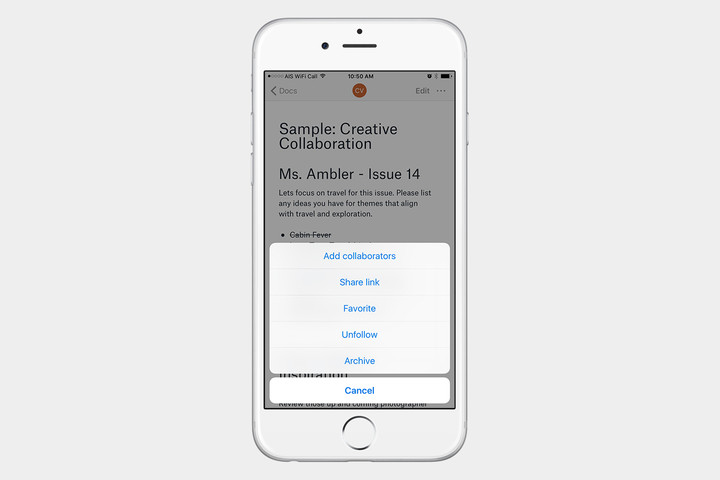
Dropbox is getting into the collaboration and sharing game with Dropbox Paper. This app is very clean and simple, just like Dropbox. You, as the creator of the document, simply send a link to your team and let them edit. If you highlight a word, it will give you an option to ask a question, or to comment on it. You can also type the @ sign, and the list of names of people who are working on the document will pop up, so that you can choose to directly send a comment to someone. Paper is straightforward, yet so effective that it’s already a must-have if you frequently work on notes with your team.
Download now for:
Android iOS
Box
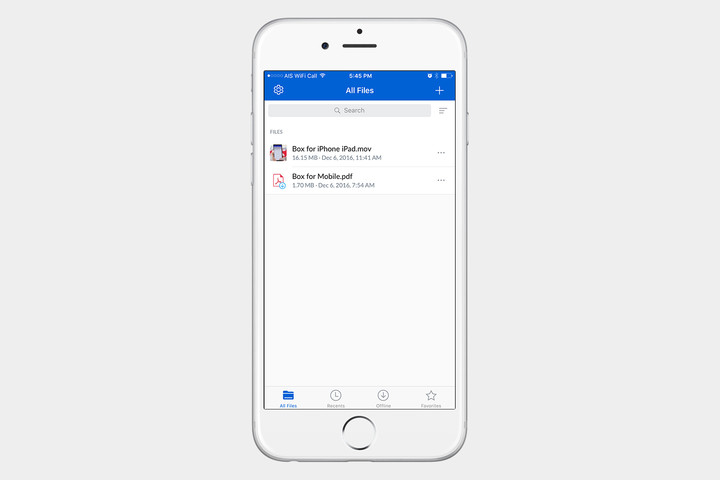
Box recently launched revamped web and Windows apps to better tackle online collaboration. The app is simple, and it works just like other collaboration apps, allowing you to send a link to those you want to have working on a document. Box takes things a step further, however, by offering an overhauled web app that you can access through any browser by logging into box.com. You can also download the standalone app for Windows or MacOS, which provides access to all your notes and enables you to work with them offline. All these features, combined with Box’s secured encryption, make the app an excellent choice for individuals and businesses alike.
Download now for:
Android iOS
iOS Notes
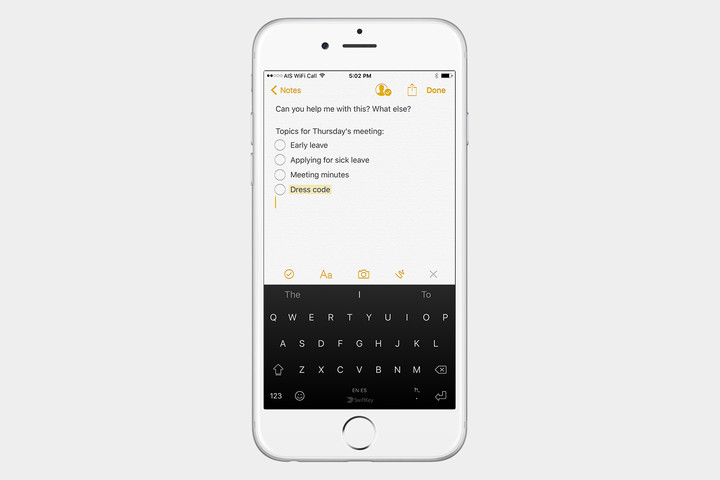
In iOS, the Notes app provides native support for collaboration. If you and your team are working with iOS devices, and you need a simple way to collaborate, then there’s no need to download anything. If you have iOS 10, you will see an Add People icon in the upper-right corner when you create a new Note. Just like other collaboration apps, it will allow you to send a link via iMessage, or any other app that you have installed on your iPhone or iPad. Once your team receives the link, they can open the note and start editing. The note will appear in everyone’s Notes app, and if you choose to stop sharing the note or remove someone from the note, then it will disappear from their device. It’s a simple solution, but it may be what you and your team need.
iWork
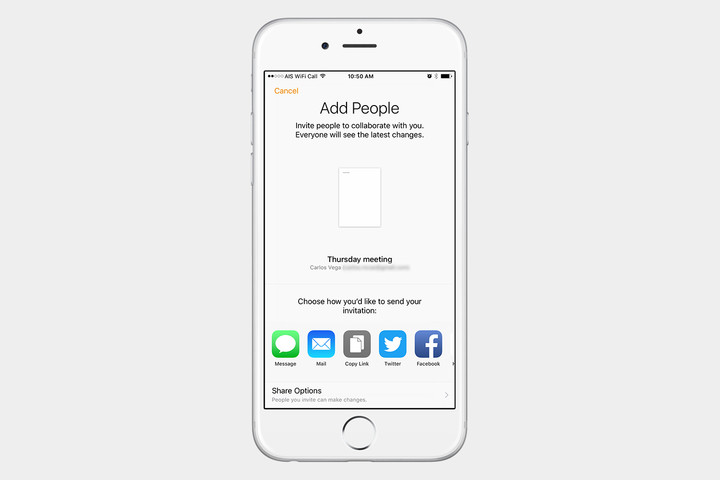
If you bought or registered an iOS device on or after September 1, 2013, then you get iWork for free. This includes Pages, Numbers, and Keynote. Collaboration is live now as a beta, and it’s very simple to use. If you’re working on a document, you can now tap on the More menu in the upper-right corner, and you will see an option that says Collaborate with Others. This works in a similar fashion to the Notes app, in that you can share the link to your document with others. Anyone who has access to the link will then be able to edit the document in question, which makes iWork another great option if you’re an iOS user looking to collaborate on documents that are a bit more complex.
Download now for:
iOS
Google Docs
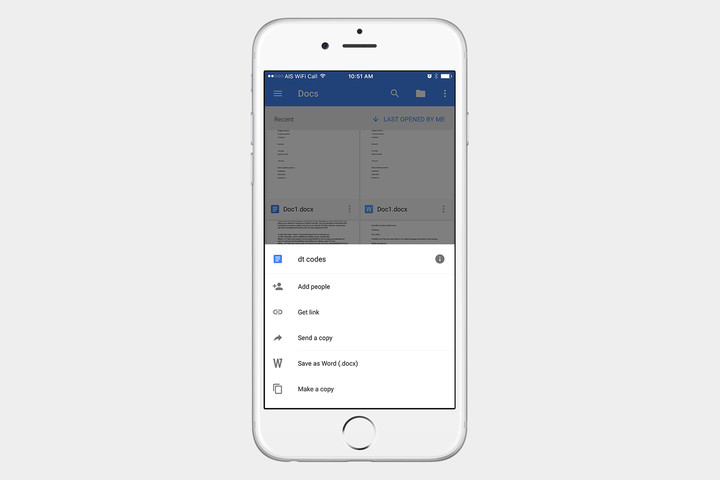
So many of us rely on Google services so much that having the Google Docs apps on your device seems like a no-brainer. Once you create a document, you can add people to it so that they can collaborate. Once they accept the invitation, you can create a multitude of documents — similar to what you can do with Microsoft Office — and have your team collaborate on those documents in real time. Combined with Google Drive, this is an excellent choice for collaboration, especially given how feature-rich the mobile and web apps are.
Download now for:
Android iOS
Intel may not be inside for long: AMD’s 8-core Ryzen CPU is up for pre-order
Why it matters to you
AMD’s new Ryzen processors are here, they’re very competitive with Intel, and you can order them today.
News about AMD’s much-anticipated Ryzen processors has continually leaked to the press since CES 2017 wrapped up last month. But a rumor isn’t the same as official confirmation, and we know now the real, final specifications of the high-end Ryzen processors everyone is buzzing about.
The company new that it would only become competitive if it was able to increase the instructions per clock, so it focused on a 40 percent improvement over previous AMD hardware as a design goal. That’s a big number – but AMD says it has exceeded it, hitting a 52 percent increase in instructions per clock. Put simply, this means Ryzen can do far more work per-core than was previously possible.
AMD is not just talking about instruction per clock, though. Core count is very much part of the store, and as predicted, the company plans to debut Ryzen with a phalanx of eight-core, 16-thread chips. By comparison, most Intel chips are quad-core, though it does have some eight and 10-core (expensive) processors.
Better yet, they start as low as $329, and cost no more than $499.
Ryzen 7 1800X
Ryzen 7 1700X
Ryzen 7 1700
Cores
8
8
8
Threads
16
16
16
Base clock
3.6GHz
3.4GHz
3GHz
Boost clock
4GHz
3.8GHz
3.7GHz
TDP
95 watts
95 watts
65 watts
Price
$499
$399
$329
This trio of processors spans the gamut from high mid-range to top of the line. The most affordable chip, AMD’s Ryzen 7 1700, is targeting Intel’s Core i7-7700K (and by extensions, its predecessors), which are currently the processor of choice for many enthusiasts. The $329 price tag undercuts the i7-7700K, which sells for $350, by about 20 dollars, but AMD claims it will slightly exceed its performance.
At the high-end, there’s the AMD flagship – the Ryzen 7 1800X. Its main claim over the more affordable versions comes in form of processor clock speed. The 1800X can hit a Boost of 4GHz out of the box. It’s also a 95-watt chip, as is the Ryzen 7 1700X, which gives some headroom for clock speed higher than the Ryzen 7 1700. Priced at $499, the Ryzen 7 1800X is definitely not cheap – but AMD says it’s designed to compete with Intel’s fancy Core i7-6900K, which retails for $1,049.
Oh, and if you’re interested in overclocking, we have good news. Every one of these processors is unlocked. AMD is also planning to launch a new cooling solution, the Wraith Spire, for those who happen to want a first-party path to improved cooling.
Pre-orders start today
The company is taking pre-orders starting today, February 22, through over 185 retail partners. This includes OEM (original equipment manufacturing) partners, who are also putting up custom, pre-built systems. The chips, and systems, will ship on March 2.
Given the high price, you might wonder if the processor will be widely available. AMD insists it will be. The company says it has plenty of experience with 14nm production from the Radeon line-up, so it anticipates a good number of chips available. That doesn’t mean they won’t sell out, though – and if they do sell out, you can bet retailers will start to increase prices of the chips they do have.
We can’t recommend dropping up to $500 on a processor before reviews are available. Indeed, putting up a pre-order for a CPU ahead of a review is a bit unusual. But if you’ve held off on Ryzen before building your next rig, well – the wait is over.
Looking to read more? Check out our first take.
Skype Lite, lightweight version of the video-calling app, now available in India
Why it matters to you
As more tech companies turn their attention to developing markets, they’re finding ways to introduce lightweight versions of their services, and Skype is the latest with Skype Lite.
Facebook has done it, YouTube has done it, and now, Skype is doing it, too. It, of course, refers to releasing a “lite” version of the company’s signature service, in this case Skype Lite, described as “the new Skype built for India to help you stay connected on the go.” Targeted specifically at the burgeoning market in the country, Skype Lite seeks to address a number of pain points relevant to India and other developing countries.
Microsoft debuted Skype Lite today at its Decoded event in India, noting that the Android app is just 13MB in size. According to the service’s new website, “Skype Lite is optimized for 2G and unstable network connections, so you can stay connected with friends and family,” and it promises to run smoothly on both new and old Android smartphones.
More: Skype is jazzing up its app with four new features to help you ‘express yourself’
And for its data-conscious clientele, Skype Lite includes a reduced data usage mode for video calls, and will allow users to see exactly how much data they’ve used to prevent any major shocks in the billing cycle. But Skype Lite won’t only be your go-to for video calls — rather, the service will also allow for SMS messages, chats, and various Skype bots.
In a blog post, Microsoft further noted that it will soon integrate Aadhaar, India’s national digital identity scheme, to allow for certain functionalities, starting in June. These will “enable Skype users to verify the identity of unknown callers in a variety of situations where identification verification is required, including job interviews, [and] goods and property sale,” the company noted.
With India as its first target market, Skype Lite has been made initially available in Bengali, Gujarati, Hindi, Marathi, Tamil, Telugu, and Urdu. The company has yet to reveal if or when the service will become functional in other countries.
Like smartphones, self-driving tech may prove problematic for road safety
Why it matters to you
While self-driving technology has been lauded as safer than the human alternative, the rise of distracted driving may suggest otherwise.
Smartphones and safety just don’t mix. Certainly not on the road. Just ask car insurers who have found that drivers today are more distracted than ever because of their mobile devices, which has resulted in costs associated with crashes growing faster than premium increases. As the Wall Street Journal reports, “America’s drivers are becoming more dangerous by the day. That is pushing auto-insurance rates higher as insurers struggle to keep up.” And things might get worse as autonomous technology allows us to take our hands off the wheel even more often.
Although self-driving technology has long hung its hat on claims of being safer than human drivers, the MIT Technology Review is a bit skeptical, especially considering the history already laid forth by the advent of smartphones. The problem isn’t the car’s autonomy, but rather our increased reliance on this sort of technology, coupled with our growing distraction. Back in September, the Review noted, “If the driver is distracted and the autonomous system does not work properly, or if the human places too much confidence in the abilities of the driver aid and ignores the warnings and the road, things can go wrong.”
More: Roborace put two autonomous cars on a track, but it didn’t end as planned
Most of today’s self-driving systems are not yet fully autonomous. Tesla’s Autopilot, for example, only works part of the time, and still depends on humans to take control when the machine falls short. But as humans spend more and more time behind the wheel otherwise occupied (the National Highway Traffic Safety Administration noted an 8.8 percent increase in fatalities as a result of distracted driving), they may not be taking control in due time. There’s already precedent for this kind of tragedy — just look at last year’s fatal Tesla Autopilot crash.
As a result, some car experts are suggesting that the answer lies in completely autonomous systems, thereby avoiding the risk of human error altogether. Google has long stood behind this position, and last week, Ford joined the tech company in this belief after finding that engineers were falling asleep behind the wheel of self-driving cars.
Of course, we’ve still a ways to go before we realize this advanced technology, so in the meantime, keep your eyes on the road and your hands off your smartphone.
Amazon is offering $8.63 off nearly any purchase of $50 or more today only!
Amazon has topped the charts on the annual Harris Poll for corporate reputation, and to celebrate you’ll be able to save $8.63 on any purchase of $50 or more. Using the coupon code BIGTHANKS you can save yourself on that purchase you’ve been holding out on. Whether you are in the market for a new case to protect your phone, a battery pack to keep it charged, or even a better way to get Wi-Fi through your whole house, you’ll want to make sure you get $50 in your cart to save with this promo.

Some great ways to use your discount include:
- Mini Drone
- Blu R1 HD – Currently $50 off its regular price
- 200GB MicroSD Card
- Netgear Orbi Mesh Wi-Fi System – Currently $70 off its regular price
- Ad-powered Moto G4 – Currently $50 off its regular price
Remember, this discount is only good for today, and there are a few exceptions to it. You won’t be able to use the coupon on orders placed through Alexa or Prime Now, and it doesn’t apply to video games, digital content or Amazon Gift Cards. Be sure to check out all the details at Amazon and then load up your cart with the stuff you want so you can save today!
See at Amazon
For more great deals on tech, gadgets, home goods and more, be sure to check out our friends at Thrifter now!
How to manage Chrome’s Autofill feature

Chrome’s Autofill feature remembers typos, too. Good thing editing is so easy!
Having the Chrome browser remember your details when filling out forms on the internet can be handy. Most times when you sign up for any service or buy something online, you’ll need to enter the same information each time and a secure way to enter it all at once saves time and means fewer errors. But it’s only a good thing if all the info is correct.
Thankfully, changing the data stored for Chrome’s Autofill feature is simple. So is turning it off completely if you would rather not have this information about you — including your credit card numbers — stored in the cloud.
When you first enter information about yourself, Chrome can save it if you have the Autofill feature turned on. The information it saves ranges from the relatively harmless to the sensitive, including credit card information, as mentioned above. Here’s a list of what gets saved when you’re using Autofill.
- Name
- Organization
- Street address, including city, state or province, ZIP/post code, and country
- Phone number
- Email address
- Credit Card information
Your name and address are tied to credit card data in Chrome’s Autofill settings or can be data from Google Payments. We think Google Payments is a better place to store your Credit Card information, including the associated name and billing address, but we’ll include instructions for managing it through Chrome for completeness’ sake.
Autofill data is in the cloud, not on a device. You always need to be aware of what data you’re saving and where you’re saving it when it comes to your personal information.
You can add, edit, or delete Autofill information at will through Chrome, both on your phone or from a desktop version, like the one you find on a Chromebook. Because the data is stored in your Google personal cloud, the information is the same across all instances of Chrome you’re signed into. That’s another good reason to make sure you sign out when you’re finished on any computer you share with other people.
How to change the Autofill data through the desktop version of Chrome:
Open the settings menu and scroll down to Advanced Settings. Click to open them.
In the Passwords and Forms section, click the Manage Autofill settings link.
To add an address, click Add new street address.
To add a credit card, click Add new credit card.
To edit an existing address or credit card, hover over its entry and click Edit.
To delete an address or credit card, hover over its entry and click Delete.
Click Done when you’re finished.
You’re unable to change addresses stored in Google Payments through Chrome’s settings. To edit one of these, follow the same procedure and then sign into Google Payments in the new tab that opens.
Changing your Autofill data on the Android version of Chrome is almost the same. You’ll need to open the settings and tap the Autofill forms entry to find your existing data or add new data. Once open, you’ll see the same data as the desktop, displayed in a single scrolling list for a better mobile view. Add, edit, or delete your data the same way as mentioned above.
Turning Autofill off

If you don’t want Chrome to hold your data and fill out forms, it’s simple to turn the feature off. You might want to do this on some devices and not others, and in that case, you need to look at how to select exactly what to sync between devices.
Read: How to choose what you sync on Chrome across devices
To turn Autofill off in the desktop version of Chrome go to Settings > Advanced Settings > Passwords and Forms and uncheck the box labeled Enable Autofill to fill out web forms in a single click.
To turn Autofill off in the Android version of Chrome tap Settings and then Autofill forms. Tap the switch at the top to toggle it to the off position.
Questions?
Let us know in the comments below, or ask Jerry in our forums.
New Futurama game for Android promises to bring authentic experience for fans
Good news, everyone! Futurama may finally be getting a mobile game worthy of the show expansive universe of comedy.

Futurama is coming back! …as a mobile game. Yes, despite the animated series final finale airing back in 2013, the show is getting a brand new game for 2017 in a partnership between FOX Interactive and game developers TinyCo. Unfortunately, we don’t know any specifics related to gameplay or what sort of hi-jinx Fry, Leela, and Bender will be getting up to yet, so instead we’re left to speculate based on clues from TinyCo’s previous licensed titles.

TinyCo was responsible for bringing another popular FOX animated series, Family Guy, to the mobile platform with Family Guy: The Search of Stuff. It’s a city building game with delayed build times and in-app purchases — as well as millions of downloads from the Google Play Store alone. It’s hardly a stretch of the imagination to see how a show that’s centered around an interplanetary delivery service could easily be developed into a lucrative, quest-based mobile game with a free-to-play model — but again that’s pure speculation on our part.
At the very least, Family Guy: The Search of Stuff proves that TinyCo takes its source material seriously and takes the time to faithfully adapt the look, feel and humor of the original show to a mobile game.
And that’s great news, because Futurama deserves a well-made mobile game more than any other franchise. Of all the great animated series that existed during the early 2000s, Futurama did the best job of capitalizing and embedding itself within the proliferation of nerd culture, and was literally kept alive thanks to fans showing support on the Internet. It was a incredibly creative and well-written show that offered a smart satirical look at the world and science fiction tropes won over the hearts of diehard fans… despite having been cancelled multiple times.
Family Guy: The Search of Stuff proves that TinyCo takes its source material seriously and takes the time to faithfully adapt the look, feel and humor of the original show to a mobile game.
And really, it’s not like Futurama needs a mobile game, but it would be nice to have something to make up for the other game “based on the series”: Futurama: Game of Drones an uninspired tile-swapping game with the Futurama characters and branding slapped on.
So it’s heartening to hear that the developers behind this new title carrying the Futurama brand are huge fans of the Futurama series. As TinyCo’s Head of Business Operations Michael Chen explained, the team has the added benefit of working so closely with the series’ original cast and crew.
“Our team is all die-hard Futurama fans, and we work day in and day out with the amazing people that gave birth to the incredible Futurama world. It is a labor of love and we just hope that all of our passion, love, and hard work translates into something that befits this world and these characters we all love,” said Chen.
“We work with the original crew every day on this game. They are an integral part of making the game the best it can possibly be. We firmly believe that you can’t get to 100% authenticity for a game on a brand like Futurama without working with the folks that created it. They lived this world for so long and have such unbelievable passion and love for the world and what makes it tick, that without them you can only do so much to make it authentic.

Without revealing any specifics, Chen did specify that the game should take advantage of one of the core aspects of Futurama — going on zany space adventures — would be a big part of the game. And that’s good because, as Chen acknowledges, there’s a lot of pressure to deliver when you’re dealing with cherished source material.
“We firmly believe that you can’t get to 100% authenticity for a game on a brand like Futurama without working with the folks that created it.”
“Yes there is added pressure, but the pressure for an authentic brand experience is the right pressure to have to push a team to deliver a better product,” said Chen.
“When creating a game based on a world with beloved characters and universe it is an imperative that the experience is authentic in order to make it a game that’s worth a player’s time. If you have incredible mechanics and gameplay, but the world and characters are misrepresented or slapped on, you are doing your product and the fans of that brand a disservice.”
As a Futurama fan, I’m cautiously optimistic to see what TinyCo and the Futurama crew have in store for us.
You can pre-register for the game in the Google Play Store or at http://www.youwillplayfuturama.com
See at Google Play Store
Android Gaming

- Best Android games
- Best free Android games
- Best games with no in-app purchases
- Best action games for Android
- Best RPGs for Android
- All the Android gaming news!
New leak shows off the LG G6 next to last year’s G5
LG G6’s slim bezels get highlighted in latest leak.
The latest LG G6 leak shows off the device next to last year’s G5. LG has previously stated that the G6 will feature a big screen in a small body, and it’s easy to see that from the image posted on Weibo. In spite of featuring a 5.7-inch QHD+ display, the G6 is only marginally larger than the 5.3-inch G5.
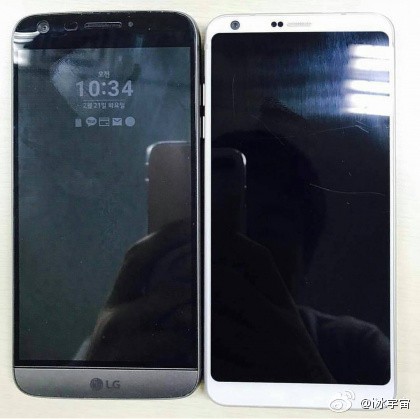
The thin bezels certainly make the device much more appealing, but we’ll have to wait and see if they pose any usability problems. In addition to the numerous leaks and rumors, we’ve seen sevveral teasers from LG in recent weeks highlight marquee features of the device, with the latest showing off the dual 13MP cameras at the back.
With the 5.7-inch display set to offer a 2:1 ratio, LG is introducing new features to take advantage of the screen real estate. One such feature is a square shooting mode for the camera, which lets you take photos for social platforms like Instagram. The square mode allows you to essentially use the lower half of the screen to preview the image, which is what LG is highlighting in its latest teaser:
The LG G6 will make its debut on February 26 at Mobile World Congress. Stay tuned as we bring you all the coverage from the ground in Barcelona.
 AIVAnet