


Stryker is using Microsoft’s HoloLens to design operating rooms of the future
Why it matters to you
Stryker’s use of Microsoft’s HoloLens AR solution could lead to more flexible, functional operating rooms in the future.
Augmented reality has a number of increasingly important applications in a variety of industries, from engineering to retail to interior design. One of the most exciting applications of AR, and the one that promises perhaps the most immediate impact on our lives, is in medicine, where AR can help educate, diagnose, and even treat disease in new and innovative ways.
Microsoft’s HoloLens AR solution is perhaps the most advanced today in terms of becoming a part of the real world, even while it’s not yet a retail option aimed at consumers. Global medical technology company Stryker, which is using HoloLens to redesign the operating room, provides a clear example of the potential of AR in this setting.
More: Hololens being adopted as visualization aid for spinal surgery
Anyone who’s ever worked in an OR knows how complicated they can be. Because they’re used for all kinds of different surgical disciplines, from general surgery to orthopedic, cardiac, and others, the equipment and setup required to meet every need can become incredibly complex and varied. Lighting, tools, equipment, and how patients are oriented in the OR space must be capable of changing at a moment’s notice to accommodate different kinds of surgical procedures.
As a maker of all kinds of products used in the operating room, Stryker has a vested interest in helping hospitals and doctors design efficient and cost-effective surgical suites. The company is using HoloLens to design shared OR rooms that can use holograms to account for all of the people, equipment, and setups imaginable without needing to pull in actual physical examples.
That potentially saves time and money and allows Stryker to more quickly and effectively envision different OR scenarios. Stryker can also utilize 3D to more realistically visualize a finished design and reduce the design errors introduced by much more limited 2D representations.
Other organizations are using HoloLens to affect the future of medicine, such as Case Western Reserve University and the Cleveland Clinic, which are using Microsoft’s AR solution to better understand and teach human anatomy. Ultimately, it’s likely that one of the first areas where HoloLens and AR in general will make the most impact is in medicine, regardless of how quickly the technology rolls out to consumer applications.
Stryker is using Microsoft’s HoloLens to design operating rooms of the future
Why it matters to you
Stryker’s use of Microsoft’s HoloLens AR solution could lead to more flexible, functional operating rooms in the future.
Augmented reality has a number of increasingly important applications in a variety of industries, from engineering to retail to interior design. One of the most exciting applications of AR, and the one that promises perhaps the most immediate impact on our lives, is in medicine, where AR can help educate, diagnose, and even treat disease in new and innovative ways.
Microsoft’s HoloLens AR solution is perhaps the most advanced today in terms of becoming a part of the real world, even while it’s not yet a retail option aimed at consumers. Global medical technology company Stryker, which is using HoloLens to redesign the operating room, provides a clear example of the potential of AR in this setting.
More: Hololens being adopted as visualization aid for spinal surgery
Anyone who’s ever worked in an OR knows how complicated they can be. Because they’re used for all kinds of different surgical disciplines, from general surgery to orthopedic, cardiac, and others, the equipment and setup required to meet every need can become incredibly complex and varied. Lighting, tools, equipment, and how patients are oriented in the OR space must be capable of changing at a moment’s notice to accommodate different kinds of surgical procedures.
As a maker of all kinds of products used in the operating room, Stryker has a vested interest in helping hospitals and doctors design efficient and cost-effective surgical suites. The company is using HoloLens to design shared OR rooms that can use holograms to account for all of the people, equipment, and setups imaginable without needing to pull in actual physical examples.
That potentially saves time and money and allows Stryker to more quickly and effectively envision different OR scenarios. Stryker can also utilize 3D to more realistically visualize a finished design and reduce the design errors introduced by much more limited 2D representations.
Other organizations are using HoloLens to affect the future of medicine, such as Case Western Reserve University and the Cleveland Clinic, which are using Microsoft’s AR solution to better understand and teach human anatomy. Ultimately, it’s likely that one of the first areas where HoloLens and AR in general will make the most impact is in medicine, regardless of how quickly the technology rolls out to consumer applications.
The Apple Watch Series 3 could launch with two major improvements
The Apple Watch is the best-selling smartwatch ever released, however there’s always room for improvement. While the Apple Watch Series 2 did improve on the Series 1 in a few key areas, some are looking to the Series 3 to offer what they really want to see.
But what exactly will the release of the Apple Watch Series 3 bring? The device is shaping up to be quite an interesting one. Here’s everything we know about it so far.
More: Future Apple AirPods may use magnetic ear hooks to keep them off the ground
Display
The Apple Watch Series 3 won’t use the same touch panels as its predecessors. According to DigiTimes, Apple will source glass-film capacitive glass from Biel Crystal or General Interface Solutions.
The reason: Apple is reportedly unhappy with the yields of its current glass manufacturer, TPK. The firm has been unable to produce the Apple Watch’s particular brand of glass at scale, reportedly because of the smartwatch’s curved surface.

Carlos Vega/Digital Trends
New features
The Apple Watch Series 3 may be the first in Apple’s portfolio to support LTE connectivity. According to a Bloomberg report, company engineers weren’t able to finalize a cellular design without compromising battery. To combat the problem, Apple’s reportedly invested in “low-power cellular data chips.”
A report from DigiTimes, meanwhile, mentions two key improvements to the Apple Watch Series 3 — performance and battery life. The Apple Watch has never been a high performer and it has always suffered from battery life issues, so improvements in those areas will certainly be welcome changes. Still, the Apple Watch Series 2 battery can generally last for around 2 or more days — so if Apple is seriously focusing on battery life for the Series 3, it’s possible that it’s also introducing new features that could put a bigger drain on the battery.
More: Apple’s waterproof Watch Series 2 also gets faster, brighter, and has GPS
Design
Many are hoping that the Apple Watch Series 3 will bring with it a major redesign, however if recent reports are anything to go by, unfortunately this may not be the year we see that happen. According to a report from DigiTimes, which sources Chinese publication Economic Daily News, the overall design of the third Apple Watch will remain the same, despite the fact that it will include a few new key features.
What that means is that those hoping for a round Apple Watch may have to wait a little longer, if one is ever released at all. While round smartwatches have become quite a trend in the Android Wear market, the Apple Watch has stuck with a four-cornered form factor.

Release date
So when will we get the new Apple Watch? The report from DigiTimes suggests it will land at some point in the third quarter of this year, meaning that Apple could be shifting to a yearly upgrade cycle for the Apple Watch.
We’ll keep this post updated as we learn more about the Apple Watch Series 3.
Article originally published in January 2017. Updated on 02-21-2017 by Kyle Wiggers: Added a rumor that Apple will source the Apple Watch Series 3’s glass-film from another supplier.
Remix OS consolidates your laptop and smartphone into one package
Why it matters to you
Remix OS, an Android-based smartphone operating system from Jide Technology, supplies a desktop environment when plugged into an external monitor.
Microsoft’s Continuity. Samsung’s Flow. Motorola’s Atrix. Some of the world’s biggest gadget-makers have tried and failed to built an elegant device that consolidates the computer and smartphone in one. A new entrant called Jide, though, might finally have hit the nail on the head.
Beijing-based Jide Technology has spend the last three years developing a dual-mode operating system based on Android, Google’s mobile smartphone OS, called Remix OS. It’s capable of switching between a Windows-like desktop environment and an interface environment optimized for phones, and is effectively a smartphone’s default operating system.
More: Google’s adding WebVR support to Android, desktop versions of Chrome
Once the operating system has been installed and the smartphone’s been connected to an external monitor, Remix’s desktop environment launches. Installed Android apps feature floating menus, a start menu, and a task bar. Microsoft Word, Gmail, and even games like Asphalt become navigable with a keyboard and mouse.
“[It will be] as close to stock Android as possible,” Jide Technology CEO David Ko told The Verge. “But imagine when you get back to your office or study, you connect your phone and it turns into a PC mode, just like a laptop or desktop.
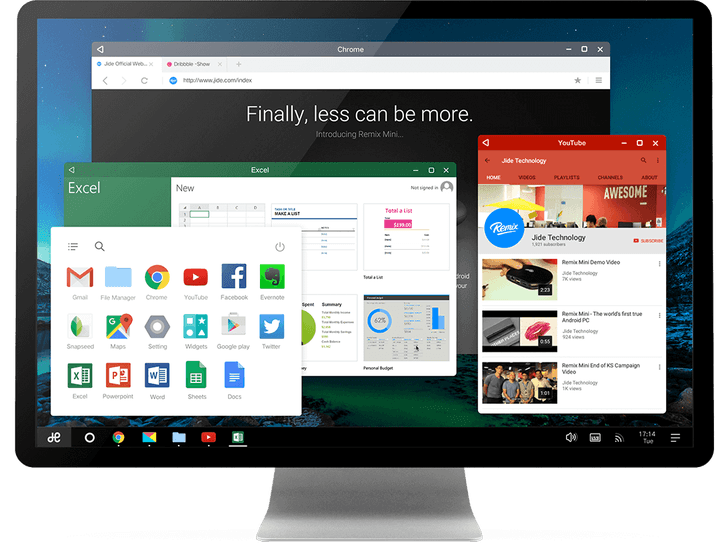
Ko envisions Remix replacing laptops, tablets, and even desktops in developing markets. He sees office workers using a phone as their primary device, bringing it home with them and connecting it to a monitor and keyboard.
More: If Google wants us to buy PCs running Android, it needs to get serious
“In the next five years, roughly 5 billion people will be coming online,” says Ko. “And when they come online, their No. 1 choice will be the smartphone; an affordable smartphone, and that will be an Android,” Ko told The Verge. “If your phone can replace [your PC], it’s a huge saving, and has a big impact to productivity.”
But as The Verge notes, multi-device setups are an unattractive proposition in countries where low-powered, budget handsets dominate. And then there’s the matter of setup.
Jide’s searching for a partner who’s willing sell phones that support Remix OS, but has yet to sign an interested party. And while the Remix will be eventually be made available for crafty users to download and install themselves, it lacks access to Android’s app market — the Google Play Store. Installing apps requires additional steps.
More: New Remix OS player will create a virtual Android desktop on your Windows PC
The road to an all-in-one smartphone is paved with failures. Ubuntu’s attempt, dubbed Convergence, never caught on in a meaningful way, and Asus’s PadFone range — a combination phone and tablet — suffered the same fate. Ko believes Remix OS’s free-to-download distribution method and access to the broader Android ecosystem will make it a success where others have failed.
“This is the culmination of the past three years’ of development,” says Zhend. “The freedom to not have to worry about carrying a laptop or tablet is a very powerful thing.”
Google testing Voice over LTE support for Project Fi
Project Fi is testing VoLTE support via T-Mobile’s network
If you’re a Project Fi customer, you may have noticed improved call quality over the past few weeks. That’s because Google has been quietly testing Voice over LTE (VoLTE) for a subset of Project Fi users, formally announced in a post on the Project Fi Help Forum. If you’re curious to know if you’re one of the fortunate testers for this new service, you can find out by looking for the signal indicator to continue displaying LTE when making or receiving a call.

VoLTE allows you to make calls over a data connection without using any of your data allocation. You also get the added benefit of faster data browsing during an ongoing call — perfect for those times when you need to look up directions on Google Maps while talking to someone. You’ll also get faster call setup for a smoother overall call experience on your phone.
If you’re curious to know more about Project Fi and how it works, it’s Google’s phone carrie, which offers you mobile data service spread across three mobile networks: Sprint, T-Mobile, and U.S. Carrier. Your phone will intelligently switch between the different networks to find the strongest connection, and it will also automatically use Wi-Fi for calls and texts wherever available.
Project Fi is restricted to Google’s devices — the Google Pixel and Pixel XL, Nexus 6p, and Nexus 5X — and VoLTE support for Project Fi is also limited to T-Mobile’s network, as it’s currently the only partner network to fully support VoLTE.
Google hasn’t set a timetable for when VoLTE will roll out to all Project Fi users, but testing will continue and we’re sure we’ll hear updates as things progress.
Are you one of the lucky Project Fi VoLTE testers? Let us know your experiences so far in the comments below!

The Galaxy S8 won’t follow Google’s advice for its virtual buttons
Samsung is going to try to recreate its hardware navigation button layout with software buttons on the Galaxy S8.
We always knew the day would come (or did we?) when Samsung would do away with its capacitive navigation buttons and physical home button for something a bit more… flexible. Now, it looks like exactly that is happening, based on earlier leaked photos and some illustrations from the upcoming Galaxy Tab S3 manual.

The Galaxy S8 will indeed have on-screen navigation buttons, but according to leaked images, they will be reversed from the standard format found on most Android devices today — and in accordance with Samsung’s reverse order that it maintained for so many years. While this makes sense from a continuity perspective, it also finds Samsung continuing to go against the grain of the rest of the Android industry. Perhaps there will be an option to reverse them, as many devices from the likes of Huawei and LG offer.
The illustration, which cannot be confirmed as genuine right now, depicts the Galaxy S8 with a rear fingerprint sensor next to the camera, too.

Finally, the manual shows the Galaxy S8 sitting in its Dex computer dock, ostensibly used to interface with a laptop or desktop computer. With the Galaxy S8 expected to be one of the most powerful devices released this year — a Snapdragon 835 or Exynos 9 chip depending on region — it should have plenty of performance to power a desktop environment.
What do you think of what you’ve seen of the Galaxy S8 so far?
The latest Facebook spam wave is all thanks to deceptive UI
I just spammed all of my friends and family to install an app I had just uninstalled.

Installing new apps is a part of the job. It is rare that I will go through a whole day without deciding to check out an app I haven’t heard of before, and a lot of my friends will recommend stuff either for my opinion or to share a new cool thing. It’s rare that a new app finds a permanent home on my phone, but I like trying new things so I usually dive in without a ton of research.
Today that had an unfortunate side effect, and it’s actually part of a nasty spam wave hitting Facebook right now.

I got a notification from a friend to try out Chatous via Facebook. Tapping the link takes me right to the Play Store, where I see it is a messaging app that lets you talk with random people in your immediate physical area. It’s a simple enough app; you see a bubble with an avatar on it show up in a radar and tap to interact. There’s very little personal information shared in the account creation process, making it easy to be fairly anonymous while enjoying a conversation that could very well end in discovering shared interests with a local person. Overall, not the worst idea.
I quickly sent a message to my friends asking them to ignore it.
During the account setup process, Chatous pings your Facebook account and asks if you want to invite your friends into the app. I have never once in the history of ever wanted to do this, so I quickly dismissed the screen and went on to test some of the features of the app. There was only one person in my area using the app, and he seemed mostly interested in showing me photos of dog genitals, so I moved to uninstall the app. Alongside my Uninstall Complete notification was a new notification from Facebook, where a friend was asking me for more information about this app I had just sent them.
That’s right, even though I explicitly told this app to leave my friends alone, every single one of them got a notification from me inviting them to install this app.
I quickly sent a message to my friends asking them to ignore the previous notification and stay away from the app, and that’s when I saw this was not an isolated incident. Some of my friends had been getting this recommendation from others all day long, and a little further research revealed this was not isolated to Chatous. This is a common UI trick designed to spam people into installing your app, and the origin of the spam isn’t even aware this is happening unless someone tells them.

There’s not much that can be done about this right now, aside from letting your friends know not to trust app recommendations on Facebook, even from trusted friends. This user-hostile experience is an unfortunate form of notification spam that gets used because it works, and it’s the kind of thing that keeps people from trying any new apps at all.
New LG G6 teasers suggest phone will be water and dust resistant
Is there anything we don’t yet know about the LG G6?
LG seems to want us to know everything about its upcoming flagship, even though it’s about to officially debut the LG G6 at Mobile World Congress next week. For instance, it has posted a couple short teasers that suggest the phone will come with both water and dust resistance.
- READ: LG G6 design details confirmed, straight from the horse’s mouth
The first video, called Pool, shows someone swimming, while the second, called Flour, shows a table of flour. We also see the LG G6 outline in the end frame of each clip, along with video descriptions that say: “Taking a day off at the pool? Just relax and enjoy LG G6″ and “Stay apart from the particles. LG G6.” In other words, in case it isn’t already obvious, the new LG G6 should be safe around water and dust.
The teasers don’t actually confirm the IP rating, but we’re sure LG will announce those details in Barcelona. The company has already confirmed the phone has a ‘FullVision’ 18:9 5.7-inch display, LG UX 6.0 software, and a 32-bit Quad-DAC like the LG V20.
And it’s rumoured to be the first phone – aside from Google’s own Pixel phones – to feature Google Assistant. Check out Pocket-lint’s rumour round-up for more details on what the LG G6 might feature.
LG G6: Pool
LG G6: Flour
The Alienware 13 gets better with VR and impressive battery life
Gaming laptops used to be an outlier in the world of portable computing. When the rest of the market was focused on extending battery life, gaming laptops doubled down on raw power and thick frames designed for better airflow. Trying to find a small gaming machine that didn’t sacrifice power for portability was a fool’s errand. Today, things are different. Gaming laptops can be thin, have enough battery life to survive a plane flight and double as a productivity and entertainment machines with few compromises. The best recent example of this to cross my desk is the Alienware 13, a small, powerful gaming laptop that does almost everything right.
The New Alienware 13 isn’t just a strong example of a compact gaming notebook. It’s also the brand’s first outing with an Intel 7th-generation Kaby Lake Core CPU, which promises to push 4K content to the laptop’s screen without decimating battery life. Combined with the strides NVIDIA made with its mobile GPU platform last year, that alone makes 2017 a good year for PC gamers to consider upgrading their mobile battle station. But there’s more to love about the Alienware 13 than just its new internals.
Hardware

Somewhere between the garish, brightly colored accents of ASUS’ ROG Strix laptop and the thin aluminum shell of the Razer Blade Pro, you’ll find Alienware’s latest notebook — a machine with enough flair to identify itself as a serious gaming rig yet still subtle enough to keep it from being an eyesore. Its simple, matte black finish lets it blend in as a normal work laptop, but its anodized aluminum lid, subtly angled front lip and Dell’s AlienFX lighting lend it just the right amount of attitude.
At a glance, the machine looks like a minor tweak of Alienware’s previous gaming laptops, albeit with less LED lighting, but there is one major change: the screen. Dell has moved the Alienware 13’s display about an inch closer to the user. This is actually a practical design aesthetic: It leaves a 1.3-inch lip behind the screen for heat exhaust, making the laptop’s bottom a little cooler when playing games.
That lip is also home to most of the machine’s connections, including an Ethernet jack, mini DisplayPort, HDMI socket and a USB Type-C Thunderbolt port. This is also where you’ll plug in the laptop’s AC adapter and the Alienware Graphics Amplifier, if you happen to own one. Users who just want to plug in a mouse can find a full-size USB 3.0 port on either side of the machine as well as two audio jacks on the left and an extra USB Type-C connection on the right.
The smooth, soft plastic coating that drapes the laptop’s chassis is a bit of an Alienware standard, and I’m still a fan. The rubberlike surface dulls the corners of the machine’s body and feels almost silky to the touch. Best of all, it doesn’t collect unsightly fingerprints like laptops built from harder materials.
Keyboard and trackpad

That same rubberized coating extends to the keyboard, which lends the Alienware 13’s keys a soft, almost luxurious feel. The buttons themselves are a joy to type on, falling 2.2mm and landing on a firm but springy steel baseboard. Like any keyboard bearing the Alienware TactX branding, it promises millions of keystrokes in durability and full anti-ghosting capabilities, but to me, it’s the style that makes it stand out. Unlike most modern laptops, the Alienware 13’s keyboard features full-size keycaps that meet edge to edge, with no space between the keys. It’s a design you might have seen on a machine made a decade ago, before island-style keyboards became the norm. For me, it’s a nostalgic comfort — a style I’ve always found easier to type and game on that has nonetheless fallen by the wayside.
The Alienware 13’s touchpad gets almost everything right as well. It’s a spacious mousing surface that can navigate multitouch gestures without messing up, a feat that’s unfortunately still impressive on many Windows machines. The buttons are great too; they fall with a firm but quiet click that feels just right. At worst, its AlienFX lighting feature activates at inconvenient times, causing the entire touchpad to glow if my palm ever brushes it while I’m typing. This contact never moved the cursor, but the repeated, unexpected lighting can be distracting. I turned it off and moved on.
Display and sound

Most gaming machines I review manage a passing audio grade by doing the bare minimum: offering loud, clear sound without distortion or cracking. The Alienware 13 is one of the rare few that actually impressed me. During my gaming sessions, I kept hearing odd sounds coming from my front door. I’d check the porch, and there would be nothing there. Back at my desk, the sound would pipe up again. After a few fruitless trips to the front of the house, I figured out what was happening: The laptop was somehow throwing sound across the room like a ventriloquist. The Alienware 13 has built-in surround sound that actually kind of works.
This was a surprise. Most attempts to simulate spatial sound in a laptop fall flat, but Alienware’s Virtual Surround had me instinctively glancing left and right to see where a sound might have come from. It’s a clear differentiation from simple left-and-right sound separation too, with the ability to project sound to areas close to the laptop’s chassis or all the way across the room. Like most fake surround systems, it fails to simulate having speakers behind the viewer, but it’s still a cut above the average laptop audio setup.
My review unit came outfitted with a 13.3-inch, 2,560 x 1,440 OLED touch display, and it’s simply gorgeous. It offers everything you’d expect from a great screen: vivid colors, wide viewing angles and excellent contrast. It’s a strong example of the kind of difference that display technology can make; OLED panels simply produce deeper blacks than their IPS counterparts.
Still, there are some drawbacks. The screen’s blacks are so dark that it’s almost hard to tell where the display ends and the its dark, wide bevel begins, which can make the screen look a little smaller than it really is. I also had to dial Battlefield 1’s brightness calibration dial to 93 percent to make the test logo visible. Deep blacks indeed.
Performance
| Alienware 13 (2.8GHz Intel Core i7-7700HQ, NVIDIA GTX 1060) | 4,692 | 4,583 | E16,703 / P12,776 | 24,460 | 1.78 GB/s / 1.04 GB/s |
| Razer Blade Pro 2016 (2.6GHz Intel Core i7-6700HQ, NVIDIA GTX 1080) | 6,884 | 6,995 | E18,231 / P16,346 | 27,034 | 2.75 GB/s / 1.1 GB/s |
| ASUS ROG Strix GL502VS (2.6GHz Intel Core i7-6700HQ , NVIDIA GTX 1070) | 5,132 | 6,757 | E15,335 / P13,985 | 25,976 | 2.14 GB/s / 1.2 GB/s |
| HP Spectre x360 (2016, 2.7GHz Core i7-7500U, Intel HD 620) | 5,515 | 4,354 | E2,656 / P1,720 / X444 | 3,743 | 1.76 GB/s / 579 MB/s |
| Lenovo Yoga 910 (2.7GHz Core i7-7500U, 8GB, Intel HD 620) | 5,822 | 4,108 |
E2,927 / P1,651 / X438 |
3,869 | 1.59 GB/s / 313 MB/s |
| Razer Blade (Fall 2016) (2.7GHz Intel Core-i7-7500U, Intel HD 620) | 5,462 | 3,889 | E3,022 / P1,768 | 4,008 | 1.05 GB/s / 281 MB/s |
| Razer Blade (Fall 2016) + Razer Core (2.7GHz Intel Core-i7-7500U, NVIDIA GTX 1080) | 5,415 | 4,335 | E11,513 / P11,490 | 16,763 | 1.05 GB/s / 281 MB/s |
| ASUS ZenBook 3 (2.7GHz Intel Core-i7-7500U, Intel HD 620) | 5,448 | 3,911 | E2,791 / P1,560 | 3,013 | 1.67 GB/s / 1.44 GB/s |
| HP Spectre 13 (2.5GHz Intel Core i7-6500U, Intel HD 520) | 5,046 | 3,747 | E2,790 / P1,630 / X375 | 3,810 | 1.61 GB/s / 307 MB/s |
| Razer Blade Stealth (2.5GHz Intel Core i7-6500U, Intel HD 520) | 5,131 | 3,445 | E2,788 / P1,599 / X426 | 3,442 | 1.5 GB/s / 307 MB/s |
Since Alienware is one of the most recognizable brands in PC gaming, I expect its laptops to keep pace with everything in my game library with minimal fuss. I was not disappointed here. With a 2.8GHz Intel Core i7-7700HQ CPU, NVIDIA GeForce GTX 1060 graphics and 16GB of RAM, my review unit played almost every game I tried on high or ultra settings at the screen’s native 2,560 x 1,440 resolution. Overwatch and Dishonored 2 easily broke 60 frames per second with maximum resolution and visual settings while games like Battlefield 1, Just Cause 3 and Shadow Warrior 2 could be coaxed past the 60-fps barrier by either scaling settings down to high or dialing resolution back to the standard 1080p.
The usual suspects gave the machine a bit of pause, however. The Witcher 3 had to be restricted to medium settings to hit higher frame rates at the PC’s native resolution, and Resident Evil 7 suffered from noticeable slowdown until I dialed it back to medium texture quality at 1080p. That’s about right for a smaller-form gaming laptop, but it’s also just skirting the edge of playing newer games at maximum fidelity. Keep your games tuned one step below their highest settings (or crank it to 11 but settle for 1080p) and you’ll be fine.
Virtual reality may not have hit the mainstream yet, but if you decide to pick up an Oculus Rift or HTC Vive headset, the Alienware 13 will serve you fine. With a score of 5,985 in VRMark’s Orange Room benchmark (and 1,091 in its more intensive Blue Room test), Alienware’s smallest notebook is definitely VR ready — as long as you leave most games at their default settings. Like the Razer Blade Pro and ASUS ROG Strix, it ran everything in my VR library fine until I cranked up resolution multipliers in titles like Raw Data.
Battery life
Alienware 13
7:32
Surface Book with Performance Base (2016)
16:15
Apple MacBook Pro 2016 (13-inch, no Touch Bar)
11:42
HP Spectre x360 (13-inch, 2015)
11:34
Apple MacBook Pro with Retina display (13-inch, 2015)
11:23
Apple MacBook Pro 2016 (15-inch)
11:00
HP Spectre x360 15t
10:17
Apple MacBook Pro 2016 (13-inch, Touch Bar)
9:55
ASUS ZenBook 3
9:45
Apple MacBook (2016)
8:45
Samsung Notebook 9
8:16
Microsoft Surface Pro 4
7:15
HP Spectre 13
7:07
Razer Blade Stealth (Spring 2016)
5:48
Razer Blade Stealth (Fall 2016)
5:36
Dell XPS 15 (2016)
5:25 (7:40 with the mobile charger)
Razer Blade Pro (2016)
3:48
ASUS ROG Strix GL502VS
3:03
I’ve never used a gaming laptop that wasn’t powerful enough to handle my Engadget workload. The problem has always been battery life: What good is a machine that can handle half a dozen tabbed browser windows, work chat and Adobe Photoshop and Premiere if it dies after only a few hours? Most gaming machines struggle to break four hours in Engadget’s standard battery test. The Alienware 13, on the other hand, lasted over seven and a half. True, our video-based rundown test is well suited to play nice with the processor’s Kaby Lake’s video features, but that longevity panned out in casual use too. During my normal workday, the Alienware 13 regularly lasted five to six hours on a charge. That’s still leagues behind even an average productivity notebook, but for a gaming machine? It’s not bad.
Software
The days of buying a new PC with bloatware are pretty much behind us, but that doesn’t mean there still isn’t room for improvement. While the Alienware 13 doesn’t tack on any extra software besides its own AlienFX configuration tool, an audio manager for handling the laptop’s Virtual Surround mode and a bandwidth management application, it does pester the user with annoying pop-ups — and too often. Minutes after I had opened the laptop for the first time, the Alienware software suite asked me to rate my experience with the machine. Gee, I don’t know what my experience is yet. I only just opened the box.
It’s not uncommon for software to beg users to register, rate or update it, but Alienware’s suite played this card too often, and too soon. It’s far from a deal breaker, and the pop-ups dropped off after a day or two. Even so, repeated, nagging interruptions took a lot of joy away from my first moments with the machine. Nobody likes a needy notebook.
Configuration options and the competition

My $1,831 review unit is just shy of the most powerful configuration Dell offers for the Alienware 13, with its aforementioned 2.8GHz Intel Core i7-7700HQ CPU, 6GB NVIDIA GeForce GTX 1060 GPU, 16GB of RAM and a 512 GB PCIe SSD. Tacking on an extra $150 will double the RAM to 32GB, and users can upgrade to one or two 1TB SSD drives for $400 and $1,150, respectively. Adding the slightly longer-range version of the laptop’s wireless chip (Kill 1535) will add an additional $25 to the total, with the most expensive Alienware 13 configuration ringing in at $3,156. Storage space is expensive, isn’t it?
Dell’s customization tool lets users create endless price points, but Alienware’s default configurations offer plenty of variety for folks looking for a cheaper gaming rig. A machine with half as much storage and RAM as our review unit can be had for $1,650, for instance — and downgrading its OLED display to a 1080p IPS screen will knock off an additional $250. Buyers willing to settle for a 180GB SSD and a less powerful Geforce GTX 1050Ti GPU (with just 2GB GDDR5) can score the machine for $1,150. Last, a bottom-dollar build is available for $1,000, but that means knocking the GPU down another notch to a regular GTX 1050 and settling for a dimmer 1,366 x 768 display.
If you’re thinking of going with another brand (and don’t mind missing out on that OLED screen), it’s a good time to be shopping around; Alienware isn’t the only company to upgrade its gaming rigs with Kaby Lake processors. Gigabyte’s Aero 14 can be had with the same specs as our Alienware 13 review unit for $1,750 with a larger 14-inch 2,560 x 1440 IPS display and a slightly thinner profile. You can get the same internals in an even slimmer profile in the Razer Blade’s $2,400 aluminum chassis — with a higher resolution 4K screen, to boot. That said, if you want variety, you’ll have to settle for a slightly larger chassis. Most gaming laptops are more in-line with machines like the ASUS Strix: 15 inches wide at minimum and at least half an inch thick.
Wrap-up

When friends come to me asking for a laptop recommendation, I usually try to lead them through a process of figuring out what features they need, what size they want and what fits in their budget before offering them a short list of different options from different manufacturers. When they don’t feel like doing the work, however, I usually shrug and tell them to look at Alienware. There’s a reason for that. Dell’s gaming brand has a history of making well-built gaming machines with great design and excellent performance that are a joy to use. The Alienware 13 is no exception. If you’re overwhelmed by the dizzying array of choices available to you as a PC gamer but still want to be sure you’re getting a high-quality machine, Alienware’s latest won’t let you down.
Homeland Security staff locked out of their own networks
Department of Homeland Security workers in Washington, DC ran into a massive headache when they came to work on Tuesday. Reuters sources say that staff were locked out of multiple networks starting around 5AM Eastern, possibly due to an issue with the personal identity verification cards needed to access certain systems. While it’s not clear just how much this interfered with work, there were issues across four buildings, including some used by US Citizenship and Immigration Services.
We’ve reached out to the Department for more details on the nature and scale of the problem.
The big question is whether or not this is just everyday IT trouble or a security issue. It’s entirely possible that is ‘just’ a glitch, but the government is understandably on edge after a string of hacks targeting federal organizations. The last thing it needs is a Homeland Security breach that compromises potentially very sensitive data.
Source: Reuters
 AIVAnet