


2017 Gear VR will come with a one-handed controller
Why it matters to you
The Gear VR is the device many people use to experience virtual reality for the first time, so a better Gear VR means a better first impression for the platform.
Samsung’s next-generation Gear VR smartphone virtual reality headset will come with its own one-handed controller. Instead of using the touchpad on the headset itself, users will be able to have a much more physical input mechanism for the virtual world.
If you discount the various low-cost VR headsets like Google Cardboard, the Gear VR is the most popular virtual reality headset in the world — easily outstripping the likes of the Oculus Rift and HTC Vive. It does however have a few weaknesses. It lacks positional tracking and perhaps more importantly for the mobile VR medium, decent controller support. That looks set to change with the next generation of the headset.
While Samsung has not made any sort of official announcement about this, we do have FCC filings to go by, as well as an insider’s scoop.
As it stands, Gear VR users are forced to input with a third-party controller or use the touchpad mounted on the side of the headset. The next version, designated SM-R324, we’re told will have some kind of single-handed controller. Beyond that, we don’t know much, but presumably it will have similar inputs as the current touchpad interface.
More: Our favorite Samsung Gear VR apps might just turn you into ‘that guy’ on the bus
Without any form of inside-out or external sensor positional tracking, it’s unlikely that we’ll see the controller tracked within the virtual space, but removing the need for a third party controller for serious headset users is a smart move. It could also be a way for Samsung to combat the positive reception surrounding Google’s Daydream View headset, which comes with its own one-handed remote, as per Engadget.
One other update that is said to be coming with the new-generation of Gear VR headset, is that it will have a customized face plate to allow for compatibility with the new Galaxy S8. That could mean the new Gear VR will have other advantages, like lower weight and a resolution bump, but we’ll need to wait for the official specifications to say for sure.
Sprint starts rolling out Nougat update to Galaxy S7 and S7 edge
Sprint Galaxy S7 and S7 edge users are now picking up the stable Nougat update.
After T-Mobile and AT&T, Sprint is now rolling out the stable Nougat update to the Galaxy S7 and S7 edge. The update is rolling out to beta testers right now, and should make its way to all users shortly.
As beta users were already on Nougat builds, the stable release comes in at just 167MB, but those running Marshmallow will receive the full 1.2GB update. The update brings a new multi-window mode, tweaks to the user interface, in-line notification replies, and much more.
With T-Mobile, AT&T, and Sprint rolling out the update, Verizon subscribers and unlocked customers are the only ones yet to make the switch to Nougat.
Thanks Andrew and Tom!
Samsung Galaxy S7 and S7 edge
- Galaxy S7 review
- Galaxy S7 edge review
- U.S. unlocked Galaxy S7
- Should you upgrade to the Galaxy S7?
- Best SD cards for Galaxy S7
- Join our Galaxy S7 forums
Unlocked
AT&T
Sprint
T-Mobile
Verizon
Telegram adds support for themes in latest update
You can now design custom themes in Telegram.
Encrypted messaging platform Telegram has added support for themes with the v3.17 update. You can now select from three themes — the default one, a blue theme, and a dark theme — and there’s also the option to design your own via a theme editor.

To apply a theme or create a new one, you’ll have to navigate to Settings -> Themes. You can also share your creations with the rest of the Telegram community:
Just like stickers and bots, Telegram themes are part of an open platform, so anybody can create a theme and dazzle the world with new colors and backgrounds.
You can browse themes created by other users by visiting the @Themes channel, which lists Android and desktop themes. Themes support is now available for all Android users, which constitute 85% of the platform’s userbase. iOS users will receive the update shortly, and in the meantime, the company has mentioned that it is working on building something “truly epic” for the platform.
Everything you need to know about the AT&T Unlimited plan

A complete breakdown of the AT&T Unlimited plan so you know exactly what you get if you switch.
In the United States, there are a lot of companies that can get you and your phone online, but most people use one of the four biggest: AT&T, Sprint, T-Mobile and Verizon. Choosing between them can be difficult. Your first priority should be what service works best in the places you spend your time. It’s not worth saving $10 a month if the service is bad. Once you have that sorted, you can look at what each company has to offer and the prices they charge for it.
More: Which unlimited plan should you buy?
Let’s take a look at the AT&T Unlimited plan to see what they can give you and what it will cost.
Note: The details of this plan are current as of February 20, 2017.
AT&T Unlimited plan details

- Unlimited talk, text, and data
- Unlimited talk and text to Canada and Mexico
- Advanced messaging between compatible phones on the AT&T network
- Unlimited talk, text, and data in Canada and Mexico with free Roam North America Feature (if more than 50% of use is outside the U.S. the plan can be terminated)
- Unlimited music and video streaming with optional Stream Saver for less data use
AT&T’s definition of Unlimited Data means that after you use 22 GB in a single month, your service can be slowed down if you’re in a congested area. You’ll hear the word throttled used here but you need to know that it’s only a temporary deprioritization of your data connection when you’re in a busy area. It may not happen at all depending on how many other customers are using the same towers.
Advanced Messaging features are only between two capable phones using the AT&T network in standard domestic coverage areas. A limit of 10MB is applied for any attachments. Standard text messaging has a 1MB limit for attachments.
Users who activate the free Roam North America feature need to use their phone in the domestic coverage area (U.S, Puerto Rico, and U.S. Virgin islands) the majority of the time. If 50% or more of your use in a billing period is outside of domestic coverage, your service can be terminated.
AT&T makes it clear up-front about what devices are eligible and exactly how you can use the service. Clarity is great and we appreciate it.
You can use any phone that’s compatible with AT&T’s network. If you bring your own phone you’ll pay a $25 one-time activation fee which is added to your first bill. You can also finance a phone through AT&T and the monthly cost will vary depending on which phone you choose. The AT&T Unlimited plan does not include tax and all the other assorted fees in the price.
This plan does not include mobile hotspots (except connected cars), Wireless Home Phone, Wireless Home Phone and Internet, laptops, Timex devices, and ZTE Spro 2 projectors. Users with any of those devices should contact an AT&T representative.
Additional lines can be added to an AT&T Unlimited plan. Every line has the same benefits outlined above and the $25 dollar fee applies to each. Here is a pricing breakdown.
- One line of service on an AT&T Unlimited plan is $100
- Two lines of service for $140
- Three lines of service for $160
- Four lines is $160 (The 4th device is free via a $40 bill credit on or after the second month)
AT&T Unlimited Plan add-ons

You can add a tablet or connected car to your AT&T Unlimited plan for the standard $40 monthly fee or through the AT&T 1GB Tablet plan. This plan offers 1GB of data for your tablet for $10 per month, with overages at $15 per Gigabyte. You can add a wearable (Timex wearables are not eligible) to your plan for $10 a month. You can also add a feature phone or messaging phone to your account for $25 per month.
Secondary perks
AT&T offers a plethora of services and apps to use them. Services include AT&T Drive Mode, AT&T Tablet messaging, AT&T Locker and more. You’ll find these apps and plenty more at Google Play.
Last but not least, AT&T also offers services tailored to business owners. Business Messenger, Global IP Client and more make it easier to merge your physical office with your virtual office. You’ll find the apps in Google Play and you can get more information by calling 800.331.0500 or visiting an AT&T store.

A Beginner’s Guide to Elite: Dangerous

Getting started with Elite: Dangerous? Here’s what you need to know!
If you’re looking to start exploring in the deep void of space, Elite: Dangerous is the ultimate experience among both traditional games and virtual reality experiences. Here’s what you should know getting started.
Read more at VR Heads!
Best fighting games for Android

Bring the classic arcade action you remember to your phone with these great fighting games!
Fighting games have kind of fallen to the wayside on the latest consoles, and the less said about the state of arcades the better.
But for a long while, fighting games reigned supreme in the video game world, and were often the battleground where gamers showed off their skills in arcade tournaments or huddled around a TV with your best pals. Fortunately, the genre is still well-represented on mobile devices, with a great mix of ports and original titles to satisfy fans of fisticuffs.
Here’s hoping we see more ports of classic fighting titles but until then, enjoy these great fighters.
The King of Fighters ’97

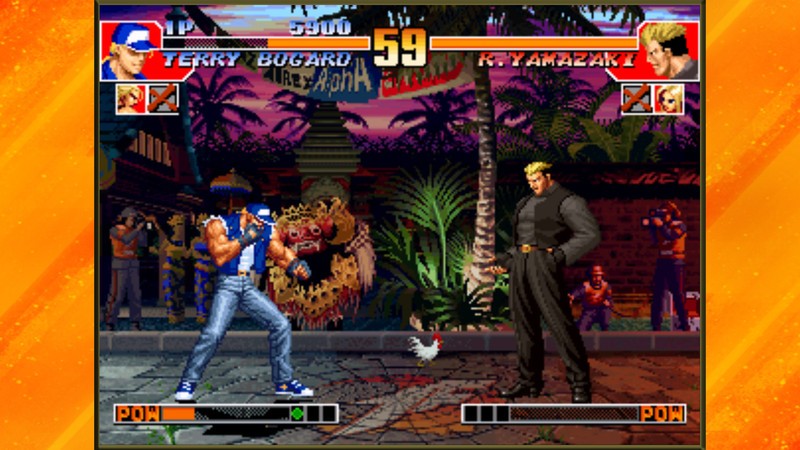
Hardcore fans of fighting games already know the name King of Fighters. It’s up there alongside Street Fighter as one of those revered arcade fighting games that has stood the test of time.
This is a fairly complete port of the game from the Neo Geo home arcade console which — most important of all for a ported fighting game — has support for Bluetooth controllers. You can choose from 34 different characters from the original game and create your dream team of fighters to take on either an AI opponent or a friend via local multiplayer.
There’s a good amount of customization available for the controls and again and the gameplay is exactly what you’d want from a ported fighting game. I really can’t recommend playing this game without a bluetooth controller, though, because the on-screen touch controls are just too challenging when you’re battling the tough AI.
Download: The King of Fighters ’97 ($2.99)
Mortal Kombat X
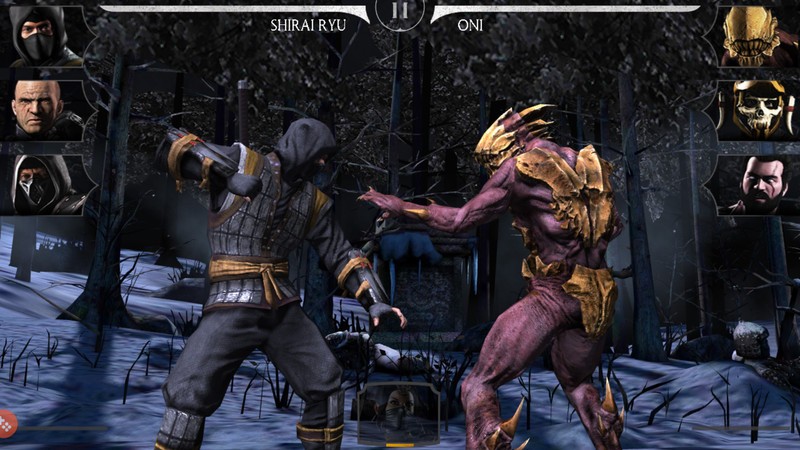

Mortal Kombat X takes the gruesome action of the well-received console edition and scales it down and optimizes it for your Android phone. All your favorite Mortal Kombat characters are here, along with some new ones thrown into the mix. And if you love ultra-violence, you’ll love what this game has in store. To that point, this game is definitely not recommended for younger kids, as the mature rating would imply.
The game employs touch screen controls that don’t actually feel like they inhibit you at all from having full control over your characters. You predominately fight in 3 vs. 3 battles, so you can strategically tag in different fighters as needed. The graphics here are basically console-quality, but that comes at a price for your storage — this game takes up nearly 2GB of space. If you’re a huge fan of Mortal Kombat, I’m sure you’ll be able to make room on your phone for this glorious, gory game.
Download: Mortal Kombat X (Free w/IAPs)
Shadow Fight 2
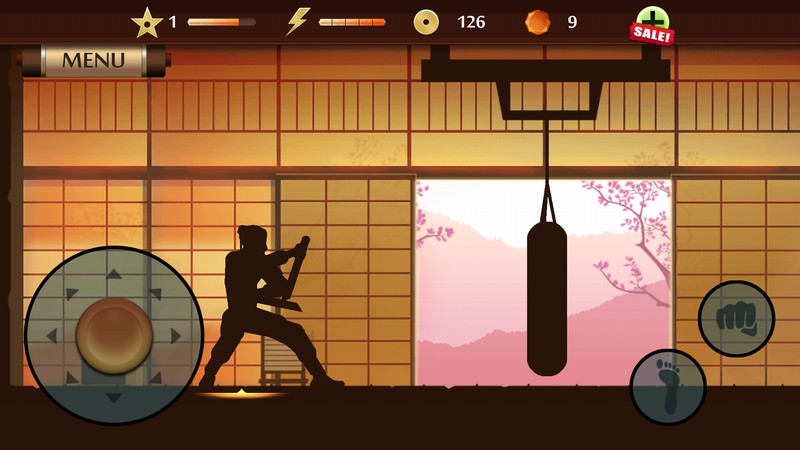
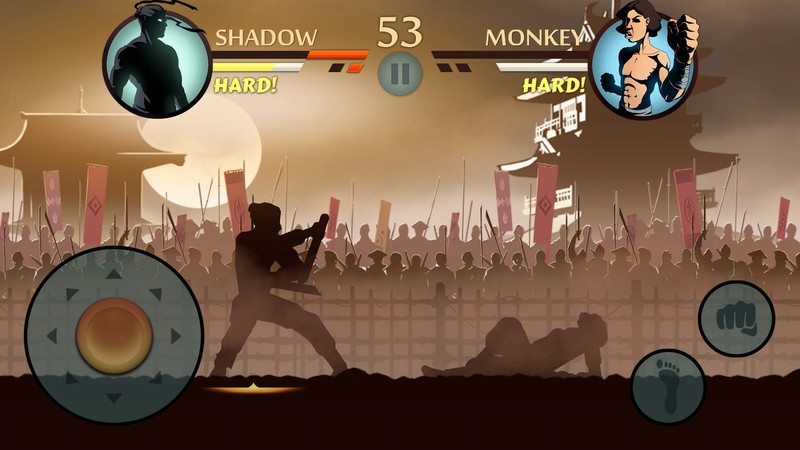
Shadow Fight 2 is an absolutely gorgeous game with fighting animations that are smooth as butter. The game gets its name from the art style — you only see the fighters as a shadowy silhouettes, battling in front of beautiful backdrops.
This game mixes elements from the RPG and fighting genres to deliver fantastic replayability. There are tournaments and a story mode to play through, which helps you to unlock new weapons, armor, and martial arts skills to help you take down your next opponent. The animations are just outstanding here, with a great amount of diversity and good hit detection so that you can counter your opponent in mid air and send them flying.
The game also plays wonderfully on the NVIDIA Shield TV, especially with a controller in your hand. Why there isn’t Bluetooth controller support for the mobile version is a damned shame.
[Download: Shadow Fight 2 (Free w/IAPs)
Injustice: Gods Among Us
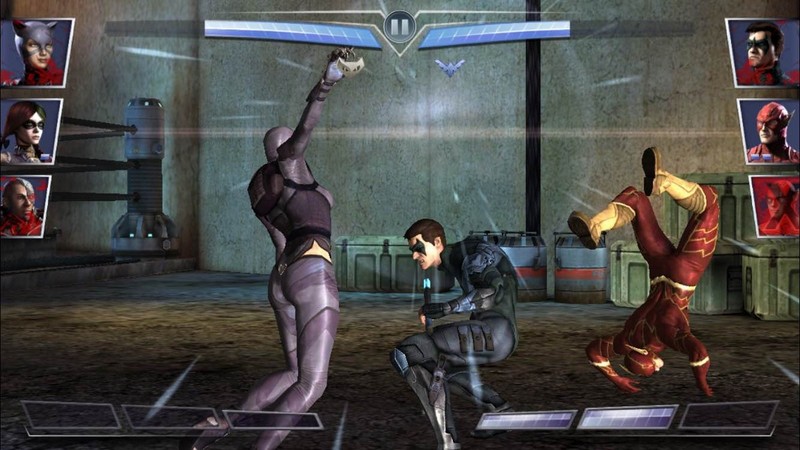
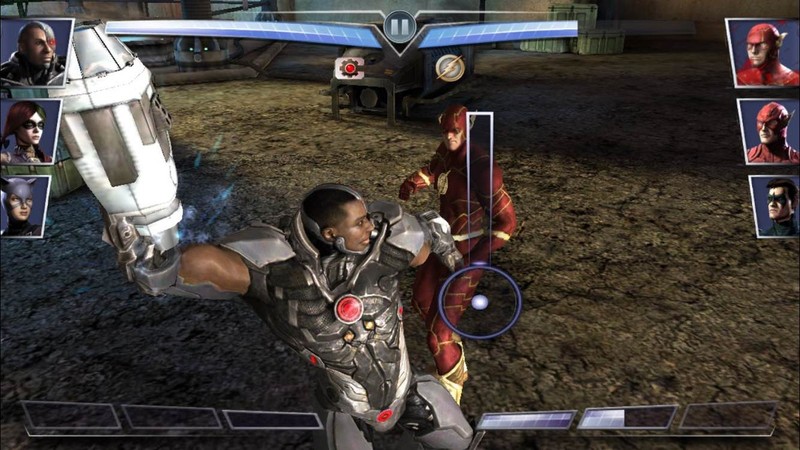
Injustice: Gods Among Us is an award-winning fighting game that puts you in control of the most powerful and exciting characters the DC Universe has to offer. We’re talking Superman, Batman, Wonder Woman, Flash, Green Arrow and even villains such as the Joker.
The game uses touch screen controls which aren’t ideal, but work well enough here. You swipe and tap to attack and link combos together. If it sounds very similar to Mortal Kombat X, that’s because both games were developed by Warner Bros., so you basically get one great core game with different coats of paint to satisfy two different fan bases. We’re not saying that’s a bad thing at all, but considering the file sizes for both of these games, you’re probably best off picking your preferred franchise. If you’re a huge fan of comic book heroes, this game is for you!
[Download: Injustice: Gods Among Us (Free w/IAPs)
Real Boxing 2 ROCKY
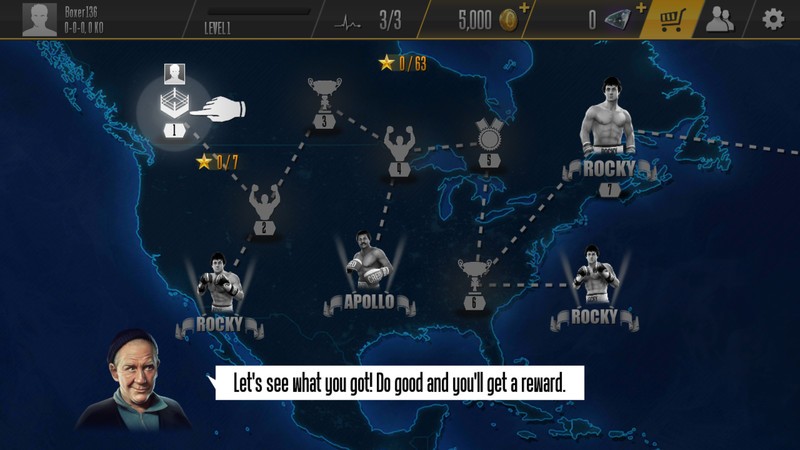

Whether you’re a fan of the Rocky franchise or just looking for a quality boxing game for your Android phone, Real Boxing 2 ROCKY pulls no punches, providing an in-depth career mode that lets you build up your custom-designed boxer through a career across multiple continents and against your favorite characters from Rocky.
The graphics are on point and the controls are quick to learn but take some time to master. The game takes it easy on you in the early goings while you’re learning the ropes, but as you progress through the different chapters, you’ll definitely need to use all the skills at your disposal to outwork your opponents in the ring. This game is free to play, with the in-game currency and ads for in-app purchases you’d expect, but the core gameplay is so good that it easily makes up for the annoyance.
Download: Real Boxing 2 ROCKY (Free w/IAPs)
What’s your favorite fighter?
Did we miss your favorite game on our list? Was it Soul Calibur? Because it’s been removed from the Google Play Store for some reason! I know, I was bummed out to see that too. Either way, let us know what you think of our picks, or what we may have missed, in the comments.
Android Gaming

- Best Android games
- Best free Android games
- Best games with no in-app purchases
- Best action games for Android
- Best RPGs for Android
- All the Android gaming news!
Sky Fighter: Training Day keeps you moving and guessing
Eyes up, soldier. Your training has begun.

The light panel around your face is full of information, but there’s barely any time to pay attention to it. Rockets are flying at you, lasers have obstructed your path, and there’s a traffic jam of sky cars ahead. You need to eliminate as many of these problems as possible before your suit runs out of power, so you’d better move fast! This is your first day as a Sky Fighter, and if you don’t show everyone what you can do on your own you may not make it to tomorrow.
Or worse, that instructor could come back and scold you.
Read more at VR Heads!
Jaybird X3 may be the perfect sport buds for Android
Wherein ye olde Modern Dad discovers the Jaybird X3 are a great companion for the gym, a quick jog, or really for whatever …
There are three kinds of people at the gym: Those wearing huge over-the-air headphones, folks with wired earbuds — and then there are those with proper wireless buds. I’ve long been one of those people who don’t mind plugging in at the gym. But it’s 2017, and time for some proper wireless headphones while I’m working out.
Subscribe to Modern Dad!!!
The Jaybird X3 aren’t the least expensive headphones I’ve ever used. But for as much as I’ve been enjoying them day after day, the $129 price tag seems just about right. The fit is just fine (with plenty of options for customizing that.) The sound is really good considering they’re in-ears. And the wireless connection has been excellent for me. Battery life has been good, charging just about once a week or so. (YMMV depending on how often you use them, of course — I’m getting a good 7 or 8 hours or more every week.)
There’s a companion Android app, too, that allows for a bunch of EQ customizations. You can choose from any of the branded ones, or make your own — and save your presets. (I’ve just been sticking with stock, though.)
What don’t I like about ’em? Only real thing I can think of is the charging dongle. But that’s not a huge deal by any stretch of the imagination. For me these wireless buds have been excellent for the gym, or while I’m out walking. Highly recommend.
See at Amazon
Modern Dad
- Subscribe on YouTube
- Snapchat
- See the gear
Best Universal Car Mounts

Keep your phone safely in sight and secure with a car mount.
When you’re on the go, your phone is more than just a tool for keeping in touch. It’s your road trip playlist and your GPS, too. For safety’s sake, mounting your phone to your dashboard, windshield, or air vents is the best way to keep it in view while keeping your hands on the wheel and your eyes on the road. We’ve gathered up a list of some excellent options for universal car mounts, and trust us, there’s no shortage of choices out there.
- iDoo Qi Car Charger Mount
- Affordable Universal Car Mount
- New Trent Arcadia Magnetic Mount
- Koomus Eco-CD One Touch Car Mount
- iOttie Easy One Touch XL Car Mount
- WizGear Universal Air Vent Magnetic Mount
- Spigen Style Ring
iDoo Qi Car Charger Mount

The car mount from iDoo is one fantastic multitasker. It offers wireless charging for your Qi-enabled phone, or space for a charging cable if you need to plug in.
You have three installation options: dashboard mount, air vent clips, or windshield mount. Take the time to experiment a little with the best sight lines for your phone when you’re ready to get set up so you’ll know which variation works for you. The cradle arm is completely adjustable, so you can avoid glare, and the frame rotates 360 degrees. No matter where you put it, the mount will be an essential part of your commute.
See at Amazon
Affordable Universal Car Mount

This offering from Affordable is as minimalist as they come, and you know what that means: no obstructed view. It’s ideal for dashboard or windshield installation.
It’s simple to install and remove when you’re switching vehicles. Bonus points are also awarded to this mount for living up to the name Affordable. It’s also been favorably reviewed for some time now; it won’t drop your phone when you’re travelling bumpy roads, and potholes won’t shake it’s grip.
See at Amazon
Koomus CD-Eco Car Mount

Remember when you kept stacks of CDs in the backseat so that you’d always have your favorite tunes close by? Well, your phone takes care of the songs these days, but your CD player can still be put to good use. The Koomus mount uses it to hold your phone in a very convenient place.
The low-profile mount is easy to install, and your CD player won’t be damaged or even recognize that it’s in use. The flexible clamps hold your phone securely with or without its case. You can also rotate your phone 360 degrees for easier viewing.
See at Amazon
iOttie Easy One Touch XL Car Mount

iOttie’s car mount is available in a few different versions, but we’re going to spotlight the XL. The suction cup is tough, and won’t budge from your dashboard or windshield. If you favor dashboard mounts, you can choose to add their Sticky Gel Pad for some extra grip, although most users say they don’t need it. The windshield mount won’t obstruct your view, either.
The XL is an especially solid choice if your phone case adds a little extra bulk, since the cradle is designed to hold larger phones to begin with. Your phone can rotate 360 degrees, and if you need to remove the mount and put it in a different vehicle, a quick rinse and dry of the suction cup makes it good as new again.
See at Amazon
New Trent Arcadia Magnetic Mount

For something completely different, check out the mount from New Trent. It holds your phone with a strong magnet, and installs onto your air vents. You don’t have to worry about snapping your phone into a cradle, just stick it to the magnetic pad and you’re on your way.
The base mount is available in black or blue, and comes with two magnetic plates you can stick to the back of two devices, especially handy if you share your car with other family members. The magnetic plates are thin enough to fit into your phone’s case, and strong enough to adhere to the base without having to constantly removing the case every time you get in the car.
See at Amazon
WizGear Universal Air Vent Magnetic Mount

Wizgear produces another magnetic car mount we’re a fan of.. The magnet is strong on this one, and if you take the mount out of the car, it doubles as a kickstand for your phone. The magnet can be concealed inside most phone cases, so you won’t have to constantly remove the case before sticking your phone to the mount.
The air vent clips keep your phone highly visible without obstructing your view. The base swivels your phone into your preferred position and promises to keep it there until you move it, even when going over rougher terrain. It’s perfect if you just need to jump in the car and go with your phone at the ready.
See at Amazon
Spigen Style Ring

An inexpensive alternative for car mounts is the Style Ring. The mount is a tiny black hook that sticks to your dashboard, and the ring sticks to the back of your phone. If you’re not wild about sticking things to your car or device, this may not be the right choice for you, but it’s convenient.
The ring that attaches to your phone doubles as a kickstand in both portrait or landscape. It hooks to just about anything, so you might find yourself hanging your phone from a variety of places. Positioning the car mount might take some patience to get it just where you’d like it to stay, but it works well for hands-free calling and accessing music. Your phone snaps into place and swivels 360 degrees. It’s the smallest car mount you can find, so if space on your dashboard is at a premium, the Style Ring is a solid option.
See at Amazon
The bottom line
First and foremost, you need to know the details of your local laws, in terms of whether or not you are allowed to mount anything on your windshield. Next, you need consider how often you’ll use a car mount and where in your vehicle it’s going to be. Each of these car mounts have distinct advantages all their own, but we think that versatility and durability are the most important qualities to look for.
Which universal car mount are you using these days? Tell us about it in the comments!
Amazon Fire TV Stick or the Fire TV 4K: Which Amazon Fire streaming device is for me?
Amazon’s Fire TV devices are the company’s fastest selling products of all time, beating both the Kindle and Fire tablets. The range allows you to access and stream a variety of content, including Amazon own The Grand Tour with Jeremy Clarkson, Richard Hammond, and James May, but also through apps such as Netflix and BBC iPlayer.
There are a couple of options available to you if Amazon is the route you have chosen – the Fire TV 4K set-top box and, shipping from 6 April, the all-new Fire TV Stick with Alexa Voice Remote. You might even find the older, standard Fire TV Stick for sale on eBay or other resellers for cheap, but which is the right one for you?
We have explored each of the three Fire TV devices to explain what each one offers, how they differ and help you work out which Amazon Fire TV device you should choose.
Amazon
Amazon Fire TV 4K
The Amazon Fire TV 4K is the latest and greatest second-generation model of the Fire TV set-top box. It succeeded the 2015 first-gen model, which is no longer available to buy, bringing Ultra HD video streaming and other features to the party.
There is a quad-core processor under the hood, 2GB of RAM, a microSD slot for expanding app-download storage and 802.11ac Wi-Fi for greater range, more stability and higher bandwidth than former Wi-Fi standards.
Like the Amazon tablets and Fire OS, the Fire TV 4K features an Android-based user platform with a heavily personalised touch. There is a huge range of music, movies and TV shows through the Amazon Prime Video subscription service, but you can also access Netflix content both through its own dedicated app and integrated into the latest user interface. BBC iPlayer, ITV Hub, All 4 and Demand 5 are available through the apps section, which has plenty of others to download too.
The biggest thing going for this Fire TV option is the large selection of 4K Ultra HD video. You can purchase or rent a selection of 4K content to play through the box to a compatible TV. Prime subscribers can also stream 4K versions of Amazon’s original TV series at no extra cost.
Amazon also offers games through the Fire TV 4K set-top box and this second-generation model has a new Voice Remote, which connects via Wi-Fi rather than Bluetooth to offer lower latency. An optional game controller is available too.
Like the Fire TV Stick below, it will get Alexa virtual assistant integration in the coming weeks.
WHY BUY?
Buy the Amazon Fire TV 4K because you have a 4K TV and you want to find and watch higher resolution content easily.
PRICE: £79.99 from Amazon
READ MORE: Amazon Fire TV 4K review
- 12 best Alexa devices you can buy today
Amazon
Amazon Fire TV Stick with Alexa Voice Remote
The Amazon Fire TV Stick is Amazon’s slimline, dongle-style streaming device, in the same vein as the Chromecast and Roku Streaming Stick. It has also been refreshed recently and offers a similar experience to the main set-top-box save for one major absence: 4K video.
The second-generation device is now almost as powerful as the Fire TV set-top box mentioned above, with a quad-core processor but only 1GB of RAM. It can do everything the set-top box can, bar deliver 4K content, as mentioned. One or two of the most graphically intensive games will also struggle on the Stick.
It offers 1080p output with 7.1 audio and has the latest version of the Fire TV operating system.
That means, while the Fire TV Stick is best matched with Amazon services, such as Prime Video, Amazon Music and Amazon Cloud, it still has Netflix integration, so search results will offer shows from the Amazon rival as well as its own.
All the other apps from the set-top box are available on the Stick too, including BBC iPlayer, ITV Hub, All 4, Demand 5 and Plex.
Importantly, the new Alexa-supporting remote control is exactly the same as the one that comes with the 4K box. Not only can you search for content using your voice, but the full Alexa experience is available too. That means you can find out the weather, sports results and many other facts and nuggets of information. And as well as have them spoken to you in Alexa’s dulcet tones, you can see visual cards on screen with supporting info.
There is dual-band, 802.11ac Wi-Fi on board and Amazon has made it possible for you to take the Fire TV Stick on holiday as it has found a way for you to input room and log-in details for connection to hotel Wi-Fi. Clever.
WHY BUY?
For those without a 4K TV but an Amazon Prime subscription, the Fire TV Stick with Alexa Voice Remote is an inexpensive way to access a variety of content. It’s also the cheapest way to get Alexa working through a telly.
PRICE: £40 from Amazon (pre-order now, ships 6 April 2017)
READ MORE: Amazon Fire TV Stick (2017) preview
Amazon
Amazon Fire TV Stick
The original Amazon Fire TV Stick is no longer available from Amazon directly, but you might be able to snag one for cheap either second-hand or in a stock clearance.
It comes without voice controls and is considerably slower than the new model.
There is a dual-processor, 1GB of RAM, dual-band Wi-Fi and Bluetooth all on board, as well as 8GB of storage like the other Fire TV Stick, along with a range of games and content. It doesn’t have Alexa though, and many of the super slick new UI features won’t be quite as super slick on the old Stick.
You do get access to tens of thousands of TV episodes and movies though, from the likes of Amazon Video, Netflix and BBC iPlayer, as well as games including Crossy Road, Sonic The Hedgehog 2 and Hill Climb Racing.
WHY BUY?
If you want an even cheaper way to access and stream a wide variety of content to your TV but you’re not as bothered about 4K, speed of use or Alexa, this is effective and fuss-free. Definitely worth considering if you have an Amazon Prime subscription and little cash.
PRICE: £35 from Argos (possibly cheaper elsewhere)
READ MORE: Amazon Fire TV Stick review
 AIVAnet