


Qualcomm Snapdragon X20 will bring 1.2Gbps LTE download speeds to phones
Why it matters to you
Faster data rates mean you can do more in less time on your smartphone.
Qualcomm may be one of the major companies working on 5G, but that doesn’t mean it has forgotten about LTE. In fact, the company has just unveiled the Snapdragon X20, a new wireless modem that promises a hefty 1.2Gbps download speed over an LTE connection on mobile devices.
That’s a pretty huge 20 percent faster than the company’s previous flagship modem, and it achieves this speed through carrier aggregation, which uses different frequency ranges to download up to 12 different streams of 100Mbps each. Even upload speeds are fast, at a cool 150Mbps.
More: Apple vs. Qualcomm: Everything you need to know
The modem isn’t just targeted at faster download speeds. It also supports 3.5GHz, which is used by Citizens Broadband Radio Service. In other words, it will now support private LTE networks. On top of that, it’ll be able to take LTE phone calls on phones with dual SIM cards.
Of course, just because the modem can handle these data speeds doesn’t mean you’ll be able to get those speeds in the real world. First, you’ll need to be one of only a few people using a particular cell tower, and you’ll need to be near a cell tower that can handle each of the frequency bands used by the modem — and that’s assuming your carrier supports the higher speeds in the first place, which is itself unlikely at this point. Last but not least, you’ll first need to buy a phone that has the new modem installed.
Still, the release is exciting — more and more carriers are likely to support higher LTE speeds, and more phones will have the modem built-in later this year. Qualcomm appears to be starting to lay the groundwork for 5G — higher LTE speeds will play a big role in the larger 5G framework down the line.
Microsoft confirms arrival of Windows 10 Redstone 3 in late 2017
Why it matters to you
One you’ve updated to Creators Update in April, you’ll have yet another update to look forward to by the end of the year.
Windows 10 was introduced on July 29, 2015 and received its first major update, the aptly named November Update, in November 2015. The next update, Anniversary Update, arrived in August, and then the Creators Update is expected in April.
The rumor mill has long projected that a third update, codenamed Redstone 3, is coming at some point in late 2017. Now, Microsoft has finally confirmed that a third update is indeed scheduled for this year, as part of a presentation at its Ignite 2017 event in Australia, developer Rafael Rivera announced on Twitter.
More: Developers are free to make feature-rich Windows 10 Creators Update apps
Windows 10 release lifecycle, cadence pic.twitter.com/NxSB9wE2PY
— Rafael Rivera (@WithinRafael) February 20, 2017
The notable slide indicates that a “Second Update in 2017” will be coming sometime later in the year. As usual, there will be a “feedback” period during which, presumably, the update is provided to Windows Insiders for testing. Then, a pilot phase will occur, presumably when a final build is more thoroughly tested — likely similar to the feature-complete Creators Update version that Windows Insiders are currently testing.
Then, the as-yet-unnamed update will be released and will run alongside Creators Update. This shows that Microsoft intends to continue its trend of having two updates supported at the same time, just as currently users can be running the November Update or Anniversary Update versions of Windows 10.
As a refresher, Anniversary Update brought a host of new features and functionality to Windows 10, including enhanced Windows Ink, an improved Windows Hello experience, a smarter Cortana, and a more useful Action Center and notifications system. Creators Update will be focused on enhanced Windows 10 gaming, improved 3D support, and Windows Holographic for low-cost VR headsets.
Redstone 3 is expected to bring the My People feature that Microsoft pulled from Creators Update, a new design language codename Neon, and the beginnings of support for Microsoft’s Home Hub that will take on Amazon Alexa and Google Home. Otherwise, nobody knows what Redstone 3 will provide, or exactly when it will be released.
Doppler Labs Here One review

Research Center:
Here One
Doppler Labs came out of nowhere at CES 2016 with its smart earplugs, the Here Active Listening System. Leveraging Bluetooth and an impressively packed app of goodies, the “hearables” stood out from other wireless earbud outfits by letting you control what and how you hear with noise cancellation, hearing enhancement, and even studio-style noise filters and equalization.
We just had one real problem with the Here Active: They didn’t didn’t play music.
Now Doppler is back with the new Here One, the company’s next step for smart wireless earbuds, with a more intuitive app and, of course, music playback. Packed with cutting-edge technology, the Here One aren’t without their quibbles — and for average listeners they probably aren’t the best fit — but they do offer solid music playback along with a funhouse of features that allow you to thoroughly explore and control the sonic world around you.
Out of the box
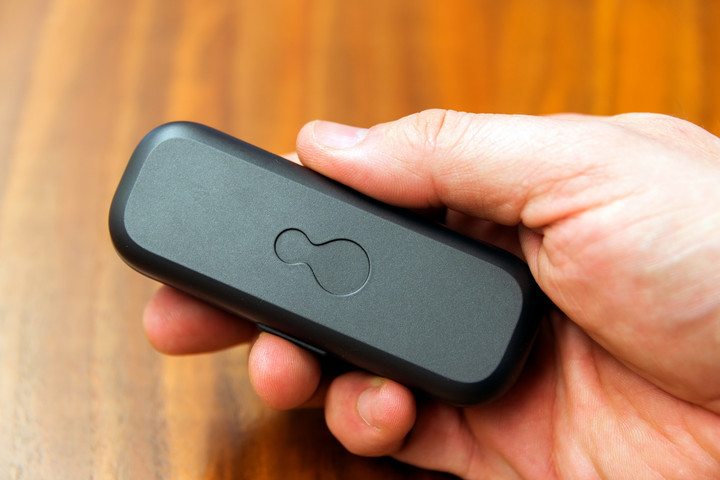
The Here One come with what is becoming a familiar companion for true wireless earbuds: a sleek wireless charging capsule. This one is armed with a single LED at the front to indicate charging status and battery life. Inside the portable charger, the earbuds rest eagerly on metallic sensors.
More: Jabra Sport Elite review
As each bud is pulled out, it’s immediately evident that, unlike many of the wireless earbuds we test (especially at this price point), they aren’t magnetically held in place. To account for this, the LED on the case’s front will flicker quickly when either of the ‘buds isn’t seated right — it’s a nice assurance, but we’d rather they just stayed put.
 Bill Roberson/Digital Trends
 Bill Roberson/Digital Trends
 Bill Roberson/Digital Trends
 Bill Roberson/Digital Trends
Accessories include a charging cable for the charging case and an ample selection of eartips, including three sizes in both silicon and foam.
Features and design
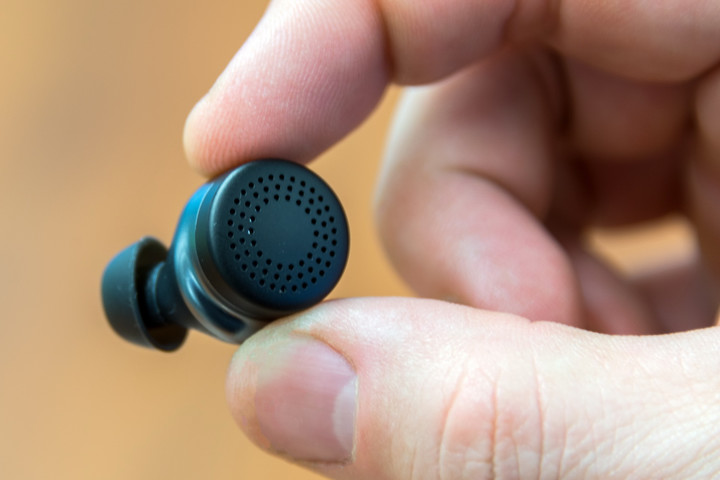
The Here One’s size is just about perfect for true wireless earbuds: They’re large enough to keep from rolling out of sight and into the great unknown, yet small enough to be undetectable by others at a short distance. Matte caps on the exterior give way to a shiny casing beneath for an attractive look.
LEDs light the way for your wireless experience, including white indicators set just beneath the earbuds’ exterior caps to let you know when they’re connecting to one another, and a four-dot array inside the portable charger to indicate its battery life. The case claims it will provide three full charges while on the go, though that seemed somewhat optimistic in our real-world testing. We’ll also note and it took 2.5 hours to juice the ‘buds to full strength from empty.
That’s important, as the Here One offer just around two hours of wireless music streaming per charge — less than we’d been told at their CES 2017 debut — and that’s the shortest runtime in their price class. While Here One do a lot more than your average pair of true wireless buds, the battery shortfall is extremely limiting — it’s barely enough time to use the ‘buds on a short flight. Fortunately, they run a little longer when not streaming music.
The Here One’s size is just about perfect for true wireless earbuds.
Another quibble is the Bluetooth connection, which faltered occasionally with an iPhone 6 perched in our back pocket, though they offered impressive range with clear line of sight. The buds also had to be manually re-paired on a few occasions; a message from the app informed us they couldn’t be found, forcing a trip to Bluetooth settings. Doppler Labs said this is an anomaly, and suggested some solutions like resetting the app and the phone. After charging the buds overnight the problem ceased, but it’s something to be aware of.
The earbuds boast balanced armature drivers inside, the smallest in the audio world, allowing them to cram in more tech and still remain impressively light — just 6 grams per side. That also makes them pretty comfy, and they’re easy to wear for extended periods.
More: The best earbuds you can buy
As for physical controls, tapping once on the side of the earpiece answers calls, while tapping twice calls up Siri. Like most earbuds of this ilk, using touch controls means smacking your ears a bit, and they aren’t as accurate as we’d like.
The app
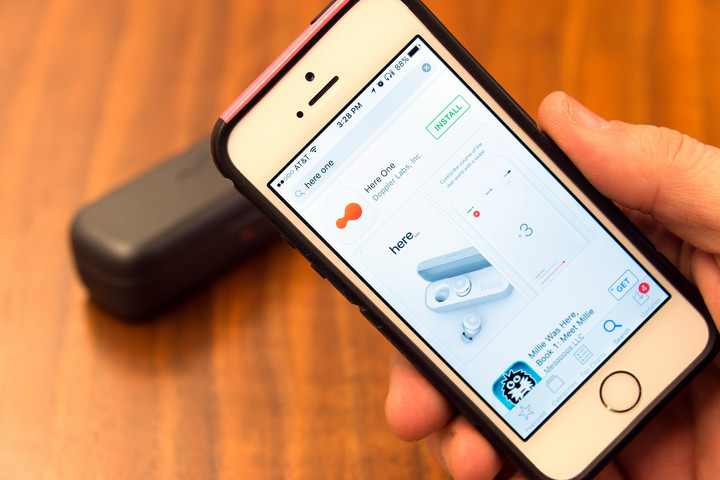
More than just about any wireless earbuds on the market (save maybe Bragi’s Dash), the Here One are driven by the proprietary app for iOS (Doppler says a currently limited Android version will gain more features via updates).
Straight out of the gate, the app directs you to set the ‘buds in action, including clear commands to pair them to your phone, as well as automatically creating a “sound profile” based on your own hearing to tailor the sound for any issues your ears may have.
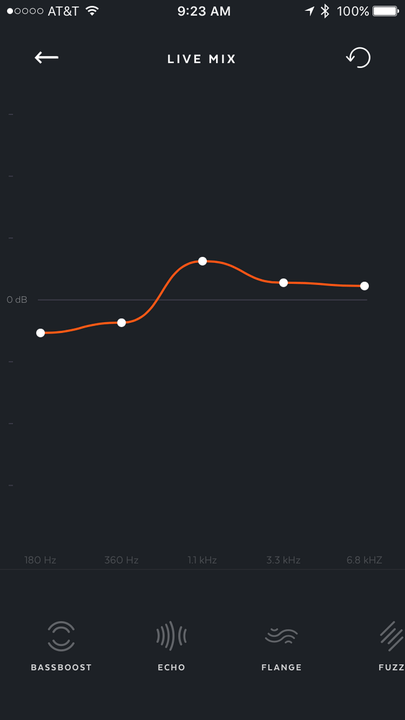
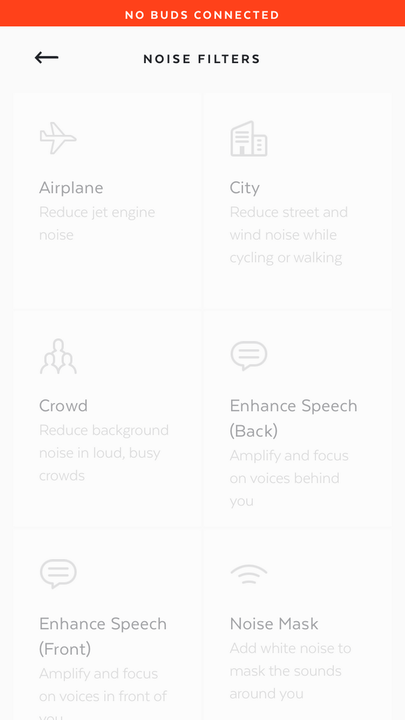
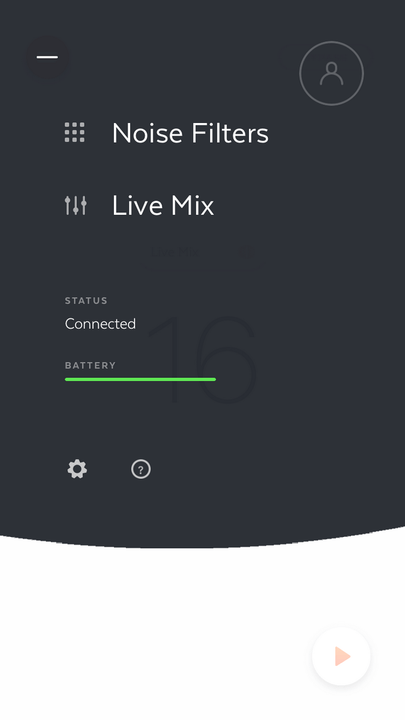
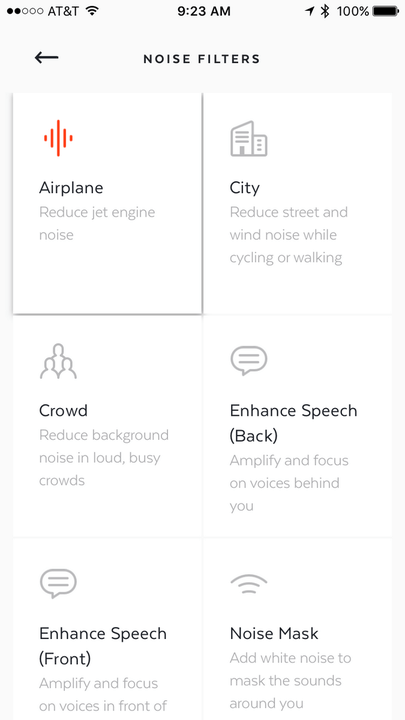
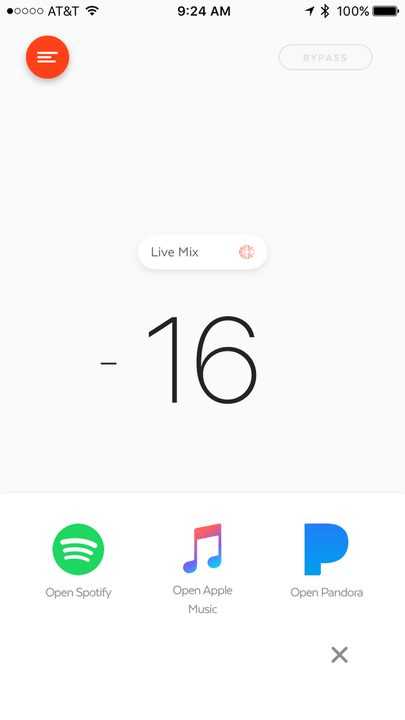
Upgrades over the Here Active app include easier control of ambient volume, allowing you to strafe your finger up or down to raise or lower the level, as well as easier access to noise filters. There’s a bypass button to turn audio adjustment on and off, and at the bottom, a play button which calls up apps like Apple Music and Spotify.
More: Jabra Sport Pulse Wireless Special Edition review
Noise filters include basic options like City and Crowd, options aimed at the hearing impaired (or the nosey among us) such as Enhance Speech (Back) and Enhance Speech (Front) to control sound enhancement directionally, and custom environmental settings like Restaurant, Office, and Airplane.
Perhaps the coolest feature is the live Equalization option, which allows you to move nodules along a graphic EQ to shape the frequencies of ambient sound in real time. It works relatively well for attacking irksome frequencies in live sound, though it’s not exactly like having control of the sound board.
Here One in action
For most users, Here One’s applications are somewhat limited. In fact, Doppler Labs’ CEO Noah Craft told us flat out, “If you just want a wireless headphone, to be totally frank, I wouldn’t spend the extra money to get Here One.”
For musicians (such as the author of this review), and active music lovers, the Here One definitely offer some very cool options. One of the most intriguing moments was bringing them to a friend’s DJ party. Not only were the Here One great conversation starters, but they worked pretty well to filter out the sound to a tolerable listening level in a friend’s basement. We were able to filter out bass for a lighter punch, and raise the midrange for a crisper sound, though the latter effect wasn’t quite as dramatic as we’d hoped.
Using noise filters is an almost surreal experience, especially moving between them, which creates a dizzying sonic shift as the earbuds change modes. Raising or lowering the voices around you is a fun trick and, in fact, at the party we were able to adjust the filters in a way that kept the noise to a minimum, while still allowing us to easily hear voices around us. Note that there’s around 20-30 ms of digital delay, which takes some getting used to.
For those with ailing hearing, the Restaurant and Enhance Voice modes will no doubt come in handy, and we appreciated the ability to better hear friends in a crowd.
Volume control moves between +6dB to -22dB, but it’s important to understand that the “0” level isn’t what you might expect — it actually brings in ambient audio to mimic your hearing without earbuds. Lowering the volume also doesn’t offer the kind of powerful cancellation you’ll get from a pair of over-ear noise cancelling headphones; -22dB actually turns the ‘buds off, letting them passively block sound. Using them on an airplane is helpful thanks to the frequency manipulation, but it’s not necessarily a full-on replacement for your noise canceling cans. That’s especially true due to the poor battery life, which is a fraction of top noise-canceling over-ears.
Here One Compared To
Jabra Sport Elite

Jaybird X3

Apple AirPods

Sol Republic Amps Air
NuForce BE Sport 3
Jabra Sport Pulse Wireless Special…
Jabra Halo Smart
Plantronics BackBeat Go 3
Erato Apollo 7
Bragi Dash

Jabra Sport Pace Wireless
Jabra Sport Pulse
Jabra Sport Wireless Plus Bluetooth
Denon Globe Cruiser AH-W200
Phiaton PS 20 BT
One of the most interesting experiences was walking to a local pizza place with the ambient sound raised to avoid traffic surprises; Our first instinct was to crank the volume to +6dB to clear the music — and boy did it! A pickup truck passing by sounded like a tractor trailer as it approached giving a shocking “vroom!” that dazed us out of our jams. Moving volume to +4dB, we were still impressed how well the buds picked up ambient sound, including a driver clicking his alarm three blocks away that sounded like it was a matter of a few dozen feet. Yet, while ambient sound gets through, it’s a little hard to focus with music playing.
Audio performance
Music streaming with Here One is impressive for true wireless earbuds in their price class, offering an accessible sound signature defined by smooth and punchy bass, a boost of warmth in the lower mids, and impressive clarity in the upper midrange which carves out some good detail.
Using the multiple noise filters is an almost surreal experience.
Crunchy instrumental textures like distorted electric guitar and saxophone are favorites when it comes to digging deeper into the music. The earbuds also have an affinity for synth tones, offering buoyancy in analog pad tracks and swelling attacks from Nord and Moog synthesizers. We were even surprised a few times by the depth of the soundstage, which allows instruments soaked in reverb or pushed out to the sides of the stereo channels to sit nicely in the mix.
The sound comes up a little short when it comes to the higher registers, especially the “sparkle frequencies” at around 10k and above. Sound is rolled off relatively quickly at the top end, and what little hints of distortion we heard during our evaluation came from above. Cymbals and higher percussion tend to break up a bit at the upper edge, and the issue seemed to increase with active noise filtration engaged, though it was hard to isolate it with ambient audio entering the mix.
Overall, while the Here One are far from audiophile earbuds, the sound they offer is well balanced, accessible, and pleasantly clear across genres.
Our Take
One of the wildest pairs of true wireless earbuds in the burgeoning market, Doppler Labs’ Here One are a niche product for musicians and the hearing impaired. While they improve upon the original Here Active “smart earbuds” by adding music streaming and a more intuitive app, we can’t help but wish Doppler Labs squeezed another hour or two of battery life out of them.
How long will it last
The DT Accessory Pack
Audiowipes disinfectant towelettes 2-pack
$29
Anker PowerCore+ mini 3350mAh portable charger
$13
Q-tips cotton swabs
$3
The Here One appear to be solidly constructed, though their light plastic shells will leave them open to accidents if you’re a rough-and-tumble user, and unlike many new true wireless earbuds, they’re not waterproof. We also wish the plastic charging case was a bit more robust, seeming to bend at the hinge a bit when stressed.
What are the alternatives
There are a ton of new options in the true wireless earbud genre, but few of them do what Here One does. Nuheara’s IQbuds, which we checked out briefly at CES 2017, appear to be the strongest challenger in the “hearables” genre at present, offering a very similar feature set. Those looking elsewhere for feature-packed wireless earbuds could check out the Dash from Bragi, but they don’t offer augmented audio, and the ‘buds also had connection problems for us.
Should you buy it
Maybe? We always try to be concise here, but this one is a bit complicated. If you’ve got some hearing issues, or you love being in control of the sound around you, Here One may well be a good solution for you — they’re much cheaper than professional hearing aids which offer similar features, and they’re also useful for live sound applications. However, at $300, the short battery life continues to be a hindrance for music streaming, and we caution potential buyers to be realistic about their expectations there before pulling the trigger.
Details about Samsung’s upcoming Exynos 9810 processor begin to leak
Why it matters to you
Samsung’s Exynos 9810, the expected processor for the upcoming Galaxy S8, is a capable chip that will make the phone super fast.
Samsung’s next major mobile chip is a mystery no longer. According to sources close to Korean media, the next processor in the electronics giant’s Exynos line is the 9810 and it is a veritable powerhouse.
Samsung will reportedly position the Exynos 9810 against Qualcomm’s upcoming flagship, the Snapdragon 835, Huawei’s Kirin 970 chip, and Apple’s A10 Fusion SoC. It’s manufactured on the same 10nm FinFET technology, which uses technology like a 3D transistor structure, triple-patterning, and bi-directional routing to deliver a 30 percent increase in area efficiency, 27 percent higher performance, and 40 percent lower power consumption.
More: Samsung’s latest chip could make bulky smartwatches a whole lot thinner
The Exynos 9810 will have two sets of four cores for a total of eight: Four of Samsung’s power-efficient 2.5GHz Mongoose M2 cores (compared to the outgoing Exynos M1 CPU cores) and four of ARM’s 1.7GHz Cortex A53 cores. The former will kick in for intensive tasks, while the latter will handle background updates that require less power.
The chip interfaces with LPDDR4x, a speedy form of super-dense RAM that can support memory modules up to 8GB in size. It also supports the latest version of universal flash storage (UFS), a fast removable storage standard.
In terms of graphical power, the Exynos reportedly sports a Mali G71 clocked at 550MHz. It’s significantly more efficient than its predecessor and features 18 to 20 cores that support resolutions of up to 4K (4,096 x 2,160 pixels). As WCCFTech points out, that is incredibly competitive — ARM has made claims that the 16-core G71 graphics chip can match the performance of the average desktop GPUs.
More: The Galaxy S7 and S7 edge are fast, but Exynos versions have major performance issues
Interestingly, industry sources tell PhoneArena there are actually two versions of the Exynos 9810, Exynos 9810V and Exynos 9810M. The ‘V’ variant packs an 18-core GPU, while the ‘M’ model sports a 20-core graphics chip.
But neither is a slouch when it comes to network connectivity. The Exynos 9810 comes paired with a Cat.16 modem that supports speeds up to 1 Gbps, a feature that will reportedly come at the cost of support for a wide range of networks.
The Exynos 9810’s exact specifications may not be a sure thing, but the wait won’t drag on much longer. Rumors suggest Samsung began mass production last October, and in a recent invitation, the company teased a mysterious “Cloud 9” Exynos chip with the subtitle “coming soon.”
More: Samsung’s latest chip could make bulky smartwatches a whole lot thinner
The Exynos 9810 is expected to power select international variants of Samsung’s upcoming Galaxy S8.
HTC U Ultra Video Review
For years, the name HTC was synonymous with solid smartphones. If you bought a high-end HTC, you knew you were getting a classy metal chassis, slick and sporty software, and better audio than any other smartphone. But the company’s reward for all that quiet consistency was a customer base that slowly evaporated as its competitors cleaned up. So last year it shook things up a little with the well-received HTC 10. And this year, everything’s different — except the price tag. I’m MrMobile, and this is the HTC U Review.
Featured Products
- HTC U Ultra
Stay social, my friends
- YouTube
- The Web
- Snapchat
Best Microsoft apps for Android

Microsoft apps have come a long way on Android.
Microsoft essentially shunned Android and iOS for several years, but with Satya Nadella taking the helm in 2014 and adopting a mobile-first stance, the company has turned its attention to bringing its apps and services to rival platforms. From heavy-hitters like Office to side projects developed by employees in their free time under the Microsoft Garage label, Microsoft has a lot to offer on Android.
Microsoft Office

Microsoft made the Android and iOS versions of Office free in 2014, opening up the floodgates for its adoption on these platforms.
Standalone apps for Word, Excel, and PowerPoint debuted in 2015, allowing users to quickly edit documents, spreadsheets, and presentations on the go. Basic editing functionality is available for all users, but if you want advanced features — inserting section breaks, viewing file history, customizing headers and footers in Word — you’re going to have to subscribe to Office 365. If you’re just looking to create, edit, or save documents, then the free option should be more than adequate.
Word, Excel, and PowerPoint sync over OneDrive, allowing you to quickly view files stored on the cloud. The apps work even if you don’t have the cloud storage service set up, but you’ll be limited to working with files locally stored on your device. If you’re not a OneDrive user, you can also sync your files through Dropbox or Box.
- Download Word from the Play Store
- Download Excel from the Play Store
- Download PowerPoint from the Play Store
OneNote

OneNote has picked up several new features lately, turning it into one of the best note-taking apps currently available. One of the biggest additions in recent times is cross-platform availability, making it a viable contender to the likes of Evernote, even more so now that the latter service has gravitated to a paid structure.
By contrast, OneNote is completely free, and lets you easily type, draw, or hand-draw notes. The service lets you scan handwritten notes, and has a powerful search feature that lets you find what you’re looking for. You can organize your notes with labels, save web clippings, take voice notes, add photos and videos, and so much more.
OneNote also offers the ability to password protect your notes, version history for your files, Android Wear support, and a widget that lets you quickly jot down a note. The best feature is that you can access your notes even when you’re offline, which isn’t possible unless you’re on a paid plan on Evernote.
Download OneNote from the Play Store
OneDrive

OneDrive is a feature-rich cloud storage service that rivals Google Drive, Dropbox, Box, and others. OneDrive integrates with OneNote and Office apps to provide a seamless experience on Android. The app has automatic photo and video backup, and you can link it to your camera roll to automatically sync photos to your OneDrive account.
OneDrive lets you download files for offline use, share photo albums and collaborate on documents, and receive updates when someone makes changes to shared documents. The free tier comes with 5GB of storage, but if you’re subscribed to Office 365, you’ll get 1TB of cloud storage. If you’re not on Office 365, you can buy 100GB of storage for $1.99 a month or 200GB for $3.99.
Download OneDrive from the Play Store
Skype

Skype revamped its UI in 2015, offering a cleaner layout that gives you easy access to calls, chats, and contacts. Calls between Skype users are free, and the service also offers group video calls for up to 25 people. Skype retooled chats by rolling out emoticons and Mojis, which are essentially short clips from popular movies and TV shows. You’ll also be able to send photos, videos, and share your location from the IM interface.
Skype also offers the ability to call international numbers and landlines, with the service boasting some of the most affordable rates in this space. To incentivize adoption in emerging markets, Skype is letting customers from India call mobile numbers in the U.S. and Canada for absolutely free.
Download Skype on the Play Store
Outlook

The Outlook app is one of the best email clients available on Android. Microsoft paid over $200 million for Acompli, a mobile email service with built-in calendar and file sharing, back in 2014, and has rebranded the service to Outlook. Since then, it has added several features, including the core functionality of Sunrise Calendar, another of Microsoft’s acquisitions.
Outlook lets you manage email from Gmail, Outlook.com, Microsoft Exchange, Yahoo, and others, providing a unified mailbox. You can archive or delete mails with a swipe left gesture, or peruse your mails at a later time using the schedule function.
The app hooks into the built-in calendar to add details from your emails automatically, and it offers a Focused Inbox that lets you prioritize important emails. You can also attach files easily from OneDrive, Dropbox, and Google Drive. As with all Microsoft services on Android, Outlook is free. If you’re in need of a better email client, then you should definitely give Outlook a try.
Download Outlook from the Play Store
Groove

Groove is what used to be known as Xbox Music and has come a long way since then. One of the leading benefits is platform ubiquity, with Android supported in addition to iOS and Microsoft’s Windows platforms covering mobile, web, PC and the Xbox console.
It’s not always been easy to recommend, but since rebranding to Groove Microsoft has put a lot of work into the service. Android has finally caught up to Windows, and the latest features such as Your Groove are now here.
The catalog is vast, too, backed up by a digital store for you to own the music as well as stream it. The Android app is also really nicely done, with recent makeovers injecting some style and sophistication. The only thing Groove really lacks is a family plan, but there’s always hope we’ll get one some day.
Download Groove from the Play Store
Microsoft Authenticator

If you regularly sign into a Microsoft account, the company’s own two-factor authenticator comes in handy. Instead of the usual six-digit code to log you in, Microsoft Authenticator lets you authorize the sign in attempt with a simple tap, making the process much more convenient.
In addition to adding your Microsoft account, you can also add details for other services that are secured by two-factor authentication, including Google and Facebook. Haven’t secured your accounts yet? Here’s why you should set up two-factor authentication right away.
Download Microsoft Authenticator from the Play Store
Office Lens

Office Lens is essentially a portable scanner that lets you easily scan whiteboards, documents, and receipts. I used Scanbot for several years, but Office Lens’ integration with Office apps gives it a distinct advnatage over other utilities in this space.
You can scan and upload your documents to OneNote, Word, or OneDrive, and Office Lens offers the ability to convert your images to Word documents, PDFs, and even PowerPoint files. The app uses optical character recognition to convert images into text, making them searchable.
Download Office Lens from the Play Store
Arrow Launcher

Arrow Launcher offers an interesting take on launcher. Instead of letting you add apps to the home screen, the launcher automatically picks out your most-used apps, and arranges them based on your usage patterns. The launcher has a vertical app drawer, a dedicated home screen for widgets, as well as a lot of customization options, including support for custom icon packs and live wallpapers.
You can easily access your recent calls, messages, and documents, and the launcher has Wunderlist integration, allowing you to set up reminders quickly. The launcher also has notification badges that show the unread count for your emails and messages.
Download Arrow Launcher from the Play Store
Xbox

If you have an Xbox One, the Xbox app offers a ton of utility. The app acts as a virtual controller for the Xbox One, allowing you to control your console with your phone. You can also scroll through your activity feed, view achievements, messages, buy games from the store, and much more.
Download Xbox app from the Play Store
Your turn
What Microsoft apps do you use on your Android phone or tablet? Let us know in the comments below.
Best cases for Google Pixel XL

Protect your larger Pixel with a quality case.
The Google Pixel XL is a big, beautiful phone, and if you have one, you’ll definitely want to keep it protected from scuffs and daily wear and tear along with bumps and drops.
Fortunately there are a number of great case options available that, depending on the option you go with, will keep your phone safe while also adding some style and/or functionality to your device.
- Google Live case
- X-Level PU Leather Luxury
- Spigen Liquid Crystal
- Lifeproof FRE
- Spigen Rugged Armor
- UAG Plasma Feather-Light Rugged
- Caseology Body Shield
Google Live case

We just have to start with Google’s proprietary smart cases, which are available in a plethora of different style options, depending on your tastes. You may choose from a collection of cases designed and inspired by a number of great artists, upload your own photo, or map out your favorite place in the world and design your own custom case. Each case comes paired with a live wallpaper for your Pixel XL, for a 360-degree style for your phone.
This case also includes a programmable shortcut button on the back. Connecting via NFC, you can use the added button to quickly turn on the flashlight, toggle Wi-Fi, or launch the camera or another app on your phone. Folks have had mixed results with this feature, so this should only be considered a cool perk and not the prime feature of this case if you’re interested in buying.
AC’s own Andrew Martonik initially had some troubles getting a Live Case shipped out for his Pixel XL, but when he finally got one for the smaller Pixel he seemed quite happy with it. If you’re willing to pay a premium price for complete customization and some added functionality from the shortcut button, this case will do you right.
See at Google Store
X-Level PU Leather Luxury case

If you’re sick of the look of plastic cases and want to style things up, you can’t go wrong with this slim and stylish offering from X-Level. This case is made from tough polyurethane and features a snug fit with decently sized cutouts for all your ports and of course the fingerprint scanner on the back, but it’s got the look and feel of leather. This not only helps protect your phone but also makes your Pixel XL a little easier to hold in your hand. It’s available in three different color options: black, Dark Coffee, and a pink gold option,
Our very own Phil Nickinson got the Dark Coffee option and offered his thoughts on this leather case back in December and was quite happy with the value he got from this relatively inexpensive case:
“A couple weeks into this one and so far it’s been money well-spent. The cutouts for the camera and fingerprint sensor aren’t over-sized. There’s a little bit of daylight visible from the front where the 3.5mm headphone jack sits, but that’s a minor fit-and-finish thing. The case itself fits snug enough and hasn’t once tried to come off.”/quote
See at Amazon
Spigen Liquid Crystal

If you’re the type that prefers to show off the actual design of your phone, then the Spigen Liquid Crystal is the clear case you want. Featuring precise cutouts and a snug fit, this minimalist case lets you see the unique design of your phone while keeping it safe from scuffs and scratches. There’s a slight lip around the perimeter of the screen, which allows you to put your screen face-down on a table without worry.
The corners feature Spigen’s Air Cushion Technology, which helps to absorb the impact if your phone falls on its corner — typically a disastrous scenario for any phone. Frankly, this clear case is so good at what it does, you might forget it’s even there, but you’ll be glad it is if anything bad happens.
See at Amazon
Lifeproof FRE

One of the biggest shortcomings that people mention regarding the Pixel and Pixel XL is the lack of water and dust-proofing. It’s a feature found on a growing number of flagships and for some it might actually be a deal-breaker.
Fortunately, Lifeproof has come out with its FRE case for both the Pixel and the Pixel XL. If you’re unfamiliar with Lifeproof cases, they offer complete protection from water, dust, snow, and drops of up to 6 feet. If you lead an active lifestyle and need your phone to be able to withstand anything that nature might throw your way, your choice is clear. Invest in the Lifeproof case for your Pixel XL and give your phone the best protection available.
See at Lifeproof
Spigen Rugged Armor

While this rugged case from Spigen doesn’t offer the waterproofing or complete coverage of the Lifeproof case, it’s a quality-built case that just looks great, featuring all the heavy duty protection you expect from a Spigen case with a sleek design. Spigen’s Rugged Armor is a great option for your phone. Best of all, the design on the back of the case mimics the two-part design of the phone itself, so even though your phone will be protected by TPU, it’ll still look like a Pixel in your hand.
There are carbon fiber-style accents on the back, which also improve your ability to keep a grip on your phone, and the case is affordably priced considering the premium build and quality.
See at Amazon
UAG Plasma Feather-Light Rugged case

Made from a silicone sleeve with rubber bumpers along the sides and in the corners, this UAG case for your Pixel XL is lightweight but offers heavy protection for your phone.
This is a transparent case, available clear (Ice) or tinted (Ash), and it adds some much-needed texture to the outside of your phone to help with grip. It’s also thin enough so as not to interfere with NFC compatibility, so if you’re using your Pixel XL with Android Pay, that won’t be impeded. Keep your phone secure without adding unnecessary bulk with the UAG Plasma Feather-Light Rugged case.
See at Amazon
Caseology Body Shield case

This is another very popular case option for the Google Plxel XL — and for good reason. It blends the shock absorption of a soft TPU sleeve with the rugged design of a hard plastic shell, and wraps it up in an elegant design that really fits the aesthetic of the Pixel XL.
It features a matte black finish along the back with a panel of carbon fiber texture along the camera sensors. That means that it’ll be easier to hold in your hand while still providing great protection against drops, scratches, and daily wear and tear.
See at Amazon
What are your favorite cases?
Have you tried any of the cases we’ve highlighted? Got one you love that didn’t make the list? Let us know in the comments below!
Google Pixel + Pixel XL
- Google Pixel and Pixel XL review
- Google Pixel XL review: A U.S. perspective
- Google Pixel FAQ: Should you upgrade?
- Pixel + Pixel XL specs
- Understanding Android 7.1 Nougat
- Join the discussion in the forums!
Google Store
Verizon
Blizzard will no longer support your old Windows Vista PC
Blizzard is legendary for supporting games well after they’ve left store shelves. Diablo II, for instance, got a patch last June, 16 years after the action RPG shipped. However, even a committed developer has its limits. The company has announced plans to end support for both Windows XP and Windows Vista across several games, including Diablo III, Hearthstone, Heroes of the Storm, StarCraft II and World of Warcraft. This will be a “staggered process,” but it’s a hard cutoff once a given title loses support — it won’t run until you upgrade.
Firmer schedules will be available closer to the end dates for each game.
It won’t shock you to hear why Blizzard is taking action: the effort involved wasn’t worth it anymore. While there was still a “decent” number of people running XP and Vista when Microsoft itself ended support, that’s no longer the case. The “vast majority” of players have moved on to newer Windows releases, Blizzard says. As Ars Technica points out, the move may well be linked to the internet connection requirement for these titles.
The odds are that you won’t be affected if you’re reading this. However, this will certainly matter for people holding on to a borderline PC that can’t upgrade to Windows 7 or later. It’s a particular problem for gaming cafes in China and other countries, since they tend to hang on to older operating systems and don’t always have the money to replace their PCs. There will be people who’ll notice, in other words… the fallout just won’t be as severe as it would have been a few years ago.
Via: Ars Technica
Source: Battle.net
Apple Updates Logic Pro X With Minor Bug Fixes and Feature Improvements
Apple today updated Logic Pro X, its software for audio professionals, to version 10.3.1. The new update introduces a few bug fixes and refines two previously implemented features.
According to Apple’s release notes, Logic Pro X 10.3.1 fixes a bug that caused regions to behave unexpectedly when moved, and it fixes an issue that could cause regions on Track Alternatives to get deleted.
As for feature additions, global edits cutting or inserting time are now also applied to inactive Track Alternatives, and projects that use sample rates other than 44.1kHz can be shared to GarageBand for iOS.
Today’s 10.3.1 update comes just over a month after Apple released Logic Pro X 10.3, a major update introducing a refreshed interface, Track Alternatives, and Touch Bar support for the new MacBook Pro.
Logic Pro X is available for purchase from the Mac App Store for $199.99. [Direct Link]
Discuss this article in our forums
LG G6 design details confirmed, straight from the horse’s mouth
LG will host its LG G6 announcement event this Sunday, 26 February, before Mobile World Congress 2017 gets underway. However, there will be little left to reveal as the company is more than happy to blurt everything out beforehand.
It has created a dedicated webpage for the forthcoming phone, where you can sign up for official spec and release details when they are available. And on that page, the company has confirmed several key features for the handset.
“The LG G6 has it all,” it says. That includes a “full-metal body”, “state-of-the-art fingerprint scanner”, and a “premium design”.
LG has also revealed that it will be waterproof and will come with a camera that “captures it all at once”, referring to the wide-angle lens the company has previously discussed. We’ve also learned recently that it will have an 18:9 screen.
- LG G6: Release date, rumours and everything you need to know
- LG G6 vs LG G5: What’s the rumoured difference?
- LG G6 to feature an advanced dual-13MP wide angle camera
- LG G6 gets UX 6.0 to make best use of massive 18:9 display
Specifications are yet to be fully discussed, so there’s one reason for Pocket-lint to attend the event in Barcelona. We’ll also be bringing you photos and video of the new phone. Thanks to LG though, very little will come as a surprise.
We will also be at MWC 2017 all next week to bring you all the news and releases from all of the manufacturers in attendance, make sure you come back to us often and also keep an eye on our dedicated round-up feature: Mobile World Congress 2017: Nokia, Sony, Huawei, smartphones and more.
 AIVAnet