


Report: Xiaomi wants to expand its product portfolio in 2017
Why it matters to you
Xiaomi wants to take on the competition through increased efficiency — which could mean better phones at lower prices.
It looks like 2017 could be a big year for Xiaomi — the company could be set to expand its portfolio of devices in an effort to keep up with the competition in its homeland China, according to a report from Digitimes. That competition comes straight from the bigger players in the country — Huawei, Oppo, and Vivo.
The news isn’t surprising, but it is interesting. As XDA-Developers notes, only a few years ago Hugo Barra, who at the time was Xiaomi’s vice president of international, said that the company was able to keep its prices low by offering a small portfolio and by offering phones with a “longer average selling time.” In other words, the “more focused the portfolio, the more efficient they can be at managing those costs.”
More: Xiaomi Mi Mix 2: News and rumors
So what should we expect from Xiaomi’s expanded portfolio? Well, according to Digitimes’ sources, the company will offer more midrange and high-end smartphones, beyond what it would normally offer in its devices portfolio. This will help it keep up with the many releases from its competition in China.
A key aspect of managing Xiaomi’s expanded portfolio involves improving the efficiency of its supply chain, and Xiaomi is even reportedly considering allocating new suppliers for certain aspects of the supply chain. Specifically, the company may start sourcing display panels from a company called Truly Opto, however the report doesn’t go into detail about whether that would be true for all of Xiaomi’s devices, or just a select few.
It will be interesting to keep an eye on Xiaomi this year, especially if these reports prove to be true. Midrange smartphones are becoming increasingly important in smartphone manufacturers’ portfolios, so it certainly makes sense that Xiaomi would want to begin offering more such devices. Now hopefully the company will make more of a push in the U.S.
Origami-inspired kevlar shield provides portable, quick-deploy cover for police
Why it matters to you
This origami-inspired Kevlar shield is designed to protect police officers — or anyone else — caught in a firefight.
Unless modern criminals are easily distracted by paper cranes, “life-saving” probably isn’t the first word you’d think to use to describe the ancient Japanese paper-folding art of origami.
That may be about to change, however, courtesy of a new research project coming out of Utah’s Brigham Young University. What engineers at BYU have developed is an origami-inspired, lightweight bulletproof shield designed to protect officers from gunfire.
More: Sounds crazy, but this liquid body armor is more bulletproof than Kevlar
“Our lab has been looking at different origami-based concepts,” Larry Howell, professor of mechanical engineering, told Digital Trends. “For example, we’ve previously worked with NASA to create deployable space systems that are very compact for launch, and which can then expand in space. We’ve also worked on surgical applications, where you could get something to enter the body through a small incision, and then unfold to carry out complex tasks. However, the idea of using this research to create a barrier was a new opportunity for us.”
Created by the university’s Compliant Mechanisms Research group, the Kevlar barrier is a freestanding shield structure, which can be erected in just a matter of seconds. It is built with 12 layers of Kevlar, which are fused together with a thin aluminum core in the center, based on an origami fold pattern called Yoshimura. This is ideal because not only does it open quickly, but it also has a curved shape that protects from both the front and sides.
In testing, the shield was shown to be able to stop bullets from several common handguns.
“In an emergency situation, the origami shield can be transported easily in the trunk of a car, carried to the location, and deployed quickly to protect two to three officers,” Terri Bateman, adjunct professor of engineering at BYU, told Digital Trends. “Other products on the market are heavier — up to 90 pounds — must be held up by the user, and are flat. During the development process, the professors and students in our lab were highly motivated by the thought that this product could save lives.”
The next step is to further refine the shield, and make improvements so it can be easily manufactured. There are also other variations the team is interested in developing such as a smaller model for an individual officer, or ones that could potentially be used in public buildings (such as schools) to protect inhabitants in the case of a shooting.
Here’s every PC game with Tobii eye tracking support
Virtual reality offers a unique way to experience video games, transporting players to different worlds and continuing to blur the line between gaming and reality. The technology isn’t for everyone, however. Traditional displays still deliver fantastic gaming experiences, and with the addition of Tobii’s Eye Tracker, games can feel just as lifelike without the need to wear a bulky headset.
More: Tobii announces an array of new eye-tracking initiatives for 2017
By setting up a Tobii Eye Tracker for use with your PC, you can control certain aspects of your favorite games — and occasionally entire games — with nothing more than your gaze. This can create stronger emotional bonds between you and the in-game characters, streamline clunky control schemes, and breathe new life into older games.
More: Tobii’s eye tracker is a gaming dream come true, but only if you like Deus Ex
A few features of the Tobii Eye Tracker are common across several supported games. Aiming or controlling the camera with your eyes, often called “Aim at gaze,” is seen on a number of third-person and first-person shooters, as is “Extended View,” which pans out the camera when your eyes hit the edge of the screen. A third feature, “Clean UI,” hides the majority of on-screen information until you stare at a particular piece, such as a health bar or map. Below, we’ve created a table listing all the games that use Tobii technology, as well as the features you can expect to use in them.
Game
Aim with eyes
“Extended View”
“Clean UI”
Special Features
Amphora
Yes
Yes
No
Affect environment with a glance. Light effects “highlight your focal point.”
Arma 2
No
Yes
No
Head posing.
Arma 2: Operation Arrowhead
No
Yes
No
Head posing.
Arma 3
No
Yes
No
Head posing.
Assassin’s Creed Rogue
No
No
No
Direct movement with eyes, pause by looking away.
Assassin’s Creed Syndicate
Yes
Yes
Yes
Character adapts to light based on your gaze.
Battle of Sol
Yes
Yes
Yes
Beatshot
Yes
No
No
Not only “aim at gaze,” but “fire at gaze.”
Blind Love
No
No
No
Control character with gaze.
Coffin Dodgers
Yes
Yes
Yes
DayZ
No
Yes
No
Deus Ex: Mankind Divided
Yes
Yes
Yes
Interact, use abilities, and enter cover at gaze. Open inventory at gaze.
Dogos
Yes
No
Yes
Dying Light: The Following — Enhanced Edition
Yes
Yes
No
Zombies become aware when looking at them. Interact and sprint at gaze.
Elite: Dangerous
Yes
No
No
Euro Truck Simulator 2
Yes
No
No
Eye Tracked Paintings
No
No
No
“Events” trigger in peripheral vision.
Eyeron Defender
Yes
No
No
Farming Simulator 15
Yes
No
No
Farming Simulator 17
Yes
No
No
Fast Sight
No
No
No
Interact with environment using eyes.
Glimpse of Fear
Yes
No
No
Interact with environment using eyes.
Grab Your Eyes
No
No
No
Mini-game collection. All controlled with eyes.
Iron Front Liberation 1944
No
No
No
Knee Deep
No
No
No
Select objects with eyes. “Big Brother” eyeball tracks your gaze.
Master of Orion
Yes
Yes
No
Faster gamepad navigation.
Mechrunner
Yes
No
Yes
Microsoft Flight Simulator X
Yes
No
No
Pavilion
No
Yes
No
Interact with objects using eyes.
Pollen
No
Yes
No
Eyes affect environment.
Prepar3d
Yes
No
No
Project Root
Yes
No
No
Reflections
No
Yes
No
Interact with objects using eyes. Gaze triggers response from characters. “Dynamic depth of field.”
Rise of the Tomb Raider
Yes
Yes
Yes
Head posing. Highlight and throw with gaze.
Shadow Tactics: Blades of the Shogun
Yes
No
No
Interact with UI and characters, center, and place marker with eyes.
Shelter 2
Yes
Yes
No
Cubs respond to eye contact. Direct movement with eyes.
Son of Nor
Yes
No
No
Transform environment using eyes.
Spectrophobia
Yes
No
No
Symbols react to your gaze.
Steep
No
Yes
Yes
Take on Helicopters
Yes
No
No
The Hunter
Yes
Yes
No
The Hunter: Primal
No
Yes
No
The Hunter: Call of the Wild
Yes
Yes
Yes
The Solus Project
No
No
No
Interact with environment using eyes. “Dynamic depth of field.” “Sixth sense” ability.
Tom Clancy’s Ghost Recon Wildlands
Yes
Yes
Yes
Open communications wheel with eyes. Pause by looking away.
Tom Clancy’s The Division
Yes
Yes
Yes
Use grenades, enter cover, and tag enemies with eyes. Mark spot on map with eyes.
Volcanic Fields 2
Yes
No
No
Watch Dogs 2
Yes
Yes
No
Enter cover and hack with eyes.
Sailboat seizure: 469-foot yacht impounded over billionaire’s alleged debt
Why it matters to you
Another reminder to always pay your debts — and don’t short the builder of your next $500 million yacht.
Not paying a $16.3 million tab seems like more than a “technical problem.” That is how Russian billionaire Andrey Melnichenko’s spokesperson described the nonpayment of the final amount on the approximately $490 million Sailing Yacht A. Easily the longest sailing yacht in the world, it was seized by authorities and impounded in Gibraltar, the BBC reports.
The eight-deck yacht was designed inside and out by Philippe Starck and built by Nobiskrug in the northern German port of the same name. Sailing Yacht A is 469 feet long with an 82-foot beam and a 12,700 gross tonnage. It has first place in sailing yachts locked down. The second longest sailing yacht, the Sea Cloud, is 359 feet long with a 49-foot beam and 2,517 gross tonnage. Sea Cloud, also built in Germany, launched in 1931 by the Krupp Germaniawerft shipyard in Kiel, making her 86 years older than Sailing Yacht A. Compared to motor yachts, only eight in the world are longer than Sailing Yacht A.
More: The biggest, baddest, most extravagant superyachts ever conceived
The three-masted yacht also has record-length masts. The center or main mast is 100 meters high, or 328 feet — about the length of a football field and one end zone. According to the Daily Mail, the center mast even has a small room. Other outstanding yacht features include bomb-proof glass throughout, and a 193-square foot glass underwater observation pod.
Not relying on sail power alone, Sailing Yacht A has a hybrid diesel-electric propulsion system that produces 9,654 horsepower. Top speed is 21 knots per hour. Running at its 16 knots per hour cruising speed, it has a range of 5,320 nautical miles. The official classification is “sail-assisted.”

EPA, Daily Mail
The shipbuilder claims an outstanding bill of $10.4 million plus $5.9 million in interest and subcontractor charges. On Monday, Gibraltar court officials told the BBC, “The vessel is under arrest and is currently at anchor in British Gibraltar Territorial Waters.”
According to Melnichenko’s spokesperson, “We are confident that the arrest will be removed within a few days and this unpleasant episode will be over.” It better be because according to the Gibraltar Port Authority, “most arrested ships are sold in a sealed-bids auction within six to eight weeks, once the claim has been proved and judgment given.”
Until the bill is paid, or Sailing Yacht A is sold at auction, the court has put two guards on board to protect it. They are also providing food and water to its 54-person crew.
Work out at home with our 10 favorite pieces of indoor fitness gear
Just because it gets a little cold or wet outside doesn’t mean you should retire to your couch and slack off, or grow a new love handle with each latte. There’s always the gym, but getting there can be a struggle all on its own. If you’re considering building a home gym, indoor fitness gear is a good place to start.
More: The best fitness trackers you can buy
You’ll need more than just weights to keep fit, though. Cardio is a must, and being able to track your progress is just as important and easy to do. Even the scale can help manage your exercise profile. The post that follows covers what you need to reach the next level of physical fitness without leaving the warmth of your house.
Bowflex Xtreme 2 SE
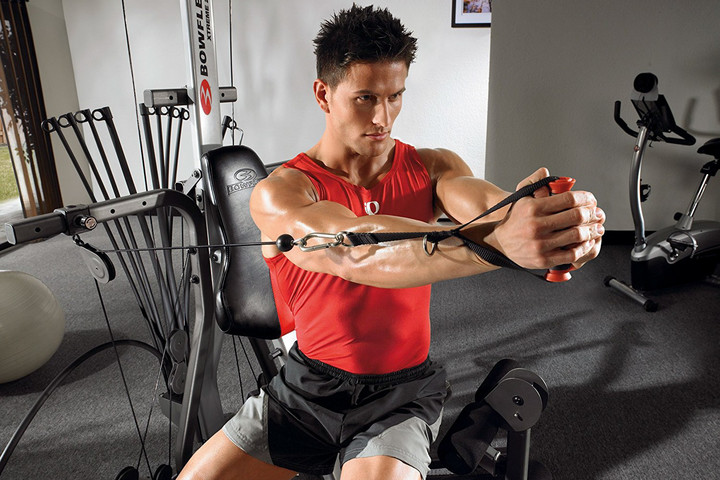
Not every piece of fitness equipment has to connect to the cloud. Bowflex’s home gym is a solid setup for the house that offers a variety of exercises. With an angled lat bar and a leg extension, no part of your body is left out. The multiple pulley system means no changing cables for different workouts, or having to hassle while keeping your heart rate up during your routine.
The Bowflex is about as compact as a full home gym gets, but it’s still a hefty beast. It takes up an 8- × 6-foot area and weighs in at 185 pounds. Unless you have a really large living room, you’re going to want to put this behemoth in its own dedicated space.
Price: $1,484
Buy it now from:
Amazon
LG Watch Sport (Android 2.0) review

Research Center:
LG Watch Sport
The wearables category continues to grow, but smartwatches are still in an odd place. Companies are finding it hard to sell the idea of a watch that costs $300 or more, yet lacks the longevity or resale value of a traditional watch. Technology is supposed to make things easier, and for a lot of people smartwatches don’t offer a compelling solution to a problem, making them a tough purchase to justify.
The first iteration of Android Wear essentially offered people a glorified notification reader. Sure, the user interface looked nice, but it was a nightmare to navigate – and you don’t want to think about navigating a smartwatch, something meant to be used at a glance.
More: Will your watch get Android Wear 2.0? Read our guide to find out
Android Wear 2.0 is Google’s second attempt, and it’s far more promising. The launch debuted on the LG Watch Sport and Watch Style, which were designed in collaboration with Google like its previous Nexus devices. The LG Watch Sport is our focus here, and it had us interested in smartwatches again — until it ran out of juice. Let’s take a deeper look.
Design and specifications
When you think of sports watches, Casio’s G-Shock series come to mind, or even Casio’s new outdoor smartwatches, the WSD-F10 and WSD-F20. There’s typically a lot going on, not just on the watch face but on the case as well.
Watch faces are important, and Google has done a great job in keeping the process of switching and customizing them incredibly simple.
The LG Watch Sport goes against the grain with a stainless-steel design that’s fairly minimal. What makes it sporty is the polyurethane band, its IP68 water-resistance rating, and GPS. It also has three buttons that help make it more functional than the Watch Style.
While I usually opt for leather-strap classic watches, the Watch Sport is more up my alley largely because of its design, though the dark blue is more beautiful than the grey. The gorgeous and large 1.38-inch P-OLED display helps too.
Unfortunately, it’s thick and heavy. It’s not a watch you’ll forget on your wrist because it’s not the most comfortable to wear. It feels like a premium watch, but the rubber strap — which isn’t replaceable — contributes to my desire to take the watch off after long periods of time to rub my wrist.
The screen is protected with Corning’s extra-durable Gorilla Glass 3, and the Watch Sport has an ambient light sensor that helps dim the screen and make it monochrome when you’re not looking at it.
 Julian Chokkattu/Digital Trends
 Julian Chokkattu/Digital Trends
 Julian Chokkattu/Digital Trends
 Julian Chokkattu/Digital Trends
It’s powered by Qualcomm’s Snapdragon Wear 2100 processor with 768MB of RAM, 4GB of internal storage, and a 430mAh battery. It also sports Wi-Fi, Bluetooth, and LTE connectivity — the latter will require a SIM card that you can insert in the back.
There’s also GPS, the IP68 rating that lets you take it for a swim, and NFC for Android Pay.
A streamlined interface and the Play Store
I fired up my second-generation Moto 360, which has been collecting dust, and the differences between Android Wear 1 and 2 are startling, namely the poor design choices Google made the first time around. Users were required to swipe through so many screens to access a particular setting! In retrospect, version 1.0 feels especially clunky.
Android Wear 2.0 – which I’m actually testing on the other hand — is a joy to use in comparison. The interface is streamlined and simple. Swipe down to access quick settings, and swipe up to move through your notifications. To minimize fingerprints on your watch screen, the crown rotates, allowing you to use it as a scroll wheel or to zoom in and out of maps.
It doesn’t always scroll through every screen, however: some apps aren’t optimized for that yet, including some screens in the Android Wear 2.0 interface, strangely. Pressing the crown instead (it’s the middle button on the Watch Sport) pulls up your apps. You can pin your most used apps to the top.
While there are a lot of Wear apps, the bulk of them have yet to be updated to version 2.0. This may take a while, and in general there needs to be more app support so that notifications can offer a richer experience. Uber finally joined, but where’s Lyft? Where’s Twitter? We’ll have to wait and see how soon third-party developers support version 2.0 or the platform in general.
There’s also the Google Play Store, which means you don’t need your phone to download Wear apps, and iPhone owners using the Watch Sport can bypass the App Store. It also means you don’t need to clutter your phone with apps you may use only on your smartwatch — a godsend for people who don’t like to have redundant or unnecessary apps on phones.
We don’t recommend hunting for apps through the Play Store, because it can be annoying on the small screen. Use the Google Play Store website on a computer and remotely install apps to your watch instead.
More: Swarovski partnering with Qualcomm, Google on an Android Wear smartwatch
The user experience on the Watch Sport is solid for the most part; the Snapdragon Wear 2100 processor is sufficient, but there are moments of stutter and lag, such as when you’re downloading or updating apps. Loading apps, the Play Store, and even Google Assistant takes longer than expected too, but it’s unclear if this is a connectivity or processing issue.
Google Assistant
Pressing and holding the crown button calls up Google Assistant, or you can just say “OK Google.” The functionality is almost identical to what you could do previously with voice search on Android Wear.


While it can’t perform some functions the Assistant on Google Home can — such as controlling your smart home devices — it’s more personable. You can ask it to tell you stories, jokes, and more as you can with the Assistant on other platforms.
Google has built a great voice assistant that allows you to easily trigger actions like finding your heart rate, placing calls, setting a reminder, sending a text, and more. But there’s opportunity for more once Google decides to unify the Assistant across its platforms.
The company tells us Assistant on the watch will support third-party actions “like turning on/off the lights (through Philips Hue) and making a restaurant reservation (through OpenTable),” though no specific timeline was mentioned.
Watch faces and complications
By far, two of the best features of Wear 2.0 are face customizations and complications: Just swipe left or right to scroll through other watch faces. You can set one up by long-pressing it, or by tapping the settings icon when perusing.
Google has built a great voice assistant that allows you to easily trigger actions.
Complications, by the way, are meant to mimic those smaller subdials on a traditional watch. They offer up information at a quick glance, such as the time to your next calendar event, how active you’ve been this week, and more. You can change which one you’re showing by tapping on them when customizing the watch face — third-party apps can add their own complications as well.
Android 2.0 offers more control over the color scheme of a watch face and layout of the complications (you can also have none). The best part: If you have more than one favorite style, you can customize as many as you want and just swipe left or right to switch.
For example, if I’m heading to a fancy dinner I’ll swap to a minimal, traditional-looking face with no complications. When I’m out and about, I’ll swap to one that more readily gives me important information. This is my favorite feature in Android Wear 2.0 — watch faces are important, and Google has done a great job in keeping the process of switching and customizing them incredibly simple.
Notifications, Pay, and Fit
Google has added Smart Reply functionality from services like Inbox and Allo to the Android Wear OS itself. This is possible with on-device machine learning, which impacts third-party applications as well.
Smart Replies have definitely been useful, but if they aren’t doing it for you, tap Reply to access voice-to-text, an emoji scribbler, or the keyboard. I usually opt for voice input or the keyboard, where I can swipe through letters — it’s surprisingly accurate.
You can also press the globe sign to switch keyboards to the handwriting input, in case you want to draw your letters. This works well for when you want to write short responses, but the other input types are far more versatile.

Julian Chokkattu/Digital Trends
Still, all these input methods allow for greater choice in how someone wants to respond to notifications. While it may look silly talking to your watch or trying to type, I’ve found it useful in situations like when I’m in a crowded train and can’t access my smartphone. Notifications are the crux of a smartwatch, and Android Wear handles them excellently.
A few gestures from the first version of Android Wear have carried over too, but you have to turn them on. Flick your watch away from you to pull notification cards up, and flick it towards you to go back and even pull your settings down. These gestures are my favorite way of interacting with a smartwatch, because it’s truly hands free.
In the world of finance, Google has finally caught up with the likes of Samsung and Apple with payment functionality on its smartwatch platform. Android Wear works with Android Pay thanks to the NFC sensor in the Watch Sport, meaning your smartwatch will need NFC to be able to use Android Pay.
LG Watch Sport Compared To

Samsung Gear S3

Samsung Gear S2

Apple Watch Series 2

Motorola Moto 360 (2015)

Martian Passport MP100WSB

Garmin fenix 2

Meta M1 Watch

LG G Watch R

Netatmo June

Neptune Pine

Motorola Moto 360

Martian Notifier Watch

Phosphor Touch Time

Samsung Gear Fit

Basis B1
The top button on the Watch Sport is configured to Google Fit, but the bottom is for Android Pay. This can be customized to your liking, but by default pressing the bottom button pulls up your credit card; all you have to do is hold your wrist up to the payment terminal. It works pretty well, though it may take a few extra seconds to load and process — expect to spend some awkward time with the cashier.
More: ZTE will launch an Android Wear watch with LTE Connectivity later this year
Google Fit has been improved in Wear 2.0 to automatically detect workouts, and the app can also offer tips on proper technique for some exercises. The GPS is relatively accurate — it would usually put me a little less than a block away from where I was standing.
Abysmal battery
And that finally brings us to battery life. No matter how much I enjoyed using Android Wear, I was constantly worried on my device’s battery life.
When I didn’t use the Watch Sport and left it on my desk for about 20 hours, it went down from 100 percent to 66 percent. Standby time needs to be improved and likely LG and Google can pull that off, but the watch probably just needs a bigger battery.
It feels like a premium watch, but the rubber strap — which isn’t replaceable — contributes to my desire to take the watch off after long periods of time to rub my wrist.
Bottom line, it’s near impossible to get a full 24-hour cycle with the Watch Sport, and that’s without even using the GPS or fitness-tracking features. Moderate to heavy usage left me at 20 percent when I came home from work at about 6 p.m. If I had an after-work event to head to, the watch would most likely be dead.
Light usage — almost only checking notifications and responding to a few — fared a little better. I ended a work day with 30 percent battery, which still isn’t good enough — especially when the Apple Watch and the Samsung Gear S3 can keep going and going for comparable prices.
It’s unacceptable that battery life is so abysmal. I usually take off my watch when I get home, and the Watch Sport goes straight on the charger. Charging it every night isn’t an issue — it’s the fact that I have to think about my watch’s battery constantly that bugs me. People are already having a hard time justifying a smartwatch purchase. You know what makes it worse? Seeing a dead smartwatch that can’t even tell the time.
Batteries degrade over time, too. I imagine a year from now I’ll be coming home with an even lower amount of battery left — that’s worrying and makes it hard to recommend the watch.
Warranty information
LG offers a limited warranty that covers your device for one year from the date of purchase, and you’re only protected from manufacturing defects.
Our Take
The LG Watch Sport is a good smartwatch, mostly thanks to Android Wear. If you’re interested, go to an AT&T or Verizon store to see how it fits your wrist first, as that can make or break your decision.
For $350, you get the latest features of Android Wear plus GPS, an IP68-rating, three buttons, and NFC. Smartwatch enthusiasts will enjoy the device, but I think Android Wear still won’t incite the curiosity of the average person. That’s not necessarily a fault of the OS but an issue with smartwatches in general.
The DT Accessory Pack
LG Watch Sport screen protector
$2
Fugoo Sport portable Bluetooth wireless speaker
$150
Born to Run
$12
I find myself liking the device the more I wear it, but battery life is what kills it. If this can be fixed via a software update, we’ll update our review, but not being able to handle a day is inexcusable. The Apple Watch and Samsung Gear S3 can, and they cost around the same.
Are there better alternatives?
If you’re an iPhone user, there’s no reason to go for any smartwatch other than the Apple Watch — it’s the best hands down. The Samsung Gear S3 is also a solid option too.
There will be an onslaught of smartwatches powered by Android Wear this year due to the release of version 2.0. If you’re unsure about the Watch Sport’s design or battery life, you can always wait to see what’s coming from other manufacturers. The nice thing about Android Wear is the software experience will always be the same.
How long will it last?
Smartwatches aren’t like traditional watches. There will be a time when they will no longer get software updates (presumably around two years), and then it largely depends on how long the device’s battery will survive. Don’t expect to keep one for more than two to three years.
Should you buy it?
No. If you’re into smartwatches and Android Wear, you will likely enjoy the Watch Sport if you can get past its size. It easily lets you respond to notifications, you can track various activities, wear it while you swim, make calls, and send texts. It handles all these core functionalities well enough that you won’t need to rely on your phone all the time. But all of that’s pointless if you’re constantly worrying about the battery life.
You can now read the fine print with this hidden iOS 10 camera feature
Why it matters to you
No more squinting to read that fine print — there is an app for that built right into iOS 10 and here is how to find it.
Hidden details, meet hidden camera mode. Every software update usually includes a handful of new controls that, without any sort of physical display, often goes unnoticed. One of those unnoticed updates on iOS 10, however, can help you notice a few fine details — a magnifier.
The feature uses the iPhone’s camera to magnify objects and reaches beyond what the zoom inside the native camera app is capable of for even more magnification. The native “app” includes a few other features for getting in close to the details, whether that is for reading the fine print or uncovering other details.

Screenshot
More: Make the most of iOS 10 with these killer tips and tricks
The feature is actually pretty simple to access, you only have to press the home button three times. But, as Business Insider points out, you have to turn it on first. Users of iOS 10 can access the feature by heading into settings, then tapping General and Accessibility. Swipe next to “Magnifier” to turn the feature on.
Tapping the home button three times brings up the feature, even while inside an app. A slider adjusts the magnification effect and while the center button looks like the same one inside the native camera app, it only freezes the image until you press it again — nothing is actually saved. The familiar lightning bolt icon turns on the camera’s flash as a steady light source.
The icon on the lower right is familiar too but instead of adding photo filters, it adjusts the brightness and contrast and triggers multi-color modes, likely a feature added to assist with colorblindness.
The use of the iPhone’s camera to magnify objects may be relatively simple but it could be handy to have an easy way to read the fine print right in your pocket and accessible with three taps. Without an on-screen control or app screen, it is one of those iOS features that are often never noticed.
How to stream the BlackBerry ‘Mercury’ announcement from MWC 2017!
‘Mercury’ is coming soon! Here’s how to follow along with the big announcement!
I won’t lie: I’m pretty jazzed for the BlackBerry ‘Mercury’, the latest phone from BlackBerry Mobile that promises to combine a classic hardware with modern Android conveniences.

While most of you won’t be able to attend the live announcement in person on Saturday, February 25 at 1pm ET / 7pm CT — it’s at a small venue in Barcelona — our friends at CrackBerry will be streaming the event for all to see. That’s a pretty good way to spend a Saturday, if you ask me.
While we already know a fair amount about the ‘Mercury’, we are still trying to figure out its specs, what it will be called and, probably most important of all, what it will cost and when it will be available. That will all be revealed in just under a week.
To follow along next Saturday, make sure to bookmark crackberry.com/bbmobilemwc2017. We’ll see you then!
BlackBerry ‘Mercury’ livestream from MWC 2017!
WhatsApp continues to be way better than Allo with its latest update
Happy birthday, WhatsApp! What’d you get me?
A ton of people around the world use WhatsApp, and have for quite a while now. What started as a simple SMS replacement app has grown tremendously over the last eight years, and now does way more than just text. According to WhatsApp, 50 billion messages are sent each day alongside 760 million video and 80 million gifs. The point is, this app is a big deal even if you aren’t using it.

To help celebrate eight years of improvement, WhatsApp is improving the Status feature. Here’s how it’s going to work, according to the WhatsApp blog:
As soon as you open the new Status tab, you’ll see updates from friends and family who are WhatsApp users in your address book. You can reply privately to your friends’ updates and control who sees what you share. All updates expire after 24 hours. And like other types of messages, you can mute or unmute contacts at any time.
Status messages can be text, video, gif, and it can all be improved with drawing or emoji like any other message. For people that live inside WhatsApp, this is almost like turning the Status page into its own little social network. It’s an exciting change, and you can expect to see it rolling out to users all over the world this week.
Everything you need to know about the T-Mobile ONE unlimited plan

A complete breakdown of T-Mobile’s ONE plan and everything else you can get when you sign up for service from Big Magenta.
In the United States, there are a lot of companies that can get you and your phone online, but most people use one of the four biggest: AT&T, Sprint, T-Mobile and Verizon. Choosing between them can be difficult. Your first priority should be what service works best in the places you spend your time. It’s not worth saving $10 a month if the service is bad. Once you have that sorted, you can look at what each company has to offer and the prices they charge for it.
More: Which unlimited plan should you buy?
Let’s take a look at T-Mobile to see what they can give you and what it will cost.
Note: The details of this plan are current as of February 20, 2017.
T-Mobile ONE plan details

- Unlimited talk, text, and data with 200MB of roaming data
- Unlimited talk, text, and data in Canada and Mexico
- One hour of free Gogo in-flight Wi-Fi and unlimited texting on enabled flights
- Unlimited data and texting in over 140 locations at 2x speed (264kbps) (limited time offer)
- Unlimited music and HD video streaming (limited time offer, applies only in the U.S.)
- 10GB high-speed mobile hotspot use (limited time offer)
T-Mobile’s definition of Unlimited Data means that after you use 28 GB in a single month, your service can be slowed down if you’re in a congested area. You’ll hear the word throttled used here but you need to know that it’s only a temporary deprioritization of your data connection when you’re in a busy area. It may not happen at all depending on how many other customers are using the same towers.
You can use any phone that’s compatible with T-Mobile’s network. If you bring your own phone you’ll pay a $20 one-time fee for a SIM starter kit. You can also finance a phone through T-Mobile and the monthly cost will vary depending on which phone you choose. T-Mobile ONE plans also include tax and all the other assorted fees in the price. Your monthly bill will be exactly what the plan costs.
Additional lines can be added to a T-Mobile ONE plan. Every line has the same benefits outlined above and the $20 SIM starter kit fee applies to each, though they go on sale regularly and it’s not unheard of to get the starter kit fees waived if you talk to a representative. Here is a pricing breakdown.
- One line of service on a T-Mobile ONE plan is $70
- Two lines of service for $100
- Three lines of service for $140
- Four lines is $160 and each additional line adds $20 to the total
T-Mobile ONE Plan add-ons
You can add a tablet to your T-Mobile ONE plan for the standard $20 monthly fee. You can add a wearable to your T-Mobile ONE plan for $5 a month. Wearable devices are limited to 512kbps data speeds.
T-Mobile also offers two Plus add-ons for people who want a few extras:
The $5 monthly T-Mobile ONE Plus add-on includes everything from the standard ONE plan plus the following:
- Unlimited in-flight data on all Gogo-enabled flights
- T-Mobile Visual Voicemail
- T-Mobile Name ID
The $25 T-Mobile ONE Plus International add-on includes everything from the ONE Plus plan and adds the following:
- Unlimited international calling to landlines in over 70 countries and mobile numbers in more than 30 countries
- Unlimited high-speed mobile hotspot
You do not have to pay for the $5 Plus add-on if you’re buying the $25 Plus add-on. These prices are per line.
Secondary perks

T-Mobile also offers other special promotions on top of what you’re paying for. These vary from free applications that support their services to free devices (through bill credits) after a certain amount of monthly payments. Some of these perks can change regularly, but as of February 2017, here is what T-Mobile is offering.
- $150 prepaid Visa card (per line) when you switch to a T-Mobile ONE plan from another carrier
- 11.2% cash back via Prepaid MasterCard on any phone you buy from T-Mobile after 6-8 weeks
- Get an LG G Pad X 8.0 or Samsung Galaxy Tab E for free (via 24 monthly bill credits)
- Get an ALCATEL LinkZone wireless hotspot for free (via 24 monthly bill credits)
- “Smartpicks” are full-featured smartphones you can finance for $5 per month (24 months at 0% interest)
T-Mobile also has long-standing extras, including apps for Visual Voicemail, T-Mobile content transfer, T-Mobile’s DIGITS, and an excellent account management application. You can find all of T-Mobile’s apps on Google Play.
Last but not least is T-Mobile Tuesdays. Each week you can get things like food or movie tickets for free and have a chance to win “top-shelf prizes and epic experiences from the coolest brands around” without buying anything. T-Mobile Tuesdays is a very popular promotion and it is available for any T-Mobile customer.

 AIVAnet