


GM’s car sharing service offers more EVs by teaming with cities
The city of Los Angeles is no stranger to embracing EVs and now its teaming up with GM’s car-sharing service to make those vehicles more readily available. Maven announced today that it’s partnering with cities to expand sustainable driving options and the initiative is kicking off in LA. Once the project fully up to speed, over 100 Chevy Bolt EVs will be available in the city.
Of course, more EVs require more charging stations. Maven is working with other companies to expand the available options. For a limited time though, the Bolt EVs will be able to use EVgo Freedom Stations in California free of charge. Maven already has some Bolts on the road in LA and Lyft drivers in the city are able to rent the EVs through the Express Drive program.
While the new project is starting in Los Angeles, Maven plans to partner with other cities to “co-create smart transportation options.” The goal here is to not only offer another form of transportation, but to create jobs and ease parking and traffic woes. The car-sharing service is available in 17 cities across the US and Canada, so there are plenty of possibilities for municipal partners. Maven also says that car sharing with the Bolt EV could eventually be linked to other mass transit options in a city, so you could easily borrow a car for a few hours should the need arise.
Untappd puts Foursquare-like beer recommendations front and center
The beer-focused app Untappd is a handy way to keep track of what you’ve tasted, what you liked and what your friends are drinking. This week, the suds social network completely redesigned its mobile software to add a bunch of new features. On top of a revamped UI, the app’s directory of Foursquare-like events, venues and beer recommendations is now a central focus. Each time you fire up the app or go to check in a beer, you’re greeted with those options in addition to trending beers, top rated brews, a global feed and trending locations.
A new map extends Untappd’s new discovery focus even further by allowing you to explore new venues close to where you are or in another part of the world. Verified locations are displayed with yellow map markers while other places you can have a beer are labeled red. Those verified locations will offer a lot more information, like menus, events, hours and contact info. You can also opt for notifications for any verified watering hole so you can be alerted when they add new beers. You can do the same for individual beers and the app will let you know when a spot close by gets it in stock.
Alongside the bigger focus on discovery features, Untappd now lets you add more details to your individual check-ins. On top of rating, location and comments, you can pick a serving style, flavor profile and note where it was purchased. The added info could come in handy when you’re looking to pick up more of that IPA you had last summer and you aren’t sure if it came in a growler or 6-pack.
Last but not least, Untappd has expanded its Wish List feature. Before now, you could add beers that you wanted to try at some point to a single list. With this latest update, you can create as many as you want while choosing whether or not they are public or private. The change means you can have style-specific lists or a guide for beers to look for during your next vacation. Untappd version 3.0 is now available for free from both the iOS App Store and Google Play.
Source: Untappd
Google Assistant now helps with your shopping on Google Home
Amazon’s Echo and its Alexa virtual assistant had a big head start before Google debuted Home, but the company has regularly announced new features to try and make up ground. Today, Google revealed a big addition and will it close to home for Amazon: shopping. You can now use Google Assistant on the company’s connected smart speaker to order goods from its Express shopping service.
This means that you can order food, medicine, pet supplies and more from stores like Whole Foods, Costco, Walgreens, PetSmart and Bed, Bath & Beyond. Currently, Google Express shopping offers access to over 50 retailers for same-day delivery in 12 states.
Unless you have a $95 annual membership, there’s usually a minimum order amount and a delivery fee associated with Express. However, when you have Google Home lend a hand between now and April 30th, you won’t have to worry about paying any membership or service fees. All you have to do to get started is input your payment info and shipping address in the Settings menu of the Google Home app.
Source: Google (1), (2)
Hasbro’s cute new robo-dog teaches coding on the sly
Toy makers are coming up with more and more ways to encourage children to learn STEM skills, and Hasbro is trying to do that in a somewhat futuristic way. The company is releasing a $120 robotic dog toy called Proto Max as part of its Furreal Makers line of animatronic pets that children can customize via an app. To be clear, you’ll be tweaking this robo-dog’s behavior and character, not the colors of its eyes or fur or the shape of its nose or face. That initially sounded a bit too much like pet Westworld to me, but after a brief demonstration, I was persuaded to quiet my internal ethics police.
Proto Max is designed for kids aged six and older to learn the basics of how programming works, but even those who don’t want to deal with figuring out how to customize a robot can still play with it. With a dial on the side of Proto Max’s perpetually smiling face, you can pick one of three pre-defined personalities: “small,” “medium” or “large.” These affect the pup’s general temperament by adjusting the volume of its voice and how it reacts to stimuli. You can open the relatively easy-to-use iOS/Android app to assign more specific behavioral traits afterwards.
All told, there are 10 trigger points on the dog’s body, including its attached ears, nose, tail and two capacitive sensors in the patch of fur on its plastic back. You can set Proto to respond to interactions with those parts in a wide variety of ways by dragging and dropping reactions to slots on an in-app diagram of the robot. During a recent demo, I customized my pup to make a happy face when I stroked her back. Although I was already anticipating her reaction, I still felt gratified when she responded as I’d expected. Not only was her behavior endearing, but it was also rewarding to see that my customization worked.

That behavior is really what makes Proto so charming. Its transparent plastic body is not the best-looking, although Hasbro says that kids it studied liked seeing the toy’s insides. But I didn’t find this robot adorable just by looking at it; instead, much like my experience with real dogs, I was won over once it came to life and started responding to my touch.
There are plenty of ways Proto can react: moving around, barking (or making other sounds) and displaying different expressions on the 2.6-inch-wide LCD screen that makes up its eyes. The LEDs inside its mostly transparent body can also change color, in case you ever wished your robo canine were a different hue. In addition to defining one-time reactions to triggers, you can also chain a series of actions together in the more advanced-looking Code part of the app. This way, you can make your pup spin around, bark three times and flash a different color when you pet it.
Some of the triggers are a little confusing, though. The microphone input option, for instance, lets you decide what your pet does when it hears any sound, regardless of the volume or words spoken. You’re most likely going to leave that blank, because, as proven during my demo, having the dog respond anytime it hears a noise gets tiring very quickly. Hasbro told us that Proto doesn’t recognize specific words just yet. If it ever does, however, that would be a much more useful and realistic trigger. Imagine being able to decide what your robot does when it hears words such as “fetch,” “nap” or “treat.”
That’s where we cross over into slightly weird territory. The whole point of having a pet is enjoying its unexpected quirks (and, let’s be real: adoration). As much as I’d love to own a dog I didn’t need to clean up after, the idea of creating a pet that did exactly what I expect it to is disturbing, and I’d could see it getting boring over time. But Hasbro says that’s not really the point here; it’s to help kids discover and understand the thought process behind such toys.
If you think of Proto Max less as a pet replacement and more as a toy that teaches how things work, it’s a compelling product that could grow with your child. Hasbro plans to introduce games in the app to challenge kids to solve problems by coming up with specific actions for Proto Max, which would make it an even more useful teaching tool. Since Makers is a new range of programmable pets in the Furreal line, it’s likely the company will release more animal versions of Proto Max in the future, so cat or unicorn lovers can hopefully have their own franken-pets soon enough.
Tinder just bought a Snapchat-like video app
With Tinder’s acquisition of collaborative video messaging app Wheel, the swiping app of choice may soon offer more than photos of available people in your area. Tinder expanded beyond dating last July with the introduction of Tinder Social, which connects groups of friends to hang out. As Business Insider notes, Wheel is similar to Snapchat’s “Live Stories,” which allows users to post to a public feed of themed videos.
Wheel co-founder Paul Boukadakis, now Tinder’s VP of Special Initiatives, said the next step is “bringing people together to create.” Wheel’s features could offer a natural extension of its Social aspect, rather than leading to direct videos between romantic matches. The latter could lead to some not-so-savory uses anyway.
Wheel made some noise while in beta last summer: when high school students created a video story focused on Arnold Schwarzenegger impressions, the feed got enough attention to draw Arnie himself to join in (We don’t know how long he kept using Wheel after that first attempt, however.)
Tinder isn’t the first dating app to add video features, though. Bumble, the app’s most direct competitor, introduced ten-second video stories that disappear after 24 hours back in January. It’s not yet clear when we might see Wheel’s features incorporated into the dating app, but co-opting features from Snapchat might not be bad idea: Instagram surpassed 600 million users at the end of 2016.
Source: Business Insider UK
Apple Considered Buying Ron Howard’s Imagine Entertainment, but Talks ‘Fizzled Out’
Another rumor of Apple’s interest in acquiring a company involved in film and television has come to light today, with Financial Times reporting that the Cupertino company was in talks to acquire production company Imagine Entertainment, co-founded by Ron Howard and Brian Grazer. The deal is said to have gotten “serious enough” to include Apple CEO Tim Cook and senior vice president Eddy Cue, but discussions ultimately “fizzled out” for unknown reasons.
Those knowledgable about the deal said that possibilities ranged from a “first look” distribution strategy granted to Apple for movies and television shows released by Imagine all the way to an investment or even an outright purchase by Apple. Imagine is a company behind a number of well-known films, including all three entries in The Da Vinci Code series, Apollo 13, and the upcoming adaptation of The Dark Tower. Some of its production in the TV space includes shows like Empire, 24, and Parenthood.
Ron Howard and Brian Grazer of Imagine Entertainment
According to Financial Times, Apple’s current approach to original video content “has many in Hollywood scratching their heads.”
This approach has many in Hollywood scratching their heads. Apple’s rounds of meetings with various entertainment industry players suggest it has not yet decided what its strategy should be.
The iPhone maker has been stalking Hollywood for more than a year, talking to leading industry players while it tries to formulate a cogent video strategy. It has considered a range of acquisitions and targets including, most recently, Imagine Entertainment, the Hollywood production company owned by Ron Howard and Brian Grazer, according to several people briefed on the discussions.
Imagine is said to have recently faced the end of a long-term production and distribution deal with Universal Pictures, which is when Apple is believed to have considered entering into a first look deal with the company. The new Imagine rumor marks another bump in the road for Apple’s trip around Hollywood, following reports that the company considered buying Time Warner last year. Later in the year, people familiar with Apple’s acquisition strategy said it was “not interested” in acquiring Time Warner at the time.
Today’s news follows a Bloomberg report from yesterday that underscored Apple’s “arrogance” in mergers and acquisitions, where it’s reported to use shrewd business tactics and non-traditional strategies in its attempts to acquire new companies. These tactics work mostly for Apple’s smaller acquisitions, according to some analysts, but impede its success at acquiring larger companies, although it is unclear how seriously Apple has pursued any such large targets.
Tags: ft.com, Imagine Enterainment
Discuss this article in our forums
Verizon Has Fastest LTE Network in the West, While T-Mobile Tops the East in Latest Study
Verizon has the fastest LTE network in western regions of the United States, while its up-and-coming rival T-Mobile has the top speeds throughout the east coast, according to a recent study by OpenSignal, which crowdsourced signal data from nearly 170,000 smartphone users who downloaded the OpenSignal app.
OpenSignal divided the United States into five regions—the Midwest, Northeast, Southeast, Southwest, and West—and found that Verizon had the fastest LTE speeds in the West and Midwest, while T-Mobile was tops in the Northeast and Southeast. Verizon and T-Mobile had a statistical tie in the Southwest.
Verizon had an average download speed of 20 Mbps in the Midwest, for example, compared to 18.4 Mbps for T-Mobile. Meanwhile, in the Northeast, T-Mobile’s average download speed was 18.6 Mbps versus 17 Mbps for Verizon. OpenSignal’s testing was completed in the fourth quarter of 2016.

LTE speeds among all “Big Four” carriers in the United States, namely AT&T, Verizon, Sprint, and T-Mobile, were fastest in the Midwest overall, while lowest in the Southwest, said OpenSignal.
The geographical breakdown is a follow-up to OpenSignal’s latest State of Mobile Networks report published last week. The original report, which included a city-by-city breakdown, found Verizon had the faster network in a number of major cities, including Chicago, Houston, Los Angeles, New York, and San Francisco.
Tags: T-Mobile, Verizon, OpenSignal
Discuss this article in our forums
Touch Bar Support in Microsoft Office for Mac Rolls Out to All Users
Starting today, Microsoft Office users who own one of Apple’s new 2016 MacBook Pro models can update their Word, Excel, and PowerPoint software to gain new Touch Bar integrations.
Touch Bar support for Microsoft Office was first announced at Apple’s October keynote event where the updated MacBook Pro with Touch Bar debuted. At that time, Microsoft outlined the Touch Bar’s capabilities, highlighting unique capabilities for Word, Excel, PowerPoint, and Outlook.
In Microsoft Word, the Touch Bar can be used with Word Focus Mode, which hides all on-screen ribbons and commands to put the focus on your work. The Touch Bar puts “the most relevant Word features” at a user’s fingertips, allowing for quick style changes.
In PowerPoint, the Touch Bar makes it easier to manipulate graphic elements. A Reorder Objects button creates a graphical map of all the layers, so users can quickly find an object and move its position. There are also special controls that are available in Slideshow View.

With Excel, the Touch Bar displays the most recently used functions when the equals sign is typed into a cell, so it’s quicker to do things like sum a range of numbers. The Touch Bar also provides access to borders, cell colors, and recommended charts.

Microsoft has also added new capabilities to the Touch Bar during its testing period. The Touch Bar can also be used to insert comments, photos, and hyperlinks into Word, it includes view-specific controls in PowerPoint, and there’s an object rotation slider for Word, Excel, and PowerPoint.
Last week, Microsoft previewed Touch Bar support, providing it to its “Office Insider” beta testers, but now the service is ready to roll out to all Office users.
Touch Bar support is currently only available for Word, Excel, and PowerPoint, but Microsoft also plans expand it to Outlook and Skype in the near future.
Tags: Microsoft, Microsoft Office
Discuss this article in our forums
How to jailbreak your iPhone, iPad, or iPod Touch with zJailbreak and Yalu102
Jailbreaking is an essential part of the iOS experience for many. For others, it’s unknown and dangerous. Thankfully, for those old and new to jailbreaking, there are multitude of ways to do it. Using tools such as Yalu102 and zJailbreak, jailbreaking is not only faster than ever, but also easier. Whether you’re a hardened veteran of jailbreaking, or if this is your first time trying it, this guide will help you jailbreak your iPhone, iPod touch, or iPad.
More: 100 awesome iPhone apps for 2017
What is jailbreaking?
First and foremost, let’s take a moment to remember this guide is not a guarantee that you will successfully jailbreak your iPhone, iPod, or iPad. When dealing with something like a jailbreak, there is always a small chance something could go wrong with your phone, and we cannot be responsible for this. However, jailbreaking, especially with Pangu is extremely easy and you should be perfectly fine.
To ‘jailbreak’ your iPhone means you are freeing it from the limitations imposed by Apple. Freeing a device means that it can install applications from outside Apple’s iTunes App Store and you can fiddle with previously restricted aspects of an iOS device. Jailbreaking can also help you unlock your iPhone to make it available on other carriers.
To jailbreak your device, you’ll need a computer, your iOS, and your iOS cable. Most jailbreaks are compatible with any device capable of receiving the iOS 10, iOS 10.1, or iOS 10.2 updates, so if Apple has prompted you to update, then you can go ahead and follow this guide.
Xiaomi Mi5S Plus review

Research Center:
Xiaomi Mi5S Plus
You’ve decided to splurge on a massive new smartphone, and are eyeing those with cool dual-lens cameras, but getting bewildered by the growing number of options. While Huawei, Apple, and even Honor phones will already be on your list, what about an imported phone like the Xiaomi Mi5S Plus? It’s a strong performer on paper, and comes with that dual-lens camera, but the price puts it in the same category as awesome phones from OnePlus and ZTE.
This means it’s far less of an impulse, what-the-hell buy than you may expect, and more of one that needs some consideration. Can the dual-lens camera swing the deal? We’ve been trying out the Mi5S Plus to see if you should be happy spending such a sizeable amount of money on an import device, or if it’s better to stay closer to home.
Design
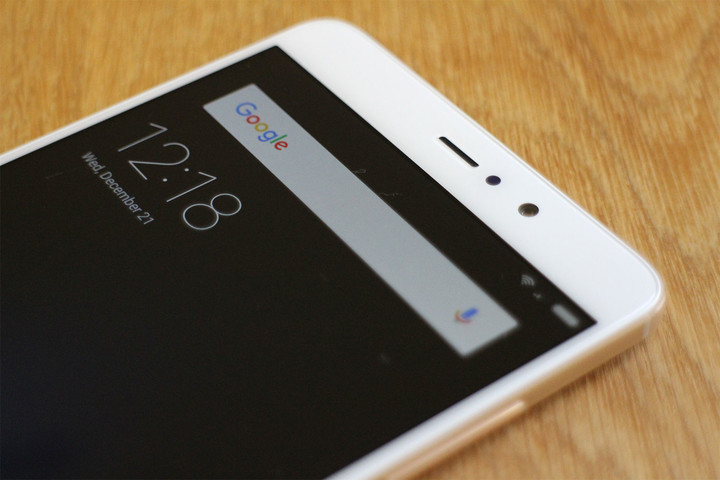
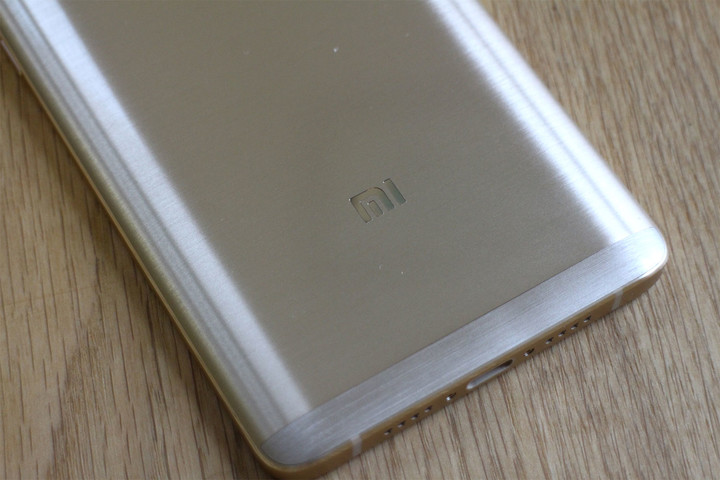
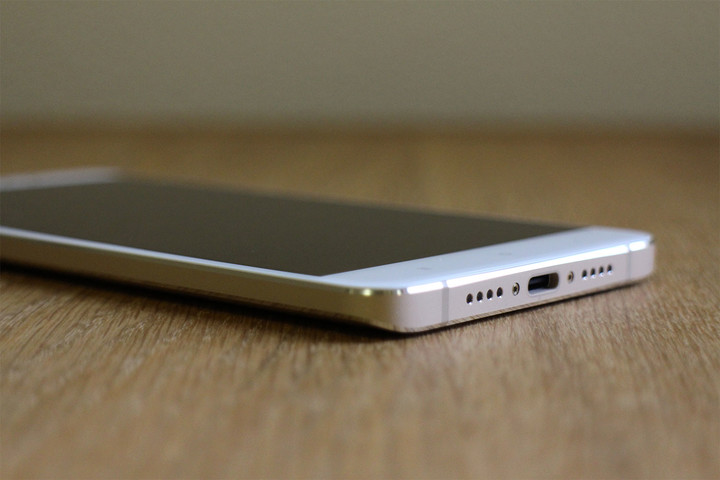
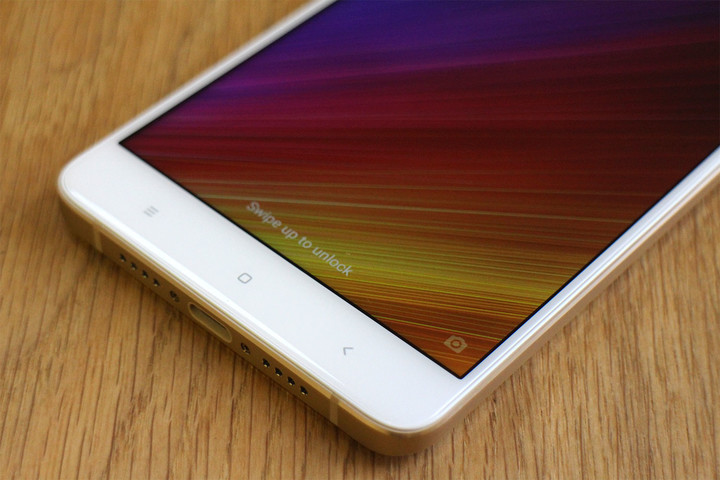
Xiaomi makes great-looking phones, and it’s sticking closely to an established theme — shapely bodies with curved brushed metal rear panels — with the Mi5S Plus. It’s very similar to the Redmi Pro, the last Xiaomi phone we examined closely, just on a larger scale. It’s about the same size as an iPhone 7 Plus, but has a 5.7-inch screen, so it’s a compact shape. However, the body is quite thick at 8mm.
 Andy Boxall/Digital Trends
 Andy Boxall/Digital Trends
 Andy Boxall/Digital Trends
 Andy Boxall/Digital Trends
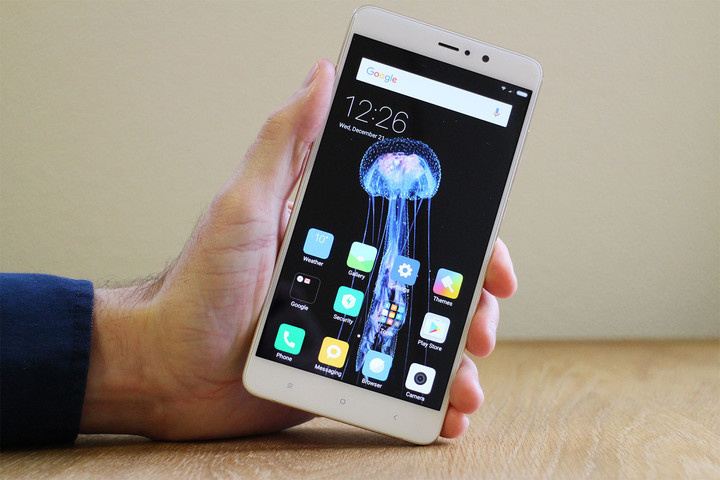
This extra thickness is effectively disguised by the curved metal sides, which make it very comfortable to hold, especially where the bottom corner rests at the base of your palm. It’s not quite as easy to use one-handed as the Huawei Mate 9 — a bigger phone — and I struggled to reach across the screen with my thumb. It’s lighter than the Mate 9 at about 170 grams, putting it closer to the iPhone 7 Plus.
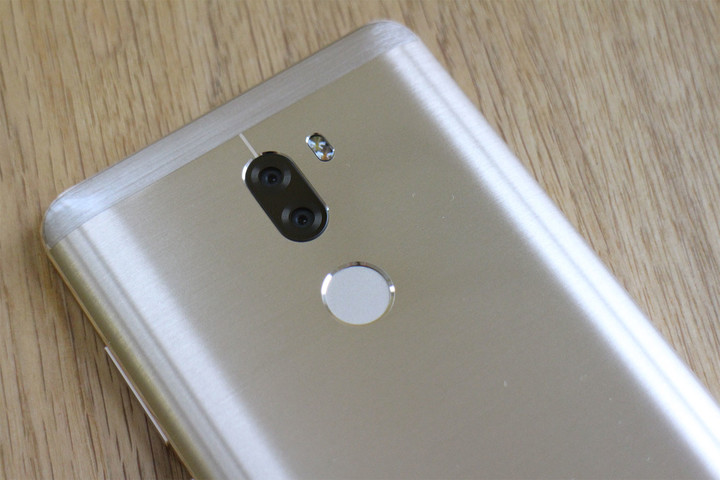
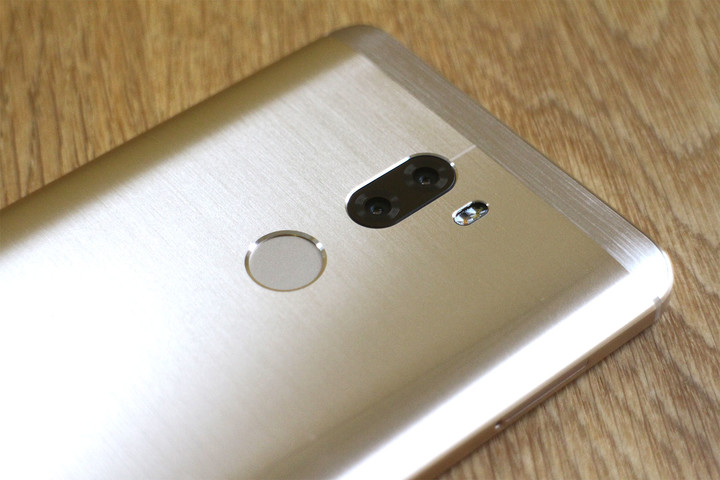
A fingerprint sensor is mounted on the back under the twin camera lenses. It’s easily located when picking up the phone, and quick to react. In addition to locking the phone, it can secure apps and activate a child mode. What it doesn’t do is make the Mi5S Plus compatible with Android Pay. Try to set the mobile wallet feature up, and you’ll get a warning that because the phone runs a custom version of Android, it won’t work.
The rear cam takes solid enough pictures, but we are left feeling there should be something more.
How about the build quality? It’s not quite up there with hardware we’re used to paying nearly $400 or more for. The rear panel has a slight flex to it when pushed, something that probably isn’t a bad thing, but just feels off. I prefer my smartphones to feel solid, something the Mi5S Plus does everywhere else, which makes this aspect stand out more. Additionally, our review model arrived with a very slight imperfection where the metal rear panel meets the antenna band at the top of the phone. The super-shiny surface means it catches the light, and is very noticeable.
This makes the Mi5S Plus a mixed bag. We like the cool, minimalist design, its simplicity, its in-hand comfort and lightness, but aren’t sold on the build quality of a phone that costs this much money. It’s not a deal-breaker, because the things we noticed don’t affect its operation in any way; but they’re flaws we’d rather not see at all in a phone we otherwise rather like.
Camera
Here’s the big selling point, at least, it should be given the increased attention on dual-lens cameras over the past year. Because there are two 13-megapixel camera lenses on the Mi5S Plus, you may expect it to shoot those cool bokeh pictures with the blurred background. You’re wrong, it doesn’t do that — well, not like the Huawei Mate 9, Redmi Pro, or iPhone 7 Plus, at least. Instead, the two lenses work together to take higher-quality pictures, mixing together results from the two lenses.
Andy Boxall/Digital Trends
It’s a bit of a disappointment. Not that it’s a bad camera, it’s just the higher-quality shots aren’t all that much “better” than the normal ones, just different. Scroll through your images, and you’ll see the regular and enhanced snaps aren’t identical, but it’s often impossible to pin down which one was taken in what mode, and which one ultimately looks better than the other. With a bokeh mode, you instantly see the benefits of the dual lenses. It’s not like Xiaomi doesn’t make cameras with artificial bokeh modes. The Redmi Pro has one, and it’s perfectly fine.
The higher-quality dual lens shots aren’t much better than ‘normal’ single-lens photos.
Through experimentation, we found that used inside, Stereo Mode revealed clearer blacks but less detail in shadowy areas. Without Stereo Mode, the opposite was true. It’ll be down to you which looks better. The improvement in black levels makes sense, because one lens shoots only in monochrome, like Huawei’s Leica camera, and there’s a dedicated Mono mode, too. We miss optical image stabilization as well, and are surprised it has been left out of a flagship phone.
The selfie cam is much more fun. It has 4 megapixels, which is rather low these days, but the f/2.0 aperture lets in plenty of light, which makes up for any shortfall in raw pixel count. There is a massive range of live filters to play around with — including a Mosaic mode to pixelate out your friend’s faces, or amusingly pretend they’re doing something rude — and a decent beauty mode with adjustments for skin tone and slimness. It’s not complicated, is fun to use, and who doesn’t like to snap a good selfie every now and then?
Again, it’s all a mixed bag. We like the selfie cam, think the rear cam takes solid enough pictures, but are left feeling there should be something more.
Software
Xiaomi phones run Google Android, but with a heavily customized user interface over the top called MIUI. Because it originates in China, where Google software is barred, Google Play doesn’t come standard. Depending on where you purchase a Xiaomi phone, it may come with Google Play and related apps pre-installed. Our version, through importer GearBest, has Google Play ready for us to use.
Andy Boxall/Digital Trends
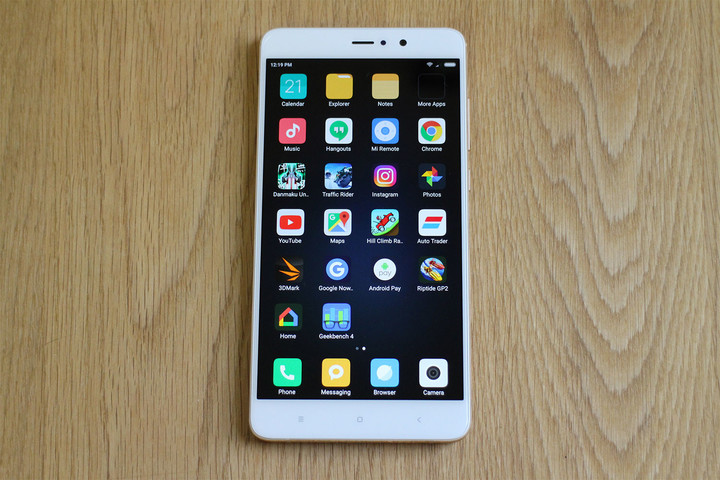
MIUI is a step beyond most third-party Android user interfaces, covering many of the familiar aspects of the operating system, with altered views, different apps, or new ways of doing things. Rather than being a hateful mishmash of half-baked ideas, MIUI is a solid, attractive, and endlessly customizable piece of software. MIUI 8.0 is installed on our review phone — it comes in English, and is currently the most stable version out there. Xiaomi also pushes regular updates to its phones, but the Android security patch status does still lag behind — it was July 2016 on our phone. The base version is Android 6.0 Marshmallow, which is also out of date.
If you want a phone that will shrug off even the most taxing tasks, the Mi5S Plus is the device for you.
Apps are spread across multiple home screens, like an iPhone, and the notification shade works slightly differently than usual, presenting shortcuts in a horizontally scrolling list instead of a further pulldown window. Xiaomi knows how to present an attractive UI, and all its standard icons are minimalist blocks in solid colors, with clear, helpful icons. It really looks fantastic. A theme store on the phone lets you alter most aspects if it’s not to your liking.
Xiaomi pre-installs a selection of apps, including a calculator, clock, voice recorder, QR scanner, compass, and plenty more. Our phone didn’t have any other pre-installed third-party apps, but that may not always be the case. If any demos or third-party apps are included on your phone, previous experience tells us they’re quickly uninstalled.
Non-Google apps often get a bad rap, but there are several Xiaomi apps we like, and wouldn’t replace. The weather app is very good, providing plenty of detail in an easily viewed manner. The data comes from AccuWeather. The standard calendar and gallery apps are also great, repeating Xiaomi’s preference for clean, simple design. There are a few unique Xiaomi features on the Mi5S that are also useful. Second Space lets you set up a separate account, perhaps for work or a child, on the phone. If that’s overkill, Dual Apps allows two versions of a single app to work on the phone, making it handy for a work and personal Facebook account, for example.
Some early hiccups with the software, where the camera app crashed and others performed slowly, soured our initial week with the Mi5S Plus, but a software update sorted them out, and it has run without a problem since. Of all the non-standard Android user interfaces out there, Xiaomi’s MIUI is one of the best. Don’t let it put you off trying a Xiaomi phone.
Performance
The Mi5S Plus has Qualcomm’s Snapdragon 821 processor inside. It’s not quite the latest, but it’s pretty close, and good enough for the OnePlus 3T, the HTC U Ultra, and other smartphones. It’s supported by 4GB of RAM in our phone, but a version with 6GB of RAM is also available if you’re willing to pay more. We’d say 4GB of RAM is more than enough for most tasks. The 4GB Mi5S Plus has 64GB of internal memory, while the 6GB model has 128GB. There’s no MicroSD card slot, sadly, but the SIM card tray will accept a second SIM card.
Andy Boxall/Digital Trends
Guess what? The Mi5S blazes along. The Snapdragon 821 is an excellent performer, and we have no complaints at all about app compatibility, speed, or playing games. If you want a phone that will shrug off even the most taxing tasks, the Mi5S Plus is the device for you. Riptide GP 2, with the graphics resolution turned up to maximum, plays like a dream with no frame rate issues or slowdown at all. Bullet-hell shooter Danmaku Unlimited plays superbly in HD and on Hard mode, where an awful lot happens on screen at once.
Zipping through the usual apps, The Mi5S Plus is a pleasure. It’s smooth, speedy, and performs with the same urgency you’d expect from a phone with one of the latest processors inside. It’s unfortunate that the benchmarks, as is sometimes the case, don’t tell the whole story. Our AnTuTu test returned 118180, which is well below other Mi5S tests for some reason, and Geekbench 4 gave 3436 multicore. Don’t pay them any attention.
Battery, screen, and connectivity
We’ve been impressed with the Mi5S Plus’ 3,200mAh battery, which has happily lasted for two days of normal use, and features a USB Type-C connector, and Quick Charge 3.0. In less than 90 minutes, the Mi5S Plus was fully charged, which makes it highly usable. The power efficiency of MIUI is assisted by the 1920 x 1080 pixel LCD screen. Super high-resolution screens are great, but they do suck battery power. Dropping it down to 1080p really helps extend the battery life here.
More: Xiaomi Redmi Pro review
It doesn’t ruin the Mi5S Plus either. The screen may use LCD technology, rather than an AMOLED panel, but it’s really bright, crystal clear, and a joy to look at. There’s a reading mode to reduce sleep-interrupting blue light, but there’s no scheduler, so you have to activate it manually. However, you can apply it to certain apps, such as an e-reader app, to make it slightly more user friendly.
Andy Boxall/Digital Trends
The Mi5S Plus is an import-only phone, and doesn’t support all the right bandwidths for 4G LTE use in the United States. It’ll happily connect to AT&T and T-Mobile’s 3G network, though. In the U.K., where the Mi5S was tested, it spent the majority of its time connected to a 3G signal on the O2 network. Again, it doesn’t have the right bands for 4G LTE connectivity, but it never felt slow, and any speed difference may only be noticeable in back-to-back tests, or when streaming high-quality video.
Warranty, availability, and price
The price of the Xiaomi Mi5S Plusvaries based on importers, due to currency fluctuations, but on average, it starts at $400. You may be lucky enough to grab it for a little less on the right day. You can’t buy it in stores, so you need to find a willing importer if you want to buy one. While there are several choices out there, GearBest supplied our Xiaomi Mi5S Plus and has always delivered a faultless service.
Buy the phone through GearBest, and it comes with a three-day dead-on-arrival warranty, a 45-day money back guarantee if the phone should break down during that time, plus a one-year warranty to cover against defects. Yes, you’ll still have to go through getting support from China primarily by email and snail mail, but that’s strong aftersales service. If you break the phone due to mistreatment, drop it in the bath, or change the software and brick the phone, it won’t be covered.
Our Take
Blazing speed, two-day battery life, and damn fine value are huge assets, but it’s the Xiaomi Mi5S’ half-baked camera that leaves us frustrated
Is there a better alternative?
Because $400 now buys you plenty of very cool smartphones, the Mi5S Plus faces quite a challenge. The OnePlus 3T and ZTE Axon 7 both work on U.S. networks with 4G LTE connectivity, and don’t require an importer to buy, so we’d have to say you’d be better off buying one of those. However, there’s something to be said about being different and opting for the Xiaomi — but we’d be very tempted to grab the Xiaomi Redmi Pro instead.
It’s considerably cheaper — less than $200 at the time of writing — has a dual camera lens that produces fun bokeh shots, is fast enough for most tasks, and gives you the same MIUI 8 software experience. If you’re a newcomer to the brand, and are curious about all the fuss regarding Xiaomi phones, it’s a better starting point than the Mi5S Plus.
How long will it last?
Like the alternatives mentioned above, the Mi5S Plus isn’t water-resistant or particularly able to stand much wear. The screen isn’t covered with Gorilla Glass either, and it’s not clear whether an alternative like Dragontail is used instead, so a strong glass screen protector would be recommended here.
Xiaomi delivers regular updates to MIUI, adding new features and fixing bugs, but it’s not the fastest when it comes to version changes. The Mi5S Plus operating system is Android 6.0 Marshmallow, and it’s also lagging behind with security updates.
Should you buy it?
It’s close, but no, we can’t wholeheartedly recommend the Xiaomi Mi5S Plus. It’s a great value, it looks excellent, is really powerful, and the software experience is very user friendly, but the camera and connectivity let it down. Not having 4G LTE isn’t the end of the world, but we wanted the camera to be so much better than it actually is. It’s rather frustrating, because we’ve seen before that Xiaomi knows how to do good cameras. Why it didn’t go all the way with the Mi5S Plus, and make it a real Mate 9 and iPhone 7 Plus competitor, is a mystery.
 AIVAnet