


Exiled Hyperloop One co-founder launches rival venture
The former co-founder of Hyperloop One has made his grand return to the world of firing people across the country in vacuum tubes. Brogan BamBrogan has announced the launch of Arrivo, a new company that’ll develop technology based on Elon Musk’s Hyperloop concept. It’s the third such company to enter the fray, competing with Hyperloop One and Hyperloop Transportation Technologies.
The company was founded by BamBrogan alongside the other members of Hyperloop One’s infamous “gang of four.” Rounding out that quartet is David Pendergast (Partnerships), William Mulholland (Finance) and Knut Sauer (Business development). They’re joined by Jadon Smith, a former SpaceX engineer who worked on the company’s reusable rocket platform and former Hyperloop One propulsion engineer Nima Bahrami. The seventh (and final) co-founder is Andrew Liu from construction and technology form AECOM who has previously led the company’s LA transportation group.
Arrivo will be headquartered in Los Angeles and is planning to develop two test sites in the near future, including one in the United States. The company is claiming, however, that it will have “revenue-generating projects” up and running within three years. We can’t believe that the business will have working loops by then, given how much research, development, testing and construction the team will have to do. Then again, it’s always been believed that BamBrogan was instrumental in Hyperloop’s development while at SpaceX. That’s enough to earn him a little patience, at least while he gets back into the race.
It was back in July 2016 when BamBrogan quit Hyperloop One amid rumors of internal strife at the well-heeled startup. Not long after and the former SpaceX engineer filed a lawsuit against the company that he had co-founded. The documents alleged that colleague Afahin Pishevar — brother to co-founder and Silicon Valley power player Shervin — had threatened BamBrogan’s life. The paperwork showed screencaps from a security video showing Pishevar drape a tied noose across the back of Brogan’s chair.
The accusation was refuted by Hyperloop One, which called the lawsuit and its claims “unfortunate and delusional.” The company shot back, saying that the “gang of four” were planning to start a rival company and were violating non-compete and non-disparagement clauses. A few months later, the lawsuit was settled with the terms of the deal being kept well behind locked doors. It doesn’t take a genius to work out, however, that whatever noncompete clauses were in place have been withdrawn, enabling Arrivo to spring into life.
Source: Arrivo
WhatsApp offers two-step verification to everyone
What was once in beta is now available to everyone. WhatsApp is rolling out two-step verification, an additional layer of security, to all of its users on iOS, Android and Windows. It’s an optional feature which you can set up by heading to Settings, followed by Account and Two-step Verification inside the app. You’ll need to create a six-digit passcode, which will then be required every time you try to register your phone number with WhatsApp (for instance, when setting up your account on a new smartphone).
You can also designate an email address which, in an emergency, can be sent a link to disable the feature. WhatsApp highly recommends this as a fallback, just in case you forget the code. It’s a different approach to most technology services, which typically send a randomized string to your phone over SMS. To help you remember, WhatsApp says it will ask for your code “periodically.” An inconvenience, sure, but a trade-off we would argue is worthwhile for greater security. If the app is your primary mode of communications, you owe it to yourself to turn this feature on.
Via: Mashable
Source: WhatsApp
Samsung and Google have work to do before the Chromebook Pro launches
Samsung’s forthcoming Chromebook Pro, which the company introduced in partnership with Google at CES last month, appeared to be the latest contender in my search for the perfect premium Chromebook. For me, that means a high-resolution screen, excellent keyboard and trackpad, and a battery that lasts all day. I’m also looking for a well-designed machine, not the cheap, netbook-inspired computers that were the hallmark of earlier Chromebooks.
On the surface, the Chromebook Pro offers all of that, along with a few new hardware and software tricks. It’s the first Chromebook specifically designed with the Google Play Store and Android apps in mind. It’s also the first Chrome OS device with a stylus, and Google added new features to its Keep note-taking app to make it work with a pen. Samsung and Google claim that the machine learning prediction should remove latency to the point that it feels like writing on the Surface Pro 4 — one of the best stylus experiences available.
Of course, more than a quick CES demo is needed to see how the Chromebook Pro stacks up — so I’ve been putting the device through the wringer over the last week and a half. However, this is not a formal review. Samsung provided reviewers with pre-production units; the final, finished product (which will ship in black, not the silver you see in these photos) won’t ship until the end of April. With a few months to go, I wanted to give Samsung and Google some advice on what they can improve between now and launch time. When the Chromebook Pro eventually hits the market, we’ll revisit it in the form of a scored review.
The biggest issue with the Chromebook Pro also happens to be its most unique feature. The combination of stylus (which is basically identical to what you’d find in Samsung’s Galaxy Note phones) and pressure-sensitive display is currently way too laggy to be useful. During a joint demonstration for reporters late last month, Samsung and Google specifically said how lag kills the experience of writing on a screen — but right now, I’m always waiting for the screen to catch up with my pen strokes. Yes, I can technically take notes on this screen, but it’s not the experience Google promised. And it’s definitely not as good as the input experience on an iPad Pro or Surface Pro 4. At this point, I’ve pretty much given up on using the Chromebook’s pen.

It’s important to note that Google says it hasn’t yet turned on the machine learning writing assist in the version of Chrome OS that I’m running. That’s part of the problem with using a pre-production machine: Some things just aren’t ready yet, making the device difficult to evaluate. As it stands, this potentially unique feature adds nothing to the experience.
Another problem is how Chrome OS plays with Android apps. This feature has been in the works for months, but it still doesn’t feel ready for prime time; there are issues with both performance and implementation.
Performance simply needs to be better for it to be worth running these apps alongside standard Chrome apps. Tools that I use daily (e.g., Google Play Music, Wunderlist, Pocket, Netflix, Google Calendar, Inbox and Google Docs) worked just fine — but in most cases, the web versions were faster and better optimized for laptops than their Android counterparts. What’s more, the games I tried (including Alto’s Adventure, Dots & Co, Rayman’s Adventure and the Google-recommended Asphalt 8) all felt laggy compared to how they run on Android phones and tablets. Consistently dropping frames when playing games is a big problem that defeats the purpose of playing them in the first place.

The good news is that performance seems to have improved in the few weeks I’ve been using the Chromebook Pro, thanks to a series of software updates. Google will be gathering data on the Play Store and Android app usage in the next few months — the Samsung Chromebook Plus (a laptop that’s identical to the Pro with the exception of a weaker ARM processor) hits stores this Sunday, with the beta Play Store included. Hopefully the company will continue to optimize Android performance over the next few months before the Pro launches.
There’s also the simple matter of what the experience of using Android apps on a Chromebook will be like for first-time buyers. By default, a Chromebook’s app drawer is loaded up with what are essentially web-app links for Google services likes Docs, Drive, Gmail, Keep and Photos, among others. But you can also download those same apps from the Play Store. If you want offline access to Google Play Music or Movies, for example, you’ll need the Android apps. But the rest of the time, the web versions seem to work better. They were designed for traditional desktop computers, after all.
Users can also end up with multiple versions of the same app and not really know which is which, or which is better to use. For example, I’ve used the Wunderlist Chrome app for a long time, but I also installed the Android version to see which is better. The website feels more fluid to me, but the Android app pops up notifications for my reminders. That’s quite helpful for a reminders app, but using the Chrome version is generally a better experience. Which should I use?
Running Android apps on Chrome OS is a lot like using an Android tablet: The whole experience just isn’t optimized for a bigger screen. The Hangouts Android app, even when full-screen, is just one giant pane showing either your list of ongoing conversations or the details of whatever chat you’re in. The Chrome app, on the other hand, has two panes, making it much easier to jump between threads. Similarly, I thought having Facebook Messenger running in a small vertical window on the side of my screen might be handy. But you can’t resize the app, it only runs in portrait mode, and tapping enter doesn’t actually send a message. You instead need to click on the “send” button, which slows things down.

All told, my experience running Android apps was mixed at best. Generally, most web services are good enough at this point that the experience is superior to running Android on a laptop. The obvious exception is offline mode, but I’m offline infrequently enough that this didn’t change my opinion. I still think there’s potential here, but a good amount of refinement is needed, along with a tutorial to help new buyers understand when to use Android apps versus web apps.
Another thing I hope to see Samsung and Google improve is the Chromebook Pro’s battery life. The computer is rated for eight hours of usage, but I typically got little more than six. And the computer takes a long time to charge — more than two and a half hours to go from three percent to full. That said, 90 minutes got me to about 88 percent, which was more than enough for another half-day of work. Although the battery itself is likely to be the same at launch, perhaps further software optimizations will get the computer to that eight-hour mark.
To end on a positive note, I think it’s worth discussing some of the things that the Chromebook Pro does right. For starters, the form factor hits all the right note for me. While Samsung’s design language hasn’t changed much over the years, it nonetheless makes for a pleasing look. The rounded corners make it comfortable both for typing and carrying — and they also give it a distinctive aesthetic that helps keep the laptop from looking like yet another MacBook Air clone.
That quality isn’t skin-deep either. The Chromebook Pro feels much more sturdy than HP’s similarly priced Chromebook 13. The all-important keyboard and trackpad are similarly reliable. They both feel slightly cramped compared to my MacBook Air, but the keys themselves are responsive and there’s nothing wrong with the trackpad aside from being a little small.

The 2,400 x 1,600 display is also a highlight. It’s bright and sharp, and features the same 3:2 aspect ratio as the now-discontinued Chromebook Pixel. That might mean wider black bars when you’re watching a movie, but the majority of the time I really appreciated the extra vertical screen real estate. The laptop’s default 1,200 x 800 scaled resolution means most UI elements are pretty large, but scaling things up to 1,350 x 900 gave me more room for my content. The hinge in particular feels both strong and smooth, with no sticking or hitches as it moves from laptop to tablet mode. And while software problems made writing on the screen less than ideal, the hardware side of the equation is actually pretty good. There’s a slight bit of resistance when using the stylus that makes it feel more like a writing instrument on paper and less like a stylus sliding across slick glass.
Given this computer’s pre-production status, I’m not ready to say whether or not it’s worth the $550 asking price. That will depend on how much Google improves the software experience over the next few months. Simply turning on the machine learning feature should make using the stylus much smoother, and Google will continue optimizing Android app performance in the coming weeks.
But it remains to be seen if this is the Chromebook that will convince people to pay a more premium price. I’m cautiously optimistic because I’ve been looking for a higher-quality Chromebook for a while. But if you just want an inexpensive laptop for getting things done, there are plenty of cheaper options available now. For the time being, those of you who want a premium Chromebook should wait until April to decide if Samsung deserves your cash.
Tim Cook Describes Fake News as ‘One of Today’s Chief Problems’
As Apple CEO Tim Cook continues to make his rounds in Europe, Good Morning Britain managed to catch him for a quick interview while he was visiting Woodberry Down Primary School yesterday. Regarding fake news, which has been an increasingly hot topic since the U.S. Presidential election got into full swing last year, Cook said that “this is one of today’s chief problems.”
In the wake of growing fake news, companies like Facebook have taken action to bring the quality of an article to their users’ attention before they share it with their friends. For Apple, Cook said that the solution to the problem is not a simple one.
“We have to give the consumer tools to help with this. And we’ve got filter out part of it before it ever gets there without losing the great openness of the internet. And so this is one of today’s chief problems, it is not something that has a simple solution.”
Cook covered another topic during his stay in London this week, discussing Brexit with United Kingdom Prime Minister Theresa May. According to The Independent, in the talk Cook said that he is “very optimistic” about the UK’s future outside of the European Union, and that it will be “just fine,” although there will undoubtedly be some “bumps in the road along the way.”
In a statement released after the meeting, Apple said: “We are proud that Apple’s innovation and growth now supports nearly 300,000 jobs across the UK.”
Apple will continue to back the UK in the future, as it currently plans on building a new headquarters at London’s Battersea Power Station, expected to be complete by 2021. After its completion, 1,400 employees will be moved from eight locations around London to occupy the company’s new UK offices.
Early this morning, Cook also continued documenting his European adventures on Twitter, congratulating the Tate Britain art gallery after he visited its digital artwork exhibit. Yesterday, he stopped in the offices of ustwo games in London to get a sneak peak at the latest mobile game from the company behind Monument Valley.
Note: Due to the political nature of the discussion regarding this topic, the discussion thread is located in our Politics, Religion, Social Issues forum. All forum members and site visitors are welcome to read and follow the thread, but posting is limited to forum members with at least 100 posts.
Tag: Tim Cook
Discuss this article in our forums
Project Rome SDK is the latest step toward Android-Windows 10 integration
Why it matters to you
Microsoft is one step closer to making your Android smartphone play nice with your Windows 10 PC.
It’s been a few years since Microsoft first made it clear that the old “Windows-only” days were behind it. Microsoft continues to push Windows 10, but it’s also putting serious resources behind supporting the competing iOS and Android platforms.
At its Build 2016 event, Microsoft announced Project Rome, yet another of its many cross-platform efforts. Project Rome is intended to connect Android devices to Windows 10 machines, and Microsoft has announced that the Android version of the Project Rome software development kit (SDK) is now available for Java and Microsoft’s own cross-platform development tool Xamarin.
More: Cortana for Android syncs notifications, lets you leave your phone in your pocket
Project Rome will let developers who are making apps for both Android and the Windows 10 Universal Windows Platform (UWP) enable the app to communicate across platforms. For example, a music app could discover other devices on the same network that have the app installed. The app could then be launched on those other discovered devices, and then allow the Android device to remote control the app on Windows 10.

All of the required functionality to accomplish kind of cross-platform interaction isn’t yet available, but Microsoft plans to include it soon in a future release of the Android SDK. For now, developers can access Java and Xamarin examples at GitHub, with examples of UWP apps available as well. The Windows 10 components needed to support Project Rome capabilities were released in 2017 with the Windows 10 Anniversary Update.
There’s already a significant amount of interaction between Microsoft’s apps and Windows 10 platform and other devices, including iOS and Android. You can already use Cortana on both competing platforms, as well as sync your notifications between Android and Windows 10. Soon, Android apps and Windows 10 UWP apps will communicate and interact as well, meaning that it’ll be even less of a compromise to run a Windows 10 PC alongside and Android smartphone.
Project Rome SDK is the latest step toward Android-Windows 10 integration
Why it matters to you
Microsoft is one step closer to making your Android smartphone play nice with your Windows 10 PC.
It’s been a few years since Microsoft first made it clear that the old “Windows-only” days were behind it. Microsoft continues to push Windows 10, but it’s also putting serious resources behind supporting the competing iOS and Android platforms.
At its Build 2016 event, Microsoft announced Project Rome, yet another of its many cross-platform efforts. Project Rome is intended to connect Android devices to Windows 10 machines, and Microsoft has announced that the Android version of the Project Rome software development kit (SDK) is now available for Java and Microsoft’s own cross-platform development tool Xamarin.
More: Cortana for Android syncs notifications, lets you leave your phone in your pocket
Project Rome will let developers who are making apps for both Android and the Windows 10 Universal Windows Platform (UWP) enable the app to communicate across platforms. For example, a music app could discover other devices on the same network that have the app installed. The app could then be launched on those other discovered devices, and then allow the Android device to remote control the app on Windows 10.

All of the required functionality to accomplish kind of cross-platform interaction isn’t yet available, but Microsoft plans to include it soon in a future release of the Android SDK. For now, developers can access Java and Xamarin examples at GitHub, with examples of UWP apps available as well. The Windows 10 components needed to support Project Rome capabilities were released in 2017 with the Windows 10 Anniversary Update.
There’s already a significant amount of interaction between Microsoft’s apps and Windows 10 platform and other devices, including iOS and Android. You can already use Cortana on both competing platforms, as well as sync your notifications between Android and Windows 10. Soon, Android apps and Windows 10 UWP apps will communicate and interact as well, meaning that it’ll be even less of a compromise to run a Windows 10 PC alongside and Android smartphone.
Start dating more efficiently with one of these 8 apps
Dating apps kind of suck — just ask anyone between the ages of 22 and 35. Despite this, they’ve become the normal way to meet people and ask them out. This puts you in a tough spot. Because everyone else is using dating apps, it’s tough to avoid using them, too. It’s a self-perpetuating cycle. To help you navigate all the choices out there, we’ve picked eight of the most prevalent dating apps — or those that bring something unique to the table — along with our expert opinions on their accessibility, foibles, pratfalls, best intended uses, and everything else in between.
And we tried them. Each and every one.
While we can’t promise you won’t encounter an unwanted pornographic pic or a complete loser, we can at least tell you what you might be in for with each of these apps. That said, bonne chance!ung
Tinder

First off, Tinder the app requires you to have a Facebook account in order to enable it, and you have to be over 18. Once enabled, you can set up a concise profile that consists of a 500-character bio and up to six images (we suggest always including a photo). You can also link your Tinder account to your Instagram, and include info about your employer and school. Discovery settings allow other users to find you, if desired, and set a few preferences regarding who you see. Then the real fun begins.
Tinder shows you a photo, name, and age. You can tap on the photo to see additional information regarding the person and Facebook friends you share (if any). You can also choose to swipe right (to like them), left (to pass), or up if you want use one of your precious “super likes” to show them you really really like them. If you and someone have both swiped right on one another, a screen will appear showing that you’ve matched and inviting you to send them a message. But most of the time, the Tinder experience will consist of flicking through profiles like channels on the television.
Tinder actually has one of the best user interfaces of any dating app around. The photos are large, the app is — comparatively speaking — svelte, and setting up your profile is pretty painless. Overall, Tinder gets an A for its usability. Also, no one can message you unless you have also expressed an interest in them, which means you get no unsolicited messages. While there are a fair few people on Tinder who use it strictly to collect swipes, many people are actually inclined to meet up in real life, which is not always the case with dating apps. Tinder is possibly the most popular dating app, too, meaning the likelihood of matching with someone you’re interested in who doesn’t live super far away is greater than with apps that have fewer users.
Download now from:
iTunes Google Play
OnePlus pushes out OxygenOS 4.0.3 as 128GB 3T finally up for pre-order

Update adds Wi-Fi assistant, low-light camera enhancements and Amazon apps for Indian users.
OnePlus has started rolling out its third major revision to the Nougat-based OxygenOS 4 for the OnePlus 3 and 3T today, bringing the phones up to version 4.0.3. With this latest upgrade, OnePlus continues to squish software bugs, but has also added some welcome enhancements to Wi-Fi connectivity and low-light performance for the camera. Users in India, where OnePlus has partnered exclusively with Amazon for sales of its phones, also get a pre-installed Amazon Prime app. (Yay?)
 Click to enlarge
As usual, the release will be staggered across several days at first, so don’t fret if you’re not seeing the upgrade notification right away. For the impatient, the usual trick of using Opera VPN to temporarily trick your phone into thinking it’s in either Canada or Germany seems to work just fine.
Alongside today’s software upgrade, OnePlus sends news that the 128GB version of the OnePlus 3T is finally available to pre-order online — in the “gunmetal” color only. The UK store has the roomier 3T model marked as “shipping within 11 days;” for the U.S., it’s 8 days. Earlier this week OnePlus also announced availability of the 64GB 3T in “soft gold,” which ships within 4 days on both countries’ stores.
OnePlus 3T and OnePlus 3
- OnePlus 3T review: Rekindling a love story
- OnePlus 3T vs. OnePlus 3: What’s the difference?
- OnePlus 3T specs
- Latest OnePlus 3 news
- Discuss OnePlus 3T and 3 in the forums
OnePlus
Amazon
How to update Kodi on your Amazon Fire TV Stick

Now that Kodi 17 is out for Android, that means you can update on your Fire TV Stick. Here’s how.
Because Kodi isn’t available to download through the Amazon Appstore, getting the latest version requires a little more effort on your part than it would on anything with access to the Google Play Store. Fortunately, if you’ve installed it once, you’re probably familiar enough to update it.
Whether on a Fire TV Stick or the larger Fire TV, this guide applies to both.
See at Amazon

There are a few different ways you can go about this, but we’re going to use the same method as installing Kodi for the first time on the Fire TV Stick. If you need a refresher on that, you’ll find the full details linked below.
How to install Kodi on the Amazon Fire TV Stick
The method to get the latest version is exactly the same. You’ll need to make sure ADB Debugging and Unknown Sources are enabled in Settings if you deactivated both after your initial Kodi install.
Open up Downloader on your Fire TV Stick and enter this URL to pull down the latest version:
Once downloaded you’ll be prompted to install or cancel, naturally you want to select Install. After it’s all finished, the next time you open up Kodi you should be looking at the new Kodi 17 Krypton stock interface.
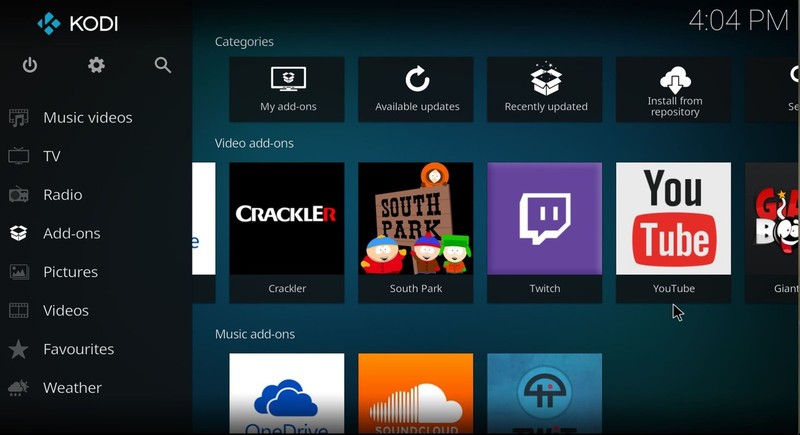
As Kodi 17 is new there may well be compatibility issues with some of your add-ons. If you’re concerned about breaking any important functionality, then there’s nothing stopping you holding off for a while and keeping tabs on updates to make sure this won’t happen.
It’s as simple as that. Go forth and enjoy yourselves some Krypton!
Here are the 12 finalists from Motorola’s Moto Mods developer contest

Motorola’s developer challenge leads to interesting new Moto Mods.
Motorola kicked off the “Transform the Smartphone Challenge” last November, in which the company turned to third-party developers to come up with innovative ideas for future Moto Mods. After receiving over 700 submissions from 55 countries and 30 states, Motorola has picked out 12 finalists, with the shortlisted submissions now raising money on Indiegogo to bring their projects to life. Each finalist received a Moto Mods Development Kit as well as a Moto Z handset, and their concepts are now ready to be crowdsourced.
The final selections include a solar battery mod, an add-on that brings RGB lighting to the phone along with wireless charging, a digital recorder add-on, and even one that can be used as a universal controller for your smart home devices. Here’s the full list of shortlisted mods:
- Edge – Supercharge your notifications
- The Ultimate Moto Z Mod with Wireless Charging
- The Palm Smart Remote for Moto Mod Devices
- Linc Smart Walkie Talkie MotoMod Concept
- Digital Recorder For Moto Z
- Smart Z Wallet – Moto Mods concept for Moto Z
- Euromod, an Eurorack digital toolbox
- Mico – A Modular Solar Battery Moto Mod
- InstruMod – A Moto Z Mod Measuring Instrument
- Z Sterilizer, a Moto Mods concept for Moto Z
- Modulator, A Digital Walkie Talkie Moto Mod
- EarMods – The Best Earphones Mod for Moto Z
Some of the ideas for the Moto Mods are certainly interesting, and Motorola has said that it will pick ten grand winners next month based on originality of the concept, commercial viability, and “overall use of the Moto Z modular platform and crowdfunding success.”
The grand prize winners will get to visit Motorola’s offices in Chicago and pitch their mods to the company’s executive development team, while receiving mentoring and guidance. They also stand to secure an investment from Lenovo Capital — which set up a $1 million fund to spur new Moto Mod development — to bring their product to market.
See at Indiegogo
 AIVAnet