


Having trouble with your LG V20? Here are solutions to the most common problems
The LG V20 is an amazing smartphone with a sleek design, excellent audio quality, and a fantastic set of cameras. Despite its many highs, however, there are some lows. These amount to a handful of problems that owners have been experiencing since the phone’s release last year. There aren’t enough bugs and glitches to scare people away from the device, sure, but they’re good to know about all the same.
More: The 15 best LG V20 cases to keep your phone in perfect condition
Problem: Battery drain
Battery drain is a common problem among smartphones, but with the V20, the problem seems to be more widespread. People are talking about the phone’s battery life on forums at Android Central, XDA Developers, and Verizon, claiming their batteries are draining far more quickly than expected, sometimes after just a few hours and with minimal to average use. The issue has appeared on Verizon, AT&T, T-Mobile, and Sprint versions of the hardware.
Potential solutions:
- Restart your phone and see if the battery drain persists.
- Check to see if an app is draining the battery by going to Settings > General > Battery & power saving > Battery usage. Check for an update for that app, or delete it and see if the battery life improves. Many have suggested removing Facebook and other related apps like Messenger, as they have been known to drain batteries quickly.
- Try the Battery Saver feature. Enable and customize this by going to Settings > General > Battery & power saving > Battery saver.
- Clear the Cache Partition:
- Go to Settings > General (if you have that option) > Storage. When the page loads, tap Cached data > Yes. The time it takes for this process to finish will vary based on the size of the data.
- On T-Mobile devices: Settings > General > Storage & USB > Internal storage. Wait for the page to load, then tap Cached data > OK.
- You can also try a factory reset. You can do this by going to Settings > General > Backup & reset, then tap either LG Backup or Back up my data to backup your important information. Afterward, go to Settings > General > Backup & reset > Factory data reset.
26 best iPhone 7 Plus cases to protect your Apple phone
No one likes a bruised apple, and if you drop your new iPhone 7 Plus it could end up scraped, scarred, or worse. The smart play is to invest in some protection. There are lots of different cases out there; some safeguard against drops, some are all about the style, and some add extra functionality. We’ve been checking out your options and these are some of the best iPhone 7 Plus cases you can buy right now.
More: The best iPhone 7 screen protectors to shield your phone’s big, beautiful display
iFace First Class ($30)
The iFace First Class case has an unusual shape to it, adding a subtle curved contour to the sides. The curves make the iPhone 7 Plus more comfortable to hold. The soft rubber edges vastly improve grip, while a special honeycomb-shaped interior increases drop protection. The case also meets military standards. The rear is smooth, has an opening for a lanyard strap, and comes in various colors. We love the pearl gray version and the emerald green model. It’s lightweight, really comfortable to hold, and well-priced. There’s even a metal plate inside the case’s body for use with iFace’s $20 magnetic in-car holder.
Buy one now from:
Amazon
Native Union Clic Marble ($80)
It’s simple. Do you want a stunning case that effectively mirrors the investment you made in the device itself? The Native Union Clic Marble is it. The case has a shatter-resistant sliver of real marble — each piece is unique, too — reinforced with fiberglass, and a contrasting metal panel fitted into a rubber body for complete protection. Available in white with gold or black with brushed aluminum, it’s an absolutely stunning case that attracts as many admiring glances as the phone itself. The fit and finish is excellent.
Buy one now from:
Amazon Native Union
Proporta Slim Stand Case ($43)
A folio case for your iPhone 7 Plus with a lot more built-in protection than usual, thanks to the cover having an aluminum plate inside. It’s a great feature. Not only does it really protect the screen, but it provides a strong base when the case folds into a stand and can be used with Proporta’s magnetic car mount. The case is quite heavy, though, however, the interior plastic phone holder is minimalistic, giving the case a slim profile.
Buy one now from:
Amazon Proporta
Native Union Clic Crystal ($35)
Made with Native Union’s characteristic care and attention, the Clic Crystal follows the trend for transparent sections to show off your phone’s color. The rest of the case is made from protective rubber, ready to absorb shocks. If you’re looking for a grippy case with a gorgeous style, that’ll still shows off your new phone, with one of the best fits we’ve tried, this is it.
Buy one now from:
Amazon Native Union
RhinoShield PlayProof ($25)
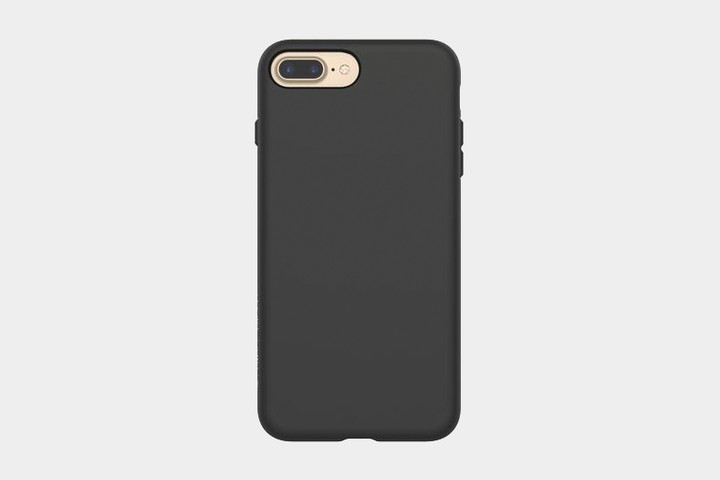
A break from the many folio cases out there. The RhinoShield PlayProof wraps the iPhone 7 Plus very effectively, including a substantial lip around the screen, plus the smooth polymer body will absorb shocks if you drop the phone. The fit is excellent, and the subtle RhinoShield branding on the side looks great, ensuring the rest of the case looks very simple. One of the most pleasing to hold cases we’ve tried too, thanks to the sleek finish.
Buy one now from:
Amazon RhinoShield
Snakehive Vintage Leather Wallet ($24)
Made from European cowhide nubuck leather, the Snakehive Leather Wallet is one you’ll just want to hold in your hand, it feels so good. It’s all thanks to a wonderfully soft texture on the outside, which has been smoothed out for extra protection on the inside. The iPhone is held in a slim, clear plastic case, with wide cutouts for the volume and power buttons, along with the speakers and charging port, too. Opposite are three card slots and a pocket for cash, plus a magnetic clasp that keeps the case closed. The folio case can fold out into a stand for your iPhone 7 Plus, for watching video. Don’t miss this super stylish, real leather folio available in the burgundy seen here, or in chestnut brown and navy colors, at an excellent price.
Buy one now from:
Snakehive
Benchmark cheating returns — this time with OnePlus and Meizu
Why it matters to you
Some folks use numbers to see how well a phone performs, and if those numbers aren’t accurate, they feel manipulated and lied to.
Benchmarks might not fully represent the performance users can expect from a smartphone, but the hardcore Android community puts stock in them because they paint a rough picture of a smartphone’s potential. That is why Samsung and HTC made headlines a few years ago when the companies cheated with benchmark scores for their devices, and that is why OnePlus and Meizu are making headlines now, reports XDA Developers.
Equipped with Qualcomm’s Snapdragon 821 chipset and a mostly clean version of Android, the OnePlus 3T is a speedy phone and one of the better options available. According to the report, the site’s editor-in-chief wanted to take a closer look at the processor and how it worked in the phone, so he used Qualcomm Trepn and Snapdragon Performance Visualizer to see how the CPU’s clock speed is boosted when opening apps.
More: Problems with your OnePlus 3 or 3T? Here’s how to fix them
What he found was that certain apps on the OnePlus 3T did not go back to normal idling speeds after being opened. XDA teamed up with Geekbench to see whether this was the case, and the results confirmed that the higher clock speeds were due to an application’s name, not the CPU workload. In other words, the clock speeds were kept up when apps like AnTuTu and Geekbench, two of the more popular mobile benchmarks, were opened in order to boost benchmark scores.
The report also calls out Meizu and its Pro 6 for the same practice, though to a lesser extent.
Interestingly, OnePlus confirmed the report and said the benchmark scores were a feature within OxygenOS, the company’s take on Android, to help games and resource-intensive apps perform better.
“In order to give users a better user experience in resource intensive apps and games, especially graphically intensive ones, we implemented certain mechanisms in the community and Nougat builds to trigger the processor to run more aggressively,” said OnePlus in a statement. “The trigger process for benchmarking apps will not be present in upcoming OxygenOS builds on the OnePlus 3 and OnePlus 3T.”
As previously alluded to, Samsung, HTC, Sony, and LG were found guilty of benchmark cheating, though they eventually stopped the practice.
Double your Galaxy S7’s battery life with this discounted $39 charging case
If you love your Samsung Galaxy S7 but find yourself constantly stopping to refuel the battery, then a battery case may be just what you need. The Samsung Galaxy S7 does have a better battery life than the S6 but if you’re using it often throughout the day, it’s unlikely a full charge will last you until evening.
Battery cases can get pricey, but for a limited time, you can get a Trainium Atomic Pro Battery Case designed specifically for the Samsung Galaxy S7 for only $39, which gives you a 44 percent (or $31) discount off the regular list price of $70.
More: Samsung Galaxy S7 review
 This updated battery case features a powerful 4,500mAh Li-polymer rechargeable battery and a new reinforced Micro USB port to charge the device. The case can give you an extra 100 percent or more battery power, equivalent to an additional 28 hours talk time or 13 hours web browsing time.
The Trainium Atomic Pro Battery case is designed to pack extra battery life without being intrusive. Unlike some case that are big and bulky, this model is carefully crafted with a 360-degree bumper design and hard-shell backplate that protects your phone from daily wear and tear, yet is slim enough to fit easily into pockets. Small LED power lights indicate how much power you have remaining and are located on the softer side that safely holds your Galaxy S7. Although the case adds a little extra padding to the exterior of your phone it still provides easy access to all buttons and ports, so, for example, you won’t have an issue plugging in your headphones.
It has quick-charge sync-through technology, which allows you to sync your phone to your computer without having to remove your phone from the case. You can also charge your Samsung s7 and battery case together with the included Micro USB cable. Finally, the case comes with a lifetime warranty, ensuring you get maximum use out of the device.
The Trainium Atomic Pro Samsung S7 Battery Case normally retails for $70 but is available on Amazon for only $39, for a limited time.
$39 on Amazon
Lenovo’s Tab3 8 Plus might be the midrange Android tablet you’re looking for
Why it matters to you
If you’re looking for an Android tablet that won’t break the bank, you might want to pay attention to Lenovo’s Mobile World Congress showings.
Ahead of February’s Mobile World Congress hullabaloo, Lenovo’s Tab3 8 Plus leaked in all its glory and, from the looks of things, it seems like a solid midrange offering in the Android tablet realm, reports Italian site Notebook Italia.
On the outside, the Tab3 8 Plus will reportedly feature an 8-inch, 1,920 x 1,200 resolution display, with Dolby Atmos stereo speakers on either the top or bottom of the display — or left and right, depending on how you hold the tablet. An 8-megapixel camera with LED flash sits around back, while the 5MP selfie snapper should be just fine for video chats and the like.
More: Here’s everything we know about Lenovo’s second-generation Moto Z
Under the hood, Qualcomm’s octa-core Snapdragon 625 chipset and 3GB RAM are purported to power the Tab3 8 Plus, with a respectable 4,250mAh battery keeping the lights on. The 16GB of internal memory is on the meager side, but the MicroSD card slot supports up to an additional 128GB.
Those internals are somewhat protected from the elements, thanks to the Tab3 8 Plus’ IP52 certification that protects the tablet from dust. However, the tablet is only splash-resistant, not water-resistant, so while it can withstand a bit of rain, we would not take the tablet to the shower or at poolside.
Finally, the Tab3 8 Plus reportedly runs Android 6.0.1 Marshmallow out of the box.
There are still a few unknowns that surround the tablet, such as availability and pricing. Odds are that Lenovo will officially unveil the Tab3 8 Plus during Mobile World Congress 2017, and since the tablet is part of the company’s Tab3 line of tablets, do not expect it to break the bank, with reports pegging a $200 price point.
Based on leaked press renders, the Tab3 8 Plus will be available in silver and blue and either Wi-Fi-only or 4G LTE-capable once it reaches store shelves.
Why the Google Pixel is the best Android phone
There’s no shortage of great Android phones out there — here at Android Central we’re often bouncing between different devices as we review new phone. But eventually you’ve got to pick one winner — the best Android phone overall. And right now, in early 2017, that’s the Google Pixel, which shares the honor with its big brother the Pixel XL.
We’ve laid out all the reasons why the Pixel is the best of the best in our video feature. Check it out above, and be sure to hit our Pixel written review for all the details.
- Google Pixel + Pixel XL review
- Android Central on YouTube
- Best Android phones of 2017
Google Pixel + Pixel XL
- Google Pixel and Pixel XL review
- Google Pixel XL review: A U.S. perspective
- Google Pixel FAQ: Should you upgrade?
- Pixel + Pixel XL specs
- Understanding Android 7.1 Nougat
- Join the discussion in the forums!
Google Store
Verizon
How to mute Google Home’s microphones (and why you need to)

OK Google, stop listening to me.
I love being able to yell across the room to tell my Google Home to fast forward a song or play the news. But whenever I try to use Google Assistant on my Pixel within earshot of the always-on speaker, the Home almost always intercepts, even if I need something only the Pixel can do, like search my contacts or set a reminder — which Google Home still can’t do. Sometimes we need to stop Google Home from butting in, and thankfully, it’s really easy to do.
And you don’t even have to get off the couch to do it.

“OK Google, Turn off the microphone.” This will turn off the mic without touching your Google Home, but this is a one-way control, as once the mic’s off, it can’t be heard to turn itself back on. That’s why we have buttons.
On the back of your Google Home, there is a single button featuring a mic icon with a slash through it. This is the mute microphone button. Press it once and your Google Home will announce “Microphone off,” muting its microphones and allowing you to use Assistant on your Pixel — or anything else you need without a sentient being harmless assistant listening.
If it starts telling you it’s about to reset itself, release the button before it reaches the end of the glowing countdown.

While your mic is muted, you’ll be able to easily Home isn’t listening. Google lights up the four cardinal points of the Google Home’s top-mounted display in a warm warning orange.
When you’re ready to let Google hear you again, press the mute button once more. The orange lights will disappear, and your Google Home will cheerfully tell you “Microphone on.”

We shouldn’t have to do this…
That the mute button is so necessary is a travesty. Sure, the ability to turn the mic off when you don’t want Google and goodness-knows-who listening is fine, but to have to mute the Google Home mic because you want to text a reply using your voice while Mountain View’s air freshener is in the room is ridiculous. ‘OK Google’ is recognizable on six devices at different points in the room and can even distinguish which device hears you best, but even if you’re talking directly into your phone ten feet from a Google Home, it’ll try to respond instead. That’s some great listening abilities, but it’s not always useful.
We hope that this behavior changes, but right now, we can only hope. In the meantime, we’ll be ready to mute our Homes so that we can get what we need to done without Google Home butting its nose in every time we Google a Chinese takeout place to call.
Google Home
- Google Home review
- These services work with Google Home
- Google Home vs. Amazon Echo
- Join our Google Home forums!
Google Store Best Buy Target
Here’s how you can become a certified cyber security hacker
If you’ve been following the news lately, you’ll have seen hackers making the news more and more frequently. There’s a cyberwar raging as anonymous groups of malicious hackers seek to steal sensitive information and compromise online. This means that now more than ever, there’s a huge demand for ethical hackers with penetration testing skills for finding web security vulnerabilities. Learning these valuable skills could open up a whole new career path for yourself. The good news is that all the resources are available to learn right from your home, and that’s where this Android Central Digital Offer comes in!
Learn how to become an ethical hacker! Learn More
With the Cyber Security Hacker & Pen Tester Certification Training
bundle, you get 24/7 access to over 21 hours of course content, which includes 117 classes that teach you everything you need to know via video, quiz, exercise files, assessments & online discussion.

These courses cover a range of topics, including:
- Threat modelling
- Web-based vulnerabilities
- Cross-site request forgery
- Penetration testing methodologies
We know you’re busy, and you may not have a lot of free time to learn all these new skills. But for just $39, you can secure all your learning materials now and then work through it at your own pace!
Save 95% on these courses! Learn More
Getting this sort of training for becoming an ethical hacker would normally set you back nearly $800, but for a limited time you can pay just a small fraction of that. Just $39 will secure lifetime access to all this valuable information.
Over 1,000 people have already bought into this offer. Join the good fight and become an ethical hacker!
Grab a battery case for your Google Pixel XL for just $52 right now!
Right now you can pick up this protective battery case for the Google Pixel XL for just $52 at Amazon with coupon code 3CP3U2P6. Not only will the case keep your phone safe, but also charged up all the time thanks to its built-in 5000mAh battery. While it may not be a case that you want to use every day with its size, it is a perfect travel companion for those long days when you know you won’t be around a charger much. The case still offers quick and easy access to all the ports and fingerprint sensor, so you won’t need to remove it to use the phone normally.

This offer is only available for a limited time, so if you are interested you’ll want to order one quickly. Don’t forget to use coupon code 3CP3U2P6 to get the savings on the case.
See at Amazon
How to manually enable Daydream on phones Google has not approved
How do I install Daydream on my phone?

Google’s philosophy with their newest VR platform is simple. In order to offer the best possible experience in Daydream, there needs to be a minimum list of requirements met. The phone must be capable of delivering two video streams at 60fps with no stutter, and when you turn your head inside a Daydream headset there should be as little motion blur as possible. Unfortunately that means no matter how capable your phone is, if it’s got an LCD display Google won’t be enabling Daydream by default. The “motion to photon latency” in LCD panels being used in phones right now is just too high, and the end result is a VR experience that doesn’t meet Google’s quality threshold.
That having been said, if you’re willing to mess around with your phone a little there may be a way to enable Daydream on your phone without Google’s blessing.
Read more at VR Heads!
 AIVAnet