


The problem with Android permissions is too much information and not enough information all at once

People freaking out over an Android app’s permissions again was overdue.
It’s a regular happening in the tech press. An app has questionable permissions and people freak out about it. Sometimes it’s warranted, but most of the time it’s because the people freaking out don’t understand the Android permission model or haven’t taken the time to see what reasons an app might have to need those seemingly sketchy permissions. And it’s Google’s fault. Sorry, Google, we love you, but this is all yours.
There are two ways to handle letting the user (that’s you and me) know what an app needs to do or needs to see in order to function. One way is to plainly state everything up front before that user installs it so they know exactly what can be done and seen. In other words, the Android way (mostly). Another way is to carefully screen each and every app and have the user trust your screening process and know that the app isn’t doing anything out of the ordinary. This is the Apple way. Both are good in some ways and bad in some ways.
It’s Serenity and crew’s job at iMore to tackle iOS issues on this front if it needs tackling— they’re more knowledgeable about them than I am — but we really need to talk about Android permissions here and why they need some attention from big G.

I’m going to pick on our own Android Central app here because I can look through the code or build it myself and know exactly what it does, what it can do, and why. Let’s start with what makes people freak out because there is a good example right in the picture above — prevent device from sleeping.
Why in the hell does an app to read a blog need to keep your phone locked awake? I don’t blame you at all if this is the first thing you think. In fact, I want it to be the first thing everyone thinks because we all need to be a little skeptical when it comes to software that we install on our phones. But our app has no intention of keeping your phone running all the time, and unless there’s a bug somewhere it doesn’t. We need that permission so that the screen doesn’t shut off while you’re reading this.
Tell us what those permissions mean and we’ll freak out less.
There are two very big issues here that Google can fix. One is hard but the other is easy, Like delicious pie easy. The hard one is to continue building out the APIs until we have one that can only keep the screen on. Let background data and everything else sleep until it’s used and keep the CPU idling unless it needs to ramp up for something else a user is doing. That’s all we’re using the prevent device from sleeping permission for anyway. If Google makes that API, we’ll switch to it. Until then, we need permission to keep your whole phone up and running even when we’re not doing anything in the background.
The second and easier thing that needs to be done is to give more information here. Once you decide that you’re going to give the user all the info about which permissions an app needs, you need to go a step further when you list them. What we have right now is either too much information or not enough information.
I am a nerd. I don’t even try to hide it. Plenty of the people reading this will also be nerds. What we see now on Google Play when permissions are shown was written by nerds for nerds. I understand it, my fellow nerds understand it, but a normal person who just wants to install a cool new app might not. Consider this:
- Prevent your device from sleeping. This application needs to keep your phone from going into a sleep state. This can only happen while the app is running and shown on your screen and may not be processor intensive. If you have any questions you should ask the developer using the contact information at the bottom of the page.
That took me like 30 seconds to bang out on my keyboard. (And 20 more to fix the typos because I think I can type really fast without looking at my keyboard but I actually can’t.) It’s not the greatest explanation of what this permission might mean, but it’s a metric shitload better that what we have now. The people at Google are way smarter about Android than I am (but I challenge any and all comers to test my knowledge on Dunmer lore) and could do this even better. If they did, it would help people who actually bother to read the permissions when they see Twitter melting about an app needing GPS data because it’s a free ad-driven app that needs GPS to show you those “relevant” Target ads when you’re in the Target parking lot.
The Android permission model needs to be refined and explained. And not by nerds.
This isn’t a new problem. Since Android became popular people have seen too much information about needed permissions without enough information about those permissions and what they mean. Then they (rightfully) freak out about it. I enjoy those freakouts. I get to sit back and watch people actually care about mobile security and their precious personal data for a day or two. But the app developers surely aren’t very happy when it happens to them, and they are the reason Android is as popular as it is.
So how ’bout it Google? Can you make a change to give us everything we need to know when we actually look at an app’s permissions without going to the Android Developer site and reading a bunch of documentation about them? We’ll love you more.
Apple is reportedly reinventing the iPhone’s fingerprint reader
Future iPhones may revolve around more than just an eye-catching curved display. KGI Securities analyst Ming-Chi Kuo, who frequently (though not always) has a knack for hardware scoops, believes that Apple is designing a whole new Touch ID fingerprint reader for future iPhones and iPads. In order for Apple to virtually eliminate bezels, it needs a reader that sits under the screen — and that means a brand new optical sensor. Development is underway, the analyst says, but development is still early enough that the technology might not be ready in time for the 2017 iPhone.
You might not even need a fingerprint sensor in the future, though. Kuo claims that Apple is looking at using face recognition (not just iris recognition) as a part of the next iPhone’s features, and may even scrap Touch ID in the long run. Face recognition isn’t new (just ask anyone using Android since 4.0), but it would have to be advanced if people are going to ditch fingerprint reading entirely. It couldn’t be fooled by a photo, for instance, and would have to be both very fast and adaptable to a wide range of conditions. You don’t want to have to enter your PIN just because it’s too dark.
Biometrics might not be the only area getting an overhaul thanks to the reported new screen. Kuo understands that the iPhone 7’s existing approach to 3D Touch won’t work with the next iPhone’s curved OLED panel, prompting a switch to a “film sensor.” The change would lead to greater sensitivity and more pressure levels, so you might not have to jab the screen quite so authoritatively as you do today.
As always, it’s important to take these claims with a grain of salt. Analysts can have the inside track on future products thanks to suppliers, but they may have incomplete info or discuss features that are subject to change. Don’t be alarmed if these features don’t make the cut, or if they show up in ways you didn’t expect. If there’s any credibility to the reports, though, unlocking and interacting with your iPhone may be much easier in the near future.
Source: 9to5Mac (1)
Google rolls out Instant Tethering for your Android devices
The latest version of Google Play Services comes with a feature that can ensure all your devices are always online. Austrian journalist Andreas Proschofsky has posted a screenshot on his Google+ account showing a new feature called “Instant Tethering.” So long as you use one Google account for all your devices, you can program them to automatically create a hotspot connection to a phone with mobile data. Unfortunately, this is a limited rollout, so you might not be able to see the option even if you’ve already updated your phone or tablet.
According to Android Police, only Nexus and Pixel devices running Android Nougat 7.1.1 can access it for now. Further, both Pixel C and Nexus 9 tablets can only connect to a phone with data — you can’t use them as a WiFi hotspot, though they can take advantage of the feature even if you haven’t upgraded since Marshmallow. Compatible phones like the Pixel XL can connect to each other’s mobile internet with no issue unless your carrier blocks the feature. Since Instant Tethering will likely roll out to more devices in the future, make sure to check Play Services every now and then.

[Image credit: Andreas Proschofsky]
Source: Andreas Proschofsky (Google+), Android Police
Meitu — What you need to know about privacy and the filtering app
[record scratch]
[freeze frame]
[shot of Phil in Meitu app]
Yep, that’s me. You’re probably wondering how I ended up here …
Every now and then we get hit with an app that seems to just take over. The latest — and god help me, I’m about to talk about selfies — is called Meitu. There’s almost no way that you haven’t seen it — or at least the results from it — in the past week or so.
It’s one of those apps that takes your pictures and filters the hell out of them until you get something that looks like you, but not you. ln this case, you get a sort of China doll thing. It’s available for iOS (in the App Store) and Android (on Google Play), and there’s a good chance you’ve already seen it being shared all over Facebook and Instagram.
But you might want to think twice before you install it.
Subscribe to Modern Dad on YouTube!
So here’s the gist. You take a picture either with the Meitu app, or use one you’ve already snapped. The app then makeups the hell out of you in a LOT of different ways. The kids love this stuff. The cool new feature everyone’s talking about, though, is the “hand-drawn” filter. It’ll take a shot of you — or someone else — and change you up.
And that’s great. It’s a lot of fun. I feel pretty already.
But there’s also a reason why you might not want to install Meitu.
Apps that are loaded up with tracking code — analytics — aren’t anything new. Pretty much every single app (or website) you’ve ever used has had some sort of analytics tracking built in. Developers need to know how their products are being used. But questions have been raised about the way they’re implemented in Meitu, and rightly so. Particularly because it harvests your phone’s unique IMEI number. There are better and less-sensitive ways to identify a device.
For its part, Meitu has said that the red flags are because the app originally was coded for use in China, which has to do things behind a government-controlled firewall. Fair enough. But that doesn’t mean that’s the right way to code things for the rest of the world. Ultimately, you’re giving access to a lot of your data just slap some makeup on your mug. Choose wisely, and stay vigilant.
An electric scooter is the perfect vehicle for quick jaunts
We have a plethora of options for getting around in an urban area. Buses, taxis, Uber, monorails, light rail and dirigibles (well, probably not the last one) make travel in big cities easier. But for those looking for a bit more freedom and fun, there’s are motorized two-wheeled options: motorcycles and scooters. While electric motorcycles are still a bit pricey (but exciting to ride), scooters that need to be plugged in instead of gassed up are appearing on the streets in larger numbers. So how useful are these battery-powered bikes? I decided to test the $3,000 Mahindra Genze 2.0 in Las Vegas during CES earlier this month to see if I would miss hitting the pump.
The annual CES gadget extravaganza extends beyond the Las Vegas Convention Center, spanning almost the entire city with events and vendors setting up shop at various casinos and centers. For myself and other attendees, that means long taxi lines, Uber and Lyft drivers “getting lost,” and one limited monorail system. None are especially reliable when you you’re in a hurry. So when given the chance to ride an electric scooter the entire week I was in Vegas, I jumped at the opportunity.

I quickly realized I had made the right decision. The Genze might only have a range of about 30 miles, and its top speed is just 30 miles per hour, but it made getting places a joy instead of an anxiety-inducing affair.
On my first trip I started up the bike with a PIN, put on a helmet and rode off toward the Mandalay Bay Convention Center. Its torque behind its silent acceleration won’t win any awards, but on surface streets it’s enough to keep you from getting run down by cars. Everything’s going great until you hit that top speed. I’ve noted this before, but if you’re used to riding a motorcycle or scooter, Genze’s top speed of 30 miles per hour can be jarring. The scooter maker places this limit on the bike so it can be sold to riders without a motorcycle license. Most of the time this wasn’t an issue, but I did end up on a few roadways where the top speed was 45 miles per hour and I felt guilty for impeding traffic.
But when I wasn’t blocking traffic, I was happy to be making my way toward my destination on my own terms. The extremely upright sitting position of the bike takes a few miles to get used to. After that, navigating through traffic (but not lane splitting, which is illegal in Nevada) was a breeze. One thing I did appreciate is how comfortable the seat was. It’s cushier than what you’ll find on most scooters and motorcycles and really, after a long day of sitting on the floor of a convention center or on a folding chair, anything remotely comfortable is appreciated.

The large “trunk” was also a welcome addition. I could throw my backpack into it during rides knowing that its deep recess and my relatively low speed would prevent items from popping out onto the street. While it’s nice the vehicle offers more storage than the average scooter or motorcycle, I still have one complaint: There’s no way to lock your helmet to the bike. Sure, you can buy aftermarket locks, but this nonetheless seems like an oversight. I was using Genze’s helmet and I made it look like it was locked to the bike when it was parked. In reality, though, anyone could have walked by and taken it. The problem is, I wasn’t about to lug it around to all my meetings and events.
And there were oh-so many meetings and events. This was CES, after all. Traversing the strip and points beyond generally wasn’t too taxing on the battery. But there was one day when I had to ride up past downtown Las Vegas after making a few trips between casinos. The bike does have an Eco mode with a 30-mile range. But I’d rather have quicker acceleration so I spent nearly the entire time in the quicker-off-the-line Sport mode. That left me with a range of about 20 miles on a day when I traveled about 19. I ended the evening wondering if I would have to call for a ride. But the scooter ultimately summoned the juice I needed and got me back to my hotel with charge to spare.
That experience is a reminder that I couldn’t just pull into a Chevron station, gas up and continue on my journey. With any electric vehicle, the owner needs to know the limits of its range. While commuting with the Genze would be no problem for me in San Francisco, any after-work leisure rides would require me to charge the battery at work.
The Genze battery pack is removable and can be plugged into any outlet. Like the Zero motorcycles, it takes a standard three-prong power cable. The port can be accessed without removing the battery so the bike can be charged in garages. And while removing the battery is a simple affair, it’s best done in daylight the first time you do it. After unlocking it, the giant block of electrons has a lever that you can’t see at 11pm in a dark hotel parking lot. Once I found it the first time, I could have located it blindfolded. Just be prepared for its considerable heft. Genze says it’s less than 30 pounds, which I can only assume means it weighs 29.9999 pounds.

Basically, this thing is heavy. And after a hard day at work, it feels even heavier. Placing it back in the bike is easy, at least. Just slide it in the bottom and push it up. Easy peasy; not stressful.
And that’s actually pretty much how the entire week went. The Genze made my week at CES less hectic, and for those 15- to 30 -minute rides between meetings I felt temporarily off the grid — no small feat at the country’s biggest tech show.
While it’s not quite up to par with its gasoline-based counterparts, the Genze electric scooter is a great way to get around a dense urban environment for those ready to make the electric plunge, but don’t want to make a huge investment in an electric car or motorcycle. Its low speed means anyone with a license can buy and ride it. (Although I advise that everyone riding a scooter or motorcycle take a safety class.) The trunk is also great for shopping, and the battery (while heavy) is easy to charge at the home or office. I would not recommend it outside of a dense city or if you’re daily ride is only a few miles roundtrip. But if you want to take full control of your transportation and you can deal with being unconnected for at least a few minutes, the Genze is worth checking out.
Shia LaBeouf starts a 4-year livestream to protest Trump
If you were determined to make a political protest through art, and had the luxuries of both fame and modern technology? For Shia LaBeouf, it’s simple: start an ambitious livestreaming project. The actor (along with Nastja Säde Rönkkö and Luke Turner) just launched He Will Not Divide Us, a project outside New York City’s Museum of the Moving Image that will protest Donald Trump by livestreaming public voices for the next 4 years. (Clearly, Shia’s not banking on Trump getting a second term.) You’re encouraged to recite the project’s namesake phrase in a show of solidarity and resistance. It’s getting an extra celebrity endorsement thanks to Jaden Smith, who has participated in some of the early streaming.
It’s not LaBeouf’s first time with long-running art experiments, or even long internet streams. He once ran a 72-hour screening of his movies in a New York theater, hitchhiked around the country using tweeted GPS coordinates and livestreamed an all-day elevator ride.
A 4-year stream is another matter entirely, however, and it’s easy to see potential problems. How long will the camera and its wall remain untouched by vandals, for instance? And while the project is getting a lot of attention on inauguration weekend, will it get more than occasional shouts in the years ahead? It’s an interesting approach to participatory artwork — we just wouldn’t count on it being a massive success.
https://t.co/7y83TPB4d1
NOW LIVEMuseum of the Moving Image, New York pic.twitter.com/uhaqLufjo2
— Shia LaBeouf (@thecampaignbook) January 20, 2017
Via: Variety
Source: He Will Not Divide Us, Shia LaBeouf (Twitter)
Redraw Keyboard – Customize ALL THE THINGS (App Review)

Android has a billion keyboard options. Okay, maybe there’s not quite a billion keyboard apps out there to choose from, but with all of the customization options offered by some of them, it might at well be since every Android user ever could easily have a different looking keyboard. However, not all keyboards are created equal and there are plenty that choose to be flashy over having the functionality of other keyboards. Redraw attempts to combine the best of functions, appearance, and even achievements into a keyboard. Yes, achievements. Let’s take a look.
Developer: Redraw
Price: Free/IAP
Download: Google Play
 Oh, Google. You slay me.
The Setup
The first thing that will pop up when you first open the app is a Google Play Games login. This may seem strange at first but connect it. I’ll cover more on this a little later on. The app will take you through all the necessary steps of enabling the keyboard in system settings and selecting it from the list of keyboards available. You then receive your daily reward. At this point, you’ve probably realized that this is no typical keyboard app but incorporates a game type element to it. Your daily reward of coins will enable you to purchase your first theme from a very extensive list. There are clean and simple themes that are a simple black and white, ones that simulate the iPhone keyboard, and ones that are way more detailed with fire, lighting, roses, skulls, and even themes such as Easter, Winter, and Black Friday (yes, that’s really a thing). After you pick your first theme, your setup is complete and you’re free to start typing to your heart’s content.
 YES! I needed a good Black Friday theme!
Features
Redraw includes a lot of popular features that are present in most of the top keyboard apps. You can tap to type, swipe your finger, word prediction, spell check, and quick access to emojis. The keyboard is set up in an intuitive way that allows you to effortlessly add emojis or stickers to any message. There are dozens upon dozens of sticker packs available, so if cute animals are your thing, you’re covered. If you like things a little edgier, there are fingers with attitudes. If you’re still feeling the Poké-craze, maybe a cool creature pack (read: not real Pokémon, but with a similar design) is more to your liking. You can also buy wallpapers for your phone, more fonts for your keyboard, and even additional sounds for your keyboard. Everything can be used to customize your keyboard exactly to your liking. There is a menu button on the top left of the keyboard that allows you to quickly access most of these setting, themes, or even achievements.
Wait… Achievement?!
Now let’s pause for a second here. This keyboard includes 35 achievements that will all supply you with even more gold coins to deck out your keyboard. Achievements range from easy things like swipe your first 5 words, to ones that you’ll get over time, such as send 10 stickers. Each achievement has a monetary value attached to it that can range from only 50 coins to a couple hundred depending on how long they take to unlock. This is a really innovative and creative feature that I believe is a first for the Android keyboard community, and it’s a welcome feature that really spices up an already extensive list of features.
 What should I go with: Blue Haired Betty or Fingers with attitude?
Daily use
I’ve been a pretty regular user of GBoard up until this point, and in my first day of using this keyboard, I was a little underwhelmed. It didn’t seem to have as good predictions as GBoard, and I had an ugly white keyboard with big bubble looking letters. Then I dug a little deeper. I turned on such features as auto-correct which fixed a great number of typos (and consequently, a lot of my complaints) then discovered where you can customize your own theme. I’m pretty big into Overwatch right now on Xbox, so I took a picture of the logo, placed it in the background, tweaked the color of the keys so they could easily be read, added an orange accent color, and changed the transparency of the key outline until my keyboard was totally geeked out and I was over the moon. My keyboard now worked great, looked great, and I was turning the heads of lots of my friends.
Conclusion
Redraw keyboard has most of the features of a lot of the popular keyboards out there but adds extensive customization and some truly unique features such as achievements. You will need to make sure that predictions and auto-correct are enabled, but once you get everything setup, the keyboard really does offer a solid experience and does it with style. Achievements are just the icing on the cake and add a lot to otherwise mundane tasks. All in all, you owe it to yourself to take this one for a spin.
Best accessories for Samsung Gear S2 and Gear S2 Classic

You’ve got the watch, now it’s time to accessorize!
Your Samsung Gear S2 deserves some stellar accessories. From unique bands to carrying cases, we’ve found the essential accessories that you’re going to want to get your hands on.
- Watch bands
- Screen protectors
- Charging docks
- Bluetooth headphones
- Carrying cases
Watch bands
One watch band is never enough. Get one for every occasion or try out as many different materials as you can. Just keep in mind that watch bands are made to fit either the Samsung Gear S2 or the Samsung Gear S2 Classic.
- Samsung Gear S2 bands
- Samsung Gear S2 Classic bands
Samsung Gear S2 bands

V-MORO rubber watch band
To give your Samsung Gear S2 a sporty look and feel, have a look at the bands from V-MORO. With seven solid colors and patterns to choose from, there’s a band to match every look and mood.
The elastomer rubber is softer and more pliable than standard silicone bands and won’t irritate or rub uncomfortably on your wrist. Wear it to the gym or with your favorite casual clothes for a fun look any day.
See at Amazon
Casetify

For band patterns you won’t find anywhere else, look no further than Casetify. Known for their original artwork, the brand has crafted five bands for the Samsung Gear S2 that are sporty, fun, and stand out from the crowd. Pictured here is the Woodland Camouflage pattern.
You can order your bands in small or large sizes, so pay attention to the sizing chart that accompanies each pattern before your make a purchase. They ship for free worldwide and make a fantastic gift for a friend or a treat for yourself.
See at Casetify
Samsung Gear S2 Classic bands
eLander stainless steel band
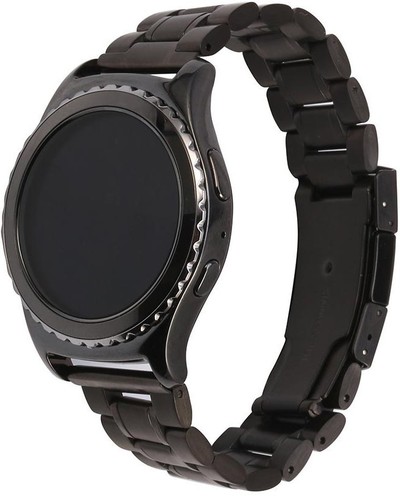
The classic look of stainless steel links pairs perfectly with the Samsung Gear S2 Classic and this band from eLander is a standout example. It’s available in silver, but the stainless steel black is equally beautiful.
It comes with a toolkit for removing extra links and fits virtually any wrist. The clasp locks securely so your watch won’t jostle around on your wrist and it’s an excellent dressed-up alternative to the standard leather band, at a reasonable price.
See at Amazon
Casetify

Coming soon to Casetify’s online store is the collection of bands for the Samsung Gear S2 Classic. Samsung’s official site has been teasing them for some time now and it looks like they’re going to be worth the wait.
The patterns are fun, unique, and tailored specifically for the Gear S2 Classic. Five vibrant patterns are on deck; pictured here is the Diamond White pattern. Get on their mailing list for a notification when the bands are ready to order.
See at Casetify
If these don’t catch your fancy, check out more of our favorites in our roundup of the best watch bands for the Samsung Gear S2 Classic.
Screen protectors
You didn’t spend your hard-earned money on your Samsung Gear S2 or Gear S2 Classic to get the face all scratched up. Put a screen protector on it!
Spigen tempered glass screen protector

Spigen is known for creating products that fit well and protect your gear. Their tempered glass screen protector fits both the Samsung Gear S2 and Gear S2 Classic and helps to stop your watch face from scratching, cracking, and overexposure to the elements.
It comes with easy-to-install wings so that you don’t get gunk or fingerprints on the underside of the screen protector. The edges won’t lift up on you and the tempered glass is incredibly thin, maintaining the touch sensitivity of the screen.
See at Amazon
Skinomi TechSkin screen protector

An alternative to tempered glass comes from Skinomi SkinTech. It still protects against incidental scratches and daily wear but is thinner than tempered glass and designed to be replaced if or when necessary, which is OK, since you’ll receive six for the price of one.
The edges of the screen protector won’t roll up and the TPU is UV-resitant, which means won’t yellow over time. It remains virtually invisible to keep the original clarity of the screen as it should be.
See at Amazon
Charging docks
Get something nice to hold your watch while it charges. A charging dock keeps in in sight and displayed for bragging purposes, and wireless charging docks mean there’s no need to tediously plug in your Gear S2 or Gear S2 Classic every night.
Samsung Wireless Charger Dock

Samsung offers their own white or black charger dock for the Samsung Gear S2 and Gear S2 Classic. If you’re feeling brand-loyal and want to stick to the product line, it’s a well-reviewed charger for the price.
The cradle holds the watch securely on any flat surface, like your office desk, coffee table, or nightstand and it doesn’t obstruct your view of the watch face, allowing you to show off the band you’re currently using.
See at Amazon
Henoda charging cradle
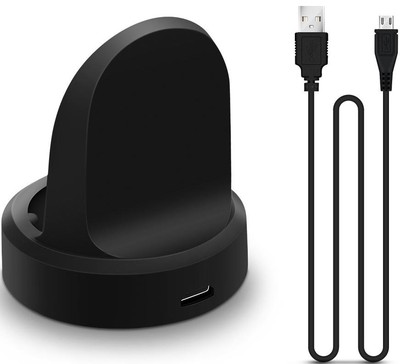
Take your pick of five colors when you buy a charging cradle from Henoda. It’s small, lightweight, and made of soft rubber that will be easy on your Samsung Gear S2 or Gear S2 Classic.
The non-slip base will keep the charger in place on any flat surface, and if you already have a charger or cradle that you use at home, the Henoda is a great alternative for travel or to keep at your desk.
See at Amazon
Bluetooth headphones
On your morning commute, your daily jog, or just around the house, Bluetooth headphones come in awfully handy when you’re wearing your Samsung Gear S2 or Gear S2 Classic.
Samsung Level U Pro Bluetooth headphones

Treat yourself to the Level U Pro headphones from Samsung. Available in black, blue, purple or bronze, they are well-designed and pair perfectly with the Samsung Gear S2 and Gear S2 Classic.
The joints are flexible and the headphones is lightweight and comfortable, as well as sweat and water-resistant, so a long run or a quick dash out into the rain won’t do any harm. The battery life has up to nine hours of talk or play time, which is more than enough to get you through the day with vivid, concert-quality sound.
See at Amazon
SoundPEATS QY7 Bluetooth headphones

Choose from 10 color combinations with headphones from SoundPEATS. Designed for active users, they fit snugly but comfortably in-ear and won’t move, no matter how much you do.
Eight hours of talk or play time means you won’t be searching for a way to charge them throughout your work day or your workout and the sweat-resistant material won’t get sticky or uncomfortable. No matter how active you get, the Bluetooth connection won’t waver.
See at Amazon
Carrying case
Your watch won’t always be on your wrist. A carrying case will give you a safe place to put it when you’re not wearing it.
BSI black leather case

Compact and lightweight, this leather case from BSI will protect your Samsung Gear S2 or Gear S2 Classic when you need a safe place to store it. The outer case is a hard shell that can handle being tossed into your gym bag, carry-on, or suitcase.
The inner case is lined with soft fabric, so your watch won’t be damaged when you’re on the go and there’s even room in the middle of the case to coil up and store a charging cable, so you don’t have to rummage around the bottom of a bag to find it when you need it.
See at Amazon
CASEBUDi watch travel case
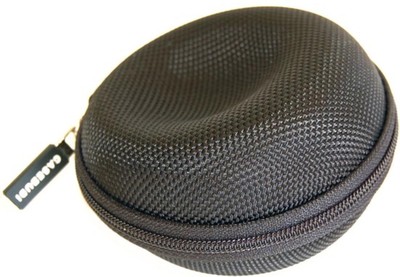
How about a case made of ballistic nylon? They exist, they’re inexpensive, and they do the job well. CASEBUDi makes travel cases for watches of all sizes and the Samsung Gear S2 and Gear S2 Classic will fit nicely.
The soft interior cushions your watch when the case gets tossed around in your bag, and the zipper and case come with a one-year warranty, so if the case is damaged in the process of protecting your watch, you can get a replacement easily.
See at Amazon
Found your favorites?
Have you come across some excellent accessories for the Samsung Gear S2 or Gear S2 Classic? Let us know in the comments below and tell us why they’re the best of the best!
Samsung Gear S2
- In-depth Samsung Gear S2 review
- Full Gear S2 specs
- Here are the phones that work with Gear S2
- Gear S2 vs. Apple Watch
- Join the discussion in our forums!
Samsung
Amazon
AT&T
Verizon
Best Buy
Styr’s system of health gadgets exists to sell you supplements
I’m the kind of guy who can always stand to lose a few pounds. The Styr Lab regimen seemed like a great way to do so. When I first saw it at TechCrunch’s Disrupt event in San Francisco last September, I was genuinely excited to give the fitness-tracking system a try. After three months using the regimen, however, I find myself just as pudgy and unmotivated as I was beforehand. Maybe even more so.
The Styr system employs a trio of devices: a bean-size tracker that can be worn on the wrist or the hip, a water bottle and a fat-sensing scale. All three are sold separately but can work in conjunction with the Styr iOS/Android app in any combination. What’s more, each device will recommend a specific in-house line of supplements (vitamins for the wearable, protein for the scale and electrolytes for the water bottle) that are tailored to the user based on his or her activity level and fitness goals.

I should point out that I didn’t consume these supplements beyond the initial month’s supply. However, based on what the Styr system recommended for my nutritional needs, I could accomplish the same effect with a men’s multivitamin and better eating habits for a fraction of the price of what Styr is asking. Seriously, it wants $68 a month for its vitamin packs, $28 per 1 lb. bag of protein powder and $24 for 12 packets of electrolyte mix.
Oddly, the system doesn’t take the nutritional value of what you’re eating, or how much, into account. The app will track whether you’ve eaten a snack, small meal or large meal, but that’s it. By those metrics, a McDonald’s two-cheeseburger meal with medium fries and soda carries the same nutritional value as eating 8 ounces of fish with a mixed-green salad and water.

Instead, the system revolves exclusively around your activity level and current weight. The activity tracker itself is minuscule, barely as long as the first joint of my thumb, or a little over an inch long. It uses a touchscreen interface, allowing the user to cycle through a home screen, step tracker, calorie-burn estimator and odometer. The screen itself is not great, requiring a good deal of squinting in direct sunlight. However, its battery life is fantastic. The little tracker lasts upward of two weeks depending on how often you activate its screen.
That said, it tends to be finicky when you do use it. The step-tracking function, for example, tended to overestimate my footwork when I wore the device on my wrist — where it routinely fell off because the band’s clasp mechanism wore out within the first month. It also had a habit of underestimating it when was attached to my belt or carried in a pants pocket. The mileage tracker was also consistently about a quarter-mile short compared to my Runkeeper data, as confirmed by Google Maps.

And, unfortunately, the same goes for its calorie counter. The wearable has no means of actively tracking how many calories you’re burning, as many rival devices do. Nor does it have any means of tracking your heart rate (even though there’s still a category for it in the app). When you do log your activity into the Styr app, it’s a time-based approximation of how much you’ve burned, at best. Whether I half-assed my morning calisthenics or really pushed myself, I was still rewarded with the same 145 calories/20 minutes. This in particular was a huge motivation killer for me.
I was much more impressed with the Styr scale, especially after having used the Fitbit Aria. The connected scale is well-designed and measures the same metrics as the Aria, providing readings for body-fat percentage, bone mass and water content, though there’s no way for me to know if any of them are really accurate. Still, it nice not to have my weight and body-fat percentages swing in 6-pound and 13-percent increments overnight, as the Aria routinely did. However, for some reason, it only tracked my weight over time. The moment I stepped off the scale, the system would discard my body-fat percentage, bone-mass and water-content readings. It makes me question why Styr even bothered to include them.

The water bottle was also a bit of a mixed bag. It’s a perfectly serviceable water bottle; there’s not a whole lot you can do to screw up that design, short of drilling holes in the bottom. However, after three months of daily use and repeated washings, I still haven’t managed to get that bitter “new-water bottle” taste out of it. Honestly, as soon as this review is over, I’m looking forward to switching back to my trusty Kleen Canteen.
Overall, I can’t figure out if the Styr fitness-tracking ecosystem is trying to do too much or too little. The app offers tracking categories for metrics none of the devices actually measure, like heart rate, yet doesn’t record all of the metrics the devices do measure, like body-fat percentage.

The entire system seems explicitly designed to sell you nutritional supplements a month at a time. That in itself is odd because the quality of the activity tracking doesn’t match the level of activity you’re supposedly needing it for. That is, the devices themselves feel like they’ve been designed for casual fitness enthusiasts, yet the company continually pushes nutritional supplements that only fitness fanatics and semipro athletes really need to be worrying about. The rest of us can probably forgo the $180 investment in these devices and get by with more regular exercise and a couple extra salads per week.
Recommended Reading: Video games and the issue of slavery
How Historical
Games Integrate or
Ignore Slavery
Amanda Kerri,
Rock Paper Shotgun
Video games certainly don’t claim to always offer a depiction of the “real world,” but for those titles rooted in historical events, how the narrative addresses certain events is key. One of the issues those historical games have to wrestle with is how to address slavery. This piece from Rock Paper Shotgun takes a look at how games have integrated events or ignored them completely.
|
The Inside Story of Google’s Daydream, Where VR Feels Like Home Wired offers a behind-the-scenes look at the development of Google Daydream in terms of design, strategy and more. |
The (Final) Problem with ‘Sherlock’ (Contains spoilers for the most recent season) |
|
How ‘Resident Evil 4’ Turned ‘System Shock 3’ into ‘Dead Space’ Two of the developers behind modern survival-horror classic Dead Space wax about the game’s inspirations and ultimately, where the franchise went off the rails. |
Inside Megyn Kelly’s New Show About Millennials, Journalists and Sex Megyn Kelly is the executive producer of the show Embeds, working alongside creator Scott Conroy. Based on this review, it seems to offer an interesting look at political journalists. |
 AIVAnet