


Apple Releases Safari Technology Preview 22 With Bug Fixes and Feature Improvements
Apple today released a new update for Safari Technology Preview, the experimental browser Apple first introduced in March of 2016. Apple designed the Safari Technology Preview to test features that may be introduced into future release versions of Safari.
Safari Technology Preview release 22 includes bug fixes and updates for JavaScript, CSS, Form Validation, Web Inspector, Web API, Media, Rendering, and more.
The Safari Technology Preview update is available through the Software Update mechanism in the Mac App Store to anyone who has downloaded the browser. Full release notes for the update are available on the Safari Technology Preview website.
Apple’s aim with Safari Technology Preview is to gather feedback from developers and users on its browser development process. Safari Technology Preview can run side-by-side with the existing Safari browser and while designed for developers, it does not require a developer account to download.
Tag: Safari Technology Preview
Discuss this article in our forums
Blu Vivo XL2 review- What does $150 get you in 2017?

American phone manufacturer Blu is back with another budget friendly device to entice those customers looking for a great unlocked option. The Vivo XL2 is the successor to the popular Vivo XL, which was released one year ago in January of 2016. This year Blu has given us an improved model that builds on the strengths of the Vivo XL and takes some chances with its software that will make users either love it or hate it.
 Key Specs:
- 5.5″ 720×1280 display (267 PPI)
- Gorilla Glass 3
- Quad-core 1.4GHz MediaTek processor
- 3150mAH battery
- 3GB of RAM
- 32GB of Storage
- 13MP main camera, 8MP front-facing camera
- Android 6.0
- 4G LTE, (2/4/7/12/17), 4G HSPA+ (850/1700/1900/2100)
Physical design
There’s very little offensive about the Blu Vivo XL2. The front of the phone looks like pretty much every other device out there right now with small bezels and hardware keys. The hardware keys, however, are hard to pinpoint unless in optimal lighting conditions. I tend to think this is a design choice by Blu, rather than an accident. The keys blend in (silver logos on a gold body) and don’t shift the focus away from the screen. Blu went the opposite route as Samsung’s super bright and in your face hardware keys.
 The bottom of the device houses a microphone and an off-center microUSB port. It’s been awhile since I’ve seen an offset USB port or a microUSB port so I was not expecting either on a phone released in 2017, but here we are. The left side of the device holds the SIM/microSD card hybrid slot. You can use either one SIM and a microSD card or two SIM cards at the same time. Very convenient for frequent travelers. The right side of the device houses the power and volume rocker, and I must say the buttons are pleasingly responsive.
 I really wish it didn’t need to be pointed out as a feature, but yes, Blu did include a 3.5mm headphone jack on the top of the device. Apple and Motorola have changed expectations for the mobile landscape by leaving out the headphone jack in their 2016 flagships and now I think we’ll see more companies following this worrying trend. Next to the headphone jack is an infrared blaster, which was a nice surprise.
My biggest gripe in the first few days of testing it out is the back of the phone. The slippery plastic rear cover doesn’t look or feel good. It’s a slippery fingerprint magnet that reminds me of phones released in 2013 or 2014. It will hold up well against drops and falls I’m sure, but Blu could have made another choice here while still keeping costs down.
Display
The Vivo XL2 has a 5.5″ 720p display covered by Gorilla Glass 3. At a PPI (pixels-per-inch) of 267, it sits at the low end of recent smartphone releases, even budget devices like the Vivo XL2. Text can get a bit blurry if you’re zoomed in and very close to the device, but for every day viewing it’s fine. It’s by no means going against the best from Samsung or LG, but for a device being sold at a quarter of the price of those devices, you’re going to have to make some sacrifices.
I’m not overly impressed with the peak brightness. Indoors you’re probably fine, but once you step out into a sunny or even a partly sunny day, you’re going to be in trouble. In addition to the low max brightness, the display tends to shift towards a red temperature which is pretty unique, but entirely unwelcome. Whites and blues feel… off while reds, oranges, and yellows feel overexposed. Fortunately, if you care about color shifting, the display doesn’t shift too much when viewed at an angle.
Must like the rest of the device, the display isn’t offensive. It wouldn’t force me to buy another device, but it’s not stunning to look at either. The low resolution of the display will keep battery life reasonable and if you’re just looking at YouTube videos and pictures on social media, the coloring shouldn’t bother you too much.
Software
Blu has made some interesting design choices with the Vivo XL2. While most of the stock Android apps remain and are the defaults (the exception being Opera instead of Chrome), we see some heavy changes in places like the lockscreen.
There are a ton of quick toggles on the left side of the lockscreen that slide out to quickly enter you into things like clickbait articles, a search bar, top stories, a media player, RSS feed, quick settings (like WiFi, audio settings, Bluetooth, a Selfie mode, and flashlight), weather, lockscreen games, and live wallpapers. The slide to unlock button can also be slide one of four ways to open up mail, camera, favorite apps, or go directly to the home screen.
The lockscreen isn’t an unwelcome choice, but it is a far departure from what you’d normally expect from an Android device. The settings app, however, is what you’d expect to see on most devices – but with a fresh coat of paint. Your list of settings are all here and in the places you’d expect. Scrolling through the list setting up the settings on the phone was a comfortable experience.
The Vivo XL2 ships with a “Carefree” launcher that is heavily customized from stock Android. Even core features like quick toggles are different- they’re brought up from a swipe up from the bottom of the display instead of living in the notification panel. The notification panel only houses notifications with no real customization.
 No app drawer leads to a mess
One major feature that is noticeably absent is the app drawer on the Carefree launcher. A quick download of Nova or a launcher of your choice quickly fixes that. I hope OEMs understand that in 2017, removing the app drawer is a really dumb idea. Please, quit it.
I can see what Blu tried to do with its software here. Customizing it to what it believes the younger crowd will want isn’t entirely silly, but I believe that a better strategy would have been to stick with Stock Android and provide a low-cost alternative to the expensive Pixel devices. Nothing Blu did in the software is too much of a selling feature and I feel like it could have put its resources in better areas.
Camera
 The Blu Vivo XL2 features a 13MP main camera and an 8MP front-facing camera. The rear camera features phase detection autofocus but I found that it didn’t seem to matter much.
Action shots routinely came out blurry and the action was generally missed by a slower-than-optimal shutter when using HDR mode. The HDR mode was almost a must as pictures regularly came out under exposed in low-light situations. Decently lit scenes led to shots suitable for social media uploading, but not much else.
The main camera is fine for a phone at this price point, but more expensive phones have much better cameras.
Conclusion
Blu has done a lot right here. The Vivo XL2’s solid body and small bezels will blend into the crowd of much more expensive phones. The battery cover on the back of the phone was my most disliked part of the physical design, but honestly, it’s fine. I don’t love it, but it keeps costs down enough for Blu to offer this at a pretty competitive price and it should stand up fine to falls.
We say it all the time, but cheap phones are getting better every day. The Vivo XL2 is another excellent example of that. The phone is more than the sum of its parts because it brings together some good ideas. I’m not in love with the software, but I can see how some would be. It offers some smart ideas that aren’t for me, but increase the functionality of the phone.
The launcher, in my opinion, is a big gamble. It’s the most used part of the software and Blu made some big changes from other phones it has released in recent years. I may sound a bit like a broken record, but I do believe Stock Android offers the simplicity and functionality that should be the standard on phones. Now, don’t get me wrong- I do like some launchers that ship on phones from other OEMs (OnePlus, Samsung, and Sony notably), but I just don’t know if this is the way Blu should go in the future.
The camera is good enough for your everyday Facebook and Instagram pictures, but it’s otherwise a bit of a disappointment. I thought we had come further with camera technology than to have such a disappointing experience in 2017 with a smartphone camera, but maybe Blu can fix it with an update down the road. The camera app that ships with the device is perfectly fine, it’s just the results from the processing of those pictures that leaves a little to be desired.
If you have a kid looking for their first smartphone, a parent looking to upgrade from a flip phone, or you just want a backup then I think this phone is a great choice. It won’t replace anyone’s daily driver if they’ve already had a smartphone, but it’s a great starter phone.
You can grab the Blu Vivo XL2 on Amazon for $149.99 however, when the device launches on January 25th, Blu will knock $50 off, bringing the price to just $99.99 from 11 AM until 5 PM.
Google Home app for Android: Everything you need to know
The Google Home app is for more than the speaker.

Google’s eponymous app controls Google Home and Chromecast devices, and opens up new worlds of content for both. Whether you need to set up a new Chromecast, refine your Google Home actions, or just need to find something to cast, Google Home has got you covered.
Home page


The main page of the Google Home app is pretty busy, but at least it’s fairly easy to find your way around. The main feed on the app’s home screen offers up trending and recommended content. After all, Chromecasts aren’t very fun without something to cast to them.
The Watch tab’s feed starts out with popular videos from YouTube and other Cast-enabled apps you have installed. When it runs out of installed apps, it moves on to recommending new apps for you to install in the Discover tab.


Discover offers up a bevy of films, TV shows and apps for you to expand your entertainment horizons with, but the true diamond in the rough for Discover comes when you search for a film using the app’s search button. Once you find a movie you want to buy or rent and Cast, Google Home will give you the price of the film in each of the compatible stores you’ve installed.
Devices
The devices section lets you view and configure your Cast devices and Cast groups. Tap on the three-line menu button on the top of any device card and you’ll be able to Reboot the device, enable Guest Mode, or edit the device’s Settings. Tapping on the device’s card will also reveal the Settings for you to view and edit.


Within Device settings, you can edit a device’s name, its Wi-Fi network, and if it’s a Google Home, you can edit which apps are tied into Google Assistant through Actions for Google. If you’ve plugged in a new device nearby that needs setting up, Setup will be a big hold action at the bottom of its device card.
More: How to set up Google Home
Guest Mode for Chromecast and Chromecast Audio (including the Google Home) allows people to Cast to it without being on the same network, which is great for parties or for friends you’d rather not give your Wi-Fi login to.


Google Home comes with a few accessibility settings to help users better hear when the device is listening. By checking the settings on this page, you can have your Google Home play a tone when it starts and stops listening to your commands.
You can also see Chromecast Audio groups on the Devices page. By tapping on a Cast group, you can rename it, remove devices from the group, or delete the group altogether.
How to set up and use Chromecast Audio groups
Main menu

 The menu in Google Home, without and with a Google Home attached to your account.
Heading back to the main page, we also have a menu hiding under the three-line menu icon in the top-left corner of the screen. If you own a Google Home, you’re going to see significantly more here, as all of Google Assistant’s services are managed through here.


The first few items here are fairly straightforward: Things to Ask brings up a basic list of commands your Google Home will accept, Music picks which app responds to requests for songs or albums, and Shopping list takes you to a Google Keep list that Google Home can add to.
Home control allows you to oversee the connected home devices currently linked to Google Assistant, such as Philips Hue bulbs and Nest thermostats.


The rest of Assistant’s features are under More Settings, like which news sources you hear when you ask for headlines and which services will let Google Home order you an Uber.
How to set up and customize Google Assistant on your Pixel
Now, the rest of the settings in the main menu here can seem mundane, but don’t write them off just yet. Above the Assistant settings is Cast screen/audio, which allows you to Cast your device screen in order to mirror your device on a Chromecast. It will drain your battery faster (in part because you need to keep your screen on the whole time), but it can help you Cast apps that don’t have native support for the feature. Devices takes you back to the Devices page we covered at the top of the article.


Account preferences is where you can refine which emails Google sends you concerning your devices and Cast services. This includes emails for the Chromecast Preview program, which can show you new features Google is working on. Offers takes you to the offers available for your Cast devices. There’s normally at least one available for your device, new or old, so check back here every now and again for free and discounted goodies.
How to Cast takes you to Google’s support website so you can see how Chromecasts work, and can be helpful if you’re trying to show a visiting relative how to put their cat videos on your TV.
The Google Store link below it likewise sends you to the Google Store website in the browser of your choice to order more Cast devices.


The setting at the bottom of the menu is one that you’ll likely overlook, but one you should absolutely use: Help and Feedback. This brings up a Web View of the help site if you need to troubleshoot your device, and also brings up a big blue feedback button so you can help Google improve its products.

Once you’ve got things set up, you might not think there’s much reason to come back to the Google Home app, but it’s definitely not an app worth forgetting about on your phone. From the Offers to Discover’s handy price comparisons to giving helpful feedback, there’s plenty of reason to make yourself at home in the Google Home app.
More: 10 Tips and Tricks for Google Home
Google Home
- Google Home review
- These services work with Google Home
- Google Home vs. Amazon Echo
- Join our Google Home forums!
Google Store Best Buy Target
Grab an ASUS OnHub router for just $99 right now!
Right now you can pick up an ASUS OnHub wireless router for just $99 at Best Buy, a savings of nearly 50%. If you are in the market for a new router, and want something that will automatically update itself to keep as secure as possible, this may be the one for you. Setting it up is extremely easy, and you can customize it to prioritize certain devices to ensure they get the most bandwidth from the router at all times. It has a USB 3.0 port, built-in LAN and WAN ethernet ports and an LED display to easily see your connection status.

This deal is only good for today, January 25, so be sure to act quickly if you are interested!
See at Best Buy
Weak G5 performance hurt LG’s mobile business in Q4 despite ‘strong sales’ of V20
LG couldn’t catch a break in 2016. Let’s hope 2017 fares better.
The hits keep coming for LG, as the company posted a loss of some $224 million in the fourth quarter on declining mobile sales.
Revenue in the mobile division declined 25% between Q4 2015 and the same period last year, with LG calling the situation “challenging.” The G5 was mainly to blame, though there was some slowdown in the entire category for the Korean giant, which couldn’t manage a huge hit despite commendable performance in the mid-range market, along with “strong” sales of the V20 later in the year.

LG says that “weak sales” of the G5 suppressed the company’s overall outlook, and looks forward to “recover[ing a] premium position in 2017 by launching successful flagship model,” referring to the G6 that launches at Mobile World Congress next month. The company sold 14.1 million devices in the quarter, down 8% year-over-year.
The story has been similar for LG over the past few months, with the modular G5 proving to be one of the worst decisions the company has made in a long time. With the G6 on the horizon, though, with a more streamlined metal-and-glass design, it is better primed to take on the Galaxy S8 — even if it won’t have the latest Snapdragon processor inside.
LG G5
- LG G5 review
- LG 360 CAM review
- LG G5 complete specs
- LG’s G5 Friends modules are a neat idea, but they won’t matter
- LG G5 Hi-Fi Plus w/ B&O
- Join the LG G5 discussion
AT&T
Unlocked
Sprint
T-Mobile
How to watch 3D movies on your Gear VR
How do I watch 3D movies in my Gear VR?

There are a lot of great ways to watch video on your Gear VR. Major streaming apps like Netflix and Hulu are a fingertip away, the Oculus Store has its own movie purchase service for a lot of new films, and several great 360-degree video apps are available to download. The thing almost all of these video apps have in common is the way the video is presented. It’s nearly all 2D video, even the 360-degree stuff.
That doesn’t mean there’s no 3D video out there for you to enjoy on your Gear VR. In fact, you have several great tools at your disposal for enjoying 3D video in both standard theater formats and in 360-degree viewing. Here’s how you get started!
Read more at VR Heads!
Pokémon Duel: Everything you need to know
There’s a new Pokémon game for Android.
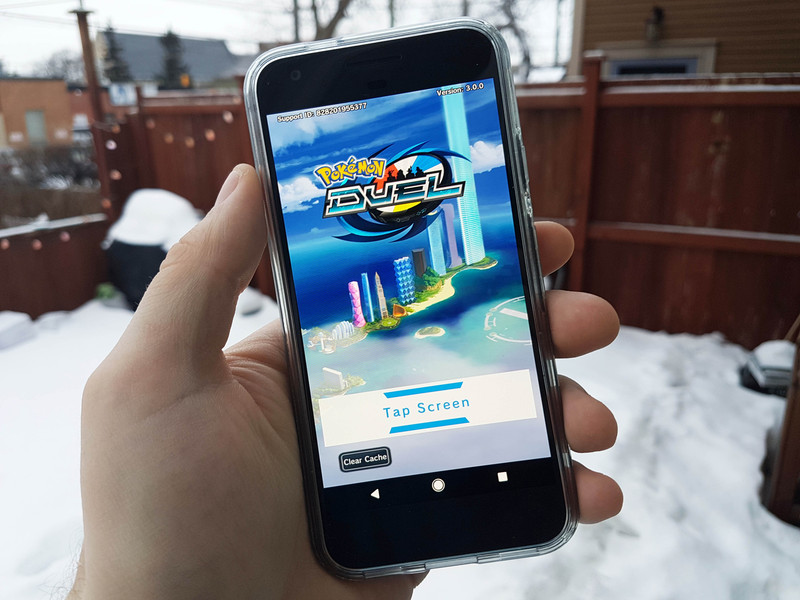
The Pokémon Company dropped a brand new Pokémon game into the Google Play Store, and those words alone might have some people buzzing with excitement. But unless you happened to be a fan of the obscure and discontinued trading figure game, you’re probably going to be disappointed.
Here’s everything you need to know about Pokémon Duel.
So what’s the deal?
Pokémon Duel is essentially a mobile version of the Pokémon Trading Figure Game, a discontinued two-player tabletop strategy game wherein players collect Pokémon figurines and battled them in 6-vs-6 battles in a fixed arena. The mobile game was originally released for iOS and Android in Japan back in April 2016, and it has finally become available to the rest of the world.
Is there a story mode?

Yes… sort of.
There’s an overarching narrative surrounding the Pokémon Figure Games World Tournament, which your character is heading to despite not knowing the first thing about Pokémon figures.
You’re told the stakes of the tournament are sky high, as the the tournament champion will win the Jewel Tower — literally a skyscraper on the island where the tournament is being held. On the train ride there, you meet Luca who introduces himself as your rival (because every Pokémon trainer needs a rival — even Pokémon…Figure…trainers?). He then runs you through a tutorial of how to navigate the many menus and teaches you the basics of how to play the figure battling side of the game.
One would assume that as you progress up the ranks, Luca returns to test you in battle. One would also assume you need to beat him several times to progress through the tournament.
Other than Luca, battling is done PvP versus other online opponents. It can take a while to find an opponent, so you’ll have to be patient.
So this game is promoting a new line of collectibles figures? Like how the original Pokémon GameBoy helped sell trading cards?

Well, yes and no. Pokémon Duel is based on the Pokémon Trading Figure Game, which totally existed as a thing about 10 years ago. All the tabletop elements are preserved, from collect and playing with figurines, to spinning a wheel to determine attack success.
But they may have been preserved too well. For examples, the Pokémon figures themselves look beautifully rendered, but this is a video game — why are they static figures? Just because it’s based on a tabletop game doesn’t mean you need to literally keep it as true to the original game mechanics required for playing the game in real life.
The Pokémon Trading Figure Game was discontinued back in 2009. Only one expansion set was ever released in the game’s short two-year existence. Feel free to draw your own conclusions.
How do you play?

The rules of the game involve moving your Pokémon around the play arena until you get one of your Pokémon to your opponent’s goal area, while simultaneously defending your own goal area. Players take turns strategically moving figures from their deck to the battle arena, moving them around.
If two Pokémon run into each other, they battle! Unfortunately, battling here only consists of spinning the figure’s attack wheel, which leaves everything up to dumb luck. Battle effects such as Confusion or Poison can be strategically played which affect your opponent’s ability to land an attack. The Pokémon who spins the higher attack wins and gets the space, while the loser is sent off the arena to the PokéCenter, where they must wait in rotation to be reinserted back in the player’s deck.
If playing with digital figurines sounds like it would be kinda lame, well… it is.
Oh, and that’s without touching on the in-game currencies you’ll have to manage and booster packs you’ll need to wait to unlock. Yep, it’s another classic free-to-play title.
Best Android games with no in-app purchases
Is this finally the Pokémon battling game for mobile I’ve been waiting for?
Going to go with a hard NO on this one — unless of course you were obsessed with the Pokémon Trading Figure Game for its short run almost a decade ago.
Will Pokémon Duel find an audience outside of Japan? Perhaps people will download it from name recognition alone, but once you’ve experienced the uninspired gameplay (which could be fun in a tabletop setting), hokey story, and the fun-killing free-to-play game mechanics, it’s really only for kids with nothing better to play and most hardcore Pokémon fans.
The tabletop version was discontinued back in 2009. Only one expansion set was ever released in the game’s two-year existence. Feel free to draw your own conclusions.
To be clear, this is nothing like the Pokémon Go phenomenon which, love it or hate it, blew up in part for nostalgic love of Pokémon, but largely due to developer Niantic’s strong handle on augmented reality gaming. Pokémon Duel offers nothing new or innovative, so unless you were a huge fan of the defunct real-life trading figure game there’s not much to see here.
What are your thoughts?
Have you checked out Pokémon Duel? Would you recommend it to others? Let us know in the comments!
Pokémon Go
- Join our Pokémon Go forums!
- How to deal with GPS errors in-game
- Which team should you choose?
- How to play without killing your battery
- The Ultimate Pokémon Go Game Guide!
- Listen to the Pokémon Go podcast!
Best tech toys for Christmas 2017: Star Wars, skateboards, smartwatches and more
Yes, we’ve just had a holiday season and our houses are still cluttered with the toys our kids got for Christmas, but forget all that, it’s time to look forward again.
Before we know it, John Lewis will be screening a new batch of animated animals and Slade will be ringing out on our radios once more. And we’ll be expected to hunt down the best tech toys to pop under the tree.
Well, never fear, Pocket-lint has already seen a fine collection of games and gadgetry that are likely to make it onto many a child’s wish list (and our own, in some cases).
We visited the London Toy Fair and here are our top tips for the best tech toys for 2017.
- 23 tech toys you wanted for Christmas but never got
Best tech toys for 2017: BeatMoovz
Pocket-lint
BeatMoovz was one of the few toys we saw that could be just as fun to use for adults as kids. It comprises two wearable wristbands with motion trackers inside that, when linked by Bluetooth to a smartphone or tablet app, plays a sound depending on your movements.
The app has a soundboard with thousands of audio clips available. You can use the wristbands, therefore, to either play music using your body, or add silly effects to your motions – such as 1970s kung fu movie noises.
It’ll be available in the summer for £50 a pair.
- BeatMoovz preview: The crazy wearable that adds a soundtrack to your life
Best tech toys for 2017: Laser X
Pocket-lint
Remember the laser quest style toys from the 80s? Character Options does as it’s bringing Laser X to the UK.
It works in a similar way to the old Lazer Tag retro gear, with two blasters and two vests coming in one package. However, the Laser X system works up to 200 metres, so you can expand your range of play.
Release date and price is TBC.
Best tech toys for 2017: Minions MiP
Pocket-lint
WowWee’s MiP robot was a huge success a couple of years ago and now, as a tie-in with the forthcoming Despicable Me 3 movie, you can get a version shaped like your own Minion.
It does many of the same things as the original, including app-controlled movement and coding tasks, but Turbo Dave can also laugh, cry and even make noisy bottom burps. Hilarious fun for all.
It’ll be available in the summer for £100.
Best tech toys for 2017: RazorX Cruiser electric skateboard
Pocket-lint
Razor has turned to lithium batteries for its latest electric skateboard, meaning it can get up to 40 minutes of use from rechargeable battery packs.
The RazorX Cruiser has geared rear wheel drive, which is controlled by a separate remote control with a go and stop slider. You can change the speed using the controls, even getting up to a maximum top speed of 10mph.
The deck is made from quality bamboo, and everything else about the board is authentic.
It’ll be available from the summer for £230.
Best tech toys for 2017: The Rocket Singing Machine
Pocket-lint
The Rocket Singing Machine is more than a karaoke microphone, it links to a tablet or smartphone via Bluetooth and can be used with any music stored on the mobile device or streamed via media services, such as Spotify. You can even find karaoke versions of your favourite tracks, without vocals, to sing over.
It has a built in speaker to play the music and an amplifier for your voice. There’s an echo effect you can add too.
Price and release date are TBC.
Best tech toys for 2017: Five Nights at Freddy’s Game
Pocket-lint
To be honest, we don’t know much about the Five Nights at Freddy’s game apart from the fact that it’s licensed from the clever and scary console and mobile title. The one at Toy Fair was an early prototype and didn’t actually do anything, but from the packaging we could see that it’s a bit like Buckaroo.
You have to steal pizza pieces from Freddy Fazbear and we suspect that should you steal the wrong piece, he wakes up with a start, scaring the willies out of you.
Again, price and release date are TBC.
Best tech toys for 2017: Sky Viper Drone
Pocket-lint
Vivid is bringing a successful range of US drones over to the UK, all under the Sky Viper banner. There are models from £60, such as the Stunt Drone pictured, all the way up to a first-person view Sky Viper Streaming Drone, which comes with a VR style headset that houses your mobile phone and gives you a drone’s eye view. That’ll be more in the £140 price range.
All the Sky Viper drones are planned for a July launch.
Best tech toys for 2017: VTech Star Wars Camera Watch
Pocket-lint
VTech has made smartwatches for kids in the past but none have drawn our eye quite as much as the Star Wars camera watches we saw at the show.
Not only do they have the ability to take snaps and video using a top-mounted lens, with 256MB of storage on board, they also feature mini-games, voice recording with Star Wars effects, a motion sensor, step counter, and all the time-telling features a kid needs.
There are two models in the range, one for BB-8, the other for the First Order. We’re still awaiting pricing and release date.
Best tech toys for 2017: VTech Star Wars Stormtrooper Digital Camera
Pocket-lint
Another Star Wars licensed device from VTech, the Stormtrooper digital camera is similar to the company’s previous Kidizoom range. However, it is all themed around the movie franchise and has several additional games and features.
For example, you can add Star Wars characters to pictures taken to make it look like you (or your child) is stood next to a Stormtrooper or the like. You can also play games using the rear screen, including an augmented reality shoot-em-up with Tie-Fighters swarming around your location.
We’re also waiting for price and release date details for this.
Best tech toys for 2017: Razor Power A electric scooter
Pocket-lint
Like its new electric skateboard above, Razor’s 2017 portable electric scooter is for kids and adults and is rear wheel driven by a lithium battery powered motor. It can also achieve speeds up to 10mph and is capable of lasting 45 minutes between charges.
Unlike many other electric scooters, the Razor Power A is very lightweight – 4kg – and can be folded so can be taken on a commute and the like.
It’ll be out in the summer for £230.
Best tech toys for 2017: VRSE
Vivid
We got to try one of the VRSE virtual reality headsets on Vivid’s stand at Toy Fair but because the design was not finalised, couldn’t bring you our own pictures. However, we still thought it worth of inclusion as the headsets and, specifically, the licensed games are good quality.
There will be two in the initial range, based on Jurassic World and Batman. Each will cost £70, which gets you the headset, a themed Bluetooth controller and an app download. You use either and Android or iOS smartphone in the visor to provide the screen.
Where we think VRSE differs from most other “toy” VR devices we’ve seen in the past is in the content. We had a brief go at an early build of the Jurassic World app and there are several mini-games and experiences included – with actual gameplay and thought gone into them. It’ll be available in July so we’ll take a more in-depth look closer to the time.
Best tech toys for 2017: Zoomer Zupps Tiny Pups
Pocket-lint
The Zoomer Zupps Tiny Pups are the only toy here you can buy now. They are the latest entry into the Zoomer series, which has already produced a robot dog and a chimp, and are inexpensive mini robotic creatures that can play some games and interact with their owners.
Leave them alone too long and they’ll start to whimper, and you can press the tops of their heads or noses to have them make other sounds. Each Zupp also has a special trick to discover.
Each of them costs £14.99 and they are all available now.
Best tech toys for 2017: VTech Kidizoom Flix
Pocket-lint
Last year, VTech released a selfie stick camera for kids and this year introduces one with a tripod that can stand just about anywhere, even wrap around a child’s arm.
The Kidizoom Flix not only takes photos, it can guard a child’s bedroom in keeper mode, taking snaps when it detects motion. It also detects faces, so can interact with its owner, even repeating phrases it hears in silly voices. The alien inside can play games with a child too.
Price and release date are yet to be revealed.
Best tech toys for 2017: VTech DigiGo Max
Pocket-lint
This year’s kid-friendly tablet from VTech comes with Android for the first time. It has a 5-inch 800 x 480 screen and 8GB of on-board storage (expandable through microSD card).
THere’s a rotatable camera at the top, for front and rear photos, and a “child-safe” web browser is built in, although we’re not sure quite how that works yet.
You can download extra games and apps from VTech’s own service.
Price and release date are TBC.
Best tech toys for 2017: WowWee Chippies
Pocket-lint
WowWee continues its robotics range with Chippies – three lovable puppies that has many features of the larger, more expensive CHiP released at the tail-end of last year. There is Chipper, Chippette and Chippo.
Each Chippie has a unique personality and will respond to their owners. They are also remote controlled through the included bone controller. More features will become apparent closer to release.
They’ll be available from Q4 at £50 each.
At internetmatters.org parents can find all the advice they will need to keep their children safe online. Designed specifically for parents, the site offers a wealth of up-to-date, unbiased information and advice about how to deal with online safety. Parents can learn about the latest issues and technologies, get great tips on how to talk about online safety with their children and get the best advice on dealing with issues and taking action. Created with experts, Internet Matters provides detailed information, but also signposts to best-in-class resources from individual expert organisations. Our goal is to ensure parents can always access the information that they need, in a format that is clear and concise.
ICYMI: Flapping wind turbines and Dubai’s firefighting jetpacks

Today on In Case You Missed It: The Dubai Civil Defence treated us to an impressive — and fantastically dramatic — video demonstrating its ‘Dolphin’ system which consists of a jetpack connected to a Sea-Doo water craft. The jetpack uses water pressure to lift the wearer into the air to provide rescuers with better vantage points in emergency situations. The system includes a thermal camera to aid in search and rescue missions, but is largely intended for situations that occur near waterways and bridges.
Meanwhile, a Tunisian company has taken inspiration from the tiny, yet mighty, hummingbird to create a new turbine design that relies on rotating fan blades to produce up to 1kW of electricity. The “Biometric Wind Converter” design uses carbon fiber wings that flap in a figure-8 motion that imitates a hummingbirds wing movements, and is said to be both less noisy and less dangerous to birds than conventional spinning turbines. The goal is to enable the turbine to gather energy on both the up- and down-strokes, however, it is still early in development and the technology it’s based on is still unproven.
And although it’s no longer technically a full-sized planet, Pluto still got some one-on-one attention from NASA’s New Horizons spacecraft — after ten years and three billion miles the spacecraft sent back over a hundred high resolution images of its approach to the dwarf planet from its July 2015 fly-by. As always, please share any interesting tech or science videos you find by using the #ICYMI hashtag on Twitter for @mskerryd.
HP recalls 101,000 laptop batteries due to fire concerns
HP is asking the owners of some laptop models to send their batteries in for a replacement to make sure their devices don’t catch fire. The US Consumer Product Safety Commission (CPSC) has issued a notice about the recall, which affects around 101,000 computers. Those who have HP, Compaq, HP ProBook, HP ENVY, Compaq Presario and HP Pavilion laptops purchased between March 2013 and October 2016 may want to check their lithium-ion battery. If its bar code starts with 6BZLU, 6CGFK, 6CGFQ, 6CZMB, 6DEMA, 6DEMH, 6DGAL or 6EBVA, the company says the best course of action is to pull it out and contact HP for a free replacement.
According to the CPSC notice, HP has received an “additional report of the battery overheating, melting and charring and causing about $1,000 in property damage.” The electronics maker issued a recall for 41,000 batteries in June 2016, but this new report compelled it to do another round. Lithium-ion batteries are prone to overheating and catching fire — the Samsung Note 7 fiasco is the perfect example — and this is far from the first time HP’s had battery troubles. It recalled hundreds of thousands of batteries over the past few years for the same reason. And until the electronics industry finds a better battery tech or a way to prevent lithium-ion-related fiery mishaps, tech companies will have to continue dealing with the same issue.
Via: CNET
Source: US Consumer Product Safety Commission
 AIVAnet