


What to Expect From Apple in 2017: iPhone 8, 10-Inch iPad Pro, Refreshed iMacs, and More
With the launch of the iPhone 7 and MacBook Pro, 2016 has been a mixed year for Apple. The iPhone 7 was released without a headphone jack, an unpopular choice that’s now been somewhat ameliorated by the launch of the AirPods, and the MacBook Pro has been plagued by battery issues, graphics problems, and complaints about the high price of the device.
Subscribe to the MacRumors YouTube channel for more videos.
Apple also saw its first decline in iPhone sales in 2016, but 2017 could potentially turn things around for the company. We’re expecting the biggest iPhone revision we’ve seen since the iPhone 6 and 6 Plus launched in 2014, plus we’re also expecting major iPad changes, refreshed desktop Macs, and software improvements.
iPhone 8 – September 2017
Rumors about the 2017 iPhone started ramping up before the iPhone 7 was even released, so there’s a lot of information out there, and at this point, quite a bit of it conflicts, so it’s difficult to get a clear picture of what Apple is planning for the iPhone’s 10th anniversary.
If you read all of the rumors and suss out some common themes, there are a few concrete details that hint at what likely to see in the next-generation iPhone. We’re assuming it’s going to be called the “iPhone 8” due to design changes that are more radical than we’d expect for an “iPhone 7s,” but it’s entirely possible Apple will go with another name.
It looks like there’s going to be at least three iPhone models, and one of those will have an OLED display. It’s sounding like we’re going to get one premium OLED iPhone somewhere in the neighborhood of 5 inches, with either a flexible curved display that wraps around the edges like the Samsung Galaxy S7 Edge or an edge-to-edge display more in line with the current design of the iPhone 7.
These seem to be mutually exclusive concepts, but we’ve heard rumors suggesting both possibilities. A display that wraps around the sides of the phone seems to suggest we’d continue to have some kind of top and bottom bezels, but information coming from sources like KGI Securities analyst Ming-Chi Kuo seems to point more towards a less curved 2.5D edge-to-edge display that does away with bezels entirely.
 Edge-to-edge iPhone concept image via ConceptsiPhone
Of course, it’s possible some “edge-to-edge” rumors refer to the removal of the side bezels rather than the top and bottom bezels, but it’s not entirely clear.
Either way, it seems the iPhone 8 will do away with the Home button, incorporating a Touch ID fingerprint scanner directly into the display. Ambient light sensors, microphone, and camera may also be located under the display for a true single piece of glass look.
Along with that OLED model, rumors also suggest we’re going to get two other iPhone models, perhaps in standard 4.7 and 5.5-inch configurations. These would presumably be less expensive and would use easier to obtain standard LCD display panels.
Either the OLED model or all three iPhone models rumored for 2017 will include a glass body, doing away with the aluminum-style body that Apple has used for several years in a row. The glass back and the display may be housed in an aluminum frame for stability, but the glass itself will mean a significantly different visual aesthetic.
A glass body will bring a fresh look, but there’s another reason behind the materials switch — wireless charging. Apple is rumored to be developing long-range wireless charging techniques, which could make their debut in 2017. An aluminum body can interfere with wireless charging speeds, while a glass body offers less interference.
It’s not entirely clear if Apple is developing its own wireless charging solution or working with a company like Energous, nor do we know exactly how wireless charging will be implemented, but it is looking like a feature we can expect to see in all 2017 iPhone models.
Other features rumored for the 2017 iPhone include a faster A11 processor, more advanced biometric features like improved facial recognition techniques or perhaps even iris scanning, and an upgraded Taptic Engine able to create “more complex tactile vibrations.” Dual cameras are expected to be offered in some iPhone models, but optical image stabilization could be added to both lenses (instead of just the wide-angle lens) in the next-generation iPhone.
Apple is rumored to be considering upwards of 10 different prototypes for the 2017 iPhone, which explains why we may be hearing so many different rumors about the device at this point in time.
As we get closer to the September launch date of the 2017 iPhone and as Apple’s own plans solidify, we’ll get a better idea of what to expect.
Read full iPhone 8 roundup
iPad Pro – Spring 2017?
Apple is working on a revamped version of the iPad Pro, and as with the iPhone, the rumors are all over the place. Apple is said to be planning on introducing three models in 2017: a 9.7-inch iPad Pro, a 12.9-inch iPad Pro, and a new mid-range model with a display that’s somewhere between 10.1 and 10.9 inches.
The 10-inch iPad Pro is rumored to feature an edge-to-edge nearly bezel-free display much like the iPhone 8, and its actual body size will be identical to the 9.7-inch iPad Pro.
For that reason, rumors suggest the 10-inch iPad Pro will be replacing the 9.7-inch iPad Pro, but Apple plans to keep the 9.7-inch iPad Pro around as a low-cost tablet option. The 10-inch and 12.9-inch models will reportedly be the new flagship models, upgraded with faster A10X processors.

The exact size of the 10-inch iPad hasn’t been sussed out yet. KGI Securities analyst Ming-Chi Kuo, who often reliably predicts Apple’s plans, says it will measure in at 10.5-inches. Japanese site Mac Otakara has a more mixed track record and has released two reports pointing towards both 10.9 and 10.1 inches. Rumors out of the Taiwanese supply chain have suggested 10.5 inches, and research conducted by Barclays Research says it’ll be 10.9 inches.
One rumor from Mac Otakara also suggests Apple will introduce a smaller 7.9-inch iPad Pro to succeed the iPad mini, but that information has not yet been confirmed by another source.
With Apple planning to introduce new iPads in 2017, there may also be more of a focus on iPad-specific software during the year. Apple is said to be aiming to enhance the iPad Pro with new hardware and software features that cater specifically to professional users, such as a faster display for smoother on-screen zooming, panning, and scrolling, and expanded iOS support for the Apple Pencil that will allow it to work in more areas.
Mac Otakara and Barclays Research have both predicted an early 2017 launch for the new iPads, perhaps in March or April, but if a radical edge-to-edge redesign is in the works, it is questionable as to whether Apple will upstage the 2017 iPhone 8 that’s expected in September with an edge-to-edge iPad launching earlier in the year.
Read full iPad Pro roundup
iMac – Spring 2017
New iMacs didn’t debut alongside the MacBook Pro at Apple’s October 2016 event, but there’s rumored to be an update in the works. According to KGI Securities analyst Ming-Chi Kuo, we will see iMacs in “mid-1H17,” which translates to sometime around March or April.
A refreshed iMac will likely include Intel’s Kaby Lake chips and AMD graphics (in models that use discrete graphics options). The iMac is potentially due for a design refresh, but there have been no rumors suggesting anything more than a minor spec update is on the horizon. In fact, information from Bloomberg suggests all we’ll see in a 2017 is a shift to USB-C and improved processors.

Kaby Lake chips appropriate for the iMac are set to come out in late December to early January, perfect timing for a spring release.
We could potentially see a new keyboard that could ship alongside an iMac. Apple is rumored to be considering a standalone keyboard that incorporates a Touch Bar much like the keyboard of the MacBook Pro. Such a product might accompany a future iMac.
Read full iMac roundup
MacBook – Spring 2017
After introducing the 12-inch Retina MacBook in the spring of 2015, Apple launched a refreshed version in the spring of 2016, so it stands to reason we’ll see yet another upgrade in the early months of 2017.

Low-power Kaby Lake chips appropriate for the MacBook are already available, so that’s a safe bet for what we might see in an upgraded machine. No design changes are expected.
Read full MacBook roundup
MacBook Pro – Fall 2017
New MacBook Pro models with a Touch Bar came out in 2016, and if Apple sticks to a traditional upgrade cycle, we’ll see a refresh with upgraded internal components in the fall of 2017. Upgrades could include Kaby Lake processors and slight price cuts, but no external design changes are expected for the next several years.

Read full MacBook Pro roundup
Mac Pro
The Mac Pro is overdue for an update, having last been updated in 2013, and we don’t know when it’s going to get a refresh. There are no concrete rumors suggesting an update is in the works, and no hints on what a new machine might include.
Processors and graphics cards appropriate for an updated machine have long been available, but Apple could be waiting for the latest technology from companies like Intel and AMD before presenting a new Mac Pro.

If a Mac Pro is planned for 2017, it could come in the spring alongside refreshed iMacs or, if Apple is waiting for cutting-edge current-generation chips, it could come in the fall.
Read full Mac Pro roundup
Mac mini
Like the Mac Pro, the Mac mini has not seen an update for multiple years, with the last update coming in October 2014. Unfortunately, we’ve heard no rumors on whether or not we can expect to see an upgraded Mac mini in 2016, but if it does come, it could include Kaby Lake chips, faster SSD options, better graphics, and other improvements that have been brought to the Mac lineup over the last two years.

Read full Mac mini roundup
MacBook Air – Never
With thinner, lighter MacBook and MacBook Pro machines now available, we don’t expect to see another MacBook Air update. Apple will likely keep the MacBook Air around for a while as a low-cost option until it’s able to cut the price on more expensive machines, but a new MacBook Air probably isn’t going to happen.

We could, however, potentially see small spec boosts and minor internal upgrades if Apple wants to keep its low-cost machine relevant for a longer period of time.
Read full MacBook Air roundup
Apple Watch – Fall 2017?
If Apple is working on a third-generation Apple Watch for the fall of 2017, it’s being kept tightly under wraps. We haven’t heard any rumors suggesting a new Apple Watch is in the works for 2017, but if we are going to get one, it could come in the fall alongside the iPhone 8.
Potential features we could see in a new Apple Watch include the first significant design changes, upgraded processors, and perhaps sensors that Apple was not able to build into the first and second-generation versions.

Cellular connectivity, a feature Apple has wanted to incorporate into the watch but hasn’t been able to add due to battery life concerns, could also come in a 2017 model. We’ve also heard rumors of a potential switch to micro-LED displays for the Apple Watch, which can be thinner and lighter with improved color gamut and brightness.
At this point, it’s too early to tell if we’re going to get a new Apple Watch in 2017, so we’ll need to wait for additional rumors to surface over the first few months of the year to figure out what’s going on with Apple’s wearable.
Read full Apple Watch roundup
Apple TV – Unknown
While it’s possible Apple could introduce an Apple TV update in 2017, we don’t think it’s likely to happen. There are no recent rumors suggesting an update is in the works, and there’s no real reason for the Apple TV to be updated.
Prior to the introduction of the fourth-generation Apple TV, Apple went several years without introducing a new version of the device, so historically, it is not on an every-year or every-other-year update schedule like Macs and iOS devices.

That said, rumors suggest a future Apple TV could include a better processor and perhaps some features that would allow it to compete with products like the Amazon Echo and the Google Home, but there are other rumors that make it unclear whether these are features that would go into an Apple TV or another standalone product also rumored to be under development in Cupertino — a home hub.
Read full Apple TV roundup
Home Hub – Late 2017?
Rumors suggest Apple is working on a connected smart home device that’s similar to the Amazon Echo. It would be equipped with a speaker and microphone and powered by Apple’s Siri voice assistant.
The hub, which has been in development for two years and is in the prototype testing phase, is said to be able to control HomeKit-connected accessories like lights, locks, window shades, and more through voice activation. It may feature “more advanced microphone and speaker technology” than the Amazon Echo or the Google Home, products it will compete with.
 The Amazon Echo
Information on the hub is a bit nebulous at this point, and it’s not clear if it’s going to be a new standalone speaker-only product or something in the AirPort or Apple TV families, both of which are possibilities. Facial recognition capabilities may be built into the device, and Apple is also working on Siri advancements that will allow it to do more.
Because the hub is still in the prototyping phase, it’s not entirely clear when it will launch. It could come in the later months of 2017, but it may not be ready until 2018. Apple could also scrap the project entirely.
iOS 11 – Fall 2017 (June Preview)
Apple introduces a new version of its mobile operating system for iPhones and iPads on a yearly basis, and in 2017, we’re expecting to see iOS 11.
There aren’t many details on what will be included in iOS 11, but we’ve heard some hints suggesting there could be more of a focus on the iPad, with features like improved Apple Pencil support that cater to professional users. Apple is said to be planning on allowing the Apple Pencil to work more widely across the operating system.
Apple is also rumored to be developing its own social networking app to compete with Snapchat and Facebook, allowing users to record video, edit video, and add filter and doodles. Such an app, if development continues, could debut alongside iOS 11.
Apple has also been exploring augmented and virtual reality with a dedicated AR/VR team, and some kind of augmented reality feature could potentially be introduced in iOS 11. Maps and Photos are two areas where Apple could take advantage of augmented reality with the iPhone’s camera, offering features like mapping overlays of real-world views or Snapchat-style photo filters.
macOS 10.13 – Fall 2017 (June Preview)
The next-generation version of macOS (10.13) will come in the fall of 2017, introducing new features and refining the macOS operating system. There’s no word yet on what features we might see in macOS 10.13, but details will likely leak out as it gets later in the year.
Apple will preview macOS 10.13 at its annual Worldwide Developers Conference, which typically takes place in June.
watchOS 4 – Fall 2017 (June Preview)
Alongside iOS 10.11, we’re likely going to get watchOS 4, an updated version of the operating system that runs on the Apple Watch. There’s no word yet on what new features could be included in watchOS 4, but we’ll get our first glimpse of the new software in June.
tvOS 11 – Fall 2017 (June Preview)
The final software update we’re expecting in 2017 is tvOS 11, a new version of the tvOS software that runs on the fourth-generation TV. Apple is still working to refine the tvOS experience, so we can likely expect to see some interface improvements and other usability changes as the company gets a better handle on how people are using their set-top boxes.
tvOS 11, along with macOS 10.13, watchOS 4, and iOS 10.11, will be previewed at WWDC ahead of a fall launch.
Related Roundups: iMac, Mac Pro, Mac mini, MacBook Air, Apple TV, tvOS 10, MacBook Pro, Apple Watch Series 2, watchOS 3, iPad Pro, Retina MacBook, iPhone 8 (2017)
Buyer’s Guide: iMac (Don’t Buy), Mac Pro (Don’t Buy), Mac Mini (Don’t Buy), MacBook Air (Don’t Buy), Apple TV (Caution), MacBook Pro (Buy Now), Apple Watch (Neutral), 12.9″ iPad Pro (Caution), MacBook (Caution)
Discuss this article in our forums
Samsung Focus is an app for Galaxy owners who work
Samsung is investing heavily in the business market, and it starts with better software.

In an effort to bring professionals to other Galaxy devices, Samsung has unveiled a new app for Samsung phones running Marshmallow and Nougat called Samsung Focus. The all-in-one productivity app seeks to be your one-stop-shop for email, calendar, contacts, and more from a single, white UI. It’s a lot like BlackBerry Hub, but limited to IMAP/POP3 email addresses.

Among the many tabs are tools of prioritizing tasks and boosting efficiency, allowing you to set up alerts for things and people you really care about and cut down on the chaff that makes it to your notifications. Samsung Focus also features shortcuts to help you join or organize conference calls, and the app can be synced with your PC, helping you keep things under control even when you’re not on your phone.
Samsung Focus can scan incoming notifications for user-set keywords in order to help you notice and respond to priority emails more quickly. Just be careful how generic a keyword you set.
Samsung Focus is available on Google Play for Samsung phones running Marshmallow or Nougat, and we wonder if it will come pre-loaded on the Samsung Galaxy S8 this spring.
Do we need another Samsung app pre-loaded on Galaxy phones, or is this one you’d use?
Samsung
Samsung is a massive South Korea-based multinational company that makes some of the best-selling phones, tablets and mobile accessories, but also spans industries such as televisions, appliances and semiconductors (like memory and processors). Samsung is the largest Android device manufacturer worldwide.
- Best Samsung phones
- Samsung Galaxy S7 edge review
- Best microSD card for Android
Amazon Echo Wish List 2017

Alexa, it’s time for some upgrades.
News that Amazon sold nine times more Echo speakers this Christmas is unsurprising. Echo Dot is absurdly cheap, and Amazon’s Alexa service is by far the most capable when you look at total available commands. At the same time, there’s a lot of room for Alexa to grow and improve in the coming year. Things to be added, changed, and in general improved in order to make this the best possible connected home hub.
Here’s where I’d like to see Amazon Echo head in 2017.
Connect to one another

Because they’re so cheap, I now have a single Amazon Echo and multiple Echo Dots in my house. Yet if I want to play music, I can only play on one of them at a time. I’d like to be able to sync all of my Echo systems together for total home audio.
We’re already seeing this work on other platforms, so it’s unlikely Amazon will wait too long to adopt this feature. In doing so, Amazon is making it possible to easily connect any kind of speaker, since the Echo Dot can connect via 3.5mm jack. That makes every decent speaker an Echo, which is going to be a great feature to have.
Unified command structure

Amazon’s command list is huge, but it’s also broken up into classes right now. You can say “Alexa, do X” or you can say “Alexa, ask Y to do X” and that second part gets complicated. Sometimes partner app names are long and the command becomes more complicated than just picking up your phone.
Amazon could unify these commands and make it possible to set favorite apps from the Alexa app, so if you have multiple skills enabled with the same basic command structure Alexa knows which service you prefer unless otherwise specified. It seems like a small change, but it’d make a big difference in how people speak to their connected hubs.
Alexa from my phone

I’m not always in the same room as one of my Echo speakers, and there’s no way I’m going to convince my family it’s alright to put an Echo Dot in the bathroom. Sometimes Alexa needs to be portable, and the way to do that is to make it something I can enable from my phone.
This isn’t going to be easy, and will likely never be allowed to be as functional on phones as Siri or Google Assistant or Cortana, but people embedded in this ecosystem that don’t own a Fire Tablet would love the Alexa function wherever they are.
Voice reminders for re-ordering

Once you figure out all of the details, shopping for quick things through Alexa is great. The one thing it doesn’t handle super well right now is re-ordering things, especially if you’re on a subscription and it’s not time for that subscription to re-send.
Being able to check in on a subscription status with something like, “When am I set to order toothpaste again” would be incredible useful. It’d also be nice to ask for a re-supply of something you have on a subscription order and have Alexa respond by asking if you want to adjust the ship date of the next subscription since you’re ordering early. Making Alexa seem more aware of your ordering history and acting based on that would be a great way to create a more complete experience here.
What would you ask Alexa to do?
Did I miss anything here? Are you looking for Amazon Echo to support something more? Share your thoughts with us!
Amazon Echo
- Amazon Echo review
- Echo Dot review
- Top Echo Tips & Tricks
- Tap, Echo or Dot: The ultimate Alexa question
- Amazon Echo vs. Google Home
- Get the latest Alexa news
Amazon
The Pocket-lint guide to smartwatch etiquette
We’re entering a brave new world. A world where you’re not (just) covertly alerted by the buzzing in your pocket, but overtly, visually and audibly by the device on your wrist.
The shifting sands of technology bring sweeping changes in social behavior. Just how will you survive? What challenges will you face as you step forward into this brighter future of the perpetually informed?
“Scientia potentia est” you’ll be thinking to yourself, but with great power comes the burden of great responsibility. As we explore these new frontiers, we need to be mindful of how we do so with the ever present smartwatch and the lure of limitless information.
Luckily, we’re going to guide you through the social mire of smartwatch etiquette.
The Questions
“Ohhh, is that the Apple Watch?”
Like walking the red carpet, people will want a piece of you and your smartwatch. This polite enquiry will be something you hear frequently. Service your public, indulge their interest: you are the font of information, let them sate their thirst. A simple reply, such as “Yes, I find it frightfully useful,” accompanied by a pause for observation, should be a polite enough response, without interrupting your busy schedule.
More recently, this question might be “Is that a Tag Heuer smartwatch?”. Smile, nod, because, yes, it is.
“Do you have somewhere to be?”
You’re having lunch with a friend, business acquaintance, or romantic interest. Your watch informs you that you’ve been mentioned on Twitter. And again. And again. That casual glance at your watch signals your distraction and prompts the question from your companion. They probably just think you’re bored and are checking the time. Like your phone, smartwatch notifications need to be tamed, or it will look like you don’t care about the person across the table.
“Excuse me, do you know what the time is?”
This is tricky. On the one hand, this person might be asking you the time because they want to steal your wrist watch. On the other, you probably have a flat battery and have no idea what the time is. It’s probably safer to ask a police officer, or just sidle away.
Remember where you are
“Hi Mum? Hello? Can you hear me? HELLO!?!”
You might be able to take calls on your smartwatch, but this should only be done in the privacy of your own home. The moment you start talking to your watch in the street, you’re all Dick and no Tracy. You already have a phone in your pocket and that’s a premium solution for making and receiving calls. Please avoid the vulgarity of shouting at your watch and sharing the response via loud speaker.
Don’t flick the wrist in maniacal fashion
Yes, your smartwatch might offer some sort of feature powered by a casual flick of the wrist. When you’re wildly flinging your arm around trying to get it to illuminate or move through notifications, it’s time to stop. Accept that it’s not working before someone thinks you’re having a stroke and calls an ambulance for you.
Don’t air your dirty laundry in public
You might be on the verge of signing an important client, when your watch reveals the sordid details of what you got up to the night before. Remember your privacy, because smartwatches are surprisingly visible. Keep your affairs private by managing exactly what can, and what can’t, be seen in public.
Don’t be a smartwatch zombie
Beware of the ever present distraction of your smartwatch. It can feed you information all the time so ensure you don’t turn into a wrist-obsessed zombie, stumbling along the pavement oblivious to the world around you. You might step in a puddle of vomit, or worse.
Don’t be a cinema spoiler
Just as soon as we’ve heeded the call to silence phones in the cinema, smartwatches march in. Cue the incessant beeping, buzzing and flashing of the display. You’re watching a movie and so are 200 other people. Consider the world around you: just turn it off or use theatre mode.
Don’t make a show of putting your phone away…
…Only to sit there looking at your watch. This one will catch you out. You make a show of silencing your phone, putting it in your pocket or bag. The person you’re with has your full attention. Except you keep checking your watch sneakily. As above, don’t deny your companion your attention, or they’ll feel worthless, like everything else is more important. If you plan to keep up with the world outside, just be open about it. Otherwise you’re being inattentive AND sneaky, and that’s no fun.
But you could try…
The friendly hug glance
We know you’d rather be checking your watch than interacting with actual physical human beings, so give more hugs. Just remember to hoist your sleeve a little when you move in so you can check your notifications over his or her shoulder as you embrace.
Dress to impress
You’re going to a formal event. You’re looking sharp. You wish you dressed your smartwatch up too. Nothing looks worse in a formal situation then the distinctly casual watch you’re using to subtly browse notifcations during that boring speech. At least have the courtesy to switch the strap for something appropriate. And lose the Mickey Mouse face. Actually, just lose the Mickey Mouse face anyway.
And remember…
“My other watch is a Patek Philippe”
People don’t want to know that you’re rich enough to afford both an expensive trinket like a smartwatch as well as a piece of Swiss horological history. Shameless self-promotion can only be vulgur. So don’t make excuses for your choice of timepiece, instead make justifications based on its merits.
“Yeah, I have a running watch too”
Smartwatches are really clever and technically they’ll do all sorts of things. But just like owning a Ferrari, sometimes you’ll need to take the Range Rover for the boot space. It’s the same with watches. Remember that dedicated sports watches are better at being sports watches. So don’t turn up to that 10km race wearing your newfangled smartwatch, when your old sports watch is the more natural choice. After all, no one looks good sweating into a cheap leather strap.
Sonos alarms are waking users a day early
Waking up to your favorite music is always nice, but it becomes rather annoying when you can’t turn off said alarm. That’s exactly what Sonos users are experiencing and one editor on our staff dealt with the headache first hand. In fact, the alarms are also going off a day early, meaning Saturday wake-up calls were playing this morning. The company posted in its forums this morning that it’s looking into the issue and recommends users delete all alarms from the Sonos app for right now.
As our editor and many others have experienced, deleting the alarms is the only way to make them stop. We’ll have to wait for official word on the cause, but alarms set for December 31st going off on December 30th could be a New Year’s or Leap Year bug. Back in 2011, Apple had a problem with iPhone alarms not working correctly on January 1st.
For now, rebooting the system won’t help and recreating alarms from scratch doesn’t fix the problem either. Your best bet is to use another form of audio to wake you up until Sonos is able to remedy the issue — unless you like having music play in your house that you can’t turn off. We’ve reached out to the company for more info on the issue and we’ll update if we get any additional details.
Source: Sonos Community
The year’s biggest loser was the American public
Even if we judge 2016 purely on the musical legends it stole from us, it would be an awful one. The truth is, this year has been rough by any standard. Our social networks, ostensibly designed to connect us, led us to turn on one another. Incidents of harassment and abuse came to define Twitter. Our already bitter and destructive discourse dissolved even further in the midst of a divisive election season. Meanwhile Facebook was flooded with an alarming number of fake news stories. And if that wasn’t enough, we were constantly reminded that none of us are safe from the seemingly endless barrage of hackers. Yep, this year the American public lost, big league.

Let’s start with one of the biggest revelations of the year: that over 500 million Yahoo email accounts were compromised in what the company claims was a massive state-sponsored hack. Though the attack actually happened in 2014, it wasn’t until this year that Yahoo acknowledged the breach. At least half a billion people — and potentially many more (one anonymous former Yahoo exec claimed the number of victims was at least twice that) — had their names, email addresses, phone numbers, birthdays and security questions compromised. The one bigger hacking revelation, also came from Yahoo. In mid December the company acknowledged that over a billion accounts were hacked in a complete separate attack. But of course, in true Yahoo fashion, this actually happened in 2013 — the company sat on this information for three years before saying a single word to its customers.
While it’s almost impossible to put a dollar amount on the Yahoo hack, there were plenty more breaches that cost the country millions (maybe billions) and hurt the public’s faith in our institutions and leaders. In August it was revealed that an attack on Oracle compromised over 330,000 cash registers across the US. The top suspect was considered to be Russian cybercrime syndicate Carbanak, a group that has previously been implicated in hits on banks worth hundreds of millions of dollars. Marriott, Hyatt, Intercontinental, Le Méridien, Renaissance, Sheraton and Westin hotels were all compromised, as were Wendy’s and other fast food and retail chains. The financial cost was manageable, but the damage to public trust seems irreversible.

Faith in our security apparatus only sunk further when it became clear that even the tech elite weren’t safe. This year Mark Zuckerberg (Facebook), Sundar Pichai (Google), Dick Costolo (Twitter), Jack Dorsey (Twitter), Brendan Iribe (Oculus), and Daniel Ek (Spotify) were all victimized. Perhaps the highest-profile hack on an individual was Leslie Jones. After briefly being chased from Twitter by racists and misogynists, she returned to the social network emboldened by an outpouring of support from fans. But the good vibes were short lived, as her Tumblr was hacked and explicit photos of her were posted online. The images were quickly removed, but it was clear that the worst elements of the internet had crossed beyond simple trolling. They had become weaponized.
Our government and bureaucracies weren’t safe from cyber criminals, terrorists and international rivals either. Over 100,000 e-file PINs were stolen from the IRS early this year, and almost 30,000 employees of the FBI and Department of Homeland Security had their personal information stolen. Several hospitals across the country were held ransom by malware, as was the San Francisco transit system. Not even our democratic systems were spared, with election boards in Arizona and Illinois falling victim to off-the-shelf hacking tools. The takeaway from all of this: Nobody is safe.

These attacks weren’t all committed by lone wolf hackers or organized cybercrime syndicates either. In some instances the top suspects have been foreign governments. Security researchers and politicians often accuse North Korea and China, but the most common antagonist in these stories ends up being Russia and the regime of Vladimir Putin. The leak of health data from Olympic athletes in September has been widely attributed to the hacking group Fancy Bear, which many experts believe operates at the direction of Russian military intelligence. The hack of the World Anti-Doping Agency (WADA) and subsequent leaking of data are viewed by many to be a retaliation for more than 100 Russian athletes being banned from the 2016 games after they were implicated in a state-sanctioned doping scandal.
The highest-profile episode pinned on Russian hackers was an attack targeting the DNC, John Podesta, Colin Powell and several other members of the American political establishment. While concrete proof of Russia’s involvement hasn’t been made public, there is plenty of circumstantial evidence and many in the security industry and intelligence services have publicly blamed the Kremlin.
Whether those behind the hacks were independent actors or state-sponsored saboteurs, one fact remains indisputable: Those emails wound up in the hands of WikiLeaks, which launched a concerted campaign to undermine Hillary Clinton and her allies. For much of 2016 the organization seemingly shifted its mission from promoting radical transparency to playing unofficial opposition researcher for Donald Trump. It’s hard to quantify exactly what impact the continual drip of information had on the outcome of the election, but it surely played some role in influencing voters. The leaked emails provided ammunition to Clinton’s critics, who used the contents of the stolen data to paint her (often fairly) as a Washington insider tangled up with special interests and foreign governments.

Considering all of this, it’s no surprise that the American public’s faith in its political system and leaders is at an all-time, dangerous low, according to Gallup. This lack of confidence became readily apparent on social media. Our already polarized public spent much of 2016 attacking one another on Twitter and Facebook. Sure, Twitter has always had its fair share of vitriol, but this year it became a full-on crisis.
Meanwhile armies of paid Russian trolls proved to be a strange new force in American public discourse. And Macedonian teens looking to make a buck turned a small local town into an epicenter of over 100 pro-Trump websites.
While the confirmed and suspected Kremlin influence on US politics drove the left to regress to Cold War rhetoric (culminating in one of the most bizarre moments in presidential debate history), it was an emerging far-right movement that became the most talked about. The so-called alt-right — a loose conglomerate of racists, misogynists and white nationalists — turned many people’s Twitter mentions into a terrifying minefield of threats and slurs.
The movement especially targeted members of the media, with tireless harassment and anti-Semitic threats (PDF) leveled at journalists. David French’s story is terrifying not only because of what he and his family had to endure but also because it’s so common. The conservative writer for The National Review is an outspoken critic of Donald Trump. The punishment for running afoul of Trump, Ann Coulter and the most extreme elements of the right was horrifying, as he wrote:
I saw images of my daughter’s face in gas chambers, with a smiling Trump in a Nazi uniform preparing to press a button and kill her. I saw her face photo-shopped into images of slaves. She was called a “niglet” and a “dindu.”
Even members of the Engadget staff were not immune from this violent and often racially charged online harassment.
For other journalists, attempts to intimidate moved from the internet to the real world. Conservative blogger and radio host Erick Erickson’s children were shouted at in a store, and Trump supporters showed up at his doorstep to “berate” him after he disinvited the candidate from an event. Maggie Haberman of The New York Times had an envelope delivered to her home that “contained three pages of anti-Semitism, replete with an illustration of someone wielding a sword and warnings about the ‘prophecy’ against Judaism.” Tamara Keith of NPR and Huffington Post reporter Elise Foley were also sent threats to their homes, and Bethany Mandel of The Forward and The Federalist was the victim of a doxing campaign that attempted to expose private information about her online.
This backlash against the media was bigger, too, than anti-Semitic attacks on individuals. The entire industry became a punching bag for both the left and right. Distrust of the mainstream media ran so deep that it allowed fake news to flourish. Propaganda and misinformation from both ends of the political spectrum crawled out of their respective dark corners of the internet and flooded our Facebook feeds. Instead of the established, if flawed, voices of mainstream media, people turned to fringe outlets that reinforced their beliefs. Things only got worse when Facebook, which was facing accusations of liberal bias, replaced the humans curating its trending stories with an algorithm. Suddenly misleading and outright untrue reports were ricocheting around people’s echo chambers, with help from a presidential candidate who routinely tweets false claims and easily debunked information.

This rise of fake news and distrust in the media is just the latest development in a worrying rise of anti-intellectualism in the United States. But for many, it has mutated from a distrust of elites and experts into a full-on rejection of facts, even in the face of irrefutable evidence.
Consider climate change, an issue that didn’t receive the attention it deserved during the election season. At this point there is scientific consensus and clear data demonstrating that average temperatures around the globe are climbing and that this is strongly linked to a rise in man-made greenhouse gases. But unlike other scientific theories with vast amounts of supporting research, climate change remains a political football. Granted, this is hardly a new development, but America is now faced with a president who has called climate change a hoax invented by the Chinese and a Congress whose committee leaders for science and technology tweet willfully misleading articles from propaganda sites.
If the president and Congress choose to reject scientific fact and roll back environmental protection, it will not only be America that loses but also potentially the whole world.
Check out all of Engadget’s year-in-review coverage right here.
Image credits: Justin Sullivan/Getty Images (Oracle sign), PETER MUHLY/AFP/Getty Images (voting machines circa 2002), Associated Press (fake news sign)
Facebook buys data on users’ offline habits for better ads
At this point, it’s well-known that Facebook is as much an advertising company as it is a social network. The company is probably second only to Google in the data it collects on users, but the info we all share on the Facebook site just isn’t enough. A report from ProPublica published this week digs into the vast network of third-party data that Facebook can purchase to fill out what it knows about its users. The fact that Facebook is buying data on its users isn’t new — the company first signed a deal with data broker Datalogix in 2012 — but ProPublica’s report nonetheless contains a lot of info on the visibility Facebook may have into your life.
Currently, Facebook works with six data partners in the US: Acxiom, Epsilon, Experian, Oracle Data Cloud, TransUnion and WPP. For the most part, these providers deal in financial info; ProPublica notes that the categories coming from these sources include things like “total liquid investible assets $1-$24,999,” “People in households that have an estimated household income of between $100K and $125K and “Individuals that are frequent transactor at lower cost department or dollar stores.” Specifically, the report notes that this data is focused on Facebook users’ offline behavior, not just what they do online.
To be clear, the majority of the information that Facebook gathers comes directly from how its users interact with the site: ProPublica found that of the 29,000 categories Facebook provides to ad buyers, only 600 of them came from third-party data providers. But the catch here is that it’s very difficult to opt out of having these providers share your data with Facebook. You’ll have to contact each provider directly, and the process can be complex, buried behind pages of legalese.
For its part, Facebook says that it doesn’t need to inform users with detail on how it uses third-party data services because they are the ones doing the tracking, not Facebook. “Our approach to controls for third-party categories is somewhat different than our approach for Facebook-specific categories,” Steve Satterfield, a Facebook manager of privacy and public policy, told ProPublica. “This is because the data providers we work with generally make their categories available across many different ad platforms, not just on Facebook.”
If you’re the type of person who wants to keep your information as private as possible, you’re probably not on Facebook anyway. But as the platform gets more and more ubiquitous, it’s good to know just how your personal information is being used — and how to opt out and keep your personal information under your control as much as possible.
Source: ProPublica, Facebook
The best stylus for your iPad or other touchscreen device
By Serenity Caldwell
This post was done in partnership with The Wirecutter, a buyer’s guide to the best technology. When readers choose to buy The Wirecutter’s independently chosen editorial picks, it may earn affiliate commissions that support its work. Read the full article here.
After testing 18 styluses in five categories for over 20 hours to find the best touchscreen stylus for sketching, writing, and navigation, we think the Adonit Mark is the one most people should buy, thanks to its unmatched combination of accuracy, comfort, and price.
Who this is for
A stylus makes it easier to draw, sketch, doodle, write notes, and use devices in cold weather, and they help people with accessibility issues that might make touchscreen navigation difficult.
If you use an iPad or other tablet largely for browsing the Web, watching video, or playing games, you’re likely better off manipulating the screen with your finger. But even if you’re just a casual iPad or iPhone user, a simple stylus might be in the cards for you this year: With new drawing-focused messaging features in iOS 10, and with most social applications incorporating some form of doodling, it’s becoming more and more useful to be able to draw coherently on glass.
How we picked and tested

The finalists, from left to right: Apple Pencil, Adonit Pixel, Lynktec Apex Fusion, Adonit Mark, Studio Neat Cosmonaut, Adonit Mini. Photo: Serenity Caldwell
Professional digital artists and avid note-takers have different needs than the average iPad user, so we picked and tested a few different styluses with those groups of people in mind, as well as a model for children and people with accessibility issues.
We picked three to five top styluses from each of the five stylus categories described in our full guide (rubber nib, mesh nib, “other” nib, active (powered) fine-tip nib, Bluetooth-powered nib) based on popularity, outside recommendations, our own stylus experience, and comparison testing.
We put the initial group of 18 models (including the Apple Pencil) through three rounds of tests on the three most recent iPad models: an iPad Air 2, a 9.7-inch iPad Pro, and a 12.9-inch iPad Pro. As for the apps, we used Apple’s Notes, which provides a good baseline for drawing features without too much overprocessing, along with the Paper app for precision and balance tests.
We designed our initial tests to evaluate the four most important characteristics of a great stylus: comfort, resistance, balance, and precision. For more on our testing procedures, see our full guide.
Based on our tests, we chose six semifinalists to test with our illustration and cartooning experts. Both artists experimented with the tools while engaged in their regular workflows.
Our pick

Photo: Serenity Caldwell
The best stylus for most people and most uses is the Adonit Mark. It feels like a high-quality pen in your hand, with an anodized finish you can’t help but want to touch. Its weight is evenly distributed across its body, allowing you to hold it close to the nib or near the other end and still have control. The Mark’s mesh nib is thicker, more durable, and smoother to write with than the competitions’. And perhaps best of all, this model is one of the most affordable styluses out there.
Don’t get us wrong: The Mark doesn’t beat the Apple Pencil—no stylus we tested does. But if you don’t have the money for a $100 stylus or you don’t have an iPad Pro, the Mark is the next best thing. Although we do have some long-term testing concerns about the durability of the mesh nib based on past experiences, the Mark’s nib is replaceable, and though Adonit doesn’t currently sell replacement Mark nibs, the company says you can request them through customer service.
The balance of this stylus is impeccable, and it feels great for writing and drawing whether you like to grip it at the nib, middle, or end. The Mark’s matte-black (or silver) anodized-aluminum finish provides a satisfying grip, and the coating is enjoyable to touch. The Mark really proved itself during our speed and precision tests. While writing or tracing, you can hold the Mark in just about any position and still get good grip and control—and you can easily avoid accidentally rubbing your palm against the screen.
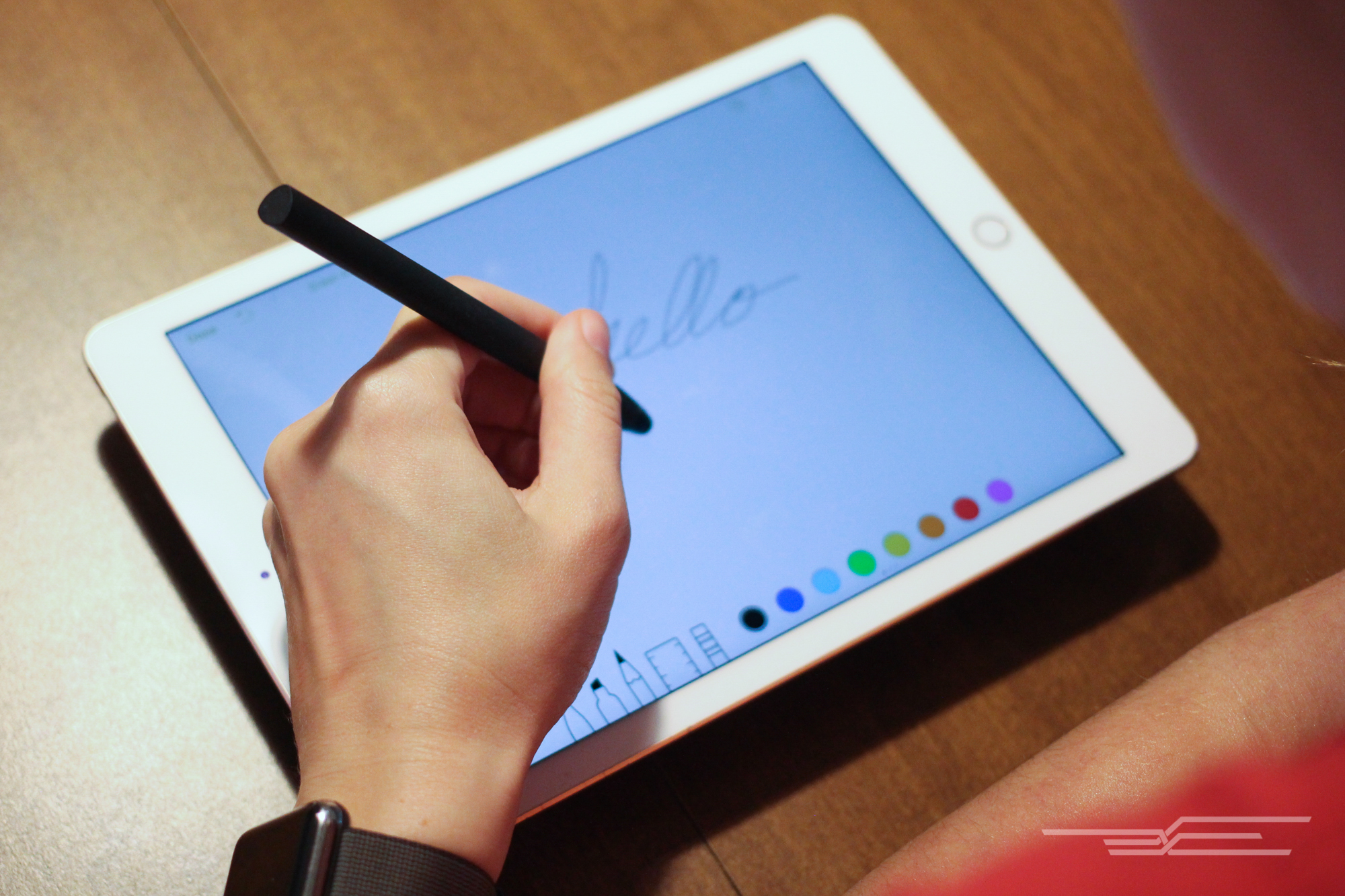
The Adonit Mark feels great in the hand, and it writes and draws well. Photo: Serenity Caldwell
Runner-up: For kids and accessibility

If the Adonit Mark is sold out or you don’t enjoy mesh-nib styluses, you can’t go wrong with the Studio Neat Cosmonaut. Photo: Serenity Caldwell
The Studio Neat Cosmonaut looks very different from most of the contenders in the stylus field—both its body and its nib are larger than those of every other modern stylus option we’ve seen. But this bigger size makes it a perfect choice for kids and people who have trouble gripping smaller pens.
The Cosmonaut’s rubber-coated aluminum body is sturdy and balanced; it feels great in the hand of a child, adult, or senior. It’s a big tool, and though its balance and resistance allow you to do excellent line work, you have to trust in the Cosmonaut’s nib precision—the stylus’s chunky body often blocks your view of the area you’re working on. For zoomed-in illustrations, loose sketching, or big writing, however, the Cosmonaut is a delight to work with. The Cosmonaut can get heavy during lengthy drawing sessions, and at around $25 at the time of this writing, it’s more expensive than the Mark. But if you want a solid stylus with a unique profile and excellent durability, you can’t go wrong with it.
For iPad Pro users: Apple Pencil

Photo: Serenity Caldwell
If you’re a professional illustrator, calligrapher, or artist, or if you need impeccable handwriting and annotation on glass, you need the Apple Pencil. If you’re an intermediate artist taking the next step, you need the Apple Pencil. And if you like using a stylus to navigate your tablet, you’ll love the Apple Pencil. The big caveat is that the Pencil currently works only with the iPad Pro models. But because Apple makes the Pencil, as well as the iPad, iOS, and software kits for developers, the Pencil can take advantage of special features (such as side-touch shading, thanks to data gathered from the Pencil’s tilt) that styluses from other makers simply cannot.
This guide may have been updated by The Wirecutter. To see the current recommendation, please go here.
Note from The Wirecutter: When readers choose to buy our independently chosen editorial picks, we may earn affiliate commissions that support our work.
Apple to Bolster Presence in India Through Tax Concessions and New Factories
Following reports this month that Apple has been in talks to manufacture its products locally in India, as well as set up a distribution center in the country, an article by Bloomberg today suggests that the Cupertino company is now asking India to offer up tax concessions on iPhones created within its borders.
According to people familiar with the matter, Apple is asking for lower import taxes and manufacturing duties, which could lead to lower-cost iPhones — a solution that Apple CEO Tim Cook has admitted is needed in India.
In a separate report by The Times of India, industry sources claim that Apple is looking to build an iPhone manufacturing plant in Bangalore, India and begin production as soon as April. Specifically, Apple supplier Wistron is said to be the partner for the Bangalore facility, and the plant is poised to be a major contributor to the Indian iPhone supply chain by the end of 2017.
Top sources in the company confirmed to TOI that Apple is “very serious” about beginning assembly operations —and thereafter full manufacture — in India by the end of next year. “Bangalore is being looked at seriously,” said multiple sources within the company. Local manufacture will help Apple price its phones competitively as full imports attract 12.5% additional duty.
Earlier in the year, Apple announced plans to build an iOS App Design and Development Accelerator in Bangalore in order to support engineering talent and boost growth in India’s iOS developer community. Around the same time that the Accelerator was announced, the company revealed plans for a new development center in Hyderabad, India focused on Apple Maps development.
The concessions and new Bangalore-based facility are the newest steps in Apple’s attempt to bolster its presence in India. This year, Apple struggled with the government’s rules on foreign direct investments, but a ruling over the summer finally cleared the way for Apple to begin expanding its retail presence in the country. Despite India’s own growth as the third-largest smartphone market in the world, Apple sold 35 percent fewer iPhones in India throughout 2016 than it did in 2015.
Tags: India, Wistron
Discuss this article in our forums
MacRumors Giveaway: Win a G-Drive USB-C SSD or HDD From G-Technology
For this week’s giveaway, we’ve teamed up with G-Technology to offer MacRumors readers a chance to win either a 1TB G-Drive Slim USB-C SSD or a 1TB G-Drive Mobile USB-C hard drive.
The G-Drive Slim USB-C SSD is an ideal accessory to use with either the MacBook or the new MacBook Pro, both of which are equipped with USB-C ports. Available in 500GB or 1TB capacities for $229.95 or $379.95, respectively, the G-Drive Slim is lightweight and portable with a sleek aluminum casing in Silver or Space Gray that matches Apple products.
It features USB 3.1 Gen 2 technology and supports transfer speeds of up to 540MB/s. It’s bus-powered and while designed for USB-C machines, it also ships with a USB-C to USB-A cable for use with older Macs.

The G-Drive USB-C Mobile is similar to the Slim SSD, but it’s more affordable at $119.95 and features a 1TB 7200 RPM hard drive. The G-Drive USB-C Mobile features support for USB 3.1 Gen 1 with transfer speeds of up to 136MB/s.
It’s also made from a lightweight aluminum and is small enough to be tucked into a purse, pocket, or backpack. It comes in Silver, Gold, Space Gray, and Rose Gold to match Apple’s line of MacBooks. The Rose Gold, which we’re giving away, is an Apple-exclusive color (and it’s on sale from Apple.com as part of Apple’s USB-C sale). Like the Slim SDD, it comes with both a USB-C to USB-C cable and a USB-C to USB-A cable for use with older machines.

To enter to win our giveaway for either a 1TB G-Drive Slim USB-C SSD or a 1TB G-Drive Mobile USB-C hard drive, use the Rafflecopter widget below and enter an email address. Email addresses will be used solely for contact purposes to reach the winner and send the prize. You can earn additional entries by subscribing to our weekly newsletter, subscribing to our YouTube channel, following us on Twitter, or visiting the MacRumors Facebook page.
Due to the complexities of international laws regarding giveaways, only U.S. residents who are 18 years of age or older are eligible to enter. To offer feedback or get more information on the giveaway restrictions, please refer to our Site Feedback section, as that is where discussion of the rules will be redirected.
a Rafflecopter giveawayThe contest will run from today (December 30) at 9:00 a.m. Pacific Time through 9:00 a.m. Pacific Time on January 6. The winners will be chosen randomly on January 6 and will be contacted by email. The winners will have 48 hours to respond and provide a shipping address before new winners are chosen.
Tags: giveaway, G-Technology
Discuss this article in our forums
 AIVAnet