


Nissan’s autonomous driving future: The Qashqai and beyond
Autonomous vehicles are no longer just a figment of the imagination, nor are they the preserve of science fiction. They are coming and whether you like the idea or not, in 10 years time, it’s likely that autonomous vehicles will be considered the norm.
Each automotive company has different ideas and plans with regards to their autonomous futures, but they are all gunning for the same goal: safer roads and stress-free transportation.
This is everything you need to know about Nissan’s autonomous plans and what we can expect from the company that has the potential to quickly bring this technology to the masses.
When will we see autonomous Nissan cars on the road?
Nissan’s first step into autonomous technology – called ProPILOT – is already available, it’s just not in Europe or the US just yet.
Nissan launched the ProPILOT on the Serena in Japan in August 2016 and at that time announced it would be coming to the face-lifted Qashqai in Europe in 2017. The US and China will also see ProPILOT eventually, but as yet no specific timeline has been detailed.
Nissan has, however, said that ProPILOT will be introduced on 10 of its core models by 2020. It hasn’t yet been revealed which models these will be, but we’d hazard a guess that a new electric Nissan Leaf will be one of them.
Pocket-lint
What is Nissan ProPILOT and how does it work?
Nissan’s ProPILOT is not a completely automated self-driving system like some others. Instead it is more of a driving assist function that incorporates self-driving features. Think of it as dipping your toe into the water rather than diving right in.
ProPILOT is activated and deactivated using a dedicated button on the steering wheel and it will take care of steering, acceleration and braking, based on information obtained through a mono camera using advanced image-processing software.
Based on the information received and processed, the car will respond accordingly, whether that means slowing down to keep a safe distance between you and the preceding car, turning a corner keeping in the middle of the lane, or speeding up to keep up with traffic flow.
Your hands, or a finger, will need to remain on the steering wheel and it has been designed for use in single-lane traffic for now. By 2018, Nissan plans to introduce multi-lane highway support, followed by urban areas and junctions support in 2020.
- Driving with Nissan ProPILOT: Removing the legwork
What’s next for Nissan’s autonomous driving technology?
Nissan ProPILOT isn’t as advanced as other systems already out there, like Tesla’s Autopilot that is already capable of handling multi-lane highways, but that’s not necessarily a bad thing.
Nissan confirmed at its second Nissan Futures event, held in Barcelona in November 2016, that it is currently working on developing technology to enable autonomous vehicles to understand different social behaviours, no matter what country or city they are driving in.
As different countries and cities have varying attitudes and behaviours towards road use, autonomous vehicles need to be able to replicate the social interaction we currently have when driving ourselves, which, according to Nissan, isn’t an easy problem to solve.
Nissan is therefore contemplating the idea of developing an autonomous vehicle that communicates intent, as seen with its IDS concept, presented at the Tokyo Motor Show earlier in 2016.
At the second Nissan Futures event, a company spokesperson said it was better to communicate intent rather than tell people what to do; the autonomous car of the future might have coloured exterior lights to indicate to pedestrians that it is aware of them, or say “Stopping” or “About to Go” on a screen on its dash to tell you what it plans to do next.
Nissan has said that there would need to be a level of standardisation across companies to work effectively though, and it is also currently illegal in some countries to have extra exterior lights on vehicles so there is still a long way to go before we see this on our roads.
- Nissan IDS concept: The driveless car of the future?
Pocket-lint
What are the current obstacles for autonomous cars?
There are a number of other obstacles in the way of fully autonomous vehicles. One of those is trust, which may be gained through ideas like the vehicle communicating intent, but another major obstacle is policy. Governments and policy makers not only need to be on the front foot, but autonomous vehicles is a cross-policy issue.
Spokespeople on the topic of policy at Nissan’s Futures event said autonomous vehicles were not just about transport, but they cross over into other aspects too, such as healthcare. For example, at present an ambulance will normally have two medics, one of which will drive, while the other will attend to the patient. An autonomous ambulance could mean both medics could attend to the patient, but this would mean a change to more than just transport policies.
Other issues regarding policy appear when it comes to blame in an accident. Who is at fault – man or machine – if an autonomous vehicle is involved in a collision? It’s another question that needs an answer but Nissan has said there are currently some talks surrounding whether autonomous vehicles may have a data recording device, like an aircraft’s black box to help determine blame.
Autonomous driving: Passenger vs pedestrian?
Policy and trust aside, and you have another million dollar question that no one seems to be able to answer. What happens if an autonomous vehicle finds itself in a situation where it has to make a decision between avoiding a pedestrian and keeping its passenger safe from a collision?
Dr Maarten Sierhuis, director of Nissan’s research centre in Silicon Valley, told us that the company wouldn’t develop a system with these ethical decision making capabilities.
Sierhuis said the system will in all cases avoid obstacles, but it’s not possible to develop a system that knows all situations.
Pocket-lint
Nissan’s autonomous driving future: Conclusion
At the moment, autonomous vehicles are a thing, and there are plenty of companies invested in making them a reality, Nissan being one of them.
Next year we will see Nissan take its first step with the launch of its ProPILOT technology on the Qashqai, and the four years following will see it introduced to more cars, as well as become more advanced, adding support for motorways and urban areas.
Beyond that, we know Nissan is working on making its autonomous technology as clever as possible and as human as possible, but there is still a long way to go with regards to policy and trust.
UK vinyl sales made more money than music downloads last week
Digital music might be the future, but legacy formats like vinyl aren’t going away any time soon. New figures from the Entertainment Retailers Association (ERA) have shown that more money was spent on vinyl records than digital music downloads in the UK last week, highlighting a significant shift in how consumers are choosing to buy their music.
Figures show that during week 48 of 2016, consumers spent £2.4 million on vinyl, while downloads took £2.1 million. Compare that to the same period last year when £1.2 million was spent on records, with digital downloads bringing in £4.4 million. The ERA puts the surge in sales down to recent shopping events like Black Friday and the popularity of the format as a Christmas gift. It’s also helped by the fact that Sainsbury’s and Tesco now stock records in many of their branches.
It’s welcome news for vinyl lovers and the music industry in general, but digital music is also going from strength to strength. Instead of buying music to keep, Brits are increasingly turning to streaming services like Spotify to get their music fix. Last weekend, The Weeknd broke streaming records on Spotify after his new album was streamed 40 million times on day one and 223 million times in its first week.
It’s also worth considering that vinyl albums are often a lot more expensive than downloads. BBC News reports that last week’s biggest-selling vinyl was Kate Bush’s triple-disc live album Before The Dawn, which costs around £52. The same album is £13 on Amazon. Downloaded albums are still more popular, though: last week saw 295,000 digital downloads versus 120,000 vinyl album sales.
Recent research suggests that some people don’t even buy vinyl to listen to, with 7 percent of collectors admitting they don’t own a record player. It’s believed that some buy records to help support artists they like, while others may use the sleeves to decorate their home.
Via: BBC News
Mint adds payment tracking so you’ll never pay a late fee again
Missing even one bill payment can have serious repercussions for your credit. Not only does doing so ding your score, it can also invoke penalty and overdraft fees, as well as boost the interest rates on your account. In fact, Americans on the whole spend more than $77 billion in penalties annually for missing their Due By dates. Mint, the personal finance management app from Intuit, aims to reduce those costly mistakes with a helpful new update for its mobile users: unified bill and payment tracking.
So rather than rely on calendar reminders and post-it notes like some people (*raises hand*), these new features will integrate all of your outstanding debt structure into Mint’s architecture so you can see exactly where your money needs to go, all in one screen. And when you have all of that information sitting in front of you, it’s much easier to remember to pay up.
And if that isn’t enough incentive, Mint can also push reminder notifications with both the bill amount and due date to your mobile device. You can even make payments directly from that notification so you have no excuse not to, aside from a lack of funds. What’s more, if you link the app to your checking account, Mint lets you pay an unlimited number of bills — fee-free — every month. Best of all, the entire process in handled within the Mint app so you don’t have to remember logins for a bunch of different websites. As you build up your credit history, Mint will show you how that affects your overall credit score through real-time updates from all three major credit bureaus.
Google WiFi review: A hassle-free router comes at a price
Google’s not new to the hardware game, but with its “made by” range, the company is making a concerted effort to marry its smart software and the gear we run it on. We’ve already tried the Pixel phones, Daydream View VR headset, Chromecast Ultra and Google Home, but until now, there was one made by Google gadget we’d yet to test, and it’s the one that arguably ties all the rest together: Google’s aptly named “WiFi” router.
Google WiFi builds on the idea of OnHub. With OnHub, Google partnered with TP-Link and ASUS to build routers that didn’t look terrible and were easy to use. Google WiFi shares those goals, and adds one more: to eliminate the WiFi black spot and the tyranny of hokey WiFi extenders. How will it do this? Well, you’ll need to buy multiple devices ($129 each, or $299 for three). But if you do, Google promises the mesh network its router automatically creates will best most other solutions out there for full-home coverage and ease of use.
There’s a few things I’ll say right up top. Google WiFi is a lifestyle device. It’s designed for people who don’t enjoy navigating the typical router admin console (or don’t even know that their router has one). If you’re the sort of person who wants to do lots of port-forwarding, or manually configure DHCP and other such things, this might not be for you. It’s not that Google WiFi can’t do those things (it can); it’s more that its focus is elsewhere.
One of those areas of focus is ease of use. Now, let’s be fair, setting up a router isn’t usually that hard, but it often involves an ugly web admin panel that — ironically for a device that helps you enjoy the internet — looks like it was designed in 2003. You’ll set Google WiFi up with an app (Android or iOS). That might have some of you groaning, but it’s all very simple and painless. In just a few steps you’re good to go. I’ll have more to say about the app later, but for now, suffice to say setup is a more contemporary experience.
Another priority for Google was making a router that looks nice, and I’d say the company did indeed achieve that. A quick internet search for “wireless router” returns a slew of angular black boxes with ugly aerials that might look okay in an office, or basement, but nowhere else. Google WiFi’s white cylindrical design, however, is fairly unremarkable and that’s precisely the point.
That is to say, Google WiFi doesn’t catch your eye, and should fit in with a wide range of home decors. I personally like how it looks. One of the things that puts me off Amazon’s Echo devices is the slight gadgety appearance. Google WiFi, on the other hand, gets the balance of function and forget-ableness just right.
Performance
But what good are a modern user interface and a sleek design if a router doesn’t get the basics right? Fortunately, Google WiFi does. The first time I ran an internet speed test, I experienced a slight sinking feeling. I realized my current Netgear router has been short-changing me to the tune of about 70 Mbps of download speed. This isn’t to say that Google’s product is the solution; it’s what it’s replacing that’s likely the problem. But it’s a problem that’s potentially sitting in living rooms and dens everywhere, without people knowing it.
That’s because there’s a general resignation that WiFi never gives you the full internet speed you’re paying for. So much so, that I barely shrugged when the 100Mb of cable internet I signed up for often translated to 30 Mbps over WiFi. I also experienced similar, if less drastic speed improvements (35Mbps to 48Mbps) when I installed Google WiFi at a colleague’s house, and that was with both routers just feet away from the PC.

In both instances, the incumbent router had been set up with default settings and basically left to do its thing. Could a bit of digging in the settings have improved the old routers’ performance? Maybe? Probably? But that’s not really how it should work for such a basic task as internet bandwidth. I also experienced similar performance improvements with PC to PC file sharing, with Google WiFi almost tripling the transfer rate of my old router every time.
These tests are not overly scientific, but they reflect how many of us — specifically the customer Google is going after — use or care about our home WiFi. Most of us want to know we’re getting the best speed we can, and that our network won’t choke when we share files. On these two basic tasks, it’s a solid thumbs up for Google WiFi.
Modular design
If you have a larger house, you’ll probably want to add extra WiFi points. With Google WiFi this is very easy to do; just tell the app that you want to add a new device, and plug it in. That’s more or less it — no need to bother with things like bridge mode (though you can do this if you have an existing router you like). Of course, there are various existing ways to patch together multiple routers — many of which are more affordable than Google’s $299 three-pack. Still, Google’s solution is elegant; an example of how these things should work.
Google claims that WiFi and the mesh network it creates offers some important performance enhancements. First up, of course, is coverage. Google WiFi’s design team wants you to think of it like a lightbulb, with you putting nodes wherever you need them. As a basic guide, Google advises one unit for about every 1,500 square feet of space. Unlike repeaters that can cause problems with handovers (when moving back and forth between the router and the repeater), the mesh network should handle all that seamlessly. It’s something most people only notice when it goes wrong, but the idea is you no longer have to feel like you’re “roaming” in your own home.
Another benefit is that Google WiFi automatically checks your WiFi is on the least congested channel every five minutes, swapping as needed. The same goes with hopping between 2.4 and 5GHz. All of this happens in the background, so theoretically you’re always getting the optimum settings. At the very least, the auto-channel setting should reduce the need for resetting the router. Conventionally, devices choose a channel on start-up and stick with it, which is why the connection can nosedive if that channel gets busier later.

While I was reading other smart router reviews I came across several comments with a shared theme. Something along the lines of “How hard is it to read up on basic networking to improve your WiFi speed?” or “Just flash custom firmware and you can set up a smart network in just a few hours.” I’ll come clean: I used to be one of these people that would install DD-WRT and get deep into the settings. But as my technology needs and financial situation have changed, I kinda just have other priorities, so the idea of a device that does its primary job well and requires zero fuss is appealing.
It’s also a shame that there’s no modem inside Google WiFi. The result being that while it’s a probably better looking than your current router, you still have to plug it into your — probably ugly — modem. In many cases, including my own, that modem is also my old router. Sure, it means I can hide the old dual-purpose box and not worry about losing performance, but it would have been nice to be able to replace it completely.
Smart features and software
There are some drawbacks to simplicity, though. The fact that you interact with Google WiFi via an app will be a bit of a turnoff for some more advanced users. As mentioned, you can get under the hood with manual settings, but doing so on an app is less than ideal. Also, if you want to connect multiple devices using a cable you’re out of luck, as Google WiFi only has two Ethernet ports. That said, my internet speeds were the same over WiFi as they were over a cable, but if your networking needs differ, and a cable LAN is important, just know you’re limited on built-in ports.
What the app lacks in deep networking settings, it tries to make up for with other useful features. “Network Assist” puts a number of practical tools at your fingertips, some of which aren’t unique to Google WiFi, but you won’t need to know how they work — just that they do. One such feature is “Priority device.” As the name suggests, with this option, you can tell Google WiFi to prioritize any phone, laptop or smart TV (basically anything on your network). So if you’re watching Netflix while downloading something in another room, and that multitasking is causing lower-quality streaming, you can temporarily give preference to your smart TV. If you have enough internet bandwidth, this might not be a big deal, but if you’re constantly maxing out your connection it can be helpful.

You can also stop specific devices from connecting at all with a feature Google is cruelly calling “Family WiFi.” In short, you’ll be able to “pause” the internet for any device at will. The “Family” part of the name hints that this is a tool for parents to use to take control over their screen-hugging kids’ internet time. It sounds like a recipe for a family argument to me, but it’s handy if you want to make sure your progeny aren’t distracted with Facebook at the dinner table. Unless, of course, they have a separate cellular data plan. As the wise Jeff Goldblum once said: Life finds a way.
Network Assist isn’t just about restricting internet; it also makes sharing your home internet easier too. If you have a ridiculously complex password, sharing it from the app is easy. There’s an option to copy it to you clipboard and share it just like you would a photo or link. In fact, you can share it through pretty much any messaging app on your phone, so if your friends are all about Trello or Twitter DMs, you’ll be able to ping them the WiFi password on their platform of choice. You could also just write it down or tell it to them, but I’m all for more options.
If, on the other hand, you don’t want to share the keys to your precious WiFi, you can create a temporary guest network with a whole new password. This guest network operates independently of your main one, which is useful if you want to limit access to shared folders and files. This feature is increasingly common on modern routers, just again, made much more simple here.
Two more features to which Google gives top billing in the app are “Network check” and “Home control.” The former, as the name suggests is a simple speed test, with independent checks for your device to the router, and the router to the internet. That’s helpful if you want to figure out where a bottleneck in speed is coming from, but sometimes it’s a little vague. The option to test your device doesn’t offer much feedback beyond “good” (I never saw what it says if things aren’t good).

Testing the internet is a little more helpful, with the device confirming the speed of the internet coming into your house, with two clear numbers for up and down speeds, along with a basic guide on whether that speed is good enough to stream HD or 4K video. Because Network Assist connects to the cloud, you can run these speed tests remotely, too. That’s great for obsessives like me who want to make sure their home connection is working fine at any time of day.
Google WiFi also has hooks into your smart home. The options aren’t exhaustive right now, but Network Assist currently supports Philips Hue lighting controls, and can also tell you what streaming devices you have available. It also supports Amazon Alexa (via IFTTT), with a number of handy recipes already available. For example, if you want to know when your kids get home (or leave), Google WiFi can send you an email when their phone connects/disconnect to the network. Again, this will depend how savvy your kids are (expect excuses like “my battery ran out, I was definitely home on time”).
I asked Google why it didn’t combine Google Home and Google WiFi as one do-it-all product. It feels like it could, or should, be. The official answer is that Google wanted to focus on eliminating the WiFi pain points without complicating things too much. I was also told, though, that the teams work together closely, so I wouldn’t be surprised if the two products eventually began to merge.
The competition
If many of these features sound familiar, it’s because there are a few products on the market right now that offer an eerily similar traits to Google WiFi (and that’s to say nothing of OnHub, which Google itself had a hand in). Eero and Luma, to name just two competing devices, use the same modular, mesh technology, and each offer easy-to-use smart features. As of this writing, Eero is a little pricier, costing $199 per device or $499 for a three-pack. Luma costs $149 for a single unit, but matches Google at $299 when you buy three together.
With all these products doing similar things at a similar price, there’s not a lot to distinguish them. Your choice will likely depend on aesthetic preference, as well as smart home compatibility. The latter is a bit hit and miss at the moment, but you can be sure this is the area most ripe for differentiation. Google is off to a decent start with Hue and Alexa, and you can expect more devices to be supported in the future. Either way, if you’re interested in this new breed of router, you have several good options.
Wrap-up

For many, buying a router is like buying a refrigerator. You want one that does the job, that maybe doesn’t look terrible, and doesn’t cost too much. And once you turn it on, you ideally won’t have to think about it. Likewise, there are people who want to measure the temperature constantly, have the ability to create different zones for different products and make sure no heat is getting needlessly lost with constant checks and tests. Google WiFi is more for that first group of people. Though those in the latter camp are only somewhat catered to here.
More practically, many people will balk at the idea of paying $300 (or more) to achieve something that they can jury rig themselves for a fair amount less. Those people will also likely have the patience to shop around a bit and find something that works for them. For convenience and good performance right out of the box, though, Google WiFi is a solid choice. It’d be nice if Google had included a modem, even as a part of a kit. It also feels like Google Home and WiFi could really have been the same device. Still, for a first step into Google-branded home WiFi hardware, the company is off to a good start.
Apple Preparing Diagnostic Tool in New iOS Update as iPhone 6s Battery Issue Expands
A few days after issuing a message on its Chinese website regarding the battery shutdown issue plaguing some iPhone 6s users, Apple today added a new message onto the site. The update reiterates on the cause of the issue — some batteries were exposed to “controlled ambient air” during manufacturing — while also expanding the scope of the affected range of customers facing the problem.
In the original message, Apple noted that “a small number” of iPhone 6s smartphones made in September and October of 2015 were facing unexpected shutdowns due to their prolonged exposure to controlled ambient air. Now, Apple said that it’s discovered a few customers “outside of the affected range” who have also been facing unexpected shutdowns of their iPhone 6s devices.
A small number of customers outside of the affected range have also reported an unexpected shutdown. Some of these shutdowns can occur under normal conditions in order for the iPhone to protect its electronics. In an effort to gather more information, we are including additional diagnostic capability in an iOS software update which will be available next week. This will allow us to gather information over the coming weeks which may potentially help us improve the algorithms used to manage battery performance and shutdown. If such improvements can be made, they will be delivered in future software updates.
As it continues to face new issues with the “small number” of affected customers, Apple is preparing an iOS update that it said will introduce an “additional diagnostic capability” so the company can gather information and improve its ability to manage the battery performance levels and untimely shutdowns. The update, presumably iOS 10.2, will be made available sometime next week, and Apple mentioned that if any improvements and solutions are discovered thanks to the diagnostic tool, “they will be delivered in future software updates.”
For those who think their iPhone 6s is affected, Apple launched a repair program last month offering free battery replacements for any iPhone 6s manufactured between September and October 2015 which are experiencing shutdowns. There’s also a new tool so customers can enter their iPhone’s serial number to see if it’s eligible for the replacement program.
Related Roundup: iPhone 6s
Buyer’s Guide: iPhone (Buy Now)
Discuss this article in our forums
Lenovo PHAB 2 debuts in India with 6.4-inch 720p display, 4050mAh battery
Lenovo kicked off sales of the Tango-enabled PHAB 2 Pro in the U.S. last month, and now the standard variant of the phone — without the Tango tech — has made its way to India for ₹11,999 ($180). The phone will be available exclusively on Flipkart starting December 9.
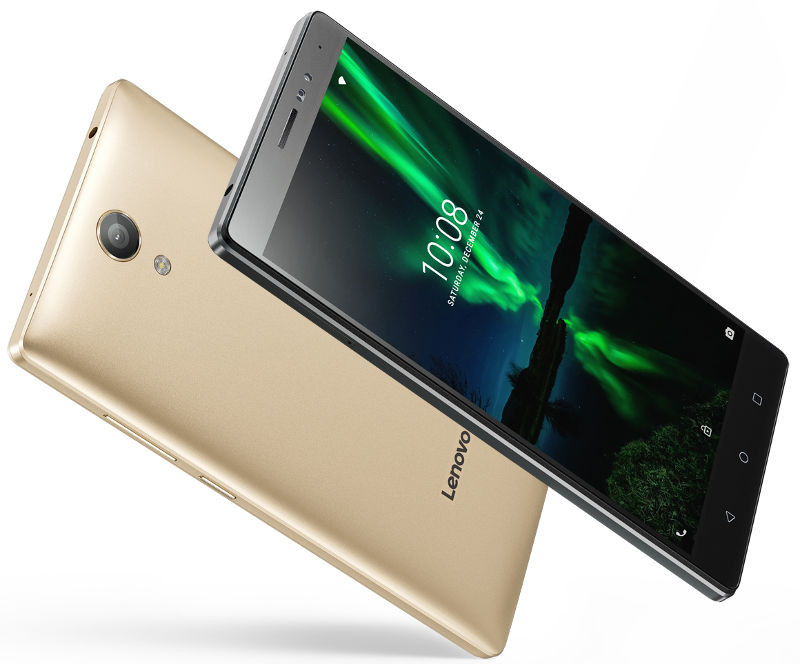
The highlight of the phone is a massive 6.4-inch display, but unlike the PHAB 2 Pro’s QHD panel, the standard PHAB 2 offers a paltry 720p panel with a pixel density of 227ppi. Other specs are in the form of a 1.3GHz quad-core MediaTek MT8735 SoC, 3GB of RAM, microSD slot, 13MP camera at the back, 5MP front camera, LTE with VoLTE, Dolby Atmos, Dolby Digital Audio Capture 5.1, and a 4050mAh battery.
On the software side of things, the phone runs Lenovo’s Vibe Pure UI on Android 6.0 Marshmallow. There isn’t anything about the PHAB 2 that particularly stands out, and you get phones with much better hardware for less. Even if you’re interested in the large screen for media consumption, Xiaomi’s Mi Max is a much better alternative.
The best TV shows to binge watch over Christmas
On-demand TV has become more and more popular over the past few years. For many, it’s now their default way to enjoy TV. Gone are the days of putting in a videotape and setting a timer, it’s now all about setting up series link or loading up a streaming app. With an extra long Christmas weekend to look forward to this year, there’s plenty of time to catch up on all those series you (and maybe the family) have been meaning to watch. Here’s what we think you should be streaming.

The Grand Tour – Amazon Prime Video
You either love them or hate them. If you’ve been waiting for Amazon’s version of Top Gear, then you’ll likely enjoy following Clarkson, Hammond and May as they take a variety of vehicles on a Grand Tour across the globe.
Black Mirror: Seasons One, Two and Three – Netflix
Charlie Brooker’s TV series has a new home on Netflix. Dark technological science fiction at its best. All three seasons are now on the streaming service but you really don’t need to watch them in order.
Goliath: Season One – Amazon Prime Video
If you like Ally McBeal and Boston Legal, then you’ll likely enjoy this Amazon Original drama from the creator of those shows. It is, as its name suggests, a David versus Goliath battle fought in America’s modern legal system. The series follows a down-and-out lawyer, played by Billy Bob Thornton, as he seeks redemption in a justice system weighted towards those with money and power.
Trollhunters – Netflix
One for the kids. This Netflix Original from Dreamworks Animation will come into its own on the frosty mornings over the festive holiday. Follow teen Jim Lake Jr. as he stumbles upon a mystical amulet on his way to school one morning and inadvertently discovers an extraordinary secret civilization of mighty trolls living beneath his small town. It’ll be available for streaming from December 23rd.
Chasing Cameron – Netflix
In the interest of offering something for everyone, how about a reality TV series for teens? Chasing Cameron follows the international social media phenomenon that is Cameron Dallas as he attempts to take his career to the next level with his close friends in tow. Embarking on an international tour that takes them across Europe and down to Australia, the series explores the contrast between the selfies and snap stories of the group’s public online profiles and their personal lives, in a unique insight into the world of digital celebdom. Available from December 27th.

Stranger Things – Netflix
Fed up with everyone talking about this hit sci-fi series? Now is the time to play catch up. When a group of kids set out to find out what has happened to their missing friend, they stumble upon a mystery which involves secret experiments, terrifying supernatural forces and a mysterious girl. With a back drop of 1980s nostalgia and Winona Ryder starring, once you’ve started there will be no stopping you.
Westworld – Now TV
Watch the new HBO series that has everybody talking. Sir Anthony Hopkins, Evan Rachel Wood, Thandie Newton and Jeffrey Wright star.

Fleabag – BBC iPlayer
As the back to work blues set in, sneak in a day in front of the TV and grab the box set of this unexpected BBC3 hit comedy, written by and starring Phoebe Waller-Bridge. Fleabag is broke and unlucky in love and constantly battling with an almost innate need to be self-destructive. She’s very funny, though, so you’ll quickly grow to love her (but then despair at her).
Master of None – Netflix
It was about time Indian-American comedian Aziz Ansari got his own (proper) TV series. This award-winning TV series follows the personal and professional life of Dev (Ansari), a 30-something actor in New York who is tries to piece together his life, relationships and do the right thing for his family. Laugh out loud funny, Master of None should not be left unwatched.
Divorce – Now TV
Tragedy and comedy are never far apart, as is brilliantly demonstrated in this landmark US series that is being billed as Sarah Jessica Parker’s next Sex in the City. SJP plays Frances who is going through a painfully realistic divorce and humour is what she draws on to get her through it. If you never got to see the series when it played out on Sky, it’s not too late to catch up with this box set version from Now TV.
Peaky Blinders: Seasons One and Two – Netflix
Set in Birmingham just after the First World War, Peaky Blinders follows the Shelbys, a gangster family who run an illegal bookies and are famed for blinding people who cross them with razor blades in their flat caps. Macarbre stuff. Cillian Murphy plays gang boss Tommy Shelby, a man you’ll love to hate.

Planet Earth II – BBC iPlayer
Nature. BBC Documentary. Sir David Attenborough. ‘Nuff said.
Catastrophe: Seasons One and Two – Amazon Prime Video
A comedy that you’ll be able to breeze through in one sitting as both seasons host six half-hour episodes (a third is currently in development). Watch Sharon Horgan and Rob Delaney as they do all the wrong things trying to fall in love in London.
Other notable mentions:
Jessica Jones / Daredevil / Luke Cage – Netflix
Transparent – Amazon Prime Video
BoJack Horseman – Netflix
House of Cards – Netflix
The Morning After: Tuesday December 6, 2016
Hey there, it’s the Morning After! Oculus Touch has two pretty good reasons to stay inside this winter, and Amazon is killing checkout lines.
Is this the future of retail?
Amazon premieres the “Just Walk Out Shopping experience”

Amazon already has internet shopping boiled down to a single click or voice command, so what’s next? Apparently, a grocery store. It’s opened an employees-only shopping location in Seattle that uses ” computer vision, sensor fusion, and deep learning” to track what people take. There’s no check-out lane here — just take your stuff and go, while Amazon bills your account and emails a receipt. The store will open to the public in early 2017, and if things go well, we assume it won’t be the last one.
Are we dreaming or is “The Last Guardian” finally here?
What to watch, stream and play this week
It’s a big week for gamers, as Team Ico’s long-awaited game is finally arriving on PS4, while Dead Rising 4 and Gigantic hit Xbox One and PC. Mythbusters fans should prepare for the first season of White Rabbit Project on Netflix Friday, and The Walking Dead wraps up for 2016 on Sunday night.
Moar emojis
Android 7.1.1 is bringing some Pixel features to other phones
The latest version of Android is rolling out to some Nexus and Pixel devices, and it comes with some new features. Of course, there’s an expanded set of emoji, a new image keyboard with GIF search for messaging apps and the previously Pixel-exclusive app shortcut feature.
Connected carjacking
Police got BMW to remotely lock a luxury sedan while the thief was inside

In Seattle, someone stole a BMW 550i after the keys were left in it, but they didn’t make a clean getaway. BMW helped police track the vehicle down in an alley, then lock the doors remotely as the thief slept inside the car.
Reach out and touch faith
Review: Oculus Touch

It’s taken nine months, but Oculus finally has motion controls that make its VR truly immersive. Devindra Hardawar was quite impressed by these controllers, calling them “great gamepads” that are “exactly what Rift owners need.” Their downsides include a lack of rechargeable battery and failure to enable true room-scale VR — unless you invest further. Maybe next time?
It’s like Latitude but different
Google launches “Trusted Contacts” location sharing app

Google’s new “personal safety” app for Android (coming soon to iOS) may test the boundaries of trust and privacy. Trusted Contacts is obviously just for people who you don’t mind giving access to your location, and it works both ways.
The contacts you enable can see if you’re active, and if necessary, request to see where you are. If everything is fine, you’ll see the notification and deny it, but if not, it will automatically share where you are (or your last known location) after a brief delay. Alternatively, you can share your location to contacts you choose, and it will keep broadcasting where you are until disabled.
Did they miss the Westworld season finale?DeepMind Lab and OpenAI’s Universe give scientists a way to test their AI “agents.”
Alphabet (parent company of Google, remember?) released the code of its DeepMind Lab on Github, providing a 3D game-like platform useful for AI research. At the same time, the Elon Musk-backed OpenAI team opened its Universe platform to the public, where researchers can let AI roam across browser tasks, Flash games and GTA V.
But wait, there’s more…
- VW’s “Moia” aims for on-demand self-driving cars
- Holiday Gift Guide 2016: The Workaholic
- Uber creates an AI lab to help fuel its self-driving dreams
Nintendo classic ‘Excitebike 64’ skids its way onto Wii U
Wii U owners, it’s time to charge your GamePad — Excitebike 64 is zooming its way onto the Virtual Console this week. Costing $10 (£9), the game arrives on Wii U this Thursday alongside Wario’s stylish Wii adventure, Wario Land: Shake It.
Released in 2000, this classic N64 motocross racer ushered Nintendo’s Excite series into the 3D era, offering an addictive combination of fun mechanics and depth. Featuring a 20-course season mode, a track editor and even a procedurally generated endless ride mode, this was a game that was ahead of its time.
With third parties all but abandoning the system, and Nintendo’s output drying up ahead of the launch of its next console, Wii U owners could do far worse than this racing classic.
Frustratingly, the Kyoto giant is still remaining tight-lipped about how its recently unveiled account system will work, leaving the fate of digital purchases looking uncertain. After forcing consumers to repurchase the same Wii Virtual Console games on Wii U, let’s hope that the new Nintendo Network ID account system will carry over Virtual Console purchases to the Switch.
Source: Nintendo e Shop
Contact lens-based tech could lead to better EV power source
A team of scientists from the UK have developed a material made of polymers that could become the answer to humanity’s battery woes. It could apparently lead to supercapacitors — battery alternatives that can charge really quickly — up to 10,000 times more powerful than usual. Thus, if an electric vehicle uses the material, it can theoretically travel farther than current EVs. It can even go from empty to fully charged in a matter of minutes instead of six hours or so. Imagine what it can do for smaller devices. You could plug in a smartphone that uses it as a power source and literally watch its battery indicator fill up in a few seconds.
The team from the University of Surrey and Augmented Optics Ltd. applied the principles used to make soft contact lenses to create the material. In fact, the person who conjured up the technique to create soft lenses 40 years ago was one of the people behind this project. The material was designed to replace the electrolyte supercapacitors use, because while the devices can gulp electricity quickly, they’re typically not as dense (i.e., they don’t hold as much energy) as batteries. It also has other potential applications, as Dr. Ian Hamerton from the University of Bristol explained:
“While this research has potentially opened the route to very high density supercapacitors, these *polymers have many other possible uses in which tough, flexible conducting materials are desirable, including bioelectronics, sensors, wearable electronics, and advanced optics. We believe that this is an extremely exciting and potentially game changing development.”
*the materials are based on large organic molecules composed of many repeated sub-units and bonded together to form a 3-dimensional network.
Augmented Optics Ltd. already set up a company called SuperCapacitor Materials Ltd. with the intention of building a full scale prototype next year, so you might see the new technology in action much sooner than you think.
Source: SuperCapacitor Materials
 AIVAnet