


All About Chrome: How Google’s browser got everywhere
We’re moving along with our plans for Chrome. But first, let’s talk about what Chrome is and how we’re going to be doing it.
Here at Android Central, we like to talk about more than phones and tablets that use Android. Google news, carrier news and even huge mega-corporations we’re familiar with buying other huge mega-corporations for obscene amounts of money are all things we find interesting and think you will, too. One of those things that are poised smack dab in the middle of Google’s plans for the future is Chrome.
Long time readers — and we appreciate you being here — might know that I like Chrome. In fact, I’m more interested in Chrome than I am with Android, and I really like Android. Let’s just say I’m a fan. I know I’m not the only fan because Chrome keeps getting better and things that use it are being developed and sold every day. Companies don’t pour money into something that doesn’t offer a return for very long. But what is Chrome? When Android Central (and Mobile Nations as a whole) talks about Chrome here’s what we think and how we’re going forward.
Chrome is a web browser
There is a good chance you use Chrome if you have a computer you use to get online with. Windows, Mac and Linux all have official builds of Chrome from Google and it’s pretty popular on all three platforms. If you have a recently built Android phone, you have Chrome on your phone, too. Even people using an iPhone can use the Chrome browser.
All these different versions of Chrome are built on the same code base. They all have similar features and the same basic user interface. For all intents and purposes, the Chrome browser is the Chrome browser.
We’ll talk about Chrome the browser when something important or cool happens. If it’s something platform specific, you might find it at Windows Central or iMore. We’re not going to focus on Chrome the browser, but we’re not ignoring it.
Chrome is an operating system
Chrome is also an operating system that powers a whole lot of laptops, minicomputers and “stick” PCs. It follows the familiar design language we know from Chrome the web browser on other devices, and it even has a browser window that’s almost exactly like Chrome for Windows, Mac or Linux. But it’s more than a browser.
Chrome the operating system is also a complete application platform.
Chrome the operating system is also a complete application platform. It supports hardware-accelerated 3D graphics, rich audio and media playback, a full array of input devices and some of the highest resolution displays available on a laptop. It’s also very lightweight and designed to run well on the most inexpensive hardware so value-conscious shoppers can find a computer that’s worth buying. And unlike Android, none of these “cheap” devices get left behind.
The things that run Chrome OS
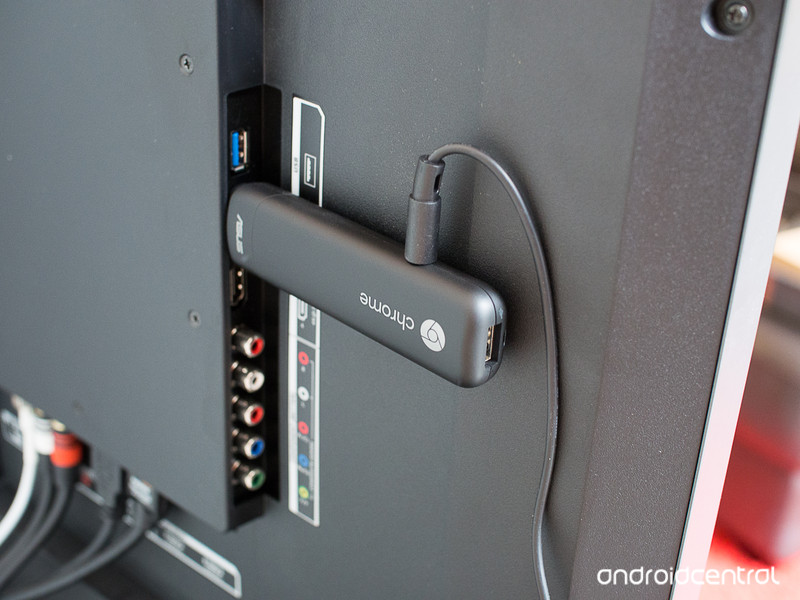
Chrome’s low system requirements make all of this fascinating. Whether you’re using a cheap and portable Chromebit or a high-end Chromebook like a Pixel or one of HP’s tricked-out models, Chrome is Chrome. You have the same UI, the same application platform, and the same code base. We’re going to talk a lot about the things that run on Chrome.
There are a ton of apps to talk about. Apps that are apps and run in their own space without any internet-powered code, apps that are extensions that are used to make your web browsing experience better and apps that are wrappers for an online experience like a code compiler or Microsoft’s Office suite. There’s something here for everyone, and we want to sort through it all.
More: The Best Chromebook apps
Some Chromebooks run Android apps. Android is now part of Chrome OS, and there is a lengthy list of Chromebooks, Chromeboxes and even a Chromebit or two that will be getting Android app support in the very near future. Google is taking their time here because businesses and schools depend on usable and worry-free Chromebooks. Android apps on Chrome was vetted very well and will continue to be vetted as it gradually rolls out to more devices.
Chrome is a lot of things but some will get more attention than others.
We expect all future Chromebooks and Chromeboxes will be built with Android support in mind. That’s going to influence our recommendations for apps and devices. We think that any new Chromebook you buy should have all the hardware features needed to support Google Play integration, and we’ll make our recommendations accordingly. As for apps, if the best app that fills a certain need is an Android app, so be it. As mentioned earlier, Android is now part of Chrome. We think pretending otherwise would be a disservice to you and to the people building the apps and hardware to run them.
It’s going to be great
We’re still an Android site. If I’m knee deep in something Chrome and I’m needed to look at something for Android, I’ll switch gears. We won’t be taking time away from Android phones so we can play with Chromebooks. We will still tell you how awesome Android can be and what you can do with it and let you know everything we think you want to know. We won’t be scaling anything back when it comes to Android.
It’s also OK if you’re not at all interested in Chrome. When you visit, you’ll find plenty of other content to go over, and once you’ve read everything there is to read we have a huge group of users in the forums who probably enjoy Android as much as you do. If you’re not participating there, you’re really missing out.
I like to be open and on the level. Maybe more than my bosses like, maybe not. I’m just letting everyone know what to expect now that I have more time to do the thing I’ve wanted to do for a long time. Trust me, it’s going to be great.
Chromebooks

- The best Chromebooks
- Should you buy a Chromebook?
- Google Play is coming to Chromebooks
- Acer Chromebook 14 review
- Join our Chromebook forums
Microsoft Research helped ‘Gears of War 4’ sound so good
Popping in and out of cover has been a hallmark of the Gears of War franchise since the first game came out in 2006. It hasn’t changed much because it didn’t need to. What’s always been an issue though is how thin the game sounds — a shortcoming of the underlying tech, Unreal Engine, powering it. But Microsoft owns the series now and has far more money to throw at it than former owners/Unreal Engine creators Epic Games did. With help from Microsoft Research, Redmond’s Gears of War factory The Coalition found a high tech way to fix that problem. It’s called Triton.
Two years ago Microsoft Research’s Nikunj Raghuvanshi and John Snyder presented a paper (PDF) titled “Parametric Wave Field Coding for Precomputed Sound Propagation.” The long and short of the research is that it detailed how to create realistic reverb effects based on objects in a video game’s map, to hear it in action pop on a pair of headphones and watch the video below.
At its simplest, Triton looks at an entire video game level and calculates the reverb properties of every material. From there, it applies realistic echo/reflection effects to the soundscape. This means incoming fire passing over a wooden crate sounds different than it would a brick wall.
It’s a much different approach compared to the way other games tweak audio to sound more realistic. Those rely on comparatively basic volume ducks and one-size-fits-all muting effects to create the illusion of occlusion and obstruction between you, the player, and the source of the sound. Peek your head up to take a potshot and the sound is unobstructed, but because you’re sitting behind a wooden garden box in a greenhouse instead of a cobblestone plaza it’s going to sound distinctly different.
Obstruction and occlusion are what keeps dialogue or battle sounds in adjacent rooms from playing at full volume, confusing the player as they walk around an environment, too. Rather than adjusting the levels of audio clips for distance, Triton considers the simulated materials and acoustical properties of the surrounding gamespace. Sound bounces off of a cave wall differently than a deserted hospital, so Triton does its best to simulate that.
If you need an example of obstruction and occlusion gone horribly wrong, fire up the recently released BioShock Collection — also based on a version of the Unreal Engine. Early on in the first game, a splicer enemy is singing a lullaby to the revolver in her baby stroller. Yes, she’s crazy, and the scene is absolutely creepy. But her voice sounds clear as day from two rooms over when there’s 30 feet (and a wall) between you. This is the type of thing that robs a scene of its immersion and atmosphere and undermines the developer’s intent: to make you forget you’re playing a video game.


“[Triton] is quite the complicated beast,” Gears 4 audio director John Morgan said. “The occlusion and obstruction values that Triton gives our game are really, really accurate to every listener position permutation possible on the map.”
A gunshot sounds basically the same in any situation in BioShock, but in Gears 4, a shotgun blast will ring out differently in the middle of a cathedral than it might in the entry way. Why? Because the ceiling is higher. It sounds like an insignificant detail, but getting it right makes a huge difference in terms of immersion — especially if you’re shooting a gun literally thousands of time in a game and rarely hear the same sound effect twice.
“A lot of people would be like, ‘Why does it sound like I’m in a bathroom when I’m going through this hallway?’ People playing the game didn’t understand why it was wrong, but it felt wrong to them,” Morgan said. “A big part of that is how does the dialog sound? How do the weapons sound? How does the reverb of that space, or the acoustic properties of that space sound? “If you get it wrong, people will notice right away.”
“People playing the game didn’t understand why it was wrong, but it felt wrong to them.”

Triton probing for sound data; player in the middle.
One of the examples Morgan is most proud of is near the game’s beginning. The new Gears have just finished fighting a few waves of robotic sentry guards and have to cut through a hospital’s maternity ward. Outside, trees sway in the breeze that descends from the mountains surrounding the deserted city; leaves rustle along the cobblestone street as the wind whispers around brick facades. The area feels like large open space because it sounds like a large open space.
That all changes once you bash through the door. Dialog has more echo as it bounces around the tiled floor and off of the propaganda posters lining the walls. Indoors, the shotgun has a more menacing bellow. Crossing the threshold back outside or into a glass-domed foyer and this changes because there isn’t a ceiling, or the one that’s there is higher and more reflective.
It’s this type of nuance and subtlety that set Gears 4 apart from its competition — even within Microsoft. But Triton’s fancy tech is a double-edged sword: Morgan said that a bulk of The Coalition’s early audio and engineering work was just getting the toolset up and running at parity with its previous project, the Gears of War Ultimate Edition remaster.
And because it’s specifically tailored to work with Unreal Engine and the third-party Wwise audio toolset, Triton’s benefits won’t make their ways into games using other design tools (even those made within Microsoft) anytime soon. Morgan said it’d be somewhat easy to port Triton into another Unreal game, but wouldn’t work with a custom game engine like, say, what Halo or Forza uses without a ton of additional labor.

If you get [reverb] wrong, people will notice right away.
John Morgan
What’s here is a far cry from the common tools used across everything Electronic Arts makes with its Frostbite engine.
“It’s not something we can just go. ‘Here, we’re handing this off to you.’” Morgan admitted. “That’s the tricky part right now if other game teams are looking at it. We’re trying to make it easier for them.”
That’s a shame, because save for Uncharted 4, there simply aren’t many other games that sound this good. Yet. A feature that’s exclusive to one game or toolset eventually finds its way elsewhere. Just look at the HDR audio system EA’s DICE studio pioneered with the Battlefield series or the lens flare effect that permeated practically every game in the late ’90s. That’s thanks in part to developers sharing their secrets at venues like the Game Developers Conference.
Microsoft has done the financial and physical heavy lifting to get Triton up and running, now it’s up to every other developer to follow suit and implement it or something similar.
“Nikunj [Raghuvanshi] has given a Siggraph presentation on [Triton], it’s not a secret anymore,” Morgan said. “People know we’re doing this, and that’s how it works.
“I think it’s a matter of going, ‘Do we want to spend the money on trying to make this happen?’”
BlackBerry DTEK60 vs BlackBerry DTEK50: What’s the difference?
BlackBerry has announced another DTEK handset, with the new DTEK60 joining the existing DTEK50.
BlackBerry has been shifting over to Android, first launching the Priv slider, an innovative handset that offered a lot of BlackBerry and a lot of Android. The DTEK50 followed, a mid-range spec device, with the new DTEK60 fitting into a higher tier.
Both offer BlackBerry’s take on Android, with added security functions, rapid patching and a few nice tweaks through the BlackBerry launcher and Hub.
This is how the BlackBerry DTEK60 and DTEK50 compare, as we run down the essential hardware specs.
BlackBerry DTEK60 vs BlackBerry DTEK50: Design and build
- Toughened glass vs plastic
- The DTEK60 is larger, but slimmer
- DTEK60 features a fingerprint scanner
BlackBerry is moving on from building its own phones and focusing on being a secure software licensing company instead, hence both the DTEK50 and DTEK60 are build by TCL. If they look familiar, that’s because that’s you’ll have seen similar handsets badged as Alcatel, with the DTEK60 looking like an Alcatel Idol 4S and the DTEK50 the Alcatel Idol 4.
The DTEK60 is the larger device measuring 153.9 x 75.4 x 7mm compared to the 147 x 72.5 x 7.4mm of the DTEK50. There’s a 30g difference in weight, with the DTEK60 coming in at 165g and the DTEK50 at 135g.
They offer a similar looking design, with a nice slim build. There’s an aluminium frame sitting at the core. The DTEK60 gets itself a toughened glass rear, where the DTEK50 has to settle for plastic.
There’s also the addition of a fingerprint scanner on the rear of the DTEK60, meaning fast and convenient unlocking with a tap.
BlackBerry DTEK60 vs BlackBerry DTEK50: Display
- DTEK60: 5.5-inch, Quad HD display
- DTEK50: 5.2-inch, Full HD display
It’s in the display where things are really different and the DTEK60 asserts itself in more of a flagship position.
The DTEK60 has a 5.5-inch display with a 2560 x 1440 pixel resolution, resulting in 534ppi. That means it has the big screen advantage, with loads of space to view and read. This makes this the largest BlackBerry display currently available.
The DTEK50 is smaller at 5.2 inches, settling for a 1920 x 1080 pixel resolution. That means there’s a lower 424ppi, meaning that the DTEK60 should look better than the 50 in all situations: it has a greater resolution and it packs those pixels in more tightly.
BlackBerry DTEK60 vs BlackBerry DTEK50: Hardware power
- DTEK60: Qualcomm Snapdragon 820, 4GB RAM, 32GB storage + microSD
- DTEK50: Qualcomm Snapdragon 617, 3GB RAM, 16GB storage + microSD
The story of the display is reflected in the story of the internal hardware too.
The DTEK60 carries a hardware load-out that’s familiar from flagship devices, using a powerful Snapdragon 820 chipset with 4GB of RAM. There’s double the storage at 32GB, which can be expanded using microSD.
The DTEK50 offers a mid-range chipset, so there’s less power on offer than its bigger brother, and less RAM at 3GB. Storage also takes a hit, dropping down to 16GB, although it also supports microSD, so that might not be a problem for you.
Given the difference in hardware, we’d fully expect the DTEK60 to be the faster device in everyday use and offer a smoother experience.
- BlackBerry DTEK50 review: Secure, just not top drawer
BlackBerry DTEK60 vs BlackBerry DTEK50: Battery life
- DTEK60: 3000mAh
- DTEK50: 2610mAh
The DTEK60, along with offering those increased hardware specs, also offers a larger battery. The bump up to 3000mAh gives the DTEK60 day-long use, with BlackBerry reporting a talk time of 26 hours.
The DTEK50, by comparison, sees itself with 17 hours of talk time.
If endurance matters, then go with the DTEK60.
BlackBerry DTEK60 vs BlackBerry DTEK50: Cameras
- DTEK60: 21-megapixel rear, 8-megapixel front
- DTEK50: 13-megapxiel rear, 8-megapixel front
Fitting the flagship vs mid-range positions that these BlackBerry devices occupy, there’s a 21-megapixel camera on the rear of the DTEK60, that offers 4K video capture.
This sits in comparison to a 13-megapixel camera on the rear of the DTEK50 which settles for 1080p video capture.
Both offer an 8-megapixel front-facing camera, with a selfie flash.
BlackBerry DTEK60 vs BlackBerry DTEK50: Price
- DTEK60: £475
- DTEK50: £275
The difference in price really shows the difference in positioning of these two handsets, with a full £200 between them.
However, the DTEK60 is likely to be the better performer in all areas. If you’re after a phone for irregular use, then the cheaper DTEK50 might fit that bill, but if you’re a power user, you’ll want the DTEK60.
Samsung says the Note 7 is safe at 60 per cent battery, issues software update
It seems Samsung is doing everything it can to save itself from the shambles that was the Galaxy Note 7. The South Korean phone manufacturer has just announced a software update for European phones that will limit the battery to charge to a maximum of 60 per cent.
- RIP Samsung Galaxy Note 7: A eulogy for a great but flawed friend
Samsung has said it’s issued the update as “the latest measure to reduce customer risk and simultaneously drive all remaining Galaxy Note 7 customers to replace their device immediately”.
Conor Pierce, VP IT & Mobile, Samsung UK & Ireland said the update is to increase customer safety and to remind Note 7 owners to replace their device as soon as possible, rather than live with a phone that can only charge up to 60 per cent. Samsung is currently running a Note 7 replacement programme that lets customers either claim a full refund on their device, or exchange it for another Galaxy smartphone, such as the Galaxy S7 or S7 edge.
- Samsung Galaxy Note 7 alternatives: Best super-sized smartphones that won’t explode
Samsung all but confirmed the existence of the Galaxy Note 8 when it announced a trade in programme in South Korea that lets Note 7 owners trade their device in for an S7 or S7 Edge for now, and then upgrade to a Galaxy S8 or Galaxy Note 8 when they’re released next year.
O2 Home offers an easy route down the smarthome path
O2 has a range of smarthome packs, aiming to make it easy to get your home connected.
Rather than you going out and buying a range of individual devices, the O2 Home approach will let you choose a pack, have O2 install it and support it in your home, in exchange for a monthly fee, rather than paying for it all upfront.
All the O2 Home devices use the same central hub, which then gives you control via one central smartphone app. This app – available via browser, iPhone or Android apps – will mean that there’s one point of access, rather than many.
There are three packs on offer called View, Comfort and Connect.
O2 Home View
- Two internal cameras
- A motion sensor
- Door sensor
- O2 home hub
- £30 a month
This pack is designed to give you a enough to be able to remotely monitor your home. Using the cameras you’ll be able to see what’s happening, with the motion and door sensors able to alert you to what’s happening when you’re away. If someone opens your back door, you’ll get an alert on your phone, for example.
O2 Home Comfort
- Tado thermostat
- Two smart plugs
- A motion sensor
- O2 home hub
- £30 a month
With more of a leaning towards controlling your heating, the big piece of the Comfort pack is the Tado thermostat. This will give you controls over your heating remotely, meaning you won’t be wasting energy heating an empty house. Smart plugs are handy, letting you turn lights on and off, or turn off devices like hair straighteners remotely.
O2 Home Connect
- Two motion sensors
- Two door sensors
- Two smart plugs
- O2 home hub
- £20 a month
The final pack that’s offered has a range of devices to get your home connected. This misses out on the big ticket items like the thermostat or the camera from the other packs, but it does have a range of sensors so you’ll know when things are happening at home.
Those packs aren’t all that O2 offers however, there’s a full selection of additional devices that you can add to the system and control through your O2 Home app, but you have to get those devices from O2, which is the catch.
There’s a parcel box that will allow deliveries to be securely placed in the box, with an alert letting you know you’ve got mail, there’s smart door locks, intruder sirens and even a keyfob to let you secure your house with a click of a button and a whole lot more.
Underlying the O2 Home is that monthly bill you’re paying, with a 2-year contract. O2 aims to add to that with additional support services, something you wouldn’t get it you just started piecing together your own smarthome devices.
On the other hand, the ongoing subscription costs might deter some, especially when some smarthome systems will let you get started for a low initial cost and let you piece together what you want, how you want.
O2 Home is available now, but it’s initially only available in the south east of the UK. There’s plenty of information on O2 Home at home.o2.co.uk.
Bank of America is building an AI helper for its mobile apps
If you’ve ever wanted to get financial advice from a computer, then you’re going to love what Bank of America is working on. The company has announced that it’s developing Erica, a “virtual assistant” designed to help customers better manage their finances. The service will sit inside the firm’s mobile banking apps and is designed to become your “trusted financial advocate.” This means that it won’t be long before an AI starts asking why you spend so much money on hats instead of paying rent.
Users will be able to interact with Erica over voice and text chat, and the ‘bot will be able to analyze your spending and spot patterns. You’ll get warnings when you have a few days of excessive spending well before you go into overdraft, advice on how to improve your credit rating and budgeting tips. More importantly, Erica will be available 24/7 to help you process transactions and, presumably, be the first point of call if have a problem with your account.
It all sounds pretty exciting, so it’s sad to learn that we won’t be able to spend any time with Erica in our phones until late 2017. Bank of America’s digital chief Michelle Moore said that the firm is still developing the tool and expects to launch it towards the back end of next year. Until then, you’ll just have to stare at yourself in the mirror and ask those tough questions about the size of your hat budget.
Via: Reuters
Source: Bank of America
New York’s free gigabit WiFi kiosks are coming to the UK
BT celebrated the 80th birthday of London’s iconic red phone boxes earlier this month, and while some of these are being updated for the digital age, there are still countless antiquated payphones across the country needing a new lease of life. Today, BT has announced plans to rip out hundreds of these and replace them with next-gen kiosks that’ll offer free gigabit WiFi, free UK calls, charging facilities and access to maps, directions and info on local services via an embedded Android tablet.
If the rejuvenation project sounds a little familiar, that’s because BT’s teamed up with Intersection to make this happen — the same subsidiary of Google’s Alphabet’s Sidewalk Labs that’s behind the Links kiosks in New York City. The monoliths themselves are identical, serving as up to 1 Gbps WiFi hotspots, providing free calls (headphones are recommended if you don’t want to broadcast your conversation through the booth’s loudspeaker), hosting two USB ports for emergency device charging and offering all kinds of useful information via the built-in tablet.
All of this will be paid for by advertising revenue, with two large displays on either side of the kiosks showing promotional material alongside public service announcements. Beyond what you can see, the pillars will also host environmental sensors for recording temperature, air and noise pollution, as well as traffic conditions and other metrics suitable for future big data/smart city applications.
The London Borough of Camden will be the first testbed for the payphone replacements, with 100 expected to be installed starting next year. “At least” 750 kiosks are planned in central London alone, with rollouts in other major UK cities over the next couple of years also on the agenda. Unsurprisingly, there’s no mention of free internet browsing on the embedded tablets, which had to be switched off in New York after less fortunate residents of the city began monopolizing them, sometimes for, erm… self-gratification.
Source: BT, LinkUK
‘The Division’ update keeps you playing past the endgame
Ubisoft is facing the same problem with The Division that Bungie encountered with Destiny: how do you keep people playing after they’ve hit the level cap, especially when extra content only goes so far? Its solution: dangle the promise of more loot. The developer has released that promised patch to overhaul the game’s mechanics, and its centerpiece is a new World Tiers feature that increases the difficulty of enemy characters in return for greater rewards. The higher the tier, the greater the chance you’ll get items you’d want to keep. You can also accrue experience beyond the regular and Underground level caps, and Ubisoft has tweaked loot drops across the board — you’re more likely to get equipment appropriate to your level, and any enemy has a chance of dropping advanced gear.
As for those overhauled mechanics? A lot has changed, and it’s mainly for the better. There have been “many improvements” to enemy AI, and it takes less time overall to kill them. Scavenging has been removed from the game entirely, for that matter, and you now progressively heal when you’re outside of combat. Weapons and armor have seen significant rebalancing as well. To top it off, skills behave very differently — there’s no longer a cap, but you face diminishing returns the higher your skill levels get.
It’s hard to say if the update will inject new life into The Division, although it at least clears the way for the DLC that Ubisoft had delayed for the sake of the new patch. From a cursory glance, though, the update appears to tackle some of the biggest complaints with online role-playing games of all kinds, especially shooter RPGs. You not only have more reason to play past the usual endgame, but should spend less time grinding or licking your wounds.
Source: Ubisoft
Dropbox pushes further into education by partnering with Blackboard
Dropbox is continuing to make the education market a priority as it looks for new customers. About six months after introducing its first product aimed specifically at schools, the company is announcing a new partnership with Blackboard Learn, one of the most widely-used “virtual learning” applications out there. If you haven’t used Blackboard Learn before, it’s a tool that makes it easier for students to collaborate and for professors to build an online home for their coursework.
The new partnership will put Dropbox right in the middle of Blackboard Learn — if you have a Dropbox account, it’ll be the default document sharing and collaboration tool in the app. Students will be able to work on documents shared in Dropbox together and use it to share files with their course instructors. And while Dropbox is now selling an education-focused product to universities, Blackboard Learn will support any level of Dropbox account. So students who may not want to shell out for a paid Dropbox account can still take advantage of it (until they run out of space, anyway).
Professors will also be able to use Dropbox as the default sharing space when organizing materials for a particular class. All the class materials can go into Dropbox, but students accessing the files won’t need to leave the Blackboard Learn experience — Dropbox will be integrated right into the software, without the need to jump to a separate website or app.

In a lot of ways, it’s similar to how Dropbox has been integrated deeply into Microsoft’s Office products over the last few years. When you use Office 365 online, Dropbox can show up as a default place to save and store documents, essentially putting it on the same plan as Microsoft’s own OneDrive. “A big part of our strategy is making dropbox work seamlessly with applications that people use every day, just like we did with Office,” says Billy Blau, head of Dropbox’s technology partnerships.
Given that 100 million people are using Blackboard Learn, it sounds like this partnership is another example of the company integrating with a tool that many of its education-focused customers are likely already using. And the company says that the number of education institutions using Dropbox jumped from 4,000 to 6,000 since it rolled out its new edu-focused plans in May. If you’re in education, either a student or a teacher, using one of Blackboard’s products, Dropbox integration should be rolling out today.
Google’s Jamboard is a 4K digital whiteboard for collaboration
It’s hard to recall today, but being able to edit a document at the same time as others was a transformative feature for Google’s suite of online office apps. That feature debuted a decade ago, though; these days, it’s something most of us take probably take for granted. And as useful as real-time collaboration is in Docs and Sheets, it’s not as organic as throwing ideas up on a physical whiteboard. So, in a bid to evolve the way we work once again, Google is unveiling Jamboard, a cloud-connected digital whiteboard that lets teams collaborate together no matter where they are.
At its core, Jamboard is basically just a 55-inch 4K display that you can use like a typical digital whiteboard. You can sketch out your ideas with a stylus for a small conference room full of coworkers. But what makes it quintessentially a Google product is its cloud connectivity. Whatever you draw on the device — which the company calls your “jam” — gets saved to your Drive folder automatically. You can pull in content from the web or other Google apps to buoy your ideas.
Most importantly, there are multiple ways for colleagues to collaborate on your work in real-time. Remote teams can use their own Jamboards to tune and contribute to your sessions as if they were right next to you. You can also pipe your jam to a Hangouts call, allowing you to potentially broadcast it to the world. And there are companion apps for Android and iOS that allow colleagues anywhere in the world to follow along. If you have an iPad or Android tablet, you’ll be able to take advantage of all of the editing tools available to Jamboard devices. Phone collaborators, on the other hand, will be able to see everything going on and input data. (You can also pipe your jams to the web, but there’s no online editor yet.)

The Jamboard itself basically looks like an oversized Nexus 10, right down to the thick bezels and the webcam above the screen. There’s a small tray at the bottom for the passive stylus and eraser, right below the downward firing speakers. You can mount it to a wall, just like any other flatscreen TV, or you could opt for the stand that sits atop four large caster wheels, which makes it easy to move about your office. There are USB and HDMI ports along the side of the Jamboard (yes, you can use it as a standard 4K display), along with volume controls and an input select button right behind the bottom-right corner.
In many ways, Jamboard is a physical extension of Google’s office suite. But it’s also a way for the company to promote freeform brainstorming without tying users to specific apps. “From the beginning… we were putting people in sort of productivity boxes from the start, you had to choose right away, are you going to use Docs, a spreadsheet, or a slide deck,” G Suite product director Jonathan Rochelle told Engadget. “We thought that might somehow limit creativity.”

Though the Jamboard’s stylus looks like a fat crayon, it’s capable of drawing lines up to a fine 1mm. There’s also a round eraser that also helps to clear off smudges from the screen. Both of those devices are passive, meaning you won’t have to worry about battery life or even pairing them. Any stylus-like device will let you draw on the Jamboard, and, just like a real whiteboard, you can also use your finger to erase things as well.
In my brief hands-on time with the device, I was impressed with the responsiveness of the stylus, which felt almost as fast as drawing on a real whiteboard. Jamboard is capable of detecting up to 16 touch points at once, so you and a few colleagues will be able to use the screen at once. Clearly, Google is targeting the same market as Microsoft’s Surface Hub, but it could be even more appealing to companies already tied to Google’s apps.
Google plans to release Jamboard for under $6,000 in the first half of 2017 for G Suite customers. The company has already started testing the device out with big companies like Netflix, Spotify and Instrument, and is accepting signups for an early adopter program for companies who are eager to start jamming sooner.
 AIVAnet