


The best of the rest at IFA 2016
Now that we’ve said goodbye to IFA 2016, it’s time to bring you highlights of the most interesting devices at the event. In this particular edition, you’ll find some that aren’t smartphones or wearables. We’re talking virtual reality massage chairs, fridges with built-in tablets, as well as adorable robots and drones. Acer’s ridiculous 21-inch gaming laptop is there too, along with its new convertible Chromebook. But that’s just part of it, so check out the slideshow and think about which items you want the most.
We’re live all week from Berlin, Germany, for IFA 2016. Click here to catch up on all the news from the show.
Netflix orders a series from ‘Mythbusters’ veterans
Still missing Mythbusters? It’s not about to come back any time soon, but you might get the next best thing. Netflix (which has a habit of resurrecting fan favorite shows) has greenlit White Rabbit Project, a series from Mythbusters Build Team veterans Kari Byron, Grant Imahara and Tory Belleci. The premise is right up their alley. They’ll investigate strange topics (such as exotic World War II weapons or seemingly impossible jailbreaks) and use science to determine the truth. You won’t have to wait long to see how well the concept works, either — Netflix premieres White Rabbit Project on December 9th, so you won’t have to put up with the year-long waits that come with other streaming releases.
Source: Deadline
John McAfee sues Intel for the right to use his own name
In the six years since John McAfee sold the eponymous antivirus company he founded to Intel for billions of dollars, the software creator has made the headlines for a variety of reasons. He’s already claimed that he could snoop on encrypted WhatsApp messages and would have “no problem” becoming president, but more recently he’s been trying to claim back something a lot more important: his name. Bloomberg reports that McAfee has sued Intel for the right to use his name after the chip maker blocked his request over trademark issues.
The lawsuit comes after McAfee joined online gaming company MGT Capital Investments as CEO and chairman in May and planned to rename the company John McAfee Global Technologies Inc. Intel, which owns McAfee’s “trademarks, tradenames, and associated goodwill,” warned that the rebrand would infringe on those properties.
In a complaint to the New York District Court, MGT and McAfee argue that “at no point in the Agreement did McAfee assign the rights to his personal name […] or agree to restrict his right to do business using his own name” and that the agreement with Intel “did not contain any non-compete provisions of any kind.”
In January 2014, Intel dropped the McAfee brand and began marketing the antivirus suite under “Intel Security.” According to Bloomberg, the chip maker is now trying to sell the company but will use the McAfee mark to help make it more valuable to buyers. Intel counsel Kerry Smith also warned that “any use of the McAfee name would be likely to dilute the McAfee mark […] by reducing its unique association with McAfee and Intel Corporation.”
McAfee and co. have requested a trial by jury in order to win the rights to his name. We wonder if his ‘How To Uninstall McAfee Antivirus” YouTube video will get an airing should they be given a court date.
Via: Bloomberg
Source: McAfee vs Intel
Bragi Unveils Wireless ‘Headphone’ Earbuds Ahead of Apple Event
Wireless audio company Bragi has today announced a new pair of Bluetooth earbuds simply called the “Headphone”. Based on the firm’s original crowdfunded Dash earpieces, the Headphone buds boast the same overall design, but lose some features in favor of a more affordable price tag.
According to Bragi, the main physical difference is the Headphone’s three physical buttons, which replace the touch controls found on the Dash for controlling playback, audio transparency, volume, and taking calls.
The activity tracking features native to the $300 Dash buds are also missing in the new earpieces, but their removal shores up battery life on the Headphone, with Bragi promising up to six hours of operation on a single charge, rather than the three hours Dash users will be accustomed to. Bragi also claims the Headphone buds feature a stronger Bluetooth connection than the Dash.
The Bragi Headphone buds are poised to launch in November and will cost $150, with pre-orders starting today at the lower price of $119.
In addition to the new earpieces, Bragi today announced a firmware update to the original Dash buds which the company says improves the accuracy of the devices’ heart-rate tracking, while also bolstering the strength of the Bluetooth connection.
With Apple’s event just days away, Bragi is unlikely to be the last accessory firm to announce wireless products this week, as the industry shifts gears in anticipation of a new iPhone widely believed to lack a headphone jack.
Apple will provide a live stream of the September 7 keynote on the Apple TV and on iOS and Mac devices through its website. MacRumors will be providing live coverage of the event for those unable to watch, both on MacRumors.com and through the @MacRumorsLive account on Twitter.
Read: What to Expect From Apple’s September 7 Event
Tag: Bragi
Discuss this article in our forums
Romoss Portable Charger Station: The king of power banks has arrived (review)
We review quite a few portable power banks at AndroidGuys. Generally most portable charging solutions are rather boring, but they’re essential for many of us as our smartphones, tablets and other tech gear need power beyond the typical charge.
Have you ever been at the gym, a restaurant or at a coffee shop doing work/homework when you ran out of power? It’s happened to all of us and the anxiety of losing power is real in the age of the smartphone. LG has named it ‘Low Battery Anxiety’; instead of offering us smartphones with two day battery life, we are still stuck with subpar battery performance on our devices.
The need for power on the go is only growing as we increasingly use our devices, especially in cases like Pokemon Go which is a leach on battery life. Backup power is also becoming more of a necessity due to the power outages caused by weather, natural disasters, and other odd scenarios that are occurring much more frequently.
I’ve been using something for the past month, that I had never even heard of, until Romoss informed me of its charging station that holds and charges eight battery packs. For a single guy like me, this charging station is well beyond my needs.
Those with large families, or small business owners who try to differentiate themselves by providing free power to their customers, like gyms, coffee shops, restaurants, and other public venues, the Romoss Charging Station is an investment that will keep your clients ‘Low Battery Anxiety’ free.
Let’s check it out.
Design
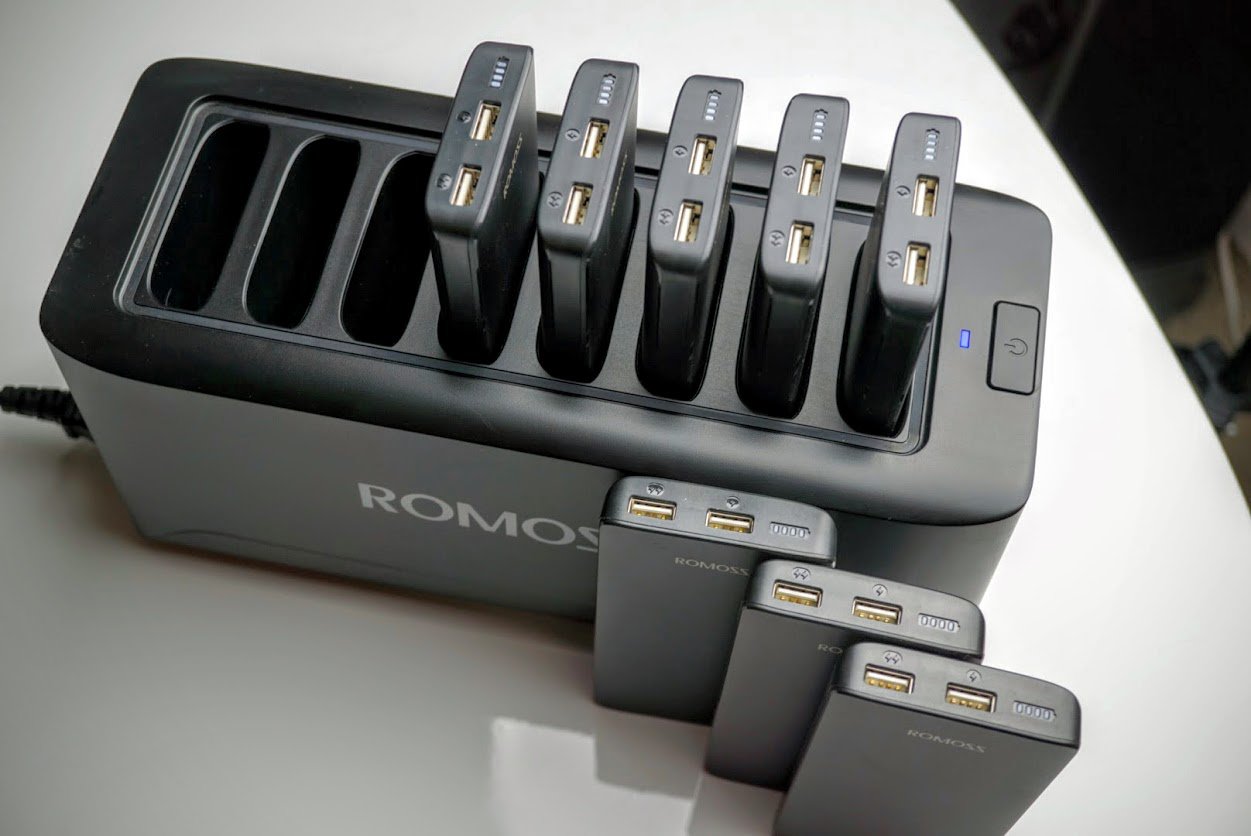
At first glance the Romoss Charging Station reminds me of a toaster oven on steroids. Instead of two slots, it has eight, and instead of dropping bread into those slots, they’re made to accept and charge eight individual portable power banks.
The Charging Station is made of matte black plastic that can be customized to suit individual business needs. If you opt for black, it comes with a matte finish which keeps away scratches and fingerprints. The build quality is top notch; all of the seams line up perfectly with no overlap of plastic on the edges. The station itself has one power input that accepts standard 100-240V, and can be daisy chained to keep wires clean if you need more than one.

Each individual power bank holds a 10000mAh lithium battery with inductive charging as the input. The inductive charging is built into each battery for ease of use (versus plugging in each battery to recharge) as well as to prevent thieves from taking the batteries home with them. There’s no way to recharge this battery other than with the charging station.
There’s a fan to keep the charging station cool while it’s under max load and recharging all eight batteries at the same time.

The fan kicks on for no more than 30s at a time in my experience, and is barely audible unless you are sitting right next to it.
Each individual battery pack has a 10000mAh rating, which is enough to charge most smartphones 3-4 times. There are also dual USB output ports so users can charge two devices at the same time at 2.4A which is the fastest iOS devices can be charged, but not quite fast enough to keep up with Android Quick Charge 2.0 and 3.0 standards.
Romoss kindly includes eight coiled charging cables with combo microUSB/lightning charging tips to suit almost all needs. It did not come with USB Type-C cables but it still can charge those devices safely with intelligent circuitry built into each power pack.

The only downside to the cables is the fact they are not permanently built into each battery pack. While you would hope users wouldn’t take them, it’s simply too easy not to in this case.
Usage
It’s nearly impossible for me to test out every single battery pack on my own. While I do not work in a coffee shop or gym, I do work a M-F 9-5pm job with 200 other employees at a biotech in San Diego. My colleagues provided the perfect testing ground for this review.
I dropped off the Romoss Charging Station in the Research group’s meeting room where we have most of our meetings, and get-togethers as well. At first the group thought the concept of the charging station was a cool novelty, but within a few days I would check on it and it was being used regularly. I frequently saw the station empty as some colleagues would bring the battery packs into the labs, offices and even home.
Since 10000mAh is enough to charge most phones 3-4 times, I had colleagues who gave me feedback that they loved taking them on the weekends on their family excursions. More importantly, it provided power to those who forgot to charge their phones before coming into work. Instead of bumming a charge off of someone else, they would grab an individual power bank and return it when finished. Romoss even provides a large vinyl sticker indicating what the charging station is so people don’t stare at it in confusion.

My coworkers use a variety of smartphones; iPhones, Nexuses, Galaxies, and a variety of budget smartphones I recommend to them as an alternative to higher priced flagships. Not one of them had a single complaint about the battery, and I work with some whiny people. The Romoss Charging Station scores high marks there for ease of use and reliability. We’ve used the station for over six weeks without a single complaint.
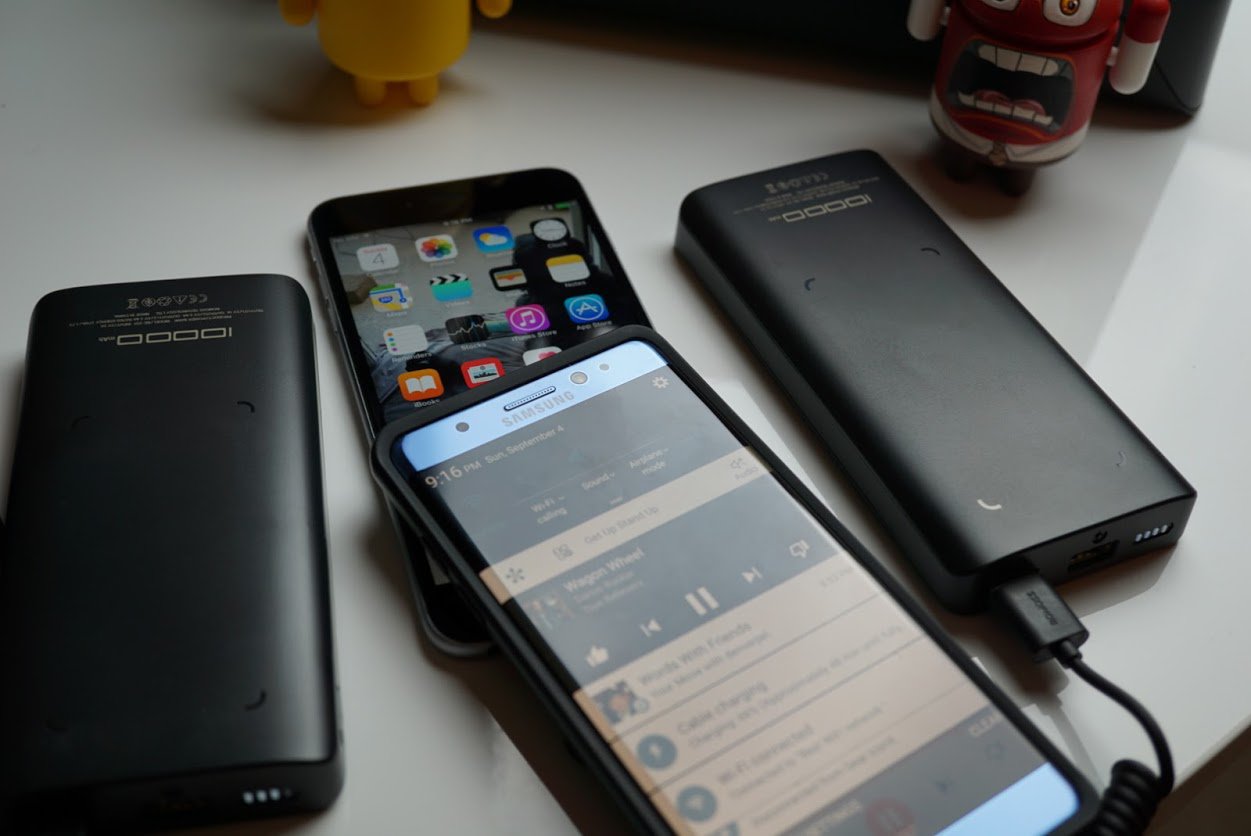
I used the power banks with a variety of smartphones and tablets myself to ensure wide range compatibility. Here is a list of devices I used:
- Nexus 6P
- Xiaomi Mi5
- iPad Pro 12.9″
- Pixel C
- Samsung Galaxy Note 7 (no it didn’t catch fire)
- Samsung Galaxy S6 and S7 edge
- iPhone 6S plus, 6S, 6 and 5SE
- Moto Z Droid
- LG G5
Not one device ran into issues. While the iOS devices charged at the fastest speed, the other Androids didn’t reach Quick Charge 2.0 or 3.0 speeds. That’s not really an issue since the power is free to use. It’s also something you probably wouldn’t want to include in a charging station like this since Quick Charge can be hard on batteries.
Recharging all eight batteries at the same time is no concern with the charging station. If you’re worried about vampire power draining out of this at night, you can turn it off with the power button on top of the station.

Summary
I am sure glad I reviewed the Romoss Charging Station with eight power banks. It’s an ingenious concept that is perfect for large families or small business owners. Portable power is becoming almost essential for every one of us who rely on our smartphones and this power station is sure to keep family members and customers happy. It sure kept my coworkers happy during the review process, and when I had to take it home for review, every single one of the users asked me when I was bringing it back. Luckily for them I will be bringing it back into work on Tuesday after the holiday weekend.
If you’d like to learn more about the Romoss Charging Station, head on over to http://www.romoss.com.

How to choose the right Chromebook

Knowing what to look for before you buy will make you happier and can save you money — which also makes you happier.
Whether you’re buying your first Chromebook or upgrading from an older model, you need to know what to look for before you part with your cash. Really, most purchases are this way — especially electronics of any sort. We can help you figure out which Chromebook features are right for you so you can be an informed buyer.
If you’re not yet sure that Chrome OS will work for you, go cheap.
Before you begin, you should set your budget. Thankfully, a fully capable and future ready (if not future proof) model can be had for well under $300 if you don’t want to go for the top-shelf. And realistically, you don’t. Chrome OS runs really well on hardware that might not have enough “oomph” for another operating system. In fact, there’s a good chance your phone will have more cores, be clocked higher and have more memory than a Chromebook that can do everything it’s intended to do. That’s not to say you won’t benefit from having a more premium model with better specs, but it’s certainly not necessary.
And that makes the first thing on our buyer’s checklist easy: if you’re not yet sure that Chrome OS will work for you, go cheap.
The top selling Chromebook on Amazon (with a 4.5-star rating, too!) is the Acer Chromebook CB-3. It sells new for $149.99 (as of September 2016). And while it’s not the nicest laptop you’ll ever see, it has a great IPS screen and runs the very latest version of Chrome OS. And runs it pretty well. You will see things get bogged down a little if you’re trying to do too much at one time, but a browser session with a handful of tabs open or a few Chrome apps or documents open won’t be a problem at all. It’s a perfect way to see how Chrome will handle doing the things you want it to do.
Amazon is also a great place to look for refurbished models that still carry a full warranty. I have seen Chromebooks for as little as $99 for Amazon Prime accounts, and any of them would be a good way to try a taste of Chrome OS so you know if you’re ready to spend a little more.
See at Amazon
If you’re already sure you want a little better hardware or are looking forward to Android apps, you still don’t have to spend a lot of money. But you do need to know what to look for.
Android apps will change how we use a Chromebook.
Android apps are going to change how we use a Chromebook. Adding almost 2,000,000 apps to one of the fastest and safest operating systems available will also make it one of the most capable for many of us. Don’t expect to run specialty programs like Adobe Photoshop or a CAD program, but for things like light video editing or 3-D drawing, you’ll find a handful of apps that can handle the task. Chromebooks weren’t designed for folks who need to use a high-end desktop or laptop. But most of us don’t need a high-end desktop or laptop and will be served well with a Chromebook. If Android apps are going to be important to you, here are a few things you need to look for.
- Make sure it’s on the list. You’ll find a list of Chromebooks that will be able to run apps from Google Play when it’s launched later in 2016. Any existing model will be listed if it’s going to support them. For newly-announced models, ask someone about Android apps before you buy. You can ask us — if we don’t know, we’ll find out.
- More storage is better. This goes without saying, but we are saying it anyway. Chromebooks were designed as a cloud-centric device. Because of this, many don’t come with a lot of storage space. Android apps can change how much you’ll need. Consider some games for Android (which will play just fine on your Chromebook) are up to 2GB or more in size, and you’ll see why. You can store a lot of data or documents or photos on the SD card, but apps will go on the actual device storage. Ideally, you’ll want 32GB or more, but 16 can work if you’re not interested in any games.
- Know how you plan to use it. Some of us want a convertible model that we can use like a tablet. Others want a traditional clamshell-style. Spending a little more to get something you’ll find more useful is worth it. Screen size comes into play here, too. If you’re on the go a lot, you might want an 11-inch model. Or the 14-incher would be better for your desk. Think about how you’ll be using your Chromebook before you buy one.
- Get a model with a touch screen. Using a touch screen for “normal” computing kinda sucks. Editing something in Google Docs or writing a long email just isn’t designed for touch input no matter which platform. That’s why the people who make tablets also make keyboard covers. But that changes when you add in apps originally designed fro a phone. They are built for a great experience when poking and swiping with your finger, and that translates well from a 5-inch screen to a 13-inch screen. While you can use the trackpad for most any of it, it’s just not as good.
- How much memory do you need? That’s determined by what you plan to do. A model with 2GB will be enough to have a few tabs open in the browser as well as an app or two running, but if you’re the power-user type you’ll want to go with 4GB. The video experience benefits from more memory, too. A 1080p video on YouTube or Google Play Movies can get a little stuttery with 2GB, but 720p runs great.
- Buy one with the right CPU. For most of us, a Chromebook with an Intel Core i3 or Core i5 CPU is absolute overkill. They are also a good bit higher priced. Unless you plan to really tax the system or dual-boot with Linux, you don’t need one. A late-model Intel Celeron (if you’re not sure based on the spec sheet, just ask) or ARM CPU is more than enough for most of us.
- How premium do you want to go? Every other item on this list can be had in a sub-300 dollar Chromebook. You can also spend upwards of $600 for one that works. The $300 model will handle most anything you throw at it, but the $600 model just feels better. I won’t toss a silly car analogy in here, but only you know how much a nicer look and feel is worth. Of course, more expensive models tend to have nicer displays and smoother trackpads, too.

You’ll have to decide which Chromebook is best for you, but we can toss a couple recommendations out. I’ve been using an ASUS Chromebook Flip for a while now (I’m writing this blog post with one) and for anyone who wants a tablet-like experience, it’s marvelous. I have to try hard to get it to struggle and the screen, trackpad and keyboard are more than acceptable. I wouldn’t hesitate to recommend it to anyone looking for a smaller (11-inch) model.
See at Amazon

If you’re ready to go all-in with Chrome and don’t mind spending a little more, The Dell Chromebook 13 is what I consider the best Chromebook available today. It’s not the most expensive model — that award goes to the HP Chromebook 13 which lacks a touch screen — but it’s not exactly cheap either. For someone using a Chromebook for business or anyone who just wants the best (it’s OK to treat yourself once in a while), the Dell 13 is the one to buy.
See at Dell
Of course, new Chromebooks are coming out all the time and something coming up may be even better. You can keep up to date on our Best Chromebooks page, and keep an eye out for our reviews. And as always, the forums are a great place to learn more about anything Chrome.
Chromebooks

- The best Chromebooks
- Should you buy a Chromebook?
- Google Play is coming to Chromebooks
- Acer Chromebook 14 review
- Join our Chromebook forums
IFA 2016: All things mobile
IFA isn’t as big of a mobile show it once was. Samsung and LG opted to have their big phone announcements elsewhere this year, and even Motorola had its own Lenovo-hosted soiree a few months ago. Still, we did see a few new handsets at the show, along with a cool new MotoMod attachment. Peruse our gallery below for all the mobile news to come out of IFA 2016.
We’re live all week from Berlin, Germany, for IFA 2016. Click here to catch up on all the news from the show.
‘Fallout 4’ immortalizes a player’s late brother
Games have paid tribute to late celebrities and fans in the past, but rarely like this. When Reddit user NoohjXLVII (aka Andy) posted about the tragic losses of his father and his brother, as well as using Fallout 4 as a coping mechanism, Bethesda responded by including his brother as a character in Fallout’s Nuka World add-on. Run into Evan at the southernmost part of Nuka World’s map and you’ll meet the recreation of a man who Andy says was just as generous in real-life as he is in-game — the virtual Evan will gladly give you whatever he can. He’s not a perfect physical match, but he captures the “essence” of the person.
This won’t make up for Evan’s passing, although you can contribute to a GoFundMe campaign to help ease his family’s burden. Even so, the character (and the care package sent to Andy) are tremendous gestures. They’ll help preserve the memory of a man who, by all accounts, was taken from the world too soon.
[Thanks, Kristy]
Via: Kotaku, Eurogamer
Source: Reddit, GoFundMe
IFA 2016 showed us how far wearables have come
The wearables world has come a long way in a very short time, and plenty of companies have had to learn their lessons out in public. The first devices they launched were often far, far too ugly to find mainstream acceptance, but now the fashion and wearables worlds are perfectly aligned. That’s why we’re taking a look at the devices that arrived at this year’s IFA, and comparing it with their more embarrassing predecessors. Think of it like #throwbackthursday, except nobody’s got one of those face-worn retainers you only see in ’80s movies.
ASUS’ Zenwatch


Like many other early Android Wear pioneers, ASUS thought that it was hip to be square. It made sense, since smartphones have square displays too, not to mention the (then) scarcity of truly-round displays. ASUS trimmed the price to make the Zenwatch cheaper than its rivals, and curved the glass over the face to offer an illusion of greater ergonomics. The end result is a watch that made square faces look reasonably stylish, even if it would only ever cater to a niche.
Two years down the road and ASUS has firmly grasped a copy of the fashion watch design playbook and is holding it firmly with both hands. The Zenwatch 3 is packing a rose-gold inlay, a chunky crown and double pushers, making it look less like an Android Wear device and more like a Longines. It’s the sort of watch that goes down well with business types who want to be seen wearing their money on their wrists.
Samsung Gear


When you look at the first Galaxy Gear you have to ask what Samsung was thinking, even back then. It may have been a refinement of the company’s S9110 telephone watch, but it wasn’t pretty, no sir. Admittedly, it’s a striking piece of gear, with a brutalist design, exposed screws and a humped, 1.9-megapixel camera that juts out of the band rather than the hardware. But when you look at Samsung’s earlier smartwatches, like the SPH-WP10, the Galaxy Gear looks like pure elegance.
Just three years stand between the OG Gear and the Gear S3, but they couldn’t be further apart in the looks department. The Gear S3 looks like a regular watch, the sort of ultra-masculine timepiece that you’d see advertised in an in-flight magazine. Like its immediate predecessor, the bezel acts as a control dial, but now it’s been geared so that it doesn’t even look like a watch from the future. In fact, the Gear S3 could convincingly pass for a Rolex diving watch made half a century ago.
Sony Headphones


Sony’s been there (or thereabouts) for plenty of milestones in personal audio, even if it might not want everyone to remember some of its own missteps. From 1968’s DR-4A, the company’s first noise-isolating stereo headphones, to the Xperia Ear, which will arrive in stores this November. Back in the day, a 5.5mm audio lead with a nice woven coating was what connected your headphones to the sound source of your choice. These days, of course, it’s all about Bluetooth, but the Ear lets you send commands to your phone as well as receive sounds back. Even if you wouldn’t necessarily call it a headphone, per-se.
A side effect of the design of these small earpieces, of course, is that wearing them are significantly less conspicuous. In an era where people wear enormous Beats-branded cans as a matter of course, in-ear earpieces are, by comparison, invisible. While the first-generation Xperia Ear stands out, other devices of its kind — like Bragi’s Dash — aren’t meant to be visible. Although, we’re getting to the point where it’s not necessarily right to call these gadgets wearables, since they’re not really worn so much as inserted. Then again, nobody wants to walk into an electronics store and ask for the insertables section.
Withings


Withings has built its ecosystem of health products piece by piece, but its first device with heart rate monitoring wasn’t one for the record books. The Withings Pulse was a square rubber brick that was intended to be worn on a belt clip like a pedometer. After your workout, you could pull out the device, press it against your finger and be told how well your heart was doing at that particular moment. But aside from its blocky design, it had some great features, including automatic activity detection and a long-life battery. Unfortunately, the act of removing it from the clip wore the rubber out pretty quickly, and it was easy to forget when you changed pants.
Now, the company has seen the error of its ways and baked in the optical heart rate monitor into its Swiss-inspired watch. The Steel HR masks its more technological components between an analog dial and sub-dial — the latter of which tells you how much activity you’ve undertaken that day. The only gadgety component of the watch is the digital sub-dial which offers your heart rate, as well as smartphone notifications for calls, emails and texts. By burying the nuts and bolts behind a well-designed and subtle timepiece, Withings is pushing us towards a world where we’re not even aware of the tech we’re wearing.
E-Ink Watches


Sony’s first E Ink watch, FES, arrived in 2014, and cleverly added the technology to both the face and wristband. That’s led to some interesting options for customization and promised to radically alter the way watches were worn. But it was by no means the first E Ink timepiece on the market, and an early proponent was Phosphor, which launched the Ana-Digi timepiece back in 2012. The display itself was static, and users could use a side-mounted pusher to toggle between time and date views on the face.
But adding E Ink to a watch clearly hasn’t provided the necessary surge in sales that Sony was hoping for. For the second-generation of its groundbreaking timepiece, it’s added more traditionally-watch like design cues. That includes a prominent bezel and sapphire glass across the crystal, making it slightly less exciting. Then again, it perhaps shows that the tried-and-tested formula for watches hasn’t changed much in the last century, and these companies have learned that if you can’t beat ’em, you might as well join ’em.
We’re live all week from Berlin, Germany, for IFA 2016. Click here to catch up on all the news from the show.
Bragi’s new wireless headphones are cheaper, but not as smart
It took nearly two years and a Kickstarter campaign for Bragi to deliver its completely wireless smart earbuds that handle music, activity tracking and phone calls. Now the company is back with its second product: The Headphone. At first glance, Bragi’s Headphone looks a lot like its elder sibling, but upon close inspection it’s quite a bit different. The main way to tell the two apart visually is the physical buttons and lack of multi-colored lights on the outside of this new model. Dash features touch controls for volume, skipping tracks, taking calls and more while Headphone has three buttons you’ll need to press to complete those tasks.
The Headphone also doesn’t have the activity tracking sensors that the Dash employs. Yes, this means you won’t be able to turn your head to answer calls or log a workout like you can with Dash. Without the extra tech on board, this new model touts nearly double the battery life at six hours. Balanced armature speakers provide the sound from your phone via Bluetooth and Bragi’s Audio Transparency feature is a click away. The tool allows for outside noise to come in so you can hear a car horn while on a run or what your coworker is saying in the next cubicle. Bragi’s feature-packed Dash is priced at $300, but the new Headphone will only set you back $150 when it ships in November.

Speaking of the Dash, the company also announced an update for the software that runs those wireless headphones. Bragi OS 2.1 improves Bluetooth performance, an issue we noted during our review, and adds language support for Chinese, French, German and Spanish. All of those fitness stats can now be shared with Google Fit and Apple HealthKit along with syncing on the Apple Watch. Bragi also added a Touch Lock that ensures you don’t use gestures when you don’t mean to, a shuffle feature for the internal music player and on-demand heart rate tracking that can be turned off should the need arise. The best part? It’s available right now.
While Bragi got a jump on the completely wireless in-ear headphone game, other companies have followed in its wake. Samsung’s Gear IconX does a lot of what the Dash offers for $100 less, including fitness tracking and internal storage. Just this week, Jabra revealed its version of wireless earbuds that track your hear rate and exercise like the other two options for $250, but the Elite Sport won’t house a a portion of your music library for phone-free access.

