


B!Sides Brain Challenge: The lost Tetris b-side (review)

THE BASICS
If Tetris and Sudoku spent one wild and crazy night together “punching numbers,” then surely B!Side Brain Challenge is the fruit of their passions.
 The goal is to arrange blocks of positive and negative numbers inside of a 5×5 grid into horizontal or vertical groups that have a combined sum of 0. As time passes, more numbers will appear on the grid. Play ends when numbered blocks fill the entire grid.
THE GOOD
Mental math is a dying art. B!Sides is a straightforward, entertaining game that will help exercise that simple math muscle and hopefully lead to a generation more readily equipped to count change at the register of your favorite lunch spot.
THE BAD
 There are no levels or save points for continuation of play, and no bonus awarded for clearing the grid at any point in the game. There are awards insofar as highlighted logos in the Achievements tab are considered adequate reward. Achievements are categorized by points earned in a single game and total number of games played.
THE UGLY
 Unless otherwise specified, stats and gamer ID are public through your Google account. Visit the Google Play Games app to change gamer ID privacy settings. For those wishing to reign anonymously as B!Side champion (your friends can’t prove it’s not true!) tap the settings menu and uncheck the appropriate boxes.
B!Warned! This game is addictive. You cannot win. You can only play until you lose. The absence of levels or save points gives way to an instinctive need to conquer B!Sides at every attempt, at the possible expense of hydration, hygiene and sleep.
Rating: 4.5 out of 5 (Google, show me a default of privacy and I’ll show you that last half of a star.)
Save £120 on the 16GB Nexus 5X
If you’re looking for a solid deal on the Nexus 5X, UK retailer Argos is currently offering the phone for just £179.95. In all, that means a savings of £120 off of the phone’s usual £299.95 price tag.

Do note that this deal is only for the black 16GB version of the Nexus 5X. In any case, be sure to check out the deal at the Argos link below for much more.
See at Argos
Nexus 5X
- Nexus 5X review
- 5 things to know about the Nexus 5X
- Read the latest Nexus 5X news
- Learn about Nexus Protect insurance
- Learn about Project Fi
- Join the Nexus 5X forums
- Nexus 5X specs
Google
B&H Photo
Amazon
The best 360-degree cameras (that you can afford)

There are a lot of 360-degree cameras out there, and there are going to be more. These are the best we’ve used.
This is going to be a big year for 360-degree cameras. And we don’t mean big 360-degree cameras. Rather, we’re talking about consumer-friendly cameras that are as easy to use as they are affordable. Cameras that can fit into a pocket or purse, and won’t bust your wallet in the process. These are cameras that connect to your phone for remote shooting as well as sharing. These are cameras from mobile companies you know, like LG and Samsung, and others that you might not, like Ricoh and 360fly.
And there are a lot of cameras out there already, and so many more to come. We’re going to take a look at as many as we can and rank them here.
Ricoh Theta S

The best consumer-grade 360-degree camera you can get (so far)
Pros
- Solid design
- Good still image quality
- Decent sharing platform
Cons
- Video quality is just OK
- No expandable storage
- App UI can be confusing
When it comes to 360-degree cameras, you tend to get what you pay for. While the Ricoh Theta S costs a little bit more than other options out there, the difference is immediately apparent, and Ricoh gets a few features right that other manufacturers didn’t. That starts with the design. Theta S is a single piece and comes with a neoprene sleeve to protect it. (Be sure to use it!) The shutter button is perfectly placed, and you shouldn’t accidentally hit it when going for the power button. Still images come in at about 14MP, while video hits 1080p at 30fps, which unforutnately is pretty low when you’re talking about 360-degree work.
Ricoh has its own service for uploading videos and pictures, which particularly is good for the latter since Google+ and Flickr remain the only main social platforms on which you can share those. (Facebook is still coming.) Perhaps most important is the inclusion of a Wifi Direct on/off toggle, so you can quickly disconnect your phone from the camera if you need proper data back. The Theta S also smartly (though with a clunky UI) lets you choose a data method to share your pictures — 3G/LTE, Wifi access points, etc. — because, again, your phone will be connected via Wifi Direct, which doesn’t doesn’t have access to the Internet.
Theta S isn’t the perfect platform. But it’s the best we’ve used so far and comes in under $400.
More: Check out our Ricoh Theta S review
See at Amazon
LG 360 CAM

A decent starter 360-degree camera
Pros
- Easy to use
- Non-threatening design
- Works on Android and iOS
Cons
- Image quality is just OK
- Wi-Fi Direct is wonky
- App could use some work
LG was the first of the major mobile companies to come forward with a 360-degree camera. And it’s an accessible little shooter. It looks like a camera, first and foremost, with dual 13MP lenses that see everything (except directly below it) that output a 16MP spherical image or video. The 360 CAM has a single shutter button, charges via USB-C and has a 1,200 mAh battery.
It’s easy to use, and the results are decent, but not spectacular. Lighting plays a key to this, and to that end the included application provides for full manual control over ISO and aperture and what not. Stitching between the two lenses also can be pretty apparent. The 360 CAM Manager app is a little clunky (as is the Wi-Direct connection a phone needs to connect with the camera), but it gets the job done and is pretty full-featured. A nagging issue is that you have to first download your picture or video to your phone and then make sure to disconnect from the camera manually before trying to share anything. But from there you can easily share pictures to Flickr or Google Maps in 360 degrees; same for video to Facebook our YouTube.
All in all, not a bad effort, especially at its $199 price point. You get what you pay for: Decent images, ease of use, and the knowledge that more money will get you better quality.
More: Check out our LG 360 CAM review
See at AmazonSee at Verizon
See at B&H
360Fly

Built for anything
Pros
- Waterproof down to 5ATM
- Clever mount system
- Great battery life
Cons
- Software is complicated, especially for photos
- Not exactly pocketable
- Not a perfect sphere
360Fly is one of the early offerings in the 360-degree camera space, and the focus was clearly on being durable. The orb design is rugged, and the casing is sealed such that a little rubber mic plug makes this camera waterproof down to 5ATM (which is DEEP underwater, if you didn’t know). A unique locking mechanism on the bottom of the orb allows you to quickly snap the camera onto your mount of choice, and the box includes mounts for the most common sport camera systems. The one button on the casing starts recording video after a press, and lets you know with LEDs when the battery is getting low.
As clever as the hardware design is, 360Fly’s software is the exact opposite. There’s no easy way to take a single photo, and the Desktop app leaves quite a bit to be desired. Sharing to Facebook isn’t easy unless you’re in the Desktop app or you want to share a link to the 360Fly video hosting service, which is a little obnoxious. What you do get once you figure out the software looks nice enough, though the resolution on this camera isn’t quite enough to enjoy on more than your phone screen. You also aren’t recording a complete sphere, since 360Fly only has the one camera.
If you’re looking for a 360-degree camera to hold up like an action or sport camera, 360Fly has what you’re looking for. If you aren’t planning on biking down a mountain or diving with sharks, you may find this isn’t quite what you want.
More: Check out our 360fly hands-on
See at Amazon
Samsung Gear 360

Pros
- Excellent software experience
- Very good pictures and video
- Every feature you could hope for
Cons
- Unique design isn’t easily pocketable
- Only works with Samsung’s phones
- Stitch lines are very apparent
Really good, with a couple hangups …
Samsung’s Gear 360 has been the spherical camera we’ve really been waiting for. It’s Samsung. It’s got to be good, right? And for the most part, the Gear 360 is that, with its dual 15-megapixel lenses.
First, it’s a joy to set up and use. It’s the only 360-camera we’ve used that we’d be fine handing to our mothers, leaving them to figure it out. Samsung has the software experience nailed, and we’ve had exactly zero connection problems. Sharing pictures and video to the usual places — Facebook, YouTube, Flickr, etc. — is as easy as sharing any other file from one app to another, too.
Our first issue is that the Gear 360 doesn’t fit in your pocket like the other cameras on this list. And if you can’t carry it around easily, you’re not going to use it as often. (If you’ve always got a bag of some sort of you, that’s moot.) Second is that the Gear 360 currently only works with Samsung phones — the Galaxy S6 and GS7, and the Note 5. That might change at some point, but for now it’s the way it is. The good news is the Gear 360 works really well without a phone at all, thanks to the buttons and display built into the thing. It’s not quite as easy, but it can be done. And lastly is that pictures and video from the Gear 360 are pretty prone to stitching lines — that is you can clearly see where one of the pictures tries to blend into the other. This is more apparent if there’s an object near the camera itself.
It’s not a bad camera by any means, and the $349 price tag is right on. But the final problem is that Samsung still isn’t selling it in the United States. You can, however, import one from elsewhere if you want.
More: Read our complete Gear 360 review
See at Samsung
OnePlus 3 versus Galaxy S7 edge: Challenging at half the price

The OnePlus 3 has a hit on its hands, but does it stand up to the top dog?
OnePlus has come out swinging in 2016 and released a great phone with few compromises in the OnePlus 3. It’s launching into a world where we have tons of great flagship phone choices, not the least of which being the Galaxy S7 edge.
The Galaxy S7 edge has won over the hearts of many Android fans with its great hardware, awesome performance, industry-leading camera and top-end features, but it also retails for well over $700. At a fraction of the cost the OnePlus 3 aims to hit many of those same points … but does it succeed? We’re putting the phones head-to-head to see how they stack up.
Hardware, design and display

Though the OnePlus 3 may not have as unique or interesting design as its predecessor, it certainly has stepped up its overall game in terms of quality and feel to offer something right on par from what you get in other flagships. The Galaxy S7 edge is perhaps the finest example of Samsung’s renewed sense of hardware innovation, with its metal and glass body just exuding engineering excellence all around. Samsung definitely has an upper hand here in terms of looks, as the OnePlus 3 is rather generic … the Galaxy S7 edge is an absolute standout all around.
The OnePlus 3 is generic, while the GS7 edge is rather extraordinary.
Both offer relatively small bezels around the same-sized 5.5-inch display, though the Galaxy S7 edge is a bit more compact overall in terms of height and width. Any of that gain in grip is quickly eroded by the slick glass back and curved display, though, which makes the GS7 edge a bit of a nightmare to hold and manipulate with one hand. Even though the OnePlus 3’s aluminum body is slippery in its own right, there are predictable curves and a little bit of grip to be had there.
The displays themselves are both AMOLED as well, but of course that doesn’t tell the whole story. The OnePlus 3’s 1080p display is above average with solid colors, viewing angles and brightness, but that’s just not good enough to challenge what Samsung has to offer. The QHD panel in the GS7 edge is brighter, crisper and more colorful than anything else on the market today, and no matter how you feel about the actual usability of the curved edges it sure is stunning to look at. OnePlus was fighting a battle it couldn’t win here, and it’s worth noting just how much better the Galaxy S7 edge’s display is.
One of the nice features you can’t see (of course) is the waterproof coating that the Galaxy S7 edge has, keeping it safe from any liquid you may or may not try to put it in contact with. It’s one of those little things you get in a high-end phone nowadays that’s often axed from less expensive models. And even if you don’t feel like your phone is in danger of getting wet all that often, it really is — all it takes is one accident.
OnePlus 3 complete specs
Galaxy S7 edge complete specs
On the inside, the phones exchange leads in some areas to basically come out on the same level overall. You’ll find a Snapdragon 820 processor in both, or the comparable Exynos 8 in the GS7 edge in some regions, supported by a massive 6GB of RAM on the OnePlus 3 and “just” 4GB on the Galaxy S7 edge — in all practical applications, 4GB is plenty right now. The Galaxy S7 edge has less storage with just 32GB on board to the OnePlus 3’s 64GB, but the edge’s SD card slot remedies that for many. Both phones have excellent one-touch fingerprint sensors, which is great, and have equally mediocre loudspeakers coming from the bottom of the phone.
Software, performance and battery life
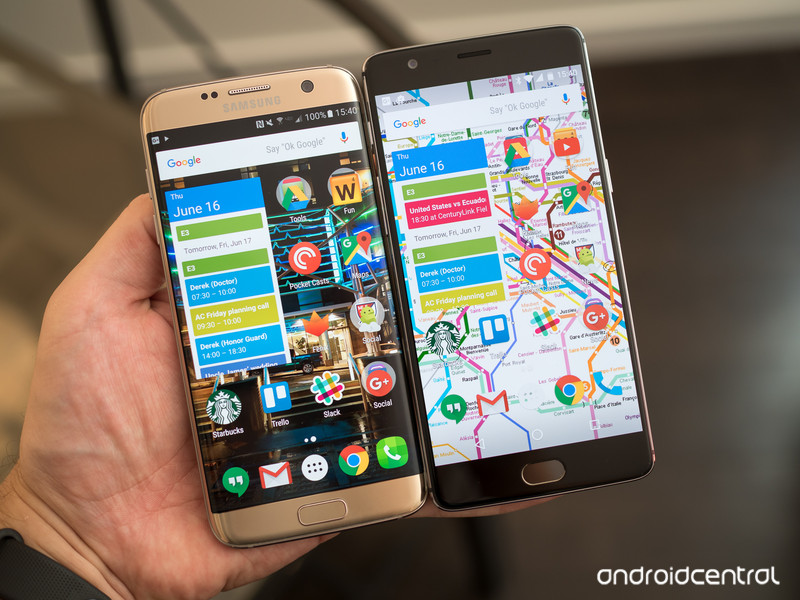
When looking at any phone comparison that includes a Samsung Galaxy, the software section always takes a bit of extra weight — suffice to say Samsung doesn’t have the best reputation for software quality. All history of questionable software design aside, Samsung’s take on Android 6.0 Marshmallow is actually quite good, particularly if you want to take the time to swap out your launcher and keyboard. There are tons of useful additions throughout the operating system, and on the Galaxy S7 edge performance throughout is absolutely stellar. Perhaps the biggest drawback at this point is no longer the interface, but the huge number of duplicative apps installed that you can’t remove or even disable — if you don’t want to use many of Samsung’s built-in apps, you’re stuck looking at them forever. That’s before you get to the massive piles of bloatware that its carrier partners load on the phone … it’s not a pretty picture when you open the app drawer.
Even those used to Samsung’s software may find OxygenOS a nice change of pace.
On the other hand, OxygenOS on the OnePlus 3 is quite simple and easy to grasp. The subtle set of customizations made to Android 6.0 are really nice, and add a lot of the same features that Samsung does without all of the heavy-handed design changes. You get configurable options throughout the operating system, from gestures and buttons down to a dark mode and some neat little features in the stock launcher app. Performance on the OnePlus 3 is just as quick and reliable as the Galaxy S7 edge, and OnePlus only bundles a few essential apps — and you can disable all of them, if you wish. If you’re at all happy with stock Marshmallow, you’ll be ecstatic to see the OnePlus 3 … and even those used to the extra features of Samsung’s software may be able to see the nice middle ground here.
Samsung is surprisingly ahead in terms of software update reliability.
With quite a bit less going on in the software, OnePlus manages to get really solid battery life out of what is a notably smaller battery than the Galaxy S7 edge. The 3000 mAh cell can handle a full day’s work or play without complaining, putting it on equal footing with the 3600 mAh in the Galaxy S7 edge in all of my time using it. The OnePlus 3 seems to slip into Marshmallow’s Doze mode for battery savings a bit quicker as well, which in my eyes pulls it ahead of Samsung’s implementation. With both phones having a quick charging solution you can top up either one super quickly, but Samsung’s cross-compatibility with Quick Charge 2.0, as well as inclusion of wireless charging, definitely give it a leg up there.
In an interesting turn of events, it actually seems as though Samsung is in the lead when it comes to software updates. Based on the past few months, Samsung has shown a solid amount of skill in pushing out monthly security updates to most of its flagship devices, though some carriers have generated exceptions to that case. In turn, OnePlus hasn’t had the best record of pushing either monthly security updates or large platform updates to its phones, with the OnePlus 2 taking several months to receive Marshmallow and at the time of writing the OnePlus X still not having its Android 6.0 update. That could definitely change with the OnePlus 3, but right now this is one area where Samsung is actually in the lead.
Cameras

Even with its general side-step in quality from the Galaxy S6, the Galaxy S7 is easily one of the best all-around smartphone cameras out there today. It’s amazingly quick to open and capture photos, and the end results are pretty fantastic. Its 12MP sensor has big 1.4-micron pixels, a fast f/1.7 lens and optical image stabilization, which on paper puts it nicely ahead of the OnePlus 3’s 16MP sensor with 1.12-micron pixels and f/2.0 — the difference in megapixel count is basically irrelevant at these resolutions.
The GS7 edge takes a slight lead on paper … and in real-world results.
When it comes to the camera interfaces, Samsung has the slightly busier of the two, but that doesn’t make it worse. Both make it super easy to just launch the camera (a double-press of the home button on Samsung, the power button for OnePlus) and start taking photos, but you can quickly toggle settings or switch between modes as well. Both offer RAW image capture and full manual modes, but Samsung takes the slight advantage here with myriad shooting modes to download and choose from.


While the OnePlus 3’s camera is very quick to open and capture photos, it’s still beat by the unbelievably fast Galaxy S7 edge. Whatever magic Samsung is working with the camera is baffling, as it can capture photos with absolutely zero delay, even when shooting in HDR, and let you get onto sharing them or taking more photos in a flash.
Now, how about the photos themselves? Here’s a handful of side-by-side comparisons to check out.


Galaxy S7 edge (left) / OnePlus 3 (right). Click images to view larger.



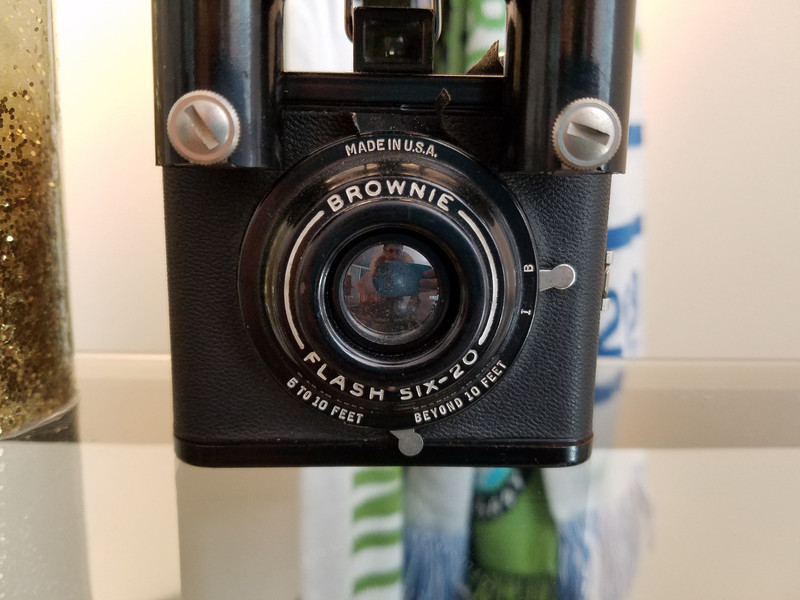


As I’ve noted many times, the Galaxy S7 edge still tends to take photos that are a bit too warm and more saturated than the actual scene, and that’s definitely evident against the more true-to-life OnePlus 3. Some people prefer the punchier colors that Samsung reproduces, but I tend to like something a little closer to natural.
In good lighting situations, the differences between these cameras is basically imperceptible — both take great, sharp photos that look awesome on everything from Instagram to locally on your desktop computer monitor. In more difficult lighting situations — ranging from indoor lamp-lit scenes to night scenes — the differences are more pronounced. The Galaxy S7 edge still pulls ahead in really dark scenes, though it still often goes overboard on softening noisy areas, whereas the OnePlus 3 keeps some of the noise in what looks to be a more natural photo in the end. The Galaxy S7 edge is also not always absolutely tack-sharp on close-up images, which the OnePlus 3 can sometimes best it at.
Overall, I have to say the Galaxy S7 edge offers the better of the two experiences, but the differences aren’t all that notable until you set the resulting images next to each other. Using the OnePlus 3 standalone I never once took a photo that I wasn’t happy with, nor did I ever wish I was using the Galaxy S7 edge’s camera again.
Bottom line
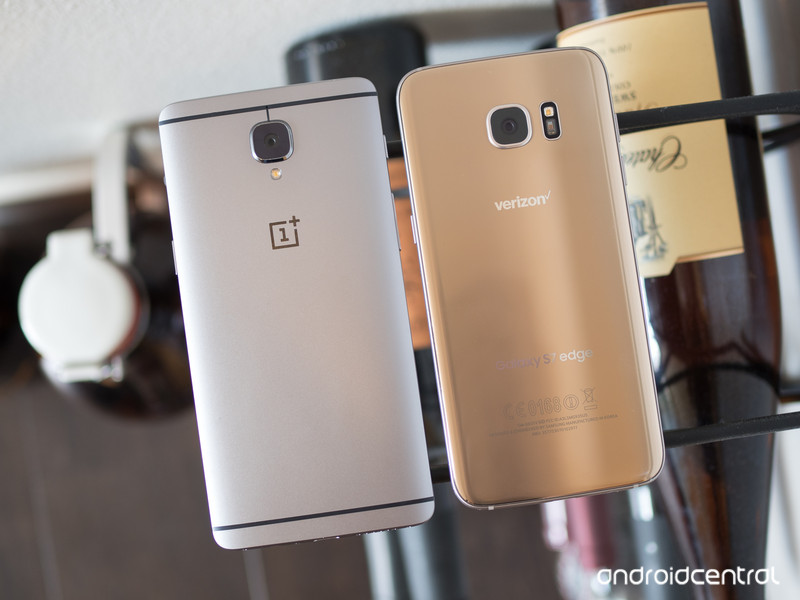
For a lot of people, this comparison starts and ends with the price. There’s the group that wouldn’t ever consider a phone that costs more than $400, then the group who will pay more if they perceive extra quality is there, and the last group who will spend top-dollar and don’t necessarily care about the “value” offered.
The GS7 edge is better … but how much extra do you want to spend?
That first group won’t be considering the Galaxy S7 edge at $800, they just won’t even bother. They’ll get the OnePlus 3 or some other solid phone with a great price. The high-end users will probably gravitate toward the Galaxy S7 edge — it has all of the bells and whistles, great hardware and comes from a name they trust.
It’s the middle group — which is probably the biggest, for what it’s worth — who actually have a serious decision on their hands when looking at the OnePlus 3 and Galaxy S7 edge as potential phones for them. For most of the people who are trying to equate what they’re getting with how much they’re paying, the Galaxy S7 edge is a tough sell here. Sure you could like the sleeker design with the glass back, and you can appreciate the waterproofing or the nicer display, or want a camera that’s a little bit better … but for what amount of money? Is that worth $300+ to you? Chances are it isn’t.
Because for just $399, you can buy the OnePlus 3, and spend that difference in cash somewhere else — perhaps on an extra charger, a nice set of headphones, a case … well, anything, really. And in the end you’re going to enjoy that experience just as much as what you get from the Galaxy S7 edge, or maybe more knowing you saved some money doing it.
OnePlus 3
- OnePlus 3 review: Finally, all grown up
- OnePlus 3 specs
- OnePlus 3 vs. the flagship competition
- Latest OnePlus 3 news
- Discuss OnePlus 3 in the forums
OnePlus
Samsung Galaxy S7 and S7 edge
- Galaxy S7 review
- Galaxy S7 edge review
- Here are all four Galaxy S7 colors
- Should you upgrade to the Galaxy S7?
- Learn about the Galaxy S7’s SD card slot
- Join our Galaxy S7 forums
AT&T
Sprint
T-Mobile
Verizon
This DJI Phantom 3 drone hit a Quebec woman in the head
Picture this: You’re out enjoying a sporting event, just minding your own business. All of a sudden a 2.7-pound DJI Phantom 3 drone falls from the sky and beans you squarely in the head. What do you do? You file a lawsuit.
That’s exactly what happened to 38-year-old Stéphanie Creignou, who unfortunately suffered injuries when the drone fell from the sky and crashed directly into her head. She’s yet to get back to work, and as a result of her injuries, she was forced to cancel a vacation she had already planned with her husband.
You can see it in the video footage captured by VTOL-X Drones, a professional drone provider that was, in an ironic turn of events, hired by event organizers to obtain aerial footage of the event.
Drone operator Rosaire Turcotte is unsure of how he lost control of the drone or how the incident occurred. In an interview with VAT News, he attests that he has “zero explanation” and believes he “acted in the safest way possible.”
According to VTOL-X Drones company CEO Flavio Martincowski in an interview with PetaPixel, the man was actually operating the drone without the proper permits and flying too close to a gathering of people. In fact, the incident transpired just after VTOL-X Drones questioned Turcotte about those very things.
Currently the Transportation Safety Board of Canada is investigating the crash, which could easily have been avoided had drone enthusiasts paid more attention to regulations in place to keep this things from happening. That said, accidents do happen — but this is a very unfortunate one indeed.
Source: PetaPixel
Apple’s New Differential Privacy Feature is Opt-In
When Apple introduced iOS 10, macOS Sierra, watchOS 3, and tvOS 10 at the 2016 Worldwide Developers Conference, it also announced plans to implement a new technology called Differential Privacy, which helps the company gather data and usage patterns for a large number of users without compromising individual security.
At the time, Apple said Differential Privacy would be used in iOS 10 to collect data to improve QuickType and emoji suggestions, Spotlight deep link suggestions, and Lookup Hints in Notes, and said it would be used in macOS Sierra to improve autocorrect suggestions and Lookup Hints.
There’s been a lot of confusion about differential privacy and what it means for end users, leading Recode to write a piece that clarifies many of the details of differential privacy.
First and foremost, as with all of Apple’s data collection, there is an option to opt out of sharing data with the company. Differential data collection is entirely opt in and users can decide whether or not to send data to Apple.
Apple will start collecting data starting in iOS 10, and has not been doing so already, and it also will not use the cloud-stored photos of iOS users to bolster image recognition capabilities in the Photos app.
As for what data is being collected, Apple says that differential privacy will initially be limited to four specific use cases: New words that users add to their local dictionaries, emojis typed by the user (so that Apple can suggest emoji replacements), deep links used inside apps (provided they are marked for public indexing) and lookup hints within notes.
Apple will also continue to do a lot of its predictive work on the device, something it started with the proactive features in iOS 9. This work doesn’t tap the cloud for analysis, nor is the data shared using differential privacy.
Apple’s deep concern for user privacy has put its services like Siri behind competing services from other companies, but Differential Privacy gives the company a way to collect useful data without compromising the security of its customer base.
As Apple’s VP of software engineering Craig Federighi explained at the WWDC keynote, Differential privacy uses hashing, subsampling, and noise injection to enable crowd-sourced learning without simultaneously gathering data on individual people.
Related Roundups: iOS 10, macOS Sierra
Discuss this article in our forums
 AIVAnet