


Sphero’s SPRK robot for kids can now withstand more abuse
Nearly two years ago, Sphero decided to turn its robot ball into more than a toy. The company launched SPRK, an educational program for kids to build up their coding skills, as a complement to its charming connected device. Then, in 2015, it followed that up with the Sphero SPRK Edition, a redesigned version with a clear shell and a companion app that let users set up commands for the robot to follow. Now Sphero is introducing the second generation of its education-focused ball, dubbed SPRK+. It’s a minor but still noteworthy upgrade compared to the original version.
SPRK+ sports a more scratch-resistant body and tap-to-connect features, which will make it easier to pair it with iOS and Android smartphones or tablets. The new, tougher UV coating is important because this model is intended to be used in schools, where the robot ball is prone to drops and other situations that could scratch its shell heavily. It’s less prone to scratches this way, according to Sphero. Of course, like its predecessor, SPRK+ is water-resistant as well.
To go along with SPRK+, Sphero also revamped the SPRK Lighting Lab app for iOS and Android. There’s now more of a community aspect to it, where teachers and students can share their lessons, activities and programs with others. Sphero says the Lightning Lab application is what ties the entire experience together, as it allows it to continue promoting skills to anyone through robotics. “We just want to make toys that inspire,” a Sphero representative said to Engadget during the SPRK+ demo.
The SPRK+ arrives today for $129 on Sphero’s site, as well as Apple stores and retailers like Amazon and Best Buy.
Apple Once Again Blocks Older Versions of Adobe Flash Player Due to Vulnerability
Last week Adobe issued a security advisory for Flash Player, indicating that version 21.0.0.242 and earlier had a critical vulnerability that could potentially cause a crash and allow an attacker to take control of the infected system. Adobe issued a fix a couple days later.
Apple today published a support document explaining that users with out-of-date versions of the Adobe Flash Player plug-ins will see a “Blocked plug-in,” “Flash Security Alert,” or “Flash out-of-date” message when attempting to view Flash content in Safari.
Plug-ins like Adobe Flash Player have long been an issue for Apple, requiring forced updates and security fixes to patch vulnerabilities. When vulnerabilities arise, Apple has been consistent in blocking older versions of the web plug-ins. Apple is looking to reduce the risk of potential issues with macOS Sierra, in which Safari will deactivate Flash Player and other plug-ins by default in an effort to push the more modern HTML5.
To continue using Flash, users must download the latest Adobe Flash Player update from Adobe’s website.
Tags: Safari, Adobe Flash Player, Vulnerabiltiies
Discuss this article in our forums
Everything you need to know about Amazon X-Ray for TV shows and movies – CNET
You’ve seen that face before. That actor… so familiar, yet it’s driving you nuts because you can’t place the face. Wasn’t he in that thing? With that gal?
And that song! The one playing in the background while the two characters meet-cute. It’s so great! But what is it? Sure, you might be able to Shazam it — if not for all the onscreen dialogue getting in the way.
X-Ray to the rescue. I consider this feature one of Amazon’s unsung heroes, as it’s equal parts interesting, informative and practical. And it’s available almost everywhere Amazon Video can play.

Most Amazon X-Ray features are just a tap or two away.
Screenshot by Rick Broida/CNET
Officially known as X-Ray for Movies & TV Shows, the tool instantly provides extra information about what you’re seeing onscreen at any given time: the names of actors and other shows or movies they’ve appeared in; the name of whatever music is currently playing; even trivia about a particular scene, location, bit of dialog and so on.
Where does all this data come from? X-Ray is powered by IMDb, and it’s integrated into the following devices/platforms:
- Amazon Fire tablets (excluding first-generation Kindle Fires)
- Amazon Fire TV devices
- Android phones and tablets
- iPhone and iPads
- Nintendo Wii U console
- Web browsers that support HTML5
Yes, sadly, Roku doesn’t appear on that list. Although IMDb’s X-Ray info page indicates support for both Roku and Xbox, Amazon either hasn’t deployed that support yet or has decided not to. (I double-checked my Roku box and, sure, enough, no X-Ray.)
For everything else, the service is activated by default, though it requires a live internet connection. Thus, if you’re watching, say, an Amazon Video download on your next flight and you’re not connected to Wi-Fi, you won’t get the feature.
But when you’re online, activating X-Ray is as easy as tapping the screen on your phone or tablet. If you’re watching in a browser, just move the mouse. And Wii U users can select the X-Ray menu on the GamePad.
Those actions cause the X-Ray overlay to appear, at which point you can tap or click any actor or song name to get more information. (Surprise: You can also purchase songs directly, provided they’re available from Amazon.) Once X-Ray is visible, hit View All for a wider selection of options, including a list of scenes, a complete list of actors and music and any available trivia.
That scene-list option can be useful, as it lets you quickly jump to a particular scene rather than trying to manually scan the timeline.
Beyond that, X-Ray is just a cool little extra that people tend to forget exists. Next time you’re having trouble placing that actor’s face, just X-Ray it!
How to opt out of Adobe’s ad-based data collection services – CNET
 Enlarge Image
Jason Cipriani/CNET
We all know and accept the fact that companies track and monitor our usage, both within an app or website. However, it’s almost always a shock when you’re faced with just how much data a company collects about its user base.
Take Adobe’s Marketing Cloud as an example. The company collects data when you use the desktop app, mobile app, upload content to its servers, its own websites, in addition to websites, apps and social network pages of marketers who use its Marketing Cloud service.
It’s, well, it’s a bit shocking when you look at the list. Actually, it’s a good idea you do just that by visiting the opt-out page in the Adobe Privacy Center.
There you’ll find a list of all the different methods Adobe uses to collect user data, along with information detailing how to opt-out of specific data collection methods.
Unfortunately, there isn’t a single button to remove you and all of your data from the service. Instead, you’ll need to carefully read through each section and follow its instructions.
Some areas, such as Internet based-ads, are as easy as clicking on an opt-out button on the page (assuming you’ve logged into your Adobe account, of course). Other services require you to do things like open the mobile app and opt out in its settings, or to opt-out of machine learning analysis of any content you upload to or send files over Adobe’s servers, you’ll need to visit your Adobe account preference page.
Canon imageCLASS LBP151dw review – CNET
The Good The Canon LBP151DW is adept at printing high quality text documents with respectable print speeds. With the help of its 802.11 b/g/n Wi-Fi print server, it can also connect to the cloud to print directly from mobile devices and Google Chrome Web browsers.
The Bad The printer can’t scan or copy documents; doesn’t support Apple AirPrint; the toner refills are more expensive than average.
The Bottom Line The Canon LBP151DW is a competent workhorse laser printer, but rival models offer more features and lower ink costs for the same price.
Single-function printers — those without scanning or copying capability — are a rare species these days, but a simple monochrome laser printer like the Canon imageCLASS LBP151dw ($169, £119, AU$230) is all you really need if you print mostly text documents and don’t have a need for color output. The printer is fast to spit out jobs and it’s great for connecting to a variety of computers and mobile devices. But printers are ultimately judged by the cost of their consumables, and the LBP151dw will ultimately cost you a lot more to refill the toner than competing devices.
Canon imageCLASS LBP151dw
See full gallery


1 – 5 of 9
Next
Prev
Design
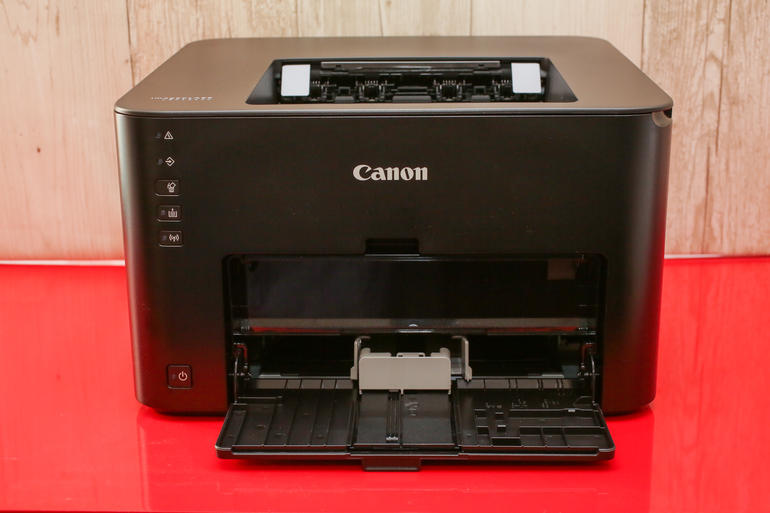
The imageCLASS LBP151dw is your basic black box of a printer. You can load 250 sheets of basic white paper into the tray on the bottom, or you can also feed different types of media like card stock or envelopes into the manual feed tray.
 View full gallery
Canon imageCLASS LBP151dw
Sarah Tew/CNET
The unit measures 15.4-inches (39.1 cm) wide, 13.2-inches (33.5 cm) deep and 9.7-inches (24.6 cm) tall, which means it’s bigger than the HP LaserJet Pro P1102W and not quite as compact as the Brother HL-L2360DW, but it should still fit just fine on a small desk without taking up too much space.
There’s no display on the front so you can’t monitor the progress of a multi-page job, but that’s to be expected for a monolaser printer. There is, however, an indicator button that lights up on the control panel if you’re out of paper, or if there’s a jam to clear. To that end, I never experienced a single paper jam in the few days I spent testing the Canon.
Canon imageCLASS LBP151dw
| $84, £59 UK, $114 AU |
| 15.4″ x 13.2″ x 9.7″ (39.1 cm x 33. cm x 24.6 cm) |
| 1 black toner cartridge |
| Yes |
| No |
| No |
| USB, Ethernet, Canon PRINT Business app, Mopria Print Services, Google Cloud Print |
| 250 Sheets |
| None |
Features
The LBP151dw was designed for the economic-minded and has a built-in auto-duplexer, which is just a fancy way of saying that it can flip a sheet and print on both sides before spitting out the paper.
Google wants to help symptom-searchers find the right diagnosis
It’s easy to search for medical advice on the internet and to come away from it thinking you’re dying.
If you have a headache or a weird rash or stomach pains, the first thing you’ll likely do is search for your symptoms and their likely causes on Google, but because the internet is a strange and wonderful and awful place, you’ll end up with tonnes of misleading results. Well, Google thinks it can do better, because it’s rolling out a new symptom search feature that’s supposed to show you better results.
So, in the future, when you use the Google app for iOS and Android to search for a symptom like “headache”, you will see a card-like list that shows related conditions (“migraine,” “tension headache,” “cluster headache”, etc), an overview description, information on self-treatment options, and advice about what might warrant a doctor’s visit. Google is curating this list from health conditions mentioned in web results.
But it’s gone a bit farther: Google checks those health conditions against medical information it collected from doctors for its Knowledge Graph: “We worked with a team of medical doctors to carefully review the individual symptom information, and experts at Harvard Medical School and Mayo Clinic evaluated related conditions for a representative sample of searches to help improve the lists,” Google explained.
Google’s card-like lists might also include illustrations, stuff you can swipe on, or drop-down menus that you can tap to see more information. Also, Google said it plans to expand this feature from US- and English-only to other countries and languages. It will also bring the feature to desktop. The company has likely developed this feature because more than 1 per cent of Google searches are symptom-related.
Keep in mind all medical information on Google should only be used for informational purposes. You should consult a doctor for medical advice.
This Microsoft video shows what Chrome does to a laptop battery
If you’re like us, you have a love-hate relationship with Chrome.
Google’s web browser is fast, secure, and loaded with powerful features – so, naturallt, it’s one of the most popular browsers today. However, it’s becoming clear that it isn’t exactly the most efficient browser available. There’s a lot of anecdotal evidence online as well as some tests that show Chrome has a negative effect on your laptop’s battery life.
But nothing has driven that message home better than a new battery test video by Microsoft. The Redmond-based company wanted to prove that its Edge browser lasts longer than other browsers when used specifically for video playback and basic surfing. In Microsoft’s video, for instance, Chrome lasted 4 hours and 19 minutes during a streaming video test.
Microsoft Edge, on the other hand, lasted 7 hours and 22 minutes. The test also showed Opera and Firefox use more battery than Edge when playing video, opening sites, scrolling articles, opening new tabs, etc. To further show how Edge offers lower overall power consumption, Microsoft published data it collected from “millions” of Windows 10 PCs.
Keep in mind most people don’t watch web video for hours on end, so Microsoft’s battery test video is a little extreme. Also, Microsoft conducted this test using Surface Books, and we suspect browser efficiency varies by hardware.
Still, it’s obvious that Google should do more to improve Chrome’s battery efficiency.
Is this Samsung’s new Gear S3? Leaked pics seem to reveal watch
It’s time for the Gears S3 rumours to start up, apparently.
A recent leak suggested that Samsung’s follow-up to the Gear S2 smartwatch is codenamed Solis and will run Tizen, but now, overexposed images posted to Twitter (and spotted by SamMobile) have given us a first look at the upcoming watch. It’s hard to tell if they’re real. All we can see is a round smartwatch with a Rolex-like design, including a metal bracelet and fluted bezel.
The images are also stamped with the brand “Gear S3”. These could be fakes or a bad Photoshop job, but either way, it’s safe to assume that Samsung is developing a Gear S3 and might even launch the watch at IFA 2016 in Berlin. That show will kick off in early September. We’ve assumed the Gear S3 will make an appearance then because Samsung launched the S2 at last year’s IFA.
There’s not much else to go on for now, but stay tuned to Pocket-lint’s Gear S3 hub for all the latest news, including more leaks and rumours.
Pay what you want for a 5-course bundle to master copywriting
Your brand’s potential relies upon your ability to convey a concise, understandable message. Without any copywriting background, you could likely stand to improve your brand impression with a skill set upgrade.
Take your abilities to an whole new level with the Pay What You Want: The Marketing Copywriter Bundle, available for a limited time on Pocket-lint Deals.
Marketing your brand and communicating its core message is important. Through the five courses included in The Marketing Copywriter Bundle, copywriting principles will become second nature, and you’ll learn the ropes of writing for a business audience as well as a wide spectrum of social media marketing.
Here’s what’s included, for a total value of £197.05 ($285):
- Effective Copywriting Principles
- Intro to Marketing Analytics
- Improve Your Business Writing
- Facebook Marketing for Small Businesses Course
- Twitter Marketing for Small Businesses Course
If you’re just looking to polish your brand-building tactics in Facebook and Twitter, simply pay any price you want, and you’ll get the Facebook Marketing for Small Businesses Course and Twitter Marketing for Small Businesses Course for as little as you want to pay.
Beat the average price on this deal, and you’ll unlock all five premium courses to conquer marketing analytics, crafting headlines, video copy, and much more. Track your progress with various exams, exercises and real-life applications of your newfound knowledge as you receive instruction from some of the industry’s top-performing professionals.
What are you waiting for? Grab the deal now before time runs out!
Single-molecule switch gets us closer to light-powered computers
The computer and gadget industries have boosted the power of components by shrinking them to near-microscopic scale. One radical field, molecular electronics, takes this to its logical extreme: constructing circuits and devices from single molecules. Researchers at the Peking University of Beijing have just created a switch that can be dependably flipped on and off when hit with one photon, clearing the way for infinitesimally small applications in systems that use light instead of electricity.
Researchers are diving into the field of optical electronics for obvious reasons: light moves faster than electricity, which means faster computations. Shrinking those components results in even faster speeds, which could be useful in systems like solar panels, light sensors or biomedical applications, suggests Scientific American.
Previous attempts to create this single-molecule component were finicky, resulted in switches that got stuck in the “on” position or couldn’t be activated by different types of light. The Peking University researchers used different materials that allowed the switch to stabilize in either binary position yet still be activated by light.
This switch could last for up to a year, which is a vast improvement on the shelf lives of earlier attempts. “In many cases, molecular junctions have lives of minutes, hours, or in fortunate cases days,” Ioan Bâldea of the University of Heidelberg, Germany told Scientific American. While we’re still years from seeing these switches deployed in commercial products, it’s an important step to building stable components at a microscopic scale.
Source: Scientific American
 AIVAnet