


Sniper Elite 4 gameplay preview: Super sharp shooter
There are dozens of high-quality shooters available at the moment, but few offer the pace, strategy and consideration of Sniper Elite 4. The follow-up to Elite III is set in 1943 Italy during World War 2.
As the title suggests, you’re an elite sniper, Karl Fairburne; a covert agent helping the Italian Resistance take down the Fascist regime of the time. Played in third-person, switching to crosshair first-person view to fire your long-range rifle, the game has a good balance between the two viewpoints. It’s like Hitman on steroids meets Metal Gear Solid, with some Assassin’s Creed elements thrown in for good measure.
There’s a glut of other weapons to take advantage of, too, from pistols to automatics, which can be allocated via the quick-select weapon wheel. Such guns are best for firing in closer quarters if you’re not a stealth pro and get caught out in the field. Go too gung ho and you’ll probably not get far though. But Sniper Elite allows you to make such tactical decisions, so playing through a level can be tackled in a variety of ways as you see fit.
The level we played at E3 begins to the side of a bridge with a giant artillery mortar cannon atop it. The mission is simple: blow the bridge. Which, as we found, is a lot harder than it seems. Partly because there are so many fun distractions and potential routes to take. Use binoculars to mark out Fascist opponents, set up mine traps for passing armoured cars, shoot explosive barrels to cause fiery carnage for those nearby.
It’s the sniper aspect of the game that’s critical though, which has been setup with added precision. Marked enemies have distance markers, which you’ll need to keep in mind if you’re going to hit a far-away target (scope zeroing has been added to this game too). From magnification zoom to heart-rate, critical crosshair placement can be aided by using the right bumper button to slow the flow of time slightly for a pinpoint strike.
Get that right and the slow-motion X-ray kill cam that follows is something special. Bodies’ exteriors become transparent, revealing the bones and organs within, with critical damage observed in kills. We scored some headshots, but the game goes beyond this: we even scored an eyeshot once. And, if you’ve seen the gameplay trailer, you’ll know that even testicle shots are possible. And you’ll score extra experience points for such kills. It’s kind of gruesome but totally awesome.
Rebellion
If you’re a Sniper Elite 3 fan then you’ll love Sniper Elite 4. It’s a much larger campaign game, with each level considerably bigger than the series has ever offered before. It’s meticulously crafted, too, with all sorts of places to hide, plus you can now traverse obstacles in a way that wasn’t possible before. Clamber along the outside edges of bridges, drop between open windows; basically become a stealthy badass, Assassin’s Creed style.
Should you get caught out and killed then the game works with a checkpoint system, so you’ll be reverted back to your last major moment within a level. It’s not cruel enough to bring you back to the very beginning each time.
The game looks sumptuous too. Running in 1080p on both Xbox One and PS4, there’s as much detail on screen as there is in the game’s sniper setup. And although we didn’t get to play it, there’s a dedicated co-op mode too – which we suspect will be a whole lot of fun.
First Impressions
If you’ve looked at Sniper Elite games before and thought “boring” then Sniper Elite 4 really ups the ante. It strikes a great balance between stealth and action.
Developers Rebellion might have been playing a fair chunk of Metal Gear Solid 5 in recent months, because we felt more than a hint of that in the gameplay. Which is high praise, given how much that game impresses.
Whether you’re a World War 2 era fan, or just up for a tactical shooter challenge, Sniper Elite 4 strikes a sound balance. The big question will be whether it can maintain interest over a long campaign and inject enough variety to be a bona fide five-star release. We’ll find out for sure in February 2017, but things are already looking very promising indeed.
More women accuse former Tor developer of sexual misconduct
Two more women have stepped forward to accuse former Tor project developer Jacob Appelbaum of sexual harassment. That brings the total accusations against Appelbaum to at least eight, as recorded on JacobAppelbaum.net, a website created to raise awareness of his behavior.
Appelbaum was a core member of the Tor project, and one of the people who had access to and published Edward Snowden’s classified documents released in 2013. He’s a well-known name in the hacktivist community, so his resignation from Tor amid allegations of sexual harassment made waves.
“We are deeply troubled by these accounts,” wrote Tor’s executive director Shari Steele in a June 4th blog post about the resignation. And indeed, each individual account on JacobAppelbaum.net is a horrific read. The website describes his behavior as “an open secret, in some circles, for years,” so it’s surprising that it took so long for victims to come forward.
Though most of the experiences were shared anonymously for fear of retaliation, a few people have publicly claimed their stories, including Tor community and staff members Alison Macrina and Isis Lovecruft today.
Macrina explained on a Medium blog post that she came forward publicly to lend weight to the accusations. “Many of the anonymous victims do not have my established trust and visibility in the community,” she wrote, “So today I am using my power to speak up for those who cannot.”
Appelbaum has called the assertions a “calculated and targeted attack [that] has been launched to spread vicious and spurious allegations” about him. He said that the accusations of criminal sexual misconduct against him are false, and that he has received death threats.
The Tor Project says it is working with a legal firm specializing in employment issues, including sexual misconduct, to carry out private investigations into the allegations.
Sixty percent of women in tech have been sexually harassed, according to a 2015 survey of about 200 women in the industry. Of these, 39 percent said they did not report the harassment for fear of hurting their careers.
It’s not easy to step forward and report cases of harassment. People worry about retaliation, not being taken seriously and possible damage to their careers and reputations. It’s often easier, even though frustrating, to brush incidents aside and hope they don’t reoccur. It’s even easier to dismiss these accusations as false. But dismissing these reports out of hand is harmful, and potentially gives offenders leeway to do what they want without fear of reprehension.
Update: Investigative journalist and Engadget columnist Violet Blue has also documented her own encounters with Appelbaum in a post on Medium.
Via: Gizmodo
Source: Medium, Patterns In The Void
Now advertisers can target users who tweet a certain emoji
As much as we debate new Twitter features that affect users, in its pursuit of revenue the company is constantly courting advertisers. Its latest gambit capitalizes on that oh-so-popular element of modern conversation and 2015 “word” on the year: the emoji. Now, advertisers can target more than just specific words in tweets, they can also cite particular emoji to find users they believe will be receptive to their pitches. In other words, use the pizza emoji in a tweet and expect an ad from Dominos or someone similar coming your way soon. Twitter also says it can serve up users “based on their expressed sentiment” and “based on their passions.” We’re not sure what this will mean for the eggplant or 💯 emoji, but users will probably find out soon enough.
Big news! Target emojis right from Twitter Ads 👏🏼😎😂 🦄 🍕 https://t.co/Ksikmgi3W5
— Twitter Advertising (@TwitterAds) June 15, 2016
Source: Twitter Advertising Blog
NASA conducts largest fire experiment in space
As part of its efforts to ensure the safety of spacefarers, NASA set a 16×37-inch block of cotton-fiberglass material on fire aboard a spacecraft that’s making its way back home. Since the largest material NASA ever burned in space before this was the size of an index card, this is now officially the biggest fire experiment conducted outside our planet. The Spacecraft Fire Experiment or Saffire-I, as it’s officially called, happened aboard the Cygnus spacecraft that ferried the ISS’ largest delivery back in March.
NASA’s Glenn Research Center created a special module for the undertaking to make sure the flames don’t spread out. They then triggered the experiment from the ground a few hours after Cygnus left the ISS on June 14th. The spacecraft traveled a thousand miles before the sample stopped burning, so you can expect quite a few images from the agency. Glenn’s researchers are still waiting for data to arrive, though — you’ll have to wait at least 24 more hours to see them.
NASA plans to conduct two more fire experiments aboard a Cygnus vehicle. Saffire-II will burn 2×12-inch materials to “assess oxygen flammability limits,” while Saffire-III will set another big sample on fire.
Still patiently waiting to receive #Saffire data containing imagery from yesterday’s experiment. It could be another 24 hrs.
— NASA Glenn Research (@NASAglenn) June 15, 2016
Source: NASA (1), (2), (Twitter)
Nine tips to get the most out of the Gear Fit 2 – CNET
 Enlarge Image
Jason Cipriani/CNET
You’ve set up your Gear Fit 2, now what? Start within going through these settings to get the most our of your brand new smartwatch, fitness tracker combo.
From changing watch faces or installing new ones from the store, to controlling Spotify from your wrist, there’s plenty of functionality hidden in the Fit 2.
Watch faces
There are a couple different ways to go about changing the watch face on the Fit 2. On the device itself, tap and hold on the current watch face. A few seconds later, you’ll feel a small vibration and the Fit 2 will display installed watch faces for you to pick from and customize, or “stylize” as the watch calls it.
On your phone, you can open the Samsung Gear app and tap on Watch faces. In this section of the app you can change the active face, as well as customize how it looks. Additionally, you can delete and install new faces from the Galaxy App Store.
Add, delete and organize widgets

Enlarge Image
Jason Cipriani/CNET
Swiping to the left on the main screen of the Fit 2 will scroll through widgets, each on detailing various bits of information. To customize which widgets are displayed and the order of said widgets, view a widget and then long-press on the screen.
A short vibration will indicate you’ve enabled edit mode, with thumbnails of the widgets showing up. You can then delete a widget by tapping on the “-” sign, drag-and-drop widgets to move them around and add widgets.
Rearrange applications
Not to be confused with widgets, the actual apps installed on your Fit 2 can also be rearranged and edited.
On the watch itself, press the bottom button to view a list of installed apps. Long-press on an app icon to enable edit mode. Any apps that can be deleted will have a “-” sign on it. Keep in mind, the core apps Samsung includes out of the box cannot be deleted. Drag-and-drop apps to rearrange their order to your liking.
Alternatively, you can use the Samsung Gear app on your phone to rearrange and uninstall apps.
Health nudges can be useful or annoying

Enlarge Image
Jason Cipriani/CNET
The Gear Fit 2 will automatically remind you to get up and move around after you’ve been inactive for 50 minutes. These alerts — an icon for which is in the photo above — while helpful for some, can be annoying if you don’t care about moving every hour.
To disable health nudges, open the Fit 2’s Settings app > tap Health Nudges > and go through the list, turning off the alert(s) you don’t want to be bothered with.
In addition to inactive alerts, this is also where you can enable or disable notifications for reaching your goals and automatic exercise detection.
Control Spotify
Beyond controlling music you have stored within the music app on your phone, you can control Spotify from the Fit 2. You’ll need to install the latest version of Spotify from the Play Store, then go into the Gear app on your phone. Select Samsung Galaxy Apps then search for Spotify. Install the Spotify Gear companion app, and bam, you’re done. Control Spotify from your Fit 2 like a boss.
Set your shortcut button
Double-pressing the bottom button on the Fit 2 acts as a quick shortcut to launch an app of your choosing. Assigning which app launches from the shortcut, open the Gear app on your phone and select Settings > Double press Home key. From there, select your app and you’re all set.
Increase the vibration
The Fit 2’s default vibration setting for calls and notifications is a bit weak. Thankfully you can increase that with just a few taps on your wrist.
On your Fit 2 to go Settings > Vibration > Long Buzz and turn it on.
Protect your Fit 2 with Screen Lock
Samsung included the ability to lock down the Fit 2 each time you take it off, requiring a passcode whenever it’s put back on before it starts working again. This is handy should you not want someone to put on your Fit 2 and view your notifications and health info, or should you ever lose the device.
To enable Screen Lock, open Settings on your Fit 2, select Screen lock then Select type followed by PIN. Enter a PIN code and you’re all set. The next time you remove and put the Fit 2 back on, you’ll need to enter the PIN using the keyboard on the Fit 2 before it will unlock.
Speaking of losing a device

Enlarge Image
Screenshot by Jason Cipriani/CNET
It’s probably also a good idea to enable remote access on your Fit 2. With Remote Access turned on, you can remotely find and locate a Fit 2 as long as it’s connected to Wi-Fi. You can also remotely wipe it, and enable reactivation lock which requires your Samsung account info before the Fit 2 can be wiped and set up on a new device.
You can find the various settings to better protect your Fit 2 in the Gear app on your phone under the Find my Gear section.
FoldiMate Release Date, Price and Specs – CNET
A startup has dreamed up a device to ease some of the burden of doing laundry.
It’s called the FoldiMate, a home robot designed to fold your clean clothes all by itself with professional skill and quality results. About the size of a standard domestic washer or dryer and with a big ticket price to match ($700 to $850), the appliance will apparently grab garments within its reach, pull them inside its innards for processing, then spit out piles of smartly stacked and crisply folded clothing.
The quest for making laundry chores less onerous isn’t new. Manufacturers of washing machines and clothes dryers have added special steam cycles to their products that promise to remove wrinkles (and even odors) from garments so you’ll spend less time ironing. Lately, other laundry gadgets with lofty claims have come to market, such as the LG Styler and Whirlpool Swash. These machines are designed to “refresh” delicate items at home to cut down on pricey trips to the dry cleaners. And the Foldimate isn’t the first folding machine we’ve come across. Last year at the CEATEC consumer electronics show in Tokyo, we saw a garment-folding solution called the Laundroid that managed to fold a dress shirt in about five minutes.
But companies have yet to give consumers products that can actually hold up to human performance. Steam washer and dryer cycles can smooth out wrinkled fabrics, but cannot dispel them entirely. Sadly, the Styler and Swash don’t actually remove dirt from your clothes the way regular washing machines do, nor do they press as well as an old-school iron, and they are limited to tackling a few (or one) item at a time.
Unfortunately, the FoldiMate seems to have similar limitations and sounds even more complicated to use. For instance, you can’t just dump mounds of apparel into the FoldiMate all at once and expect it to sort everything out. To use the FoldiMate, you must first clip individual garments such as shirts, sweaters and pants onto the horizontal racks on the front of the machine.
The inner workings of the FoldiMate do sound intriguing — if the product works as the company promises. The FoldiMate draws clipped clothing into an inner chamber where a series of mechanisms robotically flip, fold and flatten cloth items into shape. FoldiMate also subjects clothes in the chamber to a special treatment similar to the Whirlpool Swash that includes steam, perfume and fabric softeners. The result, say the people behind FoldiMate, will be garments that are neatly folded, expertly layered and ready for your wardrobe. The machine is supposed to be swift too, tackling laundry loads twice as fast as you would if you folded them manually.

The FoldiMate stacks crisply folded items
FoldiMate
If you’re dreaming of owning a FoldiMate device of your own, you have a bit of a wait in store. While the startup behind FoldiMate says they will begin taking preorders in 2017, the unit isn’t expected to ship until sometime in 2018 and will cost between $700 to $850. If you want the dewrinkling feature, you’ll have to fork over an additional $200 to $300 plus the cost of treatment capsules ($15 to $40 each).
More details about FoldiMate
- Can handle medium-sized items like shirts, pants and towels
- Can’t fold small or large items like underwear, socks and bed sheets
- Clip capacity is 15 to 20 garments
- Takes 10 seconds to fold one item, 20 to 30 seconds to dewrinkle
- Measures 28x32x31 inches (71cm x 81cm x 79cm) and weighs 66 pounds (30kg)
- Dimensions similar to typical home clothes dryer
- Uses standard 110V / 220V electrical power
Meizu Pro 6 review
Meizu is well known for their mid-range and entry-level smartphones that are surprisingly low-cost, but the Chinese OEM does have some solid high-end phones on offer as well, that continue to be priced quite aggressively.
For Meizu, these high-end devices are seen in the form of “Pro” iterations of their base “MX” flagships. This time around however, the company seems to have done away with the MX line altogether, by jumping directly into the releasing the latest Pro edition smartphone.
- Meizu MX5 Review
- Meizu MX4 Pro Review
What does this device bring to the table? We find out, in this comprehensive Meizu Pro 6 review!
Buy now from Amazon
Design
As has been the case with previous Meizu smartphones, the inspiration in terms of design is quite obvious at first glance. However, with the Pro 6, Meizu attempts to do things a little bit different and includes a few unique design elements, that allows for some separation from the design of the iPhone, and previous generation Meizu smartphones as well.
The Pro 6 does come with a full metal unibody construction, with the aluminium used appearing to be of a higher quality grade. There are no sharp or flat edges on this phone, with the back curving in along the sides to meet the front. The antenna bands appear at the top and bottom on the back as well, but with a unique look that certainly hasn’t been seen before. The rear camera is actually HTC 10-esque in its appearance, below which can be found a 10 LED flash.

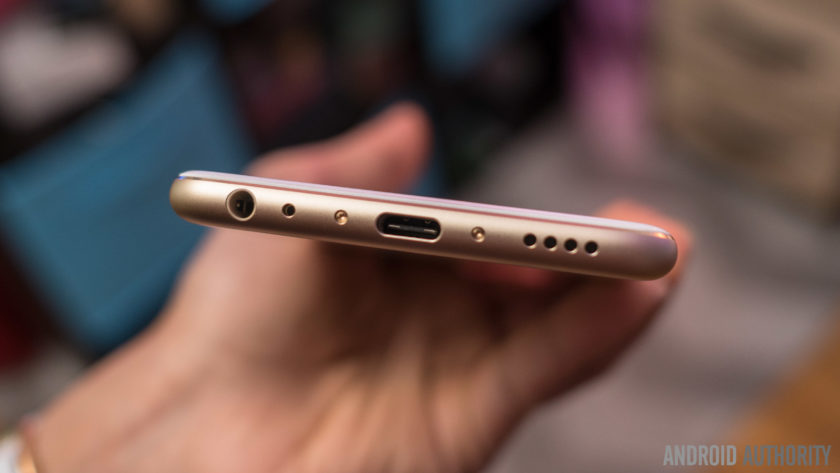
The volume rocker and power button are on the right side, and at the bottom is the headphone jack, USB Type C charging port, and single speaker unit, in a design that will be extremely familiar. In fact, the overall design of the Meizu Pro 6 will be rather recognizable, but that isn’t necessarily a bad thing. Helping the well known design language is a high quality build that allows for the device to feel fantastic in the hand, and design is an aspect that most will consider to be a positive.
Display
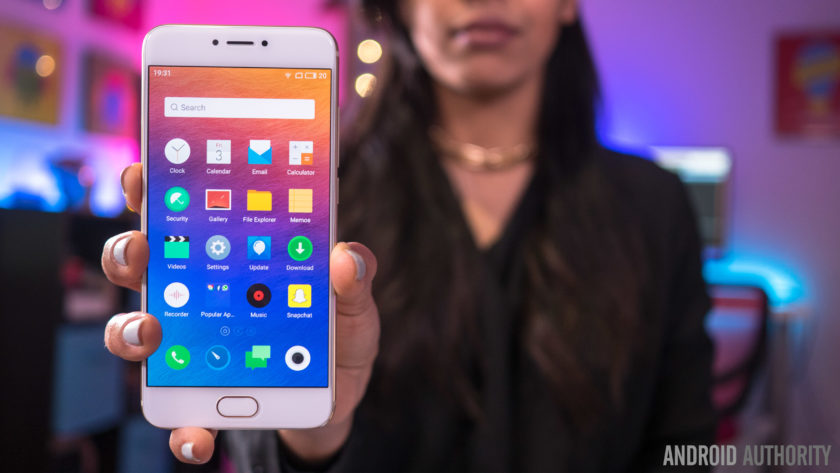
Unlike previous Pro iterations that featured large 5.7-inch displays, the Pro 6 features a 5.2-inch screen, that allows for a more manageable handling experience, and the AMOLED display comes with a Full HD resolution, resulting in a pixel density of 424 ppi.
This display offers everything you’d expect to see from a high quality AMOLED screen, including vibrant, saturated colors, and deep, inky blacks. While some AMOLED displays tend to have a pinkish tinge when setting the display at the lowest brightness level, that doesn’t seem to be the case here either. It may not boast the highest resolution or pixel density when compared to its flagship brethren, but 1080p is more than enough at this screen size, and the display of Pro 6 proves to be quite impressive.
The display comes with a few interesting software and hardware features as well. On the software side, these features include eye protection, which results in an orange hue to help avoid the harmful effects of blue light, and is especially useful when you are trying to sleep. You can also manually change the color temperature of the display, and there are also various display modes that let you adjust the level of color saturation on this display.
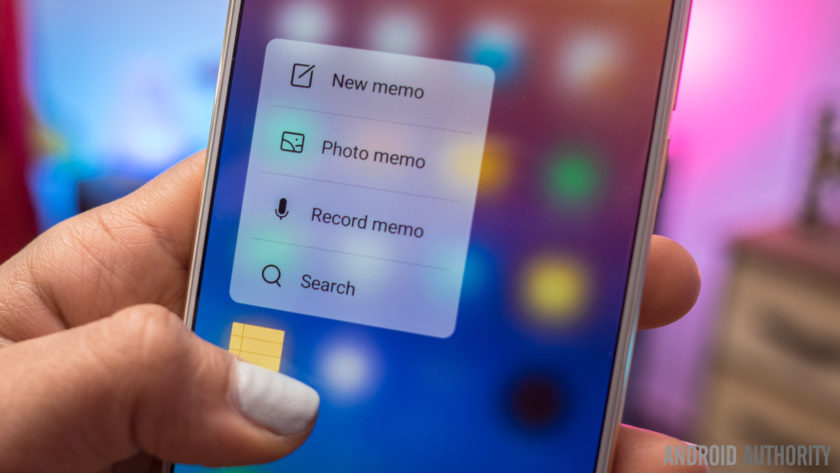
However, the new addition, that will also result in more comparisons with the iPhone, is the availability of Meizu’s take on 3D Touch, called Force Touch. If you’ve used 3D Touch on an iPhone before, you will find the experience to be largely similar here. A force press will display different shortcuts, like video mode or selfie mode with the camera, and there is also a peek and pop gesture, where a bit of pressure will bring up a a preview of an image, and adding more force makes the image larger and larger, until it becomes a full size. Unfortunately, the number of third-party Android apps that support Force Touch is extremely limited, so for now, you are restricted to using these with Meizu’s apps only.
Performance
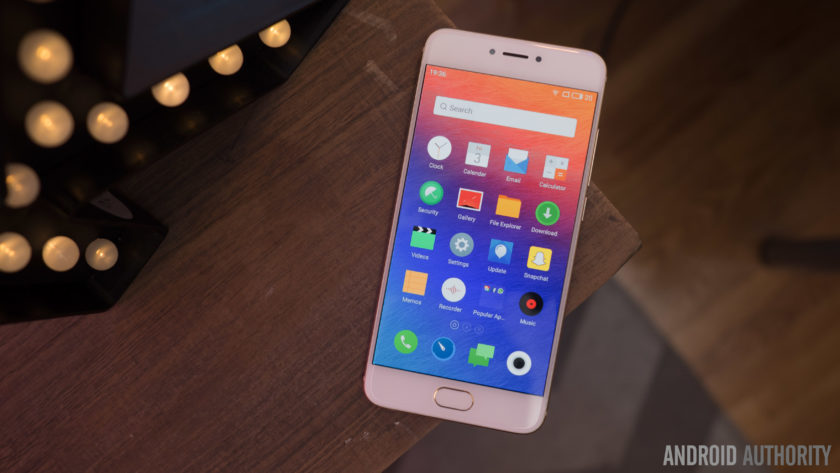
Under the hood, the Meizu Pro 6 comes with a deca-core MediaTek MT6797T Helio X25 processor, clocked at 2.5 GHz, and backed by the Mali-T880MP4 GPU, and 4 GB of RAM. You can see the benchmark scores in the screenshots below, but as far as real world performance is concerned, the device handled everything very well.


The Pro 6 didn’t really slow down in any instance, and everything from opening, closing, and switching apps, to all other everyday tasks is smooth and snappy for the most part. There are some issues as far as gaming is concerned though, with load times being a touch slow, and a few instances of lag and stutter seen when playing processor-intensive games.
Hardware
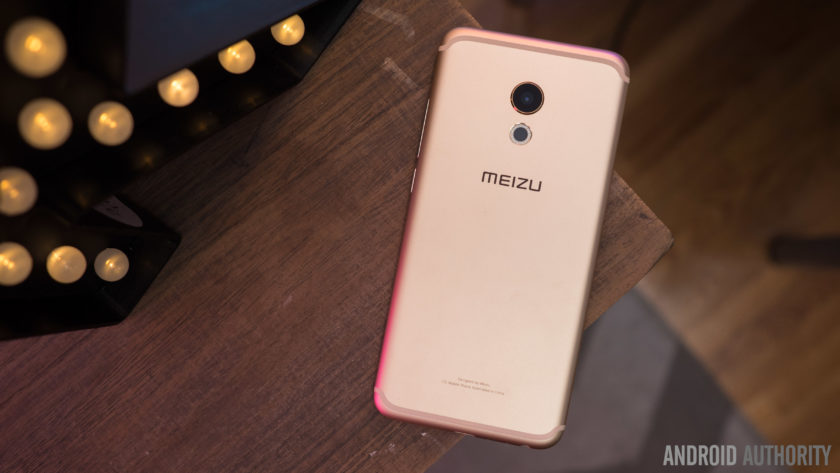
32 GB or 64 GB are the in-built storage options available with the Meizu Pro 6, but users with storage concerns will have to opt for the higher version, with the device not coming with expandable storage. You do get dual SIM capabilities here, which can be useful for some, depending on the market.
Below the display is a lone home button that also doubles as a fingerprint scanner. The performance of the scanner was actually very surprising, and is one of the fastest we’ve seen on a smartphone so far. Granted, you do need to press the home button and turn the screen on before the device can be unlocked, but when the screen is on, just a tap of the home button is enough to unlock the device. Of course, the sensor is very reliable as well but it doesn’t quite compare to other smartphone fingerprint sensors that allow you to unlock your phone without waking the phone first.
There are no on-screen of capacitive navigation keys to be found on this device, and Meizu has quite an unique implementation in place. The back button functionality is actually a part of the home button as well. While a press of the home button works as expected, a simple tap on it will work as a back key. This can take some getting used to, especially when considering that the majority of Android smartphones has a dedicated back and Recent Apps key, but is a nice way to keep the front of the device clean, and avoids using up any additional display real estate.
As far as the Recent Apps page is concerned, this can be opened by a swipe up from the bottom of the display. The app you are currently using will slowly shrink as the Recent Apps list comes up, with a good looking animation, and this works really well, for the most part. It can be a touch frustrating to trigger this action, with only a slow and steady swipe up guaranteeing a result every time, and this can get quite annoying for users who switch between apps often.
 The single speaker unit sits at the bottom of the device, and as is always the case, this isn’t the best position for a speaker. Not only is the sound going away from you when watching videos or listening to music, but the speaker is also easy to cover up when holding the device in the landscape orientation. However, Meizu does manage to impress when it comes to audio quality. The sound is clear and loud, and the speaker delivers a good amount of bass as well, and this is easily one of the best bottom-mounted speakers we’ve seen on Android smartphone thus far.
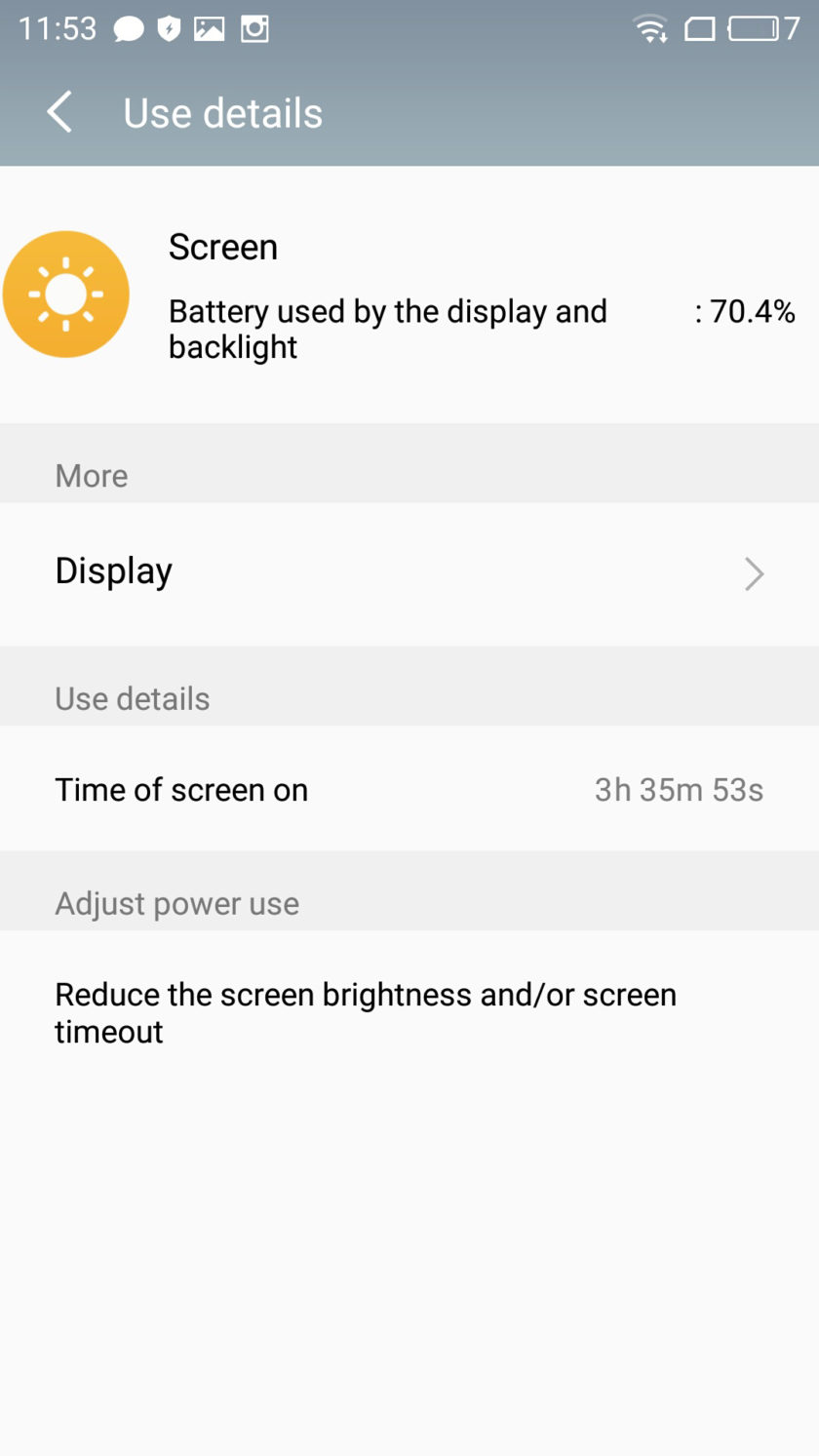
The Meizu Pro 6 comes with a rather small 2,560 mAh non-removable battery, but the battery life is still quite good. You will get around 3 hours and 45 minutes of screen-on time with moderate usage, and for the most part, that may be enough to get you comfortably through a full day of use. Depending on your usage, you may find yourself needing to recharge the phone half way through your day, but the good news is that the Pro 6 does come with a USB Type C port (USB 3.1) and some form of fast charging capabilities, that will allow you to be up and running in no time.
Camera

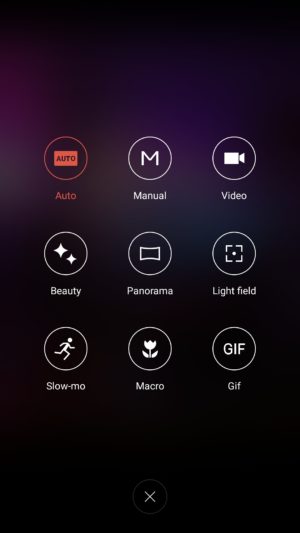
The Meizu Pro 6 comes with a 21 MP rear camera, with a f/2.2 aperture, a laser-guided auto focus system, and a 10 LED dual tone flash, along with a 5 MP front-facing camera with a f/2.0 aperture. There is no optical image stabilization here however, which is quite disappointing to see.
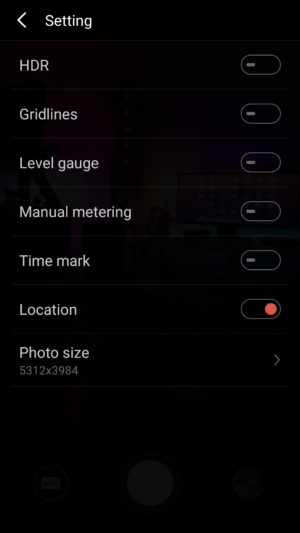
21 MP does allow for you to zoom in a lot into shots and crop in a good amount, but unfortunately, images don’t appear very sharp, with a lot of detail being lost as well. There is some noise to be seen, even in well-lit conditions, and the color reproduction is lacking as well. The camera is capable of taking some decent shots, but the lack of color is noticeable no matter what. HDR does help a lot in some situations, but sometimes that is often to a point where the shot begins to look unrealistic.
Image quality is definitely a mixed bag when it comes to this camera. The usual issues crop up when taking pictures in low-light conditions, with the loss of a lot of detail, colors being even more lackluster, and the overall image being generally dark and noisy. HDR is also hit and miss in poorly-lit situations. Sometimes, it will brighten the image just enough to create a good shot, but at other times, it will brighten the image way too much, which does bring out more detail in the shadows, but also results in overblown highlights.

You can shoot 4K video with the Pro 6, and while the video quality is decent for the most part, the lack of OIS is very noticeable here, making for some very shaky videos. The camera also sometimes struggles when it comes to focusing on objects when shooting video as well.
The 5 MP front-facing camera has a larger pixel size than most, in order to capture more light, but selfies are also below average. In brightly-lit outdoor situations, you can get a decent selfie, even though the image will often end up quite soft, and with some amount of noise. If you’re taking a selfie in anything other than well-lit conditions however, the images will turn out to be very blurry, or with lots of distracting noise.
Software

On the software side of things, the Meizu Pro 6 is running the latest version of the Flyme OS, based on Android 6.0 Marshmallow. Past iterations of the Meizu’s custom OS weren’t the best, but the company has been making some useful changes the help make the user experience a lot better.
There’s still no app drawer available though, leaving users dependent of creating folders to keep things organized. Some of the changes include the Recent Apps screen that can be opened with a swipe up from the bottom of the display, and comes with a cool animation and is presented in a nice layout. The pull down menu isn’t divided into two sections anymore, with the quick toggles and notifications all housed in a single page. Finally, Meizu has also added a Settings icon and shortcut at the top of the notification drop down, something that was surprisingly missing from previous iterations of the Flyme OS.

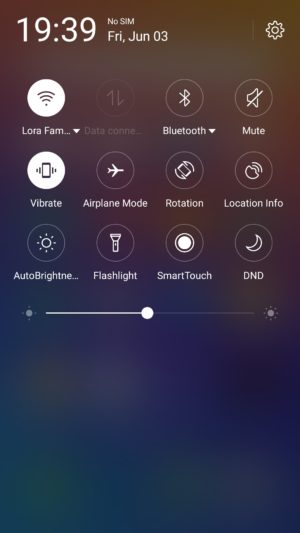


There are some nice features baked in as well, such as a slew of gesture controls, that include double to wake, a gesture input to pull down the notification shade, and up to eight different letter inputs that can be assigned to bring up specific applications. The Flyme OS offers a very different take on Android than what you may be used to, but different doesn’t have to mean bad, and it certainly doesn’t in the case of the Meizu Pro 6.
Specifications
| Display | 5.2-inch Super AMOLED display Full HD resolution, 423 ppi |
| Processor | 2.5 GHz deca-core Helio X25 processor Mali-T880MP4 GPU |
| RAM | 4 GB |
| Storage | 32/64 GB |
| Camera | 21 MP rear camera, f/2.2 aperture, laser auto focus, 10 LED flash 5 MP front-facing camera, f/2.0 aperture |
| Connectivity | Wi-Fi 802.11 a/b/g/n/ac Bluetooth 4.1 NFC GPS+GLONASS USB Type C 1.0 (USB v3.1) |
| Battery | 2,560 mAh |
| Software | Flyme OS based on Android 6.0 Marshmallow |
| Dimensions | 147.7 x 70.8 x 7.3 mm 160 grams |
Gallery

Final thoughts

So there you have it for this in-depth look at the Meizu Pro 6! The latest flagship Meizu managed to impress in more ways than one, and while there may not be anything unique to help this device stand out from the crowd, it does really well with the features it does have to offer. The fingerprint scanner is fast, and while the placement of the bottom-mounted speaker isn’t ideal, the audio quality is surprisingly good. Meizu has also managed to clean up their software experience to some extent, and while it will still take some getting used to, the additional features end up being quite useful.
That said, the camera isn’t particularly impressive, which can be a deal breaker for a lot of users. The Pro 6 isn’t the most affordable when importing the device to the US, but in markets where the phone is officially available, what you do get is a solid smartphone that proves to be dependable for the most part.
Buy now from Amazon
What do you think of the Meizu Pro 6 and do you intend to buy one? Let us know your views in the comments below!
‘Resident Evil 7’ in VR is a sweaty, puke-inducing masterpiece
I nearly tossed my cookies in the middle of Sony’s media lounge at E3, while hosting a Facebook Live stream and playing Resident Evil 7: Biohazard on PlayStation VR. This wasn’t a case of Nerd Flu or a bout of food poisoning — I finally experienced the notorious curse known as VR sickness. For years I’ve been drifting from headset to headset without a care in the world, content in the knowledge that I didn’t get nauseated while playing games in virtual reality. I’d read about people feeling queasy after playing Elite: Dangerous or Project Cars, but I never fully understood why it was such a big deal. Couldn’t these people just chug some Pepto Bismol and get on with their immersive gaming experiences? Where did all these weak-stomached crybabies come from anyway?
Crybabies, consider this my formal apology, courtesy of PS VR and Resident Evil 7.
I was incredibly excited to play Resident Evil 7 in VR. I’m a long-time franchise fan and I loved the direction that Capcom decided to take with this installment. It’s in first-person, a departure from other games in the series, and at first glance it looks more like PT or Outlast than a traditional Resident Evil title. This is great news for me; I adore psychological thrillers and the recent wave of exploration-based, haunted house horror games has been pure nectar for my adrenal glands. With a team of terror masters behind the Resident Evil 7, I was prepared to be scared. However, I was not prepared to puke.
A third of the way through the demo, with Engadget Social Media Editor Mallory Johns streaming my every move live to the internet, I suddenly felt feverish. In an instant I was burning up, sweat building on my hairline and at the base of my neck. I fanned myself and assumed it was the adrenaline kicking in. After all, I was wandering around a dilapidated, carcass-filled house that was supposed to scare my pants off at any moment. Nerves were normal.
With Mallory feeding me questions from the live stream, I continued to talk and search the house despite a growing discomfort in my chest and stomach. The first wave of nausea crashed over me shortly after I climbed the stairs for the first time, my head tilted upward as I peered around a dark loft space occupied by a group of naked mannequins. I wondered if I was coming down with the flu.
Two minutes later, I was barely paying attention to the game. My stomach churned and my skin steamed. Mallory asked what I was seeing on the screen and I snapped back into presenter mode for moments at a time, but the nausea only increased. Ten minutes into the demo, I had paused to fan myself once and lifted the headset away from my eyes three times. At that point, I knew that if I put the PS VR back on, I was going to puke all over Sony’s media lounge, live on Facebook. I called it quits. Mallory ended the stream as I asked the Capcom employee if people complained of VR sickness a lot. He shrugged.
I was on the brink of vomiting for 10 minutes following the demo. Mallory rushed with me to the bathroom but the fresh air and real world filling my vision gradually dulled the nausea. It was all incredibly strange — I’d never felt anything like it, especially not while playing a game in VR.
We asked around and found that my experience wasn’t unique. Multiple people reported feeling sick while playing Resident Evil 7 on PlayStation VR, including some who said they’d never experienced VR sickness before. A friend sat down to play the demo and as we talked afterward, he paused multiple times to cover his mouth, on the verge of vomiting. A staff member at a neighboring demo station said that people regularly left the Resident Evil booth with VR sickness, including one man who removed the headset to reveal a head drenched in sweat.
This was a shame, largely because the demo was legitimately wonderful otherwise. The house was claustrophobic and mysterious, the graphics were immersive and the story was just starting to reach a fever pitch by the time I had to quit. Despite the overwhelming nausea and clammy sweats, I remain interested in Resident Evil 7 (the full game lands on January 24th, 2017, by the way) — just not in VR.

Maybe I fell ill because I used the right analog stick too much to look around instead of simply turning my head (old habits die hard). Maybe the sickness struck because I hadn’t eaten lunch and my stomach was overflowing with excitement at playing Resident Evil in VR. Maybe I was pregnant. OK, it wasn’t that one — but the thought did cross my mind before I heard the stories from other people who felt pukey after playing the demo.
It’s worth noting that the Resident Evil 7 demo on PS VR runs at 60fps, the minimum specs that Sony will allow on its new headset. In comparison, the Vive, Oculus Rift and Razer’s HDK 2 all require at least 90fps. VR sickness is a tricky beast — it stems from a wide range of factors, including frame rate and latency issues, and disparate games can induce nausea for different reasons. A dropped frame here or there can turn an immersive experience into a roiling vomit catalyst, and subtle lag between a player’s head movements and the on-screen reaction can destroy an otherwise wonderful game. Low frame rate isn’t the only culprit when it comes to VR sickness, but it’s definitely on the list.
Again, I’ve never gotten sick while playing a VR game before, no matter how long I’ve worn the headset or how quickly I’ve turned my head in-game. The nausea that assaulted my body while playing Resident Evil 7 in VR was so sudden and sweaty that it was scary — just not in the way Capcom intended.
Follow all the news from E3 2016 here!
Pinterest nabs Fleksy’s team to improve its digital scrapbook
When it launched in July 2012 as an app designed to help blind users type via muscle memory, Fleksy was one of the first apps to bring extended typing features to iOS. Today, Fleksy announced it has been acquired by Pinterest for an undisclosed amount and will be open-sourcing some of it’s accessibility features for the blind and visually impaired.
According to VentureBeat, Fleksy’s award-winning keyboard app and technology won’t actually be coming to Pinterest itself, although they will remain in the App Store and Google Play store “for the foreseeable future.” As part of the deal, half of Fleksy’s 10-person team just became part of Pinterest’s mobile and mobile platform engineering departments and will incorporate their knowledge of visual search into Pinterest’s platform.
“Pinterest is intensely focused on refining the mobile experiences that make it possible to flow effortlessly through our catalog of ideas — on any device, any place in the world,” Pinterest’s Head of Core Experience Scott Goodson said in a statement. Likewise, Fleksy Founder and CEO Kosta Eleftheriou said his company will “continue working on intuitive content discovery experiences on mobile. We’ll be bringing our expertise on both iOS and Android to join Pinterest in developing the most robust, beautiful and engaging ways to help people discover ideas.”
Although it’s never been the most popular third-party keyboard on either Android or iOS, Fleksy racked up a sizable user base and slew of accolades, including Apple’s Best of App Store 2012 and app of the month from Royal National Institute of Blind People. It was also used to break the Guinness World Record for fastest touch-screen text message in 2014.
Fender’s Mod Shop lets you customize a new guitar on the web
Typically, ordering a custom guitar not only means spending more money, but it usually means an extended wait as well. Fender has a solution for both of those issues, taking a cue from the likes Motorola and other companies that have offered customers the ability to tweak the design of a product or device before ordering. With the Mod Shop, Fender will let you put the finishing touches on a Stratocaster, Telecaster, Precision Bass or Jazz Bass so that the instrument matches your sense of style exactly.
Once you select the model you want to customize, you’re able to select the orientation, body color/finish, fingerboard, pickups, pickguard, tuners, bridge and hardware color before handing over the funds. Of course, pricing starts at $1,650-$1,800 and varies depending on the level tweaking you do and just how much the selected materials cost. You’re free to fiddle around as much as you like, with the ability to take a snapshot when you get to something you might want to buy. This gives you a reference to come back to later on if you still want to make further changes.
All of the usual sharing tools are there too, so you can let your friends weigh in before emptying your savings account. You can also post a design to Fender’s own gallery for other aspiring designers to ogle. The best part? Fender promises you’ll be playing your custom creation in a month, no matter how many changes you make to the instrument The Mod Shop is live now on desktop and mobile, so go on and design the axe of your dreams.
Source: Fender
 AIVAnet