


Scientists find the largest known planet to orbit two stars
The notion of planets in a Tatooine-like system with two or more stars isn’t strange (they’ve been known since 1993), but a truly massive planet hasn’t been seen before… until now. Scientists using NASA’s Kepler space telescope have discovered Kepler-1647b, the largest known planet to orbit two stars (aka a circumbinary planet). The 4.4 billion year old gas giant is about as large as Jupiter, and orbits at a much further distance than other confirmed planets with a 1,107-day trip. That’s still much closer than Jupiter, which takes 12 years, but it remains a rarity given our current knowledge.
To no one’s surprise, researchers are doubtful that there’s any life to be found on Kepler-1647b; you won’t be visiting Aunt Beru and Uncle Owen any time soon. There’s a chance that any large moons around the planet might harbor organisms, though. And the discoverers are quick to note that this is just the “tip of the iceberg” for large, long-orbit circumbinary planets. Although the chances of finding a planet that supports life are very slim, there should be enough of these unusual star systems out there that the concept is plausible.
Via: Space.com
Source: NASA, ArXiv.org (PDF)
Jason is still up to his old tricks in ‘Friday the 13th: The Game’
Jason Voorhees is all about chasing his victims down and ensuring they meet grisly deaths. It’s good to see him keeping true to form in Friday the 13th: The Game, which we’re finally able to look at some decent gameplay for.
The video below lets us check out some of the action from both Jason’s perspective and the victims, showcasing Jason’s uncanny ability to find the squealing teenagers in the dark. Honestly, it seems a little unfair to play as one of the unsuspecting victims unless you’re super crafty. You’re definitely going to need to work together if you want to survive.
Friday the 13th: The Game drops for Xbox One, PS4 and PC this fall.
Via: Polygon
What happened at WWDC 2016?
Need a quick recap on all the news from WWDC 2016? Our own Dana Wollman and Chris Velazco were on the scene and are ready to run through all the news about macOS, iOS, watchOS, tvOS and any other platforms Apple may have introduced. Most of these changes won’t hit your devices until the fall, but this way it will only take a few minutes to get familiar with all the new features immediately.
Get all the latest news from WWDC 2016 here!
How to sign up for the iOS 10, MacOS Sierra public betas – CNET
Apple unveiled iOS 10 and Mac OS Sierra, the operating systems for its mobile and desktop platforms respectively, Monday at the company’s annual Worldwide Developers Conference.
As with past WWDC announcements, developer betas will made available today, with public betas and official releases to follow. The public betas for both iOS 10 and MacOS Sierra will available in July, with the final releases of each scheduled for the fall.
- iOS 10, MacOS Sierra and a better Siri: Everything Apple just announced
- Apple WWDC 2016 keynote kicks off
- See all of CNET’s WWDC coverage
If you want to get your hands on Apple’s latest software and don’t have a developer account with Apple, you can sign up now to be notified when the public betas are released in July (Apple hasn’t specified an exact date in July). You can sign up here and will need to provide your email and password for your Apple ID. You need to sign up only once to be notified when both the iOS 10 and MacOS public betas are available.

Apple’s iOS 10 was unveiled at WWDC 2016.
CNET
As with any pre-release software, you may encounter bugs and other performance issues. The purpose of the developer beta as well as the later public beta is to help Apple and its developers iron out the kinks before the final versions are released. Thus, we urge you to proceed with caution, using an old device and backing up your data before installing beta software.
For more, see our complete coverage of WWDC 2016.
8 reasons you’re finally going to wear your Apple Watch – CNET
At its yearly developer conference that kicked off on Monday, Apple announced iOS 10, renamed OS X to MacOS and showed off new features on tvOS. WatchOS 3 — the next software update for Apple Watch — got a lot of attention, to, and it looks to be a doozy.
It might even turn the Apple Watch into something you (and I) will want to use more of.
Below are eight features that make the Apple Watch a whole lot better:
No more staring blankly at your wrist
From day one, the Apple Watch has been plagued with slow loading times for apps. Currently, the process goes something like this:
- You raise your wrist and tap on an app icon.
- The circular, spinning dots start up.
- With your wrist still raised, you go walk the dog, take out the trash, take a nap and then the app finally loads.
With WatchOS 3, your most-used apps will load seven times faster according to Apple. The onstage demo of apps launching was impressive and if it works the same off the WWDC stage, faster app loading will make the watch a lot more usable.
Apple Watch gets an app dock
With apps now loading faster, it would make sense for you to have quicker access to those apps. For that, Apple included an app dock similar to the one found on MacOS or iOS. So, you can set certain apps to live in the dock and quickly open the dock by pressing the side button on your watch.
You can then scroll through previews of the app and tap on the respective card to launch the app. This is a far better use than using the side button as a shortcut for digital touch.
Compete with friends in fitness
Tracking your activity on the Apple Watch has been a very lonely experience, since you can’t share or send your stats to friends or family members and encourage one another to try harder.
Taking a page from Fitbit’s playbook, Apple is bringing friends to the Activity app. You can cheer on or trash talk those on your friends list, depending on their daily activity status (or lack there of).
 Enlarge Image
Screenshot by Jason Cipriani/CNET
Scribble
There are times when you simply cannot dictate a message to your watch, so Apple has added the ability to write on the watch using you finger.
Apple is calling the feature Scribble. When it’s activated, you write out your message, one letter at a time on the screen of your watch. The watch will identify your handwriting and translate it to text, ready to be sent in a message.
As promising as it sounds, I can’t help but worry my horrible handwriting will be unreadable even to a computer.
More Apple Pay
When WatchOS 3 launches this fall, not only will you still have the option to use Apple Pay by tapping your wrist on a compatible payment terminal, but you can also complete purchases directly on your wrist through apps.
Instead of taking your phone out to complete a purchase on, say, Etsy, you can complete the payment directly on your wrist with a few taps on the screen.
Easier watch face changing, better complications
The process for switching between watch faces is now improved, requiring nothing more than a simple swipe to the right or left across your current watch face.
In addition to being able to quickly change faces, the Apple Watch app on your iPhone will now display which complications an app has. This will help with making a purchase decision by knowing exactly what an app is capable of doing on your wrist.
Just breathe
A new health app, called Breathe, will remind you to take a moment and breathe. Not that Apple thinks you are dumb enough not to know how to breathe, but the thinking here is that we should all take a few minutes every day to clear our mind, be more aware of our breathing in an attempt to relax and lessen stress levels.
Accessibility
Apple has long prided itself as a company that pushes accessibility features forward, making the company’s various devices usable for all.
As detailed during Monday’s keynote, Apple has developed a wheelchair mode for the Apple Watch. When activated, users will get credit for activity as he or she moves around in a wheelchair. And instead of getting an hourly alert to stand up, wheelchair users will be told “It’s time to roll.”
See which Macs will — and won’t — work with MacOS – CNET
Apple rebranded Mac OS X as MacOS on Monday at the company’s annual Worldwide Developers Conference. In addition to changing the name of its Mac operating system, Apple dropped support for a number of Macs, the first time it has adjusted the hardware requirements for a Mac OS release since 2012 with OS X 10.8 Mountain Lion.
According to a slide at the end of Craig Federighi’s MacOS presentation at the WWDC keynote, the following models will support MacOS Sierra:
- MacBook — late 2009 and later
- MacBook Air — 2010 and later
- MacBook Pro — 2010 and later
- iMac — late 2009 and later
- Mac Mini — 2010 and later
- Mac Pro — 2010 and later

Screenshot by Matt Elliott/CNET
From OS X 10.8 Mountain Lion to OS X 10.11 El Capitan, Apple’s hardware requirements were:
- MacBook — late 2008 aluminum/early 2009 and later
- MacBook Air — late 2008 and later
- MacBook Pro — mid/late 2007 and later
- iMac — mid 2007 and later
- Mac Mini — early 2009 and later
- Mac Pro — early 2008 and later
This change leaves the following models out in the cold for MacOS Sierra:
- MacBook from 2008 and early 2009
- MacBook Air from 2008 and 2009
- MacBook Pro from 2007, 2008 and 2009
- iMac from 2007, 2008 and early 2009
- Mac Mini from 2009
- Mac Pro from 2008 and 2009
For more, see our complete coverage of WWDC 2016, learn how to sign up for the iOS 10, MacOS Sierra public betas, and which iPhones and iPad will and won’t work with iOS 10.
Sony PlayStation VR Release Date, Price and Specs – CNET
Sony’s got its own virtual-reality hardware for the PlayStation 4, and it’s called the PlayStation VR. And now we know it costs less than the Oculus Rift or HTC Vive, and isn’t arriving until later this year. But it could be the most accessible high-end VR hardware of all. The PlayStation VR costs $399, £349 or AU$550, and will arrive on October 13 2016.
You still need a PS4 to use it: All you get for that price is the headset, and necessary connector hardware and cables. While it works with the PS4 and its DualShock 4 controllers, the motion-tracking Move controllers and PlayStation Camera ($60, £39, AU$75) don’t come packaged in. You need the camera, so expect to pay for one, and you’ll probably want the controllers, unless you still have them lying around from the PS3.
Sony promises that the PSVR will come with up to 50 games at launch. Many that Sony teased are familiar from other VR demos we’ve seen, such as Job Simulator and Eve: Valkyrie. A good handful, like a newly announced Star Wars Battlefront game, look like exclusives, at least for now.
The PlayStation VR headset still looks similar to what we tried below during previous sessions with it. While wearing the headset you’ll be able to access the PS4’s menus and features. You can even enter “cinematic mode” and play any game or app in a simulated 16:9 screen.
So far, what we’ve seen looks pretty good.
Up close with Sony’s PlayStation VR headset…
See full gallery


1 – 4 of 12
Next
Prev
The headset
- 5.7-inch 1080p OLED display
- 100-degree field of view
- 120Hz refresh rate
Sony’s PlayStation VR is a different type of VR headset. Some VR headsets run off phones. Others use high-end PCs. By connecting to a PlayStation 4 — 40 million of which have been sold around the world — PSVR could be an instant option for people who just don’t have and will never buy an expensive PC for games. And what we realized, after playing more of the PSVR’s games, is that it’s really good at what it does.

The PSVR headset feels pretty comfy.
Josh Miller/CNET
Like the Oculus Rift and HTC Vive, the other two high-profile virtual-reality systems you should expect to see in 2016, the PlayStation VR is a tethered headset that uses special curved lenses to magnify and stretch a 5.7-inch screen across your field of vision.
Like those other headsets, it also uses a host of sensors to tell which way your head is pointing at all times. That way, no matter where you look (even if you turn around and look behind you), you see the portion of a virtual world that you’d expect to see if you were actually there, looking at it with your own eyes.
No, the PSVR isn’t as high-res or graphically superpowered as the top-end Oculus Rift and HTC Vive. But we’re not sure you’ll notice. Games run smoothly and look crisp on the headset’s clear, bright display. You can see pixels, yes, and sometimes games or videos can look blurry, but for many games it just works, like the Nintendo Wii used to just work. Forgive that analogy, because it’s meant in a good way. The PSVR seems like a more family-friendly kind of virtual reality than its more serious competitors.
The PSVR’s headset fits better than the tight scuba-goggle designs of Vive or Rift. A simple headband, and gentle rubber eyepieces fit over glasses easily. The display doesn’t fog up, and while the porthole-style field of view can sometimes seem narrow, you forget about it and take in the games, and suddenly become immersed.
Sony’s PlayStation VR headset will cost you…
See full gallery


1 – 4 of 18
Next
Prev
Sony has far more experience building consumer electronics (including earlier headsets) than its competitors, and it shows in the PlayStation VR’s comfortable design. The well-padded headset easily and securely cinches up to your head, just by turning a clicky, bike-helmet like dial on the back of the device.
The front section, the part that goes over your eyes, can slide toward your face or away from it with the press of a button. That means it can easily accommodate people who wear glasses, or allow you to briefly peek at the real world around you without fully removing the headset from your skull.

Adjusting the headset to fit.
Nate Ralph/CNET
The PlayStation VR plugs into your PS4 with a breakout box that includes an HDMI splitter, so you can hook up the headset and a TV at the same time. That way, friends and family can see a portion of what you’re seeing, and play certain kinds of games together.
The controllers
- DualShock 4 gamepad for many games
- PlayStation Move wand controllers to simulate hands
- PlayStation Camera to track everything
How do you control yourself while using the PlayStation VR? So far, Sony’s been showing the headset off with some controllers you might already be familiar with: The PlayStation Camera, DualShock 4 gamepad and the wand-like PlayStation Move motion controllers that were designed for the last-generation PS3 console nearly five years ago.
The camera can track the bright blue LEDs on the headset and the ones in the gamepad as well as the Move wands simultaneously: We’ve seen up to one headset and two controllers at a time.

A pair of PlayStation Move controllers in use.
Nate Ralph/CNET
The wands mean you can not only turn your head in a virtual world, but also have a pair of basic hands to pick up and drop virtual objects, fire virtual guns or manipulate all kinds of virtual tools. Problem is, at least in the demos we’ve tried, the Move controllers haven’t been particularly great at that job.
While the HTC Vive’s controllers are responsive enough to let you literally juggle virtual pots and pans (no kidding) and the Oculus Rift’s upcoming Oculus Touch controllers feel pretty fantastic, too, we’ve frequently failed to pick up virtual items with the Move.
$399, but you won’t get everything
The PSVR sounds affordable, maybe, at first: It undercuts the $600 Oculus Rift and $800 HTC Vive. But hang on, all you get with PSVR is a headset and cables. You don’t get any controllers, including the PlayStation Move wands that PlayStation’s VR uses for many of its games. You can use a DualShock 4 controller, yes, but that’s not included either. But more importantly, you need a PlayStation Camera. That’s another add-on. Sony hinted it will offer bundles that include these accessories, but there’s a good chance that package will creep back towards at least $500.
You can use it as a second screen for your PS4
The PSVR can run any PlayStation game on its screen, or show your movies or apps, in a cinematic 2D big-screen mode. It may sound silly, but it also means you could use it to play games while someone else has the TV on, like the Wii U and its gamepad.
The PSVR can also play 360-degree videos and show panoramic photos. I looked at a sample video, but it looked pretty blurry. A better, professionally made 3D 360-degree video of Joshua Bell playing a violin solo looked much better, but was shot with Sony’s own rig of action cameras and produced solely as a tech demo.
The games look good
PlayStation VR will have 50 games by launch, according to Sony, and hundreds of developers working on titles. The biggest game announced so far is Star Wars Battlefront, but there are other exclusives peppered throughout Sony’s announced games so far. Others are games debuting for Oculus Rift and HTC Vive.
We tried a lot of games we’d never seen. And mostly, the games were really good.
Rez Infinite updates the classic, trippy cyberpunk music game to feel like you’re slipping along through a neon dream concert. Rigs, a multiplayer mech-suit sports game where you throw yourself through a metal hoop and blast your opponents, was full of lag last year but now plays silky-smooth and nausea-free. Weird puzzle games like Gnog feel like the types of strange but wonderful PSN games we love, but in 3D VR. Sony’s own collection of game franchises, plus a stable of developers, could make a huge difference.
In our experience though, there are already two VR games pretty far along in development that you won’t want to miss: Eve: Valkyrie and Job Simulator. They could be killer apps for virtual reality — reasons you might run out and buy a VR headset to begin with.
Eve: Valkyrie is an incredibly immersive space dogfighting game, one that puts you in the cockpit of a fast-moving fighter and does it damnedest to convince you that you’re actually there. Your armed-to-the-teeth space capsule is filled with holographic user interfaces and physical controls that float right in front of your eyes, looking pretty darn realistic.
You can turn your head, look up, down and even over your shoulder to keep a bead on your foes as they whiz past. Wheel your ship about to engage them, and you can lock onto enemy craft with guided missiles as long as you keep your gaze fixed for long enough. Perhaps the most impressive touch is how your in-game body mirrors your actual body, even leaning when you lean in the real world. (You use a gamepad to steer your ship, not your head.)
Job Simulator feels like the polar opposite of Eve: Valkyrie, with no fast-paced dogfighting among the stars. Instead, you’re an office drone in the year 2050, tasked with performing jobs that even robots find too menial to bother with (or so we presume). Mostly, though, the game is about messing with as much stuff as possible using the Move controls.
You can grab just about anything in the office, throw it anywhere you like, and just enjoy the zaniness of using your real hands in a virtual world. There’s a red Swingline stapler that shoots staples clear across the room, a working computer that plays an Angry Birds clone — if you plug in the power and find the right disc — and a dunking bird that’ll drink from your coffee mug, just to give an idea of some of the things you can do.
PSVR could also be used to play more experimental storytelling apps and experiences, just like on Rift and Vive. Allumette, from Penrose Studios, is a storybook world telling a tale of a sad girl in a floating city that looks like it’s made of stop-motion physical objects. A concept social app threw three of us at CNET into a weird cartoon playground where we threw balls at each other and danced badly, waving giant emoji-like hands.
Would we buy the PSVR?
It’s still hard to tell. This is expensive stuff, even if it’s cheaper than the Rift or Vive. Sony promises 50 games when the PlayStation VR launches in October. That’s plenty, and Sony is also promising entertainment and social apps too. The bar is being set high. But so far, PSVR delivers in its demos, and its games and comfortable headset could be its greatest strengths.
Apple iOS 10 Release Date, Price and Specs – CNET
Apple spent the bulk of its annual Worldwide Developer Conference (WWDC) talking up iOS 10, its new software for the iPhone and iPad — and for good reason. The exhausting list of new features takes in the Siri voice assistant, photos, maps and my personal favorite, the ton of new ways to interact with friends using the Messages app.
Any iPhone 5 and newer will run Apple iOS 10 (sorry, iPhone 4 and 4S) — check out the complete list here. Features that use 3D Touch for pressure sensitivity will only work on the iPhone 6S, 6S Plus and forthcoming iPhone 7.
iOS 10 is available to developers now (so they can start taking advantage of the new capabilities) and due out to everyone else in the fall (the public beta drops in July). Some of the additions are admittedly more interesting than others, but they’ll all help build on Apple’s OS empire. Here they are in order of my favorites.
1. Incredibly interactive messages
Disco balls! Invisible ink! Emoji out the wazoo! This is Apple jumping on the zeitgeist of social messaging with the new Messages app in iOS 10. This is Apple’s most developed change to the sprawling software, and also its broadest-reaching and most light-hearted. You’ll get:
- Rich links that show photos and video when you paste a URL
- Better access to the camera and photo gallery
- Emoji appear in your predictions list (and you can tap words to replace with emoji)
- Emoji appear 3 times larger in the chat dialog
- Text bubbles paste in sizes ranging from extra-small to extra-large
- Double-tap a bubble to send a reaction
- Invisible ink message you scrub with your finger to unveil
- Animated stickers (like from JibJab)
- Pay friends using Apple Pay, right in the message
Messages for iOS 10 is now open to developers, so expect a dizzying amount of options by launch.
Here are the coolest new features of iOS…
See full gallery


1 – 4 of 11
Next
Prev
2. Lock screen becomes more of a hub
You’ll be able to:
- Raise the phone to wake the lock screen
- Use 3D Touch to jump into a notification
- Respond to messages from the lock screen
- Slide right to open the camera
- Slide left to open widgets
- Access to the new Home app
This, too, will work with third-party apps, which means that you may be able to take care of much of your business without even needing to unlock the phone (we expect this to be optional, in case you’re worried about others messing with your lock screen.)
3. Voice-command Siri to do stuff in your favorite apps
Expanding on the theme of newfound openness, Apple is letting app-makers latch on to Siri, so you can dictate Apple’s voice assistant to do your bidding in other apps. Example: “Siri, use WhatsApp to tell Andy I’m running 5 minutes late.”
You’ll then be able to preview the message within the Siri app before sending it on its way.

Press here, pay somewhere else!
CNET
4. Buy stuff from your Mac, but pay from your iPhone
You could already answer iPhone calls on your Mac, but a change to Mac and iPhone software means you’ll be able to pay for things as well. Let’s say you’re shopping on your laptop. Come checkout time, you can place your thumb on the iPhone home button and use TouchID to authenticate the purchase taking place on a totally different device (with an Apple Pay partner). Genius.
Also, Apple Pay is coming to Safari on iOS.
5. New keyboard tricks spare your tired, typing hands
While you’re typing, Siri can now anticipate what you might want to do or say and suggest information you may need, like a contact’s phone number, or an action, like put your dinner reservations on the calendar.
6. Control your smart home from any screen
A quick swipe to call up the Control Center gets you quick access to gear in your house that works with Apple’s HomeKit, like a doorbell camera. In addition, the brand-new Home app groups controls for all your HomeKit-enabled appliances into one screen for you to adjust one at a time or as part of a “scene,” or profile. (Bonus! You can say “Good morning, Siri” — or tap it on the Home app — to launch the morning scene.)
7. Paste iPhone URLs on your Mac, and vice versa
As part of the same set of iPhone/Mac bridging software called Continuity, you’ll also have a universal clipboard that will let you paste URLs and other text on either your Mac or your iPhone or iPad. As a Mac user who has access to an iPhone (and a million other phones as well), the convenience factor is going to be huge.
8. Find photos more easily
iOS 10 uses facial recognition software to automatically build albums of people, places and events. This takes a lot of organizing work out of your hands, and also makes photos a heck of a lot easier to search.
9. Better mapping for your phone and car
I’m a Google Maps kind of gal, but Apple is making a big effort to catch up. It’s refreshed Maps app starts with suggestions when you slide up. It also bakes in alternate routes, traffic information along the route, as well as gas stations and restaurants — the app will also tell how you much time a fill-up will take. You can order an Uber from the app (and track it), and even book a dinner reservation with OpenTable and pay with Apple Pay, all without leaving the app.
If you have Apple Car Play, turn-by-turn directions read out on your car’s instruments.
10. Music app redesign lets you rock and rap along to lyrics
You can sum up the completely redesigned Music app like this: Lyrics, discovery and recommendations. For music lovers who don’t use a third-party service, this one makes music easier to find than before. But the best part of the app was still the way it was announced on stage.
11. Automatic photo albums and videos
Click the Memories tab in your iOS 10 photo reel to see auto-organized albums (see #8) and video highlights, like of a family vacations. You’ll also see a map of all your locations, and other related content, like another event where Grandpa and Grandma also tagged along.

You’ll be able to easily reach contacts that use third-party services.
Tyler Lizenby/CNET
12. More ways to contact friends from the address book
I suffer from having contact information spread out across all my chatting platforms, so I love the idea of Apple making it easy to contact friends on third-party apps (like What’s App, for example) directly from their contact card.
Likewise, a VoIP call from this service or others can integrate into the lock screen and your list of recent calls. iOS 10 will also include voicemail transcription, and you can use a third-party app to suggest if an unknown caller is spam (Apple demoed Tencent.)
13. Reading subscription magazines in the News app
You can already see newsfeeds laid out in snazzy ways, but in iOS 10, you’ll be able to also see spreads for content you already subscribe to, like The Wall Street Journal. Breaking news notification also make the cut. This is how the old Newsstand should have always been.
14. Delete unwanted Apple apps
You know those apps on your home screen that you never use and don’t really want? You can yank ’em out in iOS 10. Here’s how.
15. Collaborate in a Note
I use Notes all the time to write stories and to-do lists, so the option to collaborate is pretty welcome.
Samsung Galaxy S7 Active review
For the past few years, Samsung has introduced a rugged version of their Galaxy S flagship a few months after the former launched so it came as no surprise to see the Galaxy S7 receive the same treatment. With the original Galaxy S7 already sporting water and dust resistance despite its glass finish, the need for an Active variant was diminished, yet Samsung clearly sees demand for a rugged flagship.
- Galaxy S7 Review
- Galaxy S7 Edge Review
- Galaxy S7 Active vs Galaxy S7 Quick Look
In past years, the Active range has always differentiated heavily from the Galaxy S flagship with diminished specs the compromise for a more durable offering. Yet this year, it shares many of the same specs as its flagship sibling meaning there’s very little to differentiate the two handsets.
Is the Galaxy S7 Active an after-thought or is it the final piece in the jigsaw of the perfect smartphone? Is brawn more important than beauty? Our Galaxy S7 review called the handset refined, polished and possibly the best smartphone ever but does this also apply to the Galaxy S7 Active? Find out in this, our Galaxy S7 Active review.
Buy the Galaxy S7 Active now!
Design

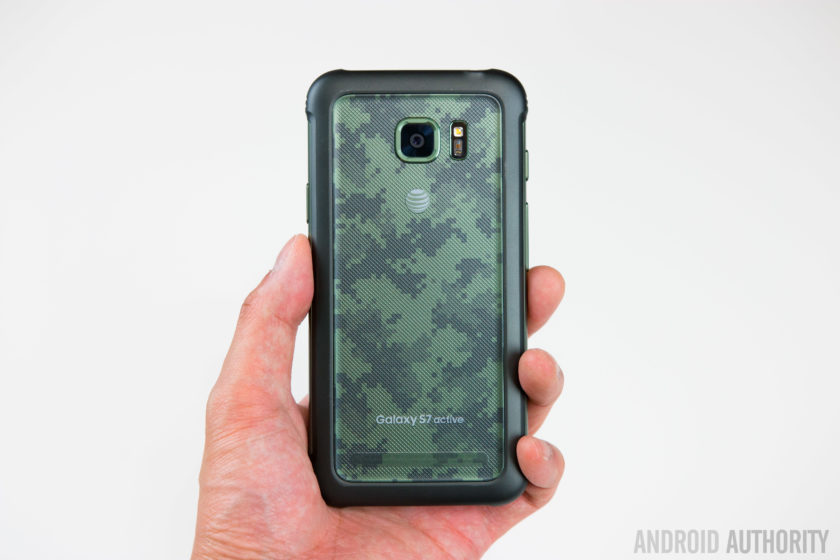
The biggest difference between the two handsets is in the design; the original Galaxy S7 features an all glass and metal design but the Galaxy S7 Active swaps this out for a more rubberized body. Like previous Active devices, the rubber build does result in quite a thick phone that is honestly a little bit bulky but this trade-off is certainly not new to the Galaxy S7 Active.
Most people who drop their phone find the handset can break (often beyond repair) when it lands on a corner or leading edge and to prevent against this, Samsung has reinforced the corners in a bid to ensure the Active doesn’t suffer the same fate as other less durable handsets. Naturally, you do lose the sleek curves and corners of the original Galaxy S7 but the compromise is certainly worth another look when you consider this phone is much more likely to survive a hefty drop.

The rugged exterior means the Galaxy S7 Active conforms to the MIL-STD-810G military standard for protection against extreme conditions. As a result, the phone is rated as being resistant to drops from heights under 5 feet and being able to survive harsh conditions including salt, dust, humidity, rain, vibration, solar radiation, transport and thermal shock. Like every rugged smartphone, the Galaxy S7 Active does have a limit and you will be able to break it if you try hard enough but it’ll survive a lot more knocks than most, if not all, other current flagships.
Build quality aside, the Galaxy S7 Active also trades the capacitive navigation keys of the Galaxy S7 Active for physical hardware buttons for the recent apps and back keys. Instead of the simulated vibration-based feedback provided by the original’s capacitive keys, the Galaxy S7 Active’s keys provide real tactile feedback and although they take getting used to, they are certainly very easy to press.
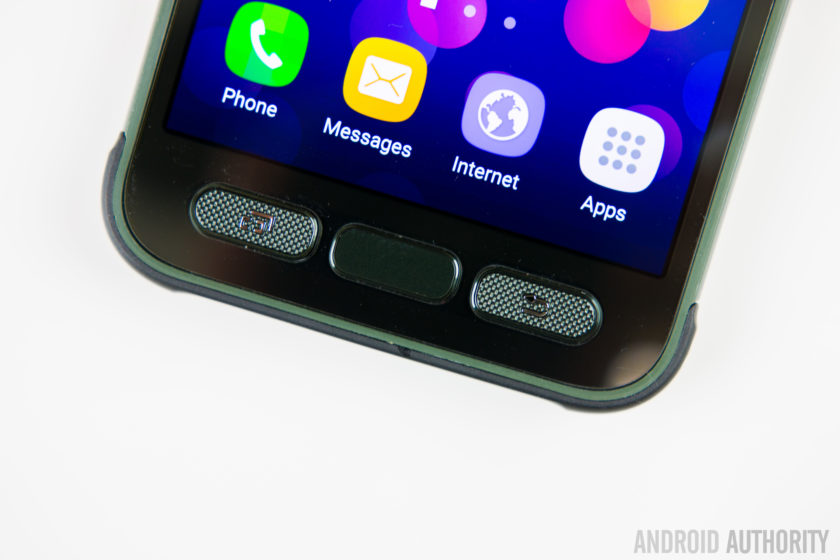
The home button is no different to other Samsung devices but unlike last year’s Galaxy S6 Active, you still get the home button which means the Active range now supports authentication-based features such as Samsung Pay.
The majority of other buttons and ports are in the same place as the Galaxy S7, with the exception of the headphone jack which is moved to the top of the phone. The Galaxy S7 Active does gain the ‘Active key’. The key is completely user definable and can be configured for three different actions – your standard short press, a long press and a double press – which can be used to open any application you choose, with a further option to allow the app to open when the phone is locked.
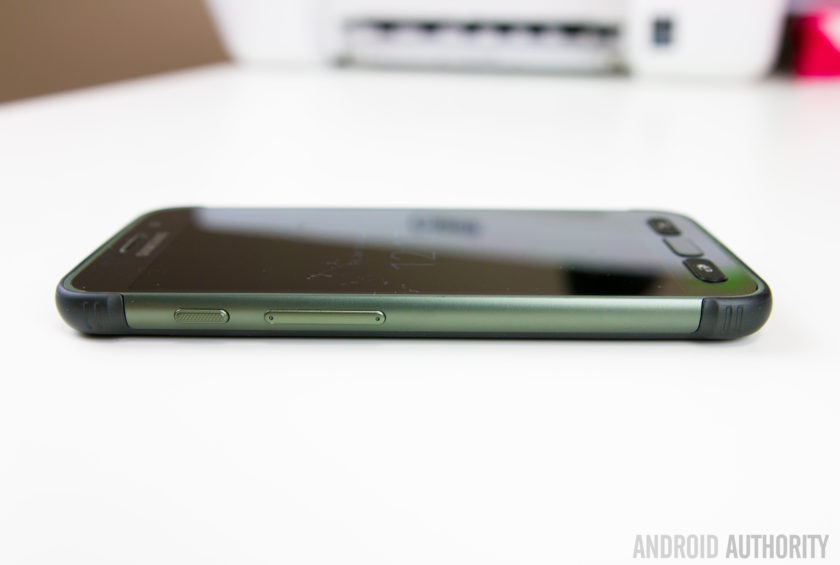
How does it feel to go from the sleek and slender Galaxy S7 to the larger and beefier Galaxy S7 Active? The simple way to explain it is that the Active very much feels like the Galaxy S7 inside of a case, which comes complete with the front lip to protect against any damage. Yes, it doesn’t have the sleek finish of the Galaxy S7 but the rugged features mean this smartphone can withstand more than most and if the fragileness of the Galaxy S7 is a concern for you, the Galaxy S7 Active certainly addresses these.
Display
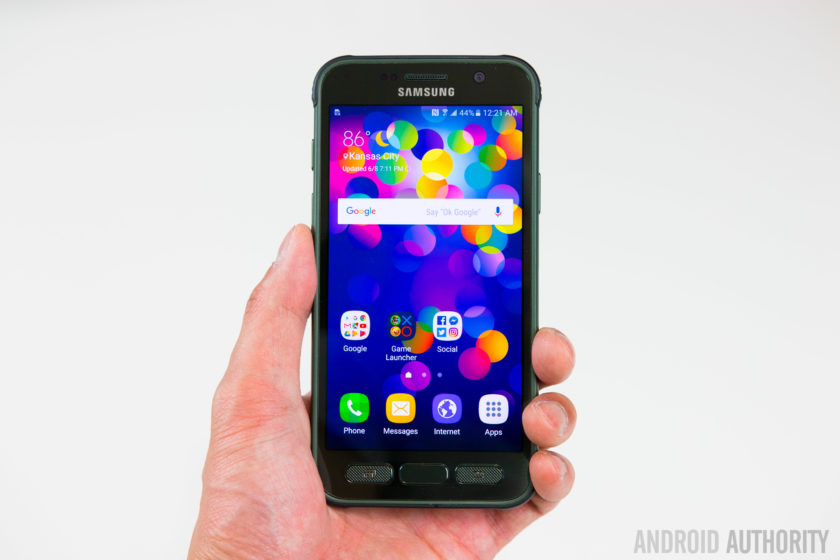
While the Galaxy S7 Active shares the same 5.1-inch QHD Super AMOLED display as the Galaxy S7 – which offers 2560 x 1440 pixels resolution – it does gain one very crucial feature: shatter resistance.
The display is shatterproof up to 5 feet meaning the handset should survive a drop from shoulder height for most people, or so Samsung claims. The display is protected by a Corning Gorilla Glass 4 panel – which we know is susceptible to shattering – with a plastic protector on top so shatter resistant, not shatterproof, is the more applicable word to describe the display.
A problem with screen protectors or devices that use a plastic panel on top of the display is that often it can detract from what could be a very good display. Luckily, with the Galaxy S7 Active, this is not an issue but the plastic panel does scratch easily, which may eventually detract away from the Active’s appeal.
Battery Life
The last major change between the Galaxy S7 and Galaxy S7 Active is the size of the non-removable battery. Last year’s Galaxy S6 sported quite a small battery (at 2560mAh) and this year, Samsung beefed it up by 18% to a more acceptable 3000mAh in a bid to provide improved battery life.
 Related: Samsung Galaxy S7 battery life review99
The Galaxy S7 Active raises the bar yet again, with a 4000mAh battery that is 33% larger than its sibling, and even bigger than the excellent 3600mAh unit inside the Galaxy S7 Edge. On occasion a larger capacity battery doesn’t always translate to exceptionally better battery life but Samsung clearly has the formula figured out, with the Galaxy S7 Active proving to excel in the battery department.
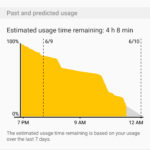


Despite heavy usage that included hours of gaming and YouTube streaming, the Galaxy S7 Active’s battery proved to be stubborn and very difficult to drain completely in one day. During our testing, screen on time often exceeded 7 hours despite resource-intensive tasks throughout the day and there’s no doubt that the Galaxy S7 Active offers the best battery life in the Galaxy S7 family.
Performance & Hardware

Aside from the key differences outlined above, the rest of the Galaxy S7 Active is very much the same as the Galaxy S7. Under the hood, this is powered by the Qualcomm Snapdragon 820 processor with 4GB RAM and with the Active being exclusive to AT&T in the USA, it’s unlikely we’ll see an Exynos-powered version launched in the near future.
On paper, the thought of AT&T’s additions to the software would lead to the assumption that performance will be inferior to a device that doesn’t have this additional load but in actual performance, the Galaxy S7 Active shows no signs of having carrier apps added. In regular use, there’s no lag of note and generally performance is almost identical to the Galaxy S7.
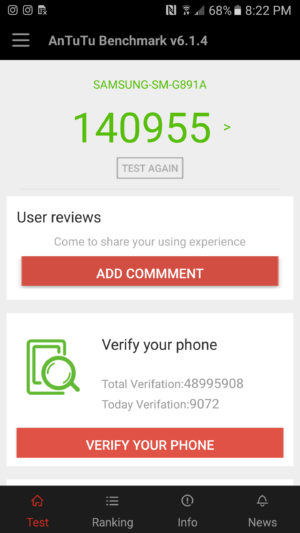
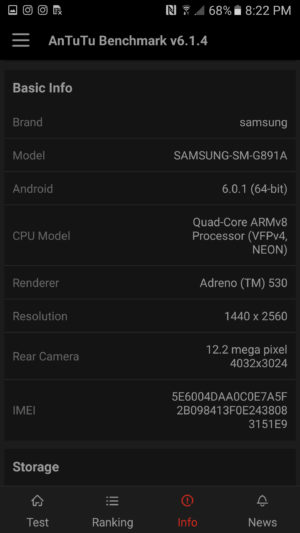
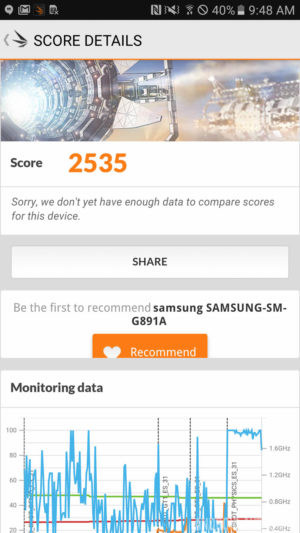
Running the usual benchmarks also corroborates this theory, with the Galaxy S7 Active proving to be on-par with, if not better, than the Galaxy S7 and S7 Edge. In AnTuTu’s benchmark test, the S7 Active scores 140955, whereas the regular S7 scored 129375. Moving on to GeekBench 3, the S7 Active scores 2282 in the single-core test and 5201 in the multi-core test, which is almost identical to the 2269 and 5156 scored by the Galaxy S7. Our last benchmark result comes from 3DMark, where the Galaxy S7 Active scores 2535 while the regular Galaxy S7 scores 2528.
Overall, there’s no denying that the performance of the Galaxy S7 Active is certainly one of the best on the market and unlike previous years, keeping mostly similar internals to the regular Galaxy S7 family has meant the Galaxy S7 Active offers performance on par with, if not better, than the best flagships on the market.
Camera
The camera on the rear of the Galaxy S7 Active is the same 12MP sensor with f/1.7 aperture and lightning fast dual autofocus found in the regular Galaxy S7. The images produced are sharp, vibrant and contrasty and the camera excels in most lighting conditions.
 Recommended: Camera shootout: Galaxy S7 vs the best flagships339
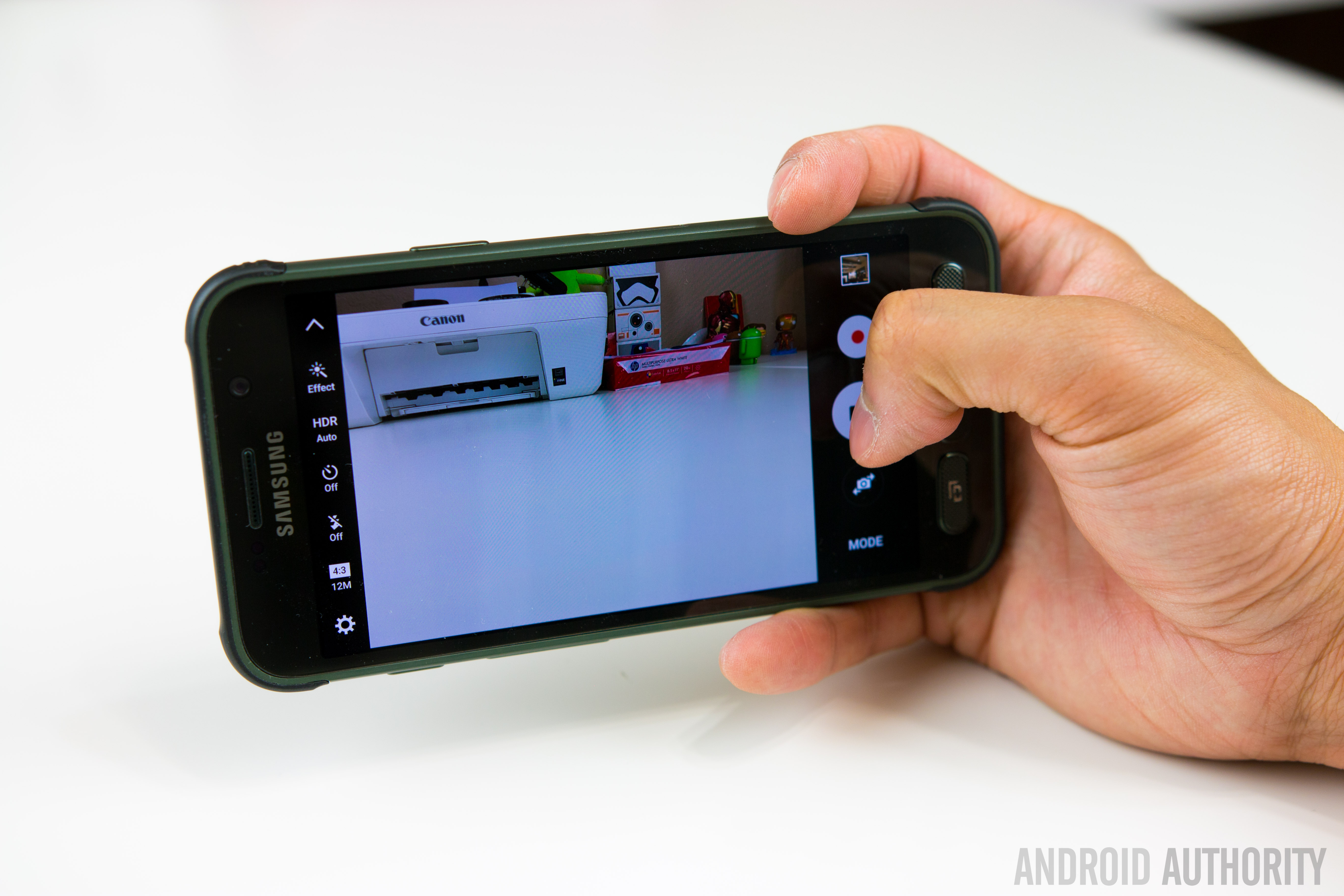
Like the regular Galaxy S7, you can still double press the home button to quickly launch the camera and the camera software remains mostly the same, with features such as selective focus and live broadcast to YouTube also present.
One new feature that does set the handset apart is the Aqua mode which has been made specifically for the S7 Active and it lets you use the active key to take photos and the volume keys to record video when you’re using the S7 Active underwater.
Galaxy S7 Active Camera Samples:

With the Galaxy S7 offering an excellent camera experience and the Galaxy S7 Active sporting the exact same camera offering, it comes as no surprise that Samsung’s latest rugged flagship has an excellent camera. The addition of an aqua mode arguably makes the camera better than the Galaxy S7 but whatever the condition, you can certainly rely on the Galaxy S7 Active’s camera.
Software

The Galaxy S7 Active is running on Android 6.0.1 Marshmallow with Samsung’s TouchWiz interface on top. Generally, the Galaxy S7 family sports a heavily refined user experience that has been optimised and streamlined to offer the best performance possible and, for the most part, the S7 Active certainly continues this trend.
Where the issue arises however is in the handset’s exclusivity with AT&T in the USA, which inevitably leads to the addition of carrier apps and bloatware to the software. From the Galaxy S5 to the Galaxy S7, Samsung worked hard to make its software bloat-free and as streamlined as possible while keeping the company’s targets in mind but the AT&T bloatware undoes a lot of Samsung’s positive move.


That being said, the benchmarks and real-world usage reveal that the carrier bloat doesn’t have a big effect on the performance, which is not typical of the normal effect carrier bloat has on a smartphone. Yes, none of the apps can be uninstalled and you’re unlikely to use some of the preloaded apps – which include AT&T’s own services, Lookout security, the Yellow Pages and Direct TV – but they don’t seem to have a marked effect of any kind on performance.
For some users however, non-removable carrier bloat can be a deal breaker and that’s really the biggest downside to the Galaxy S7 Active. For more on the overall software experience, check out our TouchWiz Feature Focus video below:
Specifications
Here’s the key specs for the Samsung Galaxy S7 Active:
| Display | 5.1-inch Super AMOLED display 2560 x 1440 resolution Shatterproof display |
| Processor | Quad-core Qualcomm Snapdragon 820 2x 2.15GHz, 2x 1.6GHz |
| RAM | 4GB |
| Storage | 32/64GB |
| MicroSD | Yes, up to 256GB |
| Durability | IP68 rating
MIL-SD-810G certified (dust, salt, humidity, rain, vibration, solar, transport, thermal shock resistant) |
| Cameras | 12MP rear camera with f/1.7 aperture, 1.4-micron pixels, OIS 5MP front camera with f/1.7 aperture |
| Battery | Non-removable 4000mAh battery |
| Fast charging | Yes |
| Wireless charging | Qi and PMA |
| Software | Android 6.0 Marshmallow |
| Dimensions | 9.9mm thick 185g |
Gallery
Conclusion

There’s no denying that a rugged smartphone with the capabilities of the Galaxy S7 Active will appeal to a lot of users but AT&T’s exclusivity, coupled with the effect on software, does mean a lot of users won’t be able to acquire the Galaxy S7 Active even if they wanted to. In fact, a few years in with proven interest in the Active range, it remains surprising that Samsung hasn’t struck deals to bring the Active range to other carriers and markets.
If the Galaxy S7 were a sports car, the Galaxy S7 Active could only be considered a tank; both will get you to your final point but only one will handle whatever you throw at it.
The Galaxy S7 Active is certainly not the best looking phone but the more rugged design and better battery life are more than worth the compromise. In fact, considering the more fragile build of the Galaxy S7 and its susceptibility to damage, the S7 Active is arguably the better smartphone. If the Galaxy S7 were a sports car, the Galaxy S7 Active could only be considered a tank; both will get you to your final point but only one will handle anything you can throw at it.
- Galaxy S7 Review
- Galaxy S7 Edge Review
- Galaxy S7 Active vs Galaxy S7 Quick Look
The Galaxy S7 Active shows that sometimes, brawn really is more important than beauty.
With comparable performance and hardware, an excellent camera and much better battery life, the Galaxy S7 Active is arguably what the Galaxy S7 should have been. At first glance, the S7 Active may not seem like the smartphone for you but don’t be fooled: they say you shouldn’t judge a book by its cover and the Galaxy S7 Active shows that sometimes, brawn really is more important than beauty.
What do you think of the Galaxy S7 Active and would you rather have the sleek Galaxy S7 or its rugged, more durable cousin? Let us know your views in the comments below!
Apple will let you remove (and re-download) its default apps in iOS 10
One of the biggest announcements from WWDC 2016 wasn’t actually announced on stage: removable default apps.
Apple failed to mention during its main keynote that it plans to unbundle apps from iOS 10. For the first time, iPhone and iPad owners will be able to delete some of Apple’s own apps – like Maps, Calculator, Music, Videos – from their homescreen. They’ll also be able to re-download them. We know this because those apps have landed in the App Store with descriptions and screenshots and everything.
Also, developers who’ve already downloaded today’s developer beta have confirmed the news. That said, it appears as though apps like Messages, Photos, and Camera cannot be deleted. We’re assuming they’re too tied into the iOS system to be removed. Apple has published this help page with more information on removing built-in apps, warning you may see some issues if you remove its default apps.
User data will also be wiped with any deleted app, Apple explained. You’ll lose any integrations with other features and services too. So, if you delete the Music app, you will not have access to Apple’s music services via CarPlay. Below is the entire list of default apps that can be removed. You’ll notice that Game Center is not on the list – so alas, you’ve still got to tuck that annoying one away.
Android users will be quick to point out that Google already did this sort of thing with Google Play Services in order to speed up how it delivers new features to software. Also, iPhone and iPhone users still need to wait on setting new default apps for things like email, etc. That capability is not yet available and may never be. Keep in mind iOS 10 is still new, so such functionality could arrive one day.
Apple is expected to officially release iOS 10 with this new feature in autumn, alongside its latest iPhones.
Confirmed: stock apps are removable!!! pic.twitter.com/hk7Jk98Rli
— Matt Ellison (@iWindowsTech) June 13, 2016
 AIVAnet