


Apple Car Talks With Daimler and BMW Fell Apart Over Leadership Issues, iCloud
Apple has been unable to establish a deal with Daimler and BMW over a possible manufacturing deal for the Apple Car, reports German news site Handelsblatt. Apple is said to be seeking a partner that could potentially help it produce the Apple Car, as Apple has no experience with vehicle production.
Talks with Daimler and BMW reportedly ended because there were questions over who would lead the project and which company would have ownership over data. Apple is said to be holding out for deep iCloud integration.
A Magna Steyr conceptual vehicle from 2012
Apple wants the car to be closely built into its own cloud software, while the German carmakers have made customer data protection a key element of their future strategy.
The talks with BMW collapsed last year, while those with Daimler collapsed more recently, the sources said.
Rumors last year suggested Apple was considering using the BMW i3 as the basis for its electric car project, but as was mentioned today and in past rumors, Apple’s talks with BMW fell apart after just a few months. Additional rumors have speculated Apple and BMW could resume talks at a later date, and Apple is also said to be in talks with Magna Steyr. Apple executives have visited Austria to speak with Magna Steyr and there’s not yet any indication that those talks have come to an end. Today’s report suggests Magna Steyr is the frontrunner to work with Apple on manufacturing the so-called Apple Car.
Apple’s car project is focused on creating an electric car, which may or may not include self-driving capabilities. Such a vehicle will likely interface with the iPhone and other Apple services, but beyond the fact that a car is in development, little is known about the project.
Hundreds of employees are working on the car, at secret locations rumored to be located in Sunnyvale, California and Berlin, Germany. Apple is said to be aiming to complete work on the car in 2019 or 2020.
Related Roundup: Apple Car
Tag: handelsblatt.com
Discuss this article in our forums
Stanford Offers New Course on Developing iOS 9 Apps With Swift
Stanford University this week launched its latest iOS development course on iTunes U, which was once again created by Paul Hegarty. For the last several years, Stanford has provided its iOS development courses on iTunes U free of charge to those who wish to learn to create apps for iOS devices.
The 2016 course has been updated with iOS 9 and Swift, with course prerequisites listed as C language and object-oriented programming experience exceeding Programming Abstractions level and completion of Programming Paradigms.
Updated for iOS 9 and Swift. Tools and APIs required to build applications for the iPhone and iPad platforms using the iOS SDK. User interface design for mobile devices and unique user interactions using multi-touch technologies. Object-oriented design using model-view-controller paradigm, memory management, Swift programming language. Other topics include: animation, mobile device power management, multi-threading, networking and performance considerations.
Stanford’s “Developing iOS 9 Apps With Swift” can be subscribed to through iTunes or through the iTunes U app on the iPhone or iPad. Sessions will be released on a regular basis, with the first introductory lecture available now. [Direct Link]
Discuss this article in our forums
Barrier X Review: Fast Paced and Fun

Overview
Barrier X is a simple, fast-paced game where you dodge obstacles and continue as long as you can.
Developer: PinkApp
Cost: Free (In-app purchase for no ads)
Review
This is one of those games that fall into two categories. The first category is well known to
 Start Screen
everyone as a “Doctor’s Office game”. A game you can pull out anytime anywhere you have a few minutes and play. The second category is one I made up called “Just one more time”, where you’re playing it, you die, then you say, “OK, Just one more time”. Of course, “one more time” happens about a million times before you actually put it away.
The graphics are very colorful with very techno like music that compliments them very well. There are two words before and after game play; Barrier and Crashed. Each letter represents a level that you must click to enter the level, which is a very cool and minimalist way to keep up with the levels. The game does have ads, but they aren’t intrusive nor interrupt your game play. Overall, a very well-designed app that is easy to navigate and understand.
Game Play
The game has very simple controls; tap left or right to dodge obstacles or enemies. There are seven levels, which you think that you will fly thru, but you won’t. As you play, every 15 seconds you speed up and after 30 seconds the next level is unlocked. Once you have completed a minute, that level is complete.
Conclusion
This is a very hard game to play right out of the gate. If I had to complain about anything it would be nice if they started you out a little slower to get the hang of it, but that’s nitpicking. Overall this game is very well-designed and easy to understand. It also can be addicting, so watch out.
Download Barrier X in the Play Store
1 of 11


How to use Podcasts in Google Play Music on the web

Finally! You can now subscribe and listen to your favorite podcasts with Google Play Music.
First it was its own streaming service and now Google Play Music has evolved to include podcasts in its library. Gone are the days of needing a third party app to subscribe and listen to your favorite podcasts ( the Android Central Podcast, of course!); you can now centralize all of your listening habits, thanks to Play Music.
We’ll walk you through how their web interface works to get you on your way to podcast paradise.
- How to find and subscribe to your favorite podcast in Google Play Music
- How to view your subscribed podcasts in Google Play Music
- How to share a podcast on Google Play Music on the web
- How to share specific podcast episodes with Google Play Music
- How to listen to a podcast in a pop-up window in Google Play Music in Chrome
How to find and subscribe to your favorite podcast in Google Play Music
There are a couple easy ways you can find podcasts through Play Music on the web.
Visit Google Play Music in your favorite web browser.
Click the menu button in the top lefthand corner of your screen.
Click Podcasts.

There are three ways to find a podcast:
- Top Charts: These are promoted podcasts or podcasts with the most subscribers.
- Categories: Click All categories just under Your Podcasts, to browse the top-rated podcasts in each category.
-
Search: Click the search bar and type in the name of the podcast you’re looking for or search by topic. Podcast results will appear under Podcasts.

Click on the podcast you’d like to subscribe to.
Click the Subscribe button below and to the right of the podcast’s title. Click the same button to unsubscribe.

At the moment, you can’t manually add an RSS feed, so for now you’ll have to be happy with searching.
How to view your subscribed podcasts in Google Play Music
Now that you’ve subscribed to all your favorite podcasts, you don’t have to search for them every time you want to listen.
Visit Google Play Music in your favorite web browser.
Click the menu button in the top lefthand corner of your screen.
Click Podcasts.
Click Your Podcasts next to Top Charts.
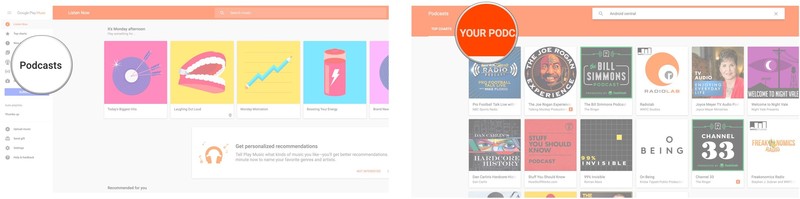
All the podcasts you’re subscribed to will appear here. You can listen to and manage them all from here.
How to share a podcast on Google Play Music on the web
There are a few different ways you can share your favorite podcasts.
How to share a podcast via a link with in Google Play Music
Find or view the podcast you’d like to share.
Click the podcast.
Click the Share button next to Subscribe.
Click Copy Link.
Paste the link wherever you’d like to share it.

How to share a podcast to Facebook with Google Play Music
Find or view the podcast you’d like to share.
Click the podcast.
Click the Share button next to Subscribe.
Click Facebook.
Click Post to Facebook.
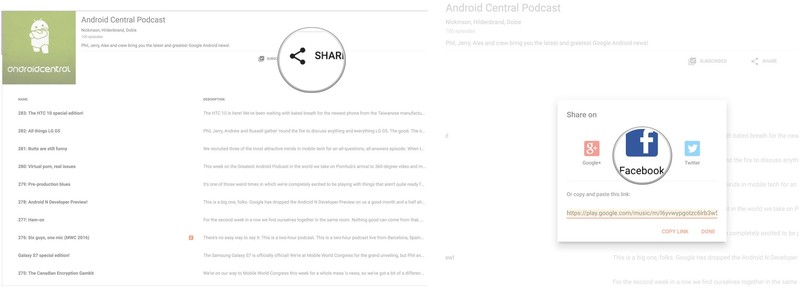
The link for that podcast will now be shared on your wall.
How to share a podcast to Google+ with Google Play Music
Find or view the podcast you’d like to share.
Click the podcast.
Click the Share button next to Subscribe.
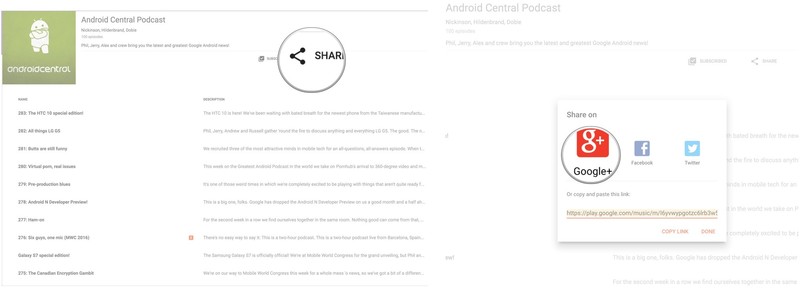
Click Google+.
Click Share.
How to share a podcast to Twitter with Google Play Music
Find or view the podcast you’d like to share.
Click the podcast.
Click the Share button next to Subscribe.
Click Twitter.
Click Tweet.

How to share specific podcast episodes with Google Play Music
Find or view the podcast you’d like to share.
Click the podcast.
Click an episode.

Click the episode menu button. It’s the three vertical dots to the left of the episode description.
Click Share.
Share, as described above.

How to listen to a podcast in a pop-up window in Google Play Music in Chrome
If you want to listen to a podcast but still want to search around in Google Play Music, you can listen to the podcast in a separate pop-up. Here’s how:
Find or view the podcast you’d like to listen to in your Chrome browser.
Click the podcast.
Click the mini player button in the bottom right of the screen. It’s a square with an arrow pointing upward and to the right.
Click Install.

Click Add app.
Find or view the podcast again.
Click the podcast.

Double-click the episode you want to listen to.
Click the mini player button in the bottom righthand corner of the screen.
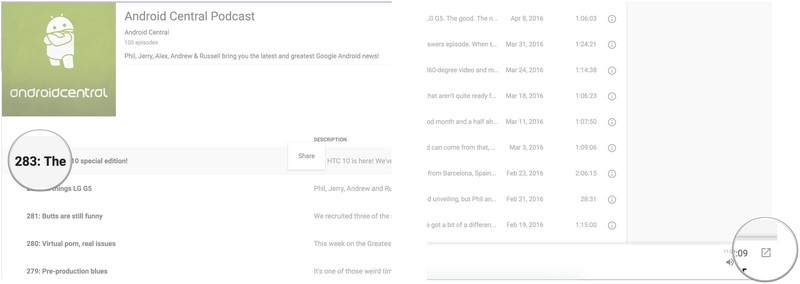
Note: this feature is only available in Google Chrome.
A small pop-up window will appear wherein you can control the episode you’re listening to using traditional music control.
Submit your podcast to Google
Exploding Kittens card game blasts onto Android

Exploding Kittens, a strategic digital card game with art from The Oatmeal, is now available on Android. The game is actually a digital version of a physical card game, in which you try to keep playing by avoiding the Exploding Kitten card.

To play Exploding Kittens, you’ll need two to five players. You’ll take turns drawing and playing different cards, and you’ll need to use each card to avoid the exploding kitten cards. Once you draw one of those, you’re out of the game, unless you have a defense card. While you can play with core deck, you can also purchase expansions in the app itself.
The game supports local and online multiplayer. You can either join an existing match using a code given to you by a friend, or host a match yourself.
Exploding Kittens is available now on the Google Play Store for $1.99
You can now play your favorite podcasts directly in Google Search for Android

The Google Search app for Android is getting an update that will allow users to play podcast directly from search results.

Google says:
To try it out, search for a podcast and you’ll see three recent episodes, a play button for each, and an option to see more episodes. Podcasts are available globally in English. With controls at the bottom of your screen to play/pause, rewind or fast-forward, you’ll be free to browse the web on your phone while you listen — or even turn off your screen. The podcast will keep playing in the background until you’re done.
This new feature comes just a couple of days after podcasts were added to the Google Play Music app. You can check out the official Android Central Podcast in Google Play right here.
Brace yourself for Season 6 with our Game of Thrones Wallpaper Wednesday

Don’t let your home screen fall into a rut — switch out your wallpaper!
You don’t have to pull out a complex new theme like Deadpool to bring a breath of fresh air to your home screen. A new wallpaper can do wonders, and launchers like Action Launcher can re-theme your entire home screen around a good wallpaper. In our effort to help brighten your device — and maybe your day — we’re compiling some wallpapers for you to try out.
If you’ve got a wallpaper you use everywhere, share it in the comments below! We’re always looking for something new. Now get your wallpaper picker ready and see what’s in store this week.
Winter Has Come by James Bousema

A number of things come to mind in this beautifully macabre scene. It’s lonely at the top. The road to the top stomps over a lot of bodies. But mostly to my mind what comes to mind is blood. That’s a whole lot of blood. Like put-the-Red-Wedding-to-shame whole lot of blood.
Winter Has Come by James Bousema
Iron Throne by jjfwh

The Iron Throne is the subject for a lot of wallpapers, but this surprisingly simple symmetric wallpaper pulls me in somehow. And this deviantart user has a whole gallery of poster-type wallpapers for us to showcase our House pride with.
Iron Throne by jjfwh
The Old Houses of Westeros

Another series of wallpapers with German-style crests on parchment backgrounds stirs something within me. I dunno if it’s just how I was trained by Harry Potter or if it’s the helmets atop each crest (look at the Magneto-style helmet for House Martell!!), but if you’ve got to wear a House crest into battle — or work, more often work — it’s hard to go wrong with these beauties, originally from reddit.
The Old Houses of Westeros
Baratheons by Looksnookem

While deer are not my favorite animals, the ones used in the iconography for Baratheon house are just the most majestic animals on the show (and that quite possibly includes the dragons). And this illustration of a Baratheon stag, quite possibly with magical powers judging by the aura surrounding it and its glowing white eyes, is the most majestic I’ve come across yet. I look in those glowing eyes and I’ve never believed harder in OURS IS THE FURY.
Baratheons by Looksnookem
Game of Musical Thrones

Game of Thrones is a show with a lot of doom, gloom, death, destruction, blood, guts, and other soul-crushing endeavours. (Thank you, George R.R.Martin!) Sometimes you just have to laugh in the face of that much shock, awe, and occasional horror of this show or you’re just gonna start bawling. The idea of all the House animals playing musical chairs with the Iron Throne just makes you want to laugh, and we need those laughs after another bloody, bloody episode. As an added bonus, you can buy a dashing t-shirt with the same design so that you can show off your nerdiness and help fellow fans laugh off [redacted] getting [redacted] in Sunday’s episode.
Game of Musical Thrones
Inbox now helps you keep up with calendar events, newsletters and links

Google is rolling out an update for its Inbox by Gmail email client on Android. It includes some new features for keeping up with events in Google Calendar, among other things.

Google stated:
Events can be hard to keep track of in your inbox because details—and people’s plans—may change. Inbox now gathers emails from a single event together and shows you what’s changed at a glance. When you tap on an event, you’ll see a comprehensive overview, all in one place.
In addition, Inbox will now allow users to preview the content in newsletters and click directly to any article in them. It also offers a way to saved shared links:
Simply share the link to Inbox on Android or iOS, or use the new Inbox by Gmail Chrome extension on web. When you check your email, you’ll see your saved links grouped together in one place.
HTC 10 versus iPhone 6s: No place like home (button)

Can HTC regain its position of strength?
The HTC 10 looks nothing like an iPhone. Let’s just get that out of the way.
Its predecessor, or half-sibling — whatever you wish to call the One A9 — resembled the iPhone 6s in more than a few ways, but much was made about nothing. The two phones were made of single blocks of brushed aluminum, with etched speaker ports, front home buttons and, perhaps most egregious on the part of HTC, a small rounded camera bump.
Whatever. That was then, this is now. HTC has returned with its best phone yet, seven months into Apple’s latest iPhone flagship life cycle. So why compare the two? Because HTC is gunning directly for Apple’s design leadership — and say what you will about Apple, the iPhone, or the latest model, the industry has responded to Apple’s guidance in a big way — and many Android users are looking for alternatives to the Samsung behemoth.
Hardware

The HTC 10 is what would have happened to the iPhone 5s if Apple had decided to broadly expand its use of the chamfer. All single-cut bevel and anodization. But HTC’s latest somehow retains that unknowable essence the company lost between the release of the M7 and the A9, which became splotchy after the M9 was too similar (but somehow too different?) to the M8.
In other words, it’s been a confusing few years for the Taiwanese once-giant.
In that time, Apple’s sales, and its confidence, have soared. The company sold over 200 million iPhones in 2015, buoyed by the release of its now-standard three-size strategy. Though the 4.7-inch iPhone 6s looks identical to its predecessor, Apple thickened and strengthened the shell slightly to prevent the occasional bent chassis.
Both phones are unquestionably well made, but the HTC 10 finds a satisfying compromise in its 5.2-inch screen size compared to the iPhone 6s’ considerably lower-resolution 4.7-inch display and its Plus counterpart’s 5.5-inch panel. I can happily say using the HTC 10 with one hand is not just possible, but enjoyable. While it takes a dextrous thumb to maneuver between the top notification shade and capacitive home button (that doubles as a fingerprint sensor), I never once felt it a precarious proposition.
It’s been a confusing few years for the Taiwanese once-giant.
HTC also managed to out-engineer Apple in terms of external sound, too: the HTC 10 boasts two speakers, one front-facing in next to the earpiece, the other down-facing, placed identically to the iPhone’s. Together, the two speakers are loud, clear, and noteworthy. They speak to HTC’s commitment to audio in an industry that has erred almost entirely on the visual experience of a smartphone. But there, too, HTC excels.
The HTC 10’s QHD display doesn’t get quite as bright as the iPhone 6s’, but its viewing angles and color accuracy are just as good. While colors don’t explode as they do on Samsung’s Super AMOLED panels, the HTC 10’s SuperLCD5 finds a happy (and, through settings, customizable) medium.
The more I use the HTC 10, the more impressed I am by what the company accomplished, especially in such trying times. Apple has the luxury of two-year design cadences, of near-infinite research and development budgets, of sourcing the best parts from the best component makers. Viewed in such a context, it is even more incredible that HTC pulled off such a device under its heavy constraints.
Software and experience

Let’s keep this short(ish). HTC’s pared-back Android Marshmallow software is a pleasure to use, and promising compromise for customers looking to pivot from, but not abandon, the Nexus line.
In years past, there used to be whole swaths of features that iOS users coveted from Android and vice versa. Without inciting riots, let’s just all admit (yes, it’s alright to do so) that both platforms are reaching a point of maturity where all the major checkboxes have been ticked. Robust app ecosystems; scalable notifications; built-in virtual assistants; settings galore (to a fault).
The more I use the HTC 10, the more impressed I am by what the company accomplished
Where Android continues to suffer, though, is how its OEM partners approach modifications, some with a heavy hand, and others, like HTC, with a more forgivable lighter touch. As has been the case in years past, HTC’s commitment to expeditious updates, regular bug fixes, and Play Store-pushed core apps have fostered a leanness that, outside of Google itself, very few companies can consistently claim. When HTC promises an update to the latest version of Android within three months of its announcement, we have no reason to doubt. Sure, some of these updates are hampered by carriers’ inconsistent quality assurance processes, but for the most part we see HTC out the door first.
By comparison, Apple, by virtue of its closed circle of hardware and software, releases updates to all carriers, across many of its products, at the same time. While this does cause unforeseen problems on occasion, the vast majority of users get to benefit from new features, bug fixes and security updates on the same day. Google has alleviated many security concerns with its monthly patches, but some partners are better than others at pushing them out to users with regularity.
Read the full review
There’s a lot more to HTC’s software improvements than we have room for here, so read through Alex Dobie’s review to get the full scoop.
Read our HTC 10 review
At its core, the HTC 10 provides a software experience both recognizable as Sense and as stock Android, though with the requisite bloat, such as pre-installs from Facebook and News Republic that remind us we’re dealing with a company looking to monetize aspects of its software experience. You see this exemplified in Boost+, the much-derided app that is now available to all Android users in the Play Store.
I think most people want HTC to succeed, and based on its increasingly cozy relationship, especially Google. But it will take more than debloating and simplifying its software to find an audience.
Camera quality

In an area where HTC has floundered in recent years, it’s comforting to know it has righted what used to be its devices’ biggest liability. That isn’t to say that everything is perfect — and we’re in a holding pattern of sorts until HTC issues its first of what will likely be many camera-related patches — but it’s by far the best camera experience ever seen on an HTC handset.
On the flip side, Apple’s apparent camera advantage has been steadily eroded in the months since the iPhone 6s’s release. From Samsung’s Galaxy S7 to LG’s more-than-capable G5, the Android ecosystem has blown the proverbial game wide open. HTC fits somewhere in the middle; its 12MP “UltraPixel” rear shooter isn’t quite as reliable as the iPhone 6s for capturing true-to-life daytime shots, but its optical image stabilization is great for evening captures. And while the iPhone 6s, even without OIS, manages to eke consistently better 4K video than the HTC 10, the latter has some of the best audio capture I’ve ever gleaned from a mobile device. Again, HTC targets a small but important part of the smartphone segment.


HTC 10 (left) / iPhone 6s (right); click images to view larger


In terms of front-facing cameras, the two are relatively evenly matched in good light; it is in poor light where the iPhone forces you to activate its contentious Retina Flash to avoid blurriness from the 5MP sensor. HTC’s industry-first optically-stabilized 5MP front shooter manages to grab ahold of more light in darkened environments, but augments such scenes with fine grain caused by a slightly smaller sensor.
Wrap-up

HTC has entered the market with a phone I am increasingly enamored with. From its stunning design to its impressive spec sheet and graciously reliable camera, there are few things for which I can fault HTC. Its biggest problem is its environment; it goes up against Samsung’s best-ever lineup, and Apple’s continued strength in the market.
I honestly haven’t been able to say this since the One M7 back in 2013, but HTC’s smartphone is as good as anything on the market right now, and shouldn’t be dismissed even when placed next to Apple’s or Samsung’s best.
HTC 10
- HTC 10 review
- HTC 10 specs
- These are the HTC 10 colors
- Our first photo and video samples
- Meet the Ice View case
- Join our HTC 10 forums
HTC
Verizon
Verizon simplifies its Cloud storage plans, now includes 5GB of storage each month for free
Verizon is simplifying its Cloud offerings and giving you more for your money. The base plan now includes 5GB of storage per month for free, and the top plan goes as high as 1TB per month for $9.99. With these new plans, Verizon is giving customers more storage without asking for any additional money, so you can now safely store all of your contacts, photos, videos and more in the cloud without breaking the bank.

The new cloud storage plans, as noted by Verizon now are:
- Small (S): Free 5GB of storage per month
- Medium (M): $2.99 for 25GB of storage per month
- Large (L): $4.99 for 250GB of storage per month
- Extra-Large (XL): $9.99 for 1TB of storage per month
Current subscribers will be given the additional storage of the tier they are on without having to do anything on their end, for example if you’re currently on a 75GB plan you’ll be bumped to the new 250GB plan.
 AIVAnet