


Bang and Olufsen’s new compact speaker packs big sound
Bang and Olufsen is well-known for its high-end audio gear, but the Danish electronics company has a number of portable devices under its belt, too. Today, the company announced the BeoPlay A1: the company’s smallest portable speaker to date. The Bluetooth-enabled accessory not only offers a wireless speaker for listening to tunes, but it’s small enough to easily pack away in your rucksack. Similar to other wireless gadgets, the A1 also handles calls via a built-in microphone should the need arise. B&O touts a full 24 hours of battery life for its newest BeoPlay device, which is certainly an attractive feature.
Similar to other B&O products, the BeoPlay A1 sports an aluminum top and speaker grill. Underneath, the bottom half is covered in a soft-touch rubber and threre’s a leather cord for hanging the speaker on a peg or coat hook. Starting on the right edge, you’ll find a power button and volume controls. As you make your way around the outside, towards the center lies a USB-C port for charging and a battery indicator light. That light flashes orange while the A1 is charging and turns green when it’s fully recharged, which takes about 3 hours. The indicator also lets you know when the battery level hits 15 percent with a solid red light. When that red light starts flashing, head for an outlet because you’ve got less than 10 percent battery power left.
Continue around that outer edge and you’ll come to controls for speakerphone, Bluetooth pairing and a feature B&O calls Connect. Connect serves as a play/pause button of sorts that resumes playing the last thing your were listening to. It even reconnects to the last device you were using with the speaker. While there is a BeoPlay app for iOS and Android, I had no trouble connecting both my Moto X and my MacBook Air to the A1 without downloading the extra software.
In terms of sound, I was actually quite surprised by the audio quality of the rather compact A1. Not only does it get quite loud without distorting, the speaker offers a range of tones smaller Bluetooth options typically don’t. There’s plenty of low end for a fuller sound and the speaker’s design blasts tones in 360 degrees, maintaining clarity the whole time. I found myself using it laying flat almost always, perhaps because I don’t have a coat hook to hang it from. The A1 sounded great on my desk, kitchen bar and dining room table — all places I could see myself using it on the regular.

The B&O BeoPlay A1 comes in two colors: natural (silver/gray) and moss green. If you’re looking to nab one, you can do so today for $249 (£199). That’s $20 more than Beats’ Pill+, but $50 less than the UE Megaboom. There are some other features to consider with those two alternatives, but sound-wise the A1 bests them both. Sure, there are cheaper options, but if you want a solid mix of sound, design and portability, B&O’s latest checks all three boxes.
Australian researchers developed a blood test for Parkinson’s
By the time Parkinson’s disease makes itself known in humans, it’s already too late for treatment. But La Trobe University in Australia has developed a test that detects a biomarker present in blood cells in folks with the disease. The school describes the test as a means of detecting problems within cell mitochondria that cause an energy-and-stress-sensing protein, dubbed AMPK, to permanently activate and start damaging cells.
The research is being bankrolled in part by Parkinson’s perhaps highest-profile patient, Michael J. Fox. Well, his foundation dedicated to further research on the debilitating malady, that is. The downside is that even with Fox’s Foundation for Parkinson’s Research and the Shake It Up Australia Foundation’s $640,000 grant to La Trobe, more money is still needed for the test to be ready for the public. And beyond that, it’d still take five years to hit the market with additional funding.
For now, the school is increasing the amount of testing it’s doing, going from a group of 38 people to 70. According to The Guardian, the ultimate goal is to do a longitudinal study with “thousands” of people in their 40s prior to them being at risk for the disease and before they start showing physical symptoms. From there, the researchers could test beyond Parkinson’s and see if the same method could be used to diagnose other neurological disorders, like Alzheimer’s, as well.
Via: Popular Science
Source: La Trobe University
Samsung highlights the Galaxy A 2016 series in new commercials
Samsung has rolled out a series of commercials showcasing what’s on offer with the mid-range Galaxy A 2016 series. The videos highlight the metal and glass designs of the phones, the f/1.9 camera with OIS, and also offer a quick look at how you can use Samsung Pay with the handsets.
The Galaxy A5 and Galaxy A7 are available in a handful of countries including China and India. Be sure to check out our review of the Galaxy A7 to see how Samsung is trying to solidify its position in the mid-range segment:
Galaxy A7 2016 review
Oppo’s selfie-focused F1 Plus goes up for sale in India for ₹26,990
Oppo F1 Plus is now available in India. Pre-orders for the phone kicked off on April 11, and the handset is now available for purchase in retail stores across Delhi, Mumbai, Kolkata, and Chennai for ₹26,990.

The phone offers a 5.5-inch Full HD display, MediaTek Helio P10 (MT6755) SoC with eight Cortex A53 cores at 2.0GHz and a Mali-T860MP2 GPU, 4GB of RAM, 64GB storage, 13MP camera at the back, a 16MP front shooter designed to make you the “selfie expert,” LTE, 2850mAh battery with VOOC Flash Charge at 4A. On the software front, you’re looking at Color OS 3.0 running on Android 5.1 Lollipop, which is looking stale at this point.
There’s plenty to like about the F1 Plus, and if you’re interested in getting a hold of one, be sure to read our initial impressions:
Oppo F1 Plus unboxing and first impressions
Samsung wants to go hyperlocal in India to boost online sales
Samsung is looking to go hyperlocal to increase sales through e-commerce stores. Under the strategy, Samsung authorized dealers and its own brand stores will fulfil deliveries for orders placed on e-commerce sites, ensuring price parity between online and offline retailers while facilitating faster delivers.

Citing a source close to the matter, ET Tech writes:
Samsung is localising ecommerce order delivery, installation and even collection of payment for cash-on-delivery orders through authorised distributors and dealers who will be market specific.
Samsung sells its wares through WS Retail on Flipkart and Cloudtail on Amazon, but the recent regulatory change means that no single vendor can contribute to more than 25% of the sales. By letting its own dealers handle sales and deliveries, Samsung has more control over its online portfolio.
It looks like the manufacturer is working with Amazon, Flipkart, and Snapdeal to list its local sellers on the e-commerce platforms, with customers automatically redirected to the closest brand store based on their pin code. While the move is certainly interesting, it remains to be seen how the switch will affect after-sales service. From Rahul Saigal, MD at digital marketing consultancy Netimpact Solutions:
While there may be potential advantages for consumers such as installation, but the real test will be in service delivery and post-delivery issues for which the ecommerce sellers have already built their name.
AT&T rolling out April security patch to Galaxy S7, S7 edge
AT&T Galaxy S7 and S7 edge users are seeing an update that brings the April security patch. The update comes in at 173MB, and includes the latest security fixes from Google.
Not much else is known about what’s new, but from the discussion in our forums, it looks like the update includes the touchscreen and stability fixes that have been rolling out to the S7 and S7 edge globally.
Haven’t received the update yet on your AT&T Galaxy S7 or S7 edge? Be sure to head into Settings > About device > Download updates manually to download the update.
Thanks Ed and Drew!
Samsung Galaxy S7 and S7 edge
- Galaxy S7 review
- Galaxy S7 edge review
- Here are all four Galaxy S7 colors
- Should you upgrade to the Galaxy S7?
- Learn about the Galaxy S7’s SD card slot
- Join our Galaxy S7 forums
AT&T
Sprint
T-Mobile
Verizon
Google’s Chrome experiment shows artists painting with light
Google has commissioned six artists to paint and sculpt with light using the company’s virtual painting app Tilt Brush. And yes, the big G has captured the whole process, so you can watch the artists work on their masterpieces. The team used Kinect to film the artists at work and tweaked Tilt Brush to be able to show each brush stroke on a browser.
Since the project’s a Chrome experiment, you can access all the videos in the series called “Virtual Art Sessions” without a virtual reality headset. You can even drag the videos on your browser to view the in-progress pieces from different angles, including from the artists’ POV. The sessions are pretty fascinating to watch to say the least. But if you’re more interested in how the Google team pulled it off, check out their detailed explanation on the G Developers’ website.
Source: Virtual Art Sessions, Google Chrome (YouTube), Google Developers
Nova Launcher – THE BEST launcher on the Play Store. Period. (Review)
In the early days of home computing, if you wanted to access a program, you had to know how to speak your computer’s language. This language, or “code”, could be unique across multiple computer brands. You had to use a “command line” tool to talk to your computer. If you didn’t know how to speak your computer’s language, you couldn’t do anything with it. This led to a steep learning curve for most people and could even prevent some of them from using a computer altogether. Something had to be done about this.
Fast forward to today, and you have what are known as a “Graphical User Interface” or “GUI”, (pronounced, gooey) for short. A GUI is a simple and visual way for you to interact with your computer without having to know any type of coding language. When you boot up your Mac or PC and see all of the icons, folders, the wallpaper, start menu, etc; these are components of the GUI your Windows or Mac OS software is using.
So how does this apply to an Android device? Well, in the Android world, instead of using the term “GUI,” we use the term “Launcher.” A launcher is basically a GUI for your phone or tablet. Every Android device you buy comes with a launcher pre-installed. They go by different names, but when you turn on your phone and click on an icon to access something, you are interacting with your device’s launcher. The look, style, colors, wallpaper, and all other visual and interactive elements are part of the launcher. The launcher is what allows you to use your phone without having to know Android’s coding language.
Why is a launcher important?
A launcher is the doorway to your device. If you want to surf the web, check Facebook, check your email, or do anything else on your device, you need a launcher to do it. Most of the launchers that come pre-installed on your phone will be slow and bloated. In the industry, we call these pre-installed launchers, “stock launchers.” If they are not slow in the beginning, they will get slow over time. Your phone will become laggy and less responsive. Samsung’s Touchwiz launcher that comes on Galaxy and Note devices by default, is one of the worst offenders. To make things worse, we can’t change how these stock launchers look, aesthetically. You can change the wallpaper and use widgets, but outside of that, if the stock launcher is ugly or visually displeasing, too bad. You’re stuck with it.
One of the great things about Android is that it gives you options. If you hate your stock launcher, no problem; there are other options out there. There are tons of third party launchers on the Google Play Store. There are so many, in fact, that it would take tons of time and more money than you would care to spend, to try them all. I want to simplify this choice for you. I want to save you that tons of time and money.
The best third party launcher on the Google Play Store, bar none, is TeslaCoil Software’s Nova Launcher.
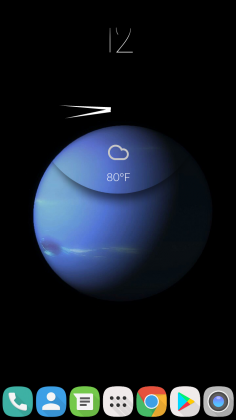
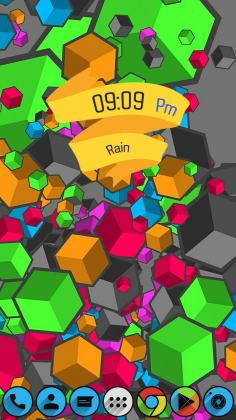
 Look created using Nova
Quality Without Compromise
What do we look for in a launcher? First and foremost, quality. The launcher needs to run well; free of debilitating bugs. The launcher needs features that work. It needs a solid support community and solid support from its developers. It needs to be innovative and aesthetically pleasing. Lastly, it should not rely on intrusive ads for support. Nova Launcher meets every one of these requirements with top marks.
Why should you choose Nova?
The first thing we tend to think with, when it comes to selecting a product, is our wallet. We ask ourselves, “Is the price right?”
Nova Launcher is 100% free. Yes. Free. There is a Nova Launcher Premium upgrade for $4.99 that is purely optional, but even if you never purchase it, you are still getting a fully featured, complete launcher, with the free version. In fact, the features that are unlocked with the Premium upgrade are centered around convenience instead of added functionality, as you will see.
What’s the difference?
Specifically, all of the basic settings, functions, and customization options will be available to you in the free version Nova Launcher. Extra features, like gestures, will be unlocked with the Prime upgrade. Below is a breakdown of the features each version of Nova offers:
Nova free:
- Custom grid – the ability to change how many icons can be displayed on your home screen
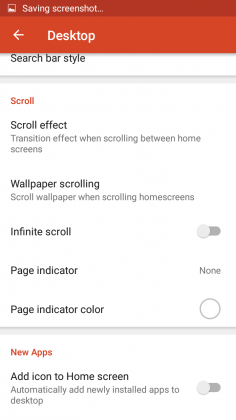
- Infinite scroll – the ability to scroll through all of your home screen pages continuously without having to ever scroll backwards.
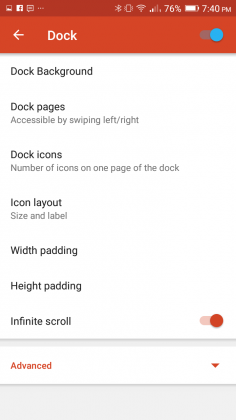
- Scrollable dock – you can add pages to your dock, all of which you can use to store app icons of your choosing. I personally use three pages with the dock set to seven icons. By default, most launchers only allow four icons on your dock and no “page feature” whatsoever.
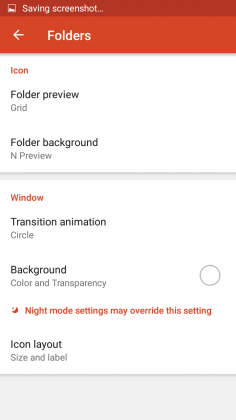
- Folder icons – this allows you to customize the icon, background and preview styles of folders on your home screen.
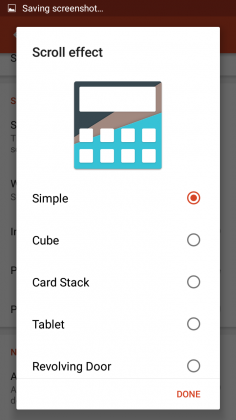
- Scroll effects – change the transition animation when you scroll between your home screen pages
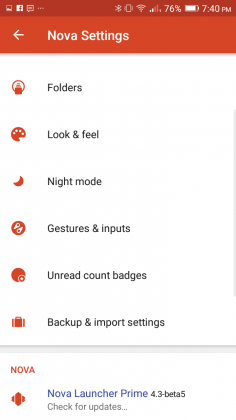
- Backup/Restore – save your Nova Launcher settings and configuration. If you save your backup to the cloud, you can access your Nova settings across multiple devices.
- Customization – compatibility with custom icon packs and themes to change the look of Nova
Nova Prime:
- Gestures – this feature allows you to use gesture based shortcuts for functions on your device. For example, I have my phone setup up to open the Android Settings app if I double tap on my home screen. I also have a gesture set up to access Nova’s settings if I swipe up on my home screen
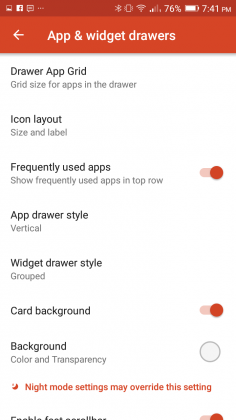
- App drawer groups – organize your app drawer into folders and tabs. This allows you to put like applications together for easier access.
- Hide apps – this feature allows you to hide unused applications in your app drawer
- Icon swipes – this feature allows you to set gestures to specific icons, so that instead of performing a gesture on your home screen, you perform the gesture on a specific app icon itself.
As you can see, the Prime features tend to center around convenience over function. Because of this, as stated earlier on, if you decide to never spend a dime on Nova, you are still getting a complete custom launcher experience.
It is also of note that you will never see an ad in the free version of Nova. This is not so with the launchers like Go Launcher, Hola Launcher, and others that offer in-app purchases.
 Created using Nova
User Interface, Settings, and Customization
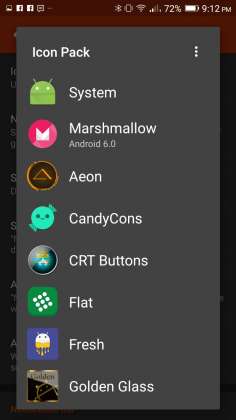
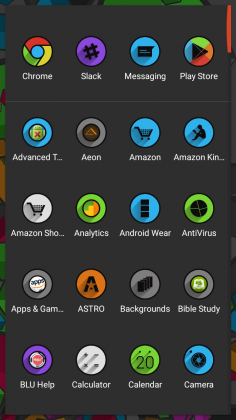
One of the best things about a custom launcher is customization. You essentially can make Nova Launcher look however you want. There are dozens, if not hundreds of icon packs on the Google Play Store that you can download. Some of these icon packs are free; others cost money. Regardless, there’s some great stuff out there and it’s a great way to give your device some new life if you’re growing bored. I run a weekly feature called Steal This Look! that features new icon packs, widgets, and wallpapers. I always use Nova Launcher in the feature, so it’s a great place to start, to find resources for Nova, to begin customizing your device.
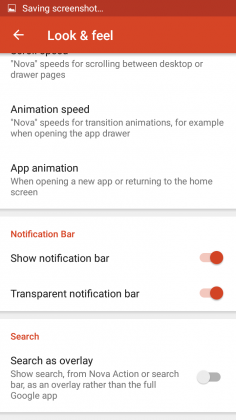
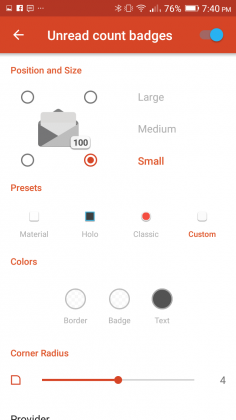
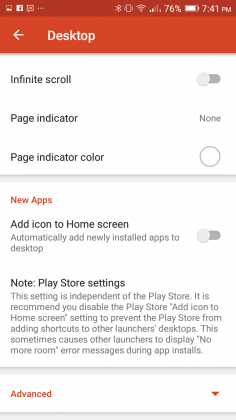
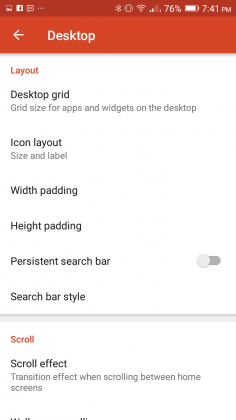
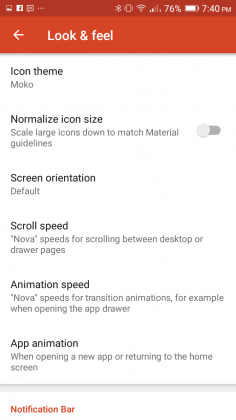
In addition to icon packs, Nova also offers you the ability to change more nuanced parts of the launcher such as, desktop grid, which allows you to change how many icons you can display on your home screen(s). You can even change the actual size of the icons to help maximize your home screen’s real estate. You can hide your notification bar, change scroll and animation speeds, change the animation used when opening apps, customize folder options, and many other things. You can even change the app drawer background and color. Heck, you can also change the highlight color that appears when click on an icon. The customization that Nova offers is not limitless, but it’s broad and easy to use.
Performance
Nova flies! It absolutely flies. I have never seen a launcher perform so well on a device, and I have used a lot of them. Is your Samsung device slowing down and getting laggy? Install Nova. It will feel like you’re using a new device.
Case and point, I have a Moto G 2014 that I use occasionally. It has 1GB or RAM, which is severely inadequate for an Android device these days. The phone is SLOOOOOW! The slow performance eventually frustrated me to the point of needing to take action, so I did the next logical thing; I installed Nova Launcher. I can attest to you from personal experience that Nova Launcher made this phone feel night and day different. The phone went from being laggy, and at times unresponsive, to being zippy, fast, and running like a phone with much better specs. Installing a custom ROM in addition to Nova only made things even better.
Conclusion
If you’re bored with your phone or tired of its slow performance, you owe it to yourself to download Nova Launcher now! It is absolutely free and it will radically change your device’s look and feel. Hands down, you will not find a better launcher on the Google Play Store. I’ve used a lot of them, and no matter what, I always come back to Nova.
Nova Launcher – Google Play Store
1 of 16

Canon EOS 1D X Mark II review: The fast and the furious, part II
The big boss is back for round two: the Canon EOS 1D X Mark II is the company’s top-end full-frame DSLR, which replaces both the original 1D X and video-focused 1D C models. And it really is one serious bit of kit, as we’ve been finding out during a couple of days’ shooting for this review – from ultra-low-light disused underground water caverns, to high-speed car chases, (literally) explosive stunt setups and even the odd sheep. Yep, sheep. We like to live dangerously after all.
Unveiled a short time after Nikon lifted the lid on its top-spec D5, which has a wholly new 153-point autofocus system, has the Canon 1D X II still got the smarts to call itself king of the pro full-frame market? We’ve been putting this DSLR through its paces to see just just that. Hint: the answer, if you’re all about speed, is a reassuring yes.
Canon EOS 1D X Mark II review: Design
Having handled the 1D X II for a couple of days there’s a whole lot to like about it. Not that it’s particularly different to the original model: the large scale body is almost identical, albeit for some rear thumbstick design and texture changes; an extra “bump” on its head courtesy of a built-in GPS module; and, tucked away inside, a CFAST card slot for ultra-fast write speeds (it sits alongside a more conventional CompactFlash port, so no need to necessarily upgrade to the newer format just yet).
Pocket-lint
It’s a pretty serious wedge of kit, though, so if you’re looking for something small then, well, this isn’t going to fit the brief. Having just reviewed the mid-range Canon 80D, the 1D X II is a whole different beast. But you knew that already. And despite the size everything falls to place in the hand well, catering for both portrait and landscape orientation thanks to dual controls (the second set of which can be deactivated with the twist of an external control).
Our only build gripe, really, is the lack of a variable screen. Which some pros will probably shrug at, but if Pentax can do it with the K-1 then we’d like to see it elsewhere. Shooting at floor level in the Cisternerne in Copenhagen made clear how useful this feature would have been, rather than working somewhat blindly. But as gripes go, it’s a passing one that most probably wouldn’t be expecting.
Canon EOS 1D X Mark II review: Autofocus
At first glance the Mark II’s autofocus system seems to be one and the same 61-point arrangement as found in the earlier 1D X. Sure, the layout is the same, but it’s all about new tweaks and nuances that ensure it’s still a top tier system.
Pocket-lint
Canon EOS 1D X Mark II review – sample image at ISO 400
First is the Ai Servo III+ continuous tracking system which utilises the gyros in image-stabilised lenses to help predict tracking movement. Let’s say you’re shooting out on a racetrack where there’s a sharp bend – you follow the curve of the road but the camera doesn’t know to predict this because, until now, it’s not been able to judge speed of physical movement. By using the gyro information it can predict when your physical movement is slowing down or speeding up, in which direction, and predict where the subject and, therefore, active autofocus points ought to be headed. Assuming you have the correct “scenario” selected from the five available within the 1D X II’s menu system – which comes with a full 65-page document to help explain their nuances and usage scenarios. This is detailed, drill-down deep stuff.
Second, all 61-points are sensitive to f/8 – which will be handy if you’re using a 2x converter and are forced to use a smaller aperture (21 of these AF points are cross-type to said sensitivity). You can choose to utilise all points or cross-type only in selection, with 1-point, 5-point group, 9-point group, centre/left/right areas and full 61-point arrays being available using the dedicated focus type button and M-fn button (we swapped the latter for the front thumbwheel as it’s more familiar).
Rewinding back to our experience in Copenhagen’s Cisternerne and it’s clear just how advanced this autofocus system is in single rather than continuous AF too. When it comes to dark venues this is a prime example: even ISO 25,600 at f/2.8 was pulling up shutter speeds not much better than 1/15th sec. Yep, it’s dark in there. So dark, in fact, that the camera could “see” more than we could by eye; so a snap to judge composition was typically best to work from and then readjust accordingly. It’s quite astonishing – and as much as a tripod would be the logical solution for shooting in such a scenario, that wasn’t available at the time. Still, the handheld shots are passable despite such demanding settings.
Pocket-lint
Canon EOS 1D X Mark II review – sample image at ISO 25,600 – 100 per cent crop
Anyway, back to the autofocus. With continuous autofocus setup to the 9-point group, often towards the bottom or outer edge of the frame to allow space for fast-moving subjects, we’ve found fast-moving cars to be snapped into focus from the very first frame and the tracking capable of maintaining focus on every frame thereafter in a continuous burst. It’s very impressive. A slightly wider spread of AF points, even less sensitive ones, would be welcome though – that’s something Canon hasn’t really pushed forward.
Canon EOS 1D X Mark II review: Set speed
Which brings us on to just how fast the 1D X II is. A 14fps continuous burst mode makes it the world’s fastest full-frame DSLR at this moment in time, pipping the Nikon D5 to the top spot (which offers 14fps with mirror lock only; Canon goes to 16fps in this mode – while Quiet Mode is a little quieter than the original 1D X and now capable to 5fps). So Nikon has the autofocus point numbers, Canon is for those eking out an extra frame in a burst for that elusive moment.
As we’ve pointed out above it really doesn’t miss a beat either. Shooting a stuntman leap over barrels – aided by a controlled explosion and a trampoline, but of course – was focus perfect each and every time, even without pre-focusing. And he was no slow-moving lad. Going one faster and we’ve shot a dragster speeding out of a garage and various car-chase scenarios, all of which the camera has responded to very well indeed.
Pocket-lint
It goes on and on in burst mode too, with machine gun-like vigour. The 1D X II can shoot 170 consecutive raw & JPEG files at full 20.2-megapixel resolution (with the right CFAST card on board) so there’s little chance of missing that special moment. That’s about a 12-second burst, non-stop, with no let-up and it clears to the card in double-quick time. We doubt any pro will need more than that – we’ve been shooting 5-second 72-frame bursts that have cleared to the CFAST card in roughly 1-second, so there’s no hanging about.
Canon EOS 1D X Mark II review: Live view / video
The 1D X Mark II’s autofocus systems comes in two distinct flavours too, because the new 20.2-megapixel sensor at the heart of the camera is the first Dual Pixel CMOS AF sensor to appear in a full-frame model. That means it has phase-detection photodiodes that can be used to focus when in live preview only (not via the viewfinder). And, as live view systems go, it’s as quick as they come in the DSLR world.
Unusually the rear screen is touch-enabled, but only for live view – handy to avoid accidental knocks for standard shooting, but equally handy for tapping to focus on a subject whether shooting stills or video content. We think it’s about time such a feature made its way into a pro camera, particularly a camera proficient in video capture, despite the lack of a vari-angle bracket for easier waist-level work.
However, we would like to see more detail with focus point size adjustment in live view mode though, because as good as the face detection and tracking is, it’s not infallible – but can be over-ridden by half-pressing the shutter button to maintain focus on the given tracking area.
Pocket-lint
Canon EOS 1D X Mark II review – sample image at ISO 1000 – 100 per cent crop
Then there’s video capture, an area the 1D X II elevates, hence it standing-in as the 1D C replacement too. It’s possible to shoot 4K at 60fps (in 17:9 DCI cinema standard) for up to 29-minutes 59-seconds at 800Mbit/sec without limit to file size (compression is 8-bit 4:2:2 rather than 10-bit colour though; and there’s no clean HDMI out offered – which videographers may see as a major downfall or a £5,200 camera). If that sounds like a recipe for overheating then a “heat pipe” has been designed to dissipate heat around the camera to stop the sensor getting too hot. Just don’t expect the CFAST card to remain cool.
Video is one not to be overlooked for stills capture too, something competitors such as Panasonic are promoting heavily of late. Because the shutter speed can be set within manual video mode you’re able to shoot at faster speeds per frame to avoid subject blur that can be an issue. So if 14fps isn’t quite enough for you then, light permitting, 8-megapixel image extractions from video are possible at a rate of 60 per second, should you want.
Canon EOS 1D X Mark II review: Image quality
We’ve not just been dashing around shooting stuntmen, cars and, um, sheep though. We’ve been shooting people on fire in the studio too. Obviously. Which brings us to the 1D X II’s still image quality, in the field, in the studio and in-between.
Pocket-lint
There is some interesting detail about that new 20.2-megapixel sensor, however, which has on-sensor analogue-to-digital conversion for a shorter circuit path, which in turn, Canon claims, means less heat and lower image noise – but specifically at the lower ISO sensitivities.
Overall the 1D X is all about balance. It doesn’t over-do the megapixel count, offering just 2-megapixels more resolution than the original 1D X from 2012. It maintains a low-pass filter unlike many higher-resolution cameras these days (that are ditching that for slightly sharper results and increased risk of moire). It’s the camera for sports photographers, studio photographers, pros on the go. And the image quality is impressive indeed.
Are you going to see a mind-boggling massive leap at the lower ISO settings? You’ll have to dig deep. But even so, don’t focus on trying to see something and just look at the images themselves. They’re natural looking, well exposed – thanks to a new light meter that has three times more resolution than the original 1D X’s one – for more balanced colour than before. We’d say 98 per cent of the time it’s been bang on too, save for a couple of overly blue-cast shots in evening light. It can even do clever things like gauge light flicker to negate firing the shutter at an incompatible moment when shooting under such lighting conditions.
Pocket-lint
Canon EOS 1D X Mark II review – sample image at ISO 2000
Many will ask whether the 1D X II offers image quality that can outshine the rest of the Canon range. That answer is kind of political we suppose: it’s all about the 14fps burst shooting and autofocus system really; the images you can capture using that are beyond any other Canon product. In terms of quality there are results so similar from other EOS models, or even “better” at higher resolutions available – it’s all about choice.
As we see it we’ve been using the camera entirely contently at ISO 1600 with no fear of details lacking or image noise peering into the image. Critical dark background shots maintain richness even at such sensitivity, as seen by our “flaming gymnast” model. Shoot outdoors and similar ISO sensitivities – used in order to bump up the shutter speed – maintain bags of clarity. Just look at the dragster (ISO 400), explosion (ISO 800), or even car chase/crash scene (ISO 2000) in our gallery to see what we’re talking about.
Push to the higher ISO sensitivities – such as a line-up of beers (ISO 5000) – and there’s a whisper of colour noise in mid-shadows. Keep pushing things – such as the ultra low-light underground Cisternerne shot (ISO 25,600) – and the detail diminishes, but even at these 5-figure settings you can get something usable at small scale. Needs must. Canon has actually been more conservative with maximum sensitivity compared to Nikon too, maxing out at 51,200 (extendable to 409,600, not the 3,280,000 extended capacity of the Nikon D5).
Pocket-lint
Canon EOS 1D X Mark II review – sample image at ISO 2500
We’ve used the 1D X II with an EF 100-400mm f/4.5-5.6L IS, EF 200-400mm f/4L, EF 24-70mm f/2.8L II and EF 11-24mm f/4L to get a full sense of how it acts with a variety of glass strapped to the front. If you want sharp then there’s plenty of glass to choose from, including the L-series optics Canon is renowned for. It’s no change here: the glass continues to do its thing.
Verdict
There’s probably a thousand things we’ve not quite touched upon with this Canon EOS 1D X Mark II review – such as the rather capable Wi-Fi and remote control, or the GPS log tracking (both out-the-box in-camera features) – but that’s just how detailed a top-tier product is. Focus on the core of what matters most, though – autofocus, continuous burst, buffer capacity, image quality, battery life (we shot 1100 frames over two days and still had two of the five bars of power showing up) – and this is one almost untouchable pro camera. Its only threat, and lesser so on the speed front, is the Nikon D5 (not that many established users with a bunch of optics are likely to up and switch just like that).
As an upgrade from original 1D X to Mark II you’re getting small bumps in AF system performance and resolution, plus some video smarts and touchscreen live view – but it’s not a giant leap. But when cameras are this capable where else is there to go? One feature we’d liked to have seen is a vari-angle LCD screen, like that of the Pentax K-1. And a wider array of focus points wouldn’t go amiss for some creative framing too. Oh, and the lack of clean HDMI out for 4K video capture will rile some videographers not wanting to fork out for a C300.
But we’re scratching around to try and find fault. When it comes to creative professional tools the 1D X Mark II is not just a worthy successor to the original, it’s an astounding high-speed DSLR in its own right. The original was genre defining and this, the sequel, is one of those rare but lauded better-than-the-original moments.
Your next colored bracelet can detect environmental pollution
Turns out your collection of neon-colored silicone bracelets have a use beyond showing support for a fallen-from-grace cyclist’s non-profit after all. The material can actually trap pollutants you might be exposed to during the course of your day, according to a study by Oregon State University. Specifically, OSU was looking for how present fire retardant chemicals were in the households of 92 pre-school children. What’d the researchers find? That somehow, over the course of a week, these kids were exposed to polybrominated diphenyl ethers that aren’t being produced domestically anymore.
What’s more, “significant differences” revealed themselves in terms of exposure to the chemicals, the age of the houses the kids live in and how frequently vacuuming takes place, among other metrics.
Scientists seem pretty interested in the absorption properties of the bracelets beyond this study, too. Chemical & Engineering News writes that the fashion accessories are pretty similar to human skin with how they interact with pollutants. Other experiments in this vein have revealed chemical exposure levels in roofers and may even be useful for predicting if prenatal exposure to polycyclic aromatic hydrocarbons leads to asthma in children.
Think of them as an extension of the grade-school science experiment where you’d put loops of cellophane tape in different locations to see what kind of pollution was in the area. Except, you know, these are a lot more effective.
Via: Popular Science
Source: Science Direct
 AIVAnet