


FreshTeam is a messaging app that tracks employee locations
Traveling salespeople of yore could get away with plenty because, hey, who was ever gonna find out? These days, there’s a smartphone in your pocket and a boss at the other end of the internet expecting an answer. That’s where FreshTeam comes in, which is an Android and iOS app designed to let employers keep track of employees without needing to harass them. By harnessing the sensors in your smartphone with its own algorithmic secret-sauce, the app is capable of detecting your presence without your input. The service allows your boss to know where you are, what you’re doing and how much battery you’ve got left on your device without ever having to ask. Yep, it does sound like a privacy nightmare, but the team’s reasoning does make some sense, at least on paper.
FreshTeam’s big idea is to eliminate what it calls “low value messaging,” the sort of chats that could easily be automated away forever. For instance, if a boss wants to know where you are, they can spot your GPS location without having to ask. It can even detect when you’re behind the wheel thanks to your phone’s sensors, and thus redirect incoming calls so you’ll keep your eyes on the road. Naturally, all of this info can be shut off when you’re not at work, but it could be a useful way of dealing with a company with a lot of remote employees. The app is free on both Android and iOS, and includes both voice and video chats of up to 100 people.
As tracking technology gets cheaper and more sophisticated, it’s likely that more companies will look into adopting something like this for their mobile workers. It’s also likely that this will become a new battleground for employee rights, since people may resist the idea of being tracked. Earlier this year, a British newspaper put motion trackers on the desks of every staff member, ostensibly to monitor their energy usage. Workers felt that this was a violation of their privacy, and protested, leading to the devices being withdrawn in less than a day. Although, in FreshTeam’s case, we imagine that you’ll be aware of the system before you sign your employment contract.
Source: FreshTeam
Facebook Developing Standalone Camera and Live Video App
Social networking site Facebook is developing a new standalone camera app aimed at encouraging Facebook users to share more photos and videos, reports The Wall Street Journal.
Developed by a Facebook team in London, the app reportedly opens directly to a camera much like Snapchat, giving users a way to quickly capture photos and videos. Another feature planned for the device is the ability to live stream video, mimicking existing apps like Meerkat and Periscope. In recent months, Facebook has been making a strong push into live video.
The app may be designed to combat a growing decline in the number of photos and videos Facebook users are sharing as focus has shifted towards articles and away from original content. Market research conducted by GlobalWebIndex suggests 37 percent of Facebook users uploaded or shared their own photos in 1Q 2016, down from 46 percent in 1Q 2015.
Other methods Facebook is using to encourage the sharing of original content include news feed prompts based based on interests and location, an “On This Day” feature for sharing past posts, and an option to post pre-made collages taken from a user’s Facebook photo repository.
According to sources who spoke to The Wall Street Journal, Facebook’s camera project remains in the early stages and could potentially never see a release should it be shelved.
Tag: Facebook
Discuss this article in our forums
Apple’s Upgrade Program Now Available for iPhones Purchased Through Online Store
With the launch of the iPhone 6s and 6s Plus, Apple introduced an iPhone Upgrade Program in the U.S. designed to let Apple customers pay a monthly installment fee for a new iPhone and trade it in after 12 months of payments to get the next-generation iPhone.
When it debuted, the iPhone Upgrade Program required customers to purchase their iPhones within an Apple retail store to take advantage of the service, but as of today, the iPhone Upgrade Program is also available as an option when purchasing an iPhone from Apple’s online store.
Apple’s iPhone purchasing pages have been updated to reflect the change, with Apple’s own pricing listed as a payment plan option instead of the carrier pricing options that were previously listed when purchasing an iPhone.

With the iPhone Upgrade Program, installment pricing on the entry-level iPhone 6s begins at $32.41 per month while pricing on the larger-screened entry-level iPhone 6s Plus begins at $36.58 per month. Apple’s iPhone Upgrade Program is unique compared to carrier installment plans because it includes AppleCare+ in the monthly price.
The iPhone Upgrade Program is available for devices purchased with AT&T, Verizon, and Sprint service.
Discuss this article in our forums
Nvidia Shield Android TV review – CNET
The Good The Nvidia Shield Android TV streaming box offers best-in-class hardware, connectivity and gaming capabilities. It works with 4K streaming services including Netflix and YouTube. The Android TV platform delivers good conversational voice search from the included game controller. Native app selection is solid, and if you use your smartphone or tablet to Cast compatible apps, it can access most important services. The interface is lightning-fast — even with relatively complex apps. You can upgrade storage up to 128GB.
The Bad It’s more expensive than any other streamer and doesn’t include a remote, aside from the game controller. Native app selection is still weaker than that of Roku, Apple TV and Amazon Fire TV. The menu system seems designed to push users toward Google’s media services, and voice search doesn’t yet include Netflix.
The Bottom Line The Nvidia Shield’s 4K video and solid gaming chops will appeal to geeks, and software updates have made it more stable, but app shortfalls and a relatively high price limit its appeal.
The Nvidia Shield Android TV box tries to straddle two galloping horses headed in different directions. It’s a difficult and potentially painful balancing act.
One plucky palomino is the world of media streamers, represented by the Chromecast, Amazon Fire TV, Apple TV and Roku. They’re all cheap, work great (more or less) and are only growing in popularity and app support.
The other raging stallion is the gaming world, in the form of the Xbox One and PlayStation 4. They’re significantly more expensive than the Shield, but they’re superior gaming devices. Most serious gamers have one or the other, or an even more expensive gaming PC.
Doing the splits in the middle is the Shield, which starts at $200 or £150. It uses the Android TV streaming media and app platform, which has solid voice search, Google Cast functionality just like a Chromecast, a pushy interface and fewer native apps than competitors.
Android TV has access to a limited library of apps compared with the Google Play Store for phones and tablets, and still lacks Amazon Instant Video, Watch ESPN and Spotify apps among others. Fire TV and Roku have a better selection of native apps, although neither has the Shield’s Google Cast capability.
If you have an early 4K TV that lacks built-in 4K streaming apps you might be tempted by the Shield’s 4K capability, but the less-expensive Roku 4 is the better choice. The Shield might also appeal to people who have large libraries of Android games they want to play on a TV, or are interested in streaming a selection of older games for $8 per month. If any of those people actually existed.
There is one group of buyers to whom Shield does appeal. Since it debuted in 2015 Shield has gained a good following of people I like to call file hoarders. They have big collections of files — namely TV shows and movies downloaded from various no-questions-asked corners of the Internet, usually ripped by somebody from DVD or Blu-ray — that they want to play on a TV over a home network. The powerful Shield does a superb job of that, whether via Plex, Kodi, Emby or something else. Of course, it also costs more than many other hoarder-friendly devices.
When they reach for their wallets, most people will bet on another horse: a different streamer or a serious gaming rig like a console or PC, or both. Although it’s better than it was a year ago at launch, the expensive Shield still fills too narrow of a niche.
Editors’ note, April 25, 2016: This review has been updated since its publication, taking into account updates including Android Marshmallow, which improved stability and added features, as well as new apps and games, and testing of the GeForce Now game-streaming service. Its Value rating was changed from 5 to 6 and its Ecosystem rating was changed from 7 to 8, which increased its overall rating from 6.9 to 7.5.
 View full gallery
Sarah Tew/CNET
Triple Shielded
The Android TV box is the third Nvidia Shield in the PC graphics company’s armory. All three are Android devices with access to the Google Play Store’s app library. They also get three Nvidia-specific features, namely optimized games and a handful of big titles like Borderlands: The Pre-Sequel and Metal Gear Rising: The Revengeance (here’s a partial list); compatibility with GameStream, which lets you stream games running on an Nvidia-equipped PC to screens elsewhere in the house or remotely; and access to Grid, the company’s cloud-based game-streaming service.
Allow me to draw tenuous comparisons to three kinds of medieval shields as we run through the family tree.
The first Nvidia Shield, a tiny, duel-friendly buckler in size, was renamed Shield Portable and sells for a whopping $550. It’s still available, although this generation is being phased out. Basically a game controller with a touchscreen screen grafted on top, the weird device suffered from a small game library compared with other portables like the PlayStation Vita or Nintendo 3DS .
The second, called the Shield Tablet, is a high-powered, $300 Android tablet that we really like. Our admiration stems from its relative value for the specifications, not from its gaming prowess. It’s a classic medium heater shield in terms of popular appeal and screen size.

View full gallery
Sarah Tew/CNET
The third is the new Nvidia Shield Android TV box. Like a tower shield, or scutum, it’s the biggest of its kind, at least in terms of the screens it feeds.
It comes in two varieties, the $200 Shield and the $300 Shield Pro. Both are available in the US and Europe now (Australian availability is not part of the conversation — sorry!).
The Pro increases onboard storage from 16GB to 500GB. I reviewed the standard Shield, but since the two units are identical aside from storage capacity (and weight, although the other physical dimensions are the same), my observations apply to it as well.
If you’re hard-core enough to be considering the Pro, be aware that the upgrade to Android Marshmallow brings with it the ability to replace Shield’s internal storage with an SD card or USB device up to 128GB. Unless you’re storing numerous files and big games on the device, that’s probably enough.

View full gallery
Sarah Tew/CNET
The box: Is that Dragonglass?
If set-top boxes were graded on aggressive looks alone, the Shield would bash the competition, and perhaps slay a White Walker or two along the way. This slim, angular shard is traced by diagonal ridges, alternating glossy and matte-black finishes, and a razor-sharp sideways green “V” that illuminates when it’s on. Best. Power. Indicator. Ever.

View full gallery
Sarah Tew/CNET
The default orientation is horizontal but you can also set it into an optional matching stand ($30 or £25) to keep it vertical. On the top is a touch-sensitive power button I accidentally hit more than once, and the slim front face sports an infrared (IR) sensor so the Shield can work with most universal remote controls.

View full gallery
Sarah Tew/CNET
The back panel lines up the Shield’s prodigious array of ports, bookended by a cooling vent. Because Nvidia.
The controller: Feature-packed but too bulky
A single Shield controller ships with the device. Chunkier than other controllers, especially those of the PlayStation 3 and 4, it feels significantly heavier in the hand.

View full gallery
Sarah Tew/CNET
It’s decent, but I definitely prefer the Xbox and PlayStation controllers, mainly because they feel much lighter; their longer grips felt more natural, especially over extended periods of gaming. Happily, the Shield worked with a variety of Bluetooth controllers (including Amazon’s) and the wired Xbox 360 controller.

View full gallery
Sarah Tew/CNET
The Shield controller out-features most, however. It offers a volume control, a microphone for voice search and a headphone jack for private listening, a la Roku 3. Unlike the Roku, volume on the Shield also controls the HDMI port’s output level, so you can control the TV or AV receiver volume, too. It’s also worth noting that, like the Fire TV and Apple TV, the Shield can pair with Bluetooth headphones like the Sennheiser Momentums I tried.
One-handed remote: A $50 option (ouch)
Unlike pretty much every other streaming box, the Shield doesn’t ship with a simple remote. Sure you can use the controller to do everything, but it’s impossible to use with one hand. You can also use the Android TV Remote Control app, which is great (especially for entering text) but requires your phone or tablet.

View full gallery
Sarah Tew/CNET
The optional clicker costs a whopping $50 or £40. It’s nice enough, as these things go, with a slick, touch-sensitive slider for volume control. I do wish the home key were more prominent and the voice-search button was less so. Dedicated controls for play/pause, rewind and fast-forward would be welcome too, but the cursor key works fine for those functions.
Just like the controller, the remote offers voice search via a built-in mic and a headphone jack for private listening. It’s also rechargeable, and had a tendency to go dead more often than I expected.
My main complaint about the remote and the game controller is that they had a tendency to become disconnected after awhile, so I had to wait for a second or two (or sometimes longer) before they could properly command the Shield. I’m guessing the idea is to save battery life, but it’s an annoying issue in a living-room device.
High-end hardware
Nvidia justifies the Shield’s high price with better specifications than any streaming box out there.

View full gallery
Sarah Tew/CNET
It starts with Nvidia’s latest Tegra X1 processor, 3GB of RAM and a 265-core Maxwell-generation GPU, for “raw performance” that’s 3x better than the 2015 Apple TV, 4x better than the 2015 Fire TV, and 10x better then the Roku 4, according to Nvidia. Those numbers deserve a healthy dose of salt, but you get the idea.
The box supports 4K video output with the potential for HDR. It has both fast 802.11ac dual-band Wi-Fi and an actual Ethernet jack — Gigabit, of course. For expansion, it has two USB 3.0 ports, a Micro-USB port and a microSD card slot that supports cards up to 128GB in size, to augment the built-in 16GB of storage on the standard Shield.
As I mentioned above, one of the chief features of the latest operating system update, Marshmallow, is to allow SD cards and USB devices up to 128GB to serve as internal storage. This feature replaces the clunky, buggy “Move apps to SD card” function. I upgraded a couple different Shield models, one with a 64GB SD card and another with a 128GB USB 3.0 stick, and it they worked fine. Nvidia’s support forum has a detailed walkthrough.
The Shield is easier to accessorize than any streaming box I’ve tested. The USB ports work with external USB hard drives and USB sticks for media playback. I connected a 2TB drive filled with photos and videos, including lots of 4K material, and it worked great once I installed the VLC Player app for playback (the default Photos & Videos app is terrible).
LG G5 vs Nexus 6P
Over the last couple of years, Android OEMs have moved on to using metal with their flagship smartphones, be it in the form of a metal frame, a metal and glass construction, or a full metal design. Plastic has quickly fallen out of favor, and while LG was seemingly the final holdout in this regard, the company has finally given in to the trend this year with the LG G5.
However, while the use of metal has generally implied a unibody construction, LG has found a unique was of continuing to offer staples like a removable battery, with this first of a kind modular smartphone bringing a few other interesting features to the table as well.
- LG G5 review
- Nexus 6P review
On the other hand is the Nexus 6P, the latest and greatest that Google has to offer. Manufactured by Huawei, the Nexus 6P does a fantastic job with combining Huawei’s penchant for great design and build quality with Google’s pure software package, and with some additional features and key improvements being made, what we finally have here is a Nexus smartphone that can give any other flagship device a run for its money.
How does the latest from LG compare to the best that Google has to offer? We find out, in this comprehensive comparison between the LG G5 and Google Nexus 6P!
Buy the LG G5
Buy the Nexus 6P
Design

As mentioned, both the LG G5 and Nexus 6P feature all-metal builds, but in the case of the former, an additional layer of primer coating, which has already been the cause for much controversy, does make the G5 feel a little less premium and plastic-y to the touch. The overall design and build quality of the LG G5 does feel a little unpolished, with something like the sudden breaks along the chamfered edges giving the appearance of the paint chipping, and the curves at the top and bottom giving it a bent look.

On the other hand, the Nexus 6P is truly the most well-built Nexus smartphone till date, with Google and Huawei paying a lot of attention to detail. The extra really makes a big difference, and the Nexus 6P certainly seems to be put together better than the LG G5. That’s not to say that there aren’t some odd choices here as well, with the black visor on the back – that houses the camera module – quite a polarizing design element.

On the back of both smartphones is the fingerprint scanner, found below their respective camera setups. In the case of the LG G5, this is also quite the departure from the norm, and while the power button on the back remains, with the fingerprint reader embedded, the volume rocker has been moved to a more standard position on the side. However, fans of LG’s rear button layout will certainly miss this unique design aspect, and might even take some getting used to if you’re moving to the G5 from another LG smartphone.

Another design factor at play when comparing the two smartphones is size, with the Nexus 6P a whole 10 mm taller than the LG G5, while also being 4 mm wider. This is, of course, because of the fact that the Nexus 6P features a larger 5.7-inch display, compared to the 5.3-inch screen of the LG G5, and adding to the height of the former is its dual front-facing speakers as well. As such, the LG G5 does offer the better handling experience here, but when putting these two smartphones next to each other, users will likely gravitate towards the Nexus 6P when it comes to the design.
Display

The Nexus 6P comes with a larger 5.7-inch AMOLED display with a Quad HD resolution, resulting in a pixel density of 518 ppi, while the LG G5 features a 5.3-inch IPS LCD screen, also with a Quad HD resolution, with the smaller size resulting in a higher pixel density of 554 ppi. The difference in pixel densities are not going to be noticeable, and both screens are definitely as sharp as you could hope for them to be.
What is noticeable however, the differing underlying display technologies at play here. The AMOLED screen of the Nexus 6P brings with it all that we’ve come to expect from this tech, including deep blacks and vibrant, saturated colors, that allow for a great viewing experience. That’s not to say that the IPS LCD panel of the LG G5 isn’t good of course. The color temperature is much cooler on the G5, which does make the whites look nice.
That said, when comparing the two side by side, users will likely prefer the extra punch in colors that is available with the Nexus 6P. One aspect the LG G5 does have the Nexus 6P beat is brightness, with its much brighter display allowing for far better visibility outdoors.
Performance

With it being the newer release, it’s no surprise that the LG G5 features the latest and greatest that Qualcomm has to offer, being powered by the quad-core Qualcomm Snapdragon 820 processor, clocked at 2.15 GHz, and backed by the Adreno 530 GPU and 4 GB of RAM. On the other hand, the Nexus 6P comes with the older octa-core Qualcomm Snapdragon 810 processor, clocked at 2 GHz, and backed by the Adreno 430 GPU and 3 GB of RAM.


You can see the expected difference in performance between the two processing packages in the benchmark results above, and this translates to real world performance as well. The G5 always opens applications faster than the Nexus 6P, even if the difference is just a split second in some cases. When loading graphic-intensive games, the LG G5 loads them much faster as well, sometimes a good 5 seconds before the Nexus 6P. Both smartphones are incredibly fast, but the LG G5 is noticeably a lot faster.
Hardware

The Nexus 6P is available in 32 GB, 64 GB, and 128 GB storage options, and with no expandable storage available, users will have to pick up one of the higher storage versions to address any concerns they may have. On the other, 32 GB is only built-in storage option available for the LG G5, but you do get expandable storage via microSD card, for up to an additional 200 GB. Both devices come with a standard suite of connectivity options, including NFC.

The fingerprint scanner is found on the back with both smartphones, and embedded into the power button in the case of the LG G5. Both scanners are fast and accurate, and unlocks the device and takes you directly to the homescreen very quickly. The scanner of the LG G5 is a touch faster than that of the Nexus 6P, but certainly not enough to be noteworthy. As mentioned, the fingerprint scanner is embedded into the power button of the LG G5, so you certainly won’t have the opportunity to take a look at the lock screen for a quick glance at your notifications on pressing the power button, with the scanner unlocking the device and opening the homescreen instead. The workaround here is the availability of the double tap to wake feature, and of course, some very basic information can already be seen, courtesy of the G5’s Always On display.
The Nexus 6P comes with a dual front-facing speaker setup, allowing for a nice stereo effect when listening to music or watching videos. On the other hand, the LG G5 comes with a single bottom-mounted speaker, that is easy to cover up when holding the device in the landscape orientation. That said, the LG G5 speakers gets just as loud as the Nexus 6P speakers, but the audio quality itself isn’t as good.

While features like the fingerprint scanner and front-facing speakers are nice additions to the Nexus line, LG takes hardware capabilities in a whole new direction, with the G5 being the first smartphone to offer some form of modular capabilities. The bottom portion of the device disconnects from the main body, and attached to this part is the battery.
Not only do you get to replace the battery if required, but the battery can now also be plugged into a slew of modules that LG calls “Friends.” These include a camera extension with physical buttons and controls, and a Bang & Olufsen Hi-Fi audio module. This modular capability makes the LG G5 stand apart not only from the Nexus 6P, but rather, any smartphone currently available in the market, and with third-party accessory manufacturers able to get into the game, things should get quite interesting.
 See also: Ears on with the LG G5’s Bang and Olufsen DAC58
The Nexus 6P comes with a larger 3,450 mAh non-removable battery, compared to the rather small 2,800 mAh unit of the LG G5. The battery life is as expected when looking at those numbers, with the Nexus 6P lasting quite a bit longer than the G5. With moderate use, the Nexus 6P can comfortably last through a full day, with around 4.5 hours of screen on-time, while the LG G5 usually ran out of juice before the end of my day, with around 3.5 hours of screen-on time. Of course, you do have the option of carrying around a spare with the LG G5, which might prove to be necessary for some.
Both smartphones come with USB Type-C ports, USB 3.0 and USB 2.0 in the case of the LG G5 and Nexus 6P respectively, and both devices also come with fast charging capabilities, to have you up and running in no time. Wireless charging isn’t available with either but quick charging makes it easy to top the battery up if you’re running low.
Camera

One point of contention with the Nexus line has always been the camera, but that all changed last year with the Nexus 6P. The Nexus 6P features a 12.3 MP sensor with an f/2.0 aperture, and instead of a larger megapixel count, the focus was on pixel size, 1.55µm pixels in this case. The pixels are larger and let in more light, making for faster shutter speeds, crisper images and vibrant colors. However, OIS has surprisingly been left out from Google’s flagship.
 Must see: Camera shootout: LG G5 vs Nexus 6P vs iPhone 6S Plus vs Huawei P9 vs Galaxy S7 vs Lumia 950 XL vs HTC 10270
Smartphone cameras have always been one LG’s strengths, and that continues with the LG G5, which comes with a dual-camera setup on the back, with each sensor able to work independently from each other. The primary shooter is a 16 MP unit with a f/1.8 aperture, the secondary rear camera is an 8 MP unit with a wide-angle lens and f/2.4 aperture, and both cameras come with OIS, and can take advantage of the laser auto-focus system.


Taking a look at the pictures above, the first thing you will notice that the main LG G5 camera isn’t as wide-angled as that of the Nexus 6P. At the right side of the photos, the stop sign and tree are seen in the Nexus 6P image, but not with that of the LG G5. Of course, that’s where the secondary camera with the wide-angle lens comes in, which creates an amazing photo, with a lot more in the shot. With HDR off, the LG G5 takes the better shot, with the color reproduction more natural, and with better dynamic range.


With HDR on, or HDR+ in the case of the Nexus, both shots become much better. HDR is a lot more subtle with the LG G5, but with the Nexus 6P, it makes a huge difference. Colors come to life, and the blue of the sky really comes through, much more so than what is seen with the LG G5. That said, there is more contrast with the Nexus 6P, and with the G5, you can actually make out details in the shadows. Colors are a lot deeper on the Nexus 6P, while the G5’s are more bright and realistic. Exposure seems to be better with the G5 as well when HDR is on both. There’s also much more detail when zooming in with the G5 thanks to its extra megapixels.


The wide angle camera, although with it’s noticeable downgrade in megapixel count, creates stunning images. The LG G5 also has a full manual mode, which isn’t available with the Nexus 6P, but even without it, the LG G5 can get a lot closer to the subject, than what is possible with the Nexus device. Overall, the LG G5 is the camera that is more fun to use with all its capabilities.


However, when it comes to low light conditions, the story is quite different. With HDR off, the G5 is a clear winner with it’s brighter image, much better colors, and less noise. But with HDR on, while the G5 creates largely the same image, the Nexus 6P boosts brightness, really saturates colors, and gets rid of all that noise. Granted, the G5 still creates a sharper image, and you could probably end up editing it to make it better, but when taking the shot, the Nexus 6P has the G5 beat in this area.


The selfie camera is another area where the Nexus 6P beats the G5, especially when HDR is on. The G5 struggles with dynamic range with the front facing camera, while the shot taken with the Nexus 6P was perfect. In the image above, where I am standing in the shadow, the LG G5 had to brighten the entire image to capture my face, losing lots of the background. With the Nexus 6P, the detail is a lot better, and the brightness is turned up only around the focal point of the shot.
Nexus 6P camera samples

LG G5 camera samples

When it comes video capture, the LG G5 comes back as the winner, courtesy of the fact that the LG G5 camera comes with OIS, allowing for smooth video recording. Colors are also a lot better, and the overall image is brighter. The LG G5 does hunt around a lot for focus though, and is prone to this weird glitch, where it seems to hunt for the focus every few seconds, though it doesn’t happen often enough to be a major problem. You can also record video using the wide angle lens camera, which is a nice touch and great for vloggers or sharing wide scenes – such as a stadium or conference – with your friends.
Software

Both smartphones are running Android 6.0.1 Marshmallow, but the experience couldn’t be more different. While the Nexus 6P comes with the purest version of Android available, the LG G5 features a heavily skinned iteration that is quite different. With the Nexus 6P, we see the Android experience Google intended it to be, with the UI following Material Design guidelines, and including only the features that Google deem are worth having.
Nexus 6P


The LG user interface may be a lot cleaner and more toned down this time around, but comes with a few features that aren’t available with the Nexus 6P, such as the ability to change the navigation buttons, and even their color. However, the app icons on the G5 look a little outdated, the folder opening animation comes from the middle of the screen, instead of where the folder is, and the settings menu can be quite hard to navigate through, with its four sections. There’s also no app drawer here, leaving users dependent on folders to stay organized, although LG has made a version with an app drawer available for users to download.
LG G5


Of course, the main selling point with having a stock Android experience also has to do with the ability to receive timely software updates. The Nexus 6P will be one of the first devices to get the next iteration of Android, whenever it is available, while any official update for the LG G5 will take some time. Deciding between the two software packages comes down to personal preference, but if simplicity, and timely updates, are key aspects for you, the Nexus 6P has the leg up here.
Specs comparison
| Display | 5.3-inch IPS LCD display Quad HD resolution, 554 ppi |
5.7-inch AMOLED display Quad HD resolution, 518 ppi |
| Processor | 2.15 GHz quad-core Qualcomm Snapdragon 820 Adreno 530 GPU |
2 GHz octa-core Qualcomm Snapdragon 810 Adreno 430 GPU |
| RAM | 4 GB | 3 GB |
| Storage | 32 GB expandable via microSD card up to 200 GB |
32/64/128 GB not expandable |
| Camera | 16 MP rear camera, f/1.8 aperture 8 MP rear camera, wide angle lens, f/2.4 aperture 8 MP front-facing camera |
12.3 MP rear camera, f/2.0 aperture, 1.55µm pixel size, dual LED flash 8 MP front-facing camera |
| Connectivity | Wi-Fi 802.11 a/b/g/n/ac Bluetooth 4.2 GPS + GLONASS NFC USB 3.0 (USB Type-C 1.0) |
Wi-Fi 802.11 a/b/g/n/ac Bluetooth 4.2 GPS + GLONASS NFC USB 2.0 (USB Type-C 1.0) |
| Battery | 2,800 mAh removable |
3,450 mAh non-removable |
| Software | Android 6.0 Marshmallow | Android 6.0 Marshmallow |
| Dimensions | 149.4 x 73.9 x 7.7 mm 159 grams |
159.3 x 77.8 x 7.3 mm 178 grams |
Gallery

Final thoughts

So, there you have it for this in-depth look at the LG G5 vs Nexus 6P! This has been a very back and forth comparison, with one superior to the other in some areas, and vice versa in others. The Nexus 6P remains consistently good across all aspects of the smartphone experience, and while the LG G5 excels in some aspects, it under performs in others, such as battery life.
Of course, one of the big selling points of the G5 is its modular nature, so if that is something you feel like you will use a lot, the choice is obvious. However, if the LG G5’s special features aren’t as important, the Nexus 6P makes for a solid alternative, that is also quite a bit cheaper as well.
Buy the LG G5
Buy the Nexus 6P
Whichever handset you go for, you’re getting one of the best Android experiences available on the market at the moment and if you’re struggling to decide which to buy, check out our LG G5 review and Nexus 6P review for a more in-depth look at each. Which of these would you pick and why? Let us know your views in the comments below!
Gmail on Android is ready for your Exchange account
Gmail threw the doors open when it added support for non-Google email accounts, but there was one glaring omission: you couldn’t get Microsoft Exchange support on all devices. Not consistently, anyway. What if you want to get your work email without turning to another app? Relax. Google is trotting out an update to Gmail for Android that supports Exchange on all devices, so your corporate reports can live in the same app as your personal messages. The update isn’t available for everyone right away, so be patient if you’re eager to move your correspondence.
You’ll at least have something else to try while you’re waiting. An update to Google Drive on the web has introduced Chrome notifications that let you know whenever someone either shares files or requests access. It’s a small thing (you’d ultimately get these notifications one way or the other), but it could save valuable time when you’re waiting for that all-important document.
All your mail in one place. An update to the Android Gmail app is now rolling out with support for Exchange accounts pic.twitter.com/yV6zjI0e6U
— Gmail (@gmail) April 25, 2016
Rolling out: Get Drive notifications in Chrome when people share a file or request access. https://t.co/XCC2esV5OM pic.twitter.com/ky1KMzEpU6
— Google Drive (@googledrive) April 25, 2016
Source: Gmail (Twitter), Google Play, Google Drive (Twitter)
Here’s what all those Snapchat emojis mean – CNET
Those emoji beside friend’s names come and go and change as you use Snapchat — sometimes daily.
From double pink hearts to flames, every emoji has a special meaning. If you don’t like the default emojis, you can change each to fit your own personality, too.
In addition to ones outlined below, there are others reserved for verified accounts, with each verified account getting a different emoji. For example, Rihanna has a red ballon emoji and Jared Leto has a cactus. Snapchat has a list of verified accounts and their emojis to make things a little easier.
Friend emoji meanings
Each emoji meaning is preset by the Snapchat team. Here’s what each one means:
- A baby face next to someone’s name means you just became friends.
- A gold heart means you are best friends. Best friends on Snapchat means you send the most chats to this person and they send you the most chats too.
- A red heart means you have been each other’s best friend for at least 2 weeks.
- Pink hearts mean you have been each other’s best friend for at least 2 months.
- A simple smiley face means you send a lot of snaps to this person, but they’re still not best friend status.
- A smirk means that best friend status is unrequited. You’re their best friend, but they aren’t someone you send snaps to the most.

Change your friend emojis to whatever you like.
screenshot by Alina Bradford/CNET
- A grimace means there’s competition. Your best friend is also that person’s best friend.
- A smiley face with sunglasses means that you and this person share a close friend.
- Flames beside someone’s name means you’re on a snapstreak. You have to send a snap every 24 hours to keep up your snapstreaks. The symbol will appear next to the numbers of days that you and a friend have snapped each other.
- An hourglass appears next to someone’s name to remind you that your snapstreak is going to end soon.
- A 100 emoji means that you’ve been on a snapstreak with this person for 100 days.
- A star means that one of your friend’s snaps was replayed by you or another snapchatter within the last 24 hours.
- A birthday cake means it’s your friend’s birthday. This emoji could be wrong though, if your friend entered a fake birth date on their profile.
How to change friend emojis
Want your best friend emoji to be a surprised cat face? No problem.
Emojis aren’t set in stone and you can change them to whatever you like. Go to Settings > Additional Services > Manage > Friend Emojis. Next, click on the default emoji in this list. A menu with new emoji choices will appear. Tap on the emoji you like and tap the back button to set your new emoji.
Don’t worry: Only you can see your emoji changes. If you don’t like your new emojis, you can change them back to the default emojis by clicking Settings > Additional Services > Manage > Friend Emojis > Reset to Default.
Gmail for Android rolls out Exchange support for all

In a win for unified inboxes everywhere, a fresh version of the Gmail app for Android is now rolling out with added support for Exchange accounts. Google announced the rollout on Twitter, while showing off Exchange support in action.

After installing the update, you should be able to add any Exchange account to Gmail with just a couple of steps. Simply select “Add Account” from the settings menu, select “Exchange” as the account type and enter your information.
For those unfamiliar, Microsoft’s Exchange is a type of email server that remains a popular choice for businesses. Now that Gmail includes baked-in support, those who are tied to Exchange for their work communications will be able to easily keep an eye on their work and personal email within the same app.
It should be noted that Exchange support appeared to be available on previous versions of the app on certain phones, but not others. Today’s update should mean Exchange accounts will work with Gmail across all phones.
HTC 10 vs. Samsung Galaxy S7 edge: The first big Android rivalry of 2016
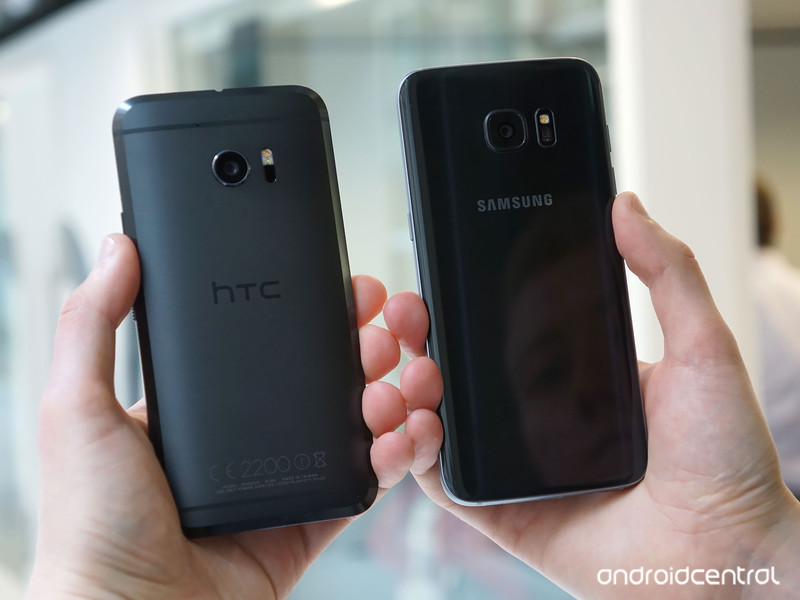
Is HTC’s best phone yet enough to challenge Samsung’s all-conquering GS7 edge?
There’s been more buzz around the HTC 10 than any recent phone from the Taiwanese company. Based on our review, it’s clear that HTC has finally addressed a couple of long standing weaknesses, and returned with a modern take on a classic metal-bodied design.
But the HTC 10 doesn’t exist in a bubble. It’ll have to go up against not only the Galaxy S7, but also its strikingly curvy sibling, the Galaxy S7 edge. As evidenced by Samsung’s marketing this time around, the “edge” is the real focus of this year’s Galaxy lineup, with a bigger battery, an impressive curved glass design and a larger 5.5-inch display.
So how do these two shape up? We’ll put them head to head after the break.
Hardware
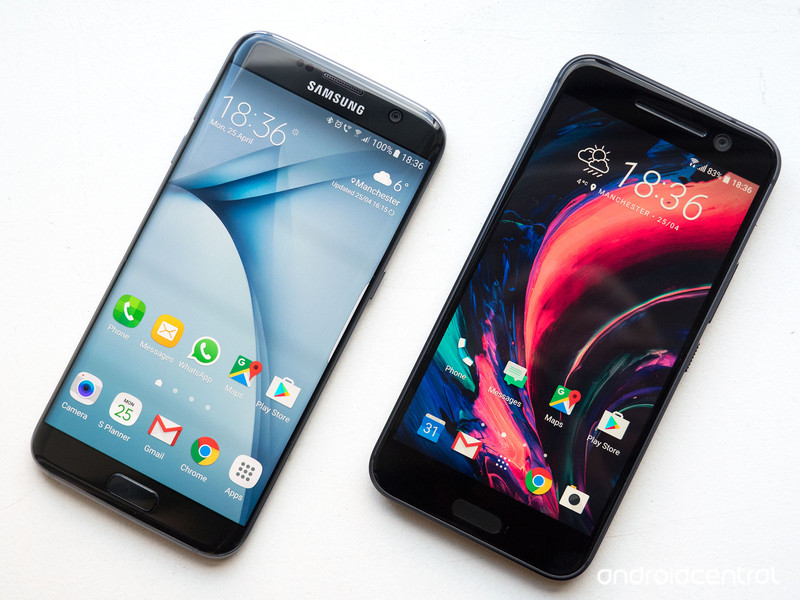
The Galaxy S7 edge and HTC 10 have come to embody their manufacturers’ respective design languages. For HTC, it’s all about the aluminum unibody — an HTC staple going back to the One M7 — brought up to date with a big, reflective chamfer around the back. For Samsung, the glass sandwich of the Galaxy S7 edge, with its curves on all sides, represent the culmination of what it started back with the Galaxy S6
The HTC 10 isn’t the thinnest or lightest Android phone you’ll find, but it is a sturdy, well-built handset that’s arguably easier to one-hand than the larger, more slippery GS7 edge. That said, the curved glass of the GS7, complemented by its svelte aluminum trim, makes for a phone that’s incredibly sleek. HTC’s design has more of an industrial look and feel, whereas Samsung’s aesthetic is closer to jewelry. The only downside is the GS7 edge’s fingerprint-magnet glass back.
The rear glass also allows for Samsung’s wireless charging capabilities — support for the Qi and PMA standards, including fast wireless charging if you fork out for Samsung’s first-party charger. For good old-fashioned cable charging, you’ve got a micro-USB port down below, paired with support for Samsung’s Adaptive Fast Charging — the Korean firm’s implementation of Qualcomm QuickCharge 2.
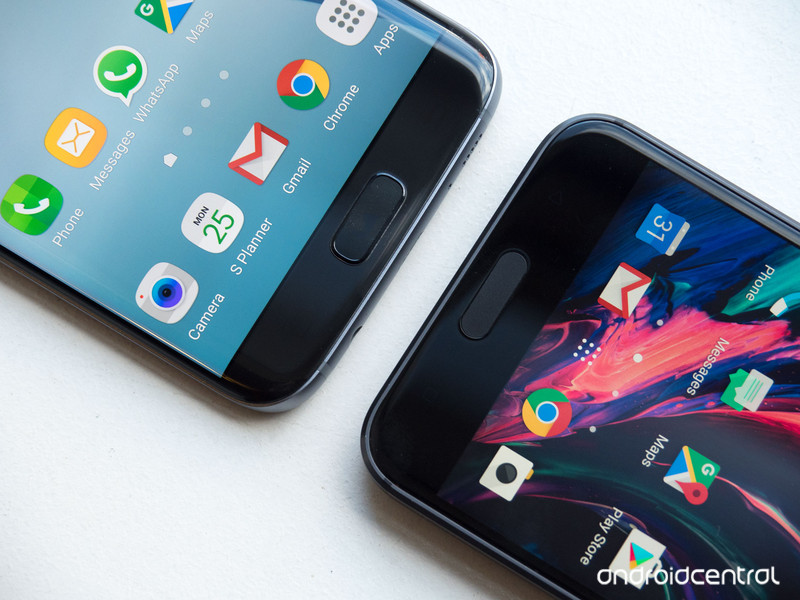
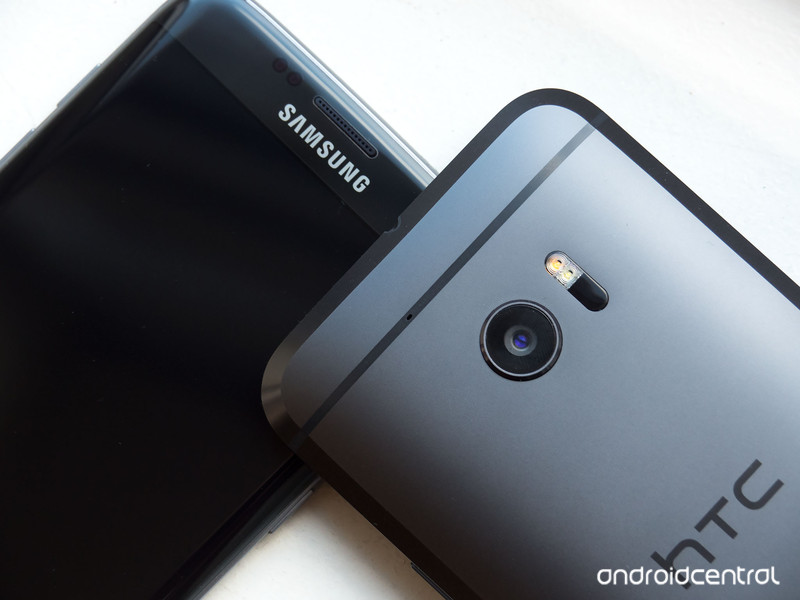
HTC can’t boast wireless charging, but it does tump Samsung in wired charging, with support for the latest QuickCharge 3 standard, along with a new USB Type-C port, which supports the latest USB 3.1 spec. (That means faster data transfers to and from supporting computers, among other things.)
When it comes to durability, the glass-backed GS7 edge obviously means you’ve got double the chance of smashing at least one of those panels should you drop the device. However Samsung clearly wins in another key area, with IP68-rated water and dust resistance, meaning it’s good under 1.5 meters of water for up to 30 minutes. The HTC 10 by comparison carries an IP53 rating, meaning it’s basically splashproof.
Around the front, both phones sport a similar arrangement button arrangement, with a handful of key differences — the GS7’s home key is a physical button, whereas the HTC 10’s is capacitive (touch-activated). Both double as fingerprint scanners, and on the whole, both handsets are incredibly quick to unlock. We’ve noticed fewer failures in the HTC 10’s scanner however, meaning less frustration in day-to-day use.
The most important part of any smartphone is the display, and although the HTC 10 and Galaxy S7 edge pack a Quad HD (2560×1440) resolution, that’s where the similarities end. Samsung uses its own SuperAMOLED technology in one of the very best phone displays available right now, with superlative brightness and daylight visibility, and colors that are vibrant but not obnoxiously over-saturated. Meanwhile HTC’s SuperLCD 5 is decent enough, but a tier below Samsung’s latest, particularly in daylight visibility.
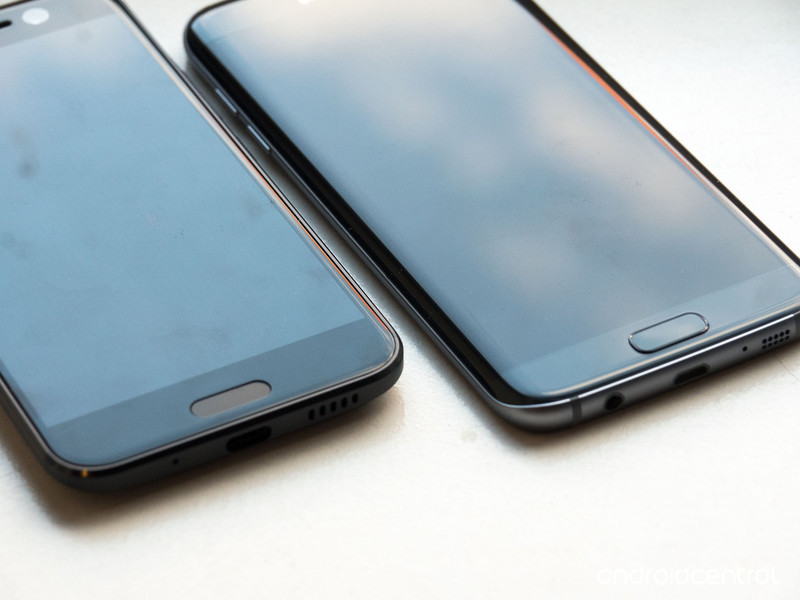
And true to its name, the Galaxy S7 edge includes Samsung’s Edge Screen — mainly a cosmetic feature, though one that’s become more useful with additional features like location-aware app shortcuts in Samsung’s latest release.
Despite the difference in size — the GS7 edge packs a 5.5-inch display, compared to the HTC 10’s 5.2-incher — the overall footprint of these two devices isn’t drastically different. Samsung’s flagship is ever so slightly taller, but the difference in width — a bigger deal for ease of use — is much more slight.
Internally, both phones pack an impressive assortment of high-end components, including the latest processors from Qualcomm and Samsung, capable camera setups and removable storage. The main internal difference is the GS7 edge’s 20 percent lead on battery capacity — 3,600mAh versus the HTC 10’s 3,000mAh.
| Operating System | Android 6.0.1 | Android 6.0.1 |
| CPU | Qualcomm Snapdragon 82064-bit Kryo quad-core | Snapdragon 820 quad-core or Exynos 8890 octa-core |
| RAM | 4GB | 4GB |
| Display | 5.2-inch QHD (2560×1440, 565 ppi)Super LCD 5 | 5.5-inch QHD (2560×1440, 534 ppi) Super AMOLED |
| Rear Camera | 12MP Ultrapixel + OIS, f/1.8 lens4K video, 120fps slow motion | 12MP + OIS, f/1.7 lens 4K video, 240fps slow motion |
| Front Camera | 5MP Ultrapixel + OIS, f/1.8 | 5MP, f/1.7 |
| Storage | 32GB + microSD | 32GB + microSD |
| Charging | USB Type-C Quick Charge 3.0 | microUSB Quick Charge 2.0 + wireless Qi & PMA |
| Battery | 3,000mAh | 3,600mAh |
| SIM | nanoSIM | nanoSIM |
| Waterproofing | No | IP68 waterproofing |
| Audio | HTC BoomSound Hi-Fi EditionTwo speakers | Downward-facing mono speaker |
| Dimensions | 145.9 x 71.9 x 9.0mm | 150.9 x 72.6 x 7.7 mm |
| Weight | 161g | 157g |
It’s also worth noting that although both phones feature removable storage via a micro-SD slot, only HTC supports Android 6.0’s Adoptable Storage feature, which allows you to treat your SD card as internal storage.
What’s more, HTC’s big focus on audio capabilities brings an impressive dual-speaker arrangement — a bottom-facing subwoofer and a single front-facing loudspeaker — along with a powerful amp behind the 3.5mm headphone jack.
Samsung can boast a few exclusive hardware features of its own, however — the aforementioned wireless charging and water resistance, together with a superlative display.
Both have a lot to offer from a hardware perspective, and the choice ultimately comes down to design preference, and whether HTC’s audio focus is worth more to you than the additional Samsung hardware goodies.
Software
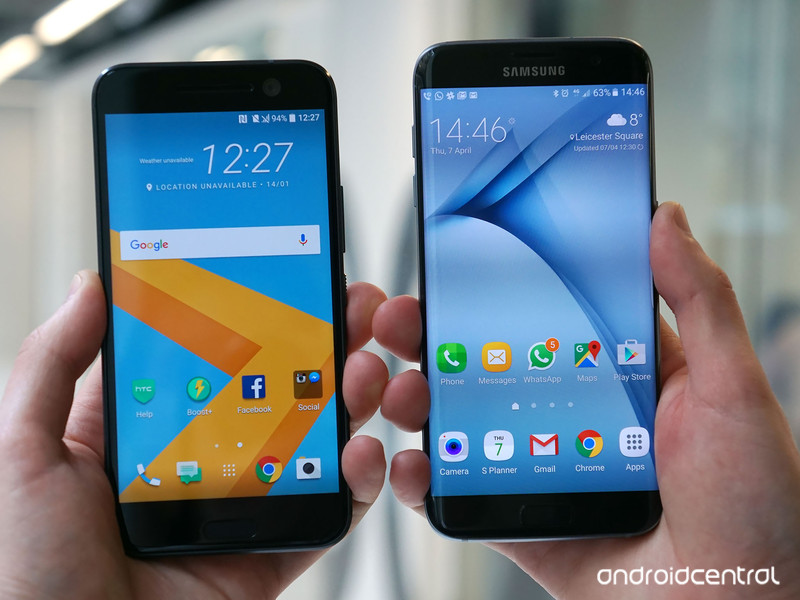
Just about all Android phones have moved closer to Google’s vision of the OS in recent years. But much variety remains between the major Android phone makers, including HTC and Samsung.
Both companies have moved away from numbered releases for their own software layers, which sit atop Android 6.0.1 Marshmallow on the HTC 10 and Galaxy S7 edge. Nevertheless, HTC Sense and Samsung’s TouchWiz are still worlds apart.
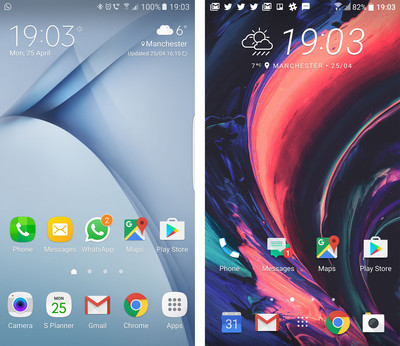
HTC has cut back considerably on its visual customizations to the OS, with a UI much closer to vanilla Android. Key Sense features like the BlinkFeed social and news reader remain, and HTC still has its own dialer, messaging and camera apps. But in other areas it’s moved away from its own in-house Android apps, instead bundling Google’s apps — for example Calendar, Photos and Docs.
HTC’s UI is much closer to vanilla Android this year; Samsung follows its own design rules.
Although HTC offers a much cleaner Android experience than in years past, it’s still possible to customize it to your own liking through the company’s extensive theming system. Like the One M9 before it, the HTC 10 has access to a wide variety of themes for customizing your home screens, fonts, buttons, sound effects, widgets and more. And new in the latest version of Sense, Freestyle mode lets you break free from the shackles of the icon grid, customizing your home screen with cartoonish stickers to launch your favorite apps.
Samsung too has its own theme store, but its base UI is far more visually differentiated, favoring light blues and greys, and rounded rectangular icons throughout. Even the motions of the app-switching menu have been tweaked, with big, swoopy animations when jumping between apps.
Unlike HTC, Samsung has an extensive suite of its own Android apps, from the S Planner calendar app, to its Gallery apps, with includes the ability to create “events” and re-discover past trips through video highlights — a feature handled through the separate Zoe Video Editor app on the HTC side. And of course Samsung also bundled its own Galaxy Apps store, a separate app marketplace for apps specifically designed with the company’s phones in mind. (It’s also where you’ll find apps for the company’s Gear wearables.)
Multi-window remains an important differentiator for Samsung.
One of Samsung’s most important differentiating features is multi-window — coming to other phones in Android N, but a major Samsung feature going back to 2012’s Galaxy Note 2. The GS7 edge’s larger display is an ideal fit for showing two apps side-by-side, or overlaying one as a floating window above other content.
Meanwhile, HTC’s major focus has been performance, with under-the-hood tweaks allowing the company to claim faster touch response and app-switching — a difference that’s there, but not excessively noticeable. Elsewhere, the HTC 10’s Boost+ app combines a few dubious functions — bumping apps out of memory as it desires — with more useful stuff like battery optimization for games, and the ability to lock sensitive apps behind fingerprint security.
The choice on the software side comes down to a decision between near-vanilla Android with a handful of differentiated apps on the HTC side, and a feature-rich, if slightly overbearing UI on the Samsung side.
Camera
With the HTC 10 and Samsung Galaxy S7 edge, both manufacturers are going all-in on smartphone photography, with 12-megapixel optically stabilized cameras around the back, and 5-megapixel selfie cameras.
That’s where the similarities end, though. The HTC 10 packs laser autofocus, dual-LED flash and an f/1.8 lens for its main “Ultrapixel 2” camera, which features large 1.55-micron pixels on the sensor for superior night photography. Over on the GS7, Samsung’s camera features 1.4-micron pixels, but behind a brighter f/1.7 lens. Both are reasonably close on paper, but the differences between the two come down to post-processing more than optics — an area in which Samsung still has a slight lead.
As a result, the GS7 is the more reliable shooter, even though HTC’s camera is impressive in its own right. While both perform well in a wide variety of situations, Samsung’s camera routinely captured more fine detail, especially in HDR mode. The HTC 10’s camera also produced generally softer looking images that could appear more washed out than Samsung’s in certain daylight conditions.
HTC has a slight lead in some low-light scenarios, with the HTC 10 being able to capture more realistic colors in night scenes, though with more chroma noise.












Any other year, HTC might have been able to boast of having the best Android phone camera.
That said, both phones can boast a place among the best phone cameras of 2016, with fast launch times, speedy captures and generally reliable performance across the board. If we were forced to choose, however, we’d have to go with the GS7 — mainly because of its slightly sharper focus, superior macro performance, and easy double-tap home shortcut for quickly loading the camera app.
Around the front, HTC pulls ahead with the first optically-stabilized selfie camera, which does a great job of capturing decent-looking pics even in low light. Like the HTC 10’s rear camera, focus can be a little soft, but the front camera’s all-round performance makes up for this.
All in all, we’re looking at two really great phone cameras, each suited to different kinds of photography.
Battery life
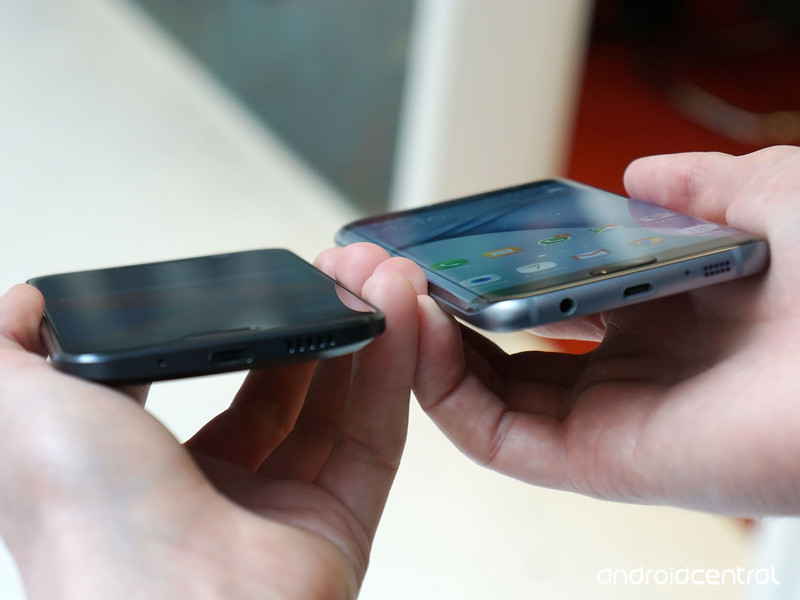
With an additional 600mAh of juice, Samsung has the lead on paper when it comes to battery capacity. And as we’ve found using the HTC 10 and Galaxy S7 edge as daily drivers in recent weeks, that advantage — perhaps combined with more efficient internals — translates into a noticeable lead in battery life for the Samsung device.
HTC claims two-day battery life, but that’s not realistic.
Whereas HTC markets the 10 as having “two-day” battery life, we’ve found this only plays out with light usage on Wifi. Once you start venturing out and using LTE with the screen brightness upped, it’s remarkably easy to kill off the HTC 10 in under a day. It’s hardly alone in that respect, but it’s worth pointing out that HTC’s battery life is far from the claimed breakthrough.
Meanwhile we’ve found the GS7 edge to be a reliable contender, particularly when travelling, or browsing over LTE for extended periods. (What’s more, Samsung’s camera setup seems far less punishing on its battery than HTC’s.)
Numbers-wise, we’re seeing between 12 and 14 hours per charge with heavy use from the HTC 10, with 3.5 to 4 hours of screen on time. By comparison, Samsung’s gotten us comfortably to the end of the day, with 16 to 17 hours per charge, and up to six hours of screen-on time.
When it comes time to charge, both phones benefit from rapid charging through Qualcomm QuickCharge, with the HTC 10 being one of the first to support QuickCharge 3 for even speedier charging than Samsung using the bundled brick.
Bottom line
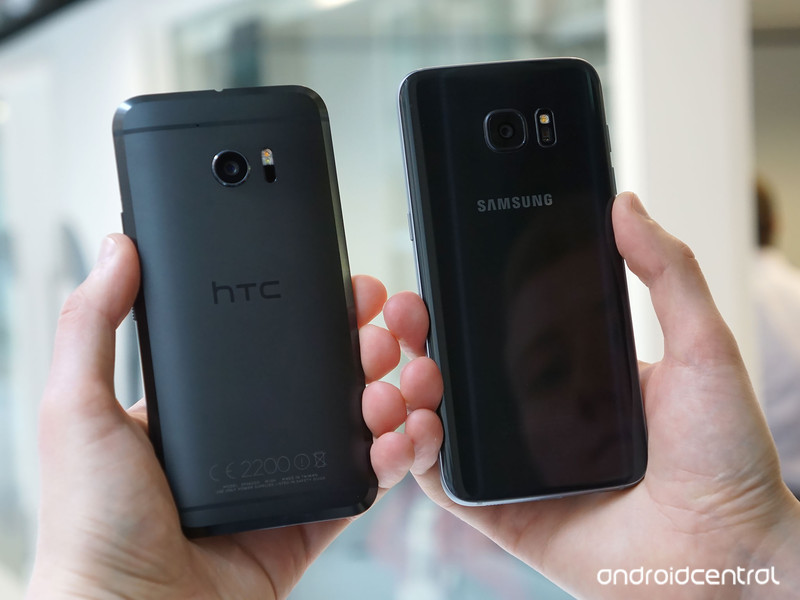
Both the HTC 10 and Samsung Galaxy S7 edge are great phones that perform well across the board. Both handsets are worth your cash, and either will provide a phenomenal, future-proof Android experience.
In our view though, Samsung’s phone has the lead in a few crucial areas, notably battery life, camera experience and display quality. That’s not to say HTC is disappointing in those areas, just that the Galaxy S7 edge has set the bar really high.
There are, however, a few areas of personal taste involved. The GS7’s fingerprint magnet back panel might be a turn-off for some, who may prefer the cold metal of the HTC 10. And at the same time, HTC’s doing a lot of impressive stuff with audio in its 2016 flagship.
HTC is the nearest Android rival Samsung has right now, and so the contest between these two handsets won’t be conclusively settled anytime soon. Nevertheless, our opinion is that Samsung’s still ahead — but with a serious competitor in the HTC 10.
Samsung Galaxy S7 and S7 edge
- Galaxy S7 review
- Galaxy S7 edge review
- Here are all four Galaxy S7 colors
- Should you upgrade to the Galaxy S7?
- Learn about the Galaxy S7’s SD card slot
- Join our Galaxy S7 forums
AT&T
Sprint
T-Mobile
Verizon
HTC 10
- HTC 10 review
- HTC 10 specs
- These are the HTC 10 colors
- Our first photo and video samples
- Meet the Ice View case
- Join our HTC 10 forums
HTC
Verizon
Facebook reportedly working on standalone camera app to encourage sharing
A new report claims Facebook is working on a standalone camera app for both photos and videos. The app is being made with the idea that users of the social network will share more content.

According to The Wall Street Journal:
A prototype of the app developed by Facebook’s “friend-sharing” team in London opens to a camera, similar to disappearing photo app Snapchat, the people said. Another planned feature allows a user recording video through the app to begin live streaming, they added.
The camera app is still in an early stage of development, according to the story, and there’s a chance it might not be released to the public. However, it adds that Facebook is working on it to encourage more of its users to create and share photos and videos with others. There are third-party reports that indicate Facebook users are not sharing or updating their pages as much as they have in the past, but that’s something the company itself seems to deny:
A Facebook spokeswoman declined to comment on product plans. The spokeswoman said the overall level of sharing on Facebook was strong and “similar to levels in prior years.”
 AIVAnet