


The HTC 10 is your favorite new phone of 2016

In last week’s poll we asked What your favorite new phone of 2016. It’s been a great year so far for phones with great options like the Samsung Galaxy S7 and the HTC 10. Trying to decide on which phone is your favorite can be a struggle with so many options. Still, it seems that the HTC 10 is the phone that’s won your hearts for best new phone of 2016.
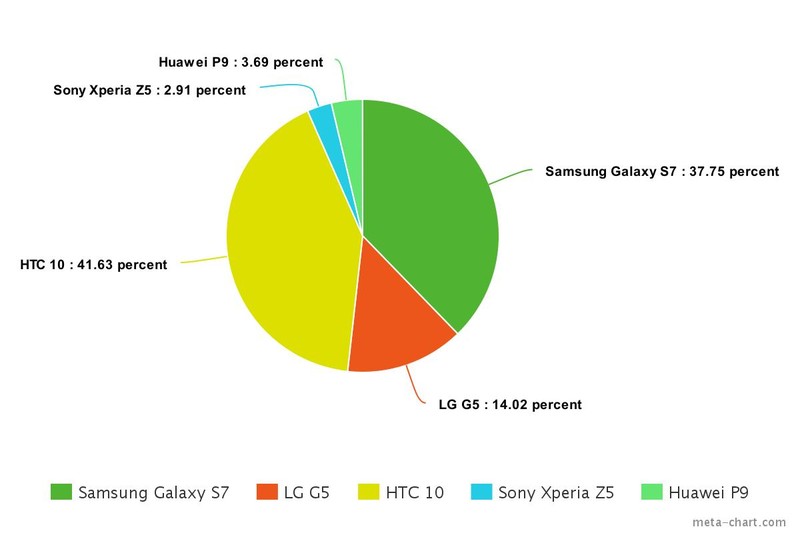
The HTC 10 came in first place this week, snatching up 41.63 percent of the vote. The Samsung Galaxy S7 was a close second with 37.75 percent. In third was the LG G5. grabbing up 14.02 percent. The Huawei P9 managed to roll into fourth place with 3.69 percent. In last place with only 2.91 percent of the vote was the Sony Xperia Z5.
Did we forget a phone that should have been a contender? Are you on team HTC 10? Let us know where you stand in the comments!
HTC 10
- HTC 10 review
- HTC 10 specs
- These are the HTC 10 colors
- Our first photo and video samples
- Meet the Ice View case
- Join our HTC 10 forums
HTC
Verizon
Dear LG: Reinstalling the software on your Android phones shouldn’t be this way
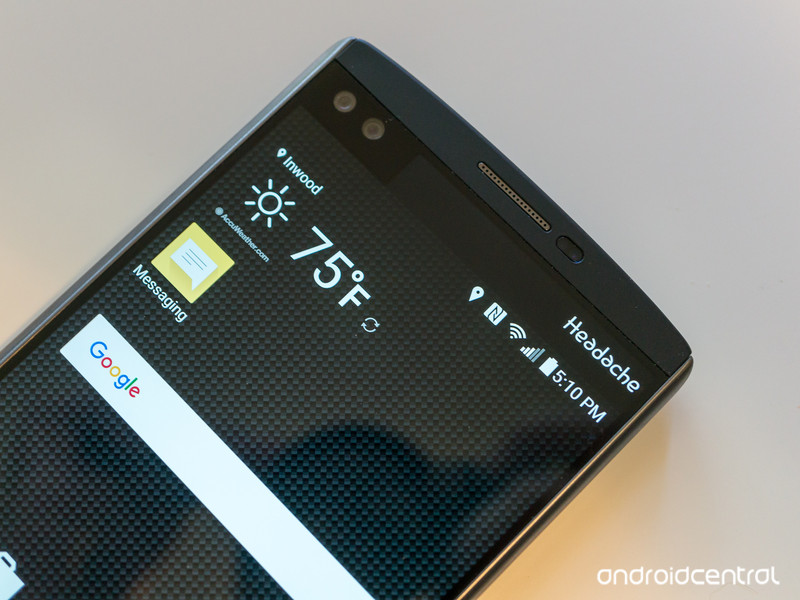
If you buy it, you should also be given the tools to fix it.
I just had to manually flash a KDZ file to my T-Mobile LG V10. Now I’m ready to turn it off and never touch it again, and it’s all because of the silly method required to “fix” it when you need to fix it yourself.
I like the V10. I wish LG would take my privacy and security a little more seriously and send out security patches regularly (I mean, come on, even BlackBerry can do that), and the LG software makes me want to pull my hair out sometimes, but I like the way it’s built, I love the camera it has and the HiFi audio hardware inside of it is really nice. I carry it with me as my point-and-shoot connected camera and music player.
Anyhoo, since I’m the only person here who uses the V10 regularly, I needed to write some words comparing it to the Galaxy S7 edge — people love those, and comparing the best of the best from LG and Samsung is something I’ve been looking forward to doing. But I didn’t want to write anything without the Marshmallow update (that took entirely too long to arrive, but that’s a whole ‘nother story) and something on my unit was fouling that up. The OTA wouldn’t run successfully, and LG Bridge couldn’t verify the software version.
I understand that this can happen, though I also think that maybe someone sent me a special “one-off” version of the software with this particular phone — my “HiFi DAC” setting has always worked with every application, for example. In any case, after some troubleshooting with T-Mobile I was finally referred to LG. Rather than send my V10 somewhere and wait, I knew I could fix it myself. That’s where things turned from being a bad experience to a complete headache.

I use all different kinds of Android phones, but I don’t “mess” with any that aren’t a Nexus. I don’t mind waiting for an OTA to get pushed, and I don’t worry about bloatware that I can’t uninstall. If it’s too bad, I just won’t use it. I like to think that’s how most people (the ones who don’t regularly visit Android blogs) use a phone. But, as I mentioned above, I needed this update to do a little work. Imagine how you folks would howl if I compared the V10 to the S7 edge while the former was still running Lollipop.
Because I don’t normally care to mess with things like flashing factory images or rooting or changing software on phones that aren’t Nexus branded, I had no idea what I was in for. I knew what to do — install the LGUP program on Windows and download the right KDZ file for my V10 — but I’ve never done it before.
I knew what to do, but had no idea what I was in for.
For starters, having to download and install (with administrator rights) software for Windows from some file-sharing site is something nobody should ever do. But LG doesn’t make the LGUP tool available for everyone, so someone working at a place that can repair and restore LG phones had to snag a copy and share it. The same goes for the KDZ file (the factory image) — LG doesn’t want you to have it, so you need to do some trickery via LG Bridge, find the right URL, then download it — or directly download a copy someone else has snagged from an LG server, and hope it’s “legit.” That’s another thing nobody should ever do.
When you buy a computer that’s not designed for your pocket — and Android phones are computers, too — you’re provided with a copy of the shipping software, or a method to download it yourself so you have a backup. Most Windows computers store a full backup in a partition on the primary hard drive so you always have a copy, while Apple and the folks making Linux computers (and this includes your Chromebook) have a public link where you can download a copy. You paid for a license for all that software with the purchase of the computer, and it’s pretty easy to put checks in place so you can’t use it for unintended purposes. If something breaks, you always have a method to restore the software on your very expensive piece of property. And the tools to do it are provided without having to find someone on the inside who can leak out a copy.
Why can’t the people making most Android phones do the same thing?

I’m not saying that flashing a Nexus phone is easy, but everything you need to do it is provided with full instructions about how to use it. The bootloader uses fastboot commands to flash images (which are provided all in one handy place direct from Google), and all the tools are available to do the work with any computer — you could flash the most current version of software on a Nexus S (even the Sprint model) using an ancient computer running Solaris (through QEMU built from source) if you wanted to do it. I certainly wish somebody from Google HQ would spend some time and build an easy front-end and Windows/OS X installer, but at least it’s there. And you can use all of this without installing potentially harmful programs from possibly dodgy sources. Motorola offers similar tools and files for phones made since Google bought it (go figure), and I hope that doesn’t change in 2016 now that Google is out of the picture and Lenovo has stepped in.
Things are different with other brands of Android phones. HTC comes close with some models (though someone needs to let them know that “your PC” is not a valid substitute for “your computer running Windows XP or later, or Vista with some wonky additional tools”) but the other “big” players — namely Samsung and LG — act like you shouldn’t have access to the backup of the shipping software, or the tools you need to install it.
Fastboot works well, and it’s free, but it won’t do much for most Android phones.
That’s ridiculous. It’s not like anyone who would be able to rip apart the software images can’t already “steal” any software right off the phone itself. LG knows this. All the people who make our phones know this, because they’re really smart people who are easily able to yank any file from any running device themselves. LG isn’t protecting any of its IP by not making everything you need available to you. All it’s worried about is that you need to take (or mail) your phone to someone it approves of if something goes wrong.
All this is stupid. I’ll imagine half of the people who visit Android Central regularly could use LGUP without much of a problem if it were easy to get and easy to install. (And we have forums full of brilliant people if you need some help.) Instead, you need to find the DLL file, the application installer, and a random common folder and do everything in the right order to make it work — and that’s after you located the right KDZ or TOT image for your phone — and downloaded it from the source who appears the most trustworthy, because LG doesn’t want you to have it.
The kicker? Fastboot exists. You can use fastboot to OEM unlock the V10. You can use fastboot to fully flash a Moto X that’s unlocked. Google provides the fastboot utility for free, and anyone can build a phone that uses it the way it’s intended to be used. Instead companies like LG (and plenty of others) limit its functionality so they can use something else and control who can fix the phone that you paid for. If LG is worried that you’ll break things then try to get your phone replaced, a big disclaimer that you have to agree to when you download or use the software is pretty easy and would take about a thousand less words than this to write. The small (and I think it’s very small) number of people who would use these tools wouldn’t have much affect on the bottom line anyway.
Using LGUP isn’t hard — but finding it and installing it takes some risks
Not everyone wants to buy or use a Nexus phone. But if you are in the position where things are really broken, you can always fix problems because Google’s not trying to make it impossible for you to fix them. And it’s not just Google. Microsoft gives users the Phone Image Designer tool. Apple has iTunes to fix anything and everything, so while they treat “mobile” a little differently, they make it easy when you have a need to repair broken software. Don’t tell me Microsoft and Apple care less about their IP and warranty claims than LG or Samsung does. I’m left thinking that it’s all about control over hardware that money from your wallet paid for, and if that’s the case, it’s a bullshit reason. I want better. Not just for myself — I’m happy using a Nexus, and don’t have to worry about the silliness — but for everyone. I’ll continue to vote with my wallet, but I know many other people can’t or won’t, and you deserve better, too.
LG V10
- Read our full review
- LG V10, a second opinion
- LG V10 specs
- All the latest LG V10 news
- Join the discussion in our forums
- LG V10 vs. the LG G4
Verizon
AT&T
T-Mobile
Amazon
Grab a Moto 360 Sport for just $199
If you’re in the market for a fitness-focused Android Wear smartwatch, the Moto 360 Sport is currently on sale for just $199. For those keeping track, that’s $100 off the Moto 360 Sport’s normal $299 price point.

Unfortunately, the latest discount only applies to the orange and white versions; you’re out of luck if you want black. Still, it’s not a bad way to get your hands on an Android Wear watch — especially if you plan use the 360 Sport with its built-in GPS as a workout companion.
The discount is set to last through May 2 at Motorola. Both Amazon and B&H Photo are also offering up the Moto 360 Sport at a discount, with the latter throwing in a free cleaning cloth and $50 gift card as well. If you’re interested, you have your pick of retailers at the links below.
See at Motorola
See at Amazon
See at B&H Photo
Google Camera update brings interface tweaks, dedicated slow motion video mode

A fresh update is now rolling out to the Google Camera app, bringing along a slew of interface tweaks and more. Of note are some interesting icon tweaks, with the shutter button losing its blue accent and the camera switcher changing to a circular design. Eagle-eyed users will also spot some slick new animations.

Meanwhile, there’s also now an option to launch directly into a dedicated slow motion video mode (on the Nexus 5X and 6P) in the slide-out camera menu, with a quick toggle to choose between recording speeds on the Nexus 6P. Previously, slow motion video capture was an option in the main video recording interface.
The Camera update is rolling out now, and we’ve so far seen it land for two of our Nexus 6Ps. As with all Google app rollouts, however, this one could take a while to land for everyone. In the meantime, here’s a quick look at just some of the changes in action.


Apple Watch 2 might pack cellular data connectivity, faster processor
Apple is working on the Apple Watch 2 and reportedly planning to add at least two things that’ll make the new watch stand out from its predecessor.
Apple unveiled its original smartwatch, called Apple Watch, in September 2014, but it didn’t begin shipping the wrist wearable until April 2015. Many people therefore didn’t expect Apple to announce a second-generation version during the iPhone 6S event in September 2015 – and they were right. The new watch also didn’t show up at the March 2016 event.
Instead, Apple in March cut the price for the least-expensive version of the watch (Sport Watch model) by $50 to $299. But don’t think Apple has given up on updating its aging wearable. According to The Wall Street Journal, analysts estimate the Apple Watch is a $6 billion business, and so Apple is definitely working on a new version with new features.
One of those new features might be cell-network connectivity. Apple Watch 2 could also come with a faster processor. Many critics have lambasted the now year-old Apple Watch because it’s not useful when away from an iPhone. You can track activity and do some things on Wi-Fi, but that’s it. And its processor is sometimes throttled to extend battery life.
With cellular data on the new Apple Watch, you could presumably leave your iPhone at home, then go out and about, and still receive notifications and run native apps. A faster processor would also make the Apple Watch 2 run smoother, quicker than Apple Watch. Unfortunately, there’s no word yet on when we can expect this new watch.
We also don’t know if a cellular Apple Watch will cost more than a standard model without cellular data. Check out Pocket-lint’s Apple Watch 2 round-up for more details on leaks, etc.
Apple Watch 2: What’s the story so far?
The Apple Watch 2 is close to being ready, or at least that’s what all the latest reports claim.
Apple unveiled its first smartwatch, simply called the Apple Watch, in September 2014, but it didn’t begin shipping the wearable until April 2015. Many people therefore didn’t expect the company to announce an updated version during its iPhone 6S event in September 2015 – and they were right. Since then however, we’ve all been asking ourselves: just when will Apple show off the second-generation Apple Watch?
To help give you some clarity, we’ve rounded up all the rumours. Here’s everything we know so far about Apple Watch 2, including when it might release, how much it might cost, and more…
Apple Watch 2: Name
We’ve only seen one Apple Watch so it’s hard to pinpoint Apple’s naming convention for the device. The company tends to stick to numerical monikers for its iOS products, such as iPhone 5, iPhone 5S, iPhone 6, iPhone 6S. The same can’t be said for its OS X products however, with names like the MacBook Pro instead.
For the sake of this feature, we will refer to the second-generation Apple Watch as Apple Watch 2 or next Apple Watch.
Apple Watch 2: Release date
According to China’s United Daily News (via The Gadget Show), the next Apple Watch could launch around June – maybe at WWDC 2016 (kicks off 13 June).
The report quoted Barry Lam, chairman of Apple supplier Quanta, who claimed: “Quanta and Apple are currently developing the second-generation of the Apple Watch, expected late next year in the second quarter.” Keep in mind Quanta is the sole manufacturer of the first Apple Watch, so if Lam is speaking truthfully, we can expect the next Apple Watch to arrive next summer.
If it does launch in the second quarter, Apple might unveil it a few months prior. In 2015, Apple held a March event to shed more details on the first Apple Watch and to unveil the 12-inch MacBook, but history didn’t repeat itself this year. Instead the 21 March Apple event simply revealed new Apple Watch straps, alongside a smaller iPad Pro and a 4-inch iPhone called the iPhone SE.
Apple Watch 2: Pricing
The first Apple Watch starts at £299 ($350) and comes in many different models, sizes, and materials. The models are called Watch, Watch Sport, and Watch Edition, and each one offers two different case sizes: 38mm and 42mm. You must first decide which model you want, then you choose your case size and the band material you prefer. There are plenty of options, which you can read about in our separate feature.
Pricing varies wildly depending on your choices. There are 20 Watch options, 10 Watch Sport options and eight Watch Edition models with prices starting at £449 and ranging up to a whopping £13,500. We expect the next Apple Watch to follow similar pricing tiers – since Apple usually sticks to the original prices it sets for devices.
That said, Apple could introduce more expensive models. 9to5Mac suggested Apple is considering additional price points between the $1,000 stainless steel Apple Watch and the $10,000 18-karat gold Edition. If that’s the case, pricing will be based on materials, naturally.
Update: Apple in March cut the price for the least-expensive version of the watch (Sport Watch model) by $50 to $299. This now appears to be the starting base price for Apple Watch going forward.
Apple Watch 2: Design
A report from South Korea (via G4Games) claimed the next Apple Watch will sport the same design and form factor as the first Apple Watch. It’ll have the same rectangular screen sizes, screen resolution, and body, which therefore means your current straps might remain compatible.
Apple Watch 2 won’t even be thinner, even though its display thickness will apparently be scaled back. This is because rumours are claiming its battery will be bigger.
Tech site, 9to5Mac also claimed the new model would come with new materials like titanium, tungsten, palladium, and platinum, supporting its claim of additional price points.
Apple Watch 2: Features
FaceTime camera
The next Apple Watch will sport a front-facing video camera (located near the top of the display) that will allow for proper FaceTime calls, according to 9to5Mac. It’ll also feature improved wireless capabilities, including a “more dynamic wirless chip” and the ability to do more without a Bluetooth connection to your iPhone, thus enabling you to place and receive video calls directly from your wrist.
Faster Wi-Fi Chip
The first Apple Watch uses Wi-Fi for app updates and messaging, but the new chip will be able to handle more data transfer and router triangulation for improved location accuracy. Although it’ll also consume more power, the next Apple Watch is expected to boast a bigger battery, so you shouldn’t notice any difference in juice (when compared to the current model’s one-day battery).
Cellular data and faster processor
According to The Wall Street Journal, Apple is definitely working on an Apple Watch 2 with new features.
Two of those new features might be cell-network connectivity and a faster processor. Many critics have lambasted the now year-old Apple Watch because it’s not useful when away from an iPhone. You can track activity and do some things on Wi-Fi, but that’s it. And its sluggish processor is sometimes throttled to extend battery life.
With cellular data on the new Apple Watch, you could leave your iPhone at home, then go out, and still get notifications and run apps. A faster processor would also make the Apple Watch 2 run smoother, quicker than Apple Watch.
Want to know more?
Pocket-lint’s Apple, Apple Watch, and Apple Watch 2 hubs have all the latest developments.
Facebook is working on a standalone camera app for live streaming
Facebook doesn’t have a good track record when it comes to standalone apps, but that isn’t stopping it from going back to the drawing board.
According to The Wall Street Journal, a team of Facebook engineers in London are working on a standalone camera app that will allow you to record video and begin live streaming (presumably via Facebook Live). The app would open to the camera to encourage you to capture and post photos and videos.
Snapchat similarly opens straight to a camera and allows you to broadcast snaps to followers, though it doesn’t have a real-time, live-streaming mode. The Wall Street Journal speculated that Facebook is in investing in mobile video in order to get its 1.6 billion users sharing more content.
It’ll also help Facebook compete with Snapchat, a photo-messaging app it once tried buying. Snapchat later built a Snapchat-like app, called Slingshot, but it was killed alongside other standalone apps like Rooms and Riffs when Facebook shut down its in-house app studio Creative Labs.
We don’t know yet what the new camera app will be called. All we know so far is that it’s just a prototype and may never see a public release. Still, it shows Facebook is exploring ways to bolster Facebook Live.
Also, keep in mind the new camera app is different from Facebook Camera, another photo app Facebook launched in 2012 but eventually killed in 2014 because it too failed to gain any traction.
READ: Facebook Live Video: Here’s how it works
This top skill can make or break a project management resume
Aspiring Project Managers need to consider mastering the methodologies actually used by Project Managers daily.
With the Agile/Scrum Certification Training for Project Managers, now available for £31.45 ($44.99) on Pocket-lint Deals, you can stack the deck of success in your favor. You’ll learn the techniques, terminology, and principles of Agile, one of the most top-used methodologies in Project Management.
The Agile/Scrum Certification Training offers 25 hours of training to help you conquer the various approaches to Agile, including Scrum, Kanban, Lean, extreme programming, test-driven development, and more. Prep for the industry-standard PMI-ACP exam as you master the source material through 20+ courses. You’ll learn to set timetables, manage multi-generational teams, and follow Agile’s pathway to project success.
Expert-led instruction offers a variety of methods and activities to make your mastery of Agile second nature, and set you on your way to acing the PMI-ACP exam. Set yourself on a direct course for success with a company that values top talent – get the Agile/Scrum Certification Training for Project Managers for £31.45 ($44.99) on Pocket-lint Deals.
The Apple Watch, one year on
One year ago Apple finally decided to get into the smartwatch game. Nobody was surprised that it happened, but the reaction it inspired has caught a few off guard. Some were shocked that it failed to explode on the scene with the same ferocity as the iPhone or iPad. Others have been amazed at how it has stubbornly clung to life, like the Apple TV did for years.
The Apple Watch has been somewhat divisive, even around the Engadget compound. Some of our editors ordered theirs on day one, others became converts later. Many still wear and like their Apple watch, while others are wondering how much they can get for it on eBay. Let’s see how seven Engadget editors feel about the Cupertino’s first stab at wearable now.
Mat Smith
I regretted buying the Apple Watch. And while I haven’t resold it, it’s not something I wear every day. The best features (message notifications, music player controls and the surprisingly consistent fitness apps) aren’t enough for something that costs just shy of an entry level iPhone. Especially since you need the phone to make the wearable worthwhile — anyone that says different is kidding themselves. Then there’s the cost of everything else: You’d better not lose that charging puck-cable. And how do they get away with charging so much for plastic straps? (Although it is a particularly velvety-soft plastic.)
There’s been a weird side effect to it all, however. I’m constantly poring over watches, and have added three more to my humble horological collection. Don’t get me wrong, the Apple Watch remains the most expensive purchase I’ve made — writing at Engadget doesn’t bring a timeless Omega within my budget. Well at least not yet. But I do like the idea of wearing a watch, having the time there, something that looks nice on my wrist. The Apple Watch is a beautiful “smartwatch,” but that’s the problem — it’s still a smartwatch. It’s chunky and normal watches just look better to me.
Edgar Alvarez

When I bought the Apple Watch on launch day, I had no idea whether it would be useful. I knew I loved the way it looked, and since I use an iPhone, compatible wearable options were limited. So I spent the $400-plus on the Watch Sport. I liked it so much I’ve since swapped that for a stainless steel model with a black leather band — it’s much fancier.
I’m happy to say I have no buyer’s remorse. My favorite thing about the Watch is that it keeps me from taking my phone out of my pocket every time I get a notification. Plus the reminders to stand up and walk around throughout the day keep my body from atrophying .
My one complaint: I wish the apps for it were faster. Sometimes they take so long to load that it’s actually quicker to take my iPhone out instead. Hopefully that will get addressed with the second-gen Watch.
Chris Velazco

Confession time: I didn’t want an Apple Watch. I only bought one because a notorious former colleague wouldn’t shut the hell up about it, and we eventually agreed it would be funny to send obscene doodles to each other. It was… for about a week. To my surprise, the Watch stayed on my wrist well after that first puerile jolt of novelty wore off, and not for any of the reasons Apple was so keen to talk about.
I never talk to Siri. My list of favorite friends is empty, so I don’t send anyone drawings or heartbeats. I can count on one hand the number of times I’ve used it for directions. Even getting notifications got to be sort of a hassle. In fact, most of the time I glance at a notification on my wrist, I regret it. That’s mostly due to the abhorrent state of my work inbox, but also because glancing at my watch mid-conversation makes me feel like a dick.
No, I like that it tells me the time. It’s a pretty accurate step-counter, too, and having all data that fed into iOS’s Health app to mingle with “calories Chris gorged on today” and “how much sleep I got” helps paint a picture of the state of my union. And perhaps best of it all, it’s nice to know if I have to put on a jacket before I go outside. For someone who slobbers over wearables on the regular, it turns out my needs are actually very basic. My low bar for features also means something eventually might slip in and replace the Apple Watch, but for now this setup is just the right amount of smart.
Dana Wollman

I stopped wearing my Apple Watch almost immediately after I wrapped my review last spring. It wasn’t until seven months later, at the start of CES, that I would put it on again. By that time, I had fallen into a funk, during which I all but stopped exercising and put on about eight pounds in as many weeks. I was just starting to cheer up when it came time for my annual, week-long trip to Vegas for the world’s premier consumer electronics show. I knew that I wouldn’t have much time on my work trip to go running on the hotel treadmill, so instead I brought my Apple Watch, with the idea that I could at least console myself with seeing how many miles I had walked around the Las Vegas convention center each day.
It wasn’t perfect — one day when I ended up crying in an hour-long taxi line after the Watch nudged me to “stand up” — but on the whole, it was helpful to see how much walking I was doing every day. Pretty soon, I was competing against myself. Sure, I walked seven miles yesterday, but what about today? I quickly remembered just how well-designed Apple’s fitness-tracking app is. Something about the color-coding and the animated rings and the different badges you can earn. Maybe I’m just a sucker for games.

Nearly four months have passed since CES. I’ve long since left Vegas, and I’ve lost all of my “sad weight” and then some. Barely a day has gone by that I have not worn the Apple Watch. I still won’t use it as a running watch due to the inaccurate distance tracking, which means that on days when I go running with my Garmin, I end up syncing the Garmin data to my calorie counter of choice, MyFitness Pal, and then I manually add my Apple Watch data by subtracting the Garmin calorie number from the larger Apple Watch one. I know, I know: Apple Watch can sync with various apps, including MFP. The point is that I’m trying to avoid having the same data sent over twice, since I tend not to take off my Apple Watch while going for runs. (I want to meet my daily step and calorie-burning goals, after all.)
If that sounds complicated and tedious, it’s because it is. But such is life when you like the Apple Watch as a fitness tracker and not as a running watch. I think my willingness to deal with that every day is a testament to how much I enjoy the UI of Apple’s Activity app, even if I can’t trust it to accurately track my workouts.
I also enjoy the Watch for its notifications, but only to a point. I’ve been accused on multiple occasions of being one of those people who’s on their phone too much, and having a smartwatch makes me seem… less rude. Glancing at my wrist is a more subtle gesture than pulling out my handset, and I get just enough information from the notifications to sate my curiosity. It’s been a trial and error process figuring out which notifications I actually want (hell no to Tinder and Slack), but I think I’ve landed on a setup that’s useful, not distracting.
All that said, the unit I’m wearing is one I have out on a long-term loan from Apple. Would I have paid my own money for this? A year ago I’d have definitively said “no.” Now I’ll upgrade that to “probably not.”
Devindra Hardawar

The best thing I can say about the Apple Watch is that I still wear it. And that’s more than I can say for other wearables — even those that I truly loved, like the Jawbone Up 2 and Misfit Shine. Once the novelty and joy of obsessively tracking your activity wears off, it’s pretty easy to give up on a typical wearable. But the Apple Watch has managed to make itself a key part of my daily workflow: it’s the main way I track my many appointments, view and respond to texts, and deal with a plethora of other notifications. I’ve grown to appreciate how it helps me cut through the never-ending onslaught of electronic noise (ironic for an expensive gadget, I know).
There is, of course, plenty of room for improvement. Apple needs to make future Apple Watch models more independent, and less reliant on being tethered to an iPhone (recent rumors suggest it might include cellular data connectivity). I’d also like some faster hardware to get rid of those interminable loading screens. They’re annoying enough on phones and computers, when you’re trying to quickly glance at your wrist load screens are absolutely infuriating.

I still can’t recommend the Apple Watch. It’s a device for a particular lifestyle of digital addiction. By its very nature (and price), it’s just not for everyone. But I wouldn’t call it an outright failure, as so many have. Analysts estimate Apple has sold around 12 million Watches over the last year, twice that of the iPhone’s inaugural year. It might not completely reshape the digital landscape, as the iPhone did, but there’s clearly a market out there for a smartwatch that helps you survive the digital hellscape.
Jon Fingas

Straight-up: the Apple Watch feels like an essential part of my body at times. I can certainly go without it if I have to. But I’m so used to turning to my wrist for notifications and apps that I miss the Watch when it’s gone. For someone who gets dozens of work-related emails every day, it’s a lifesaver. It’s also doing a lot to improve my fitness routine — there’s an almost Pavlovian urge to go on runs just to hit my fitness goals. Apps like Swarm and Transit are that much more useful when I don’t have to fish my phone out of my pocket.
Having said that, this is very much an early adopter gadget in the vein of the original iPhone. For one, it’s slow… horribly so, on occasion. Native app support in watchOS 2 made life a lot easier, but there are still times where I’m left staring at my arm while an app loads. And while I’ve grown to appreciate the Watch’s design, its thick body still screams “gadget” a little too loudly. Also, I’ll be honest: many of the things I appreciate can also be found in Android Wear or Samsung’s Gear line. It’s Apple’s implementation that makes the difference for me more than the features. I just happen to prefer its approaches to things like app navigation and haptic feedback.
For year two, I want to see Apple focus on speed above all else. I want interactions to be so quick that I rarely stop to think about reaching for my phone. That doesn’t just mean faster processors and data links, either. Frankly, Siri feels underused on the Watch — it’d speed things up if I could command any app with my voice, not just a handful of official programs. If Apple can make it so that the Watch is almost always the quickest way to get something done, it might appeal more to the everyday person, not just tech-savvy types willing to put up with a few flaws.
Nathan Ingraham

I got my Apple Watch more than 6 months after it launched, so I was well aware of both its good sides and bad. As such, I’ve been quite happy with it — I thought a lot about whether it could do the things I wanted, and by and large it’s been as good or better than I expected.
Fitness tracking is by far my most-used Apple Watch feature. For my purposes, it’s as good or better than most Fitbits I’ve tried, and the fact that I like the Watch’s physical appearance means I’m more likely to keep wearing it and get better data. I’ve quite simply been a lot more active since I got the Watch — part of that coincides with the time when I started focusing on running more, but the Watch has definitely helped me with that goal.
I do wish apps worked better, but I never really thought they were going to be a killer feature, so it hasn’t been a deal-breaker. And while getting all of your phone’s notifications on the Watch is a horrible way to live, if you take the time to set it up, you can get actually useful and timely info pushed there. All in all, I don’t regret my purchase at all and expect I’ll keep wearing it for a good long time.
MakerBot will start outsourcing its 3D printers
Less than a year after opening its 170,000-square-foot factory in New York City, MakerBot announced today it will partner with international manufacturer Jabil to produce its 3D printers moving forward. Over the next few months, the company will lay off a number of employees and shut down its Brooklyn facilities as it transitions to Jabil’s factories overseas.
In a blog post, MakerBot CEO Jonathan Jaglom cited “the volatility of an emerging market” and the need to reduce manufacturing costs as the main reason for the move. Meanwhile, MakerBot’s design, engineering, logistics and repairs teams will remain in the company’s offices in Brooklyn.
“It’s a specific, painful decision in the sense that we’re going to have to let some people go,” Jaglom told the Verge, “but it’s captured over a much broader strategic decision, which is a very important one and a very positive one for MakerBot in the long term.”
While analysts predict 3D printing will be a $20 billion industry by 2019, Jaglom has had to make some hard cuts since taking over the company in April 2015. His first major move as CEO was to lay off 20 percent of the workforce. Six months later, the company trimmed another 20 percent from its roster, with Jaglom claiming that the company needed to, “get back to our entrepreneurial spirit and address our fractured organizational structure.”
 AIVAnet