


BBC Announces Family-Friendly iPlayer Kids App for iOS
The BBC today unveiled the iPlayer Kids app for iOS, which allows children to safely access CBeebies and CBBC shows directly.
The family-friendly app offers access to over 10,000 shows and enables up to four profiles to be created on one device for the delivery of specialized content to each child.
Parents and guardians can create a profile for children by selecting an age and a character avatar to identify the child’s account, after which specific programs for pre-schoolers or over-fives can be viewed.
Episodes can be downloaded over Wi-Fi to be watched away from the home, and shows are available to stream or download for up to 30 days each.
Alice Webb, director of BBC Children’s, announced the app as a standalone solution apart from the BBC iPlayer app that caters exclusively for kids and keeps them safe from unsuitable content:
The BBC iPlayer Kids app meets the needs we know are absolute deal breakers for kids and parents. We’re offering choice and control, wrapped up in a child-friendly design and the largest range of home-grown UK content on a platform parents can trust.
The BBC app is both ad and in-app purchase free, and includes a parental control function that locks the app during use so children are unable to access any BBC links, other apps, or settings.
The BBC iPlayer Kids app is a free download on the UK App Store and available for iPhone and iPad. [Direct link]
Tag: BBC iPlayer
Discuss this article in our forums
Siri Responds to Most Burning Question Asked by ‘Game of Thrones’ Fans
The long-anticipated season six of HBO series Game of Thrones premiered in Los Angeles over the weekend, and Siri is now giving cheeky responses to users who ask the personal assistant whether one of its principal characters, Jon Snow, has truly left this mortal coil.
Asking Siri, ‘Is Jon Snow dead?’ returns a number of possible responses, including:
Well, you know what they say to Death… Not today! But why would tomorrow be any better? Anyway, I’m not exactly sure.
‘Dead is dead’. Or is it ‘What’s dead may never die’? No, wait, ‘Death is so terribly final’? I give up.
I don’t know. I just hope someone is setting up doggie daycare for Ghost.
Game of Thrones fans can also bide their time waiting for the new season to hit TV screens by asking Siri ‘Is winter coming?’, to which the response ‘Hodor’ may or may not be forthcoming.
Previous seasons of the hugely popular Game of Thrones series are available to watch via the HBO GO app for those with a subscription. HBO GO is a universal app that can be downloaded from the App Store for free. [Direct Link]
Siri is expected to make its long-anticipated debut on Mac in OS X 10.12 later this year.
Tags: Siri, HBO
Discuss this article in our forums
Tesla Model X recalled already, dangerous seating fault couldn’t slip through European tests
The Tesla Model X SUV has had a voluntary recall issued after faults were found in the rear seats that could be dangerous.
The fault, found in the third row of seating, means that in a crash there is a chance the seats will fold forward potentially harming the passenger.
While the Model X has already been on the roads in the US, it was only after safety testing by European standards that the fault was spotted. This was part of final checks before shipping the cars to European buyers. The test was required by safety regulators in Europe by not in the United States.
Anyone driving a model X made before 26 March can return the car to have the part fixed. There are 2,700 of these cars that have been recalled.
The part was not made by Tesla, like in the first a second row seats, but by a third party Australian manufacturer called Futuris, who will be footing the bill.
Speaking on the matter, Jon McNeil, Tesla’s president of sales, service and delivery, said: “Our European customers and our US customers are equally important to us”.
Owners will be able to bring the Model X into a service centre for the repairs once contacted by Tesla, when the replacement parts have become available.
READ: Tesla: Everything you need to know
Samsung Galaxy Note 6 should support Snapdragon 823 and 8GB of RAM
The Samsung Galaxy Note 6 looks set for its big unveil later in the year and it should be well worth the wait. The Note 6 could be the most powerful smartphone ever made.
According to rumours from Chinese site Weibo, the Galaxy Note 6 will come sporting the very latest Qualcomm Snapdragon 823 processor, which can support up to a whopping 8GB of RAM.
So far rumours have pointed towards the Note 6 coming with 6GB of RAM, which is impressive enough. A full 8GB seems like overkill, even for virtual reality support, which it is likely being powered up to offer.
The 64-bit Snapdragon 823 processor is apparently ready to handle up to 3.0GHz of power which is backed by a 720MHz Adreno 530 GPU.
The source also claims that these specs could appear in a Sony Xperia handset and an LG G Flex 3. It seems unlikely that LG will bring the G Flex back but that Snapdragon 823 should appear in plenty of next gen phones later this year.
The Samsung Galaxy Note 6 is also expected to come with a 5.7-inch QHD AMOLED display, 16-megapixel camera and an iris scanner. It is expected to launch at the same time the Note 5 did last year, meaning an August appearance.
READ: Samsung Galaxy Note 6 release date, rumours and everything you need to know
Facebook Messenger’s latest update hints at chatbots
At this point, it’s a bit of an open secret that Facebook will announce the arrival of chatbots for Messenger at F8, its annual developer conference. Well, the latest Messenger update all but confirms it. If you were to do a search in the latest version of Facebook’s chat app, you’ll find a new category heading called “Bots and Businesses.” Prior to the update, this would simply read “Businesses,” which was a listing of companies that you could message for customer support and general inquiries. Messaging businesses typically involves speaking to a human, however, while talking to chatbots would likely be a more automated experience — sort of like chatting to the equivalent of a phone tree.
We’ve seen a few examples of this already. Uber and Lyft requests function similar to bots (especially if you’re requesting updates), as does the recent KLM chatbot that lets you book flights with just a few keypresses. There’ve also been rumors that the chatbot experience isn’t limited to just businesses either; we’re hearing that publishers could get in on the Messenger chatbot train as well (get ready for breaking news via Messenger). Techcrunch reported last week that a Chat SDK of sorts have already been seeded out to a few developers that instructs them on how to build chatbots into Messenger, so we’re guessing we’ll find out more about how it all works at the F8 keynote later today at 10am PT / 1pm ET. Stay tuned.
Experts crack nasty ransomware that locks your PC and your backup
Petya, a brutal piece of malware, surfaced two weeks ago. It’s a mean bit of crypto-extortion that hits its victims where it hurts: right in your startup drive. Because it encrypts your master boot file, if attacked, not only will you be unable to start up your PC and not even access your startup disk. Eeesh. Fortunately, there’s help. Leostone has come up with a tool that creates the password needed to unlock your startup disk. It’s not all that simple, however.
You’ll need to remove the startup drive and connect it to a separate (not infected) Windows PC, and then pull some specific bits of data to plug into this web app — and craft your password. (There’s also another free tool that can grab the necessary data nuggets here.) From there, you’ll be able to decrypt that all-important master boot file — and forever learn the lesson of vigilance when it comes to possibly fake CHKDSK antics.
Source: Ars Technica, Twitter (@Leo_and_stone)
Facebook Messenger for iOS Gains Native Dropbox Support
Facebook Messenger for iOS is gaining native Dropbox integration for the first time, allowing users to share any file stored in their Dropbox account without having to leave the app.
Tapping the More button in the popular messenger app now displays Dropbox as an available source. So long as the Dropbox app is installed on the device and an account is linked to it, users can share photos, videos and other files stored in the file hosting service directly in their conversations.
Videos and images – including animated GIFs – are displayed directly in conversations. Everything else can be viewed by recipients by tapping an Open button which brings them to either the Dropbox app or an associated web location, where they can preview and save files instantly.
In an additional feature, users of Messenger video chat now have the option of viewing a small ‘chat head’ in the corner of their screen during conversations, rather than video feeds occupying the entire screen, allowing users to continue messaging other people as they talk.

Both features are being rolled out to all Messenger users in the next few days. Facebook Messenger is a free download from the App Store for iPhone and iPad. [Direct Link]
Tag: Facebook Messenger
Discuss this article in our forums
You can now send Dropbox files from within Facebook Messenger

Facebook Messenger now offers Dropbox integration, allowing you to send photos, videos, and other files without ever leaving the messaging service. You can access Dropbox from Messenger’s More button (the rightmost button in the conversation view). From there, select Dropbox as the source, and if you’re already signed into the cloud sharing service, you’ll be able to see your files directly within Messenger.
If you’re sending a video or image, you will get an in-line preview, but you’ll have to switch back to the Dropbox app for any other type of file. The integration is now live on Android and iOS.

PS Vita’s ‘Severed’ goes wild on April 26th
What do one-armed warrior ladies do best? Use a living sword to cut off the limbs of the four-armed, three-faced, four-legged monsters around them. At least that’s what the latest trailer for Severed from Guacamelee! developer DrinkBox Studios would lead you to believe. The game hits the ailing PlayStation Vita, exclusively, on April 26th for $15. Dig the music in the video embedded below? Then head over to Yamantaka // Sonic Titan’s Bandcamp page to either stream or buy the soundtrack for yourself.
Source: DrinkBox Studios (YouTube)
The gorgeous Samsung 5200mAh external battery pack can charge your Galaxy S7 from 0-50% in 30min (review)

Were you one of the millions who picked up the gorgeous Samsung Galaxy S7 or S7 edge? If you did, it means you chose the best looking phone on the planet right now. There are many other great alternatives to the S7 edge like the Nexus 6P and LG G5, but arguably no Android phone competes in the design category.
Samsung makes great accessories that third party manufacturers can’t match. I recently reviewed two official Samsung cases, the S-View Clear Protective Flip cover, and the LED View Flip cover. Both cases are incredibly well designed and manufactured, and are also unmatched in quality. Like the cases, Samsung’s 5200mAh portable battery is also an accessory that lives up to the curves and high-fashion of the Samsung Galaxy S7 and S7 edge.

Samsung Fast Charge Battery Pack Specs
- 5200mAh LiIon
- Universal for all USB powered devices
- Fast charging – can charge your Galaxy devices from 0-50% in 30 minutes
- LED indicator light
- Pass through charging. When a device is attached to the battery pack and the battery pack is being charged from a power outlet, the device will be charged to 100% first and then the battery pack will begin to charge.
- Available in Gold and Silver
- Comes with a USB to microUSB charging cable

Usage and Design
Samsung’s official portable battery pack has the design to match up to the edgy phones it manufactures. Samsung paid attention to design with its battery pack as it knows its customers want the best of the best. There are many alternative battery packs that serve the same purpose, but I have yet to come across one that looks as good as Samsung’s own.
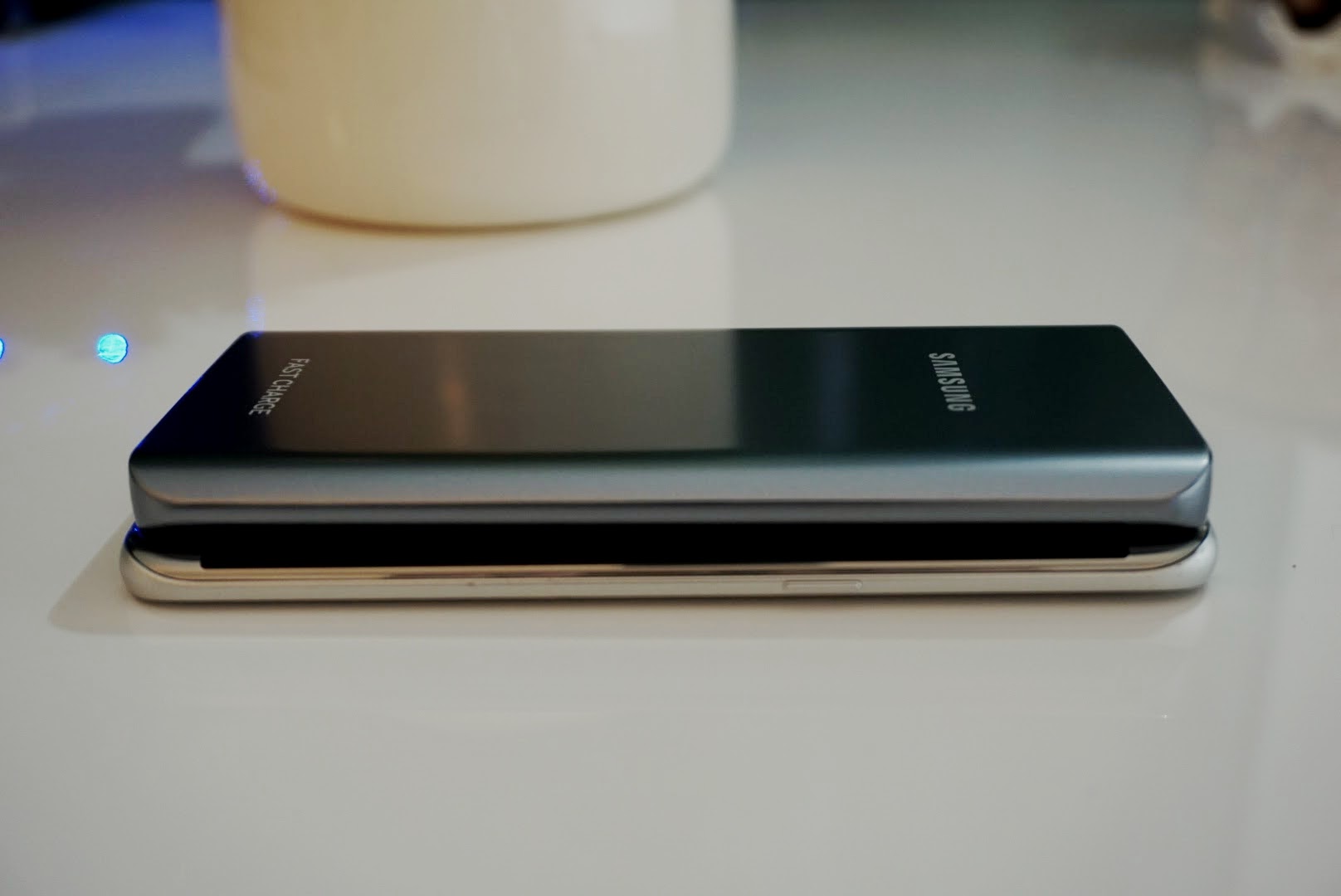
At 5200mAh, the battery is about the same physical size as the Galaxy S7 edge. It does pack enough power to give the Galaxy S7 edge (3600mAh) about one and a half charges. That is enough to get a typical user over two full days of usage away from a wall socket. The battery pack features one full size USB port which offers Fast Charging and gets my S7 edge from 0-50% in about 30 minutes. In my testing, I actually saw it go from 0-50% in 27 minutes and 32 minutes on consecutive attempts. It charged my S7 edge to full power in just over an hour of being connected.
What is extremely nice about this Samsung portable battery is its size. At just 68 grams in weight, it is significantly lighter than the S7 edge which weighs in at 157g. It is almost identical in dimensions to the S7 edge, and can easily fit in my front pocket with my smartphone. Although I prefer to keep it in my back pocket to prevent scratching my battery pack and phone. There are other batteries I have tested that offer four to five times the capacity, but they’re overkill for day to day usage. The weight of those batteries is simply too much to carry with me on a daily basis.
Summary
The Samsung portable battery offers enough juice to get me through a night or two, and doesn’t need to be carried in a backpack to be useful. The MSRP is pricey at $69.99, but is now on sale at sites like Amazon for less than $30. For the incredible design, light-weight, fast charge capability, and perfect size, it is a bargain at this price.
If you’re at all conscious of how your phone looks and want accessories to match, I suggest you pick up the Samsung 5200mAh battery and look no further. At $30 it is reasonably priced and is an accessory you should keep around for all of your USB powered devices.
Get the Samsung 5200mAh battery on sale now at Amazon.com.
 AIVAnet