


Talkshow is a messaging app that wants you to text in public
There’s a new messaging app in town and it’s called Talkshow. But unlike most other messaging apps, the conversations you have on it aren’t private. Co-founded by former Twitter exec Michael Sippey, Talkshow’s big idea is that your banter is public for all the world to see. Calling Talkshow a “messaging” app is therefore a bit of a misnomer. It’s really more like a public-facing chatroom, or a liveblog but for everyday people (which, yes, sounds a lot like Twitter). As Sippey said in an introductory blog post, it’s essentially you and your friends texting in public.
But let’s back up a little here and explain how it all works. When you first launch the app, it’ll ask you to create an account using your phone number. It then sends you a confirmation code to authorize you. Then you’re asked to add your friends, which can be found through your Facebook or Twitter login, address book or through a manual search. You can also send people an invite if they haven’t signed up for Talkshow yet.
From there, you can dive into any number of Featured Shows (hand-picked conversations from the Talkshow staff), choose one that’s currently live (that would be on the What’s On tab) or just create one yourself. To do that, you select the little “new show” icon in the corner, invite your co-hosts, give your show a title and you’re ready to start chatting. You can enter in text, images or GIFs. As with Slack, you can also edit and delete a message in case you regret something you said. Co-hosts and viewers can also “heart” individual messages if they especially like them.
You don’t have to invite a co-host to have a show either. You can just do a monologue if that’s more your jam. You’re also encouraged to share your show on Twitter or elsewhere to get folks to start watching, but it’s not necessary. All Talkshow message threads have a permalink on the web, so even those without the app can view it. You can find out how many people have viewed the show in the Info tab.

You can see hints of Twitter in Talkshow. Peeking in on a Talkshow conversation is a lot like following along a Twitter thread, except it isn’t interspersed with other random comments. That’s because the only people allowed in a Talkshow chat are the host (you) and your co-hosts (the people you’ve invited to the conversation). The public can still read along of course, but they can only offer a variety of different canned responses (These include “lol,” “This is good,” “Wait, what?” and a slew of different emojis). If they do want to join in, they can choose “Can I co-host?” as one of the reactions and you can then opt to include them or not. You can always boot them from the chat if you’ve had enough of their input. “It’s the ‘Thanks for calling!’ feature,” said Sippey.
That said, the real inspiration behind Talkshow wasn’t Twitter at all. According to Sippey, he was motivated to do Talkshow partly because of a funny messaging exchange between Taylor Swift and Ed Sheeran. Swift had posted a snippet of it to her Instagram, and that tiny bit of chatter got a lot of love from her fans. “Their conversation is relatable,” he said. “Why? Because everybody texts! And everybody texts about everything: sports, TV, politics, Beyonce’s Lemonade, Damn Daniel, or what they’re eating for dinner. I wanted to create Talkshow to give people a platform to share these conversations in front of an audience.”
If this is still all a little confusing, I did a Talkshow with Sippey himself in a little impromptu interview (Yes I realize having a Talkshow about Talkshow with the co-creator of Talkshow is incredibly meta).:
I asked him who he sees using this app. After all, who would want to have their conversations broadcast publicly? “We are already seeing sports fans, music fans, TV fans [on the service],” he said. “People that are into talking about what they’re passionate about.” He also said that Talkshow could be a great outlet for comedy or TV show casts to talk each other or connect with fans. Basically, it’s like podcasting, but in text form.
Some of the more interesting shows so far include ones about the US presidential elections, the NBA playoffs, or just really weird humorous ones that are about nothing in particular. Sippey pointed out a show that was just a mock conference called “Is This Thing On?” He also mentioned a solo show entitled “The Cute Puppies Only Show” that’s just, well, photos of cute puppies (I am behind this idea wholeheartedly).
Viewing these shows feels like eavesdropping on a really great conversation at a bar. It does feel a little voyeuristic at first, but you soon get swept up by them. One of my favorites so far is about exercise efforts, and it’s hosted by Sippey and his friends. I’m on a bit of a fitness kick myself so it was interesting to hear about how others were trying to get fit. If you’ve ever gotten sucked into reading an interesting thread on an online forum then you know what this is like.
Still, that could also be a criticism of Talkshow. You can already have these conversations in Slack, in messaging apps, in online forums and on Twitter. What makes Talkshow so different? “There’s room for a lot of different ways for people to communicate with each other and express themselves,” said Sippey, explaining that he sees Talkshow as co-existing with all of these other services, not replacing them.

Personally, I think Talkshow sells itself for a few reasons. Unlike Twitter, you can browse through different topics and pick one that interests you. Also, the fact that the public can’t randomly chime in on conversations means that the possibility of harassment is close to nil. You’re free to go on a big, uninterrupted “tweetstorm,” if you will. I do wish you could have some kind of VIP list of people who are always allowed to comment, but you can at least give people permission on a case-by-case basis.
Talkshow is only available on iOS at the moment, with no word on if or when it might reach Android. I also asked if there would eventually be a desktop version, because I found it a little difficult to write paragraph-long responses on my dinky iPhone keyboard. “We love mobile and tablets, and so we’ll have to see,” said Sippey. “But a full desktop client, we’ll see how things go!” As for future features, all he would say is that they have great things planned.
I’m generally very skeptical of new social apps, because they tend to feed into an echo chamber of tight knit early adopter communities. I’m also afraid that someone outside the Silicon Valley bubble would find Talkshow full of just cliquey people talking to themselves. That said, I’m giving Talkshow the benefit of the doubt. Because, so far anyway, I’m finding most of the shows oddly compelling. Maybe it’s because group conversations are by default more interesting than just one person on a rant, but instead of feeling like an outsider, I just feel like part of an audience, enjoying the show. And that’s really just fine with me.
Twitter for iPhone is now classified as a news app
A day after Twitter posted yet another quarter of mediocre growth, the company is making a small but notable change in how it positions its app on the iTunes Store. Starting today, Twitter is categorized under the “news” section of the App Store rather than “social networking.” It’s a change that makes a lot of sense and fits with both how Twitter has positioned itself as well as how it’s being used.
Watching news and events unfold in real time is arguably the platform’s best feature — it’s less about keeping in touch with friends and more about following people who share things you find interesting and relevant, whether you know them or not. Twitter Moments was probably the biggest new feature the service launched in the last year, and it again shows its focus squarely on curating the best commentary surrounding current events.
Whether or not this change helps the app gain more visibility remains to be seen, but at the very least it’s now the number one free app in the news category of the App Store. Previously, it had to fight off massive apps like Facebook, Whatsapp, Facebook Messenger, Skype and a number of others for visibility on that list.
Via: TechCrunch
Apple Promotes New Apple Music API Introduced in iOS 9.3
With the launch of iOS 9.3, Apple introduced a new Apple Music API, which is today being promoted through Apple’s Affiliate Program Newsletter. The Apple Music API gives developers the resources to expand Apple Music functionality in their apps, through the following features:
– Developers can see if a user is currently a member
– Developers can see which country the users account is based
– Developers can queue up the next song or songs based on a song ID for playback
– Developers can inspect playlists already in My Music or create a new playlists with a title and description (see App Store Review Guidelines for limitation)
The iOS 9.3 Apple Music API has already been built into several music-related apps, such as Shazam. The API is what enables Shazam and other music apps to do things like add songs to Apple Music playlists from directly within the Shazam app.
As noted by MacStories, Apple has also launched a new Apple Music Best Practices webpage for app developers and expanded App Store Review Guidelines for Apple Music. According to Apple’s guidelines, apps using the Apple Music API are subject to the following restrictions:
– Apps using the Apple Music API that trigger playback without explicit user action will be rejected
– Apps using the Apple Music API must expose and respect standard media controls such as “play,” pause,” and “skip”
– Apps using the Apple Music API may not require payment or otherwise monetize access to the Apple Music service (e.g. in-app purchase, advertising, requesting user info)
Apple’s developer page on Apple Music also includes technical documentation on using the new Apple Music APIs, a link to the Apple Music Toolbox for finding embeddable widgets, and guidelines on how to refer to Apple Music and portray the Apple Music service within apps.
Tag: Apple Music
Discuss this article in our forums
Investor Carl Icahn Dumps Apple Shares Over China Concerns
Billionaire Carl Icahn, who has been buying large amounts of Apple stock over the past three years, today told CBNC that he sold his stake in the company.
“We no longer have a position in Apple,” Icahn told CNBC’s “Power Lunch” on Thursday, noting Apple is a “great company” and CEO Tim Cook is “doing a great job.”
Icahn, who sold his shares earlier this year, said that he did so based on worries over China’s attitude towards Apple. Earlier this month, the Chinese State Administration of Press, Publication, Radio, Film and Television forced Apple to take down the iTunes Movies and iBooks stores, and Chinese officials believe that Apple is “too deeply established” in core industries in the country.
Apple sales also fell 26 percent in greater China in the second quarter of 2016.
“You worry a little bit — and maybe more than a little — about China’s attitude,” Icahn said, later adding that China’s government could “come in and make it very difficult for Apple to sell there… you can do pretty much what you want there.”
He added, though, that if China “was basically steadied,” he would buy back into Apple.
Prior to exiting his position, Icahn held 0.8 percent of outstanding shares. He told CNBC that he made approximately $2 billion on Apple and that he continues to view the stock as “cheap.”
Apple shares have been on the decline since Tuesday’s earnings call, where the company announced its first ever drop in iPhone sales and its first year-over-year revenue drop in 13 years. Apple stock is down approximately 2 percent today.
Tag: Carl Icahn
Discuss this article in our forums
iMovie for Mac Updated With Fast Project Creation, Other New Features
Apple today updated its iMovie app designed for the Mac, adding several new features and design tweaks aimed at speeding up the video editing process.
Fast project creation allows editing to begin with a single click, while an easier to find “New Project” button has been added to the Projects browser. Larger product thumbnails, designed to bring the look of iMovie for Mac in line with the iOS version, have been added.
Clicking a video clip will now select the entire clip instead of a range, and there’s a keyboard shortcut that enables selecting a range within a clip. There’s also support for App Preview resolutions for the iPad Pro and the Apple TV, along with performance improvements. A full list of the changes is below:
– Easy to find New Project button in the Projects browser
– Larger project thumbnails that match the look of iMovie for iOS
– Fast project creation lets you begin editing with a single click
– Clicking a video clip selects the entire clip, instead of a range
– Keyboard shortcut to select range within a clip in the browser and timeline (hold down R key while dragging)
– Support for App Preview resolutions for iPad Pro (1600 x 1200) and Apple TV (1920 x 1080)
– Improves stability
iMovie can be downloaded from the App Store for $14.99. [Direct Link]
Tag: iMovie
Discuss this article in our forums
Sunshine Weather Forecast faces an uphill battle (Review)

Overview
Sunshine is a weather app offering you the latest weather forecast for up to seven days as well as several graphs to help you plan your day.
Developer: SofTechnology
Price: Free (In-app purchases for extra features)
Review
 Main Screen
Sunshine is a beautiful weather app that has a wonderful material design that kind of gives me a Yahoo feel. That’s probably mostly to do with the purple, but it still is nice to look at.
It is powered by Forecast, which is just as good as any other weather provider. It automatically locks in on your location and, with a $1.99 upgrade price, you can add more locations.
You get a lot of the bells and whistles you would expect from a weather app such as wind speed, humidity, visibility and more. It also comes with notifications for rain, snow, sleet and fog.
That upgrade price also includes some very well-designed widgets which I feel covers most designs that you would want, although a clock added to it would be nice. There is a sharing template feature, so you can share different templates on social media; even though I haven’t used it, the more options, the better. They plan on adding Android Wear support, which I feel is a must, as well as more customization options.
Conclusion
This app is in a saturated market and really needs to add some unique features to stand out from the rest, but they are at a good starting point. Overall, it’s a solid app that I’m not sure will replace my current weather app just yet, but we will see where the developer takes it in the future.
Download and install Sunshine from the Google Play Store.
1 of 13


Not even Kate Upton’s ‘talent’ can keep Game of War from being a hot mess! [Review]

Given its popularity and advertising in recent months, I wound up being assigned to review Game of War, by developer Machine Zone, Inc. I had downloaded it in the past and tried it out. It wasn’t my cup of tea, so I uninstalled it and moved on. This time, I decided I would give it an honest try; I think you already know how that turned out.
With a 2014 advertising budget of $40 million, boasting things like 30-second television commercials, Kate Upton, and even procuring a commercial slot during Super Bowl 49, you would think that the game would be able to live up to the hype. Sadly, no such luck.
General Details
War! That is what “Game of War” is all about right? WRONG. I have played this game for a solid week and have not “gone to war” in any capacity. Sure, you can “attack” other towns and monsters but there is no battle mechanic. Who wants to play a game about fighting, and not fight?


Instead of action, we play a game about building our town into the most powerful city possible with tons of guards, resource gathering, and defensive structures. Ok, I can manage that. So this is a mobile civilization builder. Wait, what do you mean I can’t expand? So I can only build in this one place? What is the point?
Mechanics
The game controls are sub-par. For a build-and-wait game, I seem to spend an awful lot of time clicking different buildings and navigating LOTS of menus. This needs to be streamlined in order to make efficient use of the players times. When it comes to freemium games, I’m not going to pay any money to continue playing if the free play I get is cumbersome and time-consuming.


Graphics
Sadly, the graphics we see in this game are nothing like the video clips or commercials we see about it. The graphics engine looks like it was developed 8 years ago and they decided to never upgrade. The most complex graphic is the animation of characters within the buildings, very reminiscent of the game Pharo (released on PC in 2000). Other animations are both very rare and poor.

hero as advertised

hero in game
Other Details
As with all the other “free to download” games, Game of War constantly has its hand out for IAP’s, probably to feed that massive AD campaign. I have not spent a penny on this game yet, however, I have noticed there are lots of opportunities to purchase items for your hero, speed up bonuses, and purchase more dark energy (attack stamina).
Conclusion
With all of the money that is put into advertising this game, I would have hoped they had put some of that into hiring more developers and improving the actual gameplay. Save yourself the time and frustration and take a pass on Game of War, no matter how hot that model they hire is.
How to enable VoLTE on the Galaxy S7
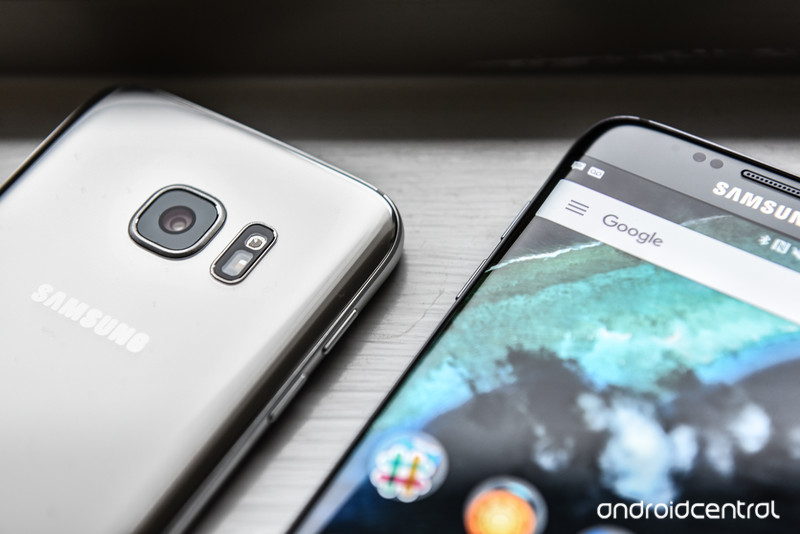
VoLTE is one of the best ways to make your phone calls sound better.
Increasingly, carriers are rolling out Voice over LTE support on their devices, but the new telephony standard, which increases sound quality by using LTE instead of 3G to connect cellular calls, is still quite uncommon.
If your carrier supports VoLTE, here’s how to enable it on the Galaxy S7 or Galaxy S7 edge.
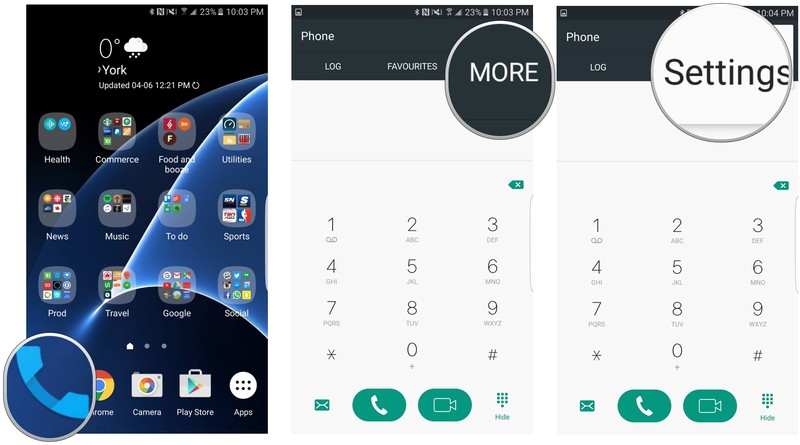
From your home screen, press the Phone icon.
Tap More on the top right corner.
Scroll down and tap on Settings.
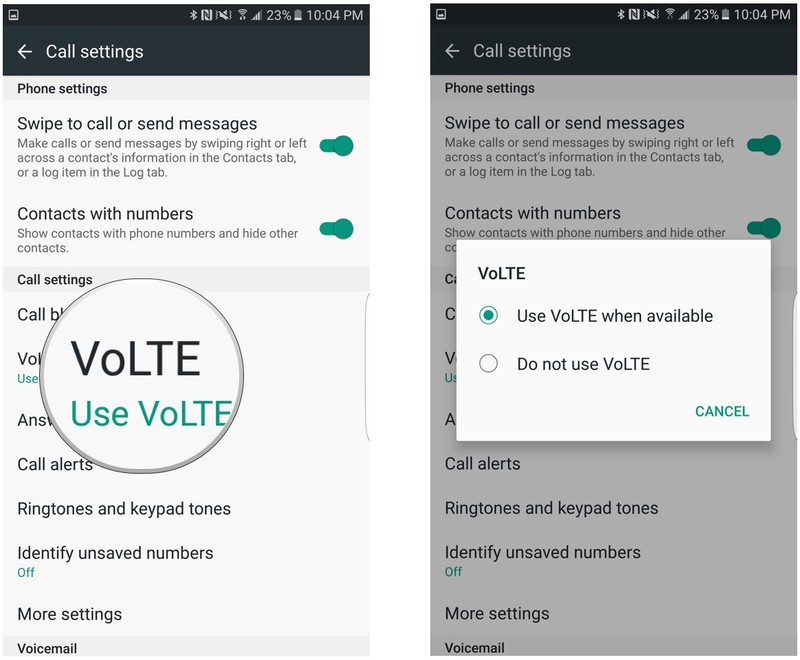
By default, VoLTE should be enabled if your Galaxy S7 or Galaxy S7 edge was first used with a carrier SIM that supports it. If your phone was unlocked and subsequently transferred to a carrier SIM that supports VoLTE, you may have to enable it manually.
Tap on VoLTE.
Make sure that Use VoLTE when available is checked.
Note: Some versions of the Galaxy S7 may show this setting in a different spot. This explanation was performed on a Canadian Galaxy S7 running on Rogers. For a more U.S.-centric version, check out How to enable Advanced Calling features on the Galaxy S7.
Samsung Galaxy S7 and S7 edge
- Galaxy S7 review
- Galaxy S7 edge review
- Here are all four Galaxy S7 colors
- Should you upgrade to the Galaxy S7?
- Learn about the Galaxy S7’s SD card slot
- Join our Galaxy S7 forums
AT&T
Sprint
T-Mobile
Verizon
Samsung’s developer pitch is all about Tizen, but that shouldn’t worry Android fans

New year, same story from Samsung when targeting the developer community.
Anyone following along with Samsung’s Developer Conference (or any trade show where Samsung is represented, actually) is seeing a lot of the word “Tizen” mentioned — TVs, cars, appliances and the whole Internet of Things are running on it. As faithful Android observers, we sometimes have a visceral negative reaction to the word, as if Samsung saying “Tizen” automatically means that Android is no longer in the picture.
But despite Tizen’s prominence as Samsung’s operating system of choice for all sorts of devices across its company, Android is still in the picture in a very big way.
Android isn’t going anywhere

Look, Samsung is a big company. No, scratch that — a huge multinational conglomerate company. Samsung has more engineers in its R&D department working on washing machines than other mobile companies have on their whole worldwide staff; and with that scale comes plenty of possibility for diversification. Every time you hear a mention of Samsung working on Tizen, remember that no single edict reaches throughout the whole company — there are plenty of people still around working very hard every single day on Android software and devices. Thousands, surely.
There’s no reason to jeopardize a $6 billion business by switching to a new OS.
Taking the stage today at the opening keynote of SDC 2016, Samsung Mobile’s head of R&D, Injong Rhee, very prominently explained Samsung’s commitment to Android. A big slide remained on-screen reminding developers that Android commands 80% of the smartphone market and there are millions of developers writing apps for the platform. And yes, Samsung is very much convinced that it is making the best smartphones around — and that’s not limited to just hardware, it’s all of the software it has spent millions of dollars creating.
Oh yeah, and Samsung’s mobile division — built almost entirely on Android — made almost $6 billion last quarter. It sold over 80 million smartphones in the first quarter of 2016 alone.
And despite increased competition from Chinese companies that are growing quickly with agile development strategies, Samsung isn’t backing down from the Android world. For years now Samsung has offered the top-selling Android phone model around the world, and is far and away the biggest single seller of Android phones. There’s no reason to throw that away by moving to a different operating system.
But Tizen is Samsung’s future beyond phones

But for as much as Samsung understands and leverages the power of Android, it knows that Android isn’t a one-size-fits-all solution for everything it wants to do. When it comes to launching and supporting an extremely diverse set of products — which includes TVs, refrigerators, street lamps and shipping containers, among other things — Android isn’t necessarily always the solution. For Samsung, having a light, simple and malleable operating system that can run on just about any type of hardware and power a vast ecosystem without the support or direction of any other company is extremely valuable.
Android isn’t a one-size-fits-all solution.
And as we’ve established, Samsung has the size and resources to build something itself when it sees a need. In this case, Tizen is the platform it has built up to work exactly the way it wants. When you’re a company the size of Samsung with ambitions to match, you build Tizen and bring everyone else to you as a platform — you don’t build your whole company on someone else’s platform.
Here’s the thing, though: just because Samsung is selling 20 million (and growing) TVs every year with Tizen as the operating system doesn’t mean that the Galaxy S8 (or S9, or whatever) isn’t going to be running Android. This is a big company, and one that can absolutely handle running multiple operating systems at once. To think otherwise is to dramatically underestimate the power of a company the size of Samsung, and misunderstand the importance of building on your strengths.
Angry Birds Action! pinball-style game ties into the upcoming movie

Rovio has released Angry Birds Action!, the latest entry in its long-running series. This game, which features pinball-style destruction gameplay, ties into the upcoming Angry Birds Movie.
Rovio says:
In the latest Angry Birds symphony of destruction, leader of the flock Red smashes and crashes through obstacles and bounces from wall to wall like a wrecking ball – all in the name, of course, of saving precious and fragile eggs. Along the way, players unlock additional content by going to see The Angry Birds Movie on opening weekend, and also play augmented-reality mini-games and earn new rewards by scanning special BirdCodes located out in the real world.
Those special codes, which unlock more content and power-ups in the game, can be found on Angry Birds Movie merchandise, such as McDonald’s Happy Meals, PEZ candy dispensers and many more, along with codes in the movie itself.
What’s more, by going to see the The Angry Birds Movie in the cinema during the opening weekend and sticking around for the credits, audience members with the game open on their device get treated to more Movie Magic – a whole new area of the game to explore and an additional movie clip that can’t be seen anywhere else but inside Angry Birds Action! Movie Magic works in the game by detecting an inaudible digital watermark that plays only behind the end credits.
You can download Angry Birds Action! now from the Google Play Store
 AIVAnet