


SpaceX completing a successful droneship landing is why 360-degree video exists

SpaceX is all like “Hey everyone, check this out!”
We’ve seen some cool things done with 360-degree video already. We’ve even captured a couple of things ourselves. Collectively, early adopters are learning what to do with these relatively new cameras, and that includes a look at when to put the tech away. It’s fascinating stuff, especially if you’re looking at things through Google Cardboard, but it’s not always clear what video you should choose to introduce new people to this technology.
And then the folks at SpaceX posted this to Facebook.
The only thing cooler than seeing a rocket that just delivered payload into space successfully land on a human-free droneship is watching it happen as though you were standing on the deck. The ability to see this in 360-degree video format makes it so much more compelling, and should absolutely be the kind of thing you show your friends when they don’t quite get why this is so cool.
Hulu is adapting Margaret Atwood’s ‘The Handmaid’s Tale’
Taking a cue from Netflix, Hulu isn’t slowing down with its original programming. Today, the streaming service announced that it’s ordered a full series adaptation of The Handmaid’s Tale, Margaret Atwood’s seminal sci-fi novel. It centers on a totalitarian society where the birth rate is falling, and fertile women are placed in sexual slavery as “handmaids” to help humanity repopulate. Elisabeth Moss (Mad Men, Top of the Lake) will star as Offred, a handmaid working in the home of a government official named The Commander. Her main goal? To find her daughter, all the while trying to deal with her low place in society.
With all the worries around the Zika virus today, and what that means for the future of human reproduction, The Handmaid’s Tale seems more fitting than ever. Atwood’s original novel won a slew of science fiction awards, and it remains one of the best explorations of female identity in fiction. The show will be led by Bruce Miller, who previously wrote for The 100 (another recent dystopian tale), Alphas and Eureka.
Source: Hulu
Scientists use ‘Moth Radio Hour’ to map meaning across the brain
Researchers at the University of California, Berkeley took on the complex task of mapping meaning along the cerebral cortex, the thin membrane that stretches across the entire brain, and their results suggest language is much more complex than previously thought. Seven volunteers listened to The Moth Radio Hour, a program where people share emotional personal tales, while lying in a functional MRI machine that tracked how their brains responded to 985 specific concepts, Science News says.
Researchers mapped the blood flow to 60,000 to 80,000 pea-sized regions across the cerebral cortex, resulting in a dense word map covering the entire brain. Turns out, some concepts showed up in several areas across the brain: “Top,” for example, appeared in a section that handles clothing and one that deals with numbers.
Scientists previously thought large chunks of the brain handled different concepts separately, but this research suggests that meaning is more spread out, with concepts linked and dissected across the cerebral cortex in interwoven waves.
“These data suggest we need to rethink how the brain organizes meaning,” Stanford University neuroscientist Russell Poldrack tells Science News.
This is just the beginning, though. All seven of the people tested were raised in Western societies and the sample size was too small to note any differences in gender. Next up, researchers want to repeat the study with 50 or 100 people from a range of backgrounds, Science News says. Check out their meaning map in a 3D, interactive model right here.
Source: Nature
Wireless carriers will adopt a new real-time text protocol by December 2017
The FCC is ready to adopt a proposal that’ll bring a new protocol to wireless networks to help people with disabilities communicate. It’s called real-time text (RTT) and will be a replacement for the aging teletypwriter (TTY) devices that let users transmit text conversations over traditional phone lines. The new RTT protocol will work over cellular networks and other “IP-based environments.” According to the FCC’s statment, RTT will “”allow Americans who are deaf, hard of hearing, speech disabled or deaf-blind to use the same wireless communications devices as their friends, relatives and colleagues, and more seamlessly integrate into tomorrow’s communications networks.”
The big differentiator for RTT over current, commonly-used text-based messaging systems is that RTT messages are sent immediately as they’re typed. The FCC said this allows for a more “conversational” exchange, and it also lets people get out partial messages in the case of an emergency. The RTT technology will let text users communicate with people on voice-based phones and vice versa; it can also work easily in your standard smartphone, eliminating the need for specialized equipment.
RTT represents a much-needed upgrade over TTY. As TTY was build to be used on standard landlines, its usage has decreased dramatically in recent years. The FCC also called it limited in speed (it only transmits at 60 words per minute), characters and capabilities. The proposal calls for RTT to roll out over wireless networks run by “larger carriers” by December of 2017.
Via: The Verge
Source: FCC
Delta is rolling out RFID luggage tags by the end of summer
In an honorable attempt to make air travel slightly less terrible, Delta announced a new program this week that will track of checked baggage via paper RFID tags.
The program will replace the familiar barcode stickers that currently get slapped on checked baggage, and RFID readers at various points along a bag’s journey will read the tag’s radio signals to insure each piece of luggage is on headed to the right place. Delta expects to equip 344 airports with RFID readers by the end of August and while a system like this has been in the works for years, Delta claims they are the first to implement it at such a large scale.
Delta also claims it already has a 95 percent accuracy rate when it comes to routing bags, but it hopes to hit the near-perfect 99.9 percent once the radio tags are implemented. Still, as the world’s second-largest airline with over 180 million customers per year, that means 18,000 unlucky people could potentially find themselves standing alone at one of Delta’s carousels, wondering where their luggage is.
Apple Debuts ‘Reimagined and Redesigned’ Support Site
Apple today updated its support site with a brand new look and new ways for users to interact with it. The new site is broken into several different blocks, with most of the attention going to three different ways users can get help.
The first block is dedicated to a search bar that provides Quick Links, which allow users to get the answers they’re looking for while they’re searching rather than having to wait for a results page. The second block allows users to find support by choosing the device they need help with and the third block features “Popular Topics,” like how to manage an Apple ID or photos.
The next set of blocks let users know they can seek help from other Apple users at the Apple Support Communities, check warranty and repair status and how to contact Apple Support. The final two blocks are dedicated to promoting Apple Workshops in retail stores and list out recall and replacement programs. The site’s new design is also compatible with mobile browsers.
Our reimagined & redesigned site is live. See it for yourself today. https://t.co/6By6G4zBum pic.twitter.com/V9iSUm2Cqx
— Apple Support (@AppleSupport) April 29, 2016
In recent months, Apple has worked to make it easier for its customers to seek help from the company about its products. Last month, Apple launched the Apple Support Twitter account, which quickly gained momentum after its genesis and was responding to nearly 100 tweets per hour.
Tag: Apple Support
Discuss this article in our forums
The One Smart Piano review – CNET
The Good The One Smart Piano is fun and kid-friendly, with a good mix of music-minded features in the app.
The Bad The number of song options in the app’s game mode is very limited, and you’ll need to pay extra to download full song tutorials. The core keyboard settings for things like pitch, tone, and instrument are comprehensive, but they’re buried too deep within the app, especially given that they don’t have a physical presence on the keyboard itself.
The Bottom Line There are better keyboards available for the money, but there’s a lot to like about those in-app smarts, too. At $300, the smaller version of this smart piano would make a good gift and a great outlet for a creative kid.

Chris Monroe/CNET
I played a lot of piano as a kid — first, by figuring out how to bang out crappy versions of movie scores and TV theme songs on my grandma’s Steinway, then, eventually, with actual piano lessons (my family could only tolerate my rendition of the theme from Indiana Jones so many times).
So, forgive me if the One Smart Piano gets me all nostalgic. It’s a $300 compact keyboard (or a $1,500 full-size electric piano) that leverages the power of your phone or tablet to give you a more feature-rich experience. Plug your device in and open the companion app, and you’ll be able to follow along with video lessons, song tutorials, and Rock Band-esque games on its screen, with LED lights in the piano’s keys lighting up to guide you along the way.
If you’re just looking for a keyboard that best approximates the feel of a genuine piano, you can find better than the One at both the $300 and $1,500 price points (roughly £205/£1,025 or AU$390/AU$1,965). Still, there’s an awful lot to like about those app-enabled smarts — especially if you’ve got kids with a budding eye or ear for music. I know 7-year-old Ry would have had a field day with the thing (and my family would have definitely appreciated the headphone jack).
Playing around with the One Smart Piano (pictures)
See full gallery


1 – 5 of 17
Next
Prev
A close look at an app-connected keyboard
The One Smart Piano is all about the app. Take that app away, and you’re left with a very, very basic keyboard that offers just a volume knob and three buttons: a power switch, a button to tap through different instrument tones, and a sustain setting.
This is at least partly by design. The One’s website touts the clean, minimalist look of the thing, with the usual controls stripped out and relocated into the app.

The keyboard settings are comprehensive, but a little hard to find.
Screenshot by Ry Crist/CNET
The problem with this approach is that those in-app controls aren’t that easy to find. They aren’t anywhere on the app’s home screen — it takes a couple of not-terribly-intuitive taps before you’ll find them tucked away in a settings menu.
Outside of those core keyboard features, the One Smart Piano focuses on teaching you how to play it. For example, you can pull up interactive sheet music that highlights the notes on the screen (and with those LEDs in the keys) as you play. You can also watch one of 105 video lessons with a virtual instructor — again, the keys will light up as he coaches you on what to play and how to play it.
There are also song tutorial videos geared towards people who prefer to play by ear. The app has a wide collection of popular songs from everyone from Ben Folds to Beyonce to the Beatles, with videos that show you exactly how to play each section of a song (and yep, the piano’s keys light up to make it even easier to follow along).
5 ways to seriously cut back on iPhone data usage – CNET
Stopping five data-hungry apps from killing your data plan isn’t the only way for iPhone owners to reduce their data usage. There are five phone-wide settings that can help keep you under your monthly data allotment.
1. Disable cellular app updates.
If your apps update automatically, make sure they do so only when you are on WiFi. Go to Settings > iTunes & App Stores and turn off Use Cellular Data.
2. Disable background app refresh.
iOS apps can update in the background, grabbing new content as they sit idle so they can show you the latest news when you return to them. Go to Settings > General > Background App Refresh and you can turn this setting off completely or go the a la carte route from the list below and choose which apps update in the background.

Screenshot by Matt Elliott/CNET
3. Disable Wi-Fi Assist.
Wi-Fi Assist is a great feature where your iPhone hands off a weak Wi-Fi signal to your cellular network to prevent pages from loading slowly or not at all as it clings to the last remnants of a Wi-Fi signal. If you sit on the edge of a Wi-Fi network at work, say, then your cellular network may be assisting more than you’d like and running up data charges.

Screenshot by Matt Elliott/CNET
To disable Wi-Fi Assist, go to Settings > Cellular and scroll all the way to the bottom to turn off Wi-Fi Assist.
4. Disable iCloud Drive on cellular.
If you use iCloud Drive to shuttle documents in and out of the cloud, those data transfers can add to your bill if they are done over a cellular connection. You can restrict iCloud Drive to Wi-Fi only by going to Settings > iCloud > iCloud Drive and scrolling to the bottom and turning off Use Cellular Data.

Screenshot by Matt Elliott/CNET
5. Download music, don’t stream.
Streaming music or podcasts for long stretches when you are away from Wi-Fi can quickly add to your data usage. Most music and podcast apps (like Spotify and Apple Music) let you restrict streaming to Wi-Fi only, which will then force you into the habit of downloading playlists or podcasts before playing them instead of the easy route of simply streaming them. Let’s look at Apple Music and Apple’s Podcasts apps as examples.

Screenshot by Matt Elliott/CNET
For Apple Music, go to Settings > Music. In the Streaming & Downloads section, you’ll see two settings if the first is enabled. The first, Use Cellular Data, lets you disable streaming via a cellular connection entirely. If that’s too drastic a measure for you, then you can leave that setting enabled and turn off High Quality on Cellular to stream songs at a lower bitrate when you aren’t on Wi-Fi.
For the Podcasts app, go to Settings > Podcasts and turn off Cellular Data. You can also enable Only Download on Wi-Fi to prevent podcast downloads from adding to your data usage.
For more, see three surprising ways to lower your data usage.
Best clear cases for the Galaxy S7

Protect your phone without cramping your style!
Wanting to protect your phone from scratches, nicks, and dents without having to dress your phone in medieval battle armor is a reasonable request. After all, you did spend a hefty chunk of change on your phone and you would like to appreciate the craftsmanship that went into its design. There are plenty of good clear cases out there for the Galaxy S7, which will allow you to keep it protected and looking all natural – if you know what we mean.
Pleson Ultra-Thin Crystal Clear Case

This case from Pleson is a single clear shell and one of the thinner clear cases available for the Galaxy S7. Made from a semi-soft plastic, this case is easy to put on and take off the phone at will, all while still feeling like it’s protected.
The charging port, headphone jack, and buttons along the side of the phone are all left open with a little extra room, so you don’t have to worry about not being able to access your phone’s primary functions.
A neat feature of this offer from Pleson is the textured inside of the case. It has tiny bumps that sit along the back of your phone to prevent air bubbles from getting trapped between your phone and your case, allowing the natural beauty of the Galaxy S7 to shine through, unimpeded.
There is a white Pleson logo on the back of the case in the bottom right corner that will contrast pretty heavily with phone, so if you were hoping for a 100% clear case, this may not be the option for you.
See at Amazon
Spigen Neo Hybrid Crystal

This Spigen case consists of two pieces: it has a clear, flexible body with a reinforced harder plastic edging. Sometimes those hard plastic outer edges on cases don’t fit the softer silicone properly, but in this… case… it fits quite well.
With the case on the phone it feels solid in your hand and far less slippery than the bare S7. Neither the rim nor the edging prevents the phone from functioning exactly as it should, nor do they prevent access to any of the ports.
One thing that should be mentioned about this case is the potential for the outer edging for loosen over time. Repeatedly taking the case on and off could result in that hard plastic to bend a little, which could cause the outer edge to feel a little less snug.
See at Amazon
TOZO Simple Series UltraThin Soft Crystal Clear

This is the thinnest case in our round-up. Clocking in at a thickness of about 0.6 mm, it’s about as bare as you can get with a case on your Galaxy S7.
The TPU (thermoplastic polyurethane) case is very soft and flexible and fits on the S7 like a glove. It almost fits so well you forget it’s there. Even though the case only sticks out above the screen just a little bit, it’s still protects the screen from getting scratches when face down on a table. And, same goes for the camera on the back of the phone, so your mind can rest easy when your phone is sitting on your coffee table.
This case is 100 percent clear with no logos or graphics to get in the way of the beautiful natural look of the Galaxy S7.
Because this case is so darn flexible it can, at times, feel loose around the edges, so if that makes you nervous, this may not be the right clear case for you.
See at Amazon
OBLIQ Premium Naked Shield Series with Metal Kickstand

OBLIQ’s case is practically the definition of style meeting functionality.
All of the great features of a clear case are offered in this one. It’s a crystal clear see-through, one-piece shell that fits snugly on your phone without impeding any of the phone’s functionality. Even with the edges of this case being a bit thicker than the rest of it, which offers more protection, it’s still easy to put on and access all of the buttons and ports that the Galaxy S7 has around its body.
Of course, the one part of this case that you can’t see through is the metal kickstand. However, that’s not a negative with this case at all. It adds a cool added flair of looking different than your average clear case while being an awesome feature that you can totally use to your advantage. Watching videos on landscape mode with the ability to still use both your hands is nothing short of a miracle.
One minor thing to note, with a thickness of 1.5 mm it is one of the thickest cases in our round-up and does make the phone seem a little heavier and bulkier in your hand.
See at Amazon
SUPCASE Unicorn Beetle Hybrid
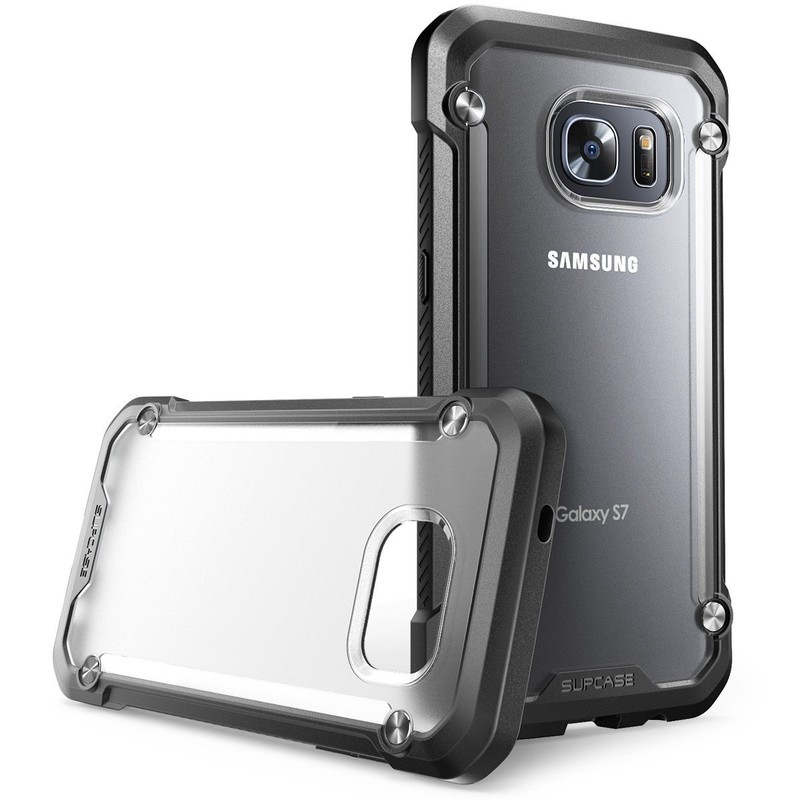
The Supcase Unicorn Beetle hybrid is the perfect case for someone who wants a clear case that is still rugged at the same time.
The most obvious thing to mention about this case is it’s not quite clear, but more translucent type, plus, the outer edge is black. If you really want to show off your Galaxy S7 you may want to look elsewhere in our round-up. However, if you want strong protection and still be able to see your phone then this could be the best option for you.
It has shock-absorbent TPU bumpers around the edges and a hard polycarbonate back panel that is actually rather slim for a rugged-style case. The raised lip around the edges also gives the added bonus of protecting the screen and camera while lying down on a flat surface.
All in all, this case single-handedly breaks the perception that all clear cases are flimsy and weak-feeling.
See at Amazon
EasyACC

EasyAcc’s clear case is as simple as we can get while still talking about a case that offers good protection. Much like the TOZO case, this is an extremely flexible TPU case that feels super grippy. If you like that rubbery grip feel, this would be the perfect case for you.
This case is totally seamless and is tear-resistant, so being too flexible shouldn’t be a concern. The edges of EasyAcc’s case are raised a little bit, so if you drop your phone on a flat surface everything should be just fine.
If you’re looking for something incredibly simple with great grip, this case is the one for you. Just beware of stretching, since it is so flexible. The TPU could also yellow over time as well since it is so light-absorbent.
See at Amazon
Samsung Galaxy S7 and S7 edge
- Galaxy S7 review
- Galaxy S7 edge review
- Here are all four Galaxy S7 colors
- Should you upgrade to the Galaxy S7?
- Learn about the Galaxy S7’s SD card slot
- Join our Galaxy S7 forums
AT&T
Sprint
T-Mobile
Verizon
Five must-have games for your HTC Vive

Consider this your HTC Vive starter pack.
Playing a game in desktop-class virtual reality is unique. There’s an emotional component that’s tough to describe no matter how talented you are with words. The way your whole body moves to dodge the projectile headed your way, or that feeling when adrenaline kicks in and the music in the background becomes the choreographer for everything you’re doing in the game. It’s intense and fantastic, but the right game can take this experience to an entirely new level.
Here are five games you must have for the HTC Vive, no matter what kind of gamer you are.
Final Approach
This is a fresh take on a game type that got insanely popular in the early days of mobile gaming. You exist as a sort of God Mode character, guiding pilots and people to safety in an array of increasingly complicated situations. Direct your planes to the safest landing point, but be sure to avoid combat pilots, alien spaceships, and weather patterns that could damage things.
It’s a casual game with a familiar concept, but the ability to move around and see everything from different perspectives makes navigating everything so much more interesting.
Buy: Final Approach ($24.99)
Holopoint
You’re going to see a lot of shooting games for the HTC Vive, and for a good reason. Being able top lift your arm in the real world and have your weapon match movement in the virtual world is a lot of fun, and being forced to physically dodge projectiles as they head your way is even better. The best of these experiences for the moment is not one with a firearm or a laser pistol, though. It’s with a bow and arrow.
Whether you’re interested in being Katniss Everdeen or there’s a Legolas costume in your closet — we’re not judging — this game is going to leave your arms sore, your brow wet, and your desire to head to a real archery range at 100 percent.
Buy: Holopoint ($7.99)
Job Simulator
No attempt to explain this game to someone who has never been inside the HTC Vive before will ever sound fun. But you’d be hard pressed to find someone who has actually played Job Simulator and isn’t completely hooked. As one of the few humans left in the world, your robot overlords are trying to find pedestrian jobs for you to do. You can choose between cooking in a kitchen, fixing cars in repair bay, running a convenience shop, and more. Each job is incredibly basic, but contained within each job is the potential to cause a fair amount of chaos.
You want to hurl a bottle of Sriracha at your robot supervisor? Go for it. You want to see if you can get the perfect paper airplane to sail across a cubicle farm? All yours. You want to fix a bunch of robot cars for an hour? Sounds kinda boring — but you can do that too!
Buy: Job Simulator ($29.99)
Audioshield
What if your favorite song was broken down into a series of brightly colored orbs, and you had to punch them out of the way with a pair of color-matched shields in order to keep listening? Audioshield exists to keep you active and listening to just about every popular song you can think of. Search for a favorite — including stuff you have store locally — and punch your way to the end of the song.
A public rating system that combines activity level, punch intensity, and accuracy gives you reason enough to keep going at your favorite song, but it’s also an incredible way to take advantage of the HTC Vive controllers.
Buy: Audioshield ($19.99)
Unseen Diplomacy
This game is the truest test of room-scale VR that exists today. Unseen Diplomacy requires you crawl around in ducts, sneak through rooms, and complete a series of spy-like tasks as you wander around in your actual room in real life. The game maps your physical space and arranges the digital world around your space, so it feels like you’re crossing a lot more space than you actually are.
It’s brilliant, if a bit short, and a perfect example of what is to come when you can move around.
Buy: Unseen Diplomacy ($2.99)
Bonus! The Brookhaven Experiment

This isn’t a finished game just yet, but the demo available in the Steam Store is all kinds of terrifying. Zombies come at your from every direction, and both the battery in your flashlight and the ammo in your gun are finite resources. If something gets close enough to bite, you can move out of the way and even pistol whip them to gain that extra second of survival.
The demo is only a couple of waves long, and the actual game promises to be more than just a standing shooter, so this is one we’re going to be keeping an eye on.
Download: The Brookhaven Experiment Demo (Free)
 AIVAnet