


iMovie for Mac Updated With Fast Project Creation, Other New Features
Apple today updated its iMovie app designed for the Mac, adding several new features and design tweaks aimed at speeding up the video editing process.
Fast project creation allows editing to begin with a single click, while an easier to find “New Project” button has been added to the Projects browser. Larger product thumbnails, designed to bring the look of iMovie for Mac in line with the iOS version, have been added.
Clicking a video clip will now select the entire clip instead of a range, and there’s a keyboard shortcut that enables selecting a range within a clip. There’s also support for App Preview resolutions for the iPad Pro and the Apple TV, along with performance improvements. A full list of the changes is below:
– Easy to find New Project button in the Projects browser
– Larger project thumbnails that match the look of iMovie for iOS
– Fast project creation lets you begin editing with a single click
– Clicking a video clip selects the entire clip, instead of a range
– Keyboard shortcut to select range within a clip in the browser and timeline (hold down R key while dragging)
– Support for App Preview resolutions for iPad Pro (1600 x 1200) and Apple TV (1920 x 1080)
– Improves stability
iMovie can be downloaded from the App Store for $14.99. [Direct Link]
Tag: iMovie
Discuss this article in our forums
Sunshine Weather Forecast faces an uphill battle (Review)

Overview
Sunshine is a weather app offering you the latest weather forecast for up to seven days as well as several graphs to help you plan your day.
Developer: SofTechnology
Price: Free (In-app purchases for extra features)
Review
 Main Screen
Sunshine is a beautiful weather app that has a wonderful material design that kind of gives me a Yahoo feel. That’s probably mostly to do with the purple, but it still is nice to look at.
It is powered by Forecast, which is just as good as any other weather provider. It automatically locks in on your location and, with a $1.99 upgrade price, you can add more locations.
You get a lot of the bells and whistles you would expect from a weather app such as wind speed, humidity, visibility and more. It also comes with notifications for rain, snow, sleet and fog.
That upgrade price also includes some very well-designed widgets which I feel covers most designs that you would want, although a clock added to it would be nice. There is a sharing template feature, so you can share different templates on social media; even though I haven’t used it, the more options, the better. They plan on adding Android Wear support, which I feel is a must, as well as more customization options.
Conclusion
This app is in a saturated market and really needs to add some unique features to stand out from the rest, but they are at a good starting point. Overall, it’s a solid app that I’m not sure will replace my current weather app just yet, but we will see where the developer takes it in the future.
Download and install Sunshine from the Google Play Store.
1 of 13


Not even Kate Upton’s ‘talent’ can keep Game of War from being a hot mess! [Review]

Given its popularity and advertising in recent months, I wound up being assigned to review Game of War, by developer Machine Zone, Inc. I had downloaded it in the past and tried it out. It wasn’t my cup of tea, so I uninstalled it and moved on. This time, I decided I would give it an honest try; I think you already know how that turned out.
With a 2014 advertising budget of $40 million, boasting things like 30-second television commercials, Kate Upton, and even procuring a commercial slot during Super Bowl 49, you would think that the game would be able to live up to the hype. Sadly, no such luck.
General Details
War! That is what “Game of War” is all about right? WRONG. I have played this game for a solid week and have not “gone to war” in any capacity. Sure, you can “attack” other towns and monsters but there is no battle mechanic. Who wants to play a game about fighting, and not fight?


Instead of action, we play a game about building our town into the most powerful city possible with tons of guards, resource gathering, and defensive structures. Ok, I can manage that. So this is a mobile civilization builder. Wait, what do you mean I can’t expand? So I can only build in this one place? What is the point?
Mechanics
The game controls are sub-par. For a build-and-wait game, I seem to spend an awful lot of time clicking different buildings and navigating LOTS of menus. This needs to be streamlined in order to make efficient use of the players times. When it comes to freemium games, I’m not going to pay any money to continue playing if the free play I get is cumbersome and time-consuming.


Graphics
Sadly, the graphics we see in this game are nothing like the video clips or commercials we see about it. The graphics engine looks like it was developed 8 years ago and they decided to never upgrade. The most complex graphic is the animation of characters within the buildings, very reminiscent of the game Pharo (released on PC in 2000). Other animations are both very rare and poor.

hero as advertised

hero in game
Other Details
As with all the other “free to download” games, Game of War constantly has its hand out for IAP’s, probably to feed that massive AD campaign. I have not spent a penny on this game yet, however, I have noticed there are lots of opportunities to purchase items for your hero, speed up bonuses, and purchase more dark energy (attack stamina).
Conclusion
With all of the money that is put into advertising this game, I would have hoped they had put some of that into hiring more developers and improving the actual gameplay. Save yourself the time and frustration and take a pass on Game of War, no matter how hot that model they hire is.
How to enable VoLTE on the Galaxy S7
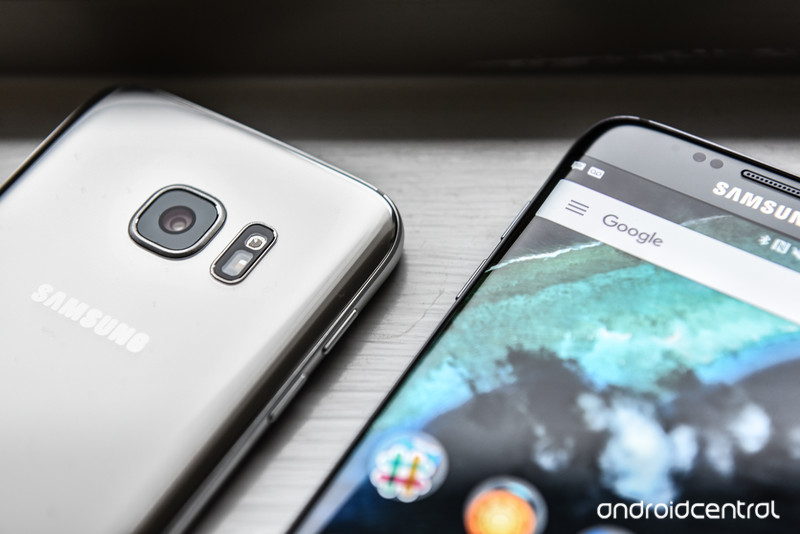
VoLTE is one of the best ways to make your phone calls sound better.
Increasingly, carriers are rolling out Voice over LTE support on their devices, but the new telephony standard, which increases sound quality by using LTE instead of 3G to connect cellular calls, is still quite uncommon.
If your carrier supports VoLTE, here’s how to enable it on the Galaxy S7 or Galaxy S7 edge.
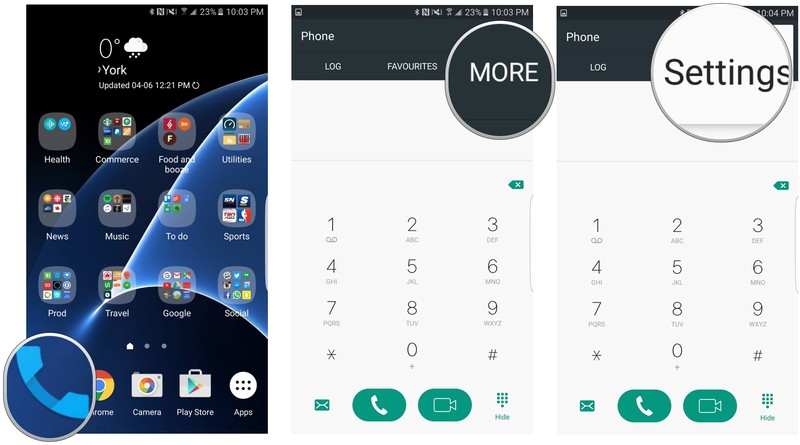
From your home screen, press the Phone icon.
Tap More on the top right corner.
Scroll down and tap on Settings.
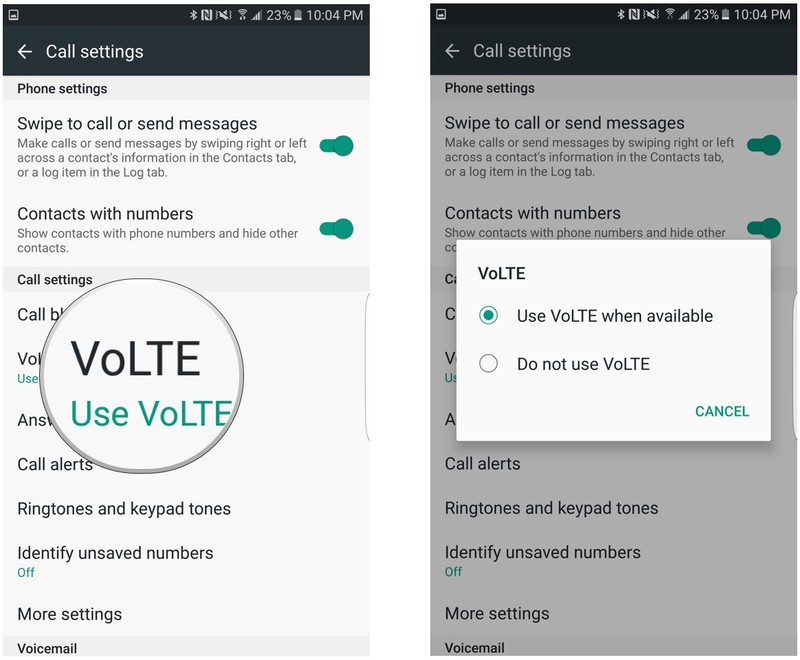
By default, VoLTE should be enabled if your Galaxy S7 or Galaxy S7 edge was first used with a carrier SIM that supports it. If your phone was unlocked and subsequently transferred to a carrier SIM that supports VoLTE, you may have to enable it manually.
Tap on VoLTE.
Make sure that Use VoLTE when available is checked.
Note: Some versions of the Galaxy S7 may show this setting in a different spot. This explanation was performed on a Canadian Galaxy S7 running on Rogers. For a more U.S.-centric version, check out How to enable Advanced Calling features on the Galaxy S7.
Samsung Galaxy S7 and S7 edge
- Galaxy S7 review
- Galaxy S7 edge review
- Here are all four Galaxy S7 colors
- Should you upgrade to the Galaxy S7?
- Learn about the Galaxy S7’s SD card slot
- Join our Galaxy S7 forums
AT&T
Sprint
T-Mobile
Verizon
Samsung’s developer pitch is all about Tizen, but that shouldn’t worry Android fans

New year, same story from Samsung when targeting the developer community.
Anyone following along with Samsung’s Developer Conference (or any trade show where Samsung is represented, actually) is seeing a lot of the word “Tizen” mentioned — TVs, cars, appliances and the whole Internet of Things are running on it. As faithful Android observers, we sometimes have a visceral negative reaction to the word, as if Samsung saying “Tizen” automatically means that Android is no longer in the picture.
But despite Tizen’s prominence as Samsung’s operating system of choice for all sorts of devices across its company, Android is still in the picture in a very big way.
Android isn’t going anywhere

Look, Samsung is a big company. No, scratch that — a huge multinational conglomerate company. Samsung has more engineers in its R&D department working on washing machines than other mobile companies have on their whole worldwide staff; and with that scale comes plenty of possibility for diversification. Every time you hear a mention of Samsung working on Tizen, remember that no single edict reaches throughout the whole company — there are plenty of people still around working very hard every single day on Android software and devices. Thousands, surely.
There’s no reason to jeopardize a $6 billion business by switching to a new OS.
Taking the stage today at the opening keynote of SDC 2016, Samsung Mobile’s head of R&D, Injong Rhee, very prominently explained Samsung’s commitment to Android. A big slide remained on-screen reminding developers that Android commands 80% of the smartphone market and there are millions of developers writing apps for the platform. And yes, Samsung is very much convinced that it is making the best smartphones around — and that’s not limited to just hardware, it’s all of the software it has spent millions of dollars creating.
Oh yeah, and Samsung’s mobile division — built almost entirely on Android — made almost $6 billion last quarter. It sold over 80 million smartphones in the first quarter of 2016 alone.
And despite increased competition from Chinese companies that are growing quickly with agile development strategies, Samsung isn’t backing down from the Android world. For years now Samsung has offered the top-selling Android phone model around the world, and is far and away the biggest single seller of Android phones. There’s no reason to throw that away by moving to a different operating system.
But Tizen is Samsung’s future beyond phones

But for as much as Samsung understands and leverages the power of Android, it knows that Android isn’t a one-size-fits-all solution for everything it wants to do. When it comes to launching and supporting an extremely diverse set of products — which includes TVs, refrigerators, street lamps and shipping containers, among other things — Android isn’t necessarily always the solution. For Samsung, having a light, simple and malleable operating system that can run on just about any type of hardware and power a vast ecosystem without the support or direction of any other company is extremely valuable.
Android isn’t a one-size-fits-all solution.
And as we’ve established, Samsung has the size and resources to build something itself when it sees a need. In this case, Tizen is the platform it has built up to work exactly the way it wants. When you’re a company the size of Samsung with ambitions to match, you build Tizen and bring everyone else to you as a platform — you don’t build your whole company on someone else’s platform.
Here’s the thing, though: just because Samsung is selling 20 million (and growing) TVs every year with Tizen as the operating system doesn’t mean that the Galaxy S8 (or S9, or whatever) isn’t going to be running Android. This is a big company, and one that can absolutely handle running multiple operating systems at once. To think otherwise is to dramatically underestimate the power of a company the size of Samsung, and misunderstand the importance of building on your strengths.
Angry Birds Action! pinball-style game ties into the upcoming movie

Rovio has released Angry Birds Action!, the latest entry in its long-running series. This game, which features pinball-style destruction gameplay, ties into the upcoming Angry Birds Movie.
Rovio says:
In the latest Angry Birds symphony of destruction, leader of the flock Red smashes and crashes through obstacles and bounces from wall to wall like a wrecking ball – all in the name, of course, of saving precious and fragile eggs. Along the way, players unlock additional content by going to see The Angry Birds Movie on opening weekend, and also play augmented-reality mini-games and earn new rewards by scanning special BirdCodes located out in the real world.
Those special codes, which unlock more content and power-ups in the game, can be found on Angry Birds Movie merchandise, such as McDonald’s Happy Meals, PEZ candy dispensers and many more, along with codes in the movie itself.
What’s more, by going to see the The Angry Birds Movie in the cinema during the opening weekend and sticking around for the credits, audience members with the game open on their device get treated to more Movie Magic – a whole new area of the game to explore and an additional movie clip that can’t be seen anywhere else but inside Angry Birds Action! Movie Magic works in the game by detecting an inaudible digital watermark that plays only behind the end credits.
You can download Angry Birds Action! now from the Google Play Store
Google Photos makes hunting for images easier with dedicated search bar

A new update is rolling out to the Google Photos app on Android, bringing a number of changes that should make finding and managing your photos a bit easier. Perhaps the biggest change is the addition of a dedicated search bar, which now sits ever-present at the top of the app.

Simply tap the search bar, and you’ll be able to easily check out your recent search phrases, people, search types and even places. Simply tap one to perform a quick search, or type in your query as always. This new search bar replaces the old floating action button.
That’s not all that’s new in the latest update, of course. Google Photos now also offers the ability to customize its automatically created movies with music, photos and videos that you choose. And in a win for micromanagers, you can now rename or delete device folders you created and move photos between them.
The latest update is rolling out on Google Play now, so it may take some time to land for everyone.
Google Photos

- Getting to know the new Google Photos
- Get your Google Photos library started
- Manage Google Photos backup settings
- What happens when you delete pictures in Google Photos?
- Managing your shared photo links
- Where did Auto Awesome go?
- Discuss Google Photos in the forums!
Google Play
The $499 HP Chromebook 13 is a sleek, all-metal workhorse
HP has just announced the Chromebook 13, an all-metal machine for the business crowd due in May for the starting price of $499. High-end specs include hardware such as a 6th-generation Intel Core M processor, support for up to 16GB of RAM and more.

While the majority of Chromebooks are aimed at the education or consumer market, the HP Chromebook 13 is also targeting business customers. One of the reasons is its support for a docking station. It can connect to the HP Elite USB-C Docking station so it can be used with large displays, full keyboards, and more ports.
The HP Chromebook 13 weighs 2.86 pounds and is just 12.9mm thick, thanks in part to its brushed anodized aluminum chassis. The 13.3-inch screen supports a resolution of 3200×1800. HP says:
The device can easily switch from mobility to desk productivity, with up to 16 GB of memory for fast performance when running simultaneous apps and browser sessions. The high-capacity 45 watt-hour battery is made of next-generation high energy density chemistry material, delivering up to 11.5 hours of battery life. When a charge is needed, the HP Chromebook 13 features USB-C fast charging using the included adapter, or on-the-go charging via other USB-C power adapters, even a phone charger.
The HP Chromebook 13 is available for pre-order now, and is expected to be widely available in May.
See at HP
Fenix resolves Twitter issues, makes its return to Google Play

Popular third-party Twitter client Fenix has made a triumphant return to the Google Play Store after being pulled earlier this week. The app had run afoul of Twitter’s token limit, but it seems that those issues have been resolved.

From Fenix on Twitter:
Good news, everyone! Fenix is back on the Play Store! https://t.co/obl5TClTM5 pic.twitter.com/tC2axD959n
— Fenix (@fenix_app) April 28, 2016
Developer Matteo Villa has said that he worked with Twitter to resolve the issue, but he has not elaborated further at this time. You can once again grab Fenix from Google Play for $5.49.
LG G5 versus Samsung Galaxy S7: Grasping at refinement

This year has been about refinement for LG and Samsung’s top phones.
These crazy little pocket computers on which we rely every day seem to grow more capable each time we blink, and there aren’t many examples of this more profound than the latest flagships from LG and Samsung. These aren’t phones: they’re entertainment powerhouses with incredibly capable cameras, and each one can be connected to a unique headset for even more incredible experiences. How cool is that?
As is often the case with two phones of such high quality, lots of folks want to know which is more deserving of their money. To help answer that question, we’re going to compare the LG G5 and the Samsung Galaxy S7.
A quick look at hardware

Over the last two years, Samsung has been pulling away from plastic, focusing instead on incorporating metal and glass into the exterior of their phones. The first generation was a welcomed change of pace, but it wasn’t until the Galaxy S7 that this shift in design language finally felt polished. The S7 is iconic: beautifully designed, and nice and solid when held in the hand. LG’s been making some significant changes as well, ditching their plastic bodies first for massive metal rails on the LG V10, and eventually moving to the all-metal body of the LG G5. Perhaps most impressive, LG figured out how to make an all-metal chassis while retaining a removable battery and modularity.
Samsung’s displays are once again without compare this year, especially in daylight. While both phones pack Quad HD (2560×1440) resolution displays, which look incredible indoors, the second you step into the sun it’s clear which one is superior. Using the camera in direct sunlight at full brightness on the G5 is nearly impossible due to glare and reflectiveness, where the S7 generally handles the same conditions without issue.
You can’t get much more different than these two phones. The G5’s bottom comes off to reveal a battery, while the Galaxy S7 is so well sealed it is waterproof up to three feet. The S7’s glass back doesn’t offer a whole lot of grip, but the phone’s more slender body a little easier to grasp than the larger G5. LG’s metal body is also coated in a thicker layer of primer than you’d expect from a metal smartphone — especially if you’re used to phones like the HTC One line or Huawei Nexus 6P — but that added texture offers a little more grip than you’d normally get on a metal phone.
While both of these phones are equipped with a lot of similar hardware, the differences couldn’t be clearer. LG has a fingerprint sensor on the back, sharing space with the power button, but it’s not quite as capable as Samsung’s front-facing fingerprint-enabled home button. But LG put extra camera in the back of the G5, a 130-degree wide-angle camera that shoots at 8MP and captures an impressive amount of the world. LG plans to offer accessories that can replace the bottom part of the phone with additional hardware features, called “Friends”, but so far the usefulness of those accessories is a little suspect.
| Processor | Quad-core Snapdragon 820 or Octa-core Samsung Exynos 8 | Snapdragon 820 |
| Main display | 5.1-inch QHD | 5.3-inch QHD |
| Storage | 32GB + microSD | 32GB + microSD |
| RAM | 4GB | 4GB |
| Rear camera | 12MP | 16MP main, 8MP wide-angle |
| Front camera | 5MP | 8MP |
| Battery | 3,000mAh | 2,800mAh (removable) |
| Operating system | Android 6.0.1 Marshmallow | Android 6.0.1 Marshmallow |
| Size | 142.4 x 69.6 x 7.9 mm | 149.4 x 73.9 x 7.7mm |
| Weight | 152 grams | 159 grams |
Samsung’s priority for the S7 was ensuring its flagship was compact and refined, where LG focused on standing out in the crowd while giving early adopters plenty to love. A big part of that was making sure the phone had a removable battery, reversible USB-C port for power, and on-screen buttons for navigating Android. The S7 lacks these things, but their fans don’t seem to mind.
It’s difficult to call one design “better” than the other, but it’s clear just by looking at the two phones that Samsung’s design language has the benefit of an extra year to polish the ideas that help make the phone stand out.
Strangely similar software

LG and Samsung both release phones with versions of Android that have been heavily customized from the product Google ships on Nexus phones, and for the most part that’s positive. Both LG and Samsung have a history of software ideas that users love, and can only find on these phones. These experiences aren’t perfect, and as a result both companies perform significant overhauls of their software experiences each year with refinements that make sure not to fundamentally break the way Google intends Android to operate.
For the most part, everything you expect to find in an Android phone is in roughly the same place. The Settings menu is organized a little differently, with LG opting to start users off with big categories to choose from instead of a long list, but all of the options you want are there. Samsung and LG both make allow for custom quick settings tiles in the notification drawer, but LG’s implementation takes up a little more space on the display. This means less space is available to show notifications, which can be frustrating if you’re constantly getting notifications throughout the day.
When it comes to performance, there’s no appreciable difference between the two. Samsung and LG have worked hard to make their phones feel fast, and both the G5 and the S7 deliver on that this year. Security, as is often the case, is not quite as happy a story. Samsung has been working hard to be transparent about when phones are getting the latest security patches from Google, but the delivery is frequently more than a month behind. LG isn’t doing any better, frequently going months without updating phones with a security patch. Between the two companies, Samsung appears to be doing a better job delivering the latest software to the S7 than LG is to the G5.
A big part of this security delay is frequently put on carriers, and that is another software issue both LG and Samsung have yet to rectify. AT&T, Verizon Wireless, T-Mobile, and Sprint all not only get in the way of installing the latest update, but bog down the S7 and G5 with pre-loaded software that frequently can’t be uninstalled. In this case, both of these phones are significantly better when purchased unlocked. Unfortunately, in the US, Samsung doesn’t make that easy.
Truly impressive cameras

Superior imaging capabilities have been a hot topic over the last two years, and when it comes to LG and Samsung cameras the conversation stays largely unchanged. Last year, LG blew us away with how surprisingly capable the G4 was with its manual camera mode, giving photographers the ability to take the exact photo they wanted and enhance it in a photo-editing app. Samsung’s ability to deliver a noticeably better point-and-shoot experience won out in the end, but both cameras were exceptional.
This year, LG has improved the ability to capture a quick photo, and Samsung has responded with improved manual controls and an impressive new sensor for capturing more light with every pixel. The results make these two phones more comparable than even when it comes to taking a photo.


As you can see, LG’s sensor this year tends to capture a little warmer than Samsung. Meanwhile, the Galaxy S7 manages to capture more detail and more depth of color in just about every shot. Neither photo in the set we have here are bad, and in some cases the G5 is the more color accurate of the two cameras, but the Galaxy S7 photos offer a little bit more overall.
Getting through a day on battery
Generally speaking, if a phone can deliver 16 hours of battery life it’s considered a “full day” of use. That varies for a lot of people, especially when it comes to how long the display is on throughout the day, but that 16-hour mark is a reasonable target for getting you through an average day.
Both Samsung’s 3,000 mAh battery and LG’s 2,800 mAh battery deliver an average of 16 hours use on a daily basis for our usage. That’s not going to be the same for everyone. It’s not even the same for the editors using the phone at Android Central, but if there’s one key takeaway from comparing the battery between these two phones it’s that the 200mAh difference between them doesn’t mean much.
Additionally, both phones use a form of Quick Charge to ensure you can go from a nearly empty battery to 50% charged in minutes. Samsung has one-upped LG by also offering fast wireless charging, which is great news for folks who are fans of the tech. You can set the phone down on a wireless charging pad and have it be 50% charged in about 35 minutes.
Meeting that 16 hour mark is almost a standard right now. Fall short, and the phone isn’t likely to get through a whole day. Go over that mark, and there’s a good chance your phone is noticeably larger than the G5 or S7. These two phones walk that line, so you’re experiences will likely end in this phone being more than enough or not quite enough batter for you.
The bottom line

At the end of the day, choosing between the LG G5 and the Samsung Galaxy S7 is going to come down to personal preference. If you like the way the S7 feels in your hand, or you absolutely must have the best possible quick-shoot camera, the S7 is going to be the way to go. If you’re interested in exploring LG’s accessories and you’d rather have a metal phone than one surrounded by breakable glass, the G5 is a great option.
If you’re having trouble choosing between the two, the better overall option is going to be the Galaxy S7. Simply put, Samsung is offering a polished, complete thought while LG is trying some new things that might be interesting if they stick around for more than just this phone.
Samsung Galaxy S7 and S7 edge
- Galaxy S7 review
- Galaxy S7 edge review
- Here are all four Galaxy S7 colors
- Should you upgrade to the Galaxy S7?
- Learn about the Galaxy S7’s SD card slot
- Join our Galaxy S7 forums
AT&T
Sprint
T-Mobile
Verizon
LG G5
- LG G5 review
- LG 360 CAM review
- LG G5 complete specs
- LG’s G5 Friends modules are a neat idea, but they won’t matter
- LG G5 Hi-Fi Plus w/ B&O
- Join the LG G5 discussion
AT&T
Unlocked
Sprint
T-Mobile
 AIVAnet