


Apple Hires Former Tesla Engineer With Expertise in Prototyping Car Parts
As work on its car project progresses, Apple has been snapping up a huge number of employees with expertise in the automotive industry from companies like Tesla, Ford, GM, Volkswagen, Bosch, and more, along with researchers who have expertise in autonomous vehicles and electric car platforms.
Each of these hires gives us a glimpse into the ideas Apple is potentially exploring for its Apple Car, and a set of recent hires suggests Apple is hard at work prototyping car parts designed for the project as research continues.
Former Tesla employee David Masiukiewicz recently left Tesla to join Apple, reports 9to5Mac. At Tesla, Masiukiewicz was a Senior CNC programmer who worked on hardware prototyping, and at Apple, he’s listed as a “Senior Model Maker” in the “Product Realization Lab” where Apple prototypes new parts and designs for the Mac, iPhone, and iPad. His job description gives hints as to what he produced for Tesla:
Precision 5 axis CNC machining of powertrain, suspension and chasis components using CATIA v5 and Openmind hyperMILL software. Programming of Mill/Turn equipment using Esprit.
In response to a question about why he left Tesla for Apple on one of his social media sites, Masiukiewicz declined to give details but said “Apple provided me with many compelling reasons to come work for them.”
Kevin Harvey, who joined Apple last year after working in the CNC machine shop at Andretti Autosport, is also working in the Product Realization Lab. Neither Harvey nor Masiukiewicz are confirmed to be working on Apple’s car project, but given their previous expertise, it’s highly likely their roles at Apple are car related rather than focused on prototyping future iPhones and iPads.
Today’s hiring news comes following a report earlier this week suggesting former Tesla vice president Chris Porritt has left the company to join Apple, perhaps for a key role developing the Apple Car.
Related Roundup: Apple Car
Tag: Tesla
Discuss this article in our forums
MiXplorer: Truly a “Mix Of (File) Explorers” (Review)

Why Download?
If you’re the type of person who likes to stay on the cutting edge of software then you’ll want to install this APK (MiXplorer). Not all apps are included in the Play Store, but that doesn’t mean that they are not worth a look.
What’s the Risk?
We’ll only share files or links to files that we feel can be trusted. While this isn’t on the Play Store, Apkmirror verifies apps and checks for security risks as well
As with any “new” (or at least new to me) app, the question is always “Can it overtake (insert name of the app that has been on every Android device at least once). In the case of file explorers, ES is probably the most widely encountered one in my days. However, I have always wanted to escape from being one of the (insert number of active users here) that ES has, leading me to scour apps on XDA. That’s when MiXplorer came up. Since I started using it close to the New Year, I’ve come to fall in love with it.
Impressions
User Interface: 4 out of 5
MiXplorer is a beautiful, material-inspired with a hamburger menu and a single toolbar found at the bottom. All your parent folder locations are easily accessible through said hamburger menu and this makes it very easy to switch from viewing your system files to viewing those on your SD card. If that isn’t enough, you can pin these to the status bar. However, navigating the settings, namely the themes and add-ons, is a little confusing. To download a new theme, you have to navigate to settings->theme->customize (not add)->add->Web/new/clipboard. This makes theming a bit of a hassle, and not very “on-the-fly.” With add-ons, you can see the whole list; but to download, it takes you to Google Drive, from which you have to find first the add-on, then the correct APK for your architecture (MIPS, x86, arm, arm64).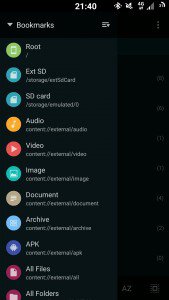
Versatility: 5 out of 5
MiXplorer brings the same things you’ve come to expect from any file manager (root explorer, cloud manager, text editor). Additionally, it brings features such as an APK viewer and editor, and a download manager, along with various add-ons that provide additional functionality.
Installation:
To install, navigate over to its APKmirror page. Press the download icon. Before installing, go into settings, find security and make sure that ‘Unknown Sources’ is checked. Then click the download notification and install.

Punch the Trump: As bad as arguing about politics (review)

Presidential elections in the United States are a big deal. Every country in the world is closely looking at candidates and major events, and then offer special coverage in the much-awaited day. Without doubt, Donald Trump is the most controversial candidates I have seen. The fact that there’s a game that lets you beat him to death is a clear indicator of it. Punch the Trump, made by Brutal Studio, tries to jump on the media’s hatred towards this peculiar character, but the result is not a great one at all.
Features
After downloading the game, the app welcomed me with the most frightening message I’ve come across in the Play Store:
“Thank you for downloading our application using the AppJolt network.
In order to enhance your mobile experience, you may receive survey questionnaires and advertisements when uninstalling and updating our application and certain other applications on your device.
By clicking OK below you accept the privacy policy and the above.”
I immediately pressed Cancel instead, which (I hope) didn’t start that helpful service that would have surely enhanced my mobile experience.
Anyways, after that rough start, you’ll get to the app’s main screen. You’ll have the option to start playing, configure a couple of settings, like the developer’s page on Facebook, and check out more games. There’s also a very cartoony Donald Trump at the side, boasting a very aggressive stance. Usually, when opening the app again, you’ll get a full-screen video ad – just because.
 You’ll see this screen a lot if you don’t want to rate the app right away.
One of the selling points of the app is that the developer added phrases used frequently by Trump himself. When pressing Play, he’ll actually say “It’s disgusting” which I found hilarious.
After this joke, the logical next step would be to start the fight itself, right? However, the app will ask you to rate it first, and will give you free belts in return (explained in a bit). It’s understandable that a developer would want his app rated, but it makes no sense to ask users before beginning a game.
Even worse, there’s no way of saying no (or at least not now), just an arrow that will take you to the in-game store. Exiting the store will NOT take you to the game, but rather to a main screen that looks different from the one we just saw. I’m dead serious.
There’s a button that says “Fight!” here (while the first main screen says “Play”) that will finally take you to the fight itself. There are five buttons are your disposal, placed at the bottom of your screen. The ones at the edges perform a light attack, while the two contiguous ones perform a strong one. The center one is reserved for blocking.
Your character is placed in a first-person perspective facing Trump, and there’s a HUD similar to what you’ll see in any fighting game, with your and your opponent’s remaining HP, and a pause button.
 You can execute combos by doing light and strong attacks in a specific order.
Similar to more robust fighting games, you can perform combos that will deal more damage. If you pause the game, you’ll find a button that will not take you to a list of combos, but rather redirect you to a website where you can see said list.
From time to time, Donald Trump will enter Rage Mode, in which his eyes will turn to dollar signs and he’ll punch like crazy. You will need to block in order to survive it. Also, the background will turn into a US flag, the music will change, and Donald Trump will say his famous line “You’re fired.” It makes fights a little less monotonous and it’s fun to watch at first.
 Finish him!
For those of you who like Mortal Kombat, there’s a “Finish him” prompt, in which you have to do a combination of attacks (which, fortunately, are shown on the screen). If you execute it successfully and on time, Donald Trump will be shot by a cartoon Barack Obama. A little bit of dark humor here, but you shouldn’t take offense by it.
When winning a game, you will earn belts, which can be used to buy in-game items. These belts can also be bought with real money. Things like bats, machetes and shurikens are available for purchase. Unfortunately, scrolling through these items is an absolute pain because of a flawed implementation that makes the items jump all over the place when scrolling through it.
General Impressions
Fights against Trump are mildly entertaining at first, but that’s it. Sure, punching a fake Donald Trump may sound appealing to some people, but the novelty wears out really fast when you analyze the game beyond that. Fights are essentially the same every time, making it really boring after some rounds.
 Some in-app purchases are available.
Nevertheless, I want to remark the fact that the game has combos that work great. The developer could have aimed for something less complicated, but chose to add combos to spice things up, so kudos.
That’s where the praise stops, however. The game has so many flaws, bugs and performance issues that it opens up the eternal dialogue about Google’s lenient approach towards app distribution inside the Play Store.
Apart from the issues discussed previously, the game does not perform well at all. Half the time (and I’m not exaggerating), the game just freezes while fighting. There is both lag and frame drops in every single fight I’ve had. When quitting the game, it forgets to enable screen timeout again, so my phone just sits there with the screen on forever. I once paused the game while on rage mode, and, when finished, Trump kept repeating his dialogue over and over.
To improve its replay value a little bit, the developer added the belt mechanic, but since these items are used on fights only, it doesn’t do much to improve the game’s replayability. Also, you get a score at the end of each fight. However, there’s no Google Play Games integration or similar, so you can’t actually compare your score with anyone.
Options
 Some peculiar options are available, like graphics quality and language choice.
In a surprising move, the developer added several options to control the game’s graphic quality. It’s really peculiar, since the game shouldn’t tax your phone’s GPU at all, but it’s nice to have the option anyway.
Also, the game doesn’t rely on automatic language detection to configure itself, but at least lets you change the interface to your preferred choice. You can also turn on or off both the music and the sound effects.
Graphics and Sound
Even though the interface is not good at all, fighting itself does not look bad. The Donald Trump character is adequate and the game’s rendition of Barack Obama, and the context he appears in, is comical. However, the interface before fighting looks bad, the scroll is hilariously flawed, and there are inconsistencies in several instances.
Sound effects are acceptable too, and the fact that the developer added phrases said by the real Trump is rather cool. However, some of them are low quality, so they don’t sound as sharp as they should.
What we like
- Some funny moments
- Many of Trump’s famous lines have been added
- Combos work fine
Room for improvement
- AppJolt’s frightening message
- Performance issues and bugs can be found everywhere
- Way too many ads
Conclusion
I understand that app development is hard. I also understand the need to monetize your efforts. However, this game could have been much better if more effort was put into it. In its current state, it’s difficult to recommend it, especially with its insane amount of bugs and performance issues, invasive ad networks being used, and poor fun factor. There are better fighting games in the Play Store. Sure, they won’t let you punch Donald Trump (which may sound appealing to some of you), but they offer a more refined, pleasant experience.
Download and install from the Google Play Store (if you dare).
The Galaxy S7 is imperfect, still the best phone in 2016 [review]
I’ve now spent about three weeks with Samsung’s newest flagship smartphone, the Galaxy S7. Like any experience with a new smartphone, it has its benefits and drawbacks, its features and its quirks. You may have read a few weeks ago that I’m planning on sticking with my Nexus 6P over the Galaxy S7 (Edge) and that’s still true but a lot of my original gripes have faded away over time. Pending what we see from HTC in the “10” smartphone, the Samsung Galaxy S7 is shaping up to be the best smartphone in 2016.
The specs are pretty standard for what we’ll be seeing this year:
- Display: 5.1″ QHD (1440×2560, 577 PPI) Super AMOLED panel
- SoC: Qualcomm Snapdragon 820 (MSM8996)
- Memory: 4GB RAM
- Storage: 32 GB, with microSD expansion up to 200GB
- Cameras: 12 MP, f/1.7, 26mm, phase detection autofocus, OIS & 5 MP, f/1.7, 22mm
- Battery: 3000 mAh, non-removable
- OS: Android 6.0.1 Marshmallow
Given that it’s pretty much exactly the same on the inside as both the HTC 10 and LG G5, Samsung had to differentiate themselves by what’s on the outside.
Design
The Galaxy S7 is without a doubt the most elegant Android phone ever built. The industrial design of the HTC One series over the last couple of years and then the Nexus 6P last last year are certainly great, but the Galaxy S7’s fusion of metal and glass is absolutely gorgeous and it feels so great in the hand that you don’t want to put it down.
One often overlooked part of the design is where to put the 3.5mm headphone jack. It seems that nearly every OEM has moved this to the top of the phone in recent years, which leaves wires going everywhere if you’re using the phone and listening to headphones at the same time. Samsung put it back on the bottom, which may sound like a small point, but it’s an appreciated design choice.
Speaking of design choices and ports on the bottom of the phone, it is very surprising given Samsung’s propensity for wanting to be on the cutting edge that they would forego the USB type-C port on its new flagship. Every other major Android OEM that has released a phone in the last 6 months has gone with USB type-C and there has even been speculation that Apple may be putting it into the new iPhone in the fall.
The only reason that I have been able to think of that Samsung would have done this was to keep the new model phones compatible with the Gear VR headset. The Gear VR is an awesome accessory, but Samsung could definitely afford to come up with a new Gear VR tomatch the new port.
 The Display
Samsung is known for having the most striking displays on the market. Another year, another Galaxy, nothing has changed. The screen on the Galaxy S7 is the same size and resolution as last year’s model. I wouldn’t be the first reviewer to say so but the Galaxy S7 is a refinement upon the S6 and in the case of the screen, there wasn’t a whole lot to improve upon because the screen in the S6 was the best on the market last year and this year it is no different.
Even though this isn’t the Edge variant of the phone, the glass does not stop flat at the edge of the phone, but instead curves around the edge by about 1mm in order to make the overall look and feel of the phone more smooth. The result of such form over function is that you end up constantly touching the screen when you’re just holding the phone normally.
The Software (aka Touchwiz)
This is without a doubt the best spin on Android that Samsung has ever made. I said the same thing last fall when I reviewed the Note 5 and I meant it. Samsung has been steadily making its flavor of Android better and better. I’m not sure how much the modern processors contribute to cleaning the clunk in Touchwiz, but the point is that the Samsung Galaxy S7 is smoother than the Nexus 6P.
Samsung has finally stopped making putting new gimmicks into the OS a selling point for its phones, which is great, but it also means there’s less to talk about on the software side of things. Still, I have some favorite features of Touchwiz that I would like to share.
 Much like on the Note 5, one of my favorite features is still the theming engine/store. I’ve been a part of the root/ROM scene since my first smartp
hone in 2010 and theming has always been one of my favorite parts of that. Seeing that feature on mainstream Android devices was a dream come true and still is a lot of fun. It’s a little annoying that it is attached to the Samsung Hub rather than Google Play, but who would actually be surprised by that?
Another one of my favorites was the addition of ultra power save mode. I don’t remember seeing this on the Note 5, which was running Lollipop at the time, but this seems to be  something that Samsung added with its Marshmallow release. It essentially takes regular power save mode on stock Android and turns it up to 11.
It limits your data and CPU usage, as well as completely shutting off a majority of the apps on your phone except for those that the user deems essential. It also utilizes the AMOLED display and makes everything black and white. It even disables the screenshot function!
The battery life on the Galaxy S7 is pretty good, but I’ve found that in a pinch, ultra power save mode can be invaluable. Ironically, using ultra power save mode disables the themes.
I’ve been using the Verizon variant of the phone, which normally requires the obligatory complaint of bloat. This isn’t to say that there isn’t bloat on this phone, there most certainly is, and you’ll probably want to be disabling some of them if you’re on Big Red lest you get annoying notifications about visiting the Verizon store. I feel sorry for the average Verizon customer who will never think to a install third-party SMS client, but I found that after I settled in with the phone and got it all set up the way that I like, I didn’t care about the apps that came pre-installed.
Samsung doesn’t just stuff things into Android, though, they take things out, too. In Marshmallow they removed two features that I thought were pretty crucial and left me disappointed with the implementation. One was something that I detailed a few weeks ago – they removed the ability for timed or ’til next alarm’ do not disturb. These are pretty small features, but why remove them? It’s really nice to be able to put my phone into do not disturb while I’m at the movies and set it to two hours so I don’t have to remember to turn it back on when I leave!
The other is something that a lot of people probably didn’t know about, maybe don’t care about, and technically can be brought back; and that’s adoptable storage. There was a feature introduced in Android 6.0 Marshmallow where the system could adopt the SD card as though it were internal memory and treat it the same way that it already treats the internal memory. That means that you can install as many apps as you want on a phone that is only sold with 32GB of storage but has been expanded to accommodate up to 160GB of storage. Samsung took this feature out. It can technically be brought back with some work at the command line, but why take it out in the first place?
Battery Life
Like I mentioned before, the battery life on the Galaxy S7 is pretty  good. It’s not as good as the OnePlus One, but it worked some sort of magic. Impressively, Samsung packed the same 3000 mAh battery that it had in the Galaxy Note 5, which had a lot more physical space to work with and more pixels to push, into the smaller footprint of the Galaxy S7, giving it better battery life than the Note 5. The battery on the S7 regularly lasted me throughout the day and only when I was planning on going past midnight did I bother with recharging before the end of the day.
Like with overall performance, I’m sure that some of the battery performance can be attributed to the Snapdragon 820 under the bonnet, but I’ve heard that the Galaxy S7 with an Exynos 8890 Octa, which is sold everywhere that isn’t America.
The Camera
It’s no secret that Samsung is the unquestioned leader in Android cameras, if not smartphone cameras in general and that hasn’t changed with the Galaxy S7. Photos outdoors come out very crisp and enjoyable and thanks to a lower resolution sensor and some new licenced tech, it’s better than ever in low light and has an impeccably fast shutter speed/auto focus. There’s a little bit of noise in the low light photos but they’re still better than what you’ll typically see from the competition.
I’m not what you would call a photographer and if I were I wouldn’t probably recommend using a smartphone to take pictures. But for the casual snapper, it’s hard to go wrong with the S7.
1 of 6


Other stuff/Final thoughts
The biggest selling point for the Galaxy S7 after having used it for several weeks is not the phone itself, but the Gear VR headset that came with a lot of early sales. Even for $99, it’s a great accessory to your smartphone.
I’ll be doing a full review of the Gear VR soon, right after we give one away, but it was the highlight of my review and for my roommate’s girlfriend, the only thing she cared about when I told her that I had the Galaxy S7 to review.
Overall, I’m still going to keep my Nexus but that doesn’t mean that the Galaxy S7 isn’t a great phone. In fact, I think it’s the best phone you can buy right now, especially if you have already owned Samsung phones and are used to some of their quirks. It’s a gorgeous phone, one that I would be ashamed to put a case on but almost definitely would have to. Make no mistake, you’ll be paying nearly $700 for this phone and almost $800 for it’s edged brethren, and that’s no small amount of money but if you have to live with a phone for two or more years, I don’t think you can go wrong with this one.
Today, we celebrate our 99-cent ‘Independence Day’
Movie fans who like to buy them on the cheap should jump on today’s sale in the Google Play Store. The classic sci-fi invasion film Independence Day can be bought for just 99 cents for Android phone and tablet owners.

This is the HD version of the movie, by the way, which normally costs $12.99, so you might want to kick the tires and light the fires to get it for a fraction of its usual cost. The 1996 film was a box office blockbuster, making over $800 million worldwide.
The sale comes on the same day that a new trailer was released for the movie’s upcoming sequel, “Independence Day: Resurgence”. The movie, which brings back many of the original actors, will be released in theaters on June 24.
One more thing: There’s also a funny promo for the sequel starring Jeff Goldblum to help celebrate Earth Day today, and all of the proceeds from the sale will go towards Earth Day Network and their Trees for the Earth initiative. Enjoy
Get Independence Day for 99 cents in the Google Play Store
Twentieth Century Fox Home Entertainment has partnered with Earth Day Network and Google Play to offer fans 99 cent Digital HD purchases of the sci-fi classic INDEPENDENCE DAY for a limited time in honor of Earth Day and the film’s 20th anniversary. Starting today, fans can go exclusively to Google Play and purchase the film for the discounted price, with all of Fox’s net proceeds benefiting Earth Day Network and their Trees for the Earth initiative.
The support from Twentieth Century Fox Home Entertainment and the sale of INDEPENDENCE DAY on Google Play will allow Earth Day Network to continue its work around the world to protect the planet, such as working with local tree-planting partners to ensure that the most impoverished communities receive new trees that will help them better feed their families and grow their local economy. The planting of these trees is so important that Earth Day Network has made Trees for the Earth their theme for Earth Day 2016
Running out of space on your Chromebook? Try these tips

16GB isn’t a lot of space. You might need a way to add more.
While Chromebooks are mostly cloud-centric machines, there are still quite a few offline packaged apps available. Sometimes, when you have a lot of those installed alongside media like music, video and pictures, there’s not much room left. Add in Google Drive syncing, and running out of space is a real possibility — especially on the 16GB storage models.
There are a few things you can do to help if you ever hit the storage wall. Let’s have a look at some of them!
Adding an SD card or USB thumb drive is an easy option

This one is simple. Your Chromebook has an SD card reader on the side, and if you add a card to it, all the space on the card is available to the operating system for storage. The same goes for a USB thumb drive.
There are a couple issues to be aware of here. The first is that you might not want half of an SD card or a USB thumb drive hanging off the side of your Chromebook where it can get broken. There’s an easy solution — use half-height drives or cards.
- Transcend JetDrive half-height card from Amazon
- SanDisk Ultra Fit USB 3.0 Low-Profile Flash Drive from Amazon
Your Chromebook can read and write to SD cards or USB drives formatted as FAT32, vFAT and exFAT. Your Chromebook can format or reformat an SD card, but it will only do it using the FAT32 file system. There is a 4GB file size and 8TB partition size limit using FAT32, so if you need to read and write files (like movies) bigger than 4GB it’s best to format the card on another machine. You can do that on a demo computer at Best Buy if you need to.
Lastly, tinkerers might want to use an ext file system on their portable drives. Besides issues with file permissions you might run into, remember that journalizing may cause flash storage to wear out fast.
A less portable solution — A USB hard drive

Like portable flash storage, your Chromebook can use a USB hard drive for a lot more storage at the cost of portability. Most any USB hard drive will work, so look for the fastest one (USB 3) you can afford, even if your Chromebook doesn’t have USB 3 ports — your next one will.
Your Chromebook can access files on a USB hard drive using these file systems:
- FAT (FAT16, FAT32, exFAT)
- HFS+ (read-only on journaled HFS+)
- ISO9660 (read-only)
- MTP
- NTFS
- UDF (read-only)
You’ll not be able to easily format a USB drive in Chrome OS, so you’ll need to do that on another computer. Also note that there is no defragmenter in Chrome OS, so if the drive gets “clogged” up you’ll need to do that on another computer, too.
Protip: Your Chromebook can also read files (like media in any of these formats: 3gp, .avi, .mov, .mp4, .m4v, .m4a, .mp3, .mkv, .ogv, .ogm, .ogg, .oga, .webm, .wav ) from a USB CD-ROM or DVD-ROM drive, so it might be worth burning your videos and music to a disc if you have room to tote a USB drive around.
Use a second Google Drive account

And don’t sync it offline with your Chromebook.
It’s easy to switch users on Chrome OS, and downloading a file to a removable drive through the file manager means it can be available for all users. Every account gets 15GB of free Google Drive storage, and it will show in the file manager where you can easily access any of it.
Of course you can also choose to not sync your Google Drive files offline to save even more space from the Google Drive app settings.
You might be able to put a bigger drive in your Chromebook

This is a little more extreme than any of the other options, and most Chromebooks don’t support it because the internal storage is soldered directly to the board.
Some notable models that can be upgraded with a bigger storage drive include the Acer C710, the Acer C720, the HP Chromebook 14, The Samsung Series 5 (and Series 5 550) and the Cr-48.
It’s easy to do on some models like the Acers or the Samsungs, and very difficult to do on the HP 14 — but it can be done.
You also might need a specific drive like an M.2/NGFF SSD and it’s best to stay away from drives bigger than 128GB. We swapped out the SSD on a trusty C720 if you want to see what you might be up against.
How to upgrade the SSD in your Acer C720 Chromebook
Have reasonable expectations

When you buy a $200 laptop that’s built to be lean and speedy, you shouldn’t expect a 500GB spinning disk drive under the hood. You wouldn’t be happy with the performance even if you did. That’s just not how Chromebooks are designed, and even the most expensive models only come with a 64GB SSD installed.
With tempered and well thought out expectations, and these few tips you should be able to manage all of your storage needs. I’m building a new desktop workstation for the office, and I have 6.5TB of storage sitting here to go in it. One day, I’ll need to worry about it getting full, and I’ll have to pay closer attention to what I save and where I save it. No computer is immune.
We have a feeling that Chromebooks with bigger storage sizes are coming, as it will soon be more expensive to spec out 16GB drives instead of 32GB. In the meantime, be sure to keep everything backed up somewhere, and learn to delete the things you’ll never need again.
Samsung Galaxy S7 Wireless Charging Battery Pack review

What at first seemed like a throwaway feature on yet another battery case ends up making it a realistic charging option.
As you may recall, I’m not the biggest fan of battery cases. They’re cumbersome, come with a load of compromises and in the end don’t add much of a charge to your phone. At the same time, the Galaxy S7’s larger battery removes the need for a battery case for most people.
Samsung launched a new style of battery case with the Galaxy S7, which at the time seemed a little confusing. Rather than plug into the USB port like every other battery case, it uses Qi wireless charging to keep your phone powered up. Initially I wrote it off as a superfluous feature addition that didn’t make a whole lot of sense for a case that’s attached to the phone.
But then I used it, and it makes so much sense I can’t believe it wasn’t done before.
Design and materials
This is perhaps the most simplistic design for a battery case, but that’s exactly what you want — just get the best balance of size and battery capacity possible. The case is basically comprised of two pieces: a hard plastic and slightly textured back that’s rigid and contains the battery and electronics, attached to a soft touch grippy rubber portion that wraps around the actual phone.
No added port bulk, no restricted access to ports.
The fact that this case charges the phone over Qi wireless seemed like a novelty at first, but it enables this case to be dramatically smaller and less complicated than those that have to plug into the USB port of the phone, which introduce a large “chin” at the bottom of the phone. There’s also no need for the case to come apart or have a hinge at any point — the soft rubber allows you to pop the Galaxy S7 in and out of the case with ease, while having enough friction to hold onto it in normal use.
The design wins just continue when you look around the outside profile of the case, which doesn’t have to bulge out on any side, and instead just puts a thin rubber lining around the top and sides of the phone. The bottom is mostly exposed, which is a huge deal for a battery case. The headphone jack, USB port, microphone and speaker are all completely free to work as they normally would — no restrictions or headphone extenders required.
Of course there’s no getting around the fact that this is a big case, and it definitely changes the ergonomics of using the Galaxy S7. Adding the case just about doubles the thickness of the phone, as well as adding probably 50% to the weight, and even with the added grip of the rubberized finish it’s still a bit unwieldy. But that’s the trade-off with every battery case, and once again the fact that this one doesn’t add any unnecessary height or side bulk to the phone is a big deal.
Using and charging

Press the button on the top of the case to see a readout of the current charge state with four LEDs, or instead make a long press of the button to start or stop the charging of the phone. Despite the confusing name of this accessory, the case itself doesn’t charge over Qi … you have to plug it into micro-USB power, and can even do so while the case is charging the phone.
You’ll get about a 50% charge, but that’s just fine.
Just like every other battery case, you’re not going to get a full phone charge out of this thing. You could’ve expected that from the start because it only has a 2700 mAh capacity — smaller than the 3000 mAh in the phone itself — but when it comes down to the rate of charging and the power lost in the process, you’re only going to get about 50% charge added to your battery with this case.
Popping the case on the Galaxy S7 at 5% battery, and using the phone as I normally would without a case, I was able to get up to 50% before the case was depleted. The charge took a full two and a half hours to complete, which is normal for a battery case and completely expected considering the usual charging rate of Qi (advertised as 5V / 1A by Samsung).
The fact that this case is so easy to quickly take on and off lines up well with the amount of charge it offers. Being able to carry around the case — as you would any other mobile battery pack — to quickly pop on when you’re pushing the phone and hit 50% battery far too early in the day is great. And taking it off in just two seconds once the charge is done (or you feel confident in the battery level) completes the experience.
A battery case you might actually want
Coming from a position of absolutely loathing battery cases as a general rule, I’m extremely impressed by the Wireless Charging Battery Pack that Samsung has made for the Galaxy S7. The choice to go with Qi charging has removed several of the barriers — extra bulk, blocked ports and unnecessary components — that typically make a battery case not worth your time, and completely tipped the scales to making this a battery case that’s actually worth while.
Some would argue that the Galaxy S7 doesn’t really need a 50% boost in battery, as the upgrade in capacity over the Galaxy S6 was enough to get most people (myself included) through the day. And honestly most who need that extra bump in battery mid-day will be better served by a versatile battery pack with Quick Charge speeds instead. But the fact is that not everyone uses their phone in the same way, and the few who need something that can fully attach and become part of the phone while charging will want to look at the Wireless Charging Battery Pack.
As far as battery cases for the Galaxy S7 go, there’s no reason to look at any other.
See at Amazon
See at Samsung
Samsung Galaxy S7 and S7 edge
- Galaxy S7 review
- Galaxy S7 edge review
- Here are all four Galaxy S7 colors
- Should you upgrade to the Galaxy S7?
- Learn about the Galaxy S7’s SD card slot
- Join our Galaxy S7 forums
AT&T
Sprint
T-Mobile
Verizon
China eyes floating nuclear power plants for remote locations
It’s difficult to provide power to offshore projects like oil rigs and a recently built island chain in the South China Sea. However, China has a solution: floating nuclear power plants. According to the state-run newspaper Global Times, the vessels are being developed with the goal of providing electricity to offshore construction projects, even in remote locations. China Shipbuilding Industry Corporation, a state-run company, is working to build an entire fleet of the floating power plants citing strong demand for the ships.
Of course, this isn’t the first time nuclear power has taken to the seas. Nuclear-powered ships have been around for decades, and back in the 1960s, the US put a nuclear reactor inside an old World War II ship to provide electricity to the Panama Canal Zone. Safety regulations are still in the works for China’s proposed power plants, which will need to be fast enough to move out of the path of a typhoon should the need arise. A rendering posted by Global Times’ parent company People’s Daily shows a potential design floating power plants that looks like a combination of a freighter and a cruse ship.
#China plans to build 20 floating #nuclear power stations to boost maritime construction https://t.co/htQilcXeJV pic.twitter.com/YZ7fO5oX5g
— People’s Daily,China (@PDChina) April 21, 2016
Source: Global Times
 AIVAnet