


Intel’s move away from PCs is difficult but necessary
There’s no doubt the PC market is in trouble. We’ve seen shipments drop steadily over the past few years — with the steepest decline ever occurring in the last quarter of 2015 — spurred on by the rise of mobile. That leaves Intel, a company practically synonymous with the personal computing revolution, with some tough choices to make. Yesterday, it announced that it’s laying off 12,000 employees (around 11 percent of its workforce) and refocusing its business on connected wearables and the Internet of Things (IoT). While it’s undoubtedly going to be a rough transition, it’s also the sort of reinvention Intel needs to stay relevant.
Basically, it’s about trading a declining market for something growing quickly. The company said its IoT and data center business accounted for around 40 percent of its revenue last year, and it called those segments its “primary growth engines.”
“Our results demonstrate a strategy that’s working and a solid foundation for growth,” Intel CEO Brian Krzanich said in a statement. “Our opportunity now is to accelerate our momentum and build on our strengths. But this requires some difficult decisions.”
Intel refused to make anyone available for interviews around the restructuring, but it wasn’t that difficult to see that it was gearing up for big changes over the past year. The head of its PC group, Kirk Skaugen, left the company earlier this month. Intel also announced plans to slow down chip releases to deal with the difficulty of making continual improvements. It’s stepping even further into new form factors with the Compute Stick. And its mobile chip head, Aicha Evans, reportedly resigned after less than a year on the job.
On top of the failing PC market, Intel also struggled to make a dent in mobile chips, which left the door open for the likes of Qualcomm. Indeed, missing out on building the iPhone’s CPU was one of former CEO Paul Otellini’s biggest regrets. Intel eventually released mobile chips for Android devices around 2012, but they were slower than the competition and came too late to make a difference. Eventually it managed to craft some capable Atom CPUs for Windows tablets like the Surface 3. (Intel’s upcoming Apollo Lake CPUs might be even better mobile contenders.)

In the end, it makes more sense for Intel to position itself where the technology industry is headed rather than hold on to a dying market or duke it out with far more established competitors. And while IoT and connected wearables might seem a bit pie in the sky today, especially with activity trackers getting increasingly boring, there’s enormous potential in those segments over the next few years. As we saw at Mobile World Congress, Intel is betting big on 5G, something that both IoT and wearables will benefit from significantly. Intel also missed out on the 4G era after backing the failed WiMAX standard: That’s not something it wants to repeat.
Krzanich also said Intel is looking at advancements in memory and FPGA (field programmable gate arrays, or chips that can be easily reconfigured for specific tasks like encryption or data analysis) technology to empower its IoT and wearable business. The company plans to launch a Xeon chip with FPGA in the coming months (the result of its $16.7 billion Altera acquisition), and it’s also working on a series of libraries to take advantage of its accelerated computing possibilities. As Intel de-emphasizes traditional desktop chips, expect it to focus more on users with specialized needs such as data analysts, researchers and scientists.
So what’s next for Intel? The company said it will start alerting employees affected by the layoffs over the next two months, and it expects to complete layoffs by next year. Restructuring will cost the company $1.2 billion next quarter, but it also expects to save $1.4 billion annually come 2017. Those savings, together with a smaller workforce, should make Intel more efficient in the future. So the next time Intel has a chance to do something groundbreaking, like building the iPhone’s CPU, it hopefully won’t miss out.
VW will reportedly pay you $5,000 to settle its emissions scandal
If you were burned by Volkswagen’s emissions cheating and don’t think that $1,000 in credits and gift cards will cut it, we have good news for you… maybe. Die Welt sources understand that VW has reached a settlement deal with US officials that will have it pay affected diesel car owners $5,000 each to make up for misleading the public on the eco-friendliness of its vehicles. That’s on top of what VW will have to pay to fix the cars in question. Provided the automaker gets the deal approved on April 21st (the deadline a court gave to agree on a fix), it’ll avoid a trial that could easily have proven more costly.
VW tells us that it isn’t commenting on the report at this time, so nothing has been confirmed just yet. If true, though, it’ll represent one of the most expensive settlements in recent memory. Even if it covers only the half-million vehicles from the original recall, back-of-the-napkin math suggests that VW could pay $2.5 billion in the US alone. Combine that with complaints elsewhere in the world and the transportation giant is bound to regret ever playing fast and loose with emissions figures.
Via: CNBC
Source: Die Welt (translated)
Samsung’s thin and light Notebook 9 harks back to simpler times
Samsung’s new flagship laptop, the $1,500 Notebook 9, does not have a touchscreen. Its display does not detach or fold back into tablet mode. It’s not even that exciting-looking. And yet I am fully enjoying my time with it. Though it doesn’t offer some of the niceties we’ve come to expect on modern laptops, it excels in just about every way that matters, with healthy battery life, a comfortable keyboard, a bright display and a thin design. Even the touchpad is OK, and that’s saying something.
Hardware

I was sure I had received the wrong shipment. The Notebook 9 is available in two sizes: 13.3 and 15 inches, and though I knew I was getting the 15-inch version to review, it really did seem, when I pulled it out of the box, that I had been sent the smaller one. First off, thanks to some super-skinny bezels (just a quarter of an inch wide), Samsung was able to cram a 15-inch display into a machine with a much smaller footprint. Think: the sort of chassis you’d normally find on a 14-inch laptop. Second — and this is where I really got confused, I think — the 15-inch version weighs only 2.9 pounds. Think about that for a second: That’s on par with the 13-inch MacBook Air. (The 13-inch Notebook 9 is even lighter, at a barely there 1.9 pounds.) Perhaps you can understand, then, where the 15-inch laptop we have here simply doesn’t match my notions of how a machine that size should look and feel.
Before I gush too much, though, I want to make one thing clear: Light as this is, it’s not a particularly pretty machine. Its magnesium-alloy casing is sturdy, yes, but it looks like plastic from afar. There’s also a strange bump where the palm rest ends, putting the keyboard on a slightly lower plane. What can I say? It’s weird-looking.
As plain as the Notebook 9 is, Samsung makes up for that in other ways. Aside from those skinny bezels and that compact footprint, the port selection is good, even despite those slim half-inch-thick edges. On the left side we’ve got a full-size USB connection, along with a headphone jack, a USB Type-C port and a Mini DisplayPort. Over on the right you’ll find another USB port, along with a full-size HDMI socket and a microSD card reader. That covers most of the bases, then, though I’m one of those people who would have preferred — and regularly use — a full-size SD slot.

The keyboard also excuses the uninspired design. The buttons here are well spaced, springy and responsive; I never have to retype a letter because it didn’t register the first time. They’re also relatively quiet, which is always a plus. If I could change anything, I would prefer not to have to hold the function key to adjust things like volume and screen brightness. But for typing, it’s fantastic.
As I said, the touchpad isn’t bad. Not perfect, but I would totally agree with my colleague Chris, who said in his initial hands-on that the trackpad “didn’t make me want to shoot myself.” Indeed, Chris. Indeed. Yes, it does that thing that other touchpads do where it sometimes makes me accidentally rearrange pinned browser tabs, but it happens less often here. Most of the time, the touch surface works fine for single-finger tracking and two-finger scrolling.
Display and sound

The display is another example of where the Notebook 9 isn’t flashy, perhaps, but is still enjoyable to use. The 1,920 x 1,080 panel we have here isn’t particularly high-res, but it still feels more than adequate for everyday use. What the machine lacks in pixels it makes up for in balanced, pleasing colors and minimal glare; this isn’t a matte panel, exactly, but the gloss is so minimal that you won’t see many reflections. It helps, I think, that the display has a high brightness rating of 350 nits. (The brighter the panel, the easier it is to outshine natural light.) Separate from screen glare, the viewing angles are wide enough that when you dip the screen forward, the colors mostly keep their fidelity. That’s also a plus.
As we’ve learned over and over again, there’s more to good screen quality than just pixel density. And if the pixel density were higher, the battery life wouldn’t be as long as it is, which would be a shame.
While I never craved a higher resolution, however, I did sometimes miss having a touchscreen. Going as far back as Windows 8, Microsoft’s operating system has been built for a mix of keyboard and finger input. Indeed, basically every Windows laptop I’ve tested in recent years has had a touchscreen, even if it didn’t have a detachable or convertible design allowing it to be used in tablet mode.
With that bit of background, you can say I’ve been spoiled. My inclination is to hit the Start button in the lower-left corner when I’m ready to power down the machine. And when I needed the built-in calculator app, it sure would have been nice to tap the numbers with my fingers rather than click, click, click on each digit. I realize that having a touchscreen would have meant a slightly heavier, slightly thicker design, but I think I would have been OK with that.
Performance and battery life
| Samsung Notebook 9 (2.5GHz Core i7-6500U, Intel HD 520) | 5,309 | 3,705 | E2,567 / P1,541 / X416 | 3,518 | 539 MB/s / 299 MB/s |
| Dell XPS 13 (2.3GHz Core i5-6200U, Intel Graphics 520) | 4,954 | 3,499 | E2,610 / P1,531 | 3,335 | 1.6GB/s / 307 MB/s |
| HP Spectre x360 15t (2.4GHz Core i5-6200U, Intel HD 520) | 5,040 | 3,458 | E2,672 / P1,526 / X420 | 3,542 | 561 MB/s / 284 MB/s |
| Razer Blade Stealth (2.5GHz Intel Core i7-6500U, Intel HD 520) | 5,131 | 3,445 | E2,788 / P1,599 / X426 | 3,442 | 1.5 GB/s / 307 MB/s |
| Toshiba Radius 12 (2.5GHz Intel Core i7-6500U, Intel HD 520) | 5,458 | 3,684 | E2,865 / P1,622 | 3,605 | 552 MB/s / 489 MB/s |
| Microsoft Surface Pro 4 (2.4GHz Core i5-6300U, Intel HD 520) | 5,403 | 3,602 |
E2,697/ P1,556/ X422 |
3,614 | 1.6 GB/s / 529 MB/s |
| Lenovo Yoga 900 (2.5GHz Core i7-6500U, Intel HD 520) | 5,368 | 3,448 |
E2,707 / P1,581 |
3,161 | 556 MB/s / 511 MB/s |
| Microsoft Surface Book (2.4GHz Core i5-6300U, Intel HD 520) | 5,412 | 3,610 |
E2,758 / P1,578 / X429 |
3,623 | 1.6 GB/s / 571 MB/s |
The unit I tested, which sells for $1,500, is the only available configuration of the 15-inch Notebook 9. That includes a 2.5GHz, dual-core Intel Core i7-6500U processor, 8GB of RAM, a 256GB Samsung-made solid-state drive and integrated Intel 520 graphics. Those are the same specs we’ve seen in a handful of other high-end laptops, including the Razer Blade Stealth, Toshiba Radius 12 and the Lenovo Yoga 900.
Given the high marks we gave each of those systems, it should come as no surprise, then, that the Notebook 9 is also a strong performer. No, it won’t suffice for any kind of serious gaming — no one said it would! — but it can otherwise keep up with the best of them. Its eight- to nine-second boot-up time is also fast, even by today’s standards. I also used it as my workhorse for much of my review period, juggling around 10 pinned Chrome tabs and open apps like Skype, Slack, Spotify and Microsoft Word. The performance was smooth throughout, though some credit is due to other key elements, like the bright display, comfortable keyboard and decent trackpad. An all-around good setup like that makes it easier to stay productive.

Basically, the machine doesn’t call attention to itself while you’re trying to get stuff done. Well, with one exception. Unlike other modern PCs, many of which come installed with Intel-owned McAfee security software, the Notebook 9 comes pre-loaded with a trial version of Symantec’s Norton Security suite. Norton isn’t alone in its affinity for annoying pop-ups — McAfee is also a bad offender — but Symantec takes death by trialware to a new level. After I repeatedly refused to pay for a subscription (read: I clicked the passive-aggressive “stay unprotected” button), I eventually started seeing a pop-up in the lower-right corner of my screen.
But unlike with other pop-ups, I couldn’t close, minimize or even move this one. Ultimately, I had to uninstall the program to make the annoying box go away. Which, let’s be real, I might have done anyway, but is that really what Norton wants? To lose a chance of me ever signing up? Also, I think we can agree that having to open program settings, uninstall an app and then restart your machine is quite an extreme, time-sucking response when all you wanna do is close a pop-up.
OK, I’m done ranting. Thanks for listening.
Battery life
Samsung Notebook 9
8:16
Surface Book (Core i5, integrated graphics)
13:54 / 3:20 (tablet only)
MacBook Air (13-inch, 2013)
12:51
HP Spectre x360 (13-inch, 2015)
11:34
Surface Book (Core i7, discrete graphics)
11:31 / 3:02 (tablet only)
Apple MacBook Pro with Retina display (13-inch, 2015)
11:23
iPad Pro
10:47
HP Spectre x360 15t
10:17
Chromebook Pixel (2015)
10:01
Lenovo Yoga 900
9:36
Microsoft Surface 3
9:11
Apple MacBook (2015)
7:47
Dell XPS 13 (2015)
7:36
Microsoft Surface Pro 4
7:15
Microsoft Surface Pro 3
7:08
HP Spectre x2
6:43
Razer Blade Stealth
5:48
Dell XPS 15 (2016)
5:25 (7:40 with the mobile charger)
Toshiba Radius 12
5:12
Samsung rates the Notebook 9 for up to 12 hours of battery life on the 15-inch model, and up to 10 hours on the 13-inch version, which I haven’t tested. I’m sure with somewhat intermittent use and conservative brightness settings you could indeed reach 12 hours, or close to it, but in Engadget’s (admittedly taxing) video rundown test, I got 8 hours and 16 minutes. Given how bright this particular screen is, I decided to re-run the test at half brightness, but even that extended the runtime by only 36 minutes.
The competition

Fifteen inches has long been one of the most popular laptop screen sizes here in the US, so you’ll find no shortage of choices there. If, specifically, you want a flagship-caliber machine that’s also thin and light, your options will dwindle to just a handful. What a nice selection it is, though. In addition to the Notebook 9, Windows users should check out HP’s Spectre x360 15t ($1,150 and up). At 4 pounds and 0.63 inches thick, it’s not quite as thin or light as the Notebook 9, but then again, it has a 360-degree touchscreen that’s bound to add some heft. In addition to being slim for a convertible this size, the 15t earned a high score for its comfortable keyboard, strong build quality, long battery life, 4K screen option and robust audio.
If performance is a priority, you might also consider the Dell XPS 15, whose top-end configurations have quad-core Core i7 chips, discrete NVIDIA graphics, 32GB of RAM and a color-accurate 4K touchscreen. Obviously, though, you’re in much more modest specs at the entry-level $1,000 price. Either way, the XPS 15 is lightweight for what it is, with a starting weight of 3.9 pounds, but it still doesn’t come close to the Notebook 9 in that regard. If you care more about portability and don’t mind giving up a touchscreen (or the option of 4K resolution), Samsung’s offering might still be your better bet.
As long as we’re on the subject of slim, lightweight laptops, I may as well mention the 15-inch MacBook Pro, though be aware that it has more in common with the Dell XPS 15 than the Notebook 9 we’re talking about here. That is to say, with a starting price of $1,999 and base specs that include a quad-core Core i7 processor, 16GB of RAM and Intel Iris Pro graphics, it’s a workhorse first. Yes, it’s portable too, at 4.49 pounds and 0.71 inches thick, but that doesn’t seem to have been as big a priority here as it was for Samsung when it designed the Notebook 9. You could also go with the lighterweight MacBook Air, but that’s a less perfect comparison, just because there’s no 15-inch Air, and meanwhile the 13-inch Notebook 9 is probably an even better match for the 11- and 13-inch MBAs.
Wrap-up

As is always the case, the Samsung Notebook 9 isn’t for everyone. But I suspect it will hit the sweet spot for many people. It’s exceptionally thin and light for a 15-inch laptop — so much so that to this day I still sometimes forget I’m using such a big-screened machine. The battery life is decent, especially if you take care to rein in that bright, 350-nit display. That screen is gorgeous, by the way, even if some power users will feel disappointed by the middling 1080p resolution. Rounding out the list, performance is fast, the keyboard is comfortable to use and even the trackpad is all right.
If you crave modern-day amenities like a 4K screen, touch panel or a 2-in-1 design, this isn’t the machine for you. But for people who just want a great laptop that’s fast and comfortable to use, this belongs on your shopping list.
Watch the ‘Star Fox Zero’ animated short here at 6PM ET
Ahead of the launch of Star Fox Zero on Wii U, scheduled for April 22nd, Nintendo this week teased an animated short with ties to the game’s story. Titled Star Fox Zero: The Battle Begins, the film will be premiering worldwide today at 6PM ET/3PM PT, featuring the fabled characters you’ve come to love from the franchise. You definitely won’t want to miss it, so make sure you’re tuned into Nintendo’s stream at the times mentioned above — link is right here.
Stick around afterwards for Nintendo Treehouse: Live with #StarFoxZero & Star Fox Guard. pic.twitter.com/QNHG3n68KI
— Nintendo of America (@NintendoAmerica) April 18, 2016
Source: Nintendo
Apple Car Talks With Daimler and BMW Fell Apart Over Leadership Issues, iCloud
Apple has been unable to establish a deal with Daimler and BMW over a possible manufacturing deal for the Apple Car, reports German news site Handelsblatt. Apple is said to be seeking a partner that could potentially help it produce the Apple Car, as Apple has no experience with vehicle production.
Talks with Daimler and BMW reportedly ended because there were questions over who would lead the project and which company would have ownership over data. Apple is said to be holding out for deep iCloud integration.
A Magna Steyr conceptual vehicle from 2012
Apple wants the car to be closely built into its own cloud software, while the German carmakers have made customer data protection a key element of their future strategy.
The talks with BMW collapsed last year, while those with Daimler collapsed more recently, the sources said.
Rumors last year suggested Apple was considering using the BMW i3 as the basis for its electric car project, but as was mentioned today and in past rumors, Apple’s talks with BMW fell apart after just a few months. Additional rumors have speculated Apple and BMW could resume talks at a later date, and Apple is also said to be in talks with Magna Steyr. Apple executives have visited Austria to speak with Magna Steyr and there’s not yet any indication that those talks have come to an end. Today’s report suggests Magna Steyr is the frontrunner to work with Apple on manufacturing the so-called Apple Car.
Apple’s car project is focused on creating an electric car, which may or may not include self-driving capabilities. Such a vehicle will likely interface with the iPhone and other Apple services, but beyond the fact that a car is in development, little is known about the project.
Hundreds of employees are working on the car, at secret locations rumored to be located in Sunnyvale, California and Berlin, Germany. Apple is said to be aiming to complete work on the car in 2019 or 2020.
Related Roundup: Apple Car
Tag: handelsblatt.com
Discuss this article in our forums
Stanford Offers New Course on Developing iOS 9 Apps With Swift
Stanford University this week launched its latest iOS development course on iTunes U, which was once again created by Paul Hegarty. For the last several years, Stanford has provided its iOS development courses on iTunes U free of charge to those who wish to learn to create apps for iOS devices.
The 2016 course has been updated with iOS 9 and Swift, with course prerequisites listed as C language and object-oriented programming experience exceeding Programming Abstractions level and completion of Programming Paradigms.
Updated for iOS 9 and Swift. Tools and APIs required to build applications for the iPhone and iPad platforms using the iOS SDK. User interface design for mobile devices and unique user interactions using multi-touch technologies. Object-oriented design using model-view-controller paradigm, memory management, Swift programming language. Other topics include: animation, mobile device power management, multi-threading, networking and performance considerations.
Stanford’s “Developing iOS 9 Apps With Swift” can be subscribed to through iTunes or through the iTunes U app on the iPhone or iPad. Sessions will be released on a regular basis, with the first introductory lecture available now. [Direct Link]
Discuss this article in our forums
Barrier X Review: Fast Paced and Fun

Overview
Barrier X is a simple, fast-paced game where you dodge obstacles and continue as long as you can.
Developer: PinkApp
Cost: Free (In-app purchase for no ads)
Review
This is one of those games that fall into two categories. The first category is well known to
 Start Screen
everyone as a “Doctor’s Office game”. A game you can pull out anytime anywhere you have a few minutes and play. The second category is one I made up called “Just one more time”, where you’re playing it, you die, then you say, “OK, Just one more time”. Of course, “one more time” happens about a million times before you actually put it away.
The graphics are very colorful with very techno like music that compliments them very well. There are two words before and after game play; Barrier and Crashed. Each letter represents a level that you must click to enter the level, which is a very cool and minimalist way to keep up with the levels. The game does have ads, but they aren’t intrusive nor interrupt your game play. Overall, a very well-designed app that is easy to navigate and understand.
Game Play
The game has very simple controls; tap left or right to dodge obstacles or enemies. There are seven levels, which you think that you will fly thru, but you won’t. As you play, every 15 seconds you speed up and after 30 seconds the next level is unlocked. Once you have completed a minute, that level is complete.
Conclusion
This is a very hard game to play right out of the gate. If I had to complain about anything it would be nice if they started you out a little slower to get the hang of it, but that’s nitpicking. Overall this game is very well-designed and easy to understand. It also can be addicting, so watch out.
Download Barrier X in the Play Store
1 of 11


How to use Podcasts in Google Play Music on the web

Finally! You can now subscribe and listen to your favorite podcasts with Google Play Music.
First it was its own streaming service and now Google Play Music has evolved to include podcasts in its library. Gone are the days of needing a third party app to subscribe and listen to your favorite podcasts ( the Android Central Podcast, of course!); you can now centralize all of your listening habits, thanks to Play Music.
We’ll walk you through how their web interface works to get you on your way to podcast paradise.
- How to find and subscribe to your favorite podcast in Google Play Music
- How to view your subscribed podcasts in Google Play Music
- How to share a podcast on Google Play Music on the web
- How to share specific podcast episodes with Google Play Music
- How to listen to a podcast in a pop-up window in Google Play Music in Chrome
How to find and subscribe to your favorite podcast in Google Play Music
There are a couple easy ways you can find podcasts through Play Music on the web.
Visit Google Play Music in your favorite web browser.
Click the menu button in the top lefthand corner of your screen.
Click Podcasts.

There are three ways to find a podcast:
- Top Charts: These are promoted podcasts or podcasts with the most subscribers.
- Categories: Click All categories just under Your Podcasts, to browse the top-rated podcasts in each category.
-
Search: Click the search bar and type in the name of the podcast you’re looking for or search by topic. Podcast results will appear under Podcasts.

Click on the podcast you’d like to subscribe to.
Click the Subscribe button below and to the right of the podcast’s title. Click the same button to unsubscribe.

At the moment, you can’t manually add an RSS feed, so for now you’ll have to be happy with searching.
How to view your subscribed podcasts in Google Play Music
Now that you’ve subscribed to all your favorite podcasts, you don’t have to search for them every time you want to listen.
Visit Google Play Music in your favorite web browser.
Click the menu button in the top lefthand corner of your screen.
Click Podcasts.
Click Your Podcasts next to Top Charts.
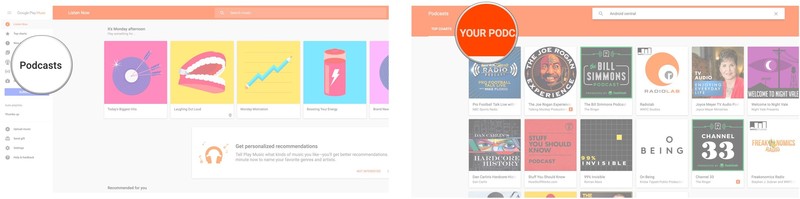
All the podcasts you’re subscribed to will appear here. You can listen to and manage them all from here.
How to share a podcast on Google Play Music on the web
There are a few different ways you can share your favorite podcasts.
How to share a podcast via a link with in Google Play Music
Find or view the podcast you’d like to share.
Click the podcast.
Click the Share button next to Subscribe.
Click Copy Link.
Paste the link wherever you’d like to share it.

How to share a podcast to Facebook with Google Play Music
Find or view the podcast you’d like to share.
Click the podcast.
Click the Share button next to Subscribe.
Click Facebook.
Click Post to Facebook.
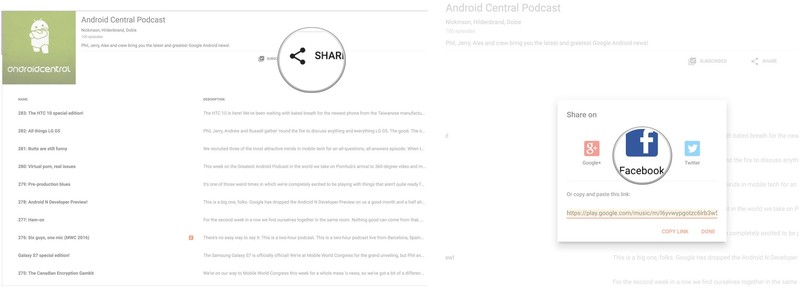
The link for that podcast will now be shared on your wall.
How to share a podcast to Google+ with Google Play Music
Find or view the podcast you’d like to share.
Click the podcast.
Click the Share button next to Subscribe.
Click Google+.
Click Share.
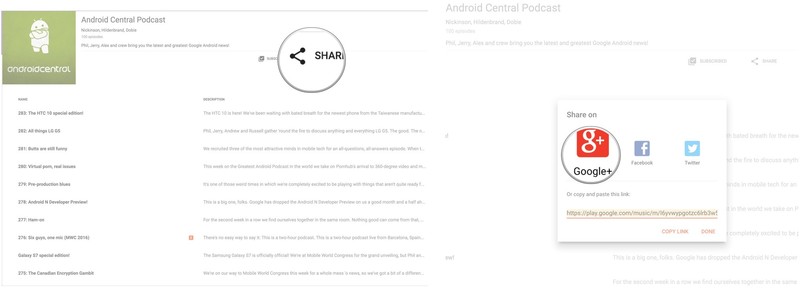
How to share a podcast to Twitter with Google Play Music
Find or view the podcast you’d like to share.
Click the podcast.
Click the Share button next to Subscribe.
Click Twitter.
Click Tweet.

How to share specific podcast episodes with Google Play Music
Find or view the podcast you’d like to share.
Click the podcast.
Click an episode.

Click the episode menu button. It’s the three vertical dots to the left of the episode description.
Click Share.
Share, as described above.

How to listen to a podcast in a pop-up window in Google Play Music in Chrome
If you want to listen to a podcast but still want to search around in Google Play Music, you can listen to the podcast in a separate pop-up. Here’s how:
Find or view the podcast you’d like to listen to in your Chrome browser.
Click the podcast.
Click the mini player button in the bottom right of the screen. It’s a square with an arrow pointing upward and to the right.
Click Install.

Click Add app.
Find or view the podcast again.
Click the podcast.

Double-click the episode you want to listen to.
Click the mini player button in the bottom righthand corner of the screen.
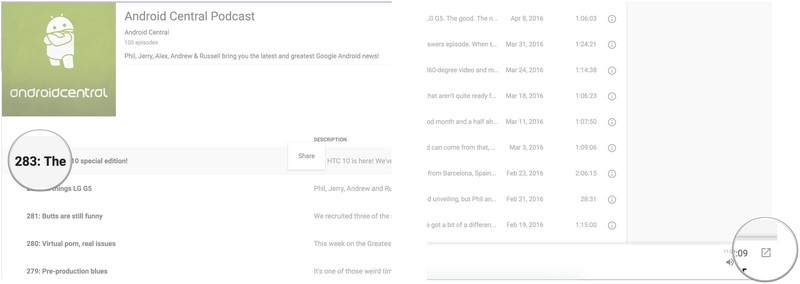
Note: this feature is only available in Google Chrome.
A small pop-up window will appear wherein you can control the episode you’re listening to using traditional music control.
Submit your podcast to Google
Exploding Kittens card game blasts onto Android

Exploding Kittens, a strategic digital card game with art from The Oatmeal, is now available on Android. The game is actually a digital version of a physical card game, in which you try to keep playing by avoiding the Exploding Kitten card.

To play Exploding Kittens, you’ll need two to five players. You’ll take turns drawing and playing different cards, and you’ll need to use each card to avoid the exploding kitten cards. Once you draw one of those, you’re out of the game, unless you have a defense card. While you can play with core deck, you can also purchase expansions in the app itself.
The game supports local and online multiplayer. You can either join an existing match using a code given to you by a friend, or host a match yourself.
Exploding Kittens is available now on the Google Play Store for $1.99
You can now play your favorite podcasts directly in Google Search for Android

The Google Search app for Android is getting an update that will allow users to play podcast directly from search results.

Google says:
To try it out, search for a podcast and you’ll see three recent episodes, a play button for each, and an option to see more episodes. Podcasts are available globally in English. With controls at the bottom of your screen to play/pause, rewind or fast-forward, you’ll be free to browse the web on your phone while you listen — or even turn off your screen. The podcast will keep playing in the background until you’re done.
This new feature comes just a couple of days after podcasts were added to the Google Play Music app. You can check out the official Android Central Podcast in Google Play right here.
 AIVAnet