


Skype’s chat bots come to Macs and the web
You no longer have to be quite so picky about where you chat with Skype’s chat bots. The Skype team has made preview bots available on both the native Mac app and the web, giving you a way to ask AI for assistance on your platform of choice. The experience won’t be much different than what you’ve seen in Windows, but there are two new preview bots to try: Murphy (which finds and creates images to answer questions) and Summarize (which recaps a web page). Give this a shot if you’ve been waiting for first-hand experience with Microsoft’s software helpers.
Via: TechCrunch
Source: Skype
New 12-Inch MacBook Tidbits: 15% Faster, 41.4-Watt-Hour Battery, Refurb Price Drop, and More
Apple today announced the next-generation 12-inch Retina MacBook with several faster tech specs, one hour longer battery life, and a new Rose Gold color option.
The ultra-thin notebook is available on Apple’s online store starting today from $1,299, and from Apple retail stores and authorized resellers beginning tomorrow.
15% to 18% Faster CPU Performance
Christina Warren has shared 64-bit Geekbench results that show the new 12-inch MacBook (1.2GHz configuration) has around 15% to 18% faster CPU performance compared to last year’s equivalent model. The notebook earned a single-core score of 2,894 and a multi-core score of 5,845, versus 2,437 single-core and 5,049 multi-core scores for the previous generation 1.2GHz model.

Primate Labs founder John Poole also shared 32-bit Geekbench 3 results for the new 12-inch MacBook (1.2GHz configuration) that confirms around a 15% bump in CPU performance compared to the equivalent 2015 model. The new 12-inch MacBook earned a single-core score of 2,670 and a multi-core score of 5,252, compared to 2,303 and 4,621 for the last-generation model.
Meanwhile, early BlackMagic disk speed tests have seen write speeds that are up to 80 or 90 percent faster than the write speeds in the previous-generation MacBook. Read speeds are also improved.
480p FaceTime Camera, No Thunderbolt 3 or DDR4 RAM
Initial reaction to the MacBook refresh among MacRumors readers has been mixed, with some appreciating the long-awaited arrival of faster Skylake processors and others disappointed that the notebook continues to have only one USB-C port, a 480p FaceTime camera, and no Thunderbolt 3 or DDR4 RAM.
MacRumors forum member PatriotInvasion writes:
No Thunderbolt 3, no extra USB-C port, and same $1,299 starting price. Ouch. Not what I expected. Let’s see what the MacBook Pros will be like.
My guess is Thunderbolt 3 is overkill for the users this Mac is targeted at, but the starting price point is overkill as well.
12-inch MacBook supporters argue that the notebook was never intended to have such capabilities, nor might those additions even be feasible without jeopardizing its size and price point, and promote the MacBook Pro as a more suitable alternative for expanded connectivity and CPU-intensive tasks.
41.4-Watt-Hour Battery

Apple says the new 12-inch MacBook has an additional hour of battery life for up to 10 hours on a full charge. The improvement was made possible by not only more efficient Skylake processors, but also due to a 41.4-watt-hour lithium-polymer battery. The original 12-inch MacBook has a slightly shorter-lasting 39.7-watt-hour battery that delivers up to 9 hours of power per charge.
– Up to 10 hours of wireless web browsing
– Up to 11 hours of iTunes movie playback
– Up to 30 days of standby time
1.3 GHz Core m7 Upgrade Option
The new 12-inch MacBook is available with a faster 1.3GHz Intel dual-core Core m7 processor as a $150 to $250 built-to-order upgrade option.

The upgrade can be applied to both standard configurations, which offer 1.1GHz Core m3 and 1.2GHz Core m5 processors for $1,299 and $1,599 respectively.
Refurbished Price Drop
Apple has lowered the price of refurbished early 2015 model 12-inch MacBooks on its online store. The notebooks now range between $929 and $1,319 in the U.S. depending on the configuration selected.
The cheapest $929 model features a 1.1GHz Intel dual-core Core M processor based on previous-generation Broadwell architecture, along with 8GB of 1600MHz LPDDR3 RAM, 256GB PCIe-based flash storage, and Intel HD Graphics 5300.
Related Roundup: Retina MacBook
Tag: Geekbench
Buyer’s Guide: MacBook (Don’t Buy)
Discuss this article in our forums
AMD’s New 400-Series ‘Polaris’ Graphics Chips Headed for 2016 Macs
Following up on its rumor of a major AMD design win reported last October, WCCFtech has confirmed via multiple sources that the customer in question is indeed Apple. The latest design win follows Apple’s use of AMD 200/300 series GPUs in the top-end 27-inch Retina iMac and 15-inch Retina MacBook Pro, and is a boon for the chipmaker that has seen its share of the graphics market dwindle over the past several years.
The design wins make mention of two graphics processor families, Polaris 10 and Polaris 11. The former carries a code name “Ellesmere” and is believed to be in the power range that would make it suitable for an upgrade to the iMac. Polaris 11 has the code name “Baffin” and it is believed to be in the power range suitable for an upgrade to the Retina MacBook Pro.

While Apple has limited discrete graphics chips to the top of its MacBook Pro and iMac lines, there would be suitable chips for all but the smallest form factors of Apple notebooks, should the company choose to embrace discrete graphics on a broader array of models.
As we previously noted, the switch to the new Polaris line of GPUs is set to be a significant performance upgrade over the previous 28nm GPUs. Announced by AMD at Computex, the lower-power AMD GPUs are set to be built on Global Foundries’ 14nm process. Through an agreement between multiple foundries, the process is equivalent to Samsung’s own second-generation 14nm FinFET process, which is the successor of the process used for the A9 and A9X featured in the latest iPhones and iPads.

Performance of these new graphics chips from AMD is expected to be double that of their predecessors, measured on a per-watt basis. This is thanks to the large size reduction and performance gains in going from the 28nm node first seen in 2011 for graphics processors to the new 16/14nm FinFET processes. This would certainly be welcome to the Mac lineup due to the increased graphics demands of the high-resolution Retina screens featured in both the iMac and MacBook Pro computers. It is reasonable to expect that Apple would allocate roughly the same power budget as on current models, meaning the 2x performance could be seen by users in some cases.
According to earlier reports, the chips should be ready to ship in consumer products in time for the back-to-school shopping season. It is not unheard of for Apple to receive priority on new chip designs, though WWDC would be the most logical time to expect these new Macs to debut. The future of the Mac Pro is less certain, though there will certainly be suitable high-end chips from AMD manufactured on TSMC’s 16nm process this year.
Related Roundups: iMac, MacBook Pro
Tags: AMD, wccftech.com
Buyer’s Guide: iMac (Neutral), Retina MacBook Pro (Don’t Buy)
Discuss this article in our forums
This portable 7000mAh power bank from VicTec can charge your smartphone with no wires
Portable batteries are a dime a dozen on Amazon.com. They come in a wide variety of shapes, sizes, materials, and charging technology. Most importantly, they all keep you going when you’re away from a wall socket.
Today’s battery I am reviewing is the VicTec 7000mAh portable Qi Wireless Power Bank from Amazon.com.

Specs
- 7000mAh Li-ion
- Qi wireless technology
- Dual USB ports
- Input: DC 5V/2A
- Output: DC 5V/1-2A
- Compatible with devices like the Samsung Galaxy S6, S6 edge, S6 edge+, Note5, S7, S7 edge, LG G4, and Nexus 6
- Dimensions: 5.68*2.76*0.66in
Design and Usage

I’ve been using the Samsung Galaxy S7 edge for about a month now, and one of my favorite features it has is Qi wireless charging.
“Qi (pronounced chee; IPA: /tʃiː/, coming from the Chinese word meaning “natural energy“) is an interface standard developed by the Wireless Power Consortium for inductive electrical power transfer over distances of up to 4 cm (1.6 inches).” – Wikipedia
Wireless charging is great, because you don’t have to worry about cables. You also don’t have to worry which direction to plug them into your devices. Simply place your Qi compatible smartphone, in my case the S7 edge, onto a charging pad or wireless battery and let the two work their magic.
The VicTec Qi Wireless Portable Power Bank runs $25.99 from Amazon.com, and offers 7000mAh of power. To put that into perspective, the S7 edge has a 3600mAh battery which means you should be able to get about two recharges out of it. The battery has a large rubbery “plus” symbol on top that acts as a grip for your device. Two full-size USB output ports sit in the front, with the input microUSB slot in between them. There’s a simple power button on the front as well, with a four LED power indicator off to the left.

Plainly put, the VicTec Portable Power Bank is just like every other battery, yet this one has wireless charging built into it. That makes it special.
It’s incredibly easy to recharge my smartphone with this battery since I don’t need to bring a cable along with me. The power bank does not have fast wireless charging technology, but that is easily overlooked considering the ease of use. I get just over one and a half full charges using this battery – wireless charging is less efficient than wired charging. What is also great is the size of the VicTec battery as it is roughly the same size as my Galaxy S7 edge. It’s extremely pocketable, light-weight and comes with me when I know I need more power.

Conclusion
The VicTec 7000mAh Wireless Portable Power Bank is a bargain at just $25.99. It’s not made from fancy materials like aluminum or glass, but it is well-built for the price. With wireless charging it’s nice to not have to carry cables around with me, but with two full-size USB output ports, I can charge up other devices as needed. Wireless headphones, cameras, smartwatches, and similar devices are all compatible with this battery.
If you have a Qi enabled device, I highly suggest you pick up the VicTec 7000mAh portable battery from Amazon.com.
If you’re wondering what skin I am using on my S7 edge, check out the full review of the Toast skin.
Bite Bite is a simple game of rhythm & patience, but needs more flavor (review)

Remember the children’s game where one player holds out their finger or hand, and can only retract it once the other person attempts to tap it? To pull out early is to risk being called a coward. To wait too long is to have your finger/hand being struck.
While playing it, it takes a simultaneous sense of calm and anticipation to balance the patience and quickness needed to succeed. The anticipation can be overwhelming, making it pretty difficult to keep your composure waiting for the right time to withdraw. If this sounds like a fun trip back to your childhood, I recommend Bite Bite, from the developer Rainbow Shell. You can download here for free from the Google Play Store. After downloading and opening, you can choose to link your Google Play Games account if you so choose.
Gameplay
Gameplay is pretty self-explanatory, though if you need some practice there is a training stage where you can hone your timing skills. Once in the game itself, you simply travel from monster to monster; each has a different look, a slightly different and more challenging array of bite sequences, and an increasing number of successful ‘escapes’ needed to transition to the next monster.
While battling each monster through the requisite number of bites, you have three lives (hearts in the corner of the screen). You hold your finger on your device’s screen, within the mouth of the monster, and wait.
After a random amount of time, the monster will bite down on your finger. You job is to remove your finger before its teeth touch you and you’re ‘bit’ (with a nice little finger amputation animation thrown in). Getting bit once or twice won’t cost you, but after the 3rd bite the bite countdown resets and you begin anew at completing the level. Once you do get through all the bites, that monster is “caged” and you move on to the next.
Overall the levels are not that difficult; it ‘s really a matter of remaining calm coupled finding a sort-of ‘zone’ where you can see/hear/feel/sense the next bite beginning. I did get myself in trouble fighting the 40-bite monster. I was cruising along, but once I crossed the 10-bites-left threshold, I tightened up and quickly burned through my three lives. This is where the addictiveness of the game kicked in; I couldn’t put the game down until I at least finished that level.
 What we Like
- Simple gameplay
- Fun color palette
Room for Improvement
- More bite variety
- More level variety; give each monster a unique personality.
Conclusion
Bite Bite does exactly what it says, and does it well. The only thing is, what it does isn’t all that much. Still, it is a fun game that takes you back to your childhood.
Where to Download
Download from the Play Store.
Roundup: Speck’s case lineup for the Samsung Galaxy S7 Edge
Here at AndroidGuys, we love phone accessories. Cases are the most popular type of phone accessory, everyone seems to have one! Today we’re going to be taking a look at the product lineup from one of the biggest brands in the world, Speck! Speck was gracious enough to send over some of its Samsung Galaxy S7 Edge cases, so let’s get to it!
CandyShell Grip
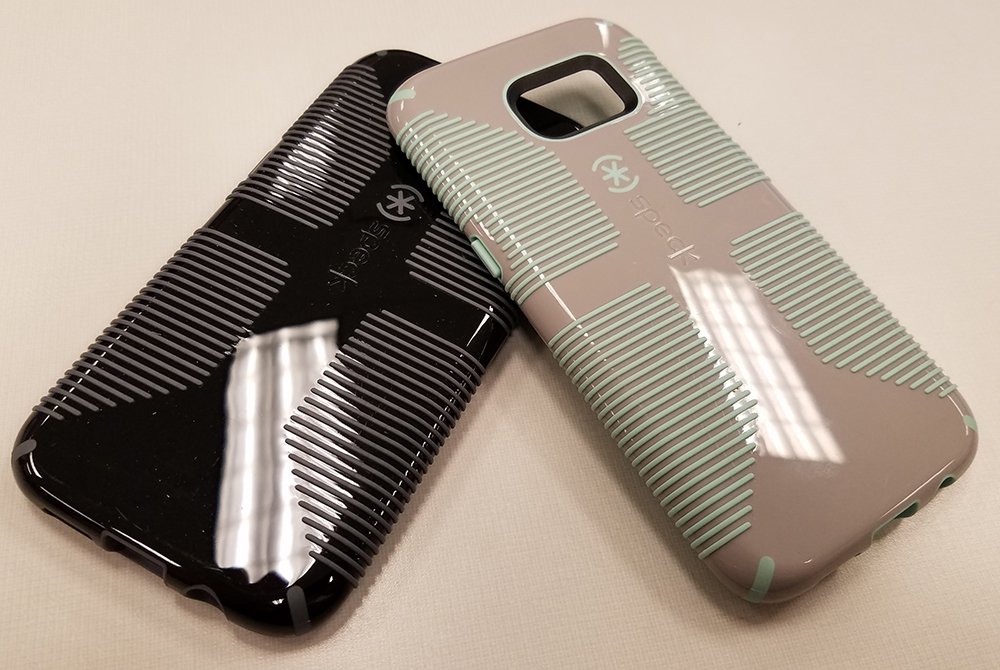
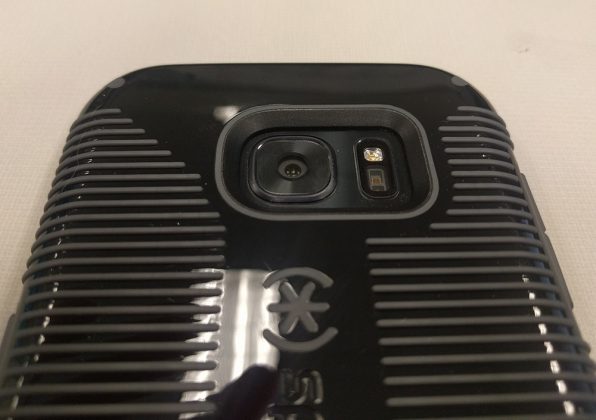
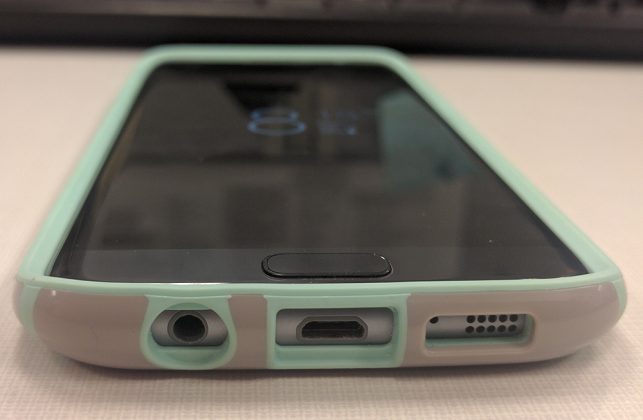
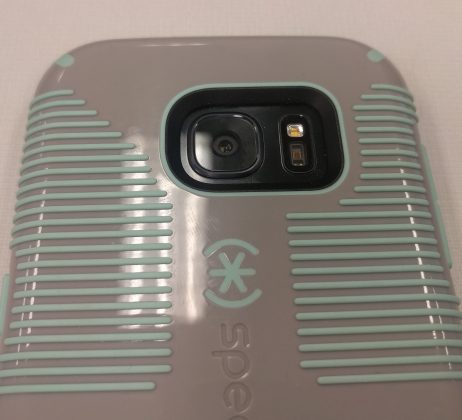
If you recognize the name Speck, the Candyshell Grip case is probably what comes to mind. The raised rubber ridges on the outside of the case are designed to help you hold onto your phone while giving the case it’s iconic look. The dual tone cases come in three color combinations: white with black lines, black with slate gray lines, and sand gray with aloe green lines. They’re all beautiful and can start a conversation.
The Candyshell Grip cases meet or exceed military standard MIL-STD-810G, which is designed to test products falling from various heights. This doesn’t mean your phone won’t ever break while in the cases, but it does mean that it has a greater chance of surviving. Everyone knows it’s possible to break your phone while it’s still in the case if you slam it onto the ground the correct way, so Speck can’t guarantee anything, but I feel much safer with my phone in one of these cases.
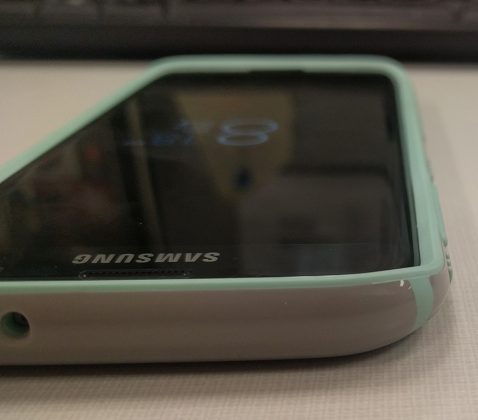
Speck markets the CandyShell Grip cases as “slim” cases, but I’d have to disagree. I suppose it’s all a matter of perspective, but I think they add just the smallest amount of bulk. While it isn’t nearly like an Otterbox case, I did feel like my phone went from the definition of sex-appeal to an instrument meant to carry out tasks. I have a theory that it could be the ridges messing with my perception because the case wall is only 0.16″ thick according to Speck.
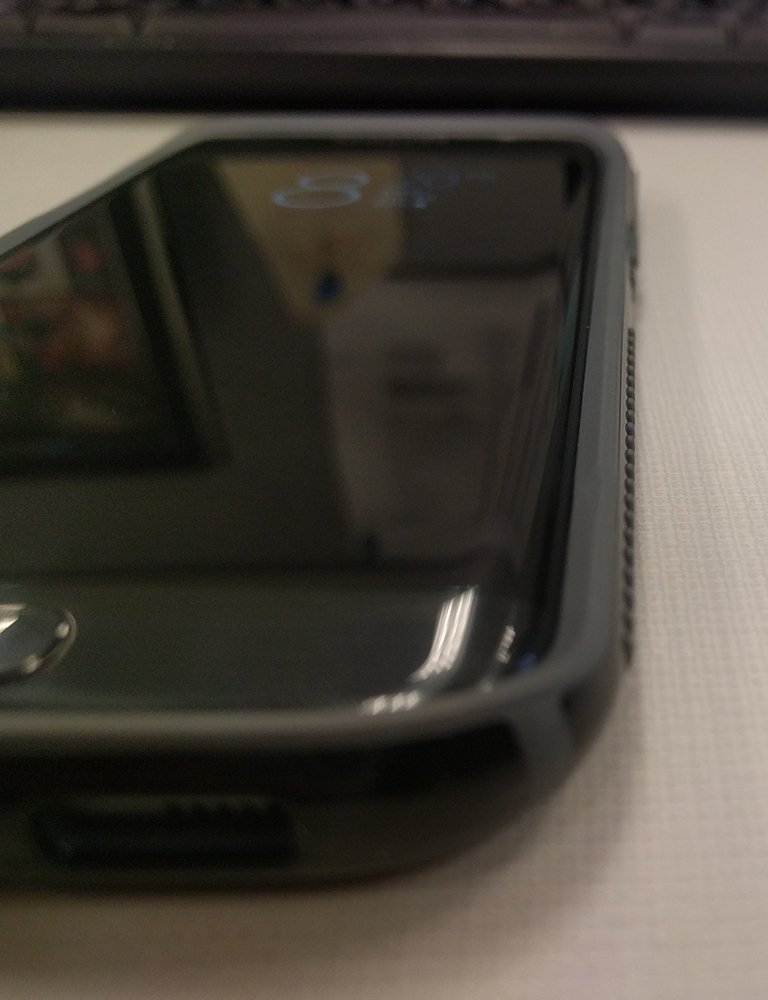
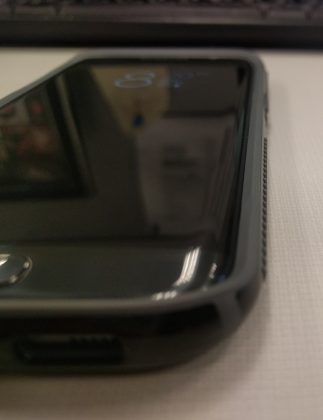
Finally, I’d like to point out a couple of things that Speck absolutely nailed. First off is cutouts. I don’t have to tell you how frustrating it is to not be able to use your favorite headphones or third party charging cable because the cutouts are too small. Ugh. It frustrates me just to think about. Luckily, Speck did a fantastic job there.
One more area I’d like to focus on are the buttons. A phone case that has mushy buttons is pretty much useless to me. Not because it won’t protect the phone, but because I won’t keep it on the phone long enough to protect it!
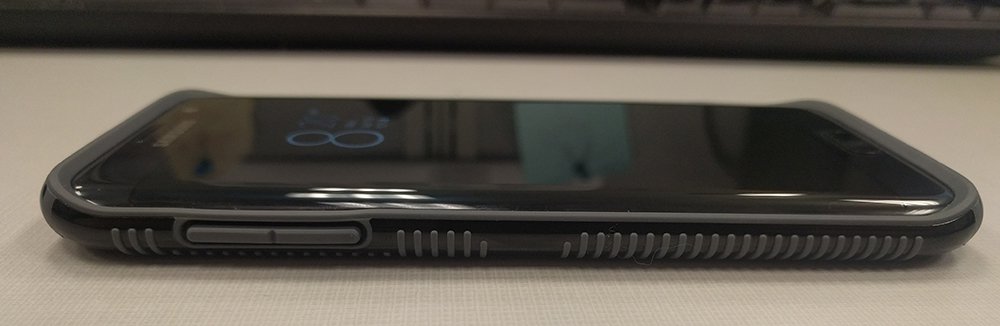
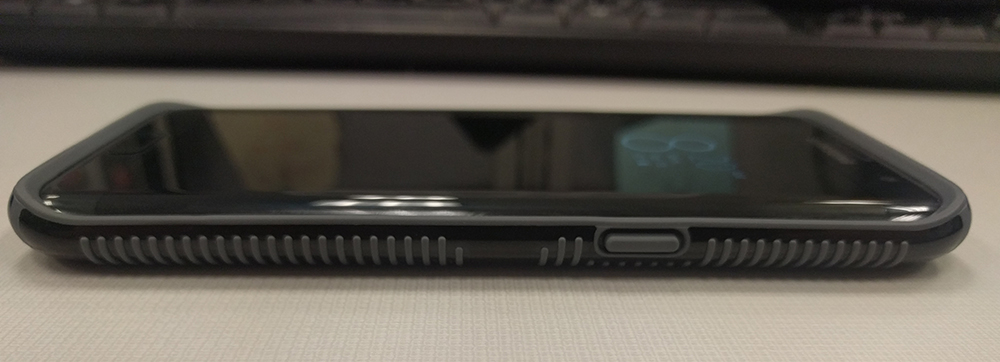
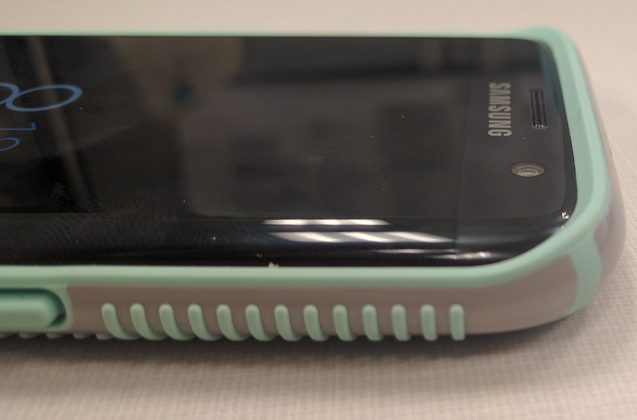
Speck’s CandyShell Grip cases have raised buttons just far enough to move your finger along the side of the case and find the button, but not so much that they stick out an unwarranted amount. Clickiness and travel are both excellent. Speck knocked it out of the park.
1 of 14
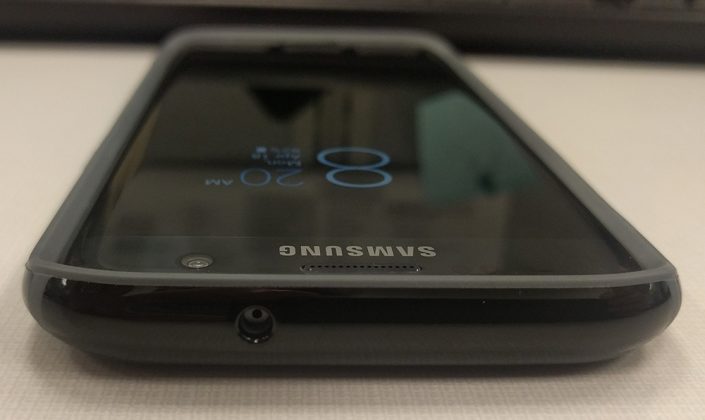
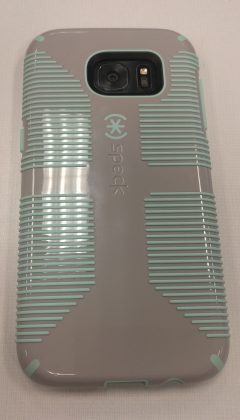
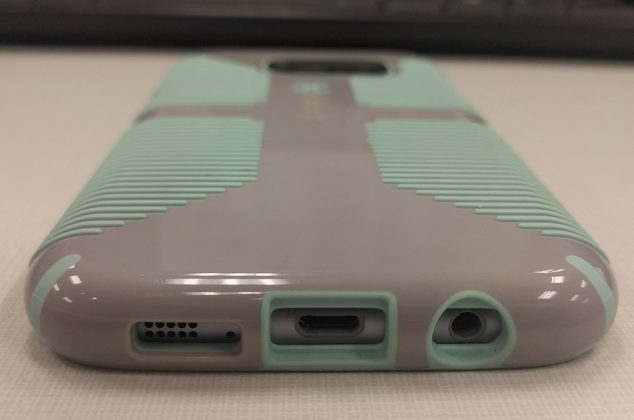
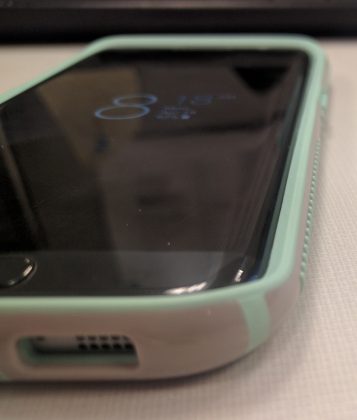
CandyShell Clear
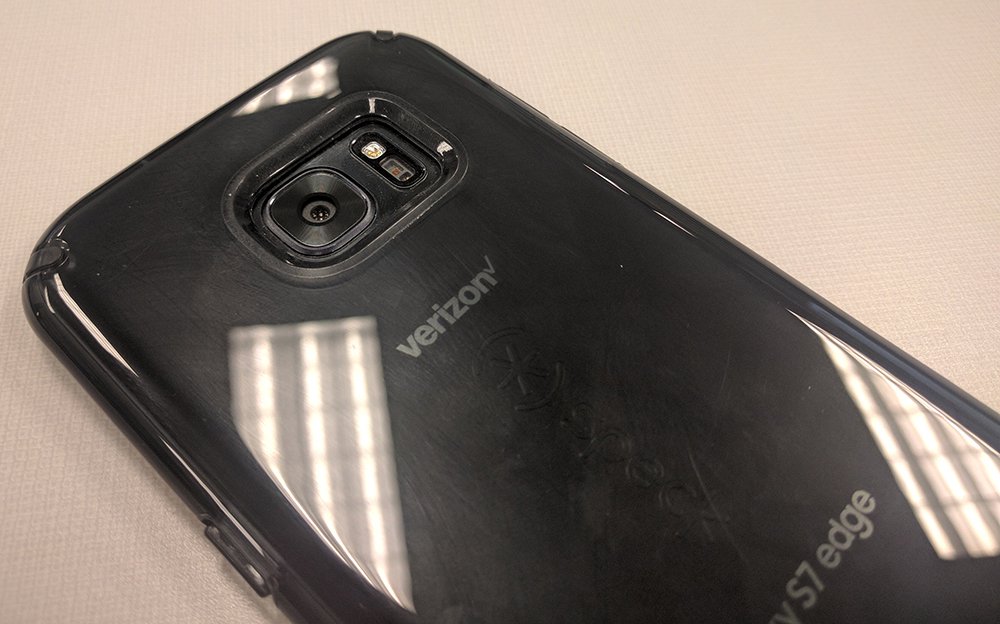
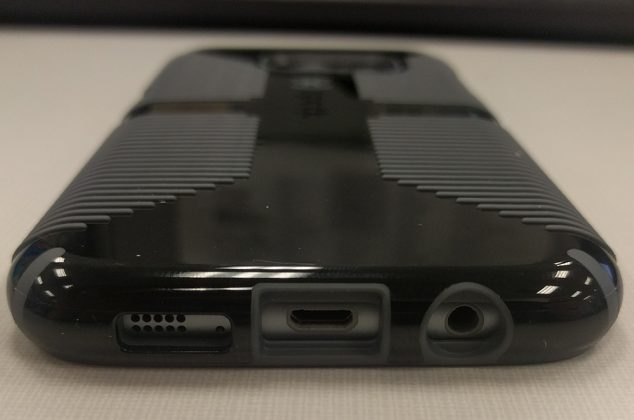
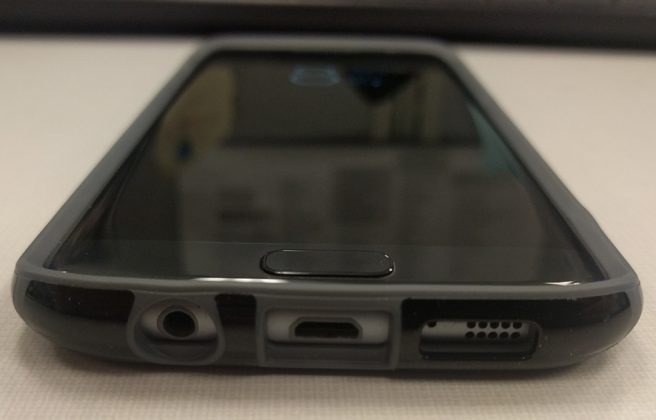
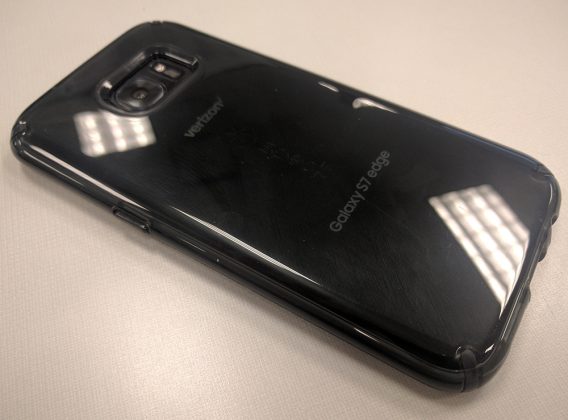
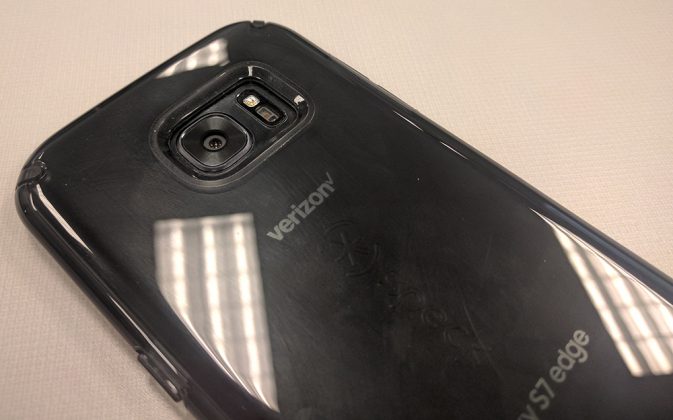
The Speck CandyShell Clear case shares a couple traits with its tougher brother but focuses more on showing off the looks of the phone, rather than showing off the looks of the case. The CandyShell Clear is, as you can guess, a clear case that you can also get in a tinted Black Onyx color (which is what I have).
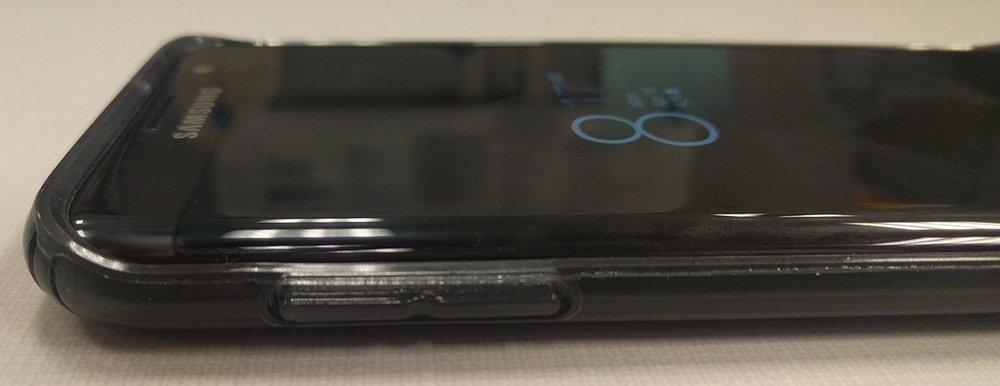
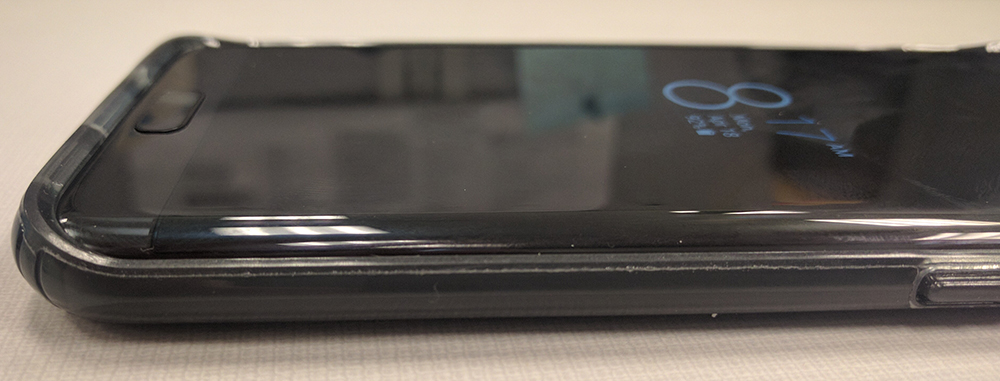
The Clear case also meets or exceeds military standards, just like the Grip. It shares the same thickness (0.16″), clicky buttons and great cutouts. Where the cases differ are in two main categories: no ridges and bulk.
I described the CandyShell Grip as feeling like it adds a little bit of bulk even though it’s only 0.16″ thick. The CandyShell Clear does not have this problem. The Clear actually feels like one of the thinnest cases I’ve ever used. It’s amazing how much perceived thickness the ridges on the Grip add.
Due to the CandyShell Clear lacking those ridges, the aesthetic is completely different. If you bought the Samsung Galaxy S7 Edge due to its sex appeal, this might be a better fit for you in terms of your protection.
The Clear case doesn’t cover up the design, it adds to it. The phone is visible through the case and the Black Onyx blends in perfectly with the color of the phone. Speck nailed it here. Due to the material used, there is still a fair bit of grip added to this case, but not as much as the CandyShell Grip case.
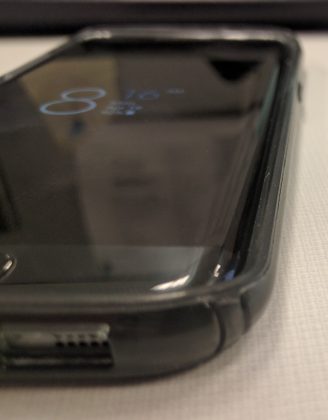
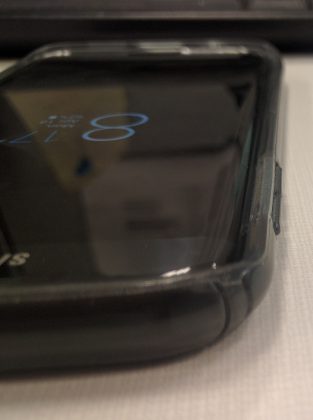
Fingerprints can be a bit of an issue. I definitely noticed that the case picks up some finger smudges (I made sure you can see them in the pictures of the back), and it’s very hard to get rid of them. I generally keep my hands pretty clean due to the work I do, but it was still a bit of an issue with the CandyShell Clear.
Overall, I don’t feel like this is a big enough issue to avoid the case. If you like the aesthetics and drop protection the CandyShell Clear provides, definitely grab one.
1 of 6
Conclusion
Speck has once again proven why it’s a huge name and retailers like B&H Photo and Best Buy carry their cases. Speck doesn’t make the cheapest cases you can pick up on Amazon, and it shows in its quality. The Samsung Galaxy S7 Edge feels like an exceptionally risky phone to own because of all the glass, but I felt safe with mine in these cases at all times.
There are some disadvantages since nothing can be perfect, but the main thing to remember here is that the positives massively outweigh any negatives I could come up with. The cases don’t interfere with edge functionality but still provide grip and protection there.
If you’re interested in picking up any of Speck’s cases, you can check them out at Amazon, Best Buy, B&H Photo, or their website.
HTC 10 review: Iconic, impressive, imperfect

HTC returns in style, with one of the best Android phones of the year so far.
The quick take
After a disappointing couple of release cycles, HTC’s 2016 flagship is a confident return to form, and a reason for high-end buyers to start paying attention to the company once again. This impressive all-rounder gets a lot of important things right — performance, build quality and, for the most part, the camera. And although it’s trumped by the Galaxy S7 in some key metrics, the HTC 10 is arguably the closest competitor Samsung has right now.
The Good
- Well-built aluminum unibody
- Fast performance and clean, uncluttered UI
- Impressive audio features
- Capable all-round camera
The Bad
- Display not great in sunlight
- Camera focusing can be finicky, particularly in macro
- Battery life inconsistent, sometimes wildly so
- Expensive SIM-free price
A return to glory?
HTC 10 Full Review
It’s easy to write off HTC. With its declining market share and shrinking revenue, it’s been some time since it was a major force in the mobile world. Today, the Taiwanese firm is outspent by Samsung and Apple, and increasingly outmaneuvered by leaner upstarts. It’s a small fish in a very big pond.

Nevertheless, HTC’s strong history in design has left many of us with fond memories of the company’s storied back catalog. Phones like the spectacularly ahead-of-its-time HTC One M7, and the beautiful and unique One S, and even the landmark Nexus One stand out as some of the best handsets of their time.
HTC needs a hit now more than ever.
However it’s been a good couple of years since the last real trailblazer from HTC, and competing in the the cut-throat phone market of 2016 demands more than just nostalgia. With diminished resources and brand value, HTC needs a hit now more than ever before.
HTC 10 is what’s hoped will fuel the recovery: A new, simpler brand backed up by a marketing message promising nothing less than perfection across the board. Sure, some of the key ingredients will be familiar to HTC alumni — BoomSound audio, metal construction and an “Ultrapixel” camera. But can a modern interpretation of these tentpole HTC features make a big enough splash — especially when it’s got to go up against the almighty Galaxy S7?
Let’s find out.
 |
5.74 in145.9mm |  |
| 2.83 in71.9mm | 0.11-0.35 in3-9mm |
- Display:
- 5.2-inch Quad HD
- SuperLCD5 Display
- 2560×1440 resolution (564ppi)
- Camera:
- 12MP Ultrapixel 2, ƒ/1.8 lens, OIS, laser AF
- 5MP Ultraselfie front camera, ƒ/1.8 lens, OIS
- Battery:
- 3000mAh capacity
- Quick Charge 3.0
- Chips:
- Qualcomm Snapdragon 820 processor
- Quad-core 2.2GHz
- 4GB RAM
- 32-64GB internal storage
- microSD slot with adoptable storage
About this review
We’re publishing this review after a week with an unlocked European HTC 10 (model 2PS6200 / M10h) on the EE and Vodafone networks in the UK. We’ve been using the phone in Manchester and London, UK, in areas with generally good 4G LTE coverage. Our device has been running software version 1.21.401.4, and it’s been paired with a Moto 360 (2015) smartwatch during most of our testing. Security patch levels aren’t shown in the menus, however the AIDA64 app shows that it’s got the March 1, 2016, patch.
Our review unit is the “carbon gray” color option with 32GB of storage, and we’ve used it with a 64GB microSD card for photo storage and Google Play Music download cache.
We’ve also been using an unlocked North American model for two weeks now, in New York City and Pensacola, Fla. We’ve not seen any noticeable differences between them, and the vast majority of this review is based on our European device.
15 minutes of 10
HTC 10 Video Review

Metal to the max
HTC 10 Hardware
The HTC 10 represents a return to the manufacturer’s design roots. An aluminum unibody with familiar angles and curves, accented by a deep chamfer circling the back, make up a modern interpretation of a classic smartphone design. Aside from the prominent branding on the back, there’s a ton of HTC design DNA here. Everything from the contrast between the lustrous machined trim and the softer matte back, to the trademark antenna bands, is pure HTC.
A modern interpretation of a classic smartphone design — An M7 on steroids.
Veterans of the brand might recognize it as a refined, souped-up version of the company’s past few flagships. Essentially, it has the look of an M7 on steroids.
It’s also HTC’s most ergonomic and easy-to-hold phone in recent years, and all without sacrificing the premium design elements we’ve come to expect. The curved back is a comfortable fit for the hand, while that enormous chamfer — combined with the flat, angled side walls — ensures a steady grip.
The HTC 10 isn’t the thinnest or lightest handset you’ll come across. (Nor, with an enormous metal enclosure, would you expect it to be.) That’s not a bad thing — it’s easy to overstate the value of both properties. What’s more important is a phone which feels sturdy and well-built, and that’s exactly what’s conveyed by the HTC 10’s somewhat chunky unibody and clean, uncluttered glass front. Its overall vibe is more industrial than the sleek, glassy Samsung Galaxy S7, but there’s nothing at all wrong with that.


The rear chamfer shimmers as the HTC 10 rotates through light.
The main decorative feature — that oversized chamfer — may be a little polarizing. But there’s no denying it gives the HTC 10 a necessary visual differentiator in an incredibly crowded field. And when combined with the darker antenna band in the carbon gray model we’ve been using, it works. On the gold and silver models, it’s more pronounced — the chamfer is far more reflective, and makes the phone appear to shimmer as it tilts through different angles of light.

The HTC 10’s rear camera — a 12-megapixel “Ultrapixel 2” shooter which we’ll discuss in greater detail later — protrudes ever so slightly through the metal back, but not enough to cause any real issues in day-to-day use. (In fact, the slight camera bump means the phone doesn’t wobble quite so much when placed on a flat surface.)
Up top, that extravagant metal design is broken up by two engineering necessities — a 3.5mm headphone jack, and a plastic section for antenna reception. It’s easy to ignore on the dark gray model, but stands out a little more in the gold and silver versions.
Meanwhile, you’re looking at a fairly standard port and button arrangement — a textured power key and smooth volume rocker on the right edge, below the nano-SIM slot, and a microSD tray over on the left. Down below you’ll find a USB Type-C cable (supporting USB 3.1 Gen1, which means faster data transfer speeds) alongside one of the HTC 10’s two loudspeakers.


HTC once again brings some serious audio credentials to the table.
Unlike its past few flagships, HTC’s latest does away with the front-facing stereo speakers that had become a staple of the “M” series. Instead there’s a new “BoomSound Hi-Fi” setup consisting of one front-facing tweeter (in the earpiece) and a bottom-facing woofer, each with its own amp, and Dolby lending its expertise on the processing end. Although it functions differently from earlier BoomSound implementations, the results are still impressive — powerful bass, and more volume than you’re likely to ever need without any noticeable loss in clarity.

There is one trade-off, however. Because you’ve got one speaker facing towards you and another pointing downwards, the HTC 10’s output is prone to more distortion when holding the phone in-hand, mainly due to the woofer being so close to your palm or index finger. The effect is less noticeable if the phone is lying flat — as it may well be if you’re playing music.
Of course the phone’s built-in speakers aren’t your only option for music playback. HTC has some serious power behind its headphone port too, with a dedicated amp capable of delivering an output level of 1V, according to the company’s own numbers. And using wired studio headphones, the difference is clear: HTC’s pushing more power than Android rivals like the Galaxy S7.
The company is also keen to highlight the HTC 10’s status as a high-definition audio certified device, with support for 24-bit audio and HD audio earphones bundled in the box in some countries. (Not including the United States, unfortunately.) It’ s a neat addition sure to appeal to audiophiles, if not those of us mainly playing compressed music from streaming services.
Nevertheless, phone audio is important — it’s where many of us listen to music the most. So it’s great to see HTC continuing to pay close attention to audio hardware, even though the days of front-facing speakers seem to have passed.

The display is equally important, of course. It’s a 5.2-inch SuperLCD5 panel at Quad HD resolution, just as we’d expect from a modern Android flagship. Generally speaking it’s a good-looking screen, with vivid colors and ample brightness without appearing excessively over-saturated. (There’s an optional sRGB mode in Display Settings for colorspace purists.) Off-angle visibility is decent too, with only slight color shifting noticeable on our unit at wider angles.
Sadly, wonky auto-brightness and less than spectacular sunlight visibility conspire to make the HTC 10 a little challenging to use in brighter conditions. Like a handful of other phones, including most of Samsung’s high-profile models, the HTC 10 has a display overdrive mode that over-brightens the screen when very bright ambient light is detected. The problem is this doesn’t kick in anywhere near as consistently as we’d like to see. Furthermore, the 10’s screen appears more reflective than Samsung’s latest round of SuperAMOLEDs, so it’s hobbled from the outset.

It’s possible some of these nagging issues with auto-brightness will be addressed in a software update. Even so, the HTC 10 is clearly a step behind the Galaxy S7 and iPhone 6s in outdoor visibility.
But there’s more going on around the front than just the screen. The HTC 10 has a unique new button arrangement built around the capacitive fingerprint scanner, which doubles as your home key. On either side you’ve got capacitive back and recent apps keys which illuminate, Samsung-style, for a couple of seconds when pressed.
In fact the similarity to Samsung’s way of doing things makes the HTC button setup particularly vexing if you’re coming from a Galaxy phone, as the button order is reversed. It’s not a huge thing, but it’s definitely a thing.


HTC nails it once again, with an excellent fingerprint security setup.
The fingerprint scanner itself is among the best we’ve used on an Android phone. Setup is quick and painless, as is using your fingerprint to instantly power on and unlock the phone. Apple’s Touch ID is faster, sure. But we’re talking tiny fractions of a second here. We’ve also noticed fewer fingerprint-related failures in day-to-day use on the HTC 10, compared to Samsung’s sensor on the GS7.
Powering this whole assembly is a collection of parts fit for any high-end smartphone. Qualcomm’s latest Snapdragon 820 chip lurks within, paired with a hefty 4GB of RAM and 32 or 64GB of storage, with microSD expandability. Unlike many rivals, HTC supports Android 6.0’s Adoptable Storage (also known as Flex Storage), letting you directly tag your SD storage onto your internal memory and use it for just about anything. (It’s possible to find apps that can’t save to it, but that’s the exception, not the rule.)
Rounding off the spec sheet. there’s a 3,000mAh fixed internal battery, along with support for Qualcomm QuickCharge 3.0. Unsurprisingly, the HTC 10 also appears to be backwards compatible with QuickCharge 2 in the handful of older chargers we tried.
As a whole then, the HTC 10 is an impressive hardware package — the latest 2016 internals brought together in a beautiful unibody enclosure, with a high-end audio setup, a decent screen and convenient fingerprint security.
Meet the Ice View case
The HTC One M8 in 2014 brought us the Dot View case, the neat dot-matrix flip cover that showed you the time, missed calls, weather and other info through a low-res grid of dots on the front cover.
With the HTC 10, we’re introduced to the successor to Dot View — a higher-res interpretation of the same idea, dubbed Ice View.
Read our introduction to the HTC 10’s Ice View case

Googley Sense
HTC 10 Software
Of all the numerous flavors of Android, HTC has generally presented some of the most coherent UI concepts atop Google’s OS. HTC Sense has been unique yet attractive, with meaningful changes, and not completely removed from Google’s vision of Android.
Then in late 2015, the HTC One A9 pared things back dramatically with a new Sense version — 7.0 G — that included many stock Android elements and design cues in place of HTC’s.
Now on the HTC 10, we’ve got Android 6.0.1 Marshmallow and an all-new version of HTC Sense. The Sense software on HTC 10 doesn’t actually have a version number — at least you won’t find one in the Settings app. Instead it’s advertised as simply “Android with HTC Sense.” And that’s a reflection of what Sense has become in 2016 — a collection of differentiated apps, UI tweaks, under-the-hood optimizations and standout features that complement the Android OS without completely redesigning it.
A 50-50 mix of Google and HTC apps, but a very Googley visual style in the most pared-back HTC Sense yet.
Through a close partnership with Google, HTC has reduced the number of duplicative apps bundled on its new flagship, using its own apps in cases where it makes sense, and in others ditching these offerings in favor of Google’s. So you’ve got HTC’s Sense Home with BlinkFeed, but the Google Calendar app. Sense Dialer, Google Photos — and so on. The overall app mix is about 50 percent Google and 50 percent HTC, but because HTC’s software has adopted a Material Design look and feel, Sense manages to avoid looking like two systems haphazardly tacked together.
When it comes to the overall look and feel, the HTC 10 is way closer to vanilla Android than what HTC One M7 and M8 owners might remember as Sense on their phones. Key elements like the notification tray, quick settings and the Settings app match the “Nexus” software experience almost identically, while the color scheme of the default Sense theme also mirrors that of vanilla Android.

As vanilla as Sense now is, HTC’s comprehensive theming engine remains in place, giving HTC 10 owners endless possibilities for customization of colors, wallpapers, fonts and sound effects. And new in the latest version of Sense, Freestyle mode is a wacky home screen layout that lets you replace traditional icons with stickers, and make your home screens an interactive scene where tapping stickers opens your favorite apps. Being increasingly old and boring, we played around in Freestyle mode for just a few minutes before retreating to the familiar territory of our grid of icons.
BlinkFeed, HTC’s social and news reader, once again gives you a scrolling panel for Twitter updates (but oddly not the preloaded Facebook or Instagram — they need a separate social plugin) and news stories. And the service continues in a similar vein to what we first saw on the One A9, with more prominence given to the News Republic brand. BlinkFeed news stories display in the News Republic app, and customization is handled through that system as well. This means HTC doesn’t need to update this component itself, but with notification nags and account sign-in pop-ups, it’s a definite step back in terms of user experience. (Either way, BlinkFeed is easy to turn off if it’s not your cup of tea.)

HTC has ton of software audio enhancements — with one odd omission.
HTC’s focus on audio extends into its software, too. When playing stuff through the built-in speakers, you’ll be able to choose between music mode and theater mode, which tweaks the EQ levels for different types of content. And when you’re connected to headphones you’ll have four options to choose from depending on the type of headset. Only problem is everything except “Other,” the generic option for all headphones, sounded weirdly muffled to our ears, regardless of which headphones we were using.
Annoyingly, these “BoomSound” software enhancements conjure up a persistent notification whenever any audio or video is playing — including silent videos in Instagram and Twitter. What’s more, the notification pops up even if all BoomSound enhancements are turned off, which is mildly irritating.
HTC’s sound setup also includes the ability to make audio profiles that tune the phone’s output to individual listeners or different audio hardware. This is done either by listening to a series of tones and answering questions, or by telling the software a few things about you (for example how old you are, what kind of music you listen to.) For us, the result was slightly louder output, with a bit more oomph given to the low end.

For all the HTC 10’s audio tweaks and preset modes, the one thing that’s missing is a dedicated software equalizer for setting your own levels. It’s easy enough to download one from Google Play, but for a phone with such a musical focus, it’s an odd omission.
Another software oddity is the “Boost+” app preloaded on the HTC 10, an application which does a handful of useful things — like letting you lock away sensitive apps behind fingerprint security, or tweak games’ performance for better battery life. It can also help clear up “junk” files like old downloads and cached stuff.
Boost+ does some useful things, but randomly clearing apps out of memory isn’t one of them.
But strangely, Boost+ also, by default, sits in the background clearing apps out of memory periodically. It’s not clear why this is necessary — Android’s memory management is pretty good, and in the Linux world free RAM is mostly considered wasted RAM. The only real upside: We didn’t notice any performance difference either way with “Auto Boost” either on or off. So at least it didn’t appear to be doing any harm.

Not that the Sense of 2016 needs any help being smooth and responsive. As you might expect, HTC’s software absolutely flies, and we experienced no instances of stuttering, animation lag or performance bottlenecks anywhere during our time with the HTC 10. Part of that’s surely due to the sheer hardware muscle of current high-end phones, but the manufacturer also claims it’s fine-tuned things under the hood for maximum performance. Given its track record in eking smooth, responsive performance out of less than stellar hardware (like the One A9), we have no reason to doubt it. But it’s arguable that we’re reaching the point of diminishing returns in smartphone smoothness and performance. Though for sure it’s blazing fast, I can’t say the HTC 10 felt noticeably quicker than either the Nexus 6P or Samsung Galaxy S7.
Overall, HTC has employed a lighter touch than ever in its software customizations, and the result is an experience we think will please Android purists and HTC fans alike. It’s fast, it looks good, and the feature set, though not extravagant, brings enough unique stuff to the table to add real value.

A handful of related software bits:
- HTC’s Motion Launch has grown a couple of new useful features, the most helpful of which is a double-swipe down on the screen when asleep to jump straight into the camera app.
- HTC Connect — the feature which lets you swipe up with three fingers to stream content to other devices — now supports AirPlay. In fact, the feature has already rolled out to older HTC phones through an app update.
- The setup wizard on our European HTC 10 gave us the option to install a selection of stuff from a list of “popular” apps. Ostensibly that’s a useful feature that saves you time poking around the Play Store later. But some of the apps on offer here toed dangerously close to bloatware territory. (Money had obviously changed hands to get stuff on this list.)
- The unlocked HTC 10 we reviewed works with EE’s Wi-Fi calling in the UK, however we were unable to get Vodafone’s Wi-Fi calling to work on the device. As Vodafone isn’t planning on ranging the HTC 10, it’s unclear whether there’ll be any official solution here. We also used Wi-Fi calling on T-Mobile in the U.S.
- When it does work, Wi-Fi calling dumps an unsightly persistent notification in your notification tray, which is less than ideal.

Ultrapixels and Ultraselfies
HTC 10 Cameras
If there’s one area in which recent HTC phones have thoroughly disappointed, it’s photography. Through a combination of hardware misadventure and lack of competent software tuning, the M7, M8 and M9 were pretty sub-par cameras compared to their competition.
Forget all that. HTC finally — finally — has a good camera.
It starts with an impressive collection of specs. The HTC 10’s rear shooter is a 12-megapixel “Ultrapixel 2” setup, with the Ultrapixel brand referring to larger pixels on the sensor. HTC’s camera setup has 1.55-micron pixels (like the Nexus 6P), letting each tiny dot take in more light than traditional smartphone cameras, which tend to measure around the 1.1-micron mark. HTC’s paired that beefy sensor with an f/1.8 lens, optical image stabilization (OIS) dual-tone flash and a laser autofocus unit. On paper, then, you couldn’t ask for much more out of a high-end smartphone camera.

Around the front, Ultrapixel morphs into Ultraselfie, with a new optically-stabilized 5-megapixel front facer — the first selfie camera we’re aware of with OIS. It’s got smaller pixels than the M9’s Ultrapixel front-facer (1.34 microns versus 2.0), but the addition of OIS and a higher overall resolution tilts the balance in favor of the HTC 10.
HTC’s Ultrapixel 2 camera is unfazed by most lighting conditions, be they bright, backlit pics or night scenes lit by streetlights.
Technology is one thing, but it doesn’t guarantee you’ll be able to take great pictures. Fortunately, HTC has mostly nailed it with its new flagship’s camera. It’s quick to launch, lightning-fast to capture and reasonably speedy to focus. Crucially, it exhibits none of the metering and exposure weirdness we’ve seen from earlier HTC cameras. With its large pixels and optical stabilization, the HTC 10 is unfazed by darker conditions, and we’ve been able to get some great-looking night shots out of the phone — with one or two caveats.
The HTC 10 is pretty trigger-happy with its ISO levels in darker shots. Compared to major rival Samsung’s Galaxy S7, the HTC 10 tends to crank up sensitivity levels to ensure a steady shot in low light, as opposed to leaning on its OIS and opening the shutter for a little longer. This results in some visible chroma noise in darker shots — although HTC’s camera routinely captured more realistic colors in night shots than the GS7, which gives things a yellowish tint.


Photos from the HTC 10 generally have true-to-life, realistic colors. HTC’s photos appear a little less punchy than Samsung and LG’s more saturated output, but look great in their own right. At the same time, it’s clear HTC isn’t sharpening its images as aggressively as its chief Android rivals, leading to pics that appear a little softer when viewed up close. On the flip side, we sometimes noticed areas of fine detail being mushed out by HTC’s noise canceling and HDR algorithms, an issue that’s less apparent with the competition.
Dependable in most conditions — but HTC’s software occasionally stumbles in macro mode.
But the main point of contention has to do with macro shots, where HTC’s software can get a bit confused. Despite the use of laser-assisted autofocus, the HTC 10 takes noticeably longer to focus on close subjects than competitors, sometimes failing to focus entirely. And on multiple occasions the phone told us the laser was being blocked when trying to take macro shots. All of these small frustrations combine to make a camera that’s just a little bit wonky when it comes to snapping food pictures, flowers or other shots where the camera is close to its subject. Hopefully some of this can be ironed out through future software updates.
Tapping the screen to focus doesn’t set the exposure level, either. The phone instead uses the entire screen to figure that out, and that can be frustrating if you’re trying to highlight something in the foreground, with light coming from behind the subject. While that’ll keep you from blowing out what’s behind, it also means what’s in front may be darker than you want.
Like most Android flagships, the HTC 10 can shoot video at up to 4K resolution, with a time limit attached: in this case, 6 minutes per clip. There’s no such limit when shooting at 1080p, which is the default for the video camera.


OIS, 4K resolution plus high-definition audio makes for an impressive video camera.
Overall, the HTC 10 shoots great-looking video with similar characteristics to its still camera — realistic colors without oversaturation, and a little focus hunting in scenes with lots of movement. Optical stabilization kicks in to make camera movement smooth and shake-free, even when walking with the device in one hand. The phone’s impressive mics, combined with optional high-res audio capabilities, are able to capture a wide range of sounds in louder conditions like concerts or noisy bars.
As for the front camera, HTC’s new stabilized selfie shooter mostly lives up to the hype. In all but extremely dark conditions, it’s able to pick out your mug and successfully focus in on it. And when it is darker, the phone can overdrive the screen’s brightness briefly to act as a makeshift flash. If we were to nitpick, we’d point out that the front camera’s focus seemed a little soft in places. On the whole, however, we have no major complaints.
HTC has also overhauled its camera app, finally including single-tap shortcut keys for flash and HDR. And there’s now an Auto HDR mode — on by default —which does a great job of automatically detecting shots with bright and dark areas. Just about everything else is tucked away slide-out menu over on the left — features like Panorama, Pro mode, which includes RAW capture, and Zoe shot, a combination of burst shots and a few seconds of video. HTC’s camera app also boasts slow-motion video, as well as a built-in Hyperlapse mode for stabilized time-lapse video, both at 720p. And there’s a regular old “settings” menu tucked away in there too, which is a bit of a rat’s nest. Fortunately there’s nothing crucial buried back there.
A big change (and part of this new Google-HTC relationship) is that Google Photos is used as the gallery app. It’s a fully functional gallery app, but it can get a bit busy and confusing, especially if you’re importing photos from other sources into Google Photos. If you just have to use HTC’s gallery app, it’s available in Google Play. Or you’re certainly free to use any other gallery app.
One thing we’d like to see is a faster quick shortcut for launching the camera app when the display is off. It’s possible to double-swipe down on the screen to open the camera, but this isn’t as quick as the double-tap shortcuts we’ve seen on other phones.

Not a perfect smartphone camera, but still a really great one.
This isn’t a perfect smartphone camera. There are minor complaints here and there. There are numerous instances where the Galaxy S7 or iPhone 6s will take subjectively better-looking photos than the HTC 10, mainly because of Samsung and Apple’s lead in image processing. But equally — particularly at night — there are times when the HTC 10 will come away the better-looking shot.
HTC has come a long way in the past year, and we’re way more confident in the HTC 10’s photo capabilities than any of the company’s previous phones. This is a camera worthy of being mentioned in the same breath as the Galaxy S7 — even if there are still some software issues to be worked out.

A ‘one day’ phone
HTC 10 Battery Life
The HTC 10 comes with a fixed 3,000mAh battery, with Qualcomm QuickCharge 3.0 support, and a unique charger from HTC. In addition to Qualcomm’s latest rapid-charging tech, the plug incorporates power management circuitry from HTC in order to regulate current in the brick itself, as well as integrated surge protection. (Perhaps in an effort to avoid damage to the phone or the charger if a dodgy USB-A to C cable is used.)

Rapid charging is a hugely important feature for a high-end smartphone, allowing a dead handset to quickly return to life with a reasonable amount of charge. HTC claims the 10 can go from zero to 50 percent in 30 minutes, and our real-world experiences back this up.
As for battery life itself, it’s been something of a mixed bag. Longevity hasn’t been poor per se, more inconsistent — and sometimes wildly so. Indoors on Wifi, the phone sips power. Outdoors on LTE, it can guzzle juice alarmingly quickly. This isn’t a universal trait. Some days, even on LTE, the phone would easily last us to the end of the day. But on other occasions we’d hit the 50 percent mark in just a couple of hours.
Ignore the hype: There’s no way you’re getting two days out of the HTC 10.
Following a week of use, battery life seems to have stabilized somewhat, and we’ll update this review with any long-term findings.
That said, on a typical day we were getting between 12 and 14 hours out of the HTC 10 with mixed, moderate-to-heavy use on Wifi and LTE, both indoors and outdoors. That consists of browsing in Chrome, chatting on WhatsApp, Slack and Hangouts and streaming music through Google Play Music, along with capturing a few dozen photos. Nothing to sniff at there, but it’s a far cry from the vaunted “two-day” battery life proclaimed in HTC’s marketing materials.
Bottom line: Expect battery life that’s passable — decent, even — but nothing spectacular. Certainly nothing near the two days HTC claims in its marketing material (which undoubtedly makes heavy use of the software-enabled power-saving features.) Even so, the bonus of rapid charging with the bundled plug makes it easier than ever to translate a brief time on charge to a meaningful boost in battery level.

The bottom line
Should you buy the HTC 10? Yes
The HTC 10 is unquestionably HTC’s best phone ever. It’s also a great Android phone in its own right, with an attractive metal unibody, top-notch audio credentials, fast and uncluttered software, speedy fingerprint security and a camera capable of taking great photos.
Even in the areas where it doesn’t shine so brightly — the distinctly one-day battery life, and the display that’s unspectacular in daylight — there’s nothing it’s straight-up bad at. Is it a “perfect 10?” Probably not. But then what is?
The HTC 10 doesn’t exist in a vacuum — HTC will be asking for flagship money in a world where the Galaxy S7 exists.
The biggest issue here is that the HTC 10 doesn’t exist in a vacuum. HTC will be selling the 10 for flagship smartphone money in a world where the Samsung Galaxy S7 exists. It’ll be dropping a great phone into a veritable ocean of great phones.
Samsung has set the bar really high this year with two truly excellent handsets. This is what you get when a corporate giant pours its enormous resources into making the best smartphone it can. By comparison, HTC doesn’t have the vertically-integrated tech, or the scale, or the financial might of its major rival. It’s not even close to being a fair fight.
Nevertheless, this is the comparison HTC invites with its claims to perfection.


And this leads into what in my view is the HTC 10’s Achilles’ heel: The areas where HTC actually truly beats Samsung are so very few and far between. The speaker’s a bit better. It can drive headphones with more power. You’ll get more accurate looking night shots, sometimes. The software is somewhat closer to stock Android, if that’s your thing. Even build quality is mostly a question of personal taste — do you prefer glass or metal? By contrast, Samsung can point to its its superlative displays, wireless charging, water resistance, VR integration and, in the case of the GS7 edge, market-leading battery life.
A worthy challenger, if not quite the very, very best.
The HTC 10 is nevertheless a phone that deserves your consideration, and potentially your money too. And given that LG’s G5 seems to have fallen flat, it’s probably the closest competitor Samsung has right now. That the HTC of 2016 can create a phone like this is impressive, and a reason for its continued relevance.
Depending on how things play out in the months ahead — and how well HTC’s marketing is received — this phone could emerge as the de facto alternative to the Galaxy S7. Ultimately, that’s what the HTC 10 is: a worthy challenger, if not quite the very, very best there is.
24 hours in the Oculus Rift

The enemy pilot that has been on my ass for the last 45 seconds finally caught up to me.
It was my own fault. I ran out of debris when I cut left instead of right, and now there’s nowhere for me to hide. Alarms are going off all through the cockpit, cracks have formed across the glass canopy, and I’ve just burned through my countermeasures. There’s no way out of this, and just as I start rotating the ship to face my enemy head on, everything explodes. Glass flies inward toward me, and then all of the air in the cockpit is sucked out into space.
In the real world, I exhale deeply and my heart rate increases. It happens every time I die in Eve: Valkyrie, and it’s the first of dozens of times my body has reacted physically to something I’ve seen in the Oculus Rift CV1.
VR hardware is nothing new, but this generation’s efforts in head tracking, higher resolution displays, and pricing that works in some but probably not enough homes has created a compelling place to play. In many ways, the current rush in VR started in promises made when future owners clicked on the Oculus Rift Kickstarter for the first time. An immersive environment for games, compatibility with the Xbox One, and a whole new world for video experiences were at the top of the list, and even as far back as the first developer kit it was clear Rift was going to be something special. Two years and several revisions later — not to mention a separate mobile partnership with Samsung — it’s clear the early vision for the hardware capabilities of the Oculus Rift has been realized.
The most important things for Oculus to have accomplished with the retail Rift are ease of use and a healthy selection of launch content. The former Oculus has mostly nailed. Out of the box, it couldn’t be more clear what you’re supposed to do with the Rift. Plug in the cables, follow the simple step-by-step instructions on the setup guide linked in the box, and put the headset on.
Oculus is a big fan of telling people you can put the headset on like a baseball cap, and for the most part that is true. If you wear glasses you’re going to want to put the headset on eyes-first instead of the way the instructions tell you, and the fit is more than a little tight — weirdly less comfortable than using the Samsung Gear VR in fact — but it works. Once the headset is set on your head correctly, the eye adjustment tool is easy to use and effective. The headset sits on your head without resting on your nose, depending on the shape of your face. If you’ve got a slender nose, you’ll find you can stare down your nose into the real world, which also causes a little bit of light bleed in virtual reality itself.
Playing a game is clearly the main event, and that part works amazingly well.
A few hours into use, and one thing that is clear about the design of this headset is a need for nearly constant cleaning. Dust on the lenses, skin particulates after letting someone else use it, and fingerprints everywhere will have you scrambling for alcohol wipes and microfiber cleaning cloths. Curiously, Oculus doesn’t include anything in the package for cleaning. Most of the rubbery surfaces are easy enough to wipe out, but the IR-friendly cloth around the outer shell is going to collect anything and everything. The same is likely true of the velcro straps over time, though that’s unlikely to be a problem unless you’re constantly adjusting.
Similar to what we’ve seen with the Samsung Gear VR, Oculus has built a virtual environment with a friendly menu system to explore. The wall of content is broken out into a couple of simple groups, with large icons and text so you’re not squinting to see what’s going on. The virtual environment is currently a futuristic apartment, with you at the center on a large rug with books and a fireplace surrounding you. The content wall is filled with games, but few of them will be immediately familiar to most. Eve: Valkyrie and two other games are available immediately to install, but if you’re looking for a big familiar name from traditional PC or console lineups you’ll be disappointed. That’s not to say there aren’t plenty of interesting things here, they’re just unfamiliar. What does seem to be missing are video apps. The Oculus-powered Gear VR has dozens to choose from, including Hulu and Netflix. It’s possible these apps are delayed or require different licenses to work with the desktop hardware out of a browser, but it’s strange to see them missing.

Installing a new game through the Oculus environment is currently a little on the frustrating side. You hit the install button with your included Xbox One controller, and when it is finished you’re told to remove the headset and complete a “final installation” on your monitor. This means removing the headset, clicking a single button on your PC, and putting the headset back on. With Eve: Valkyrie, this happened a second time after installation so you can link your Eve and Oculus accounts. This process feels unnecessary; rendering the desktop in VR for you to click that one button would be trivial, and would put significantly less work on the user. There’s even a Virtual Desktop app you can install from Steam to do exactly this, but it’s not available out of the box and installing third-party software requires navigating through Settings to enable the option.
Playing games is clearly the main event, and that part works amazingly well. Head tracking is incredibly smooth in every title we tried, but head positioning is a little more finicky. There’s a button in the Oculus quick menu for re-positioning yourself in the game, and it is frequently used at the start of Eve: Valkyrie. Games that recommend standing or sitting state it clearly, and getting those two confused is a great way to fall down or become nauseated, but the overall experience is fantastic. Visually, Oculus has delivered.

The level of immersion is exactly what we’ve come to expect from all the demos we’ve had so far with the developer hardware, but the inclusion of headphones is something new. The simple padding hides how capable these headphones are, as they look a little on the cheap side at first glance. Positioning them correctly over your ears is a great way to feel completely immersed with decent audio, but if you’ve got over-the-ear headphones you prefer you’ll probably want to swap them out quickly.
The transition from Oculus Rift Developer Kit to the now shipping CV1 version of this generation’s first big VR headset has been a long and exciting process. There aren’t many opportunities to watch a company and their first product grow and change over time, and that’s exactly what we got with the Oculus Rift as it moved from Kickstarter to trend starter. Now that we’ve finally had some time with the retail version of this VR headset, it’s a lot easier to appreciate the journey so far and at the same time feel excited about the accessories and software that are on the way for this headset.
Airbnb’s new iOS and Android apps promise to help you live like a local
Airbnb CEO Brian Chesky just took the stage at a lavish event held in the company’s San Francisco headquarters to introduce new apps for iOS and Android that he says are a reflection of the company’s philosophy to let its users “live” in the places the visit, not just view them as tourists do. “We asked people what the number one reason they travel on Airbnb, 86 percent said they want to live like a local,” Chesky said. The new apps are meant to further that goal and keep people from cookie-cutter “drive-by tourism” — what Chesky said you get when you just follow a guidebook or TripAdvisor recommendations.
The new apps further this goal in three ways. The first is a new “matchmaking” system to help you find hosts that fit with you. Furthermore, it helps the hosts hone in just the type of people they want staying in their home, as well. “Every time you do a search, we learn more about you,” Chesky said, “and through machine learning the searches become better, higher quality and more relevant to you.” What data specifically Airbnb is using to match you with your hosts isn’t entirely clear yet, but the idea is that everyone who searches on Airbnb will get different results based on their profile and history.
That idea extends to the next major new part of the app, the neighborhood matching system. Much like hosts, every time you search you can tell the app what types of neighborhoods you’re looking for (central, walkable, family-friendly and so forth) and it’ll return results based on those criteria. The program includes with 691 distinct neighborhoods in 23 cities, all covered with pretty excellent photography to give you a feel of what the place it like. When you view a particular neighborhood, you can scroll down to see places to stay based on the criteria you’ve entered.

It’s worth nothing that Airbnb launched its neighborhood system way back in 2012, but now it’s directly integrated into the app itself. Presumably, as you use the app and its neighborhood system, it’ll get better at recommending places for you to stay. The company has touted its massive data set in the past as a way to help hosts get more bookings, and it seems like that data will also be used to make the guest experience better as well.
The last component of the app sounds like the most useful — host-created guidebooks will now be integrated right into the app. At the neighborhood level, you’ll get to see what local hosts recommend as the best things around for travelers to check out. It definitely sounds like the kind of thing that’ll further Airbnb’s goal of helping its users feel more integrated into the city they’re visiting.
It sounds like these new apps are just the tip of the iceberg for Airbnb’s mission to make its users feel more like locals, as well. Chesky ended his presentation with a quick video and a tease of a November announcement that would take Airbnb “beyond the home” — it sounded a lot like he was teasing a broad rollout of the Journeys pilot program that the company started last fall. For now, though, these new apps will have to suffice.
 AIVAnet