


Falcon Northwest Tiki review – CNET
The Good Insanely powerful, thanks to the very high-end parts in this configuration, yet still compact enough to not hog your desk. Expert construction, a sturdy chassis, and a clean understated look.
The Bad Very expensive, even configured with lower-end parts. The internal components aren’t as easily accessible as in a standard tower. New high-end graphics card hardware may (or may not) be right around the corner.
The Bottom Line The Falcon Northwest Tiki is the most powerful, and most expensive, VR-ready PC we’ve tested to date.
Buy direct from Falcon Northwest.
There is no shortage of desktop PCs (and even a handful of laptops) that meet the minimum specs required for the first generation of consumer virtual reality headsets. Both the Oculus Rift and HTC Vive ask for recent Intel Core i5 or i7 processors, either an Nvidia 970 or 980/980ti graphics card, plus the right combination of RAM, video outputs and USB inputs (parallel requirements for AMD-based CPU and GPU are just as strict).
Easy enough, if you’re willing to spend $1,200 or more, but most of the desktops we’ve tested that fit the bill are gaming rigs in the most classic sense of the word. That means they’re big, they’re heavy and their designs lack a certain cosmopolitan flair. (That’s if we’re being generous. If not, we could say they look like big dorky gaming machines.)
 View full gallery
Sarah Tew/CNET
Fortunately, a handful of companies have managed to squeeze the required hardware into much smaller, more attractive boxes. Of the VR-ready desktops we’ve looked at, Alienware (owned by Dell) offers a reasonably priced X51 mini-tower at the low end of the spectrum; and we tested a midrange, midprice version of the excellent Origin PC Chronos (which includes clever removable magnetic rubber feet). But the most powerful VR-ready PC we’ve tested to date is the Falcon Northwest Tiki, a mini-tower desktop that manages to fit in more powerful components and more storage than we’ve seen in any of the full-size desktops in our VR-ready lineup.
Of course, it’s also the most expensive. This benchmark-crushing configuration costs around $4,900 in the US (that’s about £3,434 and AU$6,376, but non-US orders will have to contact the company for a custom quote), and includes an extreme edition Intel Core i7-5960X CPU, Nvidia GeForce GTX 980ti graphics card, and a very fast 512GB PCI Express SSD plus a whopping 6TB of standard hard-drive storage. Note that as component prices shift, the exact cost of any build-to-order PC can move up or down a bit. If you stick to parts at the lower end of the required VR spec, the price can get down to around $2,000, but at that point, you might as well opt for something like the entry level Asus or Alienware $999 (after bundled Oculus discount) specials.
SYSTEM NAME
| $4,900 (approx.) |
| 3GHz Intel Core i7-5960X |
| 16GB DDR4 SDRAM 2133MHz |
| 6GB NVIDIA GeForce GTX 980 Ti |
| 512GB SSD + 6TB 5700rpm HDD |
| DVD Burner |
| Microsoft Windows 10 Pro (64-bit) |
If you’re serious about VR, and are ready invest in a $600-$800 headset, plus a compatible computer, it’s worth thinking about future-proofing. The base Core i5/GeForce 970 combo should run any of the first wave of Rift/Vive experiences at the required 90 frames per second per eye, but most of those games are fairly simple experiences, in many cases little better than demos. What happens when the next generation of VR games, or the one after that, comes closer to top-end PC game graphics? To run those future experiences at 90fps, you’ll need a very powerful machine, and that’s why it may make sense to buy for next year’s games, rather than the ones available right now.

View full gallery
Sarah Tew/CNET
Keep in mind, however, that the current generation of Nvidia graphics cards has been around for almost two years, and an update is widely expected sometime later in 2015. What that might mean for VR is unknown, but a GeForce 980 or 980ti is going to be more than good enough for high-end gaming for a good while to come.
The Tiki reviewed here came with a custom blue paint job, which adds a hefty $375 to the cost (but it’s got an automotive-like shimmer and looks great). The heavy aluminum base is painted to match, and provides a major point of design differentiation between this and the Origin PC Chronos, another mini-tower VR-ready PC. The Chronon sits on removable magnetic rubber feet, which allows it to shift between vertical and horizontal setups. While the Tiki can’t lie on its side with the base attached, it does anchor the system, and prevents anyone from accidentally knocking it over, as one might conceivably do when tethered to a vision-obscuring virtual reality headset. Both designs have their advantages.
D-Link DKZ-201S review – CNET
The Good D-Link’s $250 Komfy Switch with Camera — model number DKZ-201S — makes it easy to control two light switches and see what’s happening in a room via a built-in 1080p camera. The related iPhone app is a simple access point to these functions and more, including motion and sound detection, as well as the current energy consumption, ambient temperature, humidity, light and air quality. It also has an IFTTT channel.
The Bad This pricey product’s faceplate feels a little flimsy and it’s large, meaning it won’t fit comfortably in every existing switch cutout. The Komfy’s software only supports iPhones right now and I experienced some phantom alerts.
The Bottom Line The D-Link Komfy Switch with Camera merges lighting control with home security quite seamlessly and discreetly — and the environmental sensors are a welcome bonus. Consider it as a standalone security product in any area you’d like to watch more closely.
We haven’t had a whole lot of luck with D-Link’s smart-home products in the past. Its first-gen Wi-Fi Smart Plug was extremely difficult to set up and use and its Pan and Tilt Day/Night Network Camera didn’t really work at all. Things shifted slightly in D-Link’s favor with its comically ginormous, but mostly functional Full HD 180-Degree Wi-Fi Camera.
But its latest product, the $250 Komfy Switch with Camera (model number DKZ-201S) is something I can comfortably recommend. Believe me, I’m a little surprised too.
35 connected cameras for a safer smart home…
See full gallery


1 – 5 of 36
Next
Prev
Overall, the Komfy works well and offers all sorts of features for your money:
- 1- or 2-gang light control (that’s up to two lights on the same switch plate)
- Auto-on/off scheduling
- 1080p live streaming
- Optional fee-based cloud storage, a microSD card slot (up to 64GB)
- Motion and sound detection
- Ambient temperature, humidity, light and air quality readings, energy consumption stats
- A related IFTTT channel (but no other smart home product or platform support)
Related Links:
- This so-called smart plug should be held back
- No distortion here — D-Link’s 180-degree camera is fisheye-free
- The nIFTTTy Belkin WeMo Switch + Motion reviewed
- 14 switches and sockets fit for a smart home
The downside, of course, is that you’d have to shell out 250 bucks (it’s available for $210 on Amazon right now) for a light switch when you could spend just $200 on a Nest Cam or some other 1080p live streaming camera with more mobility. D-Link’s Komfy is also limited to iPhones, automatically rendering this product useless to Android users.
At the same time, the Komfy is comparatively more discreet — way more discreet than the brand’s own massive 1080p camera — and packs in extra functionality when you consider all of the included environment sensors.
It looks nice, too. The Komfy Switch has simple black or white plastic face- and wall- plates that snap on easily after installation. Installation is a bit trickier, though. That’s mainly because it involves electrical wiring and if you aren’t comfortable in that realm, you should absolutely check with an experienced friend or hire a professional to handle this part. The Komfy is also larger than your standard switch and might not fit in the electrical cutout as easily as your previous model.
The video below is a tutorial for installing a similar product, the Belkin WeMo Switch. It will give you the gist of what’s involved, but is slightly different than the Komfy install, especially if you’re connecting two switches. Just make sure you switch the lights, fan or other device off at the circuit breaker before starting any electrical project.
Read the full Senate bill requiring encryption backdoors
If you were skeptical that polticians would be so audacious as to propose a law effectively requiring encryption backdoors… well, you just got proof. The Senate has released a finished version of Richard Burr and Dianne Feinstein’s Compliance with Court Orders Act, which demands that companies either produce data in a readable format when asked or else offer whatever help they can to make that data accessible. Despite the early uproar, little has changed between the draft and the finished bill — the only big difference is that it explains which crimes can invoke the requirement.
>Burr-Feinstein Encryption Bill by The Daily Dot
As such, it doesn’t really solve the core problems that civil liberties advocates have with the bill. By mandating that companies decrypt data on request, the bill effectively demands that companies accept permanent security vulnerabilities that anyone can exploit, not just well-intentioned law enforcement. It also ignores the likelihood that determined criminals would switch to non-US technology to escape detection, or the possibility that backdoors would could lead to lost business deals as foreign customers refused to run software they know will be easily susceptible to hackers and spies.
The good news, as before, is that the bill may not get anywhere. The White House isn’t backing the measure (possibly due to a mix of political deadlock and an election year), and numerous relevant experts (including the NSA’s director) believe that strong encryption is important. As worrying as the act might be, the odds of it becoming law are currently quite small.
Via: Daily Dot
Source: Scribd, Eric Geller (Twitter)
How to watch the Warriors game tonight online – CNET
Two decades ago, the Michael Jordan-led Chicago Bulls finished the NBA regular season with 72 wins against only 10 losses. It’s the best regular season record in NBA history. In fact, no other team has won 70 games in a regular season, until this year’s Golden State Warriors who, in their final game of the regular season tonight, have a chance to break that record and finish the year with a 73-9 mark.
If you want to watch Steph Curry and the rest of the Warriors go for win no. 73 tonight against the Memphis Grizzlies, here’s what you need to know:
When: 10:30 p.m. ET
Where: Oracle Arena, Oakland, California
How to watch: ESPN on your TV or the WatchESPN app on your phone, tablet or browser

Screenshot by Matt Elliott/CNET
The problem with the WatchESPN app is that it requires you to enter credentials from a participating cable or satellite provider. Once logged in, however, you can watch the game via the WatchESPN app on Android and Kindle Fire, iOS and Apple TV, Amazon Fire TV, Windows 10, Xbox One, Chromecast and Roku.
Fear not, cord cutters! You, too, can watch tonight’s potentially historic contest. Sling TV is currently offering a free 7-day trial, and among its many offerings is live sports on ESPN. To start your free trial, you will need to provide an email address and credit card number. And if you are signing up only to watch the Warriors tonight, then you will need to remember to cancel your free trial before your $20-per-month subscription begins.
Lastly, while you are watching the Warriors tonight, you can switch over to ESPN2 to watch Kobe Bryant’s final game and the Los Angeles Lakers go for win no. 17.
Best cheap Android tablets

You don’t need to spend a fortune to get a good Android tablet any more.
You’ll always have the high end, the high asking prices and the people who are willing to pay for them. But for many, just getting good hardware, a great experience and not emptying your wallet is the most important set of factors in buying a tablet.
The Android tablet space has exploded in recent years and there are now some great choices to be made around the $200 price point and below. Here we’ve rounded up some of the best choices you can make.
NVIDIA Shield Tablet K1

Not just cheap, but the best you can buy. Period.
Pros
- Powerful internals
- Near stock software
- Great for gamers
Cons
- No charger included
- Gaming experience requires an extra spend to get the best out of it
The Shield Tablet is a gaming powerhouse featuring NVIDIA’s cutting edge 2.2 GHz Tegra K1 processor. Forward-facing stereo speakers offer quality sound, and the now optional stylus opens up helpful functionality for day-to-day usage. But the Shield Tablet’s software is what really sets it apart. Built right into the notification tray, for example, is the ability to stream what’s on your screen to Twitch. Remote access software combined with the optional hardware gamepad allow you to play games that are running on your PC.
Alternatively, the Geforce Now cloud gaming service lets you do the same with games and computers hosted by NVIDIA. The Shield Tablet K1 recently received a mild refresh over the original, changing the exterior styling a little but more importantly reducing the price by $100. You no longer get a charger or the stylus included in the box, but the savings do give you enough extra cash to pick up the cover and controller. Which you really want if you’re going to use the Shield to its fullest.
Even for those that aren’t hardcore gamers, the NVIDIA Shield Tablet is a powerful tablet and is priced extremely competitively. And the recent update to Android 6.0 Marshmallow is excellent, and the Shield Tablet K1 is now the best Android tablet you can buy at any price point.
Read our NVIDIA Shield Tablet K1 review
See at Amazon
ASUS Zenpad S 8.0

High-end hardware and style without high-end price
Pros
- It’s lightweight
- Packs fantastic speakers
- Impressive display
Cons
- Zen UI is bloated and unwieldy
- At this price you only get the 32GB/2GB option
- Mediocre battery life
In our sub-$200 category you’re only getting the lower spec, 32GB storage and 2GB RAM option of the Zenpad S 8.0 from ASUS, but that’s not necessarily a deal breaker. You’re also getting a gorgeous 2048 x 1536 resolution display inside a light, well built Android tablet.
The Zenpad S 8.0 is perfect for one of the big uses of tablets: Media consumption. Besides the top notch display it also packs some powerful, quality sounding speakers that make watching videos or listening to music on the go a pleasurable experience.
There are a few areas to be aware of, notably the software which may not suit all tastes. Zen UI is fairly heavy and bloated, but performance of the tablet is thankfully very good. Overall it leaves you questioning why you might spend a good amount more on some other Android tablets.
Read our ASUS Zenpad S 8.0 review
See at Amazon
Amazon Fire 7-inch

Redefines the ultra-cheap tablet
Pros
- It’s $50
- Access to Amazon’s vast content and store ecosystems
- Seriously, it’s $50
Cons
- Fire OS takes a little getting used to
- No Google apps
- Mediocre battery life
In days past we would categorically steer people away from buying the super cheap Android tablets. There was little good about any of them. Amazon, however, has redefined what it means to have a super cheap tablet.
The 7-inch Fire is $50. And it’s worth every cent and probably more. Amazon ultimately wants to sell its store and its ecosystem, but what you get it a great tablet for an insanely low price.
The display is plenty good enough and while internal storage is low, Amazon allows you to use a microSD card to store anything. Including offline Prime Video. It’s fairly tough, so great for the kids, at least now runs on Android Lollipop and has access to Amazon’s App Store which isn’t as poor as it once was. With Underground you even get a bunch of paid apps for free.
It’s a perfect tablet for consuming media and letting the kids play around with. It won’t set the world on fire but there’s no shame in buying this $50 tablet.
Read our Amazon Fire 7 review
See at Amazon
Lenovo Yoga Tablet 3 8-inch

Have it your way
Pros
- Well priced
- Great battery life
- Great front facing speakers
Cons
- Camera still in an odd place
- Software will split opinions
- Design makes it difficult to hold in landscape
Now in its third generation, Lenovo’s Yoga tablet remains one of the most distinctive offerings around. The design is unusual but it also makes it one of the best tablets money can buy for consuming media since you don’t need to invest in a case with a kickstand.
You also get some great sounding front facing speakers with excellent volume, so you can just pop it down and kick back and watch a movie wherever you are.
The software experience won’t suit everyone, but it’s mostly inoffensive, and Lenovo adds a few useful apps and features instead of cramming it with bloat. But while the design is excellent in some regards, it does make it awkward to hold in landscape.
You do get superb battery life though. That bulge is full of battery, which means you get more life from a Yoga than a lot of other Android tablets.
See at Amazon
Amazon Fire HD 8
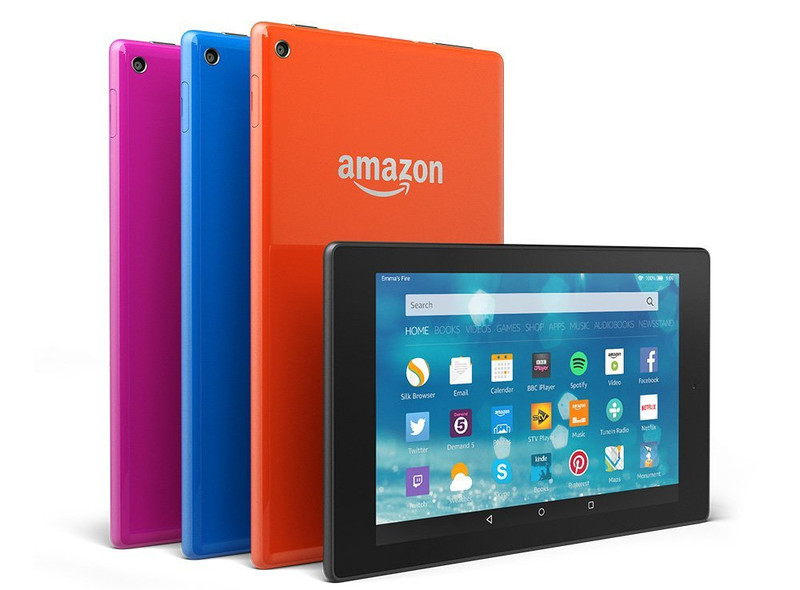
An all round media champ
Pros
- Very well prices
- Access to Amazon’s vast content and store ecosystems
- Great looking display
Cons
- Fire OS takes a little getting used to
- No Google apps
- Cheapest options still have lockscreen ads
While the 8-inch version of Amazon’s Fire tablet may not represent the ultimate value, it is an extremely attractive option in its own right. While the price isn’t the bargain basement, at $150 it’s still very affordable.
You get a larger, better built tablet over the smaller model with, importantly, a full HD display. That could be the kicker in deciding if its the tablet you want to consume on. Videos will be sharper, text will be crisper.
It’s also fairly powerful for a tablet in this price range, and while it won’t play games to the same standard as a Shield Tablet, it should be plenty good enough for most things inside Amazon’s App Store. And as with Amazon’s other tablets, you can offline Prime Video to an SD card, which is a frequent travellers dream.
See at Amazon
Put some Disney Parks magic on your phone this Wallpaper Wednesday

Don’t let your home screen fall into a rut — switch out your wallpaper!
You don’t have to pull out a complex new theme like Deadpool to bring a breath of fresh air to your home screen. A new wallpaper can do wonders, and launchers like Action Launcher can re-theme your entire home screen around a good wallpaper. In our effort to help brighten your device — and maybe your day — we’re compiling some wallpapers for you to try out.
If you’ve got a wallpaper you use everywhere, share it in the comments below! We’re always looking for something new. Now get your wallpaper picker ready and see what’s in store this week.
Sorcerer Mickey

Some imagination, huh?
Fantasmic was one of the locations I worked on my Disney College Program. This show is always gonna have a special place in my heart, and with this beautiful wallpaper, it has a special place on my home screen as well. This dark wallpaper from Disney Parks Blog makes me want to grab a souvenir popcorn tub and grab a spot (preferably on the aisle) at the Hollywood Hills Amphitheater.
Sorcerer Mickey
Hotel Hightower

“I’ve never been able to prove anything, but I’ve come to this conclusion: the hotel is cursed!”
Walt Disney World’s Tower of Terror will always be my tower, but of all the Towers around the world, the one that fascinates me the most would be the only Tower of Terror not to hold the Twilight Zone name. Japanese audiences weren’t familiar with the CBS show, so Walt Disney Imagineering came up with a newer, complex story for Hotel Hightower. The architecture is also a departure from the other Towers, and it provides for some impressive photography.
Hotel Hightower
Discoveryland

Discoveryland’s unique take on the future shows us a world of tomorrow that makes steampunk fans faint, but the biggest departure is the Victorian-inspired facade for Space Mountain. I mean, just look at that cannon! If the spires weren’t right in front of the barrel, you’d really believe it could shoot you to the moon. The time-lapse shot also gives a beautiful effect to the bay besides Space Mountain, and to the Astro Orbiter in the distance.
Discoveryland
Hong Kong Castle

It’s always interesting to see how Disney dresses up the castles around the world. Nothing may ever beat the jaw-dropping PINK of the 25th Anniversary Cinderella Castle, but the tinsel wrappes around the spires and turrets of Sleeping Beauty Castle in Hong Kong Disneyland are quite unique.
Also, it’s not quite a hidden Mickey, but in the lights from the carousel shining through the walkway are smiling at you on this wallpaper.
Hong Kong Castle
Disneyland Forever

Turn on your light! Come on and live the magic!
Disneyland is a wonderful way to spend a birthday, and one of the things I looked forward to seeing the most at the park was Disneyland Forever, a show that not only covered the castle in projects, but all of Main Street USA. This fantastic composition shot shows off some of Main Street’s lights (and the inflatable sea spires from Under the Sea) and lets the sky come alive with beautiful fireworks above a bedazzled Sleeping Beauty Castle.
Disneyland Forever
Android is finally making its emoji look like people
We still don’t know Android N’s eventual food-related name, but we are slowly learning more about its extensive feature set.

In the second Developer Preview issued to a variety of Nexus devices today, Google announced that with N it will support Emoji Unicode 9 standard, which includes a number of new pictorials. Google also plans support for skin tone variations, a feature that iOS users have been enjoying for some time.
But perhaps the most interesting change is that Google is moving away from its often-reviled cartoon emoji in favor of a “more human-looking design,” according to a post on the company’s developer blog.

The Unicode Consortium, the organization that decides on which emoji will be added to each release, plans to make Unicode 9.0 available sometime in June 2016, well before Android N becomes publicly available. New glyphs include “Face Palm,” “Bacon,” and “Mother Christmas,” though not every character will likely be included in the Android N update.
Google already added a host of new emojj with Android 6.0.1 back in December, but as with any new Android release, only a small percentage of users have received it. Of course, some manufacturers override Google’s own emoji design. Samsung in particular has its own unique set of emoji, and it’s unclear whether Google’s changes in N will have any impact on how the company approaches its pictorials in the future.
Android N Developer Preview

The Android N Developer Preview is just that — a developer preview. It is not intended for daily use. That doesn’t mean it’s not cool, and that you shouldn’t poke around. But know that things will break. Tread carefully. (And have fun!)
- What’s new in Android N
- All Android N news
- About the Android Beta Program
- Download system images
- Android N easter egg
- Join the Discussion
NVIDIA Shield Tablet K1 gets Vulkan support with Android 6.0.1 update
NVIDIA is now pushing out a fresh update to the Shield Tablet K1 that includes a move up to Android 6.0.1, along with a number of fixes. Bumping the tablet’s software version up to 1.2, the update brings Vulkan graphics API support and Android 6.0.1 goodies like new emoji and more.

Here’s the full breakdown of what’s new in the latest Shield tablet K1:
- Supports the new Vulkan™ API for high-efficiency access to SHIELD’s graphics hardware
- Adds Android 6.0.1 changes including:
- Repositioned Navigation Buttons in Landscape mode & Updated Emoji
- Double Tap Power Button to launch SHIELD Camera app
- Do Not Disturb Until Next Alarm
- Support for Android Doze mode & additional power optimizations
- Adds USB MIDI support
- Adds memory compression enhancement
- Improved Wi-Fi connectivity when waking from sleep
- Fixed Compass functionality
- Fixed Gamepad Mapper issues
- Fixed issues with moving apps to SD card
- Fixed Doom 3 HDMI output issue
- Repositioned Lasso Capture icons in landscape mode
- Update to Android 6.0 Security Patch Level March 1, 2016
- Overall stability and security enhancements
While the update is rolling out now for the Shield Tablet K1, NVIDIA says it will make its way to the original Shield Tablet “in a few weeks.”
Facebook poaches Google ATAP chief Regina Dugan to lead new hardware division
Facebook has hired Regina Dugan, the head of Google’s Advanced Technologies and Projects group, also known as ATAP. Dugan will lead a new group inside Facebook called Building 8, which will focus on building new hardware for the company, according to The Verge.
Dugan says that she is sad to be leaving ATAP, despite her excitement for her new role.
On the other hand, I am sad to leave the pirates of ATAP. Each of our efforts to create new, seemingly impossible products, has been faced with intense challenges along the way. Technical challenges. Organizational challenges. Challenges that might have broken lesser teams. This is the type of work we signed up for when we built ATAP. It is terrifying because it means we have to face our fear of failure, stare it down, more days than most. So be it.
Before heading up ATAP at Google, Dugan was the director at the Defense Advanced Research Projects Agency (DARPA). It’s not clear at this time exactly what Building 8 will be developing at Facebook.
Yahoo Mail now lets you search for GIFs, add attachments from Google Drive

Yahoo Mail has received a new update, adding the ability to easily find and attach a GIF from Tumblr to an email. The app can now also add attachments directly from Google Drive and Dropbox.
Here’s what you’ll get with Yahoo Mail 5.4.3:
- Express yourself with an animated GIF – Animated GIFs help you say hello, offer congrats, or share a laugh, all without typing a message.
- Connect your Google Drive and Dropbox accounts – Access and send documents, photos, and files stored in your cloud accounts.
- With our new widgets, you can see the state of your inbox directly on your home screen:
- See the latest emails you’ve received
- See the number of new messages in your inbox with a badged icon
- Quickly compose an email
On Android, you can also delete drafts right away if you cancel a draft that you’re writing. There are also now three widget options for Yahoo Mail, which can show your latest emails, offer an inbox count with a badged icon, or a quick compose button.
You can grab the Yahoo Mail update from the Google Play Store now.
 AIVAnet