


Twitter reportedly struggles to keep ISIS accounts offline
Twitter may be having some success in reducing ISIS’ online presence, but it’s undoubtedly facing an uphill battle. Threat intelligence outlet Recorded Future estimates that Twitter deleted over 26,000 pro-ISIS accounts in March, but saw 21,000 accounts created that same month. That’s three times as many new accounts as ISIS supporters made back in September. If the figures are accurate, they suggest that Twitter is fighting to keep above water — it can only do so much to purge accounts that are frequently recreated shortly after they’re removed.
We’ve asked Twitter for its take on the data, and we’ll let you know if it has something to say. Regardless, the info suggests that more might be necessary if Twitter wants to keep pace. Also, it’s a stark reminder that the only surefire way to fight extremism is to deal with it in the real world. So long as it’s easy to sign up for social networks in the first place, those less-than-savory elements will keep coming back.
Source: Wall Street Journal
Facebook poaches Google’s advanced technology lead
Facebook just scored a big coup in its longstanding rivalry with Google. The company has hired Regina Dugan, Google’s Advanced Technology Technology and Projects leader (think Ara and Tango), to lead a new team at the soon-to-be-built Building 8. Just what the former DARPA leader be doing there isn’t evident, but she tells Forbes that her group will rely on “ambitious R&D” to make “breakthrough” hardware that leans on Facebook’s technological skills. It’ll be in sync with the ambitious 10-year roadmap Facebook unveiled at F8 on April 12th. There, the long-term goals included getting people connected, developing artificial intelligence and fostering wearable tech like virtual reality.
It’s not certain what Google will do in the wake of this shift. The search giant is kind to Dugan, thanking her for “all her leadership,” but it’s hard to deny that this is a big blow to the ATAP team. For many, she was the core of the division — its projects revolved around Dugan’s long-serving strategies of both relying on scientific breakthroughs and pushing for tangible progress within a few years. Google may carry on with that strategy despite Dugan’s absence, but it could have a tough time finding someone to fill her shoes.
I’m excited to announce that we’ve started a new group at Facebook called Building 8 focused on building new hardware…
Posted by Mark Zuckerberg on Wednesday, April 13, 2016
Via: Forbes
Source: Mark Zuckerberg (Facebook), Regina Dugan (Facebook)
‘Star Wars: Battlefront’ gets Lando Calrissian in Bespin DLC
DICE just can’t stop making wonderful downloadable content for Star Wars: Battlefront. And although we already knew the game was getting new goodies this summer, the developer has now shared more details about the Bespin DLC. Most notably, beloved character Lando Calrissian is being added into the mix along with Dengar, the ruthless bounty hunter from The Clone Wars and The Empire Strikes Back. Both arrive in June.
But there’s more where that came from. DICE also revealed there will be a total of eight Star Wars heroes in the Battlefront Season Pass, including two who are part of an expansion pack that hasn’t been revealed yet. Any guesses on who it might be?
Source: EA
ESPN will start covering drone racing in August
ESPN is already taking advantage of the growing interest in eSports, and the network is hopping on the drone trend, too. Today, the International Drone Racing Association (IDRA) announced a “multi-year” deal with ESPN for coverage of its competitive UAV events. The network’s first broadcast of drone racing and its first-person views will be August’s US National Drone Racing Championships from Governor’s Island in New York City. Live coverage of the event will stream on the WatchESPN app, so you’ll need a cable subscription to follow along on a mobile device or streaming gadget. If you can’t tune in then, there will be a one-hour special that recaps the action as well.
Source: IDRA
The Amazon Tap is a so-so speaker with a so-so voice assistant
The Amazon Echo has been an unexpected hit for Amazon. Since it came out a year and a half ago, the always-listening Alexa has expanded its reach beyond ordering stuff and answering questions about the weather to controlling household items and cars. Now, not too surprisingly, Amazon is integrating this winning feature into new products. Case in point: the Tap, Amazon’s $130 voice-controlled Bluetooth speaker. But unlike the Echo, you have to press a button: You can’t just yell a keyword to get the device to listen to random questions or commands. The result is a mediocre voice assistant in the body of a mid-range speaker.
Like the Echo, the Tap takes the form of a black cylinder with a mesh exterior that reminds me of old-school speaker covers. Personally, in a world of Day-Glo plastic, I’m a fan of the throwback design. Because on-the-go speakers are constantly being shuttled in and out of bags, though, they also need to be able to withstand some contact with the ground.
Amazon doesn’t specifically claim that the Tap is rugged, but it sells an optional silicone case for $20 that Amazon says adds some extra protection against bumps and drops (and adds a handle, to boot). For my part, while I didn’t actually drop the speaker on purpose, it was solid enough to handle a few tumbles.
Continuing our brief tour, there are track and volume controls up top, meaning if a song comes on and the phone that’s streaming to the speaker isn’t available, you can still quickly skip that expletive-filled track you forgot to remove from your playlist before your parents’ barbecue. As for charging, you get both a USB port as well as an included dock that’s meant to live at your desk.
When it’s away from the dock, Amazon promises nine hours of music. I used the speaker for eight hours over the course of four days without it asking for a charge. So it’ll definitely make it through a long day at the beach.

Amazon used long-term speaker partner Dolby to give the Tap its decent omni-direction sound. At low and mid volumes it produces quality audio if you’re not too concerned about the bass notes. But when you crank it up, everything gets a little muddy. For the price there are better-sounding speakers out there from Logitech and Bose. But then again, none of these competitors have Alexa inside.
Indeed, it’s the digital assistant that Amazon hopes will get you to pick the Tap over other Bluetooth speakers. All of Alexa’s features are there: the ability to ask questions, order stuff and control your connected home. It’s sort of like the Echo but not really, given that you have to hit that button.

Pressing that mic icon wakes up Alexa for all of your queries. But the truly killer feature (and source of privacy-advocate paranoia) is that the Echo and (and new Dot) are always listening for a wake command. Adding a button kills the magic of the digital concierge. It also doesn’t help that this feature is inaccessible when you step outside of your home’s WiFi range. But that’s what portable speakers are for: leaving the house with your tunes.
The Amazon Tap isn’t a bad product; it’s just odd. For the same price you can get a better speaker and just leave Alexa where it belongs, in the home. But there is at least one use case in which it makes sense: the backyard. Other than that, if you’re looking for better sound in the home, the $90 Dot (a tinier version of the Echo with an audio-out port) can be connected to any speaker with the always-listening Alexa features. Outside of your property line, you have to make a choice: better sound or a feature you can’t really use every where.
Theranos CEO faces ban from operating a blood-testing lab
As more details surface about blood-testing startup Theranos, federal regulators are looking to ban the company’s founder. The Wall Street Journal reports the Centers for Medicare and Medicaid Services (CMS) is looking to not only revoke Theranos’ federal license, but it also wants to keep its founder and CEO Elizabeth Holmes and president Sunny Balwani from owning or running another lab for a minimum of two years. Theranos currently has testing facilities in California and Arizona, so the ban would impact both locations.
The actions were revealed by CMS in a letter dated March 18th. Theranos had 10 days to respond to the proposed action from regulators, which it did, giving an explanation as to why the penalties shouldn’t be imposed. Even if regulators take action, the appeals process would allow the company to keep its license during those proceedings. A Theranos spokesperson told WSJ that it’s hopeful the “corrective measures” it implemented in recent months will help it avoid the proposed penalties from CMS.
If you’re not up to date on the news, Theranos gained attention for offering blood-test results with no more than a finger prick. FDA investigators began looking into the company last fall based on data it submitted regarding its testing procedures. In the time since, reports have revealed a wealth of information about Theranos’ practices, including blood analyzers that weren’t inspected for years (by CMS no less), former employees detailing faulty testing procedures and sending inaccurate results to patients.
Back in January, regulators stated that the company’s lab work jeopardized patients’ health and safety, which led to Walgreens cutting ties with the startup. Earlier this month, a report released by CMS revealed that Theranos’ lab failed to meet its own internal accuracy standards in addition to not notifying patients of inaccurate results in a timely fashion and improper storage of blood samples.
Source: Wall Street Jounral
Facebook wants us to take VR selfies with virtual selfie sticks
When Facebook bought Oculus two years ago, many thought the combination was odd. Facebook is a social network, while Oculus makes virtual reality headsets. The two didn’t seem to go together. Well, at F8, Facebook’s Developer Conference, we might have seen a peek into how Facebook plans to integrate social into VR. It’s not just about watching a movie together or linking an Oculus account to Facebook. It actually involves interacting with another person in a virtual space; chatting, laughing, drawing doodles, sharing photos, and, as we saw in a demo here at F8, even taking virtual selfies with virtual selfie sticks.
On stage in San Francisco, Facebook CTO Mike Schroepfer donned an Oculus Rift headset, which he used to communicate to a colleague based back in Facebook’s headquarters in Menlo Park. They’re both represented as floating heads and hands, but you can customize your avatar by using virtual pens to draw in facial hair and other features. They even created virtual neckties and attached them to each other. Think of them as Snapchat doodles but in VR.

Next, his colleague gave him what appears to be a circular image. He “throws” it at Schroepfer, and it then explodes into a 360-degree image that completely surrounds both of them. The image is that of the St. Pancras train station in London. Then he tosses another image his way, and it expands to a 360-degree surrounding of Piccadilly Circus. What really got the crowd’s attention, however, was when they went to a Tower Bridge scene; they actually took a virtual selfie using a virtual selfie stick. After doing so, Schroepfer sent off the selfie to his Facebook feed through what appears to be a virtual teleporting mailbox. This, it seems, is what Facebook imagines social VR will be like.
Yaser Sheikh, a researcher for Oculus, said on stage that as technology improves, this will become even more likely. Even though current VR avatars of ourselves are still pretty rudimentary, he said that we’re still able to infer what’s happening. “The moment the points move, the ambiguity disappears,” he said, adding that the use case for social VR is manifold. You can share intimate moments like a birth of a child in VR, for example, or enjoy virtual sightseeing with friends. “Genuine, deeply convincing interactions, remotely,” is the goal. That kind of immersion and deep connection isn’t possible in just a regular photo or video, he said. Facebook is also working on head-mounted cameras to pick up more detailed mouth movements so that the avatars are more lifelike than before.
“Imagine a social experience in VR that’s indistinguishable from real life,” Sheikh said. “Where the tech disappears and you’re just interacting with another person.” Facebook is several years away from that still, but it’s clear that they’ve already started laying the groundwork for it to happen.
Apple Releases First Update to Safari Technology Preview Browser
Apple today released a new update for Safari Technology Preview, the experimental browser that debuted on March 30. Release 2 includes a long list of feature tweaks and updates to JavaScript, CSS, Web APIs, Web Inspector, Accessibility, Rendering, Media, and Networking, plus bug fixes. Release notes are available on Apple’s Safari Technology Preview website.
The Safari Technology Preview update is available through the Mac App Store to anyone who has downloaded the browser.
Apple’s goal with Safari Technology Preview is to gather feedback from developers and users on its browser development ahead of launch. Safari Technology Preview can be run side-by-side with the existing Safari browser and while aimed at developers, it does not require a developer account to download.
Tags: Safari, Safari Technology Preview
Discuss this article in our forums
iPhone 7 and 7 Plus Again Rumored to Feature Smart Connector, but No Stereo Speakers or Thinner Design
Though the iPhone 7 and 7 Plus aren’t coming out until the fall of 2016, rumors and alleged part leaks have already divulged many details about the prospective features of the device. In March, a photo of a device said to be the iPhone 7 Plus surfaced on a Chinese website, and a rendering supposedly sourced from Apple manufacturer Catcher Technology featured the design of the iPhone 7.
There’s no way to confirm whether these images are legitimate depictions of Apple’s upcoming devices, but this morning, Japanese site Mac Otakara shared a report that corroborates many of the rumors we’ve heard and shares some new details on the features we might see in the iPhone 7 and the iPhone 7 Plus.
Mac Otakara says “the possibility is great” that both the image of the iPhone 7 Plus housing and the design sourced from Catcher are “the real thing.” The iPhone 7 Plus model featured a dual camera as has been rumored, along with a Smart Connector that Mac Otakara suggests could be used to accommodate a Smart Keyboard for the iPhone.
Much of the rest of Mac Otakara’s report focuses on speculation about the iPhone 7 and 7 Plus based on the supposition that the photos are actual depictions of the two devices, along with a few new tidbits of information thrown in.
Both the iPhone 7 Plus model and the rendering from Catcher show a design that’s similar to the design of the iPhone 6s and the 6s Plus, and while previous rumors (including a rumor from Mac Otakara itself) have said the device could be thinner, even approaching the thinness of the 6.1mm iPod touch, Mac Otakara says the device photos suggest there will be little difference in size between the iPhone 7 and the iPhone 6s.

Apple is expected to eliminate the headphone jack in the iPhone 7 and the iPhone 7 Plus, and while some rumors have indicated Apple could use the space to introduce dual stereo speakers, Mac Otakara now believes Apple will continue to use a single speaker in the device. The report also includes a mention of Bluetooth-enabled EarPods that connect to the iPhone to charge much like the Apple Pencil.
The larger lens of the rear-facing camera on the iPhone 7 image indicates it will perhaps use a larger sensor, giving it improved camera capabilities despite the fact that it will not include the dual camera layout rumored for the iPhone 7 Plus. Multiple rumors have said dual cameras will be a feature limited to the iPhone 7 Plus.
A final detail in Mac Otakara’s report focuses on the potential inclusion of two new sensors at the top of the device, the purpose of which remains unclear. There is a possibility that the two sensors could be related to the display of the device, based on recent speculation from DisplayMate suggesting features included in the 9.7-inch iPad Pro could be a logical inclusion for the iPhone 7.
According to DisplayMate, True Tone display support, which adjusts the display to match the temperature of the ambient lighting in a room, could be added to the iPhone if Apple “upgrades the ambient light sensors so they measure color in addition to brightness.”
Many of the details Mac Otakara mentions in its report line up with previous rumors that we’ve heard. Both the iPhone 7 and the 7 Plus are expected to look a lot like the iPhone 6s, but with redesigned antenna bands that don’t span the back of the device. Rumors disagree about the potential thickness of the device, but there could be some improvements made by introducing a thinner display, new chip packing technology, and a slimmed-down Lightning port.
Dual cameras for the iPhone 7 Plus and the elimination of the headphone jack are the most concrete rumors we’ve heard yet, corroborated multiple times by a variety of sources. As we creep closer to the fall launch date of the iPhone 7 and 7 Plus, we should begin to get a clearer picture of exactly what features and design changes we can expect to see in the two devices.
Related Roundup: iPhone 7
Discuss this article in our forums
What to Do If Your iPhone is Lost or Stolen
iPhones are lost and stolen every day, but luckily Apple has robust tools built into iOS that will keep your data safe and your device unusable if it’s misplaced or snatched by a thief.
With Find My iPhone, you can locate lost devices, disable them, and even fully erase them, but unless you’ve been in a situation where you’ve needed these services, you may not know exactly how they work, what they do, or what information someone can access when they have your device.
This guide covers the ins and outs of losing your iPhone (or iPad), including settings that should be enabled beforehand for security purposes, how to use Apple’s tools to look for your device, and what happens when it’s in someone else’s hands.
Before You Lose Your iPhone
To cut down on iPhone theft, Apple implemented a tool in iOS 7 called Activation Lock that renders an iPhone unusable without the owner’s Apple ID or password. What that means is even when a thief or a third-party has your iPhone, it’s still tied to your Apple ID and can’t be used with any other account. Your iPhone can even be wiped completely and it will still be locked down, making it almost useless to anyone but you.
Activation Lock, available on devices running iOS 7 or later, is tied to Find My iPhone. When Find My iPhone is turned on, Activation Lock is on. When setting up a new device, Find My iPhone is automatically enabled, but you can check to make sure it’s turned on by following the below steps.
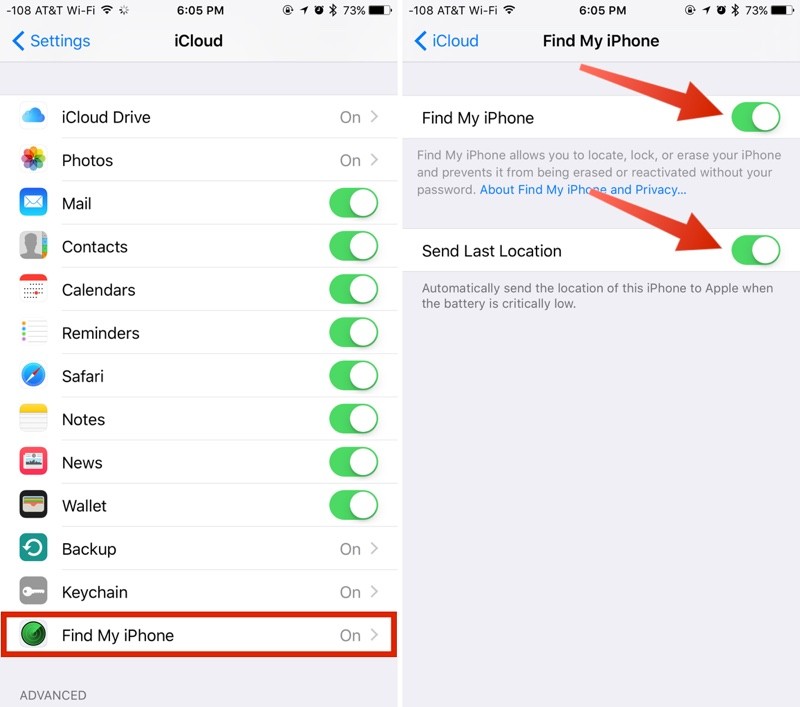
Open the Settings app
Scroll down and tap “iCloud.”
Tap “Find My iPhone.”
Make sure Find My iPhone is toggled to the on position (in green).
At this screen, enable “Send Last Location” for extra security. If your battery is critically low, it’ll send its last known location to Apple. If your iPhone is lost and your battery dies, this is a feature you’ll want to have.In addition to inextricably linking your Apple ID to your iPhone, Find My iPhone also lets you locate your devices at any time, remotely erase them, and remotely put them into a “Lost Mode” to lock down your data.
Find My iPhone is the most important feature to have turned on in the event a device is lost, but there are other key security options — a passcode and two-factor authentication. With a passcode, no one can access personal data stored on your iPhone, and with two-factor authentication, your Apple ID will be safer from hacking attempts, something a thief or person with malicious intent might try to get access to a stolen device.

Two-factor authentication will require an extra verification code to be entered before your Apple ID and iCloud account can be accessed.
Steps to Take When Your iPhone is Lost or Stolen
Logging into Find My iPhone on another iOS device or through iCloud.com is the first step to take when you can’t find your iPhone. Whether it’s been lost or stolen, if it has power and is connected to Wi-Fi or a cellular network, the approximate location of the iPhone will show up on a map.

If the iPhone runs out of battery, loses its connection, or is turned off, Find My iPhone will show the last known location for 24 hours. After that, it can’t be located again until functionality is restored.
Activate Lost Mode
Along with establishing a location for a lost device, Find My iPhone can be used to lock that device down through Lost Mode. Lost Mode displays a phone number and a message on the iPhone’s screen, leaving everything else inaccessible. If you didn’t have a passcode set up, Lost Mode will prevent your iPhone from being used. Lost Mode can be turned on by following the steps below.
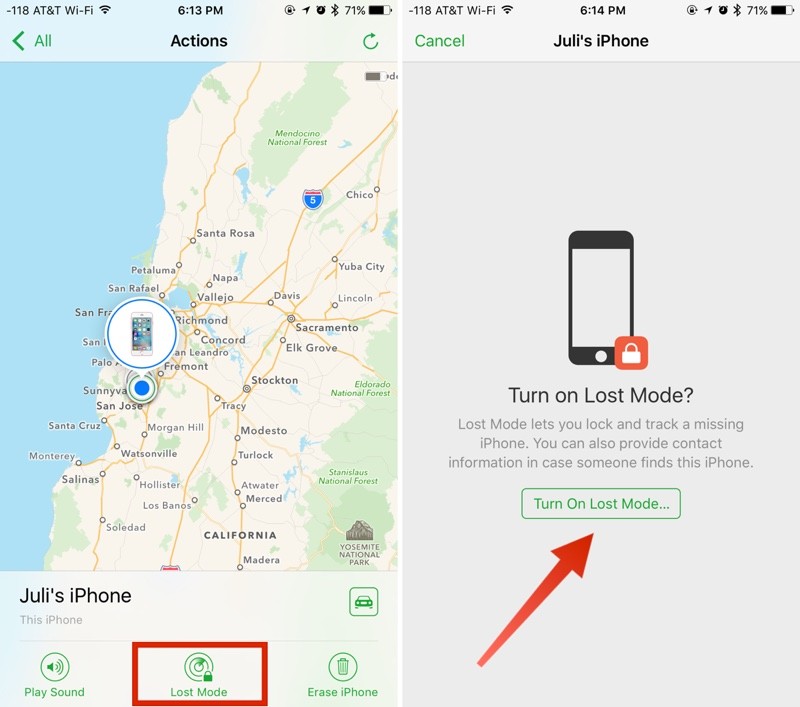
Go to iCloud.com or open the Find My iPhone app on another device. Sign in with your Apple ID.
On the web, click on “All Devices” and find the missing device in the list. On iOS, scroll down to the missing device and tap it.
On the web, a menu will pop up with the option to play a sound, erase the phone, or enable Lost Mode. On the iPhone, tap “Actions” to get to this menu. Choose Lost Mode.
If activating Lost Mode on a device without a passcode, you will be prompted to create one.
You’ll be asked to enter a phone number where you can be contacted. Enter the number or choose “Next” to skip the option.
At the next screen, you can write a message that will be displayed on the iPhone, such as an email address or a reward offering.
Choose “Done” to activate Lost Mode and then check “Notify if Found.” The iPhone is now locked and can only be accessed using the passcode you designated when turning on Lost Mode or the passcode that was already on the device. If it’s offline and later located, you will get an email when it connects to the Internet and can convey its location.With Lost Mode activated, the iPhone’s screen will display the phone number and the message you set. On a device with a cellular connection, there will also be a “Call” option to call the specified number. Emergency phone numbers are still able to be called as well.

Activating Lost Mode immediately disables credit or debit cards associated with Apple Pay, activates Low Power mode for maximum battery life, and renders all features on the iPhone, such as Siri, inaccessible.
The other options in Find My iPhone, Play Sound and Erase iPhone, are self-explanatory. “Play Sound” causes a loud beeping to occur, which can be turned off by hitting the power button on the iPhone. It’s useful for an iPhone that’s been misplaced nearby.

Erase iPhone will delete all of the data on the iPhone remotely. It should be used as a last resort because erasing the iPhone will make it inaccessible through Find My iPhone. With Activation Lock, a passcode, and Lost Mode, an iPhone is essentially locked down, but erasing data can give peace of mind if you lose a device you don’t expect to get back.
Lost Mode, Play Sound, and Erase iPhone will only work when the iPhone is turned on and has a cellular or Wi-Fi connection. If it is off or unable to connect to the Internet, these actions will be queued and activated as soon as a connection is available. Lost Mode combined with “Notify if Found” will send you an email when a misplaced iPhone that is offline can connect to the Internet.

If Lost, Use the Find My iPhone Map
If your iPhone has been left behind in a restaurant or store and you’re not sure where it was misplaced, Find My iPhone gives a close approximation of its location. If it’s in an apartment building or other dense urban area, it might not be able to pinpoint the exact spot where it is, but it can get close. As long as your iPhone is on and has a cellular or Wi-Fi connection, its location will be continually updated in the Find My iPhone app so it’s easy to track down.
With a phone number and other contact information available through Lost Mode, someone who finds it can easily contact you.
If Stolen, Contact the Police
If your iPhone has been stolen, Find My iPhone can help law enforcement ascertain its location. It can be tempting to go to the location of a stolen iPhone on your own, but doing so can be dangerous. When dealing with an unknown criminal element, getting the police involved is the safest move.
Report Lost iPhone to Carrier
The four major carriers in the United States, AT&T, Verizon, Sprint, and T-Mobile, have tools for reporting a smartphone as stolen to suspend service and in some cases, block the device from being used on the carrier’s network.

Suspending cellular service will prevent your iPhone from connecting to a cellular network, making it more difficult to track. It ensures a thief cannot use the device to make phone calls or rack up service charges, but in many cases, those features will be unavailable anyway.
What’s Accessible on a Lost iPhone?
Most people probably don’t think about the extent of the information stored on an iPhone until it falls into the wrong hands, but there’s a lot of data that’s potentially accessible. In the event your iPhone is stolen, there’s likely enough detail about you to make you vulnerable to phishing attempts and malicious social engineering.
Below is a list of what someone can find out about you and what remains hidden behind a passcode. If you don’t have a passcode, your iPhone is an open book.
Before Turning on Lost Mode
With a passcode on, whatever is available through the lock screen can be used. If you have Notification Center, Control Center, and Siri access enabled, all of those features are available to a stranger. Anything you can access from the lock screen, a stranger can access.
Siri can answer personal questions about who the iPhone belongs to and offer up contact information. Asking “Whose iPhone is this?” or “Who am I?” gives a name and a phone number. Apple Music can be turned on, and Siri can be used to make phone calls to contacts based on commands like “Call mom.”

Siri won’t give more detailed contact information like your email address without a fingerprint, apps can’t be opened, and settings can’t be changed.
In Control Center, all features are accessible. The flashlight can be turned on, the calculator can be opened, alarms can be set, and the camera can be used. Pictures can be taken, but the Camera Roll can’t be opened to display existing images.
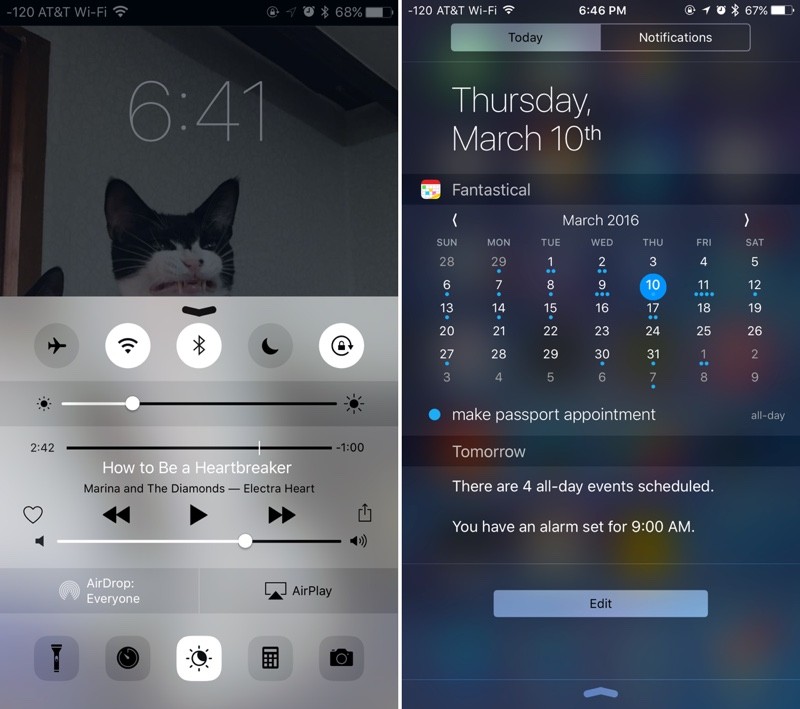 Some of the information a stranger can learn about you before Lost Mode is enabled on a lost device
Notification Center has the most potential to divulge personal information. Depending on what’s enabled, previews of emails and messages are displayed, calendar events are visible, recent Apple Pay transactions are listed, and many third-party apps, like Evernote, will show previews of content in the Today view.
If you have the Medical ID feature set up through the Health app, all of that information is available, including emergency contacts, height, weight, blood type, allergies and health conditions.

All of these lock screen features are optional and can be disabled through the Settings app if desired.
After Turning on Lost Mode
Activating Lost Mode locks the iPhone down, which is why turning it on right away is imperative. Lost Mode prevents all of the above listed features from being used. Siri is inaccessible, as is the Control Center, the Notification Center, and Medical ID information.

All someone can do with your iPhone when it’s in lost mode is call you, turn it off, or make an emergency phone call.
What Happens When a Lost iPhone is Turned Off?
If a thief turns off your iPhone, it’s going to be off the grid until the power is turned back on. Similarly, it can’t update its location when there is no cellular or Wi-Fi connection available.
In the Find My iPhone app, when an iPhone can’t be reached, it’s listed as offline. For 24 hours, the last known location is available. After that, no information about its location is shared. While a lost iPhone is turned off, it cannot respond to Find My iPhone requests to put it in Lost Mode or wipe it, but as soon as it is powered back on, Lost Mode will be activated.
What Happens When a Lost iPhone is Wiped?
Lost Mode locks down the iPhone and prevents it from being accessed in iTunes when plugged into a computer, but it can’t stop someone from wiping an iPhone via iTunes using recovery mode or DFU mode.

Even if your iPhone is fully erased, the person who has it can’t use it. Activation Lock stays on and there is no way to bypass it. As soon as the iPhone boots up, it asks for an Apple ID and password and it won’t go past the activation screen without the information.
No More iCloud Access
A thief can’t use your Apple ID after it’s wiped, but erasing the iPhone does prevent it from being located using Find My iPhone. Once wiped, the iPhone’s location will no longer be updated and you will have 24 hours to note the last known location before it simply can’t be found again.
Even with an Internet connection, an erased iPhone with Activation Lock on will not send its location to iCloud. In Find My iPhone, an erased device will be listed as “Offline” and information won’t be available again until you sign into the device with your Apple ID and password.
Beware of Phishing Attempts
Your iPhone is essentially useless without your Apple ID and password. Some thieves may make an attempt to get that information through phishing attempts like fake emails or messages, so it’s best to be aware of this possibility should your iPhone be stolen.
iOS 6 and Earlier
Find my iPhone can no longer be downloaded on devices running iOS 6 or earlier, but older iPhones and iPads that had the app installed prior to the launch of iOS 7 will still be able to use it to locate a lost device. Find My iPhone is available on iOS 5 and iOS 6.

Pre-iOS 6 devices do not include Activation Lock, but devices running iOS 6 have access to Lost Mode, which is the operating system where the feature was introduced. Devices running iOS 5 or earlier cannot use Lost Mode, but there is a feature called “Lock” for rendering a device inaccessible.
With no Activation Lock feature, an iPhone with iOS 6 or earlier installed can be wiped by a thief and set up as a new device. For that reason, if you have a device that can run the latest version of iOS, it’s always better to update.
No Find My iPhone
Without Find My iPhone enabled, there is no reliable way to track an iPhone that’s been lost as it won’t be accessible in iCloud. Not having Find My iPhone installed also means Activation Lock is turned off, meaning a thief can wipe an iPhone and set it up as a new device.
Tag: Find My iPhone
Discuss this article in our forums
 AIVAnet