


Brother MFC-J885DW review – CNET
The Good The ink cartridges on the Brother MFC-J885DW cost less to refill than other name-brand printers and the output quality is also commendable down to small fonts and faint lines.
The Bad The plastic materials cheapen the overall feel of the printer, the 100-sheet paper input capacity will likely be too small for the average small office, and the output speed is lacking compared to the competition.
The Bottom Line Brother certainly makes a lot of very respectable work-friendly all-in-one printers, but the J885DW isn’t one of them.
These days, $150 — about £100 or AU$200 — buys you an “average” multifunction inkjet printer. You know: the ones that do printing, scanning, copying — and throw in good old-fashioned faxing capability for good measure. You can certainly get cheaper, but at this price, you can usually snag decent extras like an auto-duplexer (for double-sided printing), as well as a dual-paper input tray for both regular sized and photo paper.
Indeed, the Brother MFC-J885DW — part of the company’s Work Smart series for small offices — has all those features at that $150 USD price point (£140 or AU$250). But, unlike so many other great Brother printers, this one just misses the mark in several key areas; its slow print speeds are easily outmoded by the competition, the design suffers at the hands of its cheap plastic materials and the paper input tray capacity is lacking for serious home office professionals. It’s just a flat-out “don’t buy.”
Note that the MFC-J885DW reviewed here is identical to the MFC-J880DW (a model number exclusive to some online and international retailers).
Brother MFC-J885DW (pictures)
See full gallery


1 – 5 of 13
Next
Prev
Design and features
The Brother MFC-J885DW can fit into relatively small spaces thanks to its compact footprint that measures 15.7 inches (39.9cm) wide, 13.4 inches (34cm) deep, and 6.8 inches (17.3cm) tall. You’ll need a little extra space for the paper input tray, though, and that’s where my complaints begin.
The tray is removable, which is useful for loading paper into it, but why would a printer that positions itself as an asset for small offices only have room for 100 sheets of regular letter-sized paper? Brother says it’s able to print up to 2,500 pages per month (also called the “duty cycle”), so get ready to refill the tray a lot if you think you’ll approach that amount of printing volume. By comparison, the majority of printers for small businesses and home offices have a 150-sheet tray, at least.
Brother MFC-J885DW
| $149.99 |
| 15.7 x 13.4 x 6.8 inches (39.9 x 34 x 17.3cm) |
| Print/Copy/Scan/Fax |
| 4-ink tank (Black, Cyan, Magenta, Yellow) |
| Yes |
| Yes, 20 sheets |
| USB, MemoryStick, SD |
| USB 2.0, Wi-Fi, Google Cloud Print, Apple AirPrint, Brother Cloud apps, Brother iPrint&Scan |
| 100 Sheets |
| 2.7″ (6.9cm) color TouchScreen display |
Brother tries to make up for it with a separate input tray on top of the main one that fits an additional 20 sheets of 4-inch-by-6-inch photo paper in there, but the build quality is a real point of issue, too. The plastic the company used is really thin and flimsy, and I kept worrying that parts of the tray would snap off every time I reinserted it back into the machine. Everything from the door of the media card reader to the fold-out auto-document feeder is made of the same plastic, and it gives the printer an overall cheap feel.
 View full gallery
Sarah Tew/CNET
The good news, though, is that there’s no shortage of features that Brother incorporates into the printer, and it’s all stuff that businesses will find useful for workday productivity. As mentioned earlier, you get a 20-sheet auto-document feeder on top for sending multipage documents through, and there’s also a duplexer built into the rear of the device that you can use to save money by printing on both sides of a single sheet of paper.
Since Brother hopes the average consumer will find as much utility in the J885DW as a small business would, there’s also a media card bay just to the left of the center console. Behind it, there’s a port for PictBridge-compatible USB cameras or just a USB key for data transfers, and you also get a dual card reader for Sony MemorySticks and SD cards.

View full gallery
Sarah Tew/CNET
As you’ve probably seen with other modern printers, the control panel is devoid of the buttons in lieu of a 2.7-inch (6.9cm) touch screen LCD. I personally prefer hard buttons for shortcuts and the number dial pad, but that’s a matter of personal preference. The screen does register the touch of a finger with accuracy, though, and I can see it being useful to customize exactly which apps and settings you’d want to use for a particular office setup.
The color scanner is hidden on top underneath the lid, and you can use the scan-to feature to send a document directly to a variety of destinations: email, media card, computer file, flash memory, and more. You can also use the free Brother iPrint&Scan app to send jobs directly to a mobile device.
Connectivity and wireless
You can make a quick connection to any computer running Windows or Mac OS by using a simple USB cord, but if you do that you won’t be able to take advantage of the multitude of extras you get with a wireless connection.
Denon AVR-S920W Release Date, Price and Specs – CNET
Most receiver manufacturers have already shown their hands for their 2016, which just leaves Denon and its sister company Marantz. While we’re told Marantz is coming imminently, Denon is teeing off first with its latest S-series receivers.
Denon has announced that two models, the AVR-S720W ($479) and the AVR-S920W ($579), will be available in the coming weeks.
The units share features which are competitive with others in the market, with Atmos (5.2.2) the first item on the checklist. Meanwhile DTS:X is promised in an August update.Next comes 4K compatibility with both HDCP 2.2 and HDR passthrough which will facilitate the upgrade to 4K Blu-ray. The S920W also adds the extra step of 4K upscaling, but really, you don’t need it.

The AVR-S920W rear panel
Denon
If you are streaming music from a phone, there is both Bluetooth and Wi-Fi capability onboard. However, while competitor Yamaha has incorporated its own proprietary MusicCast system into its 2016 receivers, Denon hasn’t followed suit with the S720W and S920W. You can’t stream using Denon’s HEOS app to the receivers without the use of the separate HEOS Link ($349).
Like other receivers in the ranges preceding them, we really appreciate usability features such as the input shortcut buttons on the front panel and speaker cable labels in the box.
The S720 offers six HDMI inputs and a single output, while the S920 adds two more inputs and an extra out. The S720 offers 75 watts per channel (20-20kHz) while the S920 ups this to 90W and adds “upgraded Denon sound engineering design”.
Pricing and availability for the UK and Australia are yet to be announced.
Synology RT1900ac review – CNET
The Good The Synology RT1900ac delivers excellent Wi-Fi performance, has lots of features and can work as a capable NAS server when hosting an external hard drive. The router is cheaper than most competing devices.
The Bad The router’s range on the 5GHz band is slightly shorter than competing devices, and you need an external drive to enjoy its NAS features.
The Bottom Line The RT1900ac is an excellent router by itself and a stellar one for those wanting to try out the world of network storage.
The RT1900ac is a Wi-Fi router that thinks it’s a network attached storage (NAS) server. The fact that it’s the first router from Synology — a company that’s been known for making NAS devices — probably has something to do with it.
When hosting an external hard drive connected to its USB 3.0 port, the RT1900ac is indeed a formidable storage server in itself. And in testing, as either a Wi-Fi router or a NAS server, the device was excellent, for the most part edging out more expensive competitors, such as the Asus RT-AC68U, or the Netgear R7000. It’s not perfect, however, with a relatively short range on the 5GHz band and achieving only average network storage data rates. But at the current cost of just $150, it’s the least expensive AC1900 router.
That said, if you want a router that both delivers excellent Wi-Fi performance and can also work as a host for Time Machine backup, file sharing, media streaming and pretty much anything else you can do with a typical NAS drive, the RT1900AC is an excellent buy.
For more options on excellent home network routers, check out CNET’s list of best 802.11AC routers.
 View full gallery
The RT1900ac is the first Wi-Fi router from Synology, a company known for NAS servers.
Josh Miller/CNET
Hardware
As the name suggests, the RT1900AC is an AC1900 router. (Read more about Wi-Fi standards here.) It has a top on-paper speed of 1,300Mbps on the 5GHz band and up to 600Mbps on the 2.4GHz band. On the inside, it’s powered by a dual-core 1GHz processor and 256MB of DDR3 memory. The router has more powerful spec than the Asus RT-AC68U (which runs a dual-core 800MHz predecessor) but weaker than the Linksys WRT1900ACs (dual-core 1.3GHz.)
The router has one USB 3.0 port and one SD card slot on its left side. You can use these ports to host an external hard drive and an SD card to take advantage of the router’s storage feature. Using a storage device allows you to add even more features to the router. (More on this below.) And though it’s designed to lie flat, the router can also be mounted on a wall.

View full gallery
The RT1900ac has an USB 3.0 port and an SD card slot.
Josh Miller/CNET
Software
What makes the RT1900ac stand out from other AC1900 routers is its Linux-based operating system (also known as the firmware) called Synology Router Manager (SRM). This firmware is a variation of Synology’s Disk Station Manger (DSM) operating system used for all of its NAS servers. That said, if you’ve used a Synology NAS server before, you’ll find the interface of the RT1900ac extremely familiar.
And even if you’ve never used a Synology product, the SRM is easy to figure out. The router’s interface, accessible via a browser, is very similar to that of a traditional desktop operating system, like Windows or Mac OS. In fact it’s the most comprehensive interface for a router I’ve seen with items tied together and organized in an intuitive way.
Best Android game controllers
While the vast majority of Android games are designed with the touchscreen in mind, the reality is that there are certain times when using a traditional controller just makes more sense. This applies particularly to games that were ported from a console over to Android, as well as to emulators. It also rings true for games where using the touchscreen just isn’t possible, such as VR games where your phone is strapped to your face.
- Best emulators for Android
- Best Android games
There are many different controllers to choose from on the market today, with all different sizes and layouts. For this list, we wanted to focus on the five controllers we think are the very best, regardless of the price or form factor. My goal was to have a healthy mix of different sizes, shapes, and layouts. Upon digging in, however, I found that most of the ‘ultra portable’ Bluetooth controllers just aren’t that great. That means that the vast majority of the controllers here look almost identical in size and shape, with nearly all the best controllers taking on an almost Xbox-esque design.
So without further ado, let’s jump right in.
MadCatz GameSmart C.T.R.L.
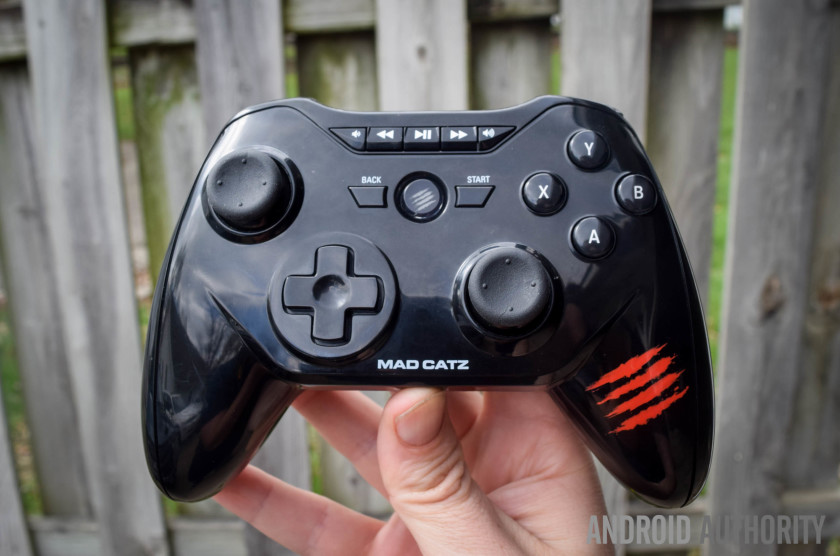
The Mad Catz C.T.R.L. is designed with both Android and PC in mind, and while it works flawlessly with the Android devices I tested it out on (The Shield tablet, Samsung Galaxy S7 Edge, Nexus 6, Nexus 6P, etc), I noticed some issues when pairing it to my Windows PC, such as the rear trigger buttons not registering correctly and other minor quirks.
Design wise, the C.T.R.L. sticks to the traditional Xbox 360 layout that has become so popular among PC and Android game controllers. The controller offers two analog sticks, a d-pad, 4 main action buttons on the face (A,B,X,Y), start, back, a button for syncing, two shoulder triggers, and two smaller shoulder bumpers. Probably one of the best extras is the built-in media buttons found on the controller’s face that allows you to play/pause, fast forward, rewind, and turn the volume up and down. This was particularly handy for use in the Gear VR and for controlling my Shield Tablet from across the room when connected to my TV via HDMI.

The C.T.R.L. also has another unique function up its sleeves, the existence of three different modes that can be toggled from a three-way sliding switch. The mode to the left is GameSmart, which is the basic mode for using this for Android. In the middle, is a mouse-mode that works with both PC and Android devices, giving you a fully functional mouse pointer controlled by your left analog stick. And to the right is the switch for making the controller play nicely with PC games.
In terms of battery power, this controller uses AAs and is rated for about 40 hours of continuous play. I haven’t used it quite that much yet, but so far haven’t run into any issues with the controller lacking juice.

For those looking for a game controller that attaches to your phone, the Mad Catz C.T.R.L. does offer this via a screw mount. When the mount is removed, you have this somewhat awkward bulge and hole at the top, which I don’t have any major love for, but it’s not the end of the world. The mount itself works fairly well thanks to jaws that pull apart with sprint tension and work well enough with all phones I threw at it, including the Nexus 6.
With that out of the way, how do I personally feel about this controller? Out of all the controllers in this list, this is the one I found myself reaching for more often than not, especially when utilizing it with my Gear VR. The C.T.R.L. not only functions great, it also feel pretty good in the hands, with enough weight to make it feel substantial and solid, but not so much that’s overly bulky. Bottom-line, I highly recommend this control if you’re looking for something that not only feels great, but adds several unique extra features like mouse functionality, PC support, and media playback.
Buy on Amazon
Steel Series Stratus XL

While I really love MadCatz controller thanks to its media controls, a decent phone holder, and a reasonably solid feel in the hands — the Stratus XL is without a doubt the most impressive looking and feeling of the Bluetooth gamepads that I reviewed. With a nice black design with orange and gray accent colors, this is a great looking controller, and equally feels great in the hand, with a nice heft to it (without being too heavy) that makes me feel like it should be pretty durable.
Like the MadCatz C.T.R.L., this one looks like an Xbox controller, but with a button layout that is actually a bit more similar to a Playstation controller. That includes two joysticks that are near the bottom and lined up directly across from one another, and a d-pad to the upper left. Otherwise, you get four main action buttons (A,B, X, Y) on the face, alongside three unique buttons in the center, and at the top you’ll find two triggers and two shoulder buttons.

The SteelSeries Stratus XL is compatible with both PC and Android, and while I spent most of my time using it with Android, I can confirm it plays nicely with my PC, as I used it to run through Fallout 4 for a bit without an issue. When using with Android, it’s equally flawless and should work in every game that supports controllers — including your favorite emulators.
Battery wise, I can’t speak for how long it lasts, but with probably close to eight or ten hours of usage, I still haven’t come close to needing to change out the AA batteries. In other words, this shouldn’t be any worse than any other typical AA-powered controller like the Xbox 360 and Xbox One gamepad.

Unfortunately, this Android game controller is really geared more at tablet users, and those that want to also use it on the PC, due to the fact that there is no phone holder option. You can certainly get a phone case with a kickstand to pair with this, but that certainly limits its portability. That said, if you want a beautiful looking controller that feels high-quality as hell, you can’t go wrong with the SteelSeries Stratus XL.
Buy on Amazon
Moga Pro Power

Despite being a few years old now, the Power Pro is still easily one of the best controllers offered not only by Moga, but by anyone out there. Sure, it feels a slight bit cheaper than the first two Android gaming controllers on the list, but the inclusion of a recharge Li-ion battery and built-in phone holder make it a great choice for gamers that want the most portable solution possible.
The Hero Power offers two clickable analog sticks, a D-Pad, four action buttons, start and select buttons, two triggers, and two shoulder buttons. The layout and shape is, once again, very reminiscent of the Xbox 360/One controllers and the design is mostly black with a little bit of orange as an accent.

The molded plastic sides here make this Bluetooth controller for Android easy to grip, and there’s enough heft to make it feel pretty good in the hands. Sure, it’s not as nice looking or feeling as the Stratus XL, but it’s not too far off from that mark.
Battery life should be pretty good here, and if you do run low, simply attach the controller to a microUSB slot and you can charge the gamepad back up without needing to replace the battery. The Moga Pro Power also has the unique ability to charge your phone from its built-in battery, though doing so will obviously cut back the controller’s battery life significantly.

One word of caution, don’t both with the MOGA app. You can use this as a standard Android Bluetooth game controller and bypass the software completely, and really, that’s the best way to do it. For those interested in using your Android Bluetooth gamepad with your PC, keep in mind that the Pro Power isn’t designed with this functionality in mind — so you’ll want to look elsewhere if that’s important to you.
Buy on Amazon
Razer Serval

The Razer Serval is an Android game controller that also happens to work with Windows and Mac computers.
Once again, we have a controller with an Xbox-esque design in place, with 4 face buttons, 2 analog sticks, two shoulder buttons, and two triggers. You’ll also notice at the bottom is a back and home button for use with Android, and there are also three buttons in the middle that can be used for shutting off the controller and for use in certain specific games (they don’t work in all of them).
I have to tell you, compared to the other Bluetooth game controllers above, this is my least favorite in terms of in hand feel. The battery compartment juts out a bit and makes the controller feel a bit awkard in the hand, for one thing. For another, something about the plastic used makes the whole controller feel a tad bit on the cheap side. Design wise, this isn’t an ugly controller, but the snake pattern on it is a little bit tacky.

Battery life on the controller should be comparable to other AA-powered controllers, and I certianly didn’t have any issues there.
The Razer Serval is a bit on the expensive side, considering most of the others on this list are similar or cheaper priced and yet feel and look better. That said, it’s still a really good controller. It wouldn’t be my first pick, but if someone gifted this to me, I’d count myself lucky, as its responsive, has great Android OS integration in the form of back/home buttons, and has a phone holder that clips on easily.

Buy on Ebay
Sminiker gamepad

I know what you are probably thinking: who the hell is Sminiker? Yes, this is an unknown Chinese brand that clearly is a Playstation controller knock-off, but don’t write it off just yet.
When creating this list, I wanted to represent the best, but also provide a solid super affordable option for those that want all the performance of the big dogs, but don’t mind cheaper build materials and other minor concessions in order to get the pricing down. And the Sminiker does this flawlessy. I’m sure there are other great ‘cheap’ controllers out there, but this was very well received on Amazon and piqued my interest enough that I had to buy one. At $20 (at time of this writing), the Sminiker Android gamepad is more than 50% cheaper than the other controllers on this list.

As far layout is concerned, you have a standard playstation design, complete with four action buttons, two analog sticks, a d-pad, start/select buttons, two shoulders, and four shoulder buttons. There’s also a clip on phone holder that works with phones up to 6-inches without a problem. Look and feel? In a word: cheap-ish. It’s super leight, which puts off the balance a tiny bit in the hand and makes it feel like it could handle too many knocks. The buttons are also a bit cheap feeling, though they work pretty well regardless. The plastic design is also made of pretty low grade material.
That might not sound like “best bluetooth game controller” material, but functionality wise, it paired perfectly, worked with Gear VR, tablets, and Android phones without an issue.
As a nice extra you won’t find on many other controllers, this gamepad has a rechargeable lithium-ion battery that didn’t run out during my 3-4 hours of usage, though I really can’t say how good it’s life is — though I’ll try to update this post in a few months once I’ve had more time with the controller.

Bottom-line, the Sminiker feels like any old generic 3rd party Playstation 3 controller, just this one happens to work with Android instead. For those that do a TON of hardcore gaming on their mobile devices might want to pass this one by, but if you’re looking for a cheap controller that works for those instances where touch isn’t enough — This is easily worth $20.
Buy on Amazon
So that’s a look at just five of the best Android game controllers on the market. What do you think of our list? Any others you’d recommend? Let us know your thoughts down in the comments.
Huawei P9 hands on
Huawei is betting big on photography with the Huawei P9, but not in the typical run-of-the-mill fashion we’ve come to expect with flagship successors. Announcing a partnership with legendary German camera-maker Leica, Huawei promises to revolutionize smartphone photography with the P9. Huawei has jam-packed its new device with so many camera features it feels more like a camera with a phone attached than a phone with a camera.
See also: Flashback and Forecasts: Huawei in 201610
The Huawei P9 is all about the dual-camera array on the back, co-engineered with Leica in an intriguing new collaboration. So much so that all other features of the phone were secondary during the press conference announcing the P9 and P9 Plus today in London. We’ll get on to the regular specs in a moment, but lets follow suit and focus first and foremost on that camera.

The P9 has dual 12 MP Leica Summarit lenses on the back, one with an RGB sensor specifically for color reproduction and the other purely for capturing black and white detail. The lenses are specially designed by Leica with an f/2.2 aperture and 27 mm focal length. Both sensors are 1.25-micron Sony IMX286 sensors (24% larger than the P8). So you’re all set for wide-angle and monochrome photography too.

What all this means is that the Huawei P9 promises to deliver exceptional light sensitivity: with the monochrome sensor promising a 200% increase over regular sensors and a 50% bump in contrast. Because this is Huawei, the P9 had to be compared endlessly to the Galaxy S7 and iPhone 6s, so to stay true to form, the P9 reportedly lets 90% more light in than the S7 and 270% more than the iPhone 6s.

There are three different focus modes on board too: laser focus, depth focus and contrast focus as well as a dedicated depth measurement chip. This means that both lenses can focus individually (along with the laser focus) and the P9’s improved ISP will automatically choose the best result. In practice it seems to work OK, but it’s far from lightning fast.
There are more camera modes on the Huawei P9 than you can shake a stick at, including a full manual mode, Bokeh effects for extreme shallow depth-of-field, selective focus, RAW and much more, but unfortunately neither lens has optical image stabilization. We’ll reserve our judgements on just how revolutionary the P9 camera is for the full review, but there’s definitely a lot to play with.

On the design side, there’s not too much new about the P9. It’s a full metal unibody with the same chamfered edges and overall look, although there’s a few relocations and redesigns. The power button is now textured, there’s only one bottom-mounted speaker grill and the headphone port has migrated south as well, sitting on the other side of the USB Type-C charging port for the fast-charging 3,000 mAh battery.
The Huawei P9 has a slightly smoother brushed metal than that found on the Huawei P8 or Nexus 6P and ever-so-slightly more rounded edges than its predecessor. Where the Huawei logo sat on the P8 you’ll now find a Class 4 finger scanner capable of identifying fingerprint ridges in 3D. One of the most surprising features of the P9 is, as always with the P series, it’s thickness. At just 6.95 mm it’s incredibly thin while still managing to avoid any camera bump at all.

Up front there’s an improved 5.2-inch IPS display, but still at Full HD resolution like the P8. The side bezel has been reduced to just 1.7 mm and the P9 now has 2.5D glass. Huawei tells us the display is capable of 500 nits of brightness and 96% color saturation. Huawei’s own 64-bit octa-core Kirin 955 SoC is powering the whole shebang, with four cores clocked at 2.5 GHz and another four at 1.8 GHz.
The Huawei P9 runs Android 6.0 Marshmallow out of the box, complete with Huawei’s Emotion UI 4.1. There are precious little changes to report on the software front so if you’re at all familiar with EMUI you’re in for more of the same. While the app drawerless interface won’t appeal to all, it’s a simple matter to throw a custom launcher on there.

There are a few variations on the specs front, depending on the particular model and region. For the Huawei P9, there’s a 32 GB version with 3 GB of RAM and a 64 GB version with 4 GB of RAM. Europe will apparently only get the 32 GB/3 GB version but it will include a microSD card slot, where Asian markets will get the option for dual-SIM. The P9 has a virtual triple-antenna architecture meaning connectivity should never be a problem.
There’s also a bigger, better P9 too: the Huawei P9 Plus. At 5.5 inches, the P9 Plus is marginally larger but still only offers a Full HD display, although it switches to AMOLED. The P9 Plus has 64 GB of internal storage and 4 GB of RAM with a 128 GB version for China. The P9 Plus also gets Force Touch (I mean, “Press Touch”), a larger 3,400 mAh battery, an IR blaster and a few other upgrades.

The Huawei P9 will be available in launch markets on April 16 for 599 for the 32 GB base model, 649 for the 64 GB version and 749 for the P9 Plus with 64 GB of storage. The P9 models come in six colors: white, grey, silver and three variations of gold: rose, haze and “prestige”. The P9 is reportedly making its way to the U.S. market but we don’t have details on that just yet. The P9 Plus will be available mid-May.
RECENT REVIEWS:
-

Fitbit Blaze Review -
Xiaomi Redmi 3 Review -
Raspberry Pi 3 review -
Samsung Galaxy S7 Edge Revie…
The Huawei P9 ticks a lot of boxes but somehow seems, even with the Leica camera, to lack a certain “wow” factor. Sure, it’s thin, has a decent sized battery, looks good and improves in multiple ways over its predecessor, but it feels like something is missing. Perhaps the camera is legitimately so good it will revolutionize smartphone photography, but I can’t shake the feeling that the revolution is meant to feel a little more exciting than this.
What are your thoughts on the Huawei P9 and P9 Plus?
Huawei P9: The first 7 things you need to know

Some quick hits on Huawei’s new dual-camera wonder.
The Huawei P9 is upon us, having just been unveiled to the world at its London launch event. The big focus this time around, without a doubt, is photography, as Huawei pushes its partnership with Leica in an effort to stand out in the crowded high-end Android space.
But there’s more to this phone than just the Leica brand and the aforementioned dual camera setup. Let’s dive deeper and take a look at some of the major P9 facts and features you might have missed.
It’s got two cameras — and more

OK, let’s get the really obvious one out of the way first. The Huawei P9 has two 12-megapixel cameras around the back, “co-engineered,” the firm says, in partnership with German camera-maker Leica. One sports a monochrome (black and white) sensor, the other a traditional color (RGB) sensor, and it’s this combination Huawei says lets the camera soak up three times as much light as an equivalent single-sensor setup, producing pics with 50 percent more contrast.
The dual camera system is paired with laser autofocus system, giving it multiple options for keeping its subject in sharp focus. Up close, the lasers do the legwork. For distance, the P9 uses depth information calculated based on the images from both the monochrome and color cameras. (In much the same way our eyes help us perceive depth.)
That’s all helped along by a dedicated dual-core ISP (image signal processor) specifically designed to handle depth information — the first of its kind, the manufacturer claims.
Wide aperture mode

Wide aperture mode, first seen in the Honor 6 Plus, returns in the Huawei P9. Because each photo taken on the P9 also captures depth information, it’s possible to simulate bokeh effects in software, in a similar way to what HTC introduced with the Duo camera back with the HTC One M8.
This can be done either in the camera app directly, by selecting wide aperture mode and tapping to focus, then adjusting the slider to choose anywhere between f/0.95 and f/16. Of course, this isn’t a true depth of field, but an approximation based on the depth information captured by the dual camera system. It’s mostly accurate, but can trip up when used with softer subjects or translucent objects.

Latest Huawei CPU
Huawei continues its use of homegrown Kirin CPUs in its high-end phones, and the Huawei P9 sees the debut of the new Kirin 955 chip, an upgraded version of the Kirin 950 introduced in the Mate 8. Like that chip, it’s built on a power-efficient 16nm FinFET manufacturing process, however the clock speeds have been increased — up to 2.5GHz for the four powerful ARM Cortex-A72 cores, and up to 1.8GHz for the lower-power Cortex-A53 cores.
Huawei’s new depth-sensing, triple-focusing ISP is another new addition in Kirin 955, giving it extra number-crunching hardware to compute depth based on its laser autofocus unit, or the two rear-facing cameras.
USB Type-C

We’re still in the awkward transition phase between microUSB and the new USB Type-C. The P9, however, stands out as the first Huawei handset to use the new reversible USB port. In theory that enables faster charging, however the bundled charging brick maxes out at 5V/2A. We’re told the regular P9 doesn’t “officially” support quick charging at higher voltages, a la Qualcomm Quick Charge, but we’ll be investigating in the days ahead to find out whether it can charge at up to 3A with the right charger, like Huawei’s own Nexus 6P.
It’s also unclear whether the phone supports USB 3.1 or not — if it does, Huawei neglected to mention during the P9 press conference.
As is often the case, USB Type-C is a bit of a mixed bag. But hey, at least you don’t need to worry about plugging it in upside down anymore.
There’s a P9 Plus, too!

In addition to the regular P9, the Huawei P9 Plus will also launch later in May across Europe and Asia. As the name suggests, it’ll ship with a larger display — a 5.5-inch AMOLED panel at the same 1080p resolution — along with a bunch of other notable hardware upgrades. The Plus boasts 4GB of RAM and 64GB of storage, up from the 3GB and 32GB of the base model P9. And there’s a stereo speaker system hidden away inside, too.
What’s more, the battery has been cranked up to an ample 3,400mAh, and Huawei has crammed an IR blaster into the top bezel for controlling your TV.
Around the back, there’s the same dual camera and fingerprint sensor from the smaller model, encased in a slightly different aluminum frame, this time with a brushed metal pattern and a slightly glossier finish.
There’s a 720p mode for saving power

If you’ve used a Huawei phone before, you’ll be aware of the company’s many power-saving features, including the ability to set a “power plan” to adjust the phone’s balance between performance and longevity. The P9 includes a neat addition to this feature set — “ROG Power Saving.” This lets you run your 1080p phone in 720p mode to conserve battery power without rebooting — although switching this feature on or off will require closing any apps that are running.
The difference is noticeable — you’re halving the number of pixels on-screen. But it doesn’t look terrible, and if you’re after another way to claw back battery power on days when you’re pushing the P9 to its limits, ROG Power Saving is a decent option to have.
Coming to Europe and Asia later in April

The regular Huawei P9 will land in Europe and Asia — no U.S. launch plans were announced today — later this month.
The 3GB P9 will go on sale on April 16 for €599, while the more capable 4GB version will run you €649. If you’re looking for the larger P9 Plus, Huawei plans to make it available on the same day for €749.
As far as carriers go, Vodafone UK and O2 UK have confirmed they’ll range both the P9 and P9 Plus, while Three UK and EE say they’ll offer the regular Huawei P9.
Are you planning on picking up the Huawei P9 or P9 Plus? Shout out in the comments!
Huawei P9 and P9 Plus
- Huawei unveils the P9!
- Huawei P9 and P9 Plus hands-on
- Huawei P9 specs
- Huawei P9 unboxing
- Join the discussion in the forums

Samsung predicts strong growth in Q1 2016 earnings guidance

Samsung has announced its earnings guidance for Q1 2016, forecasting an operating of $5.7 billion (6.6 trillion won), which would be a solid bump of 10% over the same period a year ago. Samsung has also predicted its consolidated sales will come in at $42.3 billion (49 trillion won), which would be an increase over the $40.7 billion (47.1 trillion won) won the company generated in Q1 2015.
This quarter’s guidance is notable because Samsung has signaled it expects to beat analyst forecasts, most likely due to strong sales of the Samsung Galaxy S7 and S7 edge. Samsung has had a rough go of things the past two years as competition has continued to heat up from agile rivals like Xiaomi and Huawei. The Korean tech giant has started to see things turn around in recent quarters, however.
In any case, we’ll see if Samsung’s predictions pan out when the company reports its final Q1 2016 sales figures later this month.

Video game clip-sharing service Plays.tv has 10 million users.
Plays.tv, a video-sharing platform for gamers, today revealed a major milestone: 10 million active users per month. That’s an astonishing number on its own, but it’s particularly notable considering the service has only been around for about three months. It’s not surprising, though, given the amount of gamers who love streaming content on Twitch. As a refresher, Plays.tv lets you make quick clips from broadcasts, which you can then easily share with other people on the internet. And gamers, including professional ones, seem to love it — Plays.tv says there are 1.6 billion minutes of video being produced every month on its platform.
Source: Plays.tv
Taco Bell wants you to order food from a chat bot
We’ve seen some clever ways to order food online in our day, but this one is decidedly off the wall. Taco Bell is testing TacoBot, a chat AI that helps you order (what else?) tacos in a Slack conversation. Think of it as a tasty text adventure — you can ask questions about the menu, customize your order and check your cart. It’s only in a private beta with a few companies at the moment, but you can sign up for a waiting list to have your Slack team give TacoBot a try. Just think — you could have tacos sent your way while you’re stuck in a planning session.
Source: Taco Bell
Facebook pays news outlets to use its live video service
Facebook really, really wants its live video service to be a success — so much so that it’s willing to offer cash to get those streams going. The social network explains to Recode that it’s offering a “financial incentive” to some partners to use Facebook Live. It’s not naming them, but tipsters say that BuzzFeed, the Huffington Post (one of our sister sites), the New York Times and Vox Media are all on the dole. The terms of the deals are unsurprisingly secret, but the fact that Facebook is offering cash at all is notable. Although the company has clearly been encouraging celebrities to do live broadcasts, it hasn’t acknowledged payments until now.
As for why? Simply speaking, the stakes are high. Live streaming on social networks still tends to be dominated by the likes of Twitter’s Periscope and longstanding services like UStream, and there may be some fierce competition from YouTube in the near future. Paying big publications to use Facebook Live could make it the go-to source for real-time video, at least for visitors interested in as-it-happens news.
Source: Recode
 AIVAnet