



Epic Games ditches monthly fee for developers who use Unreal Engine 4

Epic Games has announced that it is getting rid of its $19 monthly fee for developers who want to make games using Unreal Engine 4. Epic will still take 5% of any gross revenue generated by an Unreal Engine 4-based app or game every quarter after it reaches $3,000 in revenue.
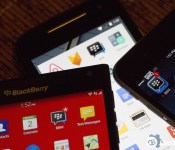
BBM for BlackBerry 10, iOS and Android updates now available

As expected, thanks to the earlier announcement, BBM has now been updated for BlackBerry 10, iOS and Android. The feature list for this update is rather large and includes custom BBM PINs, Android Wear support, Password protection and landscape mode for iOS users plus, you can now share photos in group chats and have multiple BBM channel contributors. You can have a look at the full rundown below or just head on into your respective app store and grab the update right now.
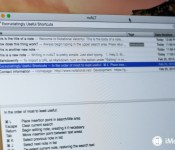
nvAlt: A Mac note taking text editor

nvALT lays somewhere between text editor and note-taking app; it’s a free-to-use Mac app for web-heads.
The app is a fork of the open-source app Notational Velocity, an application designed to let you write notes on your computer. The idea is to let nvALT be the receptacle of whatever fragments of information you want to write down so that you can easily find them later.
Notational Velocity already sports a long laundry list of features like multi-line preview, links to other notes using double brackets, Spotlight-searchable metadata tagging, and more. nvALT builds on that successful foundation by adding support for MultiMarkdown 3, an HTML source code tab, customizable HTML and CSS files for the preview window, URL conversion to Markdown, and more. This makes nvALT a great alternative note-taking app for the many of us who work and live on the web.
Composing new notes on nvALT is as simple as beginning to type in the upper search area. nvALT tries to match what you’re typing with the contents of your existing notes; at any time, you can hit the return key to create a new note with that search word as the title.
This makes it easy to organize your files by name, as long as you come up with a note naming system that makes sense. nvALT also supports tagging, allowing you to tag your notes with keywords for search purposes later on.
nvALT is thoroughly optimized to keep your fingers on the keyboard. There are keyboard shortcuts for just about every feature and function in nvALT, so you never have to resort to mouse or trackpad-clicking to get what you need.

There’s no book/folder metaphor in nvALT, as there is within many of the other note apps I’ve tried. nvALT focuses on maintaining a flat database of everything you’re working on. In fact, all the files are kept by default in a single database that you can secure with encryption, if you choose. You can store files as plain text, RTF, or HTML-formatted files, though nvALT warns you that you’ll waste disk space with the latter two options. If you work a lot in Markdown, as I do, nvALT works exceedingly well there.
nvALT saves continuously as you write; there’s no separate or distinct save function. I had absolutely no trouble quitting the app and picking up right where I left off at any time when I was using it. nvALT also makes it possible to quickly shunt your notes to other apps; I can send a nvALT note to BBEdit, for example, for thorough syntax checking and other functions that may be more suitable within a full-blown text editor.

Where nvALT comes up short compared to other note taking apps I’ve looked at recently is in multimedia support: It’s more a note-optimized text editor; for example, clicking and dragging artwork into it will embed the file location, but won’t embed the image.
As an open source project, nvALT is free to use, though the authors encourage donations if you find it useful.
- Free – Download now
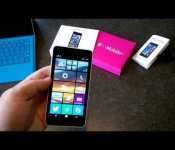
T-Mobile shows its version of the Lumia 640 in new video
T-Mobile has already announced it will begin selling Microsoft’s upcoming Lumia 640 smartphone sometime later this spring. Today, the wireless carrier released a video showing their version of the smartphone, which was filmed with another Lumia 640 with its 8MP rear camera.
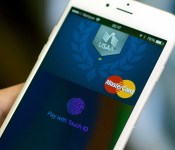
Unable to target Apple Pay, criminals unsurprisingly stick to bank fraud, identity theft

Apple Pay is so secure criminals so far have only been able take advantage of it by taking advantage of the banks behind it.
Sadly, identity theft and credit card fraud are nothing new. While Apple Pay does an enormous amount to secure the transaction process itself — merchants are given a one-time number instead of the card number to prevent expose in the case of data breach, for example — securing the banking process against basic social engineering attacks is something else entirely. When reached for comment, Apple told me:
“Apple Pay is designed to be extremely secure and protect a user’s personal information,” an Apple spokesperson told iMore. “During setup Apple Pay requires banks to verify each and every card and the bank then determines and approves whether a card can be added to Apple Pay. Banks are always reviewing and improving their approval process, which varies by bank.”
Apple provided the same comment to the The Guardian following an article which reported:
Criminals in the US are using the new Apple Pay mobile payment system to buy high-value goods – often from Apple Stores – with stolen identities and credit card details.
Banks have been caught by surprise by the level of fraud, and the Guardian understands that some are scrambling to ensure that better verification and checking systems are put in place to prevent the problem running out of control, with around two million Americans already using the system.
There’s absolutely no way banks have been “caught by surprise” by any of this, though. Not unless they thought Apple Pay was “elfin magic”, and even then that would speak to far greater problems in the banking industry than with Apple Pay. These are the same old social engineering attacks being used in the same old way.
It’s absolutely a problem for banks and retailers and for people whose identities are stolen, but there’s nothing to indicate it has anything to do with Apple Pay specifically. Furthermore, no one should be alarmed about Apple Pay in this context. Just the opposite — Apple Pay appears to be so secure the only thing criminals can do is try and trick the banks at the other end of the chain.
What’s more, Apple does a lot to help banks avoid approving illegitimate cards. Apple securely transmits encrypted iTunes account information from the iPhone to the bank. That includes the device name, phone number, last four digits of the card, etc.
Using that information, banks can determine whether or not they’ll authorize the card for Apple Pay. Banks can also choose to require a text message, email, customer service call, etc. before authorizing. All of this is publicly detailed in Apple’s iOS Security Guide.
Banks are responsible for determining the appropriate balance of convenience and security for their customers. The goal is to keep fraud at an acceptable level while ensuring customers aren’t inconvenienced by jumping through a bunch of hoops to use a credit card. If the amount of fraudulent card activation occurring with the banks current authorization mechanisms is too great, they will correct this by adding additional steps to the manual authorization process when customers call into the bank.
As long as banks and retailers understand and implement the system and safeguards provided, there shouldn’t be a problem.The Guardian, to its credit, points this out:
US banks are using a “green path” for cards they approve straight away on such data, and a “yellow path” for cards requiring more checks. But some banks have made the task too simple by asking callers to verify their identity with the last four digits of their social security number (SSN).
Though meant to be secret, SSNs are commonly stolen in identity theft, and on average 11.5 million Americans are victims of identity fraud annually, according to US data, with the average incident costing $4,930. In 2013 total losses from ID fraud in the US totalled $24.7bn. Nearly two-thirds of cases involve credit card details.
The paper cites a Drop Labs post on “green” vs. “yellow” path which also includes the following:
Though what follows was written in the context of Apple Pay, much of it translates to any other competitor – irrespective of origin, scale, intent, or patron saint.”
Again, this has nothing to do with Apple Pay. Hopefully the banks targeted, however, will figure out how to better make the call on who and how they authorize cards.
Nick Arnott contributed to this article.
Apple releases first public beta of OS X 10.10.3
Apple has released the first public beta of OS X 10.10.3. This update contains stability and security fixes, as well as the new Photos app for Mac.
The Photos app lets you view photos you have stored in iCloud. The app will replace both iPhoto and Aperture, and you can migrate your libraries from both apps into Photos.
In addition to the Photos app, developer betas of OS X 10.10.3 have added support for Google’s two-step verification, removing the need for app-specific passwords when signing into a protected Google account.
Participants in the AppleSeed public beta program can download the beta update, 14D87p, from the Mac App Store right now.
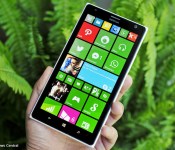
Nokia Lumia 1520.3 now getting the Lumia Denim update

For those of you who own the Nokia Lumia 1520.3 RM-938 variant, aka the SIM unlocked one that can run on AT&T or T-Mobile LTE bands, you will be excited to hear that your phone is finally eligible for the Lumia Denim update.
Numerous tips have surfaced within the last hour about an update coming in over-the-air, and our forum users are reporting the same.
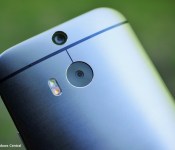
Get the HTC One M8 for Windows from Verizon for free with a two-year contract

Verizon is currently offering the HTC One M8 for Windows for free with a new two-year contract. At the same time, you can get the Verizon One M8 for Windows from Amazon for just 1 cent with a new contract.
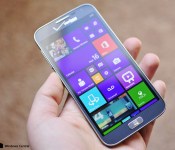
Verizon approves ATIV SE Windows Phone 8.1.1 updates, now available

Update is NOW available as of 1 pm ET!
Verizon is, ironically, ahead of many US carriers when it comes to pushing out Windows Phone 8.1 Update 1. The Samsung ATIV SE, an admittedly beautiful and well-crafted Windows Phone is now on the stage to get the update too.
The Samsung ATIV SE launched with little fanfare in April of 2014 for Verizon Wireless. Featuring a 5-inch 1080p display the phone look built for Windows Phone 8.1. However, Samsung never delivered a proper 8.1 update, so instead the phone still rocks Windows Phone 8.0 Build 10532 (Update 3) making it feel quite antiquated.
Verizon has officially approved the Windows Phone 8.1 Update 1 today, March 2, 2015. The carrier has posted a PDF detailing the massive OS upgrade, and it looks to breathe new life into what is otherwise fantastic hardware. (The ATIV SE, like other Samsung phones, experienced some issues running the 8.1 Preview for Developers updates without accompanying firmware).
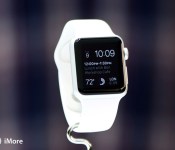
Why I’m betting big on the Apple Watch

At my core, I’ve always been a gadget geek. Gadgets are distractions, enhancements, delights: They give you something to occupy your time with, a way to learn someting new, or a building block to make your life better. As a kid, I’d carry around any gadget I could get my hands on — garage door openers, Tamagotchis, compasses, binoculars — as an adult, I’ve largely replaced that compulsion with an iPhone.
But the iPhone 6 is a solitary gadget: When you’re interacting with it, your gaze is averted from the room’s events. You become immersed in that 4.7-inch screen. It’s like a good book — while immersion can be wonderful and introduce you to new worlds and ideas, it’s not the best when hanging out with other people or trying to multitask in the car, for instance.
I want a gadget with the power of an iPhone but the presence of a much smaller, less obtrusive gadget. And I’m hoping that gadget will be the Apple Watch.
Can we have a society?
The iPhone is mentally too obtrusive and physically butts into conversation — even if you only want to check a movie time or pull up directions to your local theater, chances are you’ll end up on Twitter or replying to an email. Something like Google Glass is even worse — you never know when someone’s paying attention to you or the LCD screen between you.
The Apple Watch is — I hope — the best sort of compromise. It’s a gadget that’s on your skin, but not constantly in your face. It uses subtle, differing notifications depending on what information is being presented, some of which don’t even require you to lift your arm. And it’s single-stream — there appears to be no way to easily multitask on the Watch, which could mean that getting directions will actually be getting directions, not getting directions and checking Twitter and answering email while you do so.
There will likely still be people fiddling with their Apple Watch as much or more as they currently do with their phone. But for me, I hope the watch cuts down on my phone screen dependence — sometimes you just want to be available for notifications without having to pull your device out of your pocket to see who’s talking to you.
Bringing voice to the forefront
I also suspect that the Watch’s lack of keyboard will keep people from hammering away at it as they might an iPhone or iPad. With Siri, Apple’s voice-controlled digital assistant, as your main form of quick and detailed interaction, you have to keep your queries succinct and to the point.
Of course, this also requires Apple’s Siri software to perform a little more reliably than it does on your iPhone. It should help a little bit that you’ll be able to trigger Siri by lifting your watch to your face, but I’m hoping that part of the Watch’s introduction next week centers around Siri’s vocal improvements and smart queries for Apple’s wrist-based device.
Add in HomeKit‘s voice-activated triggers and the potential for more voice commands, and Siri could be a major part of how we interact with the Watch.
Connected messaging
On the iPhone, apps like Yo have tried to monetize our need for poke-based conversation — sometimes, you don’t want to hear about someone’s day or what their significant other said; sometimes you just want to let them know you’re thinking about them, or say hi.
The Watch helps allow you to stay in touch without having to put in a phone call or write a letter. You can send a little drawing; you can send your heartbeat; you can quickly reply to text messages using Siri or pre-worded phrases. It opens up the opportunity for connections you may not otherwise have the time for on a daily basis.
I do wonder how effective the Watch will be with traditional text messaging — I’ve had some ridiculously epic Siri misfires while trying to dictate messages before. Without some major improvements to language processing and more tapping into your often-used typed phrases, I don’t doubt I’ll have similar interactions on the Watch. Bottom line: I think it’ll come down to just how good those quick-reply message options are.
But you also don’t necessarily ever have to send traditional texts on the Watch. You could send drawings, or emojis, or heartbeats. It’s a little nugget of joy, something you can dash off quickly while in a meeting or in another conversation. As a reply to a traditional text, it’s a nice way to let the other person know that you’ve seen what they have to say without having to spend lots of time composing a reply.
The touchless future
We already know you’ll be able to use the Watch with Apple Pay, and September’s event made mention of unlocking hotel doors with the device, as well. To me, this is step one of a much bigger plan on Apple’s part. I theorized back in September about using it to unlock car doors, and Apple CEO Tim Cook recently said as much in an interview with the Telegraph. What about your house locks, or your Macs?
Or go a different tack: What about using the Watch to track your relative arm movement? Could we someday have software, for instance, that uses arm positioning while playing a cello to transcribe music to an app on your iPhone? The possibilities for a touchless, interactive future are incredible.
Wishing, hoping, and reality
We’ll know a lot more about the Apple Watch in the next month or two after we’ve gotten our hands on it — whether it truly reduces the noise or it just adds another random gadget to the mix. But I’m hopeful. To me, the promise of the Apple Watch in my life is huge. Whether it delivers on that promise, well — we’ll just have to wait and see.

