



International data rates continue to be costly for no apparent reason

Recently, Bloomberg did an excellent story detailing the absurdity of international roaming rates in today’s marketplace. Even with wireless carriers offering unlimited calling and text messages at semi-reasonable rates within the United States borders, the carriers continue charging customers “by the minute for calls, fees for each text, and outrageous prices per megabyte.”
Americans visiting Europe can spend at least $150 for a 1-gigabyte bundle of international data. That’s enough to cover some app downloads, a few hours of music on Pandora, a YouTube video or two, and a week’s worth of e-mail. Those who forget to plan ahead would pay about $20,000 for the same amount of data, according to the carriers’ published roaming rates. Back home, a gig costs about $10. – Bloomberg
These ridiculously high prices are the reason that sites like this have written in the past about wireless customers running up a $750 international data roaming bill in one minute or receiving a $200,000 bill after spending two weeks in Canada. In fact, as one report notes, Americans who go to Europe or Asia and use strictly hotel/cafe Wi-Fi will still get hit with almost $200 in data roaming charges.

So, why are these prices so high? Hasn’t 4G technology essentially removed major roaming issues around the world? Of course. But why would carriers change something that is netting them millions with little to no competition?
But without an incentive, don’t expect carriers to voluntarily blow up an insanely profitable side business. …international fees are a consistent driver of profit that expands as more people become addicted to data-hungry smartphones. – Bloomberg
Considering we continue to see story after story after story of consumers being hit with high bills (sometimes ranging in the thousands of dollars), carriers will continue this pattern until they are forced to make changes legally.
Anyone remember how much wireless carriers HEAVILY resisted sending customers data or billing alert through text message even though other carriers around the world had been doing such basic consumer moves for years? Say, why did carriers agree to these text alerts?
After the FCC threatened to pass regulations on the matter, carriers agreed to cooperate with these voluntary guidelines. The guidelines are not quite as tough as rules passed in the European Union, which allow users to automatically set a maximum monthly expenditure on data that it is impossible for them to move past without express authorization. – DSLReports
That damn FCC strikes again with their heavy-handed government interference!

HowToGeek Tips for people to avoid receiving a wireless bill that costs as much as a new car.
So, let’s review:
- Customer in America who is staying in America and uses about 6GB’s per month = $70 plans available
- Customer in America who is traveling outside the country and uses 6GB’s in a month = $120,000 ($20 per megabyte).
Not to worry though as Verizon has a perfectly good explanation for this insanity.
“It’s a complex system; there’s lots of different layers that determine rates, like regulatory and tax issues in different countries,” says Debra Lewis, a Verizon spokeswoman. “Our goal, as always, is to provide the best value.” – Bloomberg
Which Verizon is doing by jacking up the price by 171,000%.
As is often the case, most carriers around the world seem to have figured out how to not screw consumers with insanely high costs. In Japan, the country’s largest wireless carrier caps the cost that customers will pay at $25 a day to avoid gouging. In Europe, subscribers to Vodafone pay a flat fee of $8 per day and can use as much voice and data within Europe.
Instead, we are left with customers dealing with issues such as this:
John Ellis, an adjunct professor of anesthesiology and critical care at the University of Pennsylvania, returned home from a trip to China to a $2,367 phone bill for downloaded data, even though he carefully tracked his usage. And one Texas A&M University employee got an even bigger welcome home gift after a trip abroad: a $10,000 cellular data bill. – Wall Street Journal
Although T-Mobile was the first national carrier to announce that they were not charging for roaming around the world, this only applies to 2G data, which will not allow for anything other than basic e-mail and web-browsing.

Here’s the trailer for season six of ‘Community’ on Yahoo Screen

Community will get its 13-episode sixth season (and eventually, maybe a movie?) on Yahoo Screen October 19th March 17th, and now we have the first trailer. It looks like the gang are up to their usual Dan Harmon-written schemes, but it’s still missing something without Troy, Shirley and Pierce. Fortunately the rest of the cast is in their usual places, and the trailer even makes light of some of the missing members. Overall, Greendale doesn’t seem any worse for wear after jumping to the internet, er, Age of Yahoo, so we guess that $2 million per episode budget is holding up. Our only question now: will we see Yahoo Screen apps for a few more connected TV devices by the time the show debuts?
http://screen.yahoo.com/community-season-six-trailer-premiere-175500821.html?format=embed
Filed under: Home Entertainment, HD
Source: Yahoo (Tumblr)
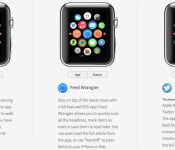
New Site Offers Interactive Look at Upcoming Apple Watch Apps [iOS Blog]
AppAdvice recently launched a new site dedicated to the Apple Watch called WatchAware, and today a new feature was introduced that showcases upcoming Apple Watch apps in an interesting, interactive way.
The site’s Apple Watch Apps section offers a selection of apps that are displayed on an Apple Watch interface, with different views for “Apps,” “Glances,” and “Notifications.” For example, for the upcoming Twitter app, which was shown off at WWDC, WatchAware allows users to click to see both what the app itself will look like and what an incoming notification will look like.
Many of the apps on the page use imagery from the apps that Apple showcased when the Apple Watch was first announced, so there may be some significant interface changes, but overall, the site gives a good look at what one might expect to see from the different types of Apple Watch experiences developers can create.

As outlined in the WatchKit API provided to developers in November, developers can build Glances, actionable notifications, and Apple Watch apps that are powered by the iPhone. Actionable notifications are notifications that allow users to taken an action or respond directly on their wrists with the Apple Watch, while Glances are somewhat simpler, giving users quick information at a glance like news, weather, and more.
Apple Watch apps are even more in-depth than notifications and Glances, letting users perform tasks like reading tweets and sending messages. Apps, which are built-into and installed via the iPhone, run entirely on the iPhone, with an interface that’s beamed to the Apple Watch. By running apps on the iPhone, Apple is able to conserve battery and provide a seamless experience transitioning from watch to phone. Apple has promised apps that run entirely on the Apple Watch will come later in the year.
WatchAware currently features popular apps like Twitter, Facebook, Maps, American Airlines, Pinterest, and CityMapper, which were featured by Apple at WWDC, but there are also several other apps that have been showcased by developers like Deliveries, Run 5k, and Todoist. The site plans to add additional Apple Watch apps as they become available.
Google Inbox updated; Adds minor UI tweaks and more functionality [APK Download]

Google has updated their Inbox app and provides some nice UI changes along with a couple new features. First off, Android 5.0 Lollipop users will now see their status bar change to the color of their action bar. More importantly, different notification sounds can now be attached to different accounts in Inbox which enables you to decipher which account your notification came from. Other additions include shortcuts to features like composing a new message and now you can switch through your several accounts swiftly by swiping left or right.
An APK file is available for download after the break!
Download: Inbox 1.3
Come comment on this article: Google Inbox updated; Adds minor UI tweaks and more functionality [APK Download]
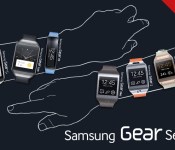
Samsung taking a time-out on smartwatches so that it can focus on making a better one

Samsung likes making smartwatches. This is an understanding one might come to, considering that the Korean giant is just one wearable away from having a different device for each day of the week. Let’s count them: the Galaxy Gear, the Gear 2, the Gear 2 Neo, the Gear Fit, the Gear Live, and the Gear S. In the weeks and months leading up to Mobile World Congress, we heard some rumors about a seventh wearable, one that would make use of the round patent which was filed last year. Nowhere is it to be seen, and the reason for it is a surprising one at that.
In a recent interview by the Wall Street Journal, Young-hee Lee, an EVP in charge of Samsung’s mobile marketing, was quoted as saying her company is “working on” the new one. She explains that, “We’ve been introducing more devices than anybody else…It’s time for us to pause,” and then adds “we want a more perfect product.”
Regardless of what one thinks about the Gear series, Ms. Lee definitely has a point about the number game; even its domestic rival LG has only managed to announce a third watch in the span of 8 months. Sony has three. Motorola has but one. Even companies like Asus and Huawei are just now starting to get into the game. And let’s not forget the sleeping giant in the arena, who despite the dizzying array of Android-compatible hardware, has yet to even announce a release date for its self-professed, magnum opus.

While the Gear S did bring a host of new functionality with it via the inclusion of a 3G radio for cellular calling and data transmission, it was nonetheless a plastic piece that doesn’t look as nice in comparison to some of the more recent offerings by competing companies such as the all metal LG Watch Urbane or Motorola Moto 360. By taking a breather of sorts, Samsung can rethink what kind of market it wants to target with its next product, and -perhaps more importantly- use feedback and reaction from that other smartwatch to help its own line.
Windows Store hits 200,000 app mark, with 385,000 apps in Windows Phone Store

Microsoft has confirmed there are now over 200,000 apps in the Windows Store, and that there are currently over 585,000 apps in the Windows Store and Windows Phone Store combined.
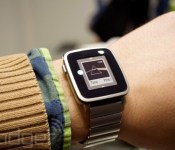
Pebble’s color smartwatch is the most-funded Kickstarter project ever

You knew it was going to happen — just days after Pebble’s Time smartwatch topped the company’s previous Kickstarter record, it’s now the most-funded Kickstarter project ever at more than $13.3 million. Almost all of the pledge money has gone toward the basic wristwear so far, but it’s the unveiling of the higher-end Pebble Time Steel that put the campaign over the top. It’s still not shocking that Pebble would do so well given its established fan base and skillful use (or abuse) of crowdfunding for publicity. The real question is whether or not the Time will face any stiff competition in the near future. Barring surprises, it’ll likely rule the roost for a long while.
Filed under: Wearables, Mobile
Source: Kickstarter

Luxury Sports Car Brand Koenigsegg Announces New Regera Hypercar With CarPlay Support
Swedish car manufacturer Koenigsegg is known for its high-priced luxury sports cars, often called hypercars. At the Geneva Motor Show today, Koenigsegg showed off its latest car — an ~1,800 horsepower hybrid vehicle with built-in support for Apple’s CarPlay service.
Called the Regera, which translates to “to reign” in Swedish, the car can go from 0 to 250 miles per hour within 20 seconds, and it tops out at a speed of 255 miles per hour. It’s equipped with a 5.0-litre twin-turbo V8 engine along with three electric motors. One motor replaces the standard transmission with the Koenigsegg Direct Drive system, and there’s a motor dedicated to each rear wheel.

Inside, the Regera is equipped with an infotainment system that includes a 9-inch infrared zForce Neonode touchscreen, which is said to offer superior touch performance and multi-touch gestures. The infotainment system is compatible with Apple’s CarPlay, letting Regera buyers connect their iPhones to their cars to access all of CarPlay’s features.

The Koenigsegg Regera is priced at $1,890,000, and only 80 of the cars will be produced. The version being shown off at the Geneva Motor Show is the first in the series, and is said to be 95 percent complete.
A long list of automobile manufacturers have signed up to partner with Apple and introduce CarPlay in upcoming vehicles, but thus far, Ferrari is the only brand that has produced a car that’s available with CarPlay — the $300,000 Ferrari FF. Audi, Volkswagen, and Hyundai have all promised that CarPlay-compatible cars will be available in 2015, and there are a number of aftermarket CarPlay solutions from Alpine and Pioneer that are currently available for purchase.
UNU Ultrapak Tour Battery Pack Review
A few months ago, I reviewed the UNU Superpak Battery Pack, and had a great experience with it. That battery pack was more portable with its 6000 mAh battery. The battery pack I have now is not as small: this 10000 mAh beast will keep your devices going for days. The UNU Ultrapak Tour isn’t necessarily supposed to be small though, as in it is packed a turbo-charging ability that uses a charger that looks similar to a computer charger. This battery pack is great for road trips or travel where you know you won’t be near an outlet easily for a while.
Function
I won’t go too deep into this, as we all know how external battery packs, and my experience with this battery pack was very similar to the one I had with the Superpak. However, I will say that what continues to amaze me about UNU’s battery packs is how long they last. Generally external battery pack’s mAh amount doesn’t translate into exact amount it will charge it devices, but UNU’s seems to defy this. I would charge this battery pack, and it lasts me charging my phone, tablet, and my wife’s phone, usually doubling up on two or three of those, and I still have a little left over on this battery pack. I also still enjoy UNU’s addition of two ports, one that charges with an output of 1 volt to 5 volts, and one that charges 2.1 volts to 5 volts. They recommend using the 1v-5v port for phones, and the 2.1v-5v port for tablets. This really helps speed up the charging for tablets that would take most external battery packs 2-3 times as long. All-in-all, UNU provides another great functioning battery pack.
Design
As mentioned before, this battery pack is not particularly small as far as external battery packs go, but the heft comes from the addition of two ports and the charger it uses. It also is due to the addition of a screen on the front of the device, which tells you the percentage the battery pack is at. I find this much more appealing than the typical dot LEDs as you get a more precise number. The power button on the side is flesh with the side, but large enough that it’s easy to find and easy to press. Next to the two ports, there is also an LED flashlight, though to be honest I’m going to be more likely to reach for my phone as a flashlight rather than an external battery pack, but I suppose this is useful in case of emergencies. Other than that, the front and back has a nice smooth finish, and the sides have a sort of rubber that make gripping this beast of a battery pack easier.
Special Features
UNU focuses on bringing well-made, long-lasting external battery packs to consumers, but they also strive to be different by bringing custom features to their battery packs. The Ultrapak Tour’s feature focus is in what UNU calls it’s Ultra-x charging technology. Essentially, the Ultrapak Tour can recharge itself in a fraction of the time other battery packs can, despite its heft in mAh. It can charge to 2000 mAh (about enough to charge up an average smartphone) in 15 minutes, and charge to the full 10,000 mAh in an hour and a half. I can happily say that these numbers are 100% accurate. One of the drags with most other external battery packs is it usually takes 8 hours to charge just 5000 mAh, so you have to plan ahead if you think you’ll need an external battery pack. The beauty of the Ultrapak Tour is you can quickly plug it in before you have to leave for an event, and be assured you’ll have enough juice to get you through the night, if not longer depending on how long you got to charge it. This feature may seem trivial, but it really has been helpful on more than one occasion, and I think it is UNU’s smartest feature yet.
Conclusion
I have thoroughly enjoyed my experience with the Ultrapak Tour, which is an odd thing to say about an external battery pack. Usually I just use it to review it, and then when I need it occasionally. But I know the Ultrapak Tour will be the first battery pack I’ll reach for the next time I need power on the go. If you’d like to pick one up, head to UNU’s site here. The Ultrapak Tour is $129.99, which is an investment, but one you certainly won’t regret.
The post UNU Ultrapak Tour Battery Pack Review appeared first on AndroidGuys.
Bitcoin Wallet by Coinbase: Making Bitcoin easy for everyone
Bitcoin isn’t new. In fact, Wikipedia points to the date of introduction as being January 3, 2009. But still many people have never heard of Bitcoin. And then on the flip side, there are lots of people who know about Bitcoin but have never considered using it. I happen to fit into the latter category, and while I’ve long know what Bitcoin is — I have largely ignored the topic. But a recent episode of “Morgan Spurlock Inside Man” peaked my curiosity enough to look further into the currency and even setup my own Bitcoin wallet.
After browsing the Bitcoin.org website and learning a bit more, I opted to use the wallet from Coinbase Inc., which is simply called Bitcoin Wallet. The setup process was quick and easy, and Coinbase does a really good job of walking even the most novice user through the process. Whether that novice user actually needs a Bitcoin wallet is another story, however if we introduce you to Bitcoin, maybe you’ll introduce a few more. And from there maybe Bitcoin will become a bit more commonplace.

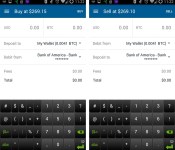
My reason for avoiding Bitcoin was because it always seemed like a separate system — a system that is completely detached from your regular banking. But the Bitcoin Wallet app from Coinbase taught me otherwise. It taught me that it doesn’t have to be entirely separate. Key features for the app include the obvious — being able to buy and sell Bitcoin. The app also allows you to easily send Bitcoin to, or request Bitcoin from another user. The sending and requesting is done using your Bitcoin address and/or a QR code. And novice users shouldn’t worry as the app provides both of those items.
The Coinbase Bitcoin Wallet app opens up to your current wallet which shows you how much Bitcoin you have and how much it is worth in terms of your default currency. In my case that means US dollars. And novice users should remember that Bitcoin value does fluctuate. Overall the Bitcoin Wallet app has a simple design, and it makes use of a navigation menu that slides in from the left hand side of your Android device. That menu is where you’ll go to buy or sell Bitcoin, adjust the settings of the app, and view your Wallet and Vault. A small circular icon in the lower right is where you can send or request Bitcoin from other users.

But going back to the part about how the Bitcoin Wallet app connects to your regular banking. Part of the initial setup process has you connecting your regular bank account. That means you can now accept Bitcoin as payment from someone. Then once that person sends you the Bitcoin as payment, you can “sell” the Bitcoin, which just means regular money will be transferred to that connected bank account.
What We Liked
- Clean and easy to navigate user interface.
- The ability to access your account from a mobile device, and from the desktop.
- Easy connection to your more traditional banking.
Room for Improvement
- Android app security limited to 4-digit PIN.
- Transfers from Bitcoin to dollar, or dollar to Bitcoin have a 1% fee attached.
- Wait times. Bitcoin purchases take 4 business days to finalize.
The wait times and fees certainly aren’t ideal, but the overall setup and the ability to easily turn your Bitcoin into regular dollars should make this an attractive entry point. And lastly, as an added bonus, you get $1 USD worth of Bitcoin just for signing up.
Bottom line here, if you were curious about Bitcoin but didn’t know where to start we suggest giving the Coinbase Bitcoin Wallet app a try.
The post Bitcoin Wallet by Coinbase: Making Bitcoin easy for everyone appeared first on AndroidGuys.

