


Get This Look: Strip UI (icon pack)
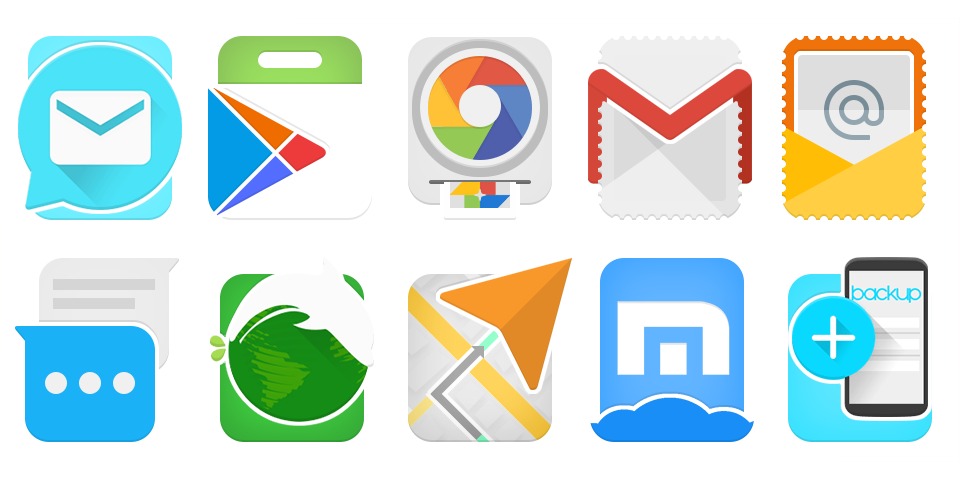
Looking to refresh your Android up with a new app, widget, icon pack, or launcher? You’ve come to the right place; we love to help with that sort of thing. Our Get This Look column is designed to help highlight things that can have a really cool impact on your smartphone or tablet.
Today we’re showing you a new icon pack that’s come to the Google Play Store. Called Strip UI, it was created with Material Design elements in mind. With both light and dark options to choose from, the pack also features dynamic calendar icons. Indeed, the date changes on the icon to reflect the actual calendar.

If you’re thinking about downloading this one we suggest you do so quickly. At only $1.29 it’s on sale as part of a launch promotion and is definitely worth the money.
Features:
- Over 3,075 beautiful icons created in the highest quality, cloud-based 4K Ultra HD Wallpapers, and material dashboard to easily use features.
- Icon masking for any unthemed icons!
- Use the material dashboard app to apply to your favorite launcher, search through icon pack categories, send a request, and much more! New requests are constantly added and updated.
- Works with every popular launcher possible, and includes fully themed graphics support for any that support it.
The post Get This Look: Strip UI (icon pack) appeared first on AndroidGuys.

Shadow Fight 2 lands some kick-ass moves onto Windows PCs and tablets
Shadow Fight 2 is a popular title available on Windows Phones, which was made available late last year. Now the game has moved across to Windows 8.1 for use on PCs and tablets. Prepare to whoop some ass.

Mac Help: Should I buy the non-Retina 13-inch MacBook Pro?

The 13-inch non-Retina MacBook Pro (called the “mid-2012″ model, in Apple parlance) is still available from Apple.
It costs $1,099, making it cheaper than a Retina model by $200. Given that it’s an older, slower machine that hasn’t been updated since 2012, it’s easy to overlook. It’s also what makes it this week’s Mac Help question.
J.R. asks:
Is the standard 13-inch MacBook Pro still worth getting?
Inside the standard MacBook Pro is an Intel Core i5 “Ivy Bridge”-era processor — current for the model year, but one major generation behind compared to current Mac models. It’s clocked at 2.5 GHz. The MacBook Pro uses Intel HD Graphics 4000 integrated graphics. The older CPU isn’t quite as energy efficient as the Haswell processors found in newer Mac laptops, so it only gets about 7 hours per charge compared to 9 estimated hours per charge in the Retina models. The graphics are slower too.
$1,099 gets you 4 GB of RAM and a 500 GB hard disk drive, making the MacBook Pro the only Mac laptop left with an internal hard disk drive (the MacBook Air and Retina MacBook Pro use much faster, more durable solid state storage instead).
The standard MacBook Pro is also the only Mac left that packs an internal CD/DVD “SuperDrive.” If you need one for any other Mac, you have to buy an external SuperDrive for another $80.
So, it’s heavier, bigger, and slower than the Retina MacBook Air. Pass on it, right?
Not so fast. The standard MacBook Pro is the also only Mac laptop you can get that has user-upgradeable RAM. You can bump it up to 16 GB using aftermarket RAM from third-party resellers.
Putting RAM in this MacBook Pro model is not trivial, but at least the RAM isn’t soldered to the motherboard as it is with MacBook Airs and Retina MacBook Pros, so you can can upgrade it if you want to.
What’s more, the hard drive is a standard SATA-equipped 2.5-inch mechanism, which can also be replaced with a larger, faster drive, or with an SSD, which will make the MacBook Pro quite peppy. I’ve done SSD conversions on even older MacBook models, including a white polycarbonate plain old MacBook from 2009, and it makes a big difference in performance.
CD and DVD reading and writing capability isn’t really something high on a lot of our priority lists anymore, thanks to the use of cloud services that can handle huge amounts of data. If you fall into that category and you frankly couldn’t care less about using optical media, it’s interesting to note that Other World Computing sells a Data Doubler conversion kit that enables you to remove the internal SuperDrive all together and replace it with a second hard drive or SSD.
If I were buying a new Mac laptop today, I’d strongly consider buying a Retina MacBook Pro or a MacBook Air before I’d buy the standard MacBook Pro. It’s too long in the tooth to bother with at this point.
If I could find a really good deal on the regular MacBook Pro, or if I already owned one, I’d certainly be willing to put some money into upgrading it to keep it running well for a few more years before I sunk an investment into a brand new Mac.
Have a Mac question you need our help with? Email machelp@imore.com or drop it in our iMore ask a question forums, no registration required!

Xiaomi plans to sell accessories in Europe through Mi.com store


After announcing plans to launch a direct-to-customer Mi.com store in the US later this year, Xiaomi has announced that it will offer a similar storefront to European customers. There won’t be any handsets up for sale, however, as Xiaomi has mentioned that like the US store, the European offering will only sell accessories.

Garmin vivosmart fitness tracker review

Garmin’s next generation fitness tracker trades in a year’s worth of battery life for notifications, a slimmer design, music controls, and more.
For some, the trade-off is a no brainer, for others, not so much.
Once you put on the Garmin vivosmart, all you have to do is link it up with the Garmin Connect app on your iPhone. Once that’s done you can not only set goals and view activity right on your wrist, you can also view notifications from your iPhone, receive inactive alerts, and lots more. But all of that matters little if the hardware and software don’t do their job. The results? Let’s find out!
The good
- Interactive notifications right on your wrist
- Move alerts let you know when you’re inactive for too long
- Water resistant up to 50 meters
- One of the most accurate bands on the market in terms of step count and calorie count
- Garmin Connect online supports syncing custom segments and workouts, great for runners
- Comfortable design that doesn’t get in the way of daily life
- Battery lasts about 5 days with all notifications on, a little over a week if you turn them off
The bad
- Not a huge fan of the clasp mechanism, but it’s sturdier than most that use the notch style band
- Supports heart rate functionality but needs a separate accessory (supports all ANT+compatible sensors)
Unlike its big brother, the vivofit, the vivosmart cashes in the endless battery life in favor of some new features. The touch sensitive screen lets you not only switch between the time, steps walked, and calories, but through notifications on your iPhone. You’ll also receive a vibrating notification if you sit idle for too long — in this case, that’s one hour. Moving around a bit will reset the idle timer.

Accuracy is key attribute in any fitness wearable. To test the vivosmart’s accuracy, I compared it to the Jawbone UP24 — one of the most accurate fitness trackers I’ve used. I wore both trackers simultaneously for a week. In most cases, the vivosmart was within 30-100 steps of my UP24. Considering Garmin is a GPS and mapping company at its core, I expected the vivosmart to be accurate, and it didn’t disappoint. Calorie count was also fairly consistent between the two. However, we always have to generalize calorie counts on fitness trackers since they have no way of knowing muscle to fat ratios for each individual. Nonetheless, it seemed fairly accurate for me on all accounts.

You can do any activity you’d like with the vivosmart on your wrist including showering or swimming, since the vivosmart is rated to be water resistant at up to 50 meters. You can also search the sizable database of activities to log workouts. I didn’t have very much trouble finding activities, both in the gym and outdoors. The only thing I didn’t like was that I couldn’t manually input calories burned the way I can with the UP app. This matters to a lot of people who use stationary exercise equipment since the band may not sense movement.
The Garmin Connect app itself isn’t the prettiest fitness tracker but it shows you a heck of a lot of information on one screen. Scrolling through the main page you can see your step count, calories burned, calorie intake (with a tie-in for MyFitnessPal), sleep data, and more. Any sections you don’t want to use or see on the main dashboard, you can hide in the settings section. You can also go to garminconnect.com and create courses and workouts which will then sync to your Garmin Connect app.

The vivosmart can also help you make sure you don’t leave your phone behind. It works by letting you know when you are getting out of range of your iPhone. For example, if you’re at the gym and you leave your iPhone sitting somewhere and walk away, your wrist will vibrate when you’re getting dangerously close of being out of range. Not only can this help at the gym, but in any situation where you may leave your iPhone sitting somewhere. Alternately, if your looking for your iPhone, you can also follow the signal bars on the vivosmart and play somewhat of a hold and cold game to find it again. If they increase, you’re getting closer. It’s also a feature not found on the vivofit.
The bottom line

The vivosmart is a great band that provides tons of information both on your wrist and in your pocket. The slim form factor makes it comfortable to wear not only during the day, but at night too. Garmin Connect adds yet another level of functionality to the band as well, making it one of the best options currently available for runners. If you don’t need notifications on your wrist, however, and hate charging things, the vivofit, or upcoming vivofit 2, may be a better option for you.
- $170 – Buy now
YotaPhone 2 Indiegogo campaign confirmed for April with special bundles for early birds
Yota today announced that beginning in April, the YotaPhone 2 will be available to consumers in the US through Indiegogo. The company is to also offer early bird pricing and bundle options for a limited time only.

The Impossible Path – a memory puzzle game for Windows Phone

The Impossible Path is a Windows Phone game that will test your visual memory and ability to steadily trace a path between two points. It is a puzzle game, but that isn’t necessarily a bad thing.
The Impossible Path has over one hundred levels of play that span three difficulty levels. Graphics are minimal and while game play starts off a little on the slow side, it doesn’t take long to pick up the speed. After playing the game for the past few days, The Impossible Path comes across as an entertaining Windows Phone game to pass the time with.

Alcatel OneTouch slips out a Windows 10 prototype at MWC 2015

Here’s something we didn’t expect to see at Mobile World Congress, a Windows Phone running the Windows 10 Technical Preview from Alcatel OneTouch. The phone is the Pixi 3, one of its range of low cost devices that can be had in a variety of screen sizes and running either Android, Firefox OS or Windows Phone. Only this version of the Windows Phone has the Technical Preview on it.
Samsung to offer 22 digital gifts to Galaxy S6 owners

Samsung offers a variety of apps to Galaxy device owners and this program is set to continue with the launch of the Galaxy S6 and Galaxy S6 Edge. A total of 22 premium apps have been confirmed as digital gifts.
Why the Mac may be poised for double-digit market share

As an analyst who studies the PC — personal computer — industry amongst many other categories, it’s been fascinating to watch the story of the Mac unfold.
At a high-level, based on many of the theories taught in business school, the Mac should not be gaining share against the once dominant Windows PC ecosystem. For the 2000-2010 sales period, the Mac averaged 3% share of annual sales. Now, at the end of 2014 the Mac was just over 6%. It’s been steadily rising as a percent of annual PC sales. I genuinely believe Apple’s share of the PC industry is poised for growth but what dynamics have changed from a decade where they averaged 3% to a new era where they are poised for growth?
Ben Bajarin is a technology industry analyst with a gift for explaining trends in a way that’s both logical and understandable. Whether it’s how many big phones really sold in North America prior to 2014, or the revenue potential of the wearable, Ben not only has the numbers, but the context, and that makes his opinions not just informative but invaluable. — Ed.
The customer
Microsoft dominated PC sales because their customer for Windows PCs in that era were corporate IT buyers. Those customers look more at price than they do overall experience. Starting around 2008, however, the industry began selling more PCs to consumer as opposed to corporate buyers. This shift is the watershed moment which began to build the foundation for the Mac as a growth story. The second fundamental change builds upon the first.
The market
When we look back at the history of the PC industry, we observe the vast majority of the PC’s life has been selling to enterprise buyers. The consumer PC market is relatively young when looked at as a percentage of that time. Decades of continual PC purchases mature enterprise buyers — they came to know exactly what they want and why they wanted it.
The same dynamic was not true of the consumer market until very recently. Consumers are only beginning to understand what they want in a PC and why. In many cases, our research indicates consumers are asking if they even need a PC in the era of tablets and smartphones.
When a market matures it typically begins to segment. This is thanks to continual purchases of a product to help refine and shape what the buyer understands about their needs, wants, and desires with a specific product. This dynamic has been absent in the past, but now that we see mature market dynamics emerge, we see it benefitting the Mac.
Consumers, for example, say they want to buy a PC they know will last and will be well supported by the vendor in case anything goes wrong. They know they will be keeping their PC for five years or more and so they’re seeing quality as an investment. They also want the peace of mind that if something does go wrong it will be fixed. Consumers seem to be recognizing that in the Mac.
The halo
Lastly, I believe we have to recognize the role the iPod and now the iPhone has played in Apple’s success. Prior to the iPod, Apple’s products appealed to only a very small and passionate user base. With the iPod, Apple was able to give millions of new customers the Apple experience. And with iPhone Apple is now giving that experience to hundreds of millions of new customers. The iPhone, by far, has Apple’s largest customer base, and it is from this base the potential upside for other hardware in the company’s ecosystem exists.
The Mac is the one product where Apple still has the lowest market share of total sales. With PC sales estimated to be in the 300 million per year range for the foreseeable future, we are watching in real-time as Apple’s share of annual PC sales increase. Prior to 2014, the Mac had only sold above five million units in one quarter in its history. In 2014 Apple sold more than five million Macs twice, back to bac,k in Q3 and Q4. Looking to 2015, I believe Apple will see their first ever quarter of six million Macs or more.
The future
How high can the Mac’s market share go? At Apple’s peak, when the market was very small, it was 16%. Not only do I believe Apple can get back to 16% but I think over the five year time frame the fundamentals of the PC markets could see Apple reach 18-20% of annual sales.
Some may feel the Mac is the least “sexy” story around Apple, especially with the grand narrative around iPhone and now Apple Watch. However, I personally believe the Mac growth story is one of the least appreciated and yet fundamentally impactful stories around many areas of Apple’s growth going forward.

