


Eddy Cue reiterates how Apple Pay and Apple Watch will work together
Apple SVP of Internet Software and Services Eddy Cue reiterated how Apple Pay will work with the Apple Watch at Friday night’s Golden State Warriors game.
Cue talked in some detail about how Apple’s payment service and wearable will work together, though most of this information was previously announced by Apple. The watch will need to be unlocked in order to use Apple Pay, which can be done either through Touch ID on your iPhone, or a passcode on the Apple Watch. Cue also said that you can choose if you’d like to enter your passcode every time you use Apple Pay on the watch, according to CNET:
“You can [type a password] if you want to, but you won’t normally have to,” Cue said. Right now the watch is unlocked, and I could do all of it without having to type any code. If I [took it off and] handed it to you, now you’d have to type in a security code or unlock it from your phone.”
While currently limited to the iPhone 6 and iPhone 6 Plus, Apple Pay will expand to more devices with arrival of the Apple Watch. As Apple has previously announced, the iPhone 5, 5c, and 5s will all be able to use the payment service when connected to the Apple Watch.
We can probably expect Apple to highlight Apple Pay use with the Apple Watch during their “Spring Forward” special event, which will take place this coming Monday, March 9.
Source: CNET
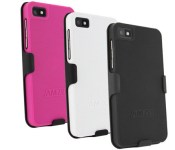
BlackBerry Z10 hard shell case and holster now only $8.95

Made from a durable polycarbonate, this hard case and holster features a unique texture that enhances grip and looks great. The holster sports a swivel belt clip that rotates 180 degrees for optimal comfort. Get yours today in black or white and save 55%

Time Warner Cable’s TWC TV app launches for Xbox One

Time Warner Cable has launched their TWC TV app for the Xbox One. The app lets you access on-demand movies and TV shows when signed in with your Time Warner Cable account. Unlike Time Warner Cable’s app for Xbox 360, this app does not let you view live TV, at least not yet.
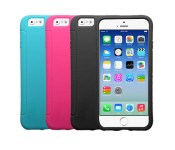
These iPhone 6 skin cases are on sale today for $4.95

Made from a durable silicone, these iPhone 6 skin cases are designed to fit comfortably around your device while adding a little extra grip. There’s complete access to the buttons, ports and camera. Get yours in black, pink or teal today and save 67%

Tiny Troopers and Make it Rain: The Love of Money both get early updates this morning

Game Troopers (Gametroopers.net) is a studio dedicated to bringing games to Windows Phone and Windows. More importantly, those games are often Xbox Live enabled with those coveted Achievements. Two of their games have received updates this morning, as the company looks to continue to support their work in the Store.
The patches are for Tiny Troopers and Make it Rain. The updates are mostly related to performance and bug fixes, but we have the changelogs for both since we know you folks like the details.

How to set up two-factor authentication for Twitter

Twitter can be a powerful mouthpiece for yourself, your brand, or your business — and an even more powerful weapon if your login credentials fall into the wrong hands. You can protect your account by enabling Twitter’s two-factor authentication options; here’s how.
To prevent your Twitter account from being compromised by enterprising hoodlums or hackers, there are a couple options available to you.
Option 1: Send a code to your phone number
When you log in to your Twitter account via app or Web browser, you can get the service to send you a code to your phone number that you must first input before gaining access to your account. Setting it up is easy:

- On the Twitter.com website, click your profile picture and then select Settings. On your mobile device within the Twitter app, tap the Me tab, then select the gear icon and tap Settings.
- Click on the Security and privacy section.
- At the top of the section, there are three options. Select the Send login verification requests to [phone number] option. (If you don’t have a phone number on file, you’ll have to add it under the Mobile section.)

- Twitter will send a test code to your device. When you receive it, click the Yes button to enroll in two-factor authentication. You’ll also receive a permanent backup code in the event you lose your phone or don’t have an active Internet connection when trying to verify your account; we suggest taking a screenshot of this and backing it up somewhere safe on your computer, or adding it to 1Password.
Option 2: Use the Twitter app
Once you’ve set up two-factor authentication via your phone, you can alternatively skip the text message charges but still secure your account by allowing your mobile Twitter app to verify login attempts. Here’s how.

- On the Twitter.com website, click your profile picture and then select Settings. On your mobile device within the Twitter app, tap the Me tab, then select the gear icon and tap Settings.
- Click on the Security and privacy section.
- At the top of the section, there are three options. Change your selection from Send login verification requests to [phone number] to the Send login verification requests to the Twitter app option.
- Any future login requests will come as notifications from Twitter’s official mobile app. (You can also find them within the app under Security > Login Requests.) If your phone is off or disabled for any reason, you’ll also still be able to access your account with the permanent backup code you generated when first setting up two-factor authentication.
Option 3: Secure your password
If you’d rather not enable two-factor authentication but still want it to be a little bit harder for evildoers to hack your Twitter account, you can require Twitter to request additional information from you in the event of a password reset.
- On the Twitter.com website, click your profile picture and then select Settings. On your mobile device within the Twitter app, tap the Me tab, then select the gear icon and tap Settings.
- Click on the Security and privacy section.
- Check the Require personal information to reset my password box. In the event of a password reset, Twitter will ask the resetter a few additional questions about you to confirm your identity, including your phone number.

Pandora planning a day pass feature for ad-free listening without a subscription

Pandora is preparing to implement a day pass service that will allow customers to buy short-term access to ad-free music streaming. The day pass will take the form of a limited, non-recurring subscription to Pandora One. The plan currently involves a 24-hour pass for 99 cents, though Pandora will be testing that price, and could even implement a multi-day pass.

Windows 10 grabs Movies & TV area in the Windows Store as Xbox Video begins to fade

Microsoft is aggressively unifying services and platforms in 2015, and one of those appears to be Xbox Video, which is being folded into the Windows Store in Windows 10.
Users who are running the Windows 10 Preview are being notified that ‘Movies & TV’ now appear in the Store’s navigation bar. Tapping the section though brings up an error message, as the sub-section is not yet ready for primetime. Microsoft notes, however, that this area goes live “later this month”.

GDC 2015: Doctor Octopus to invade Spider-Man Unlimited
In addition to Dungeon Hunter 5, Gameloft was also showing off the latest upcoming Spider-Man Unlimited update at GDC 2015. This episode of the endless runner game features the nefarious Doc Ock, and has a plotline that ties in with the print comic series.
While Spider-Men from alternate realities continue to bicker among each other, Doc Ock presents new challenges by taking to the track alongside your favorite webhead. You’ll dive under the waves into the underwater lab of Doctor Octopus, and over time gain access to new Spider-Man characters to play (including Superior Venom).
The next update for Spider-Man Unlimited will be out by the end of the month.
Pandora planning a day pass feature for ad-free listening without a subscription
Pandora is preparing to implement a day pass service that will allow customers to buy short-term access to ad-free music streaming.
The day pass will take the form of a limited, non-recurring subscription to Pandora One. The plan currently involves a 24-hour pass for 99 cents, though Pandora will be testing that price, and could even implement a multi-day pass. The company confirmed plans to offer day passes in a statement to Gigaom:
“Pandora is committed to delivering an effortless, personalized experience and we recognize some consumers may want an ad-free experience but don’t necessarily want to commit to a subscription. This offering will allow consumers to choose and explore what is right for them or suits a particular event or experience. Pricing and exact timing are yet to be determined but we expect it to be available later this year.”
There is currently no timeline for the rollout of the day pass feature. In addition to ad-free listening, Pandora One also offers higher-quality music playback, as well as more skips per day than the ad-supported service.
Source: Gigaom

