



BerryFlow Upstream Podcast – Slide

With Mobile World Congress all wrapped up and this being the first BerryFlow since then, it’s time to go ahead and discuss some of the announcements such as the BlackBerry Leap, the BlackBerry Slider, BES12 Cloud, BBM and much, much more. If you weren’t able to tune in live, go ahead and check out the video, audio as well as the full discussion and guest list below.

10 Android photography tips for beginners

Make the most out of the camera you have with you
There’s an old saying about there being no such thing as a bad camera, only a bad photographer. While we aren’t going to go that far, we can say that most any Android phone has a camera that can take great pictures — once you learn how things work and take a little time to do them.
Getting a good action-shot as it happens is an art to itself, but for those times when you want to take a few minutes and get the best picture possible we’ve got a handful of tips that can help.
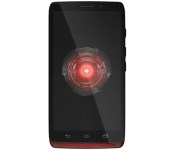
How would you change Motorola’s Droid Ultra?

Sometimes, a musician tied down to a long contract will fire out a sub-par record to fulfill a contractual obligation to their label. In some ways, Motorola’s Droid Ultra felt like an exercise in contractual obligation rather than a handset in its own right. After all, the Ultra was, more or less, the Moto X in another body, and since the X was also available on Verizon, our Brad Molen felt that the Ultra had no reason to exist. We wager, however, that plenty of you bought this handset, so why not hop over to the forum and tell us why you did?
Filed under: Cellphones, Mobile, Google
Source: Engadget Product Forums
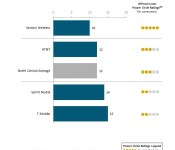
AT&T beats T-Mobile in JD Power Network Quality Report

J.D. Power released a report containing the results of the big four carriers in the realm of lost calls, slow downloads, failed texts, and other network issues. Verizon took first place as usual, but T-Mobile fell out of second this year, being pushed from its former silver medal spot by its archrival, AT&T. T-Mobile was making gains in certain regions of the US last year, most likely because of its massive expansion in 2014. However, due the added customers in 2015, T-Mobile has seen some added network issues that caused them to become 3rd. As usual, Sprint is in last place in all regions except one.
If it’s any consolation to the Uncarrier, T-Mobile is still highly rated in the realm of customer service and customer satisfaction, due to its new policies and industry-changing moves.
Source: JD Power
Via: GigaOm
Come comment on this article: AT&T beats T-Mobile in JD Power Network Quality Report

GDC 2015: A quick look at Siegecraft Commander coming to Xbox One this summer

Siegecraft Commander from Blowfish Games allows you to create the ultimate medieval fortress. This ID@Xbox game for Xbox One and Windows 10 is a turned based game that has you playing as either humans or lizardmen. Your objective is to try to take out the other race. In order to do this, you must build a vast network of towers which then allow you to add more towers or simply attack your enemy.
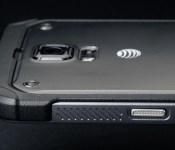
Samsung will likely release a Galaxy S 6 Active sometime this year
 If you keep up with Samsung’s product line and which devices they typically refresh, it shouldn’t surprise you that Samsung is likely to release an Active version of the Galaxy S 6 sometime this year.
Twitter user @upleaks has tweeted about a new Samsung device with the model number SM-G890A, which is fairly similar to the SM-G870A, which was AT&T’s Galaxy S 5 Active. It’s pure speculation at this point, but Samsung is usually pretty predictable about this kind of thing.
No other details about the device have surfaced, but you can bet it’ll be much more rugged than the Galaxy S 6, including having a tougher frame and being waterproof. Maybe they’ll bring the SD card back with this one?
source: @upleaks
Come comment on this article: Samsung will likely release a Galaxy S 6 Active sometime this year

Hangouts Android app and Chromebox for Meetings devices get easy guest invite support
 Google recently introduced a feature for Google Apps customers that allows them to easily invite guests to join a video call by simply sharing a link instead of actually inviting a specific person through their email account. It’s a useful feature that simplifies group video chats, especially in a work situation.
The feature originally just launched for Hangouts on the web, but it eventually made its way to iOS devices, and now it’s finally available on the Android application and on Chromebox for Meetings devices. This should effectively make the feature functional on just about every device that Google Hangouts supports.
The update is already live, but in typical Google fashion, it’ll be a staggered rollout. It should be completely deployed over the next week or so.
source: Google
Come comment on this article: Hangouts Android app and Chromebox for Meetings devices get easy guest invite support
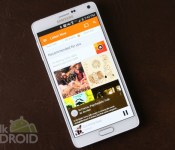
[Deal] New subscribers can get 3-months of Play Music All Access for $3

If you’re still in the market for a subscription based music service then you may want to pay attention. Currently, Google is offering a brand new deal that allows new subscribers three months of All Access (and YouTube Music Key) for just $3. That’s right, for what you’ll pay for a cup of fancy coffee, you’ll get yourself access to Google’s powerhouse of a service. Of course, once the three months end, you’ll have to pay $9.99 a month, but that’s par for the course.
If you sign up you’ll get unlimited access to Google’s growing catalog of music, plus no advertising on streaming music videos in YouTube, curated radio stations and the benefit of being able to store 50,000 songs (though that’s part of using Google Play Music free of charge, too). All you have to do is sign up here. Enjoy!
source: Slick Deals
Come comment on this article: [Deal] New subscribers can get 3-months of Play Music All Access for $3
Samsung sees record Galaxy S6 pre-orders; tops 20 million
Just last week, Samsung took the wraps off ‘Project Zero’ and unveiled a radically redesigned Galaxy S6 and even more radical Galaxy S6 edge. Samsung employed a premium design which features an aluminum chassis and Gorilla Glass 4 on both the front and back of the device. Now, it seems as if the complete redesign has paid off as Samsung has recorded a record number of pre-orders.
According to the South Korean manufacturer, they have received over 20 million orders for both the Galaxy S6 and Galaxy S6 edge combined. It breaks down to 15 million Galaxy S6 units and 5 million Galaxy S6 edge units. Now, the device isn’t up for pre-order just yet, so this represents orders from mobile carriers and not the final customers.
This is definitely music to Samsung’s ears after they received much criticism for the design on previous devices such as the Galaxy S4 and Galaxy S5. They were often criticized for the plastic design and lackluster specifications. The Galaxy S6 and S6 edge not only feature a ‘premium’ design, but also feature top of the line specs.
It is anyone’s guess how well the device(s) will sell when it comes to consumers, but this is a very good start.
The post Samsung sees record Galaxy S6 pre-orders; tops 20 million appeared first on AndroidGuys.
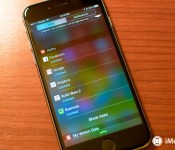
How to manage two-factor authentication on your iPhone, iPad, and Mac with Authy

Passwords are weak and often cracked. Two-factor authentication, which uses your phone number to send a secondary code you have to enter, is much stronger.
I know first-hand how scary password hacks can be, but I still put off two-factor authentication for years — relying instead on a strong multi-digit 1Password-generated password — because it felt clunky and hard to set up. What if I lost access to my phone number because I was restoring my iPhone? What if I couldn’t get network access for my two-factor code? Too much hassle, I thought.
Authy changed my opinion on two-factor authentication: The app makes it far less terrifying to deal with; it also lives on both my Mac and iOS devices, so I don’t have to worry about losing access to my accounts while my phone is restoring. Authy was recently acquired by Twillo, but the company still plans to support its two-factor authentication customers, so you don’t have to worry about it mysteriously disappearing anytime soon.
What is two-factor authentication?
Two-factor authentication is the most prevalent way to secure your accounts: It asks you to authenticate that you are who you say you are by supplying not only your password, but a six-digit code supplied from your phone or an external app. It ensures that those accessing your accounts have access to your physical devices as well as your virtual passwords, and makes a simple password crack or social engineering hack a lot harder to execute.
How to set up Authy
Downloading and setting up Authy is simple: The app is free and available for both iOS and Android, as well as on your computer as a Google Chrome plugin. Once you download Authy, you’ll be asked to set it up with your primary phone number via a call or text message; once you do so, you’re ready to start adding third-party services.

Add third-party services to Authy via code generation
Authy connects to any service that integrates with Google Authenticator for two-factor authentication; the Google service lets you randomly generate two-factor authentication tokens even while offline.
Authy supports a slew of different options, including your Google accounts, Facebook, Tumblr, Dropbox, Outlook, Evernote, Amazon Web Services, WordPress, DreamHost, and LastPass, among others. Sadly, you won’t be able to hook up your iCloud account or Twitter to Authy.
To use Authy with these services, you need to make sure they have code generation turned on. Each service has a slightly different way of enabling this, but in general you should find it under the Security section of your preferences. As an example, here’s Google’s setup screen below.

When you click to enable code generation, you’ll be presented with a barcode; scan this with the Authy app to add the account.

Once you’ve added your account, use the code generated by the Authy app to activate two-factor code generation back on the original service.
How to use Authy in day-to-day life
From here on out, you can use Authy’s codes to unlock that service for new devices — whether or not you have internet access on your primary Authy device. The app even offers a Notification Center Today widget to give you easy clipboard access to your codes. And if your phone is dead or otherwise occupied, you can also use Authy on your computer via the Google Chrome widget.
 AIVAnet