


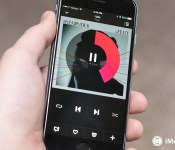
Apple reportedly backs off of $7.99 pricing model for upcoming subscription music service

According to a new report, Apple is shying away from a proposed pricing model for its upcoming music subscription service amid pushback from record companies.
This comes in the wake of news earlier this month that Apple was pursuing a price of $7.99 per month for the streaming service — $2 cheaper than rival Spotify’s premium tier.
The cause for the the shift is reportedly pushback from record labels. Billboard reports:
Negotiations for Apple’s upcoming subscription service are evidence labels are standing firm on pricing. Industry sources say Apple has backed down from its effort to lower monthly pricing for its subscription service to $7.99 from $9.99. Apple would have to absorb the loss if it sets a price lower than the standard $9.99.
In addition to the pricing news, it was reported last week that Apple has no plans to offer a free tier for the streaming service, but iTunes Radio will remain intact.
Last week, it was also reported that Apple is eyeing sometime around WWDC 2015 to take the wraps off of its streaming service, which will integrate the functionality of the current Beats app with the iOS Music app. While a more specific timeframe isn’t yet available, the same report said that the service may be bundled in an iOS 8.4 update.
In any event, we likely still have a while before a subscription music streaming service from Apple hits the scene, so plans are still up in the air, and will likely change in between now and its launch.
Source: Billboard
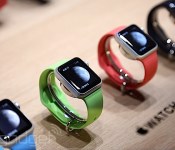
Apple Watch bands will cost between $49 and $449

An Apple Watch won’t do you a ton of good without a band to hold it to your wrist and Cupertino has plenty of options to choose from. Let’s start from the bottom: A 38mm sport band runs $49, and a 42mm one is the same price. It starts getting more expensive from there, though. The 38mm Milanese Loop (which looks an awful lot like chainmail if you ask me) is $149. Same goes for the 42mm large leather Loop. The smaller, 38mm Modern Buckle costs $249. The Link Bracelet will set you back the most, however, at $449 for a 42mm band (just over the price of two Pebble Time watches). Of course, none of them are available to ship at the moment despite how much you might want one — you’ll have to wait a few weeks for that.
Filed under: Cellphones, Wearables, Mobile, Apple
Via: MacRumors
Source: Apple
Apple Watch details: what you need to know about Android Wear’s biggest competitor

Apple revealed its first smartwatch back in September, but the Apple Watch models shown to the world back then were nowhere near final products. Six months later, Tim Cook’s company is finally revealing more concrete details on its wearables. Here’s what an Android fan should know about today’s Apple Watch announcement.

A little background
Google had a six months head start in the smartwatch race, having announced Android Wear in the spring of 2014. The first Android Wear devices were basic “reference” models from Samsung and LG, that haven’t really made a lasting impression through their hardware or features. Motorola’s Moto 360 sparked more excitement thanks to its sleek design, while more recent models from LG, Asus, Sony, and Huawei have added refinement, style, and new features to the basic Android Wear recipe.
While the Android Wear ecosystem is developing steadily, there’s still something missing. Just over 700,000 Android Wear smartwatches shipped last year, according to market research, and it’s increasingly clear that people aren’t yet convinced they want a smartwatch, let alone need one.
Will Apple, with its unparalleled marketing acumen, be able to kick-start the smartwatch category in a way Google and its partners haven’t?
Here comes the Apple Watch

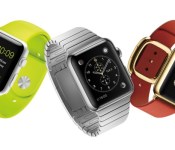
The Apple Watch will be available in three variants, and a variety of band configurations. Furthermore, all three models will be available in two sizes, 38mm and 42mm, in an apparent effort to appeal to women (and/or just those with smaller wrists) and to offer more customization options. That’s something we wish we would see from Android Wear manufacturers as well, as their current smartwatches are largely geared towards men.
At the bottom of the price range is the Watch Sport, made of aluminum and covered with ion-strengthened glass, which is identical to the iPhone cover glass. This model will be available from $349 for the 38mm version or $399 for 42mm, meaning it will compete directly with current Android Wear and smartwatches running other OS, like the Pebble Time and LG’s experimental webOS-powered Urbane LTE.
The Apple Watch Regular Edition is next up, swapping aluminum for stainless steel, and glass for sapphire. As you can imagine, pricing only gets higher from here, with the 38mm variant ranging from $549 to $1,049 and the 42mm variant from $599 to $1,099 — depending on your choice of bands.
With Watch Edition, Apple is really shooting for the luxury segment, offering 18K gold models. True to Apple’s premium demanding nature, the Watch Edition will be priced from $10,000. Yes, that’s the starting price. This particular model will only be available in limited quantities and from select retailers. We have to imagine “select retailers” could mean less of your Best Buy type stores and more of the type of establishments you’d buy high-end watches and jewelry from.

As far as functionality is concerned? The Apple Watch doesn’t feature just the interaction model based on swipes and taps that we all know from mobile operating systems and Android Wear. The mechanical crown on the side of the phone can be rotated to navigate through the installed apps, while the watch is able to differentiate between a simple tap and a hard press. There’s also some voice command integration, obviously thanks to Siri, which can be accessed by simply pressing on the crown.
In many ways, the Apple Watch experience remains largely the same as Android Wear, in that the device is meant to augment the smartphone experience, not replace it. You get all the messages you’d get on an iPhone with the Apple Watch and you get voice assistance, just like with Android Wear. However, one of the big differences in functionality is that you can receive calls on the Apple Watch, thanks to the built-in mic and speaker. For those keeping score, yes, that’s very similar to what we’ve seen with devices like Samsung’s Gear series and really nothing new.
Battery
During their initial announcement of the Apple Watch last year, battery life was an area where Apple remained rather quiet, leading folks to believe that this wasn’t going to be a strength for the Watch. As it turns out, Apple’s Watch is pretty average, coming in at about 18 hours based on “typical use”. That’s certainly nowhere as good as the Pebble or Pebble 2, and even many Android Wear watches can easily get up to two days on a single charge. Still, Apple’s Watch doesn’t appear to be much worse in this area than most of the competition.
Apps

Since it has been on market for a while, Android Wear is at an advantage when it comes to app support, but that doesn’t mean Apple doesn’t have a number of useful apps packed in and supported from day one. As you’d expect, several Apple staples will be coming to the watch including Siri, which can be accessed by pressing the crown, and even Apple Pay and Passbook. There’s also the ability to draw an animation on your screen and send it to other Apple Watch users, and plenty of other fun software tricks.
For those that need a nudge every now and then, the Apple Watch will also tell you when you’ve been sitting around too long
For exercise buffs, or those hoping to get a bit more active, the Apple Watch monitors your activity, measuring your pulse as you exercise. We imagine there are also a number of health-related apps and services on their way. For those that need a nudge every now and then, the Apple Watch will also tell you when you’ve been sitting around too long, and will remind you to get up and start moving. (My wife already nags me about that, so I don’t see this as a feature).
As for 3rd party apps, on stage Apple announced several including Twitter, MLB at Bat, American Airlines, Salesforce Wave, WeChat, Instragram, Uber and Alarm.com. Bottom-line, pretty much all the biggest hitters should be here pretty close to launch day.
Wrap up
The Apple Watch will begin pre-orders on April 10th, with the watch set to arrive in 9 countries on April 24th, the United States included. While Apple doesn’t say specifically, this availability should apply to all three models. Of course, you’ll need an iPhone in order to use the watch, as Android compatibility isn’t offered.
As you can see, the Apple Watch doesn’t exactly break the mold, but it does offer a few changes like a digital crown, Apple services integration and plenty of premium options for those that want a smartwatch but still want to brag about how they paid nearly the price of an economy car for it. Is there anything for Android fans to really be jealous of here? The only thing I personally see is the addition of two watch sizes, for those hoping for a larger watch. Otherwise, same basic concept, higher price tag.
What do you think, impressed by the Apple Watch? Do you think it will take off?
// <![CDATA[
(function () document.getElementsByTagName('body')[0]).appendChild(opst); ());
// ]]>
Bodgan Petrovan contributed to the creation of this post.
Apple Watch Hands-On: A First Look at Software, Apple Pay, Water Resistance, and More
We got several hands-on first impressions of the Apple Watch following its September debut, but at that time, finished versions of the Apple Watch with fully functional software were not available.
As of today, members of the press are getting their first look at Apple Watches running near-complete versions of Watch OS, and several sites have shared new tidbits and thoughts on the device, which we’ve rounded up below.
TechnoBuffalo‘s Jon Rettinger tested the aluminum Apple Watch Sport, Apple’s most affordable watch, giving a demo of the device’s software. A hard press on the screen brings up different watch faces, each of which can be customized, as Tim Cook described during today’s event.
In a second video, TechnoBuffalo takes a look at the design of the Apple Watch Sport, giving a close up of the backside of the watch and what it looks like on the wrist.
Mashable‘s Lance Ulanoff says all of the different Apple Watch versions “feel good to the touch” and that there’s not much difference in the display between the Apple Watch Sport with Ion-X glass and the Apple Watch with sapphire crystal. He also has good information on the fit, which is comfortable despite its protruding back.
Apple Watch is not curved to your wrist. In fact, the back bulges out over so slightly to make sure the sensors touch the wrist. This didn’t look like it would be comfortable, but it was — completely. I also got to try a number of different bands. I think the rubbery sports bands are fine, but not my favorite — they certainly make sense for the more active set. I like leather and metal options, most of which employ some sort of magnet to clasp and even adjust sizing.
TechCrunch‘s Darrell Etherington says that the Apple Watch system software is “expectedly intuitive.” The Digital Crown takes a bit of time to adjust to, but ultimately, it “makes as much sense” navigation wise as the iPod’s clickwheel. Touch input is “fast and responsive.”
The camera remote, which allows the Apple Watch to control the iPhone’s camera, is described as “especially clever” because it gives photographers a way to capture group shots and timed shots.
Re/code‘s Jason Del Rey has a detailed look at how Apple Pay will work on the Apple Watch. Apple Pay users will need an iPhone that links to the Apple Watch to share payment information from the iPhone. The Apple Watch does not store card or account information, using a placeholder code instead.
First, you need to own an iPhone — a 6, 6 Plus or a 5, 5C or 5S to use Apple Pay with the Apple Watch. Watch owners have to open the Apple Watch app on their iPhone, which Apple is installing on phones as part of an iOS software update. Once the Apple Watch app is open, you tap the Passbook and Apple Pay option in the app to add a credit or debit card to be used for in-store payments using the Apple Watch.
A passcode is required for setting up Apple Pay with the Apple Watch, and it has to be re-entered every time the watch is put back on after being removed to unlock Apple Pay. A payment is made by tapping the side of the Apple Watch twice and holding it near a payment terminal. According to Re/code, it does not look like users must have their iPhones with them to make payments with the Apple watch after linking.
Several small details on the Apple Watch have also been shared by Apple on its updated Apple Watch pages. The Apple Watch, for example, has a water resistance rating of IPX7 according to a footnote on the page, meaning its splash and water resistant but it is not waterproof. It can be worn during exercise, in the rain, and while washing your hands, but submerging it is not recommended.
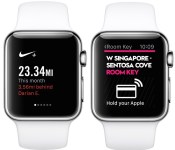
An Apple Watch apps page on Apple’s site shows off a range of apps that were demoed during the event and some that weren’t, giving a quick look at some of the things the Apple Watch will be able to do. With the SPG Hotel app, Starwood hotel visitors can use the Apple Watch to unlock their rooms, and with the American Airlines app, Apple Watch owners can get their boarding passes right on their wrists.

The Nike+ Running app displays distance, duration, and pace on the Apple Watch, while the Instagram app allows users to browse their feeds, like photos, and leave emoji comments. Shazam will identify songs, Dark Sky will let users know the chances of rain or snow, and the NYTimes Apple Watch app will offer headlines and breaking news.

iOS 8.2, released today, includes an Apple Watch companion app that has some information on Apple Watch setup. The Apple Watch will quickly connect to an iPhone using the camera. You just need to hold the Apple Watch up to the camera and align the watch display with the view finder. From there, the Apple Watch App Store is accessible, but it has yet to be populated with apps. It is not possible to delete the Apple Watch app from the iPhone in iOS 8.2.
 Image via iPhone Hacks
The Apple Watch will be available for pre-order beginning on April 10. Apple will also begin allowing customers to test the device in its retail stores on that date.
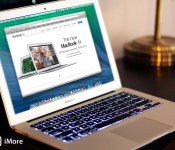
MacBook Air 11-inch vs. 13-inch: Which ultralight laptop should you get?

Mac buyers guide: How to choose between the tiny but powerful 11-inch MacBook Air or the bigger 13-inch model
We’ve already compared MacBook Airs and MacBook Pros, and you’ve decided that the svelte MacBook Air is right for you. Now you have to decide which MacBook Air is right for you – the smaller 11-inch model or the larger 13-inch version? Also, what configure to order options make the most sense? Let’s have a look.
Originally published in 2014, we’ve updated this article with info about the 2015 models.
Comparing MacBook Air models

The 11-inch MacBook Air is Apple’s least expensive laptop – its entry-level system, if you will. For that, you get a system equipped with an 11.6-inch display (measured diagonally) that can display 1366 x 768 pixels natively. You also get 4 GB of RAM and 128 GB of flash storage. You can double the storage capacity for another $200.
Priced only $100 more than the base model 11-inch MacBook Air at $999, the 13-inch MacBook Air’s 13.3-inch display shows 1440 x 900 pixels natively, but under the hood it’s very similar – 4 GB RAM and 128 GB flash storage. Like the 11-inch model, you can double storage capacity to 256 GB for another $200.
With their lids closed, both MacBook Air model rise barely more than half an inch above the table. Tapered from front to back, they’re 0.11 inches at their lowest point and 0.68 at their highest. The 11-inch model is less than a foot wide (11.8 inches) and the 13-inch model is 12.8 inches wide. The 11-inch is lighter by slightly more than half a pound – 2.38 pounds, compared to the 13-inch’s 2.96 pounds.
Both systems come equipped with 802.11ac networking and Bluetooth 4.0 support, and both come equipped with stereo speakers. Also, both sport backlit keyboards with an ambient light sensor that automatically adjusts the backlighting brightness. And despite the 11-inch’s diminutive proportions, the keyboard is the same size as its 13-inch cousin, so you make no compromise there, either.
All systems now come equipped with OS X 10.10 Yosemite along with the latest personal and productivity software for Mac, including Pages, Numbers and Keynote, Apple’s answer to Microsoft Office.
The MacBook Air in its standard configuration provide you with a spectrum of buying choices from $899 to $1,299, butting up against the base model 13-inch MacBook Pro with Retina display (and more than the legacy 13-inch MacBook Pro still in Apple’s current product matrix). But you can spend almost $1,800 if you murder out a 13-inch MacBook Air with all options.
Let’s start to compare systems and see what options makes sense.
Maximum portability vs. more screen real estate: How much difference does two inches make?

The 11-inch MacBook Air is a bit of an odd duck: it’s the only laptop that Apple makes with a 16:9 aspect ratio. The 13-inch MacBook Air and every MacBook Pro sports a screen with a more conventional 16:10 aspect ratio instead.
This gives the 11-inch MacBook Air a decidedly more cinematic feel to it, despite the tiny size. That’s the same form factor you’ll find on your flat-screen HDTV, for example. The same aspect ratio used in movies. In practical use, this means that you see more width than you do height. So the 11-inch MacBook Pro generates wider, shorter windows than its 13-inch brother.
At 135 pixels per inch, the overall pixel density of the 11-inch MacBook Air is a bit higher than the 13-inch model’s 128 PPI – measurable but not huge. The net result is that stuff looks just a smidge smaller on the 11-inch MacBook Air.
Some users love the wide screen; others hate it and claim that the screen is too small. It’s very subjective, so my advice is to compare both to see what works best for you.
The resolution of the 13-inch MacBook Air is 1440 x 900. It’s actually the same size as the 13-inch MacBook Pro sans Retina display, but with higher resolution. It’s higher-res but not Retina – and that’s an important distinction to make – Retina display is not an option on either MacBook Air model. That undoubtedly helps the MacBook Air with its amazing battery life, but it also puts it at a disadvantage for users looking for the best-quality graphics and text reproduction on their laptop.
Having said that, we survived for years without Retina display systems – if you don’t have it, you may not miss it. And the 13-inch MacBook Air gives you a decent amount of screen real estate to do what you need. If the screen gets too cluttered, fire up Mission Control and create a second desktop space.
Light weight vs. freedom from power outlets: How long can each MacBook Air last without charging?

Screen size isn’t the only fundamental difference between the 11-inch and 13-inch MacBook Air. Because it’s bigger, the 13-inch MacBook Air can pack more battery capacity inside than the 11-inch, as well. Inside the 11-inch MacBook Air is a 38-watt-hour battery, and inside the 13-inch is a 54-watt-hour battery.
Both MacBook Air models have outstanding battery life, thanks in part to the use of Haswell processors inside. Intel’s Haswell chips have a smaller die size than previous processors and are more power-efficient, which means laptops that use them like the MacBook Air can last longer on a single charge.
Apple estimates the 11-inch MacBook Air model can go up to 9 hours without recharging, while the 13-inch can go up to 12 hours. So if all day battery life is a consideration, the 13-inch MacBook Air may be the better alternative.
Slender design vs expansion: What can you connect to the MacBook Air?

Both the 11-inch and 13-inch MacBook Air come similarly equipped – a 720p FaceTime HD camera embedded in the center of the bezel above the screen, a 1/8-inch headphone jack, dual microphones (better audio quality when recording your voice or using Skype or Facetime), two USB 3.0 ports (one on each side) and a single Thunderbolt 2 port on the right side, suitable for driving an external display with up to 2560 x 1600 pixels at millions of colors (the resolution of Apple’s own 27-inch Thunderbolt Display), while simultaneously operating its internal display.
There is one key difference between the two machines, however: the 13-inch MacBook Air also sports an SDXC card slot on its right side. If you use or plan to buy a digital camera that writes to SD card, and you plan to use your MacBook Air to edit and catalog photos and videos shot with that camera, the 13-inch may be a better choice.
Is more RAM worth it?
4 GB of RAM is the standard across the line, and it’s perfectly sufficient to run Mavericks and any normal productivity apps and Internet apps that you might need to.
If you’re working with really memory-intensive apps – image-editing apps, video editing apps and music-making apps, for example – or if you’re planning to run a lot of applications simultaneously – going with 8 GB may be worth it. It’ll certainly give you more head room.
Upgrading to 8 GB may “future proof” your MacBook Air a little more further down the road, as well. Apple’s steadily increased the amount of base RAM it includes in laptops to give them more headroom for beefier performance; my late 2010-era MacBook Air came with 2 GB, and it’s feeling the pinch now that it’s running Mavericks.
It’s important to note here that you have to order your MacBook Air with the amount of memory you think you’ll need, because it’s soldered to the motherboard. You can’t upgrade after the fact. So consider your needs carefully.
Is more flash storage worth it?
Likely be the most difficult decision when buying a MacBook Air: Deciding how much storage is sufficient. If you’re migrating from another Mac, chances are you have files you want to bring over. Applications too. How much storage do you need? And how much can you offload?
Compared to the 500 GB hard drives that have become common in laptops in recent years, 128 GB of flash storage is scant space. Chances are you’re going to have to pare down, perhaps dramatically. If there are infrequently used files that you’ve archived but you still want to keep, this may be an opportunity to offload to an external hard drive, server, or even cloud service. And judicious use of iCloud as a repository for some files may be a good idea as well.
Having said that, you do have options. The 256 GB configuration of either the 11-inch or 13-inch MacBook Air is $200 more – $1,099 and $1,199, respectively. And if you don’t think that’s enough, you can double it again from 256 GB to 512 GB.
Any way you slice it, flash storage is pricey.
Past MacBook Air models have been upgradable. Third parties specializing in SSDs designed to work in older MacBook Air models don’t yet have SSD upgrades for the newest MacBook Airs, so you’re stuck with what you get from the factory. And if you run out of space inside, you’ll need to offload files one way or the other.
Is an i7 processor worth it?
With clock speeds way below MacBook Pros and some PC laptops, the MacBook Air looks on paper like it should be a pretty anemic performer, but looks are deceiving. Having flash storage makes a big difference in overall performance, since the CPU isn’t bottlenecked by a hard drive. It also helps that the same company that makes the computer makes the operating system that runs on it, and the operating system is thoroughly optimized to take advantage of that hardware as best it can.
Perhaps one of the more intriguing configuration options for the MacBook Air comes with its processor. Across the board, a dual-core 1.6 GHz Intel Core i5 processor is standard. But if you’re willing to pony up $150 more, you can replace that processor with a faster 2.2 GHz dual-core Intel Core i7 processor instead.
Beside the difference in clock speed, there are other differences inside the i7. It has more of memory cache, which stores frequently accessed data and can means the i7 works faster and more efficiently. The i5 and i7 both sport “Turbo Boost” technology, which will automatically make the processor cores run faster when needed, for short bursts. That Turbo mode practically doubles the clock speed – 2.7 GHz on the i5, 3.2 GHz on the i7.
Both processors utilize integrated graphics – Intel’s HD graphics 6000. While gaming purists and heavy-duty video users may scoff at integrated graphics, they’ve come a long way. Today’s MacBook Airs offer smoother and better graphics performance all around, compared to their predecessor.
All this reinforces that if you’re looking for maximum performance, the i7 is a solid $150 spent. But ultimately, it’s entirely optional – the standard processor is more than enough for general use.
Who should buy the 11-inch MacBook Air?
If weight and size is your most overriding factor for your laptop, the 11-inch MacBook Air is your machine. It’s barely larger than an iPad Air (albeit more than twice the weight), but it’s a fully functional Mac computer that can do just about anything you need it to. The 11-inch MacBook Air is also a terrific computer for kids in school and college students looking for a lightweight, flexible system.
There are a couple of compromises you make with the 11-inch model – 20 percent less viewable area on its display than the 13-inch, and the absence of an SD card slot. But if neither of those are significant factors in what you’re doing, the lightweight, tiny 11-inch MacBook Air may be your ideal traveling laptop.
Who should buy the 13-inch MacBook Air?
Of the two MacBook Air models, the 13-inch is the better value: its base configuration is only $100 more than the 11-inch, and it offers superior battery life, more screen real estate and SD card support.
For the price difference between a 13-inch MacBook Air and Retina MacBook Pro, you get a significant faster processor and better graphics performance, a much better screen, more memory and storage options (up to 16 GB RAM and 1 TB flash storage), and better expandability to boot thanks to two Thunderbolt 2 ports and an HDMI port. The MacBook Pro with Retina display is also heavier, by about half a pound.
Bottom line: If you’re not willing or able to pay for the MacBook Pro with Retina display, or if you want to save weight and don’t care about the differences in the two machines, the MacBook Air is a fantastic, lightweight laptop that will get the job done.
Still undecided?
If you still can’t decide with MacBook Air is the right one to choose from, I’d recommend dropping by our [Apple notebooks] discussion forum and posting a question there. iMore has a thriving online community that can help answer questions and offer advice based on their own experience. You’re also welcome to post comments here.
The MacBook Air is a fantastic, flexible computer that’s easy to carry thanks to Apple’s ingenious engineering – feather-light and slim. For road warriors and other who don’t want to be encumbered with a heavy computer, the MacBook Air makes a fantastic traveling companion.
- iPad Air vs. MacBook Air: Which Apple ultra-portable should you get?
- MacBook Air vs. MacBook Pro: Which laptop should you get?
- MacBook Air 11-inch vs. 13-inch: Which ultralight laptop should you get?
- MacBook Pro with Retina display 13-inch vs. 15-inch: Which powerful Mac laptop should you get?
- Mac mini vs. iMac vs. Mac Pro: Which Apple desktop should you get?
- Retina 5K iMac vs. Mac Pro: Which Mac powerhouse should you get?
- Mac mini: Which entry-level options should you get?
- 21.5-inch iMac vs. 27-inch iMac vs Retina 5K iMac: Which all-in-one desktop Mac should you get?
- The New Mac Pro: What options to Apple’s high-end Mac should you get?
- CPU vs. RAM vs. SSD: Which Mac upgrades should you get?

Apple Watch videos detail how each version is crafted
Apple has released a trio of videos today detailing how each version of the Apple Watch is made, from the specific metals chosen to how they are molded into being.
In the video above, Apple says that the Sport version is made up of a new alloy that is 60 percent stronger than standard aluminum alloys, yet just as light.
For the Apple Watch Steel version, Apple says that it has chosen a particular alloy of steel that is “known for its strength and corrosion resistance.” It then takes the watch through a series of processing steps and a special forging process that makes the watch 80 percent harder.
Finally, Apple says that the highest-end Edition model of the Apple Watch uses 18 karat gold in both yellow and rose varieties along with a “unique” hardening process to make the traditionally soft metal able to stand up to wear and tear. After the body of the watch is crafted, it is then run under special scanners that detect even the most minute defects. A final hand polishing results in what Apple says is a “gold that is elegant yet uncompromisingly durable.”
For much more on the Apple Watch, along with much more, be sure to check out all of our coverage of today’s Spring Forward event.
Google officially unveils Android 5.1 Lollipop

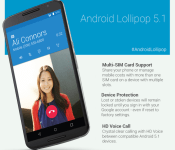
Despite the fact it has technically been around for a little while now, Android 5.1 Lollipop has finally been made official, thanks to a blog post from Google. Some of the changes in this update include stability and performance improvements, native support for multiple SIM cards, HD voice on compatible phones and, most notably, Device Protection.
With the new Device Protection feature, if your Android device becomes lost or stolen, it will stay locked until you enter in your Google account information – even if the device has been reset to factory settings. Google says the feature will be available on most Android devices shipped with the software, in addition to the Nexus 6 and 9.
Next up is support for HD voice on compatible devices, letting Android 5.1 devices take advantage of the clear high-definition voice calls that certain carriers like T-Mobile and Verizon offer. Android 5.1 will also now let you join Wifi networks and paired Bluetooth devices directly from your quick settings page. Before the update, users would need to click on the Wifi or Bluetooth buttons and jump into the Settings menu to make any changes.
While Google doesn’t official say when the update will be rolling out or to what devices, according to a few newly updated T-Mobile documents, Android 5.1 is supposed to rollout to the Nexus 4, 5 and 7 starting today. We’ll be sure to keep you updated on the official rollout as soon as we learn more!
ASUS will soon let you add a xenon flash to its phones

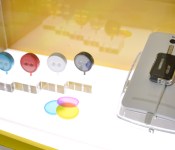
Remember the good old days when phones came with a powerful xenon flash instead of just LEDs? Well, thanks to ASUS, you’ll soon have the option to add one to an Android phone — or at least to an ASUS one, anyway. The ZenFlash came to us as a surprise announcement at today’s ZenFone 2 launch in Taiwan: It’s a xenon flash dongle that connects via USB OTG, and you can stick it onto the back of your phone for that “400 times” stronger flash. Alas, it’s still early days so there’s no further detail on this device. No price, no date and no confirmation on whether the ZenFlash will work on non-ASUS Android phones.
The second surprise of the day was the circular LolliFlash, which is essentially a basic dual-tone LED torch (with its own battery) that can be secured onto the headphone jack of any phone. Unlike Lenovo’s version, there’s no communication between the LolliFlash and its host; you simply leave the light or lights on before you take a shot — especially a selfie. It’ll even come with a set of three color filters — red, yellow and blue — that double as protective covers, but we imagine most users will just leave them at home. Again, ASUS has yet to announce commercial availability, but we can’t imagine this simple device can cause much damage to one’s wallet.
Filed under: Cellphones, Mobile, ASUS

OnePlus One now available in 16 additional European countries

As announced, OnePlus has today launched its flagship smartphone of 2014, the One, in the following 16 European countries: Bulgaria, Croatia, Cyprus, Czech Republic, Estonia, Greece, Hungary, Ireland, Latvia, Lithuania, Luxembourg, Malta, Poland, Romania, Slovakia and Slovenia.
Both the Silk White 16GB and Sandstone Black 64GB variants of the device are available in each of the above named countries with pricing set at EUR 269/ CZK 8089/ HUF 94199/ PLN 1299 for the smaller storage version, and EUR 299/ CZK 8989/ HUF 104999/ PLN 1449 for the larger.
If you’re based in Budapest, Prague or Warsaw and want to spend some “hands on” time with the handset before you purchase it, head over to your local city centre and locate the OnePlus trial booth.
Come comment on this article: OnePlus One now available in 16 additional European countries

HBO Now subscription service announced for $14.99/ month

Time Warner has just announced a new on-demand HBO service known as HBO Now. This service will cost $14.99 per month and will give users access to all original HBO programming like True Detective, Game of Thrones and upcoming shows like The Brink, Westworld and many others.
There’s one big caveat though. This service is only accessible by iOS users (iPhone, iPad, iPod Touch) for the time being, while for the rest of the crowd, there’s a web version of the service available from HBONOW.com. HBO hasn’t mentioned if an Android app is on the horizon, so we might have to wait a while to find out.
The announcement was made during the Apple Watch announcement event earlier today. We’re positive that this feature will not remain an exclusive to iOS users for too long as it would be unwise for the developers to ignore the Android population altogether, which makes up for a large part of the mobile marketshare.
But until such an app should make its way to the Play Store, users will have to stick to the web version of HBO Now. The service is quite a good bargain for $14.99 per month given the amount of content on offer. With several new series expected to break cover this year, HBO has picked the right time to make the announcement.
“HBO NOW is the next phase of innovation at HBO,” said Richard Plepler, Chairman and CEO, HBO. “With this new partnership, a natural evolution for the network, we have access to millions of Apple customers who are used to getting their favorite apps immediately. Now, they can do the same with an HBO subscription.”
Source: Time Warner
Come comment on this article: HBO Now subscription service announced for $14.99/ month
 AIVAnet