


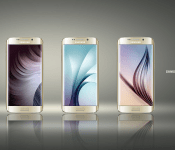
Samsung divulges design details about the Galaxy S6 Edge’s People Edge feature
 Samsung, like always, did a ton of research about consumer smartphone usage habits, and much of that research went into how they designed the Galaxy S6 Edge. Some of that research helped Samsung come to the conclusion that people think checking your smartphone in a social situation is impolite (duh) but people want to have a way to be reached by loved ones in case of an emergency, which is a very reasonable thing to want.
Research showed that roughly 71% of people want a better way to be notified about certain calls or texts, and that’s where Samsung’s “People Edge” comes in handy. When the GS6 Edge is face down, the curved sides of the screen glow different colors depending on who’s calling you. This makes it easy to tell exactly who is trying to get in touch with you and could alert you to a time sensitive situation that stands out from the other calls and notifications you’re getting.
As a very interesting side effect, Samsung claims that associating these colors with different people helps to create a stronger emotional connection with those favorite people. There’s probably some deep psychology behind that, but what’s important is that Samsung wants you to think that setting up different color combinations for your family and friends will make you like them more. And hey, they might have a good point with that.
source: Samsung Tomorrow
Come comment on this article: Samsung divulges design details about the Galaxy S6 Edge’s People Edge feature
LG ready for another big step with forthcoming LG G4

Although a lot of the buzz surrounding Android smartphones in the days since MWC 2015 has involved the Samsung Galaxy S6, Galaxy S6 edge, and to a lesser extent the HTC One M9, LG hopes to make a dent in that in the next few weeks. According to an LG official, the company was present at MWC 2015 and met with carriers and other resellers to discuss their new device. Making a positive impression will be important as the company has set a goal of 10 million units to sell during 2015.
LG says they have sold between 6 million and 7 million LG G3 devices, one of 2014’s best smartphones, since it hit the market in May 2014. According to the LG official cited by sources, the LG G4 will be unveiled in April, when everyone will be learn what they have done to change up the specs and features of the smartphone. Producing a solid entrant to the market and achieving sales success will be an important part of LG’s longer-term strategy as it will show they can keep the momentum going after the success of the LG G3.
Rumors are already swirling about LG following the path of Samsung and switching to a metal chassis for their top device. Another frequent claim is that LG will implement a fingerprint scanner. However LG equips the LG G4, it appears all but certain that the heart will be Qualcomm’s new Snapdragon 810 processor. LG went out of their way to note they “have no problems” sourcing chips from Qualcomm and noted the chip supplier had more than adequately address some “not big technical issues.”
source: The Korea Times
via: G for Games
Come comment on this article: LG ready for another big step with forthcoming LG G4
Hands on with the Apple Watch and Apple Watch Edition

Apple’s tagline is a true one: The Apple Watch is coming, and soon. Here’s what we think so far.
At Apple’s Spring Forward event, Rene and I got a chance to play with Apple’s Watch collection in a bit more detail than either of us were allowed last Fall. Though we’re going to reserve any sort of sweeping judgements about the Watch until we actually get some in-depth hands on time with them in April, here are our latest impressions of Apple’s upcoming smartwatch.
Gold is good
 Ren: Last fall, I only got a chance to try on Apple’s baseline Watch Sport. This time around, I got to wear both the 38mm and 42mm Watch and Watch Edition… and boy, I wish I was in the kind of income bracket that can afford a $10,000+ watch. The rose gold Apple Watch Edition may cost more than any piece of jewelry or technology I own, but it’s a beautiful signature item — far less heavy on my wrist than I anticipated, with a really nice fit and finish. It feels precious in a way no Apple device has before.

That said, until I inherit a duchy or multi-million dollar fortune, I’m likely leaning toward the Steel or Aluminum models for my own personal use. The steel Watch is just as polished and beautiful as its golden companion, with a much more reasonable price tag — and the aluminum Apple Watch can be dressed up without much fuss using one of the steel Watch’s signature bands.
 Rene: The Edition is amazing. The gold looks fantastic and the weight was surprisingly light. I tried the 42mm version with leather band this time and, like Ren, it makes me wish money wasn’t a thing I had to pay for what I want.

But since I do, I’m also leaning towards Sport or steel.
Interacting with the Watch
Ren: We finally got to take the Watch for an unguided spin after this event — which for me meant digging into its settings; trying out Glances, notifications, and messaging options; browsing apps; and playing obsessively with the Digital Crown. Much as I want a Watch right now, I’m glad Apple’s engineers still have a month and a half to polish its software: Though much more solid than the guided demo I saw last fall, the Watch still needs a bit of time to smooth out scrolling and transitions between its features. But it’s close — it feels like the second-to-last developer beta of an iOS device — and I’m getting very excited over its capabilities and what it might do for my life.

Rene: Some people seem confused by the many ways you can interact with the Apple Watch. Here’s probably all I’m going to do at first: Get notifications and triage them, look for quick information or to do quick interaction.

I’m happy that there’s a lot more I can do, and that apps are coming that will let me check my boarding pass, call an Uber, unlock a room, close a garage, and more. But that’s frosting to me at this point.
They had me at saving a reach.
Watch what happens
Ren: I don’t think the Watch will save humanity from being rude at the dinner table, nor will it change the world overnight. But the more I see, the more I continue to be bullish on Apple’s smartwear. I know what the Watch will do for my life: My travel alone will be much improved thanks to being able to scan boarding passes directly on it, and I can’t wait to see how it helps my cross-training for roller derby. (And if nothing else, I’ll actually have something to look at when I mime checking the time in conversations — I haven’t worn a watch in ten years, and the Apple Watch is the first device that’s truly gotten me excited to do so again.)

Rene: This is Apple Watch generation one. No one, including Apple, knows exactly what it will be to most people, let alone all people. Like the iPhone, like the iPad, it’ll take a year or two to really shake out.
But based on everything I saw last September and again today, holy wow but they’re going to be fun years.

When I was a kid my dad bought an Apple II Plus so he wouldn’t have to go to IBM to access the mainframes. It couldn’t do as much, but it could do important things more conveniently. My iPhone prevents me having to go back to my Mac whenever I leave home. Again, not as much, but ever so much more convenient. My Apple Watch will prevent me having to reach for my iPhone as often. Still won’t do as much, still will be infinitely more convenient.
And it’s only generation one.
Bands away
Ren: The Watch may be your initial purchase, but the bands are going to be the fun accessories you didn’t know you wanted. You won’t be able to buy bands off-the-bat as accessories, but an Apple representative told us they’re coming shortly after launch; so you’ll be able to rock a soft pink Modern Buckle with an Apple Watch Sport if you so desire.

The band that surprised me the most? The Milanese Loop, which I expected to hate but fell in love with almost instantly. The metal loops are so small that they don’t tug on your skin or arm hair, and the metallic clasp looks like way too much fun to fiddle with during meetings or while on the train.
Rene: I like what Apple’s doing with the bands. They’re amazing products in their own right. And since you can swap any band of the same size — 38mm or 42mm — with any watch casing of the same size, the potential isn’t only high — it’s fun.
You’ll have to choose a band when you buy, and the band will affect the initial price you pay, but at some point you’ll be able to swap to your heart and fashion’s content.
Sure, some combos might be odd, but others might be perfect for you.
The retail life
Ren: Previews from April 10 to April 24! I wished for this, but I didn’t think it would actually happen. I’m so glad they did. The Watches are personal technology choices beyond a size of MacBook or iMac screen; you need time with them to figure out which one is right for you — or even if one is right for you at all. By giving customers the chance to try the Watch on without immediate pressure to buy, it also takes away some of the stress you find in high-end jewelry shops.

The special Retail tables (on display in the event hands-on area) are also very cool: Employee badging to unlock secret drawers with hidden product rather than unlocking a glass case? It’s very Apple, and very chic.
Rene: Apple Watch is going to be a rollout like no other. We won’t just show up and line up on launch day. We’ll get a preview starting April 10. We’ll be able to go in and see which Apple Watch is best for us.
Then, on April 24, we’ll be able to buy.
There will be tables in Apple Retail with all the watches set in the center, and Apple Retail staff will have a special badge they can use to unlock a special drawer. And in that drawer will be all the watches to try on.

It’s a pragmatic system, one that respects how Apple Retail currently works yet starts to move it towards a more personal future.
Where it goes next will be fascinating to see.
The bottom line
Rene: A lot of people are over-thinking the Apple Watch. It’s a watch made by Apple. Says so right on the box. It can do a lot of super cool things. Says so right on the website. Those things will have value for people the same way a tablet has value for people. Whether it has value the way a phone does remains to be seen.

Tim Cook said he’d been wanting to make a phone call from his wrist since he was five. I have too. Unlike Cook, I lacked the genius and resources to make it happen. Thank goodness Cook had an abundance of each.
Because now we both have it. And a whole lot more.
Ren: The Apple Watch may not be for you, and that’s okay. But it has the potential to change many people’s lives for the better. I’m more convinced of this every time I see Cook and company talk about the Watch and hold it in my hands. Apple has poured all its craftsmanship and talent into this product, and it shows. I don’t know if it will be a banner success the way the iPhone was — but I love its potential.
And now I know for sure that the Apple Watch is definitely for me.

Monday Makeover: An extensive look at Go Launcher
After taking a break for Mobile World Congress, Monday Makeover is back again! There is a plethora of apps out there that allow you to customize just about every single thing on your android smartphone without even rooting. That is why we have started the weekly series “Monday Makeover.” Each week we will take one of these customization apps and talk about setting it up, discuss the features of it, and show you how you can make your android device truly one of a kind. Last week we talked about Action Launcher 3. This week we are taking a look at Go Launcher. There is a free version and pro version of this app, but we will be looking only at the free version.
Getting Go Launcher up and running on your phone is fairly simple. Once downloaded, you can tap your home button and select “Go Launcher Z” from the menu. If you are not presented with this menu after tapping the home button, you can open your settings menu and go to the “Home” tab. Here you will see your options for your homescreen and you can select “Go Launcher Z”. After this, you can return to your homescreen to see the default Go Launcher setup.
Themes

Go Launcher takes advantage of themes to make changing the look and feel of your phone quick and simple. They offer thousands of free and paid themes in the Go Store. On the homescreen, you will see the app “Themes” which will take you to the theme selection page. From here, you can browse themes to your heart’s content and apply whichever one you want. Selecting a theme will take you to that theme’s page which will either be in the Go Store or on the Google Play Store. If you cannot find the theme you want in the Go Store, you can find countless more themes in the Google Play Store. Selecting the icon in the top right of the Go Store will show you all the themes you have downloaded and you can apply them from there.
Swiping up on a homescreen will bring up six menus that we will take a look at individually.
Edit

This menu gives you the options to add widgets and apps to your homescreen, change the wallpaper, and change the scrolling effect. Under the “Widget” tab, you can select “System Widget” for access to different app widgets on your phone. You can also add widgets specific to Go Launcher like “Boost” which cleans up your RAM usage. The “Apps” tab lets you add apps to your homescreen, but it is different than normal. Instead of dragging an app to your desired homescreen, you first need to center the homescreen you want on the slider at the top and tap the app you want to add. This will move it to that homescreen. The “Wallpaper” tab lets you change the wallpaper on your phone. Tapping “Local” will give you access to wallpapers stored on your phone as well as your personal pictures. Under the “Effect” tab, you can change the transition that happens when you swipe between homescreens. Selecting each option will show you a preview in the top part of the screen.
Wallpaper

This menu will open up the same menu you get from tapping edit, accept that you are taken directly to the “Wallpaper” tab.
Theme

The “Theme” menu takes you to the Go Store where you can browse and apply whatever themes you want. This can be useful if you delete the “Theme” app on your homescreen.
Go Settings

This menu holds most of the options for customizing and changing Go Launcher. The “Wallpaper Scroll” toggle allows your wallpaper to move when you swipe between homescreen pages. “Lock Edit” will lock your homescreen so that apps and widgets cannot be added or removed without unlocking the homescreen first.
Screen

This menu gives you several options for changing the setup of your screen. Grid size changes the amount of rows and columns on your homescreens. Screen orientation lets you choose the orientation of your homescreen. Infinite scrolling lets you scroll past your last homescreen and loops back to your first homescreen. Show status bar lets you show or hide your notification bar at the top of your screen. Dock rows lets you add pages to your dock that can be swiped between like homescreen pages. If you want to disable the dock, you can turn Show dock on and off. Dock loop is similar to Infinite scrolling because it loops your dock pages so you can scroll from the last page directly to the first page. Show indicator lets you turn the indicator at the bottom of your screen on and off. This indicator shows you what page you are on. You can place the indicator at the top or bottom of your screen with Indicator position. Indicator style lets you change the appearance of the indicator.
App Drawer

Grid size let you change the amount of rows and columns in your app drawer. The more you have, the more apps will fit on each screen. This can be useful for phones with larger screen sizes and tablets. Turning on Screens scroll circularly lets you swipe past the last screen of your app drawer to get to the first.
Personalize

Under this menu, you are given access to five sub-menus that allow you to customize your phone. The Transition menu lets you change the transition between homescreens and the animation that happens when you open an app. The Icon menu brings up all the options for changing how your icons look. “Icon size” lets you choose how large or small your icons are. You can choose a preset size or a custom size. Show icon base deals with certain icon packs. If you have an app that is not supported by an icon pack, it may place a background behind the app to help it blend in. Turning off Show icon base will remove that background shape. Icon style lets you apply icon packs to your phone. This can quickly change the look of your phone more than anything else. The Font menu lets you edit app labels. App labels color lets you change the font color of app names. App labels display lets you choose when app labels are displayed and when they are not. Select Font changes the font used for app labels. The Wallpaper menu lets you choose what pictures you want to use for your wallpaper. App Drawer Background lets you choose a photo for the background of your app drawer or you can leave it transparent.
Advanced

This menu gives access to more advanced features in Go Launcher. Gesture gives you access to gestures controls you can use on the homescreen to launch apps and perform actions. I recommend spending some time here because it can really help speed up doing things on your phone. App Lock lets you lock apps with a pattern so that cannot be accessed by others. This can be useful if you have kids and do not want them accidentally opening up an app. Backup Go Launcher Z allows you to save you current homescreen setup so that you can restore it at any time. You restore backups from this menu as well. Notification Toggle lets you turn on/off the Go Launcher notification in your notification bar.
Select language lets you choose what language you want Go Launcher to be displayed in. If you are ever having problems with Go Launcher, tapping “Restart Go Launcher Z” will restart the app without removing any of your customizations.
System Settings

Tapping this will open up your phones settings.
Feedback

If you are having problems with Go Launcher and you do not know what to do, you can go to this menu and send a message to the developer. You can also include screenshots of the problem if you have any.
App Drawer

The app drawer in Go Launcher has some cool features baked into it. Tapping the magnifying glass in the bottom left brings up an alphabetical list that you can scroll along to easily find apps that begin with a certain letter. This can be useful if you have a lot of apps and want to locate a certain one quickly. The icon to the right of the magnifying glass bring you directly to the Play Store. The icon that looks like a game controller will open up a window that allows you to download games to your phone. However, you could easily use the Play Store instead. The paintbrush icon in the bottom right shows you what apps are running and lets you manage your RAM usage.
Overall, Go Launcher is a relatively fast, simple launcher. With 200 million downloads and a 4.5 star rating with over 5 million votes, it is an extremely popular launcher, too. There are some cool customization options and more themes than you could even use. Some may not find enough customization features, but for most people it will be more than enough. It is nice to look at and the animations are gorgeous. You can pick up Go Launcher for free in the Play Store or you can unlock more features with the pro version for $5.99. If you have used Go Launcher in the past, leave a comment telling everyone your impressions. While you are down there, go ahead and give us some suggestions for apps you would like to see in future Monday Makeovers. Have a great week!
The post Monday Makeover: An extensive look at Go Launcher appeared first on AndroidGuys.
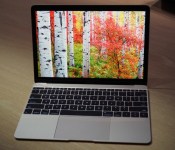
First Impressions of New 12-Inch MacBook: Ridiculously Light, but Thin Keys and Trackpad Take Getting Used To
Following today’s “Spring Forward” media event, Apple allowed members of the media in attendance to get some hands-on time with the brand-new 12-inch Retina MacBook. Many sites are now sharing their first impressions of the notebook, which includes an incredibly thin design (13.1mm), a revamped trackpad, a Core M processor, silent operation thanks to the lack of a fan, an edge-to-edge keyboard, and a single USB-C port.
We’ve gathered up some of the initial thoughts below to give our readers an introductory look at what to expect from the new MacBook.
To begin with, TechnoBuffalo has a hands-on video of the 12-inch Macbook, which gives a good look at the various features of the device, including the edge-to-edge keyboard, the Touchpad, and the new USB-C port. It also gives us a clear picture of just how thin the new MacBook is.
Engadget‘s Dana Wollman says the new MacBook at 2 pounds “makes the Air feel like a heavy old thing.” Wollman was initially skeptical of the new keyboard, which has keys with less travel, but ultimately found that the keys are “still springy.”
Though the buttons are indeed flat, and though they aren’t cushy, they are still springy. They pop back up when I hit them. That means I can type at a gingerly pace and know that for the most part, I won’t miss a key, and that most of my button presses will register. If this were another machine, I might unconsciously start mashing the buttons, just to make sure I don’t have to go back and re-type anything. I was prepared to do that here, but quickly felt my hands relax once I realized they didn’t actually need to work that hard. Again, though, there could still be a learning curve for those of you upgrading from an older MacBook.
 Image via Engadget
The Verge‘s Dieter Bohn says the new MacBook is “ridiculously thin and so light” that he didn’t believe it when he picked it up. He was impressed with the “insanely thin” 2304 x 1440 display. The trackpad, he says, is accurate, but Force Click is “far from intuitive” and that it will take him some time to get used to it.
You press down hard and keep pressing through the click, as though you were karate chopping with you finger and trying to hit a target behind the trackpad. Do that and you’ll feel a subtle second click happen, and ta-da you’ve activated force click. For the company that famously refused to put more than one button on the mouse, putting an extra interaction like this on the trackpad seems weird.
Gizmodo‘s Sean Hollister was also impressed with the lightness of the new MacBook, writing “it felt like I was holding nothing at all. It’s so light,” but he went on to say that the notebook is “not completely lovable” due to the MacBook’s keys, which are too thin. The screen, though, is “gorgeous” and he loved the new Force Touch trackpad.
Apple’s new Force Touch pad sounded a little bit gimmicky during the announcement… but I love it. I love it so much. Not because it’s easy to press like the laptop buttons of yesteryear–it’s not–but because it’s so smart. Forget copy and pasting text when you want to look up an address or add events to a calendar: Mac OS is now smart enough to do those things automatically the moment you push down on the trackpad.
You just physically push down harder–the sensitivity’s adjustable–to take an action on what looks like plain text on the web or even in a text document, and boom, you’re getting shit done.
 Image via Gizmodo
SlashGear‘s Chris Burns calls the display “incredible” with huge viewing angles and crisp, clean details. Burns highlights the single USB-C port on the MacBook, which is the only port on the device. It handles all necessary functions like charging and USB input. He also points out that the FaceTime camera on the MacBook is only 480p, lower quality than Apple’s other notebooks.
 Image via SlashGear
Wired‘s David Pierce says the MacBook is “amazingly sturdy” for being so thin, and its screen is “lovely.”
Everything about the MacBook is about beauty, whether it’s the single USB-C port on the left side–the only port on the entire device save for a headphone jack on the right–or the new Gold, Space Gray, and Silver colors. The Gold is actually much more handsome than gaudy, but the Space Gray is my favorite of the options. It’s dark and sleek, fitting for a device that’s so, so very thin.
Like the other reviewers, Pierce was not impressed with the MacBook’s keys, which he says he “immediately hated.” The MacBook, he says, runs “quite well” for a device that uses an ultra low power Core M processor.
Apple’s new MacBook will be available for purchase beginning on April 10. The 256GB base model with a 1.1GHz Core M processor and 8GB of RAM is priced at $1,299, while the upgraded model with a 1.2GHz Core M processor, 512GB of storage, and 8GB of RAM is priced at $1,599.
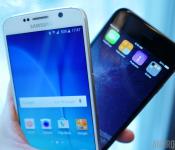
Today’s smartphone giants: looking back at 2014, where they may be headed in 2015

In terms of smartphone history, 2014 was a prolific year for smartphone OEMs. For Samsung, it saw a marked decline of sales and consumer apathy towards its Galaxy S product line, something the company hopes to reverse with the S6. For HTC, the Taiwanese company was finally able to breathe a sigh of relief as its finances went back to black, although how long that might last is questionable. For large Chinese manufacturers, the year saw huge gains in market share and earnings. For Apple however, 2014 was gloriously golden.
Gartner, the world’s largest IT research firm, has just published data on the 2014 curtain call, and the results might come as a surprise to some. Take a look at the first pair of tables:

Analysis will follow, but for now let’s just parse through the data:
With respect to Q4 2014, Apple found itself ahead of the competition. With just over a 20% of the global market share, it sold 74.8 million phones over the three month period. This is over 24 million phones more than it sold in the same period 2013, though interestingly enough the market share increase was only a little over 2.5% Q4 year-on-year. Note however, that Table 2 clearly shows despite the fantastic final quarter, Apple’s total sales in 2014 came to 191 million which, while a 40 million increase over Q3 2014, still puts it at only 15% of the global market share.
Despite the doom-and-gloom attitude that the press and even Samsung itself seem to have, the company was still the top spot in total 2014 sales at 307 million units, or roughly 25% of the market.
Samsung on the other hand, sold almost as many phones (about 73 million), yet dropped by almost 10 million from Q4 2013. Likewise, its market share contracted by a similar integer, almost 10%. Despite the doom-and-gloom attitude that the press and even Samsung itself seem to have, the company was still the top spot in total 2014 sales at 307 million units, or roughly 25% of the market. While it actually sold more phones in 2014, ironically the total annual market share percentage fell almost 6% from 2013.
Also worth mentioning are the Chinese OEMs, with Lenovo and Huawei both seeing nice growth, though neither as startling as that of Xiaomi, whose sales basically tripled when compared to those in Q3 2013.
One more chart to take a look at before getting down to details:

As you can see here, Android is unquestionably the world’s most dominant mobile OS player, with over 1 billion devices sold in 2014, and almost 81% of the market. Apple looks positively tiny by comparison at just 191 million, and about 15% of the market. Windows Phone became even less of a threat, despite its hardware actually selling more in 2014 than the year prior. Blackberry continued to decline with its annual sales dropping by over half, and its market share falling below 1%. For all the other OS platforms out there (Firefox OS, this means you), sales dropped along with market presence.
Now let’s take a more detailed look at each of the main players:

Oh how this was but a pipe dream at best prior to 2014.
Apple
Cupertino struck gold with its iPhone 6 and iPhone 6 Plus, as evident by it earning the world’s record for biggest quarterly profit ever among publicly traded companies. There is a certain degree of “told you so”, “jony come lately” disgust which Android enthusiasts might feel when faced with such news, if only for the fact that Ashton Kutcher’s inspiration was so fiercely opposed to larger sized smartphones. Sure enough, when CEO Tim Cook finally took matters into his own hands and broke the stay on larger device sizes, the sales soared. Having access to China’s seemingly infinite population certainly doesn’t help, either. The fact that Apple could do so well in Q4 2014 as compared to Q4 2013 is proof positive the size made all the difference.
The bizarre irony here is that, if Apple were to actually license its iOS to third party OEMs, while its market share would definitely increase, its sales probably would plummet. As the sole distributor of iOS devices, the company ensures that anyone in the ecosystem must play by its rules, all software must run on its hardware, and all consumers must buy its products.

Apple Watch: the device that could very well make or break Apple’s future plans.
Outlook for 2015
While the first quarter will inevitably see some continued benefits of the iPhone 6 and 6 Plus hardware, the real test for the first half of the year will be that of the market’s reaction to the newly announced Apple Watch: if it takes off then things are golden, yet if it sinks like a stone, then Apple is going to have far more than its pride to worry about, as investor confidence may very well plummet out of fear the entire platform is a waste of resources.
There is a very real possibility that Apple has peaked, especially now that it has released a phablet
Assuming history repeats itself, the iPhone 6s and 6s Plus will inevitable see some big sales as well given the annuals (or, in other words, people who upgrade each year out of love for Apple) or those whose 2-year contracts have lapsed. Will this surpass the sales of Q4 2014? That is highly unlikely unless the iPad Air 3 and Mini 4 are big sellers, or the rumored iPad Pro comes out and becomes a hit. There is a very real possibility that Apple has peaked, especially now that it has released a phablet: it was arguably the one thing users were up-in-arms about, and now that they have one, the need to upgrade the hardware each year may have diminishing utility value (assuming it had genuine value to begin with).
One potential profit point for Apple, however: If the company releases a third iPhone product line things could be almost assured to accelerate: a new device with a small screen. For all those who didn’t update to the 6/6 Plus because of their being too big, and all those who won’t this year either, a brand new top-tier-small-screen offering might go a long way, especially for all those who own an iPhone 5 or 5s and won’t be inclined to upgrade otherwise.

Samsung’s Galaxy S6 may have the fix (for the company’s smartphone sales slump).
Samsung
We’ve already discussed Samsung at length in the past few weeks and months, so in an effort to avoid rehash this will be succinct: Korea’s largest conglomerate had a really Debbie Downer in 2014 with its Galaxy S5 selling 40% less than anticipated. Even when the redesigned, metal-framed Galaxy Note 4 released in the fall, Apple’s phablet juggernaut was there to usurp sales; a bitterly distasteful situation for Samsung, given how it basically created the genre with the original Galaxy Note and did all the groundwork to legitimize the screen size. The company pledged it would fix things for the coming year, however.
Outlook for 2015
At the moment, the Galaxy S6 and S6 Edge seem to be the exact panacea Samsung needed to solve its fiscal fall-out. The press has been raving about the pair of redesigned, premium flagships, and barring some fan fury over the lack of MicroSD support and a removable battery, the public seems quite taken with them as well. The company is also taking a break from smartwatches for the time being, has yet to announce any tablets yet (by this time last year it had already unearthed no less than four), and has been quoted by saying it plans to focus on the core product lines for the time being.

There they are, Edge to Edge, and Edge to Edge. But wait, there are two more Edges not touching anything! Samsung’s Galaxy S6 Edge has two more curved sides than most other phones.
The ultimate success of the Galaxy S6 might be determined by the price point at which its set. Some have speculated that the S6 will occupy a lower price point so as to better compete in countries like China and India, where Chinese OEMs have stolen Samsung’s #1 spot. This would leave the Galaxy S6 Edge as the premium, expensive variant for those with extra cash to burn. Still, this hypothesis remains unlikely given that even when it comes to mid-range or budget hardware, Samsung doesn’t seem to interested in lowering prices to compete with its rivals (see the Galaxy A series for example).
The ultimate success of the Galaxy S6 might be determined by the price point at which its set.
As far as tablets go, while its expected the company will announce the Galaxy Tab S2 in the coming months, the rumored specs and hardware isn’t wildly different from the pair that released last year. On the contrary however, the 4:3 screen aspect ratio it’s said to ship with might be a huge turn off for Samsung supporters, or it might be just the ticket to properly displace the iPad in terms of sales dominance, especially if it does in fact, include an all-metal frame. Still, given the high price tag both will inevitably carry, it’s difficult to make heads or tails of this topic.

These two companies have already made quite a positive partnership it would seem.
Lenovo
Given that Motorola is now part of this Chinese giant (and indeed Gartner’s figures account for it as such), Lenovo had a fantastic Q4 last year. While its global market share might only have grown half-a-percent or so when compared with Q4 2013, sales-wise the bump was about 8 million units higher.
Outlook for 2015
Given that Motorola is getting major praise around the globe with its recent offerings, it’s likely that Lenovo will see increased growth this year, especially now that it can directly influence the decisions and products the formerly Google-owned entity puts out. The Moto X is a fine flagship with rich customization (something that irks one Ive) and the budget-friendly Moto G and Moto E are consistently getting good reviews for pairing affordability with good performance and relatively excellent hardware. These products will definitely help Lenovo in territories outside Asia given the extremely limited global availability of its own branded products such as the Vibe Z2 Pro.

Huawei has a very nice smartwatch coming soon.
Huawei and Xiaomi
Rather unsurprisingly, both companies had a fantastic year in 2014 with booming sales at the expense of Samsung in their home market of China, as well as neighboring India. Xiaomi in particular, has a unique business model that keeps costs low along with prices, and is definately the surprise success story of 2014 given its meteoric accomplishments. For a better look at them, and other Chinese OEMs as well, have a look at one more table from the Gartner report:


Xiaomi’s latest high-end offering, the Mi Note.
Outlook for 2015
Fantastic, to say the least. Huawei has just announced a fantastic new tablet and eye-catching smartwatch, not to mention updates to its other wearable offerings as well. Xiaomi has announced plans to broadly expand the availability of its products to outside markets, and even plans to open an accessory store in Europe and eventually in the US market. Both of these companies know how to make competitively priced hardware complete with their own unique approach to Android, and Asian customers couldn’t be happier. While Huawei is already relatively known in non-Asian territories (though perhaps for the wrong reasons), Xiaomi will need to work somewhat harder to establish itself in markets like North America and Europe.
Honorable Mentions:

The HTC One M8 next to the HTC One M9. The lack of…”distinguishing features” may-or-may not play into consumer purchasing decisions.
HTC
Interestingly enough HTC isn’t present on any of the three OEM-specific tables published by Gartner, a testament to just how far from grace the Taiwnese firm has fallen. The company had a rather diverse line of flagship products in 2014 that included consisted of the flagship Android HTC One M8 to the…Windows Phone 8 HTC One M8. Still, the Desire Eye was a flagship in all but name, and the various other offerings such as the Butterfly 2 and even the HTC Re periscope-inspired action camera showed the company is full of ideas.
Outlook for 2015
So far, HTC is off to a somewhat rough start given its decision to rehash last year’s twice-released HTC One M8 with updated internals and a different camera pair under the name HTC One M9. It has received a lot of criticism from fans and foes alike for this, but until the product hits stores nothing can be said in certain. The HTC Vive might prove to be a very promising piece of kit and at the very least comes as an unexpected development that had surprised many. The potential for a “true” flagship to hit this summer (after hype for the S6 has died down) is still a possibility, although sadly anything HTC releases this year may end up being largely ignored by all but its devoted fans. Still, the company has gone on record promising 2015 will be its best yet, so anything is possible.

Sony’s Xperia Z4 Tablet is thinner than ever.
Sony
Interestingly enough, when one examines the final Gartner table (Table 4), it would seem as if Sony had neither a good nor a bad 2014. On paper at least. The company had basically no growth or decline with respect to sales, though considering that most of its smartphones are sold in Japan, that might intrinsically be a bad thing. 2014 was a hard year indeed however, which saw the sale of its VAIO line to a third party entity as well as the continuation of its poor overall financial performance.
Outlook for 2015
Given the endless stream of bad news revolving around Sony, its finances, and its products, pessimism would seemingly go hand-in-hand. Still, the Xperia Z4 Tablet has received a lot of good press in the few days since its official announcement and many are convinced the upcoming Xperia Z4 smartphone will be “the one” to put Sony back on the path to success, especially since the Japanese conglomerate has seemingly gotten it straight that the single flagship product it has need not be updated every few months. Still, Sony has a lot of work cut out for it given the severe lack of presence its mobile division has in key territories like North America.
Wrap-Up
So there you have it. We took a look at the final sales data from 2014, made some sense of it, and then offered some thoughts on what the remaining 9+ months of 2015 may look like. Please feel free to weigh in on the figures and feature with your own thoughts, and let us know what you expect for 2015, or what you made of 2014’s report.

Senator on subcommittee for technology has ‘never sent’ an email

Need more politician-email news? Well, it turns out that Republican South Carolina senator Lindsey Graham has never sent one. Ever. While talking about the Hilary Clinton home-email-server issue, Meet the Press‘ Chuck Todd asked if Graham had a private email account. “I don’t email. You can have every email I’ve ever sent; I’ve never sent one,” said the lawmaker who sits on the Senate Subcommittee for Privacy, Technology and the Law, among three others. “I don’t know what that makes me.” As The Washington Post, notes however, that doesn’t mean he’s lacking staffers who can send emails for him.
He said it’s just more practical for him to talk to people, either in person or on the phone. “I’m glad I don’t have the ability to say everything that comes to my mind instantly,” he said in a campaign stop attended by Bloomberg. “The next President of the United States needs to be good with people, not just technology.” Graham doesn’t respond in kind to text messages, either, and if he thinks your SMS is important enough, he’ll call. His reasoning is sound (interpersonal skills are important), but this adds to the disappointing trend of lawmakers being in charge of things they don’t fully understand.
Via: The Washington Post
Source: NBC News
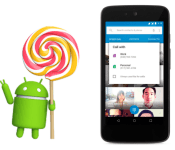
Android 5.1 Lollipop Announced. Keep on Licking.

Long gestating in the hearts of minds of the Android faithful, today Google officially announced the update for Android Lollipop to version 5.1. No more extra decimal points for you.
The update, announced via the official Android blog by VP of Android Platform David Burke, brings with it a number of subtle refinements aside from the usual stability and performance improvements. Android 5.1 actually allows the use of more than one SIM card on devices with multiple SIM slots. The image above shows an example of this at work, giving the user a choice of which phone line to use to make a call. Pretty nifty.
Device Protection will allow a lost or stolen device to remain locked until one signs in with a Google account, even if a ne’er-do-well attempts to perform a factory reset.
Another new addition is high definition voice calling on compatible devices. The Android team doesn’t specify, but we assume this is voice carried over data and not the usual cellular connection. But we could be wrong.
Bluetooth connections will now be able to be managed directly from Quick Settings. No longer will you need to go through a whopping two levels of UI to reach those precious connections. But really, it’ll be nice to have that in the forefront.
Surely other updates will come to light as 5.1 starts rolling out, presumably first to Nexus devices, but sometimes other manufacturers, like Motorola, even manage to beat Google to the punch.
Let us know if you get an upgrade notification. Google’s notice says that “today” they are “rolling out” a new version of Android, but it’s unclear whether that means “rolling out” in the sense of a big reveal or actual OTA updates. So just hit your “Check for Updates” button over and over and over until something happens.
Source: Official Android Blog
Come comment on this article: Android 5.1 Lollipop Announced. Keep on Licking.
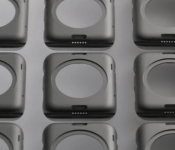
Apple Watch Diagnostic Port Spotted in Apple Promo Videos [iOS Blog]
Last week, we heard reports that a hidden “diagnostic port” was present on early Apple Watches currently in testing. The TechCrunch report indicated the port was being used for diagnostic purposes, and 9to5Mac claimed that the diagnostic port would not ship in the final version.
The port has a 6-dot brass contact array inside the groove for the ‘bottom’ strap connector slot. Several sources have confirmed its existence and placement to me. It is very similar to the connector for the Lightning connector in iPhones, as that connector currently only uses 6 of its 8 available pins. Apple recently began opening up the Lightning port for use by third parties. A source says that this port is currently for diagnostic purposes only — but that there is nothing preventing it from being a connection port for future accessories.
The port was spotted by our forum members in a number of the new Apple Watch promo videos that Apple released today.

Matthew Panzarino, the original author of the report, confirmed today that the port still exists, but he remains uncertain if it will ship in the final version:
Confirmed the ‘diagnostic port’ is still in the ᴡᴀᴛᴄʜ band channel. Don’t know if it will ship that way or not.
— Matthew Panzarino (@panzer) March 9, 2015
The Apple Watch will begin shipping in April with pre-orders starting on April 10th.

MacBook Air vs. MacBook Pro: Which laptop should you get?

MacBook buyers guide: How to choose the best new MacBook – the thin, lightweight MacBook Air, or the robust and powerful MacBook Pro.
You’ve decided that it’s time to replace your aging Mac with one of Apple’s new laptops. Or maybe you’re jumping onto the Mac platform for the first time. MacBook Air, MacBook Pro both old and with the new Retina display — there are a lot of options. They run the gamut of prices, too. What do you get for your money? And which model is best suited for you?
Note: Originally published November 2013. Updated to reflect new March 2015 specs.
Current MacBook models and their prices
Apple’s MacBook line comprises three separate product categories: the MacBook, MacBook Air and the MacBook Pro. The systems are differentiated by their size, weight and relative performance, as well as their price.

The MacBook Air is Apple’s lightweight laptop. It comes in two different form factors – 11-inch and 13-inch. It’s Apple’s least expensive laptop, starting at $899. The 11-inch model costs $899, the 13-inch model costs $100 more, $999.
Base models in both sizes come equipped with 1.6 GHz processors, 4GB of RAM and 128 GB of Solid State Drive (SSD) storage. The SSD works using PCI Express, or PCIe, dramatically faster storage interface than Serial ATA (SATA), used on pre-2014 systems.
You can configure to order the MacBook Air with a faster processor, more RAM and more storage capacity. RAM and CPU speed can’t be altered after the fact. SSD storage is upgradable, though not easily – Apple doesn’t make the SSD user-accessible, so if you decide you need more storage you’ll either have to take the MacBook Air apart or have a technician do it.
The “standard” 13-inch MacBook Pro is the next model up. It’s priced at $1,099.
That system is the only Mac left that includes an internal optical “SuperDrive.” It also sports 4GB of RAM and a SATA-connected 500 GB hard disk drive, making it the last Mac laptop that still uses a regular hard drive, too. The processor is clocked at 2.5 GHz. Customization options include a faster processor, more memory and different storage options including a larger hard drive or SSD.

For $1,299, you can have the new MacBook Pro with Retina display. It comes equipped with a 2.7 GHz dual-core i5 processor, 8GB of RAM and 128 GB of SSD storage. Retina display-equipped MacBook Pros eschew the conventional hard drive and internal optical drive found in the regular 13-inch MacBook Pro; as a result the Retina display models are thinner and lighter than their conventional alternatives.
The 15-inch MacBook Pro with Retina display brings up the rear. It’s equipped with a 2.2 GHz quad-core i7 processor, 16 GB RAM and 256GB of SSD storage. It uses Intel Iris Pro integrated graphics. The Retina display model is the only 15-inch model Apple makes. It’s priced at $1,999.
There’s a higher-end 15-inch MacBook Pro with Retina display worth mentioning separately – it’s the only model that sports a discrete graphics chip. Equipped with a 2.5 GHz quad-core i7 processor, it also includes Nvidia GeForce GT 750 graphics. It’s Apple’s extreme performer, with a price to match – $2,499.
Just like other MacBooks, MacBook Pros with Retina display can be configured to order with faster processors or more storage capabilities.
Screen size versus display density
The MacBook Air is not yet available with a Retina display – both the 11-inch and 13-inch models sport regular-resolution LED panels. The 11-inch MacBook Air has a native resolution of 1366 x 768, while the 13-inch model uses a 1440 x 900 pixel display.
Some quick back of the envelope calculations (and simple observation) confirm that the 11-inch MacBook Air is a bit of an oddball – it has a different aspect ratio than every other MacBook model. Most MacBooks incorporate a 16:10 display; the 11-inch MacBook Air has a 16:9 display. This means that the 11-inch MacBook Air actually has a wider-looking display than other MacBook models; it’s a bit more cinematic (the aspect ratio is consistent with your HDTV, for example).
In any case, the 11-inch and 13-inch MacBook Air models have pixel densities of 135 pixels per inch (PPI) and 128 PPI respectively. They’re sharp, clear displays capable of generating millions of colors, but they’re not Retina.
Neither is the $1,099 MacBook Pro. That model sports a native resolution of 1280 x 800 pixels packed into a 13.3-inch display. It’s in the same ballpark as the MacBook Air – around 113 PPI.
The “Retina display” moniker began with the iPhone and quickly migrated over to the iPad. And since 2012 we’ve seen MacBook Pros with Retina displays as well. That doesn’t mean that the MacBook Pro has the same pixel density as, say, an iPhone 5s or an iPad mini with Retina display – it simply means that you can’t make out individual pixels looking at the screen from an average distance.
In this particular case, the 13-inch MacBook Pro with Retina display sports a native resolution of 2560 x 1600 – even higher-resolution than the iPad Air. Although the screen is the same size as the regular 13-inch MacBook Pro, the pixel density is doubled – 227 PPI. The 15-inch MacBook Pro with Retina display has a native resolution of 2880 x 1800 pixels. That’s about 220 PPI.
The difference between Retina display and standard display is profound – Retina displays show more detail in photographs and make it easier to read text at smaller point sizes. Obviously there’s a finite limit to how well your eyes work, so the best thing to do is to check them out in person at an Apple retail store and figure out what suits you best.
Haswell

With the exception of the “standard” 13-inch MacBook Pro – a holdover from Apple’s 2012 product line – all MacBooks now ship with variants of Intel’s fourth-generation Core processor, known by its code-name, “Haswell.”
The newest Intel chip, Broadwell, makes its debut in the new MacBook line, powered at slower clock speeds than the MacBook Air, but with improved efficiency and better-performing integrated graphics.
Graphics speed gets progressively better further up the MacBook food chain. The MacBook Air uses Intel HD 6000 graphics, while the 13-inch MacBook Pro with Retina display uses Iris Graphics 6100, which are faster. The 15-inch MacBook Pro models sport Iris Pro graphics, which are faster still thanks to the addition of EDRAM memory. (The high-end 15-inch model also sports a discrete graphics processor which is automatically activated when running graphics-intensive apps like games and Photoshop.)
Battery Life

An important consideration for your next laptop should be how long you’ll be able to work on it away from a power outlet. After all, carrying around your power cord with you all the time means more bulk, which sort of defeats the point of having a portable computer in the first place.
The diminutive 11-inch MacBook Air sports about 9 hours of life (surfing the web; you’ll see about an hour less if you’re watching videos). The 13-inch MacBook Air, which has almost a third more battery capacity, can last to up to 12 hours without needing to get plugged back in. This model currently rules the roost in terms of battery capacity.
If watching downloaded movies is your bag, an improvement to the 2014 refresh of the MacBook Air yields better battery life when watching movies downloaded from iTunes; up to 9 hours on the 11-inch model and up to 12 hours on the 13-inch model.
The 13-inch MacBook Pro with Retina display manages to eke out a very impressive 9 hours, despite its high-resolution screen. And the 15-inch MacBook Pro with Retina display also manages a respectable 8 hours, despite all the heavy-duty hardware under the hood.
You can expect the standard 13-inch MacBook Pro, with its 2012-era tech under the hood, to require a recharge after about 7 hours.
Connectivity
All of current crop of laptops – everything except the $1,099 MacBook Pro – comes with 802.11ac wireless networking, or “Gigabit Wi-Fi.” In practice, an 802.11ac-equipped Mac is capable of transferring data wirelessly up to three times faster than the 802.11n Wi-Fi found on older machines like the standard MacBook Pro.
That is, of course, predicated on the availability of an 802.11ac-equipped base station, like Apple’s new AirPort Extreme and Time Capsule, as well as other 802.11ac-based systems working on the same network. Otherwise your new MacBook Pro will step down to the fastest speed available. 802.11ac is backwards-compatible with 802.11a, b, g and n standards.
Bluetooth 4.0 comes standard across the product line.
Expandability
The MacBook Airs both come equipped with two USB 3.0 ports and one Thunderbolt 2 port. The Thunderbolt 2 port can be used for connecting to an external display, a RAID system and other devices (it’s daisy-chainable, too). The 13-inch MacBook Air adds an SDXC card slot, making it easy to import images and movies from SD card-based cameras.
SDXC card slots are standard across the MacBook Pro with Retina display line. They also support Thunderbolt 2, but there are two Thunderbolt 2 ports. There are also two USB 3.0 ports and an HDMI connector, so you can attach your MacBook Pro directly to an HDTV if you’d like.
The $1,099 MacBook Pro has a built in Gigabit Ethernet connector, FireWire 800, a single Thunderbolt port, two USB 3.0 ports and an SDXC card slot.
Operating system
All new Macs ship with OS X 10.10 “Yosemite” pre-installed. Yosemite, which was released in October, 2014, features integration with iOS 8 through “Continuity” features – Handoff enables you to start an email or view a web page on your Mac, then seamlessly transition to your iPhone or iPad. The reverse is also true – Call Relay lets you make phone calls from your Mac, as long as your iPhone is within range. What’s more, Yosemite sports a major user interface update to provide a more consistent user experience across iOS devices.
Who should get a MacBook Air?
I liken the MacBook Air to a roadster, like a Mazda Miata. It looks lightweight, and on paper the specs don’t blow you out of the water. But get behind the wheel and it’s a completely different experience – it’s lithe, nimble and a lot of fun to drive.
In the same token, the MacBook Air is a pleasure to use; its solid state architecture, streamlined with PCIe, makes it fast and responsive. For many Mac users who are surfing the Web, running productivity software, even light graphics and design work, the MacBook Air is a perfectly balanced machine that won’t cost you a lot of money and does a lot.
The downside is the limited storage capacity. 128 GB isn’t a lot, especially if you’re a digital pack rat, and SSD costs a lot to upgrade. The inexpensive – and inconvenient – solution is to migrate content to an external hard disk drive.
Who should get a standard MacBook Pro?
The standard-issue MacBook Pro fits a niche between the MacBook Air and the MacBook Pro with Retina display. It also fits an important niche in the ecosystem: it’s a laptop for people who need a lot more local storage space than they can afford with an SSD-equipped system, or built-in optical storage – useful if you’re frequently reading or burning CDs and DVDs.
The downside is that it lacks the faster Wi-Fi, faster graphics and better battery performance of this year’s models. So there are compromises.
Having said that, the 13-inch MacBook Pro remains a popular option for many Mac users looking for a good, reliable laptop with plenty of capability. Which is why Apple’s left it in current lineup. If you’re looking for a flexible machine with lots of storage, this is a great option.
Who should get a MacBook Pro with Retina display?
At $1,299, the 13-inch MacBook Pro with Retina display is a better value than ever. The size is right for most people; the price is right for many as well. This year’s crop of rMBPs are faster and more capable than ever, thanks to an efficient processor core and the incorporation of Mavericks.
If you’re doing heavy duty graphics work on your laptop – editing huge Photoshop files, editing digital video, or if you’re looking for maximum performance, the 15-inch MacBook Pro is going to be your best best. The Iris Pro graphics are surprisingly spritely for an integrated graphics chipset, and the Nvidia graphics on the higher-end 15-inch MacBook Pro offers no compromises.
Still undecided?
If you’re still having trouble choosing between the MacBook Air and MacBook Pro, make sure to pay our Apple notebooks discussion forums a visit and become part of our awesome online community.
Any way you slice it, the MacBook line is better than ever in 2015, and whatever your choice, you’ll end up with the best laptop on the market.
- iPad Air vs. MacBook Air: Which Apple ultra-portable should you get?
- MacBook Air vs. MacBook Pro: Which laptop should you get?
- MacBook Air 11-inch vs. 13-inch: Which ultralight laptop should you get?
- MacBook Pro with Retina display 13-inch vs. 15-inch: Which powerful Mac laptop should you get?
- Mac mini vs. iMac vs. Mac Pro: Which Apple desktop should you get?
- Retina 5K iMac vs. Mac Pro: Which Mac powerhouse should you get?
- Mac mini: Which entry-level options should you get?
- 21.5-inch iMac vs. 27-inch iMac vs Retina 5K iMac: Which all-in-one desktop Mac should you get?
- The New Mac Pro: What options to Apple’s high-end Mac should you get?
- CPU vs. RAM vs. SSD: Which Mac upgrades should you get?
 AIVAnet