



Hands on with Apple’s unbelievably-thin, battery-packed MacBook
The Mac is back and thinner than ever.

We got some hands-on time with Apple’s new battery-packed, taptically-enhanced, Retina-quality laptop after Monday’s Spring Forward event, and boy, is it pretty. Here’s what Rene and I thought about Apple’s newest Mac — where it’s going, what it’s doing for the laptop space, and the accuracy of that Force Touch trackpad.
So, about that trackpad…
 Ren: Let’s get this out of the way first: I was incredibly skeptical over the MacBook’s Force Touch trackpad. There are no vertical mechanics at play here — no BlackBerry Bold-esque glass depression, just touch-based brain trickery. As I said to Rene during the event, these kinds of inventions can either be fantastic or terrible: It all depends on the execution.

I don’t know why I was so worried: The MacBook’s execution is excellent. It feels so natural and physically present that it’s hard to believe there isn’t some sort of mechanical underpinning hiding in that millimeters-thin casing. I had an Apple representative describe the trackpad’s pressure ramp-up like a gas pedal, and it’s an apt metaphor: It feels like your finger is sinking ever-deeper into the trackpad as you ramp up fast forward on a video, for instance. It’s a bizarre sensation, but one I imagine we quickly won’t know what to do without.
This technology will also be available for third-party developers to integrate into their apps, which opens up a whole avenue of more intricate gesture control. Multitouch swiping opened up the horizontal surface of the trackpad; Force Touch opens up a whole new level of vertical interaction.
And that’s not even talking about the potential for drawing or stylus interaction: Because the trackpad is pressure sensitive, you in theory can draw atop it without the need for external graphics tablets like Wacom’s Intuos line. The precision of that pressure sensitivity is another matter entirely: Apple wouldn’t say exactly how many levels were present, only that there were enough to properly simulate anything you might want to accomplish. But a quick test with Preview’s signature field proved very fruitful, with me very easily able to create a nuanced signature with variable line width just by drawing my name on the trackpad.

Finally, I’m psyched that the trackpad’s sensitivity is adjustable: You can customize the click pressure level for your finger to end up with a Force Touch result for your comfort level, just as you can change your cursor tracking speed.
 Rene: The Taptic trackpad messes with your brain. Intellectually, you know that it doesn’t work the way the traditional trackpad works. Yet when you press it, it feels like it does. What your finger experiences does not match your understanding. It makes you think physics was a big fat lie.
But go with it. Give into it. You really can’t feel the difference.
And then you start to Force Touch. You press in. And you press in a little more. And you press in a lot more. It’s a different kind of multitouch gesture — one that uses depth rather than horizontal space.
It took me a couple tries to get used to it, and I’m still not sure how many distinct levels of sensitivity it has. Yet its potential is intriguing. It’s like having second, third, and fourth click options on a mouse — but without the mess of extra buttons. It’s also hinting that Wacom-like sensitivity might finally be coming to multitouch.
Apple took both Taptic and Force Touch from the Watch to the Mac in six months flat. What could they do in a year?
Ren: An iPad Pro with a Force Touch keyboard and Apple Pen pressure-sensitivity, Rene. I can feel it in my bones.
The Retina screen
Ren: Unsurprisingly, the MacBook’s 226 pixels-per-inch Retina display is gorgeous. When Apple CEO Tim Cook brought it out on stage, we could see the colors brightly and crisply from halfway back in the theater, and up close and personal the screen didn’t disappoint. The demonstration models had HD video and photographs available for comparison, with a phenomenal nature-based desktop picture.

Fun fact: the MacBook we looked at wasn’t running OS X 10.10.3 and Photos for Mac — we had to preview all those stunning HD photographs in Preview or iPhoto.
Rene: Gorgeous. Stunning. I’m running out of platitudes for Apple’s Retina displays.
The new MacBook looked every bit as good to my eyes as the Retina 5K iMac, even though the laptop’s assembly is so thin that it’s almost two-dimensional.
Visible pixels are almost extinct on Apple devices, and this is a good thing. So are non-black glass bezels — and that’s a great thing.
The keyboard revolution
Ren: The MacBook’s keyboard is going to take some getting used to, I think — but not because the keys are too small, or the typing too cramped. It’s the force you use against the keyboard. For me, the first thing I noticed when typing on the MacBook was how hard I was banging against the keys; after focusing on making my key presses lighter, the entire writing experience improved tenfold. I don’t know if I’m used to pressing so hard because of my MacBook Air’s scissor-based key design and the improper key balance, but it’s a distinctively bizarre feeling moving to the MacBook keyboard. After typing for awhile, it almost started to feel like I was gliding across the keys — close to the feel of typing on an iPad, in a way, but with the speed and haptic feedback of physical keys. It’s weird! But I like it.

The individually-lit keyboard is also something rather special: By backlighting each key rather than a uniform backlight, the keys are brighter and leak out less light around the edges, making for an overall better experience typing.
Rene: The new keyboard is almost as big of a mindfrak as the trackpad. It’s bigger, but flatter. And instead of teeter-tottering around the edges, it’s flat and smooth across the entire surface.
If you were a fan of the Apple Extended II, I’m sorry: This keyboard is the opposite. It’s been stamped all but flat. Yet thanks to some butterfly mechanisms and stainless steel domes, it still feels great.
I say this as someone who loves, loves, loves the current MacBook keyboards — but I won’t miss them one bit. The new one is better.
Light as a feather, stiff as a board
Ren: It takes a lot to make my MacBook Air feel heavy, but a two-pound MacBook will do it. Like the iPad Air 2 versus the iPad, the MacBook practically insults the MacBook Air’s moniker, sliding in a few millimeters thinner and svelter than its low-cost cousin. But there’s a lot of power packed in that slim space — the same nine hours of wireless web browsing as the 11-inch MacBook Air, but also while powering a Retina processor and no fan. It’s a technical achievement, to be sure.

Rene: Spock might have said “nothing unreal exists” but this computer makes me doubt he really meant it. Heck, it makes me doubt the MacBook is a real computer. It’s about as heavy as the original iPad plus original iPad case. It’s also about as thick. And for a computer, that’s insane.

If people accidentally threw away, or threw overhead, the original MacBook Air, I’m a little afraid of what they’ll do to the new MacBook.
Yet it’s still a unibody, it’s still solid, it’s still a MacBook. And that’s even more insane.
Say goodbye to corded life
Ren: One of the side-effects of the MacBook’s incredible thinness is port destruction: The computer is physically almost too small for traditional USB, MagSafe, and Thunderbolt ports. So Apple ditched them all in favor of one tiny USB-C port that does it all.

On one hand, I lament the loss of the MagSafe cord: I’ve tripped (or had others trip) over that cord more times than I can count, and the magnetic charger always saved my Air from flying through its namesake and crashing to the ground. But if the MacBook’s battery life is as solid as Apple claims, you may no longer need to charge it in a setting that invites cord tripping. If I can charge my MacBook at night like I charge my iPad and phone, and leave that charger at home for everything but battery-draining video-editing, that’s an advancement indeed.
There’s one other port on the MacBook: a headphone jack. Much as Apple might want its customers to purchase Beats wireless headphones, it’s not foolish enough to ditch the corded option entirely just yet.

Rene: USB-C is the big question mark for me right now. It does a lot, including power, but it doesn’t do everything. It has DisplayPort, but it doesn’t have Thunderbolt. Thunderbolt is DisplayPort + PCI. So no more PCI.
I use my current MacBook with a Thunderbolt display. Will USB-C give me enough of that kind of connectivity?
Don’t get me wrong. I think wireless is absolutely the future. (I’m actually surprised there’s still a 3.5mm headset jack). I’m just not totally comfortable in that future yet.
World of color
Ren: The MacBook, like the iPad and iPhone, now comes in gold, silver, and space grey. And though I was doubtful before the event, I have to admit — I’m kind of willing to embrace our shiny golden overlords. The golden MacBook is gorgeous, muted in such a way as to keep from being overly tacky, and the space grey MacBook brings me back to the days of the PowerBook in the best way possible.

Rene: The gold option is a giant Peter Cohen troll. It’s also way better looking than I thought it would be. Both the specific shade and the finish make it looks classy, not crass. Likewise the silver and space gray options.

Only questions is, if you go one color, do you go all in on one color — Apple Watch, iPhone, iPad, and MacBook? Or do you mix and match?
Pricing and projection
Ren: The MacBook’s $1299/$1599 price points are not cheap: The 11-inch Air starts at $899 as a more-powerful machine with more ports and only 0.3 pounds heavier, while the 13-inch Pro also starts at $1299 with a bigger screen and extra power. Where does the MacBook fit into this lineup? It’s not quite a pro machine — it doesn’t have the processor — but it’s priced in the pro range.

Rene: I agree with Ren, but I think every time Apple does one of its radical redesigns the first version or two isn’t about price or performance. It’s about the radical redesign. This is the original Air all over again. If you want the future today, you’ll pay a little extra for it.
The bottom line
Ren: Is the Retina screen, Taptic trackpad, and two-pound weight enough to convince Apple’s customers to pick up a MacBook over an Air or a Pro? I’m not yet sure. I know I want one despite myself. I love little laptops, I’m fascinated by Force Touch technology, and I’ve wanted Retina on my 11-inch Air for years. I’m not sure if the Taptic trackpad alone will entice me to upgrade, but it’s definitely what has me thinking about selling my Air and picking up a 12-inch space grey beauty.
Rene: Last year I switched from a 13-inch MacBook Air to a MacBook Pro because I wanted more video processing power. But now, MacBook. It’s once again one of those situations where what’s new makes everything current suddenly look and feel old.
I’ll likely stick with my Pro for that performance, but I’m hugely tempted by the new MacBook, it’s Retina display, that keyboard, and that trackpad. Dagnabit, Phil Schiller, I have #MacBookLust in my heart.
Visceral Games: Battlefield Hardline developer may revisit Dead Space
When EA announced that Visceral Games were the developer for Battlefield Hardline, many gamers found themselves scratching their collective heads. Visceral is best known for Dead Space – arguably the strongest triple A horror franchise from the previous gen.
Dead Space 3 had critics divided (and some fans disappointed) as a result of the switch to Gears of War-like cover mechanics, human enemies and co-operative play – all before mentioning the chilling effect the game’s obtain-weapons-faster micro-transactions had.
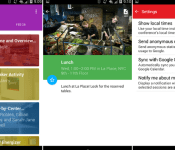
Google has a new app in the Play Store, but Interactive Events isn’t for you (yet?)

Behind closed doors in Mountain View, California, hard working Googlers bring to life all manner of cool services and Android apps. We are seeing one of these new Android apps today, but we are not sure we were supposed to. Introducing Interactive Events by Google.
A first glance, Interactive Events looks like an amazing tool to find and navigate events in your area, presumably providing vendor lists and floor plans for that comic-con or RV convention, you know, whichever you are into. Functionality we’ve seen out of the Google I/O apps of years past. However, Interactive Events does not actually do any of these things at this time.

Whether left in place accidentally, or the slip up was in actually publicly launching the app, Interactive Events immediately greets new installs with Google’s dogfood warning. Apparently, the app is not meant for non-Googlers, you know, not meant for you or I to see or use. As such, we expect an update really soon, or to see the app removed from the Google Play Store.
One thing is for sure, if this somewhat outdated looking app goes live with local event information, we will have plenty more to say about it, but for now, unless you have a valid event code, or event QR Code to scan, we can only explore the first few screens of Interactive Events.
Check out Interactive Events in the Google Play Store for more details. It’s free.
What would you say to a local events calendar and guide from Google – would you use an app like Interactive Events?

Android 5.1 factory images are live for Nexus 5, Nexus 7 (2012), and Nexus 10
 Google has posted brand new Android 5.1 factory images for several Nexus devices, including the Nexus 5, Nexus 10, and the slightly older 2012 version of the Nexus 7. If you’re ready to start flashing them on your device, hit the right link below and follow our guide to flashing factory images on your Nexus device.
Come comment on this article: Android 5.1 factory images are live for Nexus 5, Nexus 7 (2012), and Nexus 10
Marriott hotels to start accepting Apple Pay this summer

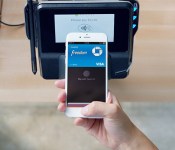
Hey, did you know Marriott already promised to stop trying to block personal WiFi devices? If that convinces you to stay in one of its hotels again, don’t forget to bring your iPhone 6 or 6 Plus: the chain will soon start accepting Apple Pay. To check in, you’ll only need to go to the contactless reader at the front desk and hold up your phone (or Apple Watch) to pay — a beep and a vibration will indicate if the transaction’s a success. The company will begin its staggered rollout this summer, starting with 11 hotels in the US, which we’ve listed below the fold. Marriott, by the way, is also developing an app for the Apple Watch that’s similar to Starwood Hotel’s. You can use it to check in before you get to the hotel, checkout and even get notification when your room is ready. The company says the app will be available when Cupertino’s smartwatches hit the market, which we’ve just learned will happen on April 24th.
The first 11 Marriott hotels to get Apple Pay:
- The Ritz-Carlton New York, Central Park
- The Ritz-Carlton Washington D.C.
- EDITION Miami
- JW Marriott Chicago
- Renaissance New York Times Square Hotel
- San Francisco Marriott Marquis
- San Francisco Airport Marriott Waterfront
- New York Marriott Downtown
- San Jose Marriott
- Courtyard Chicago Downtown/Magnificent Mile
- Courtyard Los Angeles L.A. Live
- Residence Inn Los Angeles L.A. Live

Filed under: Cellphones, Wearables, Mobile, Apple
Via: iMore

Borderlands: The Handsome Collection goes up for pre-order on the Xbox Store

Borderlands: The Handsome Collection has gone up for digital pre-order from the Xbox store today, roughly two weeks ahead of its March 24 launch on the Xbox One.

Google Now cards officially start showing up with latest Pandora update
 Pandora’s latest app update is bringing a pretty useful new feature, especially for those of you that frequently listen to Pandora radio. Now you’ll occasionally start seeing Google Now cards from the app suggesting different radio stations for you to listen to, which has been in the works since Google announced tons of third-party integration in January.
Updates like this make Google Now a one-stop interface for everything you could possibly need from your smartphone. Music, bills, important reminders, weather, you name it. Hopefully we see more radio apps start to implement cards similar to this.
Do you like seeing cards like this make their way into your Google Now stream? I’ve stuck with Google’s All Access since it was announced, but it has some pretty hit-or-miss Now cards. It’d be nice to have a quick way to start up radio stations while I’m viewing other info from that screen.
Come comment on this article: Google Now cards officially start showing up with latest Pandora update
Apple Raises Prices on Several Products in Many Countries Amid Strong U.S. Dollar
While Apple discounted the Apple TV to $69 in the United States this afternoon, it also raised the prices on several products across many countries due to the strength of the U.S. dollar. A wide selection of Apple products, including the iPhone, iPad, iPod touch, MacBook Air, MacBook Pro and Thunderbolt Display, are now more expensive in Canada, Australia, New Zealand, France, Denmark, Sweden, Finland, Portugal and multiple other countries to reflect currency adjustments.

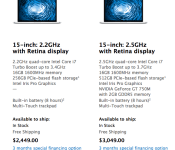
Apple now charges up to $3,049 for the 15-inch Retina MacBook Pro in Canada
A spot check of the Apple Online Store in Canada, for example, reveals that Apple has increased the price of the unlocked iPhone 6 from between $749-$969 to $839-$1,099, Thunderbolt Displays from $999 to $1,199, and 15-inch Retina MacBook Pros from between $2,099-$2,699 to $2,449-$3,049. Apple also hiked the price on the 15-inch MacBook Pro in France, with the base model now starting at €2,249 up from €1,999, and the higher-spec model up to €2,799 from €2,499.
Apple has made similar price adjustments in countries around the world today in order to ensure parity with United States pricing, following a period in which several Apple products were actually priced at a bargain compared to American prices. For instance, prior to the pricing adjustment, the Thunderbolt Display retailed for $999 in Canada, the same price as in the United States, which converts to around $799 in U.S. dollars based on the average conversion rate over the past month.
The updated prices went into effect following the return of the Apple Online Store at the conclusion of Apple’s “Spring Forward” media event in San Francisco this afternoon. Should the U.S. dollar weaken, as happened in July 2011, Apple will continue to make the necessary adjustments in order to ensure that its products and services are as consistently priced as possible throughout the world. In some cases, international prices will remain higher than U.S. prices as a buffer against currency fluctuations.

Ethiopia is hacking US journalists with commercial spyware

Ethiopia’s government is among the most oppressive political regimes on the African continent, only trailing Eritrea in its population of incarcerated journalists. And with the country’s recent implementation of off-the-shelf spyware from Italian security firm Hacking Team, Ethiopia’s leaders can–and have been–expanding their despotic reach far overseas.
Per a report from Citizen Lab, published February 12th, numerous journalists working for the Ethiopian Satellite Television Service (ESAT), a network of independent Ethiopian expat journalists operating out of Alexandria, Virginia were targeted by a member of Ethiopia’s internal information security apparatus: the Information Network Security Agency (INSA). Harassment from government officials is a regular occurrence for dissenting journalists in Ethiopia but this latest attack marks the second time that journalists outside of the East African nation have been targeted by the INSA.
What’s more, both attacks appears to have been carried out using Hacking Team’s Remote Control System (RCS) spyware. According to the Hacking Team product website, this software “is a solution designed to evade encryption by means of an agent directly installed on the device to monitor. Evidence collection on monitored devices is stealth and transmission of collected data from the device to the RCS server is encrypted and untraceable.”
Using RCS, the INSA could, in theory, be used to spy on the activities of ESAT journalists and lead authorities back to the journalist’s local sources. The target’s computer would of course first have to be infected with the RCS spyware. In this case, it came in the form of a bogus Word attachment sent to Managing Director of ESAT, Neamin Zeleke, in December of last year. Most troubling is that this sort of abuse should not even be possible using RCS as Hacking Team’s Customer Policy clearly states that:
We monitor the international geopolitical situation and we review potential customers before a sale to determine whether or not there is objective evidence or credible concerns that Hacking Team technology provided to the customer will be used to facilitate human rights violations.
However, Citizen Lab’s report suggests that not only did Hacking Team not suspend its service to Ethiopia’s government following a similar attack back in 2013, but the Italian firm may have even provided the INSA with software updates in the year since–despite published accusations against the government agency by targeted journalists and the government’s long and storied history of political repression. That’s a clear violation of the company’s internal policing policy.
Whether this latest attack against US-based journalists leads to any meaningful changes in the company’s policy remains to be seen–a front page expose in the Washington Post last year certainly wasn’t able to.
[Image credit: stereotyp-0815/Flickr]
Filed under: Internet
Via: Boing Boing
Source: Citizen Lab

Self-destructing site shows how long it takes Google to find you

Wondering how long it would take for Google’s search engine to find your website if you didn’t promote it? About 22 days, according to Matthew Rothenberg. He recently launched Unindexed, a purposefully short-lived web community that was set to self-destruct as soon as Google’s indexing technology made it searchable. While Rothenberg didn’t go out of his way to maintain the secret, participants knew that every view, post and shared link would bring the site closer to disaster — it only took 346 views and 31 contributions before everything came crashing down. Thankfully, you can recreate this experiment yourself. Rothenberg has posted the source code, so his commentary on the sad state of web anonymity should last for much longer than a few weeks.
[Image credit: Shutterstock]
Via: Motherboard
 AIVAnet