



Latest Google Play Music update brings extended album art through the status bar
 Google’s Play Music app is getting an update that changes a few minor details through the application.
With the update, whenever you’re looking at anything with album art, the artwork will extend through the status bar. This is a slight change from the colored status bar Google has been implementing, but it’s a nice change. Tapping the search button also automatically brings up the keyboard. That probably should’ve been default since day one, but hey, better late than never.
An interesting point of this update is that Google is also changing some of the branding within the app. Don’t expect to see much more “All Access” plastered anywhere, as Google is changing most of that to “Music Unlimited.” Branding changes happen all the time, but it seems like Google can’t quite get one thing to stick. We’ve had Google Music, All Access, YouTube Music Key, and none of them have really been great names, even if the service itself does well. Maybe Music Unlimited will be the magic charm.
Hit the link below to grab the update if you don’t feel like waiting for it to roll out to your device.
source: Google Play Music 5.8.1835R.1777180
Come comment on this article: Latest Google Play Music update brings extended album art through the status bar

Here is how to order the coveted Microsoft ‘Ninja Cat Unicorn’ sticker

Around the Microsoft campus, there is a growing cadre of people sporting a hilariously awesome sticker emblazoned on laptops. The stickers appear randomly in the cafeteria and often disappear just as quickly. What’s on the sticker?
Just a ninja cat with a Microsoft flag riding a fire-breathing unicorn.
The hilarity comes from the absurdity, but it also aptly represents the new Microsoft spirit. Plus, it is just fun.
Jawbone and Nike fitness trackers swept out of Apple Stores by Apple Watch
Apple Stores across the nation and online have been cleansed of fitness trackers that aren’t called Apple Watch. Both Jawbone’s UP24 and the Nike+ FuelBand have vanished from Apple Store shelves.

Admittedly, Apple’s never been keen on stocking products that compete with their own, and the impending arrival of the Apple Watch has seen fitness trackers from the likes of Jawbone and Nike dropped from both store shelves and online listings ahead of the arrival of the Apple Watch.
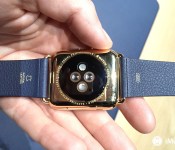
When the Apple Watch does arrive on April 24th, it will bring fitness tracking capabilities that should thoroughly outshine the more basic dedicated fitness trackers. Not only will the Apple Watch offer basic motion tracking through an accelerometer and gyroscope, it will also measure the wearer’s heart rate through sensors embedded in the back of the case. Neither the Jawbone nor the Nike fitness trackers can stake that claim.
That said, there’s the matter of price — both the UP24 and FuelBand clock in at less than half the price of the entry-level Apple Watch. Of course, the Apple Watch does much, much, more than either fitness tracker could ever hope, but it’s also less discrete and due to all of its built-in features offers worse battery life. There are trade-offs either way.
Regardless, the arrival of the Apple Watch has meant the removal of dedicated wrist-worn fitness trackers from Apple’s stores.
Source: Re/code
<!–*/
<!–*/
<!–*/
.devicebox
background-color: #5CB8DB;
border: 1px solid #E2E9EB;
float: right;
display: block;
margin: 0 0px 10px 10px;
max-width: 350px;
overflow: hidden;
width: 50%;
.devicebox h3
background: #8D98BD;
color: #fff;
font-family: “camptonmedium”,sans-serif;
font-size: 20px;
margin-bottom: 0;
margin-top: 0;
padding: 0;
text-align: center;
.devicebox h3 a
display: block;
line-height: 30px;
padding: 0 10px;
.devicebox h3 a:hover
background: #7e88aa;
text-decoration: none;
.devicebox .video
margin: auto;
border: 0px;
.devicebox p,
.entry-content .devicebox p > img,
.devicebox img
margin: 0px;
max-width: 100%;
padding: 0px;
.devicebox,
.devicebox a,
.devicebox a:active,
.devicebox a:hover,
.devicebox a:link,
.devicebox a:visited,
.devicebox p,
.devicebox ul,
.devicebox ul li,
.devicebox li
color: #fff;
.devicebox a:hover
text-decoration: underline;
.devicebox p,
.devicebox ul,
.devicebox ul li,
.devicebox li
border-width: 0px;
font-family: “camptonlight”,sans-serif;
font-size: 16px;
padding: initial;
.devicebox ul
margin: 0;
padding: 0.5em 1em 1em 30px;
.devicebox ul li
display: list-item;
.devicebox ul,
.devicebox ul li,
.devicebox li
line-height: 24px;
list-style: disc outside none;
.devicebox ul li:before
display: none;
.devicebox p ~ p
padding: 0px 15px 15px;
line-height: 1.25;
.devicebox p:first-of-type + p
padding: 15px;
.field-items p:last-of-type + .devicebox,
.slide p:last-of-type + .devicebox,
.article-body-wrap p:last-of-type + .devicebox,
.field-items p:last-of-type + .devicebox ~ .devicebox,
.slide p:last-of-type + .devicebox ~ .devicebox,
.article-body-wrap p:last-of-type + .devicebox ~ .devicebox
float: none;
margin: 0 auto 30px;
max-width: 700px;
min-height: 225px;
position: relative;
width: 100%;
.field-items p:last-of-type + .devicebox .video,
.slide p:last-of-type + .devicebox .video,
.article-body-wrap p:last-of-type + .devicebox ~ .devicebox .video,
.field-items p:last-of-type + .devicebox ~ .devicebox .video,
.slide p:last-of-type + .devicebox ~ .devicebox .video,
.article-body-wrap p:last-of-type + .devicebox ~ .devicebox .video
bottom: 0px;
left: 50%;
position: absolute;
right: 0px;
top: 30px;
.field-items p:last-of-type + .devicebox .video_iframe,
.slide p:last-of-type + .devicebox .video_iframe,
.article-body-wrap p:last-of-type + .devicebox .video_iframe,
.field-items p:last-of-type + .devicebox ~ .devicebox .video_iframe,
.slide p:last-of-type + .devicebox ~ .devicebox .video_iframe,
.article-body-wrap p:last-of-type + .devicebox ~ .devicebox .video_iframe
height: 100%;
padding: 0px;
.field-items p:last-of-type + .devicebox ul,
.slide p:last-of-type + .devicebox ul,
.article-body-wrap p:last-of-type + .devicebox ul,
.field-items p:last-of-type + .devicebox p,
.slide p:last-of-type + .devicebox p,
.article-body-wrap p:last-of-type + .devicebox p,
.field-items p:last-of-type + .devicebox ~ .devicebox ul,
.slide p:last-of-type + .devicebox ~ .devicebox ul,
.article-body-wrap p:last-of-type + .devicebox ~ .devicebox ul,
.field-items p:last-of-type + .devicebox ~ .devicebox p,
.slide p:last-of-type + .devicebox ~ .devicebox p,
.article-body-wrap p:last-of-type + .devicebox ~ .devicebox p
width: 43%;
.field-items p:last-of-type + .devicebox h3 + p,
.slide p:last-of-type + .devicebox h3 + p,
.article-body-wrap p:last-of-type + .devicebox h3 + p,
.field-items p:last-of-type + .devicebox ~ .devicebox h3 + p,
.slide p:last-of-type + .devicebox ~ .devicebox h3 + p,
.article-body-wrap p:last-of-type + .devicebox ~ .devicebox h3 + p
bottom: 0;
left: 50%;
overflow: hidden;
position: absolute;
right: 0;
top: 30px;
width: 50%
.field-items p:last-of-type + .devicebox h3 + p img,
.slide p:last-of-type + .devicebox h3 + p img,
.article-body-wrap p:last-of-type + .devicebox h3 + p img,
.field-items p:last-of-type + .devicebox ~ .devicebox h3 + p img,
.slide p:last-of-type + .devicebox ~ .devicebox h3 + p img,
.article-body-wrap p:last-of-type + .devicebox ~ .devicebox h3 + p img
float: right;
height: 100%;
width: auto;
@media all and (max-width: 500px)
.devicebox
float: none;
margin: 0;
max-width: 100%;
width: 100%;
.field-items p:last-of-type + .devicebox .video,
.slide p:last-of-type + .devicebox .video,
.article-body-wrap p:last-of-type + .devicebox .video,
.field-items p:last-of-type + .devicebox ~ .devicebox .video,
.slide p:last-of-type + .devicebox ~ .devicebox .video,
.article-body-wrap p:last-of-type + .devicebox ~ .devicebox .video
left: 0;
position: relative;
top: 0;
.field-items p:last-of-type + .devicebox .video_iframe,
.slide p:last-of-type + .devicebox .video_iframe,
.article-body-wrap p:last-of-type + .devicebox .video_iframe,
.field-items p:last-of-type + .devicebox ~ .devicebox .video_iframe,
.slide p:last-of-type + .devicebox ~ .devicebox .video_iframe,
.article-body-wrap p:last-of-type + .devicebox ~ .devicebox .video_iframe
padding-bottom: 56.25%;
.field-items p:last-of-type + .devicebox h3 + p,
.slide p:last-of-type + .devicebox h3 + p,
.article-body-wrap p:last-of-type + .devicebox h3 + p,
.field-items p:last-of-type + .devicebox ~ .devicebox h3 + p,
.slide p:last-of-type + .devicebox ~ .devicebox h3 + p,
.article-body-wrap p:last-of-type + .devicebox ~ .devicebox h3 + p
left: 0;
position: relative;
top: 0;
.field-items p:last-of-type + .devicebox ul,
.slide p:last-of-type + .devicebox ul,
.article-body-wrap p:last-of-type + .devicebox ul,
.field-items p:last-of-type + .devicebox ~ .devicebox ul,
.slide p:last-of-type + .devicebox ~ .devicebox ul,
.article-body-wrap p:last-of-type + .devicebox ~ .devicebox ul
width: auto;
/*–>*/
/*–>*/
/*–>*/
Intel to reportedly supply LTE modem for a ‘special version’ of next-generation iPhone
After siding with Qualcomm’s LTE modems for the last few years, it looks like Apple may be opting to use Intel’s latest LTE Category 10 modem on select iPhones in 2016.
According to Venturebeat:
Intel’s new 7360 LTE modem will occupy a socket on the new iPhone’s circuit board that’s long been reserved for Qualcomm chips.
Intel has been gunning hard during the past year for a place in the iPhone and now appears to have succeeded, at least partly. The 7360 chip will ship inside a special version of the iPhone that will be marketed to emerging markets in Asia and Latin America, the sources said.
For months Apple engineers have been making trips to Munich, Germany to work with Intel engineers to ready the Intel LTE chip for the iPhone, one of our sources said.
Intel’s XMM 7360 LTE modem offers LTE Category 10 connectivity with download speeds of up to 450Mbps and support for 29 LTE bands across the globe. The baseband modem supports LTE standards such as LTE-FDD and LTE-TDD, and is also compatible with TD-SCDMA, which is used by China Mobile. Mention of a special version of the iPhone is interesting, as Apple currently does not offer differentiate its products based on the region.
There was no clear reason given as to why Apple would be looking to switch from Qualcomm’s LTE offerings, which are widely regarded as the best in the segment, with the report only stating that the two companies have an “uneasy relationship.”
Apple’s move to use Intel’s LTE modems, at least partially, would be a huge loss for Qualcomm, which already lost Samsung as a partner for its Snapdragon 810 SoC earlier this year.
Source: Venturebeat
Refreshed Chromebook Pixel goes on sale for $999
When Google first launched their premier Chromebook in 2013, the Chromebook Pixel, the price tag left the average consumer out of the mix at $1299. We didn’t see a refresh come from Google in 2014, but they have brought us a new one to lust after in 2015. The new Chromebook Pixel actually comes in […]
The post Refreshed Chromebook Pixel goes on sale for $999 appeared first on AndroidSPIN.

Pad and Quill Announces ‘Luxury Pocket’ Charging Stand for Apple Watch [iOS Blog]
Pad and Quill today announced a new line of accessories for the upcoming Apple Watch, including the “Luxury Pocket Stand” charging stand, a roll up pouch for portability and two travel kits.

The Luxury Pocket Stand is inspired by old pocket watch stands and is hand carved from a single piece of African mahogany or American cherry. The stand is also collapsible, allowing users to fold it up and take it with them on-the-go.
The Roll Up Kit is crafted with full grain American steer leather for packing on the fly and comes with a pouch to hold the charging magnet. There’s also the Luxury Travel Kit and Luxury Travel Pouch, both of which come with the Pocket Stand and space for chargers. The Travel Kit, however, features secondary sleeves to hold Apple Watch bands.
The Luxury Pocket Stand is available for the pre-order price of $69.99, but will raise to $79.99 when it’s released in May. Both the Luxury Travel Kit and Travel Pouch are available for pre-order priced at $119.99, while the Roll Up Kit is available for pre-order priced at $49.99. All four products ship in mid-May.
Redditor builds smart mirror that displays Android Wear watch notifications
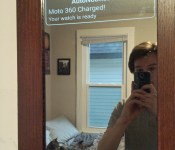
 Chalk this up for the craziest DIY project of the week. A Redditor has built a mirror that mirrors notifications from his Android phone and tablet, no pun intended. Using Auto Wear, that mirror now shows Android Wear notifications, too, like when the battery is fully charged and ready to go, as seen above. Yep, instead of actually picking up his watch to see if the battery is charged, he just gets to glance at his mirror.
Anyone want to make a bet on how long it takes for a major tech company to offer him a job?
source: Reddit
Come comment on this article: Redditor builds smart mirror that displays Android Wear watch notifications

Five Nights at Freddy’s 3 comes to the Google Play Store
Developer Scott Cawthon has just released Five Nights at Freddy’s 3 to the Google Play Store, following the recent release of the PC version. The first two games quickly made their way to the top of a few of our Best Apps lists, so we couldn’t be more excited for this release. FNAF3 promises all of the same frightening aspects of the first two games, plus many more surprises.
If you’ve never played any of these games, here’s a quick recap. You play as a security guard who has to keep watch over Freddy Fazbear’s Pizza that’s haunted at night by extremely creepy possessed animatronic robots. The aim of the game is to not get killed by them, so you have to dress up like one every time you come in contact with a robot. The graphics and lighting are the best parts of this game, making you feel like you’re really there.
Five Nights at Freddy’s 3 takes place thirty years after the pizzeria closes its doors, and the events that once took place there have simply become rumors. But the owners of “Fazbear’s Fright: The Horror Attraction” aim to revive the legend by trying to find anything that survived over the years. We’re not going to spoil any of the game for you, so we’ll just leave it at that.
As for gameplay, FNAF3 is very similar to the first two. You’ll constantly switch through security cameras and check out all of the creepy happenings around the pizzeria. There are a few screenshots attached below if you’d like to take a look for yourself.
#gallery-2
margin: auto;
#gallery-2 .gallery-item
float: left;
margin-top: 10px;
text-align: center;
width: 25%;
#gallery-2 img
border: 2px solid #cfcfcf;
#gallery-2 .gallery-caption
margin-left: 0;
/* see gallery_shortcode() in wp-includes/media.php */


Just like the first to games, the developer has released a full paid version to the Play Store along with a free demo, which you can find here. Whether you’re a fan of the Five Nights at Freddy’s series or not, this game will scare the heck out of you. If you’d like to try the game out for yourself, head to the Google Play Store link below to buy the game for $2.99.

Pad & Quill gets in on the Apple Watch charging stands with cherry, mahogany, and leather
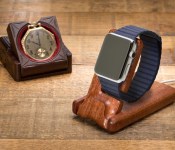
Not one to be left out of the Apple Watch accessories rush, Pad & Quill has revealed their own charging stand and travel kits — though they’re opting for premium woods and leathers.

Pad & Quill has two new accessories on tap for the Apple Watch:
- Luxury Pocket Stand: A charging stand hewn from solid American Cherry or African Mahogany. It has a slot for the circular magnetic charger to sit and routing that sends the wire around back and underneath for a clean layout. It also folds flat for travel.
$69.99 (regularly $79.99) – Buy Now - Roll Up Kit: Essentially a leather wallet with pockets for the charger with its attached USB cable and an extra watch band.
$49.99 – Buy Now
Additionally there are two bundles with the wooden pocket stand:
- Luxury Pocket Stand + Roll Up Kit: $119.99 – Buy Now
- Luxury Pocket Stand + Luxury Travel Pouch: $119.99 – Buy Now
All four Pad & Quill Apple Watch accessory options are up for pre-order now and scheduled to ship in mid-May, while the Apple Watch will go up for pre-order on April 10 and be available on April 24. If you’re thinking that these aren’t cheap options, you’d be correct. Pad & Quill tends to charge a premium for premium products — and it’s not like you’ll be able to get away with a cheap Apple Watch either.
Source: Pad & Quill
<!–*/
<!–*/
<!–*/
.devicebox
background-color: #5CB8DB;
border: 1px solid #E2E9EB;
float: right;
display: block;
margin: 0 0px 10px 10px;
max-width: 350px;
overflow: hidden;
width: 50%;
.devicebox h3
background: #8D98BD;
color: #fff;
font-family: “camptonmedium”,sans-serif;
font-size: 20px;
margin-bottom: 0;
margin-top: 0;
padding: 0;
text-align: center;
.devicebox h3 a
display: block;
line-height: 30px;
padding: 0 10px;
.devicebox h3 a:hover
background: #7e88aa;
text-decoration: none;
.devicebox .video
margin: auto;
border: 0px;
.devicebox p,
.entry-content .devicebox p > img,
.devicebox img
margin: 0px;
max-width: 100%;
padding: 0px;
.devicebox,
.devicebox a,
.devicebox a:active,
.devicebox a:hover,
.devicebox a:link,
.devicebox a:visited,
.devicebox p,
.devicebox ul,
.devicebox ul li,
.devicebox li
color: #fff;
.devicebox a:hover
text-decoration: underline;
.devicebox p,
.devicebox ul,
.devicebox ul li,
.devicebox li
border-width: 0px;
font-family: “camptonlight”,sans-serif;
font-size: 16px;
padding: initial;
.devicebox ul
margin: 0;
padding: 0.5em 1em 1em 30px;
.devicebox ul li
display: list-item;
.devicebox ul,
.devicebox ul li,
.devicebox li
line-height: 24px;
list-style: disc outside none;
.devicebox ul li:before
display: none;
.devicebox p ~ p
padding: 0px 15px 15px;
line-height: 1.25;
.devicebox p:first-of-type + p
padding: 15px;
.field-items p:last-of-type + .devicebox,
.slide p:last-of-type + .devicebox,
.article-body-wrap p:last-of-type + .devicebox,
.field-items p:last-of-type + .devicebox ~ .devicebox,
.slide p:last-of-type + .devicebox ~ .devicebox,
.article-body-wrap p:last-of-type + .devicebox ~ .devicebox
float: none;
margin: 0 auto 30px;
max-width: 700px;
min-height: 225px;
position: relative;
width: 100%;
.field-items p:last-of-type + .devicebox .video,
.slide p:last-of-type + .devicebox .video,
.article-body-wrap p:last-of-type + .devicebox ~ .devicebox .video,
.field-items p:last-of-type + .devicebox ~ .devicebox .video,
.slide p:last-of-type + .devicebox ~ .devicebox .video,
.article-body-wrap p:last-of-type + .devicebox ~ .devicebox .video
bottom: 0px;
left: 50%;
position: absolute;
right: 0px;
top: 30px;
.field-items p:last-of-type + .devicebox .video_iframe,
.slide p:last-of-type + .devicebox .video_iframe,
.article-body-wrap p:last-of-type + .devicebox .video_iframe,
.field-items p:last-of-type + .devicebox ~ .devicebox .video_iframe,
.slide p:last-of-type + .devicebox ~ .devicebox .video_iframe,
.article-body-wrap p:last-of-type + .devicebox ~ .devicebox .video_iframe
height: 100%;
padding: 0px;
.field-items p:last-of-type + .devicebox ul,
.slide p:last-of-type + .devicebox ul,
.article-body-wrap p:last-of-type + .devicebox ul,
.field-items p:last-of-type + .devicebox p,
.slide p:last-of-type + .devicebox p,
.article-body-wrap p:last-of-type + .devicebox p,
.field-items p:last-of-type + .devicebox ~ .devicebox ul,
.slide p:last-of-type + .devicebox ~ .devicebox ul,
.article-body-wrap p:last-of-type + .devicebox ~ .devicebox ul,
.field-items p:last-of-type + .devicebox ~ .devicebox p,
.slide p:last-of-type + .devicebox ~ .devicebox p,
.article-body-wrap p:last-of-type + .devicebox ~ .devicebox p
width: 43%;
.field-items p:last-of-type + .devicebox h3 + p,
.slide p:last-of-type + .devicebox h3 + p,
.article-body-wrap p:last-of-type + .devicebox h3 + p,
.field-items p:last-of-type + .devicebox ~ .devicebox h3 + p,
.slide p:last-of-type + .devicebox ~ .devicebox h3 + p,
.article-body-wrap p:last-of-type + .devicebox ~ .devicebox h3 + p
bottom: 0;
left: 50%;
overflow: hidden;
position: absolute;
right: 0;
top: 30px;
width: 50%
.field-items p:last-of-type + .devicebox h3 + p img,
.slide p:last-of-type + .devicebox h3 + p img,
.article-body-wrap p:last-of-type + .devicebox h3 + p img,
.field-items p:last-of-type + .devicebox ~ .devicebox h3 + p img,
.slide p:last-of-type + .devicebox ~ .devicebox h3 + p img,
.article-body-wrap p:last-of-type + .devicebox ~ .devicebox h3 + p img
float: right;
height: 100%;
width: auto;
@media all and (max-width: 500px)
.devicebox
float: none;
margin: 0;
max-width: 100%;
width: 100%;
.field-items p:last-of-type + .devicebox .video,
.slide p:last-of-type + .devicebox .video,
.article-body-wrap p:last-of-type + .devicebox .video,
.field-items p:last-of-type + .devicebox ~ .devicebox .video,
.slide p:last-of-type + .devicebox ~ .devicebox .video,
.article-body-wrap p:last-of-type + .devicebox ~ .devicebox .video
left: 0;
position: relative;
top: 0;
.field-items p:last-of-type + .devicebox .video_iframe,
.slide p:last-of-type + .devicebox .video_iframe,
.article-body-wrap p:last-of-type + .devicebox .video_iframe,
.field-items p:last-of-type + .devicebox ~ .devicebox .video_iframe,
.slide p:last-of-type + .devicebox ~ .devicebox .video_iframe,
.article-body-wrap p:last-of-type + .devicebox ~ .devicebox .video_iframe
padding-bottom: 56.25%;
.field-items p:last-of-type + .devicebox h3 + p,
.slide p:last-of-type + .devicebox h3 + p,
.article-body-wrap p:last-of-type + .devicebox h3 + p,
.field-items p:last-of-type + .devicebox ~ .devicebox h3 + p,
.slide p:last-of-type + .devicebox ~ .devicebox h3 + p,
.article-body-wrap p:last-of-type + .devicebox ~ .devicebox h3 + p
left: 0;
position: relative;
top: 0;
.field-items p:last-of-type + .devicebox ul,
.slide p:last-of-type + .devicebox ul,
.article-body-wrap p:last-of-type + .devicebox ul,
.field-items p:last-of-type + .devicebox ~ .devicebox ul,
.slide p:last-of-type + .devicebox ~ .devicebox ul,
.article-body-wrap p:last-of-type + .devicebox ~ .devicebox ul
width: auto;
/*–>*/
/*–>*/
/*–>*/

PaperBoy is a Feedly Reader with tons of features and a Material Design interface
 If you’re looking for a solid Feedly reader that sports a Material Design interface, Paperboy should be your first stop. It’s been updated in the Play Store bringing it to version 8.0, and it’s got plenty of features and fantastic Feedly Pro integration for those of you looking for an app to stay on top of your news sources.
The app works with Feedly’s API, so all of your sources will transfer over, but it offers its own way to add and sort different topics and categories. Plus, while you’re reading articles you can easily save and share your favorite articles, all with a floating button that fits right in with all of Google’s native apps. The design and interface of the app is top notch, and you’ll get all of the standard features you’d expect, such as sharing to apps like Pocket and Instapaper and a distraction-free immersive mode.
If you’ve ever used Feedly or you’re looking for a news aggregation app, give this one a spin.


Come comment on this article: PaperBoy is a Feedly Reader with tons of features and a Material Design interface
 AIVAnet