



Samsung launches Animal Edition Battery Packs to raise awareness of endangered animals

It isn’t often that you can accuse Samsung of being warm, fuzzy and that it’s products are cute, but perhaps this is as close as a giant tech company can be described as such. As part of the Samsung’s ‘Charge the Life’ campaign to raise awareness about endangered animals, a range of battery packs has been announced that each carries an illustration of an endangered animal on the front.

The smaller battery pack has a capacity of 8,400mAh and should be good to recharge the Galaxy S6 more than 3 times. The larger 11,300mAh battery is said to be able to charge the Galaxy Note 4 battery twice over, with power to spare. Each battery pack can charge two devices simultaneously, and there is a clear power level display as well. The 8,400mAh pack is available with either a lesser panda or fennec fox illustration while you have the choice of either the giant panda or golden monkey with the larger battery pack..
Samsung has also released an interactive app imaginatively called ‘Charge the Life’ that will react to the mobile device being charged with a selection of animations and cute sounds. The closer the mobile device gets to full capacity, the more cheerful the endangered animal becomes. There is a download link below.
In case you would like to find out more about the 4 endangered animals feature in this range of battery packs, I’ve included some details below:
- Lesser Pandas are around 42 inches long and weigh 10 pounds (4.5Kg), featuring a long, bushy tail. There are fewer than 10,000 adults and the species is listed as Vulnerable on the IUCN Red List of Threatened Species
- Fennec Foxes are a small nocturnal fox hound found in the Sahara of North Africa. They are classified as Least Concern on the IUCN Red List of Threatened Species.
- Giant Pandas are one of the most popular animals and a national treasure in China. There are fewer than 2,000 giant pandas alive in the wild and are listed as Endangered on the list.
- Golden Monkeys have a golden-orange patch on the upper flanks and back. They are also listed as Endangered on the ICUN List due to the gradual destruction of their habitat.
Source: Samsung Tomorrow
Come comment on this article: Samsung launches Animal Edition Battery Packs to raise awareness of endangered animals
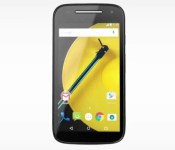
Moto E (2015) 3G now available in India for Rs. 6,999

The low-end war is heating up in India, land of Android One and Yureka Yu. The latest salvo comes from Motorola, which just launched the 3G version of the new Moto E for just Rs. 6,999.
Lunched on February 25, the second generation of the Moto E ups the specs but keeps the same low price tag that made its predecessor stand out in the crowd. The 4.5-inch device is now making its way to India, and the fact that it took Motorola just two weeks to bring it here speaks volumes of how important is India to the Lenovo-owned company.
The Moto E (2015) is now available through Flipkart in black or white, at a price of Rs. 6,999 (about $110). According to the listing, this is an “introductory offer price” valid for the initial batch, so you may want to make up your mind fast.
While the Moto E (2015) packs LTE in some other markets, the version selling on Flipkart is 3G-only. Other specs include a 4.5-inch 540 x 960 pixels screen, a quad-core Snapdragon 200 processor, 1GB of RAM, 8GB of expandable storage, and a 5MP rear camera.
The new Moto E will go up against similar priced Android One offerings, from local manufacturers like Lava, Spice, and Micromax. The latter is also offering the Cyanogen-powered Yureka, through its Yu sub-brand, though the 5.5-inch Yureka is in a somehow different class and costs around $140.
India has become a key market for Motorola; the two generations of the Moto G, in particular, did really well here, and the fast release of the cheaper Moto E (2015) suggests Motorola is eager to grab even more share, at the cost of thin margins. But it’s not just low-end – the mighty Moto Turbo arrived in India earlier this week, following its debut in Brazil, another focus of Motorola.
VAIO has launched its very first smartphone, the intuively named VAIO Phone
The rumours were true: Right on March 12th, VAIO has come out and announced its first smartphone since its split from Sony, the VAIO Phone. Clearly named for simplicity, the VAIO Phone dives into the mid-range market with its quad-core 1.2GHz, 2GB, and 2,500mAh battery. It even comes with Android Lollipop in what looks like a […]
The post VAIO has launched its very first smartphone, the intuively named VAIO Phone appeared first on AndroidSPIN.
Google says expect USB Type-C in Android phones and Chromebooks in the future
The next big thing in the world of connectors is going to the USB Type-C spec connector, and Google is making sure that its devices are going to be prepared going forward. The nifty thing about USB Type-C is that it is able to be used for display, transfer of data, or power, all from the […]
The post Google says expect USB Type-C in Android phones and Chromebooks in the future appeared first on AndroidSPIN.

Angry Birds Stella POP! takes the birds into bubble shooters
 Rovio, makers of the classic Angry Birds franchise, are introducing the latest flinging game in their series heads into new territory: the bubble shooter, or rather the bubble flinger.
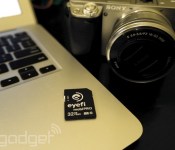
Eyefi’s Mobi Pro is its most capable wireless SD card yet

Eyefi’s always had an intriguing hook: Wouldn’t it be easier if you could just transfer photos from your cameras over Wi-Fi, instead of manually plugging into your computer? Its wireless SD cards haven’t always worked flawlessly, and they’re a lot more than standard SD cards, but they’re still worth it if you take photos regularly. Now, the company is announcing its latest card, the Mobi Pro ($100), which appears to fix many of the annoyances its customers have had over the years. Mobi Pro lets you finally upload specific photos from your camera to your computer and smartphone, rather than automatically syncing everything. You can even send RAW files to computers now (cue a chorus of “Hallelujah!” from pro photographers). Making up for the sometimes slow wireless hotspot between EyeFi cards and other devices, you can also have Mobi Pro transfer over a trusted wireless network when it’s in range, which should be significantly faster.
Just like Eyefi’s earlier Mobi cards, your photos will also get uploaded to the company’s Mobi Cloud photo service whenever you transfer them to its mobile or desktop apps. That cloud offering grants you unlimited photo storage for $50 a year, but you’ll get a year free with the purchase of Mobi Pro. It’s reminiscent of other online photo services like Flickr and Google+ (with a hint of the ambitious photo startup Everpix), but specifically tied into the Eyefi ecosystem. Eventually, Mobi Cloud will also be able to analyze your images and automatically categorize them, which should simplify the grueling ordeal of photo management.
In my brief time with the Mobi Pro, I had no trouble sending photos from my Sony Alpha 6000 to my iPhone 6 and MacBook Air. I’m the sort of casual photographer who enjoys shooting pics, but dreads the synchronization and organization process, so it basically suits my needs perfectly. It could also be extremely useful for anyone considering Apple’s new Macbook, which has no SD card slot and only a single USB-C port. Getting my phone and PC to recognize the card seemed a lot easier than earlier Eyefi products, though the company’s Mac software still needs some serious work. It’s slow and actually works against my productivity, which is ironic considering how useful its wireless SD cards are.
If you’ve already got one of Eyefi’s earlier Mobi cards, don’t fret. CEO Matt DiMaria tells us it’ll eventually offer a newer firmware that will enable some of Mobi Pro’s features at a “very low price.”
Apple’s ‘Force Touch’ Trackpad Fools Users Into Feeling Clicks Without Actually Moving
At its “Spring Forward” event on Monday, Apple announced a brand-new MacBook and updated 13-inch MacBook Pros with a fully redesigned trackpad called the Force Touch trackpad.
Like on the Apple Watch, Force Touch allows the device to distinguish between a light press and a deep press, opening up new methods for interaction. For example, while a light press could be a simple click, a deep press while browsing in Safari could bring up a Wikipedia entry in a pop-up window.

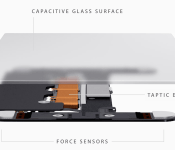
The Force Touch trackpad on the MacBook and new MacBook Pros achieves this through a total reinvention of the way the trackpad works. Apple ditched the “diving board” structure of older trackpads for a new design with four sensors, called Force Sensors.
These Force Sensors allow the user to click anywhere on the Force Touch trackpad. The “diving board” design on previous trackpads made it difficult to click toward the top of the trackpad, forcing users to move their fingers toward the bottom of the trackpad to click.
The Force Sensors are bundled together with the Taptic Engine, which is also featured in the upcoming Apple Watch. The Taptic Engine senses when a user clicks on the trackpad and issues haptic feedback to let a user know that their action was successful. As noted by TechCrunch’s Matthew Panzarino, this is because the trackpad itself doesn’t move. While the Force Touch trackpad sounds like it clicks and feels like it clicks, it doesn’t actually click.
There is a set of vibrating motors underneath that provides ‘force feedback’, also known as haptics in some applications. This feedback fools your finger into believing that you’ve pressed down on a hinged button, the way your current trackpad works. This feedback relies on phenomenon called lateral force fields (LFFs), which can cause humans to experience vibrations as haptic ‘textures’. This can give you the feel of a ‘clickable’ surface or even depth. The Force Touch feature of the new trackpad allows you to press ‘deeper’, giving you additional levels of tapping feedback. The effect is done so well that you actually feel like you’re pressing down deeper into a trackpad that still isn’t moving at all. It’s so good it’s eerie.
While the Force Touch trackpad was a main highlight of Apple’s introduction of the new MacBook, the updated 13-inch MacBook Pro is actually the first Mac to ship with the feature. iFixit has already performed a teardown of the new MacBook Pro to get a closer look at the workings of the Force Touch trackpad after removing the machine’s well-glued battery.
Read more 

ASUS ZenFone 2 video released to hype launch, expected later this month
If you have been following along the smartphone exploits of ASUS lately, you are likely as excited as we are to see the official launch of the ASUS ZenFone 2, expected later in March in the U.S. To keep the excitement going ASUS has launched a new video that does a great job of highlighting the new Android powered phone.
ASUS first introduced the ZenFone 2 alongside the ZenFone Zoom back at CES in January. “TwoFones,” as Kevin the Tech Ninja would say. The specifications list was something we were very happy to see, with a 5.5-inch HD display backed by a 64-bit Quad-Core processor, up to 4GB of RAM, up to 64GB of internal storage, a 3000mAh battery and a 13MP main shooter.

With specs like those, many expected the device to churn out a typical flagship price tag, in the $600+ range. However, ASUS has a little cost savings trick up their sleeve: their chosen processor is actually an Intel SoC, with an Imagination GPU. The end result, ASUS recently launched the ZenFone 2 in Taiwan, with the top tier unit just under $300. Downgrade to a 720p display, a slower processor, 2GB of RAM, a smaller battery and 8MP shooter for just $160.
Now that ASUS has released a teaser video for the western markets, we are hoping this means the device will soon follow. Sadly, we still have no word on when that may take place, but initial reports led us to believe later this month, we’ll have to wait and see.

For now, best hit the bottom of this article to check out our first touch of the device from CES and official announcement for all the details on this interesting, and very affordable Android 5.0 Lollipop offering from ASUS.
What do you think of the ASUS ZenFone 2, could it be the phone for you?
ZenFone 2
.rvs_wrapper
width: 335px;
.rvs_wrapper.align_left
float: left;
.rvs_wrapper.align_right
float: right;
.rvs_wrapper.align_center,
.rvs_wrapper.align_none
width: 100%;
.rvs_wrapper.align_center
text-align: center;
.rvs_wrapper.align_center.cbc-latest-videos ul li
float: none;
display: inline-block;
vertical-align: top;
.rvs_wrapper.cbc-latest-videos:not(.align_none) ul li:nth-child(2n+1)
clear: both;
.rvs_title
font-weight: 600 !important;
margin: 0 !important;
.rvs_wrapper.align_right .rvs_title
padding-left: 20px;
.rvs_title a
font-family: ‘Roboto Condensed’;
color: #3a3a3a;
.rvs_wrapper.cbc-latest-videos ul
padding-top: 10px;
.rvs_wrapper.align_left.cbc-latest-videos ul li,
.rvs_wrapper.align_none.cbc-latest-videos ul li
padding: 0 15px 0 0;
.rvs_wrapper.align_right.cbc-latest-videos ul li
padding: 0 0 0 15px;
float: right;
.rvs_wrapper.align_center.cbc-latest-videos ul li
padding: 0 7px;
.rvs_wrapper.cbc-latest-videos ul li > a
font-weight: 400;
.rvs_wrapper.cbc-latest-videos ul li > a .yt-thumbnail
margin-bottom: 0;
@media only screen and (max-width : 480px)
.rvs_wrapper
width: 100%;
text-align: center;
#page .rvs_wrapper.cbc-latest-videos ul li
padding: 0 7px;
display: inline-block;
float: none;
vertical-align: top;


Google’s new Chrome extension brings classic art to every tab

Following up on its successful Earth View experiment, Google’s latest Chrome add-on is the Google Art Project extension. Like Earth View, the new addition turns your boring blank tabs into canvases for gorgeous imagery. Rather than highlighting satellite imagery, though, this extension pulls from the Google Art Project to display famous artworks from museums and galleries around the world.
We’re still exploring what’s on offer, but we’ve already seen paintings from acclaimed artists like Whistler (pictured above), Van Gogh, Vernet, Monet and Degas. Only a quarter of a million people are using Earth View right now, meaning there are millions of drab gray tabs still left to brighten up. If yours are included in that figure, you can grab the Google Art Project extension from the Chrome Web Store for free.

Moto E 2015 goes up for sale in India for Rs. 6,999
The launch of the Moto E 2015 is set to continue Motorola’s dominance in the entry-level segment in India.

 AIVAnet