The DJI Phantom 2 Giveaway

Are you ready to take to the sky? You’ve seen everyone going crazy over quadcopters and aerial video. Now’s your chance to grab one of the best-rated drones on the market at the …


Samsung is now pushing out the long-awaited Lollipop update to all unlocked models of the Galaxy S4 located in France. The 729.59MB, upgrade which carries version number 7.18.531.2, transports the latest build of the Android operating system to the handset, in addition to a handful of bug fixes, stability improvements and speed optimizations.
For those in need of a refresh, the Lollipop upgrade brings support for multiple accounts, improved notifications, a smoother multitasking experience, Ambient Display, smarter internet connections and the recently-announced Material Design guidelines.
To start the update, make sure you’re connected to a Wi-Fi network. Then, from the home screen, press the Menu key, followed by Settings. Scroll to the bottom and tap ‘About Device’, followed by ‘Software Update and ‘Update Now’.
Come comment on this article: Samsung starts rolling out Lollipop OTA for Galaxy S4’s in France


The Google+ homepage — called the stream — can be somewhat unpredictable at times. That label at the top may say All Circles, but posts from your communities and from complete strangers — in the form of Extended Circles or Hot and Recommended posts — wind up here, too. It can be wild, it can be unruly, or — even worse — boring if you don’t have your stream set up right. But with a few simple tools, you can try to tame your Google+ stream and sculpt your stream into a fountain of knowledge.
Or a black hole of fan community posts, gifs, and cat videos. We’re not judging.

Sony has released Android 5.1 Lollipop binaries for a host of smartphones and tablets, including the entire Xperia Z series. The Xperia E3, M2, T2 Ultra and T3 handsets are also included in the list.
Binaries are used by Sony, or third parties, to make sure that AOSP will run on specific pieces of hardware. This release doesn’t allow Sony handset owners to run Sony’s official Android 5.1 on their smartphones just yet, but it does show that development in under way for all of these devices.
XDA forum member cheep5k8 has already taken the files and implemented an early alpha AOSP 5.1 build for the Xperia Z2. Most of the features already work, except the camera and a few sound glitches, but you’ll need to know what you’re doing with .img files if you want to test it out. Perhaps waiting for a more polished build would be wise.
Previously, Sony’s Twitter account had responded that Android 5.0 Lollipop would only be heading to Xperia Z branded devices. Either Sony was being cheeky and knew that it would be skipping 5.0 straight to 5.1 for some of its other devices, or, more likely, there was some miscommunication between Sony engineers and its social media team.
Hopefully we will hear official news from Sony regarding Android 5.1 updates for all of these handsets in the near future.
First announced back in January as an interstellar continuation of Civilization: Beyond Earth, Firaxis‘ Sid Meier’s Starships today launches for iPad, PC, and Mac (via iMore).
Developed by Firaxis in conjunction with 2K Games and Meier himself, Starships places players at the helm of a fleet of starships and tasks them with building a thriving interplanetary federation.
 Image via GameSpot
Players will gather new technology, discover new planets, and wage wars in missions that will randomly generate combat, offering a degree of replayability to the main story thread. Though still unclear, Civilization: Beyond Earth and Starships will also offer some form of connectivity between the two games, as well.
Set in the universe of Civilization: Beyond Earth after the age of the Seeding, Sid Meier’s Starships offers sci-fi/strategy fans a full stand-alone game experience that also features cross-connectivity with Beyond Earth, expanding the depth of both games. See if you have what it takes to rule the universe!
• Tactical Space Combat: Encounter unique tactical challenges in every mission, with dynamically generated maps, victory conditions, and foes.
• Fully Customizable Starships: Create an armada that fits your tactical plan with modular spaceship design.
• Diplomacy, Strategy, and Exploration: Expand the influence of your Federation and gain the trust of the citizens of new planets. Use the unique abilities of the each planet to enhance your fleet and Federation, and keep your opponents in check. Build improvements on worlds to increase the capabilities and resources of your Federation.
• A Galaxy Of Adventure: Explore the galaxy as you lead your fleet to distant worlds and complete missions to help the citizens of these planets. Fight pirates, protect colony ships, destroy rogue AI, and more.
• Multiple Paths To Victory: Will you win by conquering the greatest threat to the galaxy? Or will you unite a plurality of worlds in your Federation? Perhaps you will lead your people to push the frontiers of science. Each choice you make carries consequences on your path to victory
A few early reviews have praised the game for offering the complexities of the Civilization series without the huge time commitment, though simultaneously noting hardcore fans may have issue with the shorter, more “bite-sized” gameplay.
The iPad App Store version of Sid Meier’s Starships [Direct Link] is out now, but the PC and Mac editions on Steam can currently only be pre-purchased, with a three hour countdown marking the game’s release as of writing. The game is available for $14.99 on all platforms.
Are you ready to take to the sky? You’ve seen everyone going crazy over quadcopters and aerial video. Now’s your chance to grab one of the best-rated drones on the market at the lovely price of absolutely FREE. We’re giving away a DJI Phantom 2 to one lucky AndroidGuys reader. Is it you? There’s no purchase necessary so enter now and find out!
streamishere–delete
See more at deals.androidguys.com
Are you ready to take to the sky? You’ve seen everyone going crazy over quadcopters and aerial video. Now’s your chance to grab one of the best-rated drones on the market at the …

Barely a few weeks after the launch of Motorola’s second generation Moto E, Verizon Wireless has listed its LTE variant for sale on its website. Priced at $99 with contract and $199 without …

If you’re in the market for a drone with a smooth flight and nimble handling, the new Snowflake from Berlib should be on your radar. This bad boy can do 360 degree rolls and pull off 4-way …

We all know the frustration of our headphone cords looking like the Christmas lights that Chevy Case asks Rusty to untangle in Christmas Vacation. Or, even worse, enjoying the beat and feeling …
The post The DJI Phantom 2 Giveaway appeared first on AndroidGuys.

If you have a Nexus 10, you can stop tapping that “check for updates” option because we have the actual OTA update (from Google) ready for you to download and flash.
Of course, you can sit and wait, but that could take up to 2 to 3 weeks. It’s not all that hard to flash it yourself and you could be enjoying the goodness today. If you need a refresher or you’re a newbie, just hit up our complete guide to flashing this OTA to your Nexus 10 (or any other Nexus device).
Nexus 10 (mantaray) from LRX22C to LMY47D (5.1)
Come comment on this article: Android 5.1 OTA now available to download and flash for the Nexus 10

The Google Messenger app has recently received an update to version 1.2. The latest update includes new support for animated GIF files and some options have been moved to a new Advanced settings menu.
To send a GIF, just click the attach icon and pick an image file from your gallery like any other picture type. Messenger will then give you an animated preview before you hit send.

Left: Old settings. Middle: New settings. Right: GIF preview
As for the menu change, under settings there is now an extra Advanced option, which moves your phone number, auto-retrieve MMS setting and delivery report option into a separate screen. It’s a minor tweak, but makes the settings menu feel a little more organised than the long list used before.
The v1.2 update is rolling out gradually to different regions. If you can’t wait for the update to hit your local Play Store, you can install the latest Google Messenger version with the APK file found here.
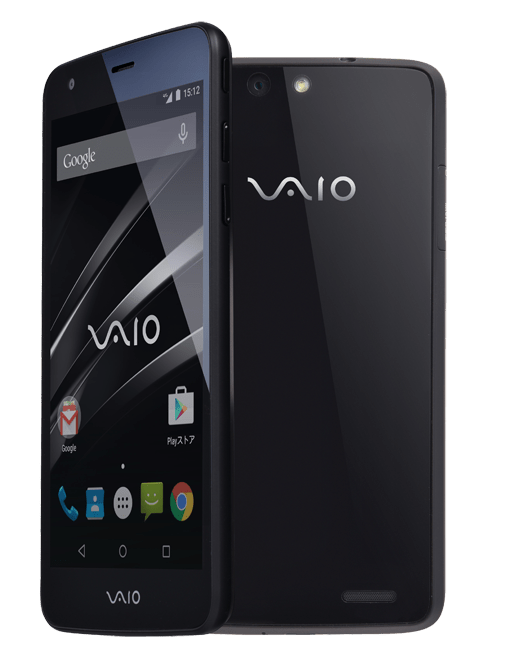
Japanese residents have a new smartphone option to choose from as VAIO has introduced it’s first Android handset. Featuring a 5-inch 720p display, the VA-10J runs what appears to be a stock Android 5.0 Lollipop build.
Specifications are pretty much what you’d expect in the middle of the pack and include a 1.2GHz quad-core processor, 2GB RAM, and a 13-megapixel rear camera. Additionally, you’ll find 16GB of internal storage with microSD expansion (up to 64GB), and a 2500mAh battery.
The VAIO smartphone price falls exactly where you might expect, that is according to Engadget. Reportedly, the phone shakes out to 51,000 yen or approximately $420 US.
The post VAIO’s first smartphone comes to Japan appeared first on AndroidGuys.

Intel announced a substantial reduction in its predicted revenues for the current first quarter of 2015.. The chip maker puts some of the blame on lower Windows-based PC business desktop sales, as many of them, have yet to buy new hardware to replace older PCs that use Windows XP

LG hasn’t exactly been secretive in its wishes to make a phablet that rivals Samsung’s Note series or the Xperia Ultra, but we still have yet to see the rumored device. Well if the newest rumor out there is true, we may see it sometime this year coming in as the LG G4 Note or G Note.
The LG G4 Note will be a premium phablet and a trademark for the name has already been proposed in the Korean patent office last month. iI the G4 Note is real, it will be a part of a line of “upcoming premium phones” and a part of a push in achieving the company’s goal in becoming the third largest smartphone maker in the world. At least according to CEO Cho Juno when he dropped the hint about these devices at MWC this year.
Come comment on this article: [Rumor] LG’s newest flagship series could be the G Note
 AIVAnet