


Latest Windows 10 Preview leak shows off Task View and Wi-Fi improvements

The Windows 10 Technical Preview is well under way, and while Microsoft has yet to release another build to the public, that hasn’t halted certain folk from publishing screenshots of unreleased builds. Improvements have been spotted in build 10036.
Google knows if your flight has WiFi

Google Flight Search can send you to a random spot on the globe, and now it’ll tell you if that fare offers WiFi too. Through a partnership with flight-rating service Routehappy, the search giant will populate your queries with amenity information like the aforementioned internet availability, in-seat power outlets, media streaming to your own device and seat type. Since trips on Virgin America’s kitted out planes aren’t exactly feasible for every trip, Google’s new tools should make it easier to see what flights offer a somewhat comparable experience before you board.
[Image credit: Jupiterimages.com]

Filed under: Transportation, Internet, Google
Via: AndroidCentral
Source: PR Newswire
Transformers: Battle Tactics sees its first in-game event to take down the evil Stunticons
DeNA has announced the first in-game event to hit Transformers: Battle Tactics, launching Menasor’s Might on both Android and iOS. This special event will take place from March 12 through March 18.

During the Menasor’s Might event, Transformers: Battle Tactics players will be tasked with taking on the evil Stunticons who have linked to form the ruthless Combiner, Menasor. Players will be able to battle elite new enemies for a limited time only, alongside collecting Stunticons. New characters are on offer with PvP combat, making Menasor’s Might a solid event for fans of the game to enjoy.
If you haven’t already checked out the turn-based title, and are a fan of Transformers, we strongly urge you do so. As noted already, the event has already commenced and will continue through March 18.
- Free with IAP – Download Now
Google Looking to Launch VPN Service for Android

There is talk spreading that Google may be considering creating a VPN service for Android users everywhere. This talk stems from a secret hidden beneath the new Android 5.1 update for the Nexus 6. If you currently own a Nexus 6 running Android 5.1, follow along and see if you can find what we’re talking about.
Included in the update for the Nexus, there is an app called Google Connectivity Services. Don’t check your app drawer; you won’t find it there. It can only be found in the list under Settings > Apps > All. It is possible to run it after tweaking it a bit. (If you are interested, follow the link below.) Once it is run, you are alerted that Google VPN is being run to keep your data transmitted securely. If you select, “Got It,” you will be taken to a Connection request window that requests your permission to set up a VPN. If you select, “OK,” the app will stop running, so it is far from finished.
While no one can be certain what exactly Google has in mind, there are plenty of things to consider. Will this service be freely available to all Android user, or will there be a charge to use it? Will there be unlimited bandwidth, or will we have caps to our VPN usage? Is Google only planning to use this feature in relation to the Mobile Network it is trying to run? Leave your comments below and start a discussion on what you think is happening.
Via: GSM Arena
Source: Pocketables
Come comment on this article: Google Looking to Launch VPN Service for Android
Unofficial ChromeOS Extension lets you access Dropbox
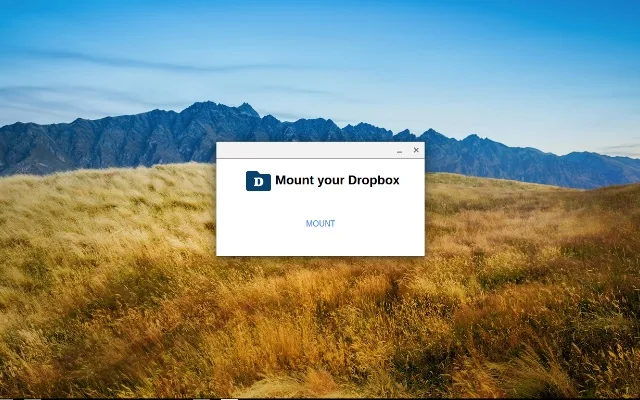
Although Google Drive is incredibly easy to use from the ChromeOS, other cloud storage providers don’t quite mesh as well. That has changed with a new unofficial Dropbox extension added to the Chrome store. Now you can sync files to and from your account on Dropbox right from the Files app.
The installation and setup are quite simple, but do keep in mind that this is a third party app, so use at your own risk. As soon as it’s set up, you will see your Dropbox files in your Files app.
Go ahead and follow the link to get it set up, and let us know how it goes!
Source: Google Chrome Store
Come comment on this article: Unofficial ChromeOS Extension lets you access Dropbox
Swarm adds One-Tap Messaging

Swarm has received an update today to allow you to conveniently message your friends immediately upon opening. The first tab will give you the option to message one person, a group of people, or every friend in your vicinity, whether he or she has Swarm or not. While messaging, you can view the map to keep up with where your friends are. Once again, Swarm is continuing to be one of the best apps for any friend-based get together for any activity—except Hide and Seek.
The original blog post also mentioned that the development team has been receiving feedback: one part of that feedback was requesting a messaging feature, which was delivered upon, and the other was a request for more of the fun and personality of older versions of Foursquare. So if you yearn for the older days of the location sharing service, you may be in luck with the next update.
Source: Foursquare Blog
Come comment on this article: Swarm adds One-Tap Messaging
Wunderlist gets Material Design and Sidebar Folders
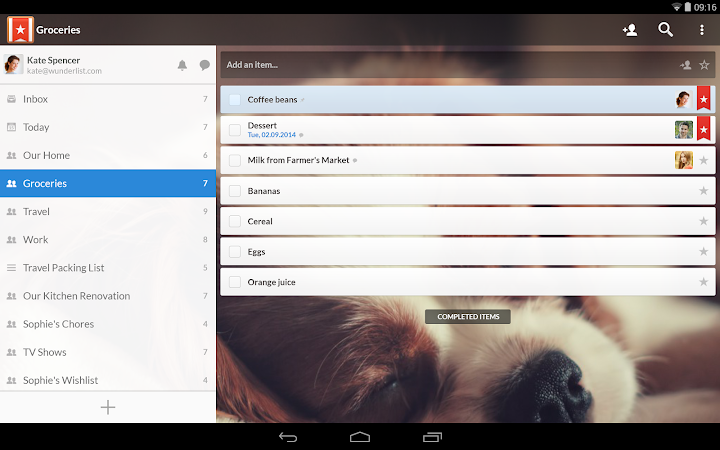
Lollipop brought many neat features with it, but one more pervasive feature was its new Material Design. While that brought with it a beautiful new design to the OS, it also brought a requirement for other applications to be updated to look more like the new OS. You can now count Wunderlist among the apps that have updated their look and feel to resemble Lollipop’s new design, with new colors throughout the app and animations. There is even a new, colorful Home View design.
On top of the visual changes, there have been some changes to the Sidebar as well. Instead of having a cluttered up mess over there, you can now organize all of your lists into folders for easier access and sorting. This new folder feature combined with Material Design will make your Wunderlist app look so much cleaner than before.
Source: Google Play Store
Come comment on this article: Wunderlist gets Material Design and Sidebar Folders
iFixit explains how Apple’s new MacBook haptic trackpad works

Apple’s new range of MacBooks have something particularly new inside them: the Force Touch trackpad. No longer hinged like previous Apple laptops, the new trackpad houses a “Haptic Engine”, outputting tactile feedback that will let you “feel” what’s happening on-screen. iFixit’s taken a closer look at how Apple did it, and while the trackpad is no longer hinged, there are now four spring mounts underneath. That haptic engine? A load of wires coiled around a magnetic core, which makes that all important vibrational feedback.
There are no moving parts to the mechanism, as Apple noted in the presentation this week, instead everything’s all done through magnets fitted underneath the pad. iFixit reckons that strain gauges inside the metal supports are how the trackpad is able to detect force. There might be a learning curve to the new trackpad, but then, there’s also a learning curve to reading iFixit’s teardowns too — find the rest of the details here.
Source: iFixit
Five laptops ready for work

We’ve got a selection of laptops here that are perfect for the workplace.
Often work will require you to hit the road, and though business-oriented tablets may suffice in some instances, there’s no substitute for a proper laptop. Laptops that are secure, rugged, and long on battery life are vital to getting things done.
Laptops make fine desktop computer replacements too, most offering enough horsepower to handle day-to-day tasks. Combined with a second monitor and full-sized keyboard, laptops can create fine working stations.
Here is the Microsoft ‘Ninja Cat on a Unicorn’ for your Microsoft Band, Windows Phone lockscreen and more

Last night, I posted on how to get a copy of the Microsoft ‘Ninja cat riding a flame-breathing unicorn’ sticker. Yes, you read that correctly. Just go with it.
Today, with my sober eyes a little bit more of the story is coming into focus, including some fan-created wallpapers, which I will give you the link to download directly.
However, first, some back story.
 AIVAnet