


Swarm adds One-Tap Messaging

Swarm has received an update today to allow you to conveniently message your friends immediately upon opening. The first tab will give you the option to message one person, a group of people, or every friend in your vicinity, whether he or she has Swarm or not. While messaging, you can view the map to keep up with where your friends are. Once again, Swarm is continuing to be one of the best apps for any friend-based get together for any activity—except Hide and Seek.
The original blog post also mentioned that the development team has been receiving feedback: one part of that feedback was requesting a messaging feature, which was delivered upon, and the other was a request for more of the fun and personality of older versions of Foursquare. So if you yearn for the older days of the location sharing service, you may be in luck with the next update.
Source: Foursquare Blog
Come comment on this article: Swarm adds One-Tap Messaging
Wunderlist gets Material Design and Sidebar Folders
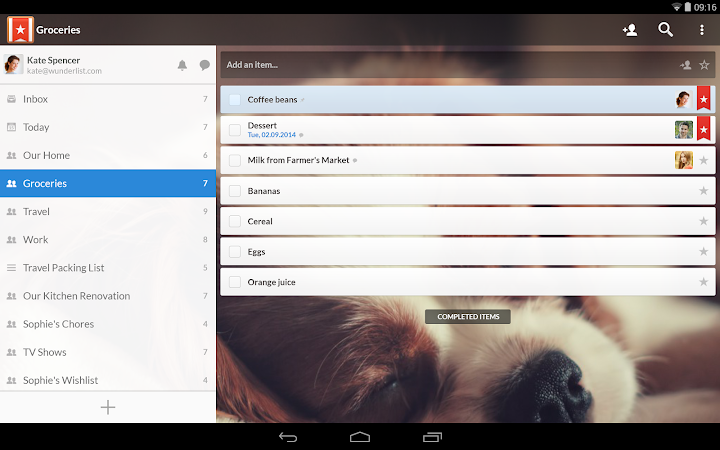
Lollipop brought many neat features with it, but one more pervasive feature was its new Material Design. While that brought with it a beautiful new design to the OS, it also brought a requirement for other applications to be updated to look more like the new OS. You can now count Wunderlist among the apps that have updated their look and feel to resemble Lollipop’s new design, with new colors throughout the app and animations. There is even a new, colorful Home View design.
On top of the visual changes, there have been some changes to the Sidebar as well. Instead of having a cluttered up mess over there, you can now organize all of your lists into folders for easier access and sorting. This new folder feature combined with Material Design will make your Wunderlist app look so much cleaner than before.
Source: Google Play Store
Come comment on this article: Wunderlist gets Material Design and Sidebar Folders
iFixit explains how Apple’s new MacBook haptic trackpad works

Apple’s new range of MacBooks have something particularly new inside them: the Force Touch trackpad. No longer hinged like previous Apple laptops, the new trackpad houses a “Haptic Engine”, outputting tactile feedback that will let you “feel” what’s happening on-screen. iFixit’s taken a closer look at how Apple did it, and while the trackpad is no longer hinged, there are now four spring mounts underneath. That haptic engine? A load of wires coiled around a magnetic core, which makes that all important vibrational feedback.
There are no moving parts to the mechanism, as Apple noted in the presentation this week, instead everything’s all done through magnets fitted underneath the pad. iFixit reckons that strain gauges inside the metal supports are how the trackpad is able to detect force. There might be a learning curve to the new trackpad, but then, there’s also a learning curve to reading iFixit’s teardowns too — find the rest of the details here.
Source: iFixit
Five laptops ready for work

We’ve got a selection of laptops here that are perfect for the workplace.
Often work will require you to hit the road, and though business-oriented tablets may suffice in some instances, there’s no substitute for a proper laptop. Laptops that are secure, rugged, and long on battery life are vital to getting things done.
Laptops make fine desktop computer replacements too, most offering enough horsepower to handle day-to-day tasks. Combined with a second monitor and full-sized keyboard, laptops can create fine working stations.
Here is the Microsoft ‘Ninja Cat on a Unicorn’ for your Microsoft Band, Windows Phone lockscreen and more

Last night, I posted on how to get a copy of the Microsoft ‘Ninja cat riding a flame-breathing unicorn’ sticker. Yes, you read that correctly. Just go with it.
Today, with my sober eyes a little bit more of the story is coming into focus, including some fan-created wallpapers, which I will give you the link to download directly.
However, first, some back story.
Cards Against Humanity on your iPhone is a lot like ____________.
Cards Against Humanity has come to the web! Cards Against Originality incorporates all of our favorite awful cards, but without having to lug around the bigger blacker box.

Taking the free-to-download print-your-own version of Cards Against Humanity, Cards Against Originality puts the over-the-top adult version of Mad Libs or Apples to Apples onto the web. If you’re not familiar with the game, a judge (usually rotating), reads aloud a black card with a prompt (either answer the question or fill in the blank), the other players offer a white card that completes it. Except that the goal is to make a combination that’s as awful as possible, and the one judged to be worst wins.
A small sampling of the more than 200 black prompt cards:
- My country, ’tis of thee, sweet land of _______.
- Why is mommy crying?
- I learned the hard way that you can’t cheer up a grieving friend with _______.
- As part of his contract, Prince won’t perform without ______ in his dressing room.
- I drink to forget _______.
- What gets better with age?
- After the earthquake, Sean Penn brought _______ to the people of Haiti.
And a few of the 800+ white cards:
- Boris the Soviet Love Hammer
- Asians who aren’t good at math
- The basic suffering that pervades all of existence
- The profoundly handicapped
- Passive-aggressive Post-It Notes
- Sean Penn
Which can lead to combinations like “Why is mommy crying? Boris the Soviet Love Hammer.”
And that sampling isn’t even remotely near the worst that Cards Against Originality offers. It can get really bad, so bad that the only way to cope is to laugh.
Cards Against Humanity was conceived as a card game to be played in person, and though Cards Against Originality is web-based, it still needs to be played in person (you just don’t need the physical cards). It works simply: one person hops on, creates a new game, and then shares the link to that game with whoever they want to join in. Everybody is dealt 10 white cards, somebody taps on the black card to serve as the judge, and then reads it aloud to everybody playing.
While this technically could be set up to play remotely, the true fun of Cards Against Humanity is in hearing everything that everybody else played read out loud by a judge trying to maintain his or her composure. And Cards Against Originality maintains that crucial social component of the physical card game.
Cards Against Originality launched yesterday, but the servers were smashed by the unexpected demand. Things are still a little shaky right now, but it’s slowly improving and the developer says to expect improved performance by the weekend (we held off a day just so we could show it to you when it was mostly functional). We’ve tried it out on multiple platforms and you’ll see the best support in Safari on iOS or in the Safari and Chrome desktop browsers (weirdly, Chrome on Android won’t let you scroll through your cards like Chrome desktop).
You can still drop $75 on the base physical Cards Against Humanity plus the four expansions (Or $115 total with the 90’s pack, the two holiday expansions, and the Bigger Blacker Box), and we wouldn’t attempt to stop you. It’s a worthy purchase. But it’s also something considerable to carry around, and for when you want to get in a game when on the road… turn to Cards Against Originality. Just don’t invite any kids. Or your mom — you’ll never be able to look her in the eye afterwards.
Source: Cards Against Originality; Via: Mashable
Free Catch the Throne mixtapes gather metal, hip hop stars

Anthrax, Big Boi, Snoop Dog, Mastodon and many others for free from Apple
There’s free music on iTunes for you to grab and it features some of the biggest names in hip hop and heavy metal. What’s more, it’s a pair of mixtapes featuring audio clips from HBO’s hugely popular fantasy series Game of Thrones. It’s called Catch the Throne, and there are two free volumes to download: 25 free tracks in all.
Other artists include Method Man, MNDR, Killswitch Engage, Mushroomhead, Daddy Yankee, Common and more. Most of the songs clock in at 4 minutes or less, so it’s a quick listen with some hard-hitting tunes.
Don’t worry about this album turning up unbidden in your music list, either. It’s free to grab, but Apple won’t push it on you.
Warning: Explicit lyrics. Don’t tell Tipper Gore!
- Free – Download Mixtape Vol 1. now
- Free – Download Mixtape Vol. 2 now
Google Flight Search now provides amenity data through partnership with Routehappy
Making a decision on which flight to take is about to get a tad easier, as Google Flight Search results will soon display amenity information for each flight.
The new information is the result of a partnership between Google and Routehappy that will integrate flight amenity data, such as whether a flight has in-seat power, Wi-Fi, and ample legroom, into Google Flights results.
Chrome OS Hidden Wallpaper Hints to New Feature

The most recent Chrome OS Dev channel release came with some more important updates and some less important ones, and one of the seemingly less important ones is a hidden wallpaper. The image is in the Chrome OS assets folder and simply looks like layers of construction paper. However, the important part is not the image, it’s the name.
Last year, Google told USA Today that it had plans to release kids’ versions of its services. No dates or specific services were given, but there is good reason to guess that the next iteration of Google’s kids’ software will follow in the footsteps of YouTube Kids, which has already seen widespread success. A Chromebook for kids would be a great addition to Google’s product line, and may be exactly what we will see in the next few weeks.
The Chromebook is already at a great price point for a youngsters’ piece of tech, and software that restricted access to adult-themed sites and apps, while allowing a child to use children’s and education apps. Chromebook has a quasi-children’s mode, but as of right now, it leaves a lot to be desired.
So here’s to hoping that Google will be diligently working on a Kids’ version of the Chromebook, and that we’re not all a bunch of deranged maniacs hunting for clues in the names of hidden wallpapers in a Developers Release of the latest Chrome OS, so that the young folks in our lives can add another item to their lists of things they want us to buy them.
Source: OMG Chrome
Come comment on this article: Chrome OS Hidden Wallpaper Hints to New Feature
3D-printed Iron Man gauntlet becomes a kid’s awesome bionic arm

It looks like Iron Man’s arm, but it’s actually a fully-functioning bionic prosthetic for a seven-year-old kid. Electronically wired and capable of moving, it can, for instance, open and close its hand if the user flexes their bicep. The limb was created by Limbitless Solutions, a non-profit made up of engineering students from the University of Central Florida, using donations and money they saved by sacrificing coffee. They specialize in designing 3D-printed limbs for children, because kids will quickly outgrow more expensive bionic limbs. Sure, their creations don’t have the sense of touch and can’t be controlled by thoughts, but kids will definitely appreciate looking like their favorite robot or superhero.
Each limb costs the team around $350 in materials — they use a 3D printer from the university’s lab — and takes them approximately 30 to 50 hours to make. The Iron Man-inspired arm, in particular, was made for a kid named Alex, who also got an Optimus Prime version for Christmas. Alex even got to chitchat with Tony Stark a.k.a. Robert Downey Jr. when he was presented his new arm, and you can watch their meeting below. If you want to support the team and have them print out more cool arms for kids, you can donate via PayPal through their website.
Filed under: Misc, Science, Microsoft
Source: Microsoft Office Tumblr, Marvel, Limbitless Solutions, Office Blogs, 3DHope
 AIVAnet