


Apple’s ‘Force Touch’ Trackpad Fools Users Into Feeling Clicks Without Actually Moving
At its “Spring Forward” event on Monday, Apple announced a brand-new MacBook and updated 13-inch MacBook Pros with a fully redesigned trackpad called the Force Touch trackpad.
Like on the Apple Watch, Force Touch allows the device to distinguish between a light press and a deep press, opening up new methods for interaction. For example, while a light press could be a simple click, a deep press while browsing in Safari could bring up a Wikipedia entry in a pop-up window.

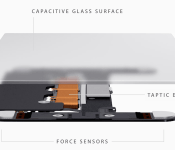
The Force Touch trackpad on the MacBook and new MacBook Pros achieves this through a total reinvention of the way the trackpad works. Apple ditched the “diving board” structure of older trackpads for a new design with four sensors, called Force Sensors.
These Force Sensors allow the user to click anywhere on the Force Touch trackpad. The “diving board” design on previous trackpads made it difficult to click toward the top of the trackpad, forcing users to move their fingers toward the bottom of the trackpad to click.
The Force Sensors are bundled together with the Taptic Engine, which is also featured in the upcoming Apple Watch. The Taptic Engine senses when a user clicks on the trackpad and issues haptic feedback to let a user know that their action was successful. As noted by TechCrunch’s Matthew Panzarino, this is because the trackpad itself doesn’t move. While the Force Touch trackpad sounds like it clicks and feels like it clicks, it doesn’t actually click.
There is a set of vibrating motors underneath that provides ‘force feedback’, also known as haptics in some applications. This feedback fools your finger into believing that you’ve pressed down on a hinged button, the way your current trackpad works. This feedback relies on phenomenon called lateral force fields (LFFs), which can cause humans to experience vibrations as haptic ‘textures’. This can give you the feel of a ‘clickable’ surface or even depth. The Force Touch feature of the new trackpad allows you to press ‘deeper’, giving you additional levels of tapping feedback. The effect is done so well that you actually feel like you’re pressing down deeper into a trackpad that still isn’t moving at all. It’s so good it’s eerie.
While the Force Touch trackpad was a main highlight of Apple’s introduction of the new MacBook, the updated 13-inch MacBook Pro is actually the first Mac to ship with the feature. iFixit has already performed a teardown of the new MacBook Pro to get a closer look at the workings of the Force Touch trackpad after removing the machine’s well-glued battery.
Read more 

ASUS ZenFone 2 video released to hype launch, expected later this month
If you have been following along the smartphone exploits of ASUS lately, you are likely as excited as we are to see the official launch of the ASUS ZenFone 2, expected later in March in the U.S. To keep the excitement going ASUS has launched a new video that does a great job of highlighting the new Android powered phone.
ASUS first introduced the ZenFone 2 alongside the ZenFone Zoom back at CES in January. “TwoFones,” as Kevin the Tech Ninja would say. The specifications list was something we were very happy to see, with a 5.5-inch HD display backed by a 64-bit Quad-Core processor, up to 4GB of RAM, up to 64GB of internal storage, a 3000mAh battery and a 13MP main shooter.

With specs like those, many expected the device to churn out a typical flagship price tag, in the $600+ range. However, ASUS has a little cost savings trick up their sleeve: their chosen processor is actually an Intel SoC, with an Imagination GPU. The end result, ASUS recently launched the ZenFone 2 in Taiwan, with the top tier unit just under $300. Downgrade to a 720p display, a slower processor, 2GB of RAM, a smaller battery and 8MP shooter for just $160.
Now that ASUS has released a teaser video for the western markets, we are hoping this means the device will soon follow. Sadly, we still have no word on when that may take place, but initial reports led us to believe later this month, we’ll have to wait and see.

For now, best hit the bottom of this article to check out our first touch of the device from CES and official announcement for all the details on this interesting, and very affordable Android 5.0 Lollipop offering from ASUS.
What do you think of the ASUS ZenFone 2, could it be the phone for you?
ZenFone 2
.rvs_wrapper
width: 335px;
.rvs_wrapper.align_left
float: left;
.rvs_wrapper.align_right
float: right;
.rvs_wrapper.align_center,
.rvs_wrapper.align_none
width: 100%;
.rvs_wrapper.align_center
text-align: center;
.rvs_wrapper.align_center.cbc-latest-videos ul li
float: none;
display: inline-block;
vertical-align: top;
.rvs_wrapper.cbc-latest-videos:not(.align_none) ul li:nth-child(2n+1)
clear: both;
.rvs_title
font-weight: 600 !important;
margin: 0 !important;
.rvs_wrapper.align_right .rvs_title
padding-left: 20px;
.rvs_title a
font-family: ‘Roboto Condensed’;
color: #3a3a3a;
.rvs_wrapper.cbc-latest-videos ul
padding-top: 10px;
.rvs_wrapper.align_left.cbc-latest-videos ul li,
.rvs_wrapper.align_none.cbc-latest-videos ul li
padding: 0 15px 0 0;
.rvs_wrapper.align_right.cbc-latest-videos ul li
padding: 0 0 0 15px;
float: right;
.rvs_wrapper.align_center.cbc-latest-videos ul li
padding: 0 7px;
.rvs_wrapper.cbc-latest-videos ul li > a
font-weight: 400;
.rvs_wrapper.cbc-latest-videos ul li > a .yt-thumbnail
margin-bottom: 0;
@media only screen and (max-width : 480px)
.rvs_wrapper
width: 100%;
text-align: center;
#page .rvs_wrapper.cbc-latest-videos ul li
padding: 0 7px;
display: inline-block;
float: none;
vertical-align: top;


Google’s new Chrome extension brings classic art to every tab

Following up on its successful Earth View experiment, Google’s latest Chrome add-on is the Google Art Project extension. Like Earth View, the new addition turns your boring blank tabs into canvases for gorgeous imagery. Rather than highlighting satellite imagery, though, this extension pulls from the Google Art Project to display famous artworks from museums and galleries around the world.
We’re still exploring what’s on offer, but we’ve already seen paintings from acclaimed artists like Whistler (pictured above), Van Gogh, Vernet, Monet and Degas. Only a quarter of a million people are using Earth View right now, meaning there are millions of drab gray tabs still left to brighten up. If yours are included in that figure, you can grab the Google Art Project extension from the Chrome Web Store for free.

Moto E 2015 goes up for sale in India for Rs. 6,999
The launch of the Moto E 2015 is set to continue Motorola’s dominance in the entry-level segment in India.


Waze Receives Usability Update

Waze, the popular social navigation app, received an update today filled with usability improvements and minor tweaks.
For starters, Waze has been improved to offer a quicker experience with improved re-routing and quicker route selection. You can now get an instant confirmation from others when you send out your ETA. U-Turn functionality has been improved, and a new traffic bar shows how long you’ll be in a jam and let’s you track your progress as you go.
Other smaller updates are minor tweaks and bug fixes to help improve the user experience.
What do you think? Any new features that you’re interested in? Leave a comment below and let us know!
Source: Google Play Store
Come comment on this article: Waze Receives Usability Update

Android 5.1 OTA updates now available to download and flash for Nexus 5 and Nexus 7 (2012) Wi-Fi

Android 5.1 is now rolling to several Nexus devices and it can take up to a couple of weeks for all devices to receive the update. We know that most of our readers are just too damn impatient to sit and wait that long, so here are the direct links (from Google) for the Nexus 5 and the Nexus 7 (2012) Wi-Fi.
You can download these Zip files and easily flash them. If you need a refresher or you’re new to it, just hit up our very extensive guide on how to manually flash OTA updates.
Downloads links after the break.
(Note: The Nexus 5 has two downloads for those that are current on LRX21O Android 5.0 or LRX22X Android 5.0.1)
Nexus 5 (hammerhead) From LRX21O to LMY47D (5.1)
Nexus 5 (hammerhead) From LRX22C to LMY47D (5.1)
Nexus 7 (2012) WiFi (nakasi) From LRX22G to LMY47D (5.1)
Come comment on this article: Android 5.1 OTA updates now available to download and flash for Nexus 5 and Nexus 7 (2012) Wi-Fi

Evernote goes Material Design with latest update

Evernote is by far the best damn business and personal productivity app in the world, and it’s getting better today with version 7.0. 7.0 brings a visual refresh with Material Design, which includes a flatter look, bolder colors, and improved typography. You will also find subtle animations for smoother screen transitions.
You can get an idea of how things look from the this animated GIF.

Material Design might be the biggest part of the update, but there are several other new features as well…….
- Customizable quick notes – Long press to add or remove quick note options
- Revamped navigation – Simpler navigation drawer with direct access to shortcuts
- Improved note editor and note view – Cleaner layout and controls
- Editable tags – Support for renaming and deleting tags
- Numerous bug fixes and enhancements
Come comment on this article: Evernote goes Material Design with latest update

Popular ‘Ulysses’ Writing App for Mac Expands to the iPad, Gets Major Update [iOS Blog]
Soulmen’s popular Markdown text editor designed for writers, Ulysses, has long been available on the Mac and is one of the more popular Mac-based writing apps due to its clean, text-focused distraction-free interface and it’s organizational system. As of today, Ulysses for Mac is getting a major update and it’s also expanding to the iPad.
For those of you unfamiliar with the app, Ulysses sets itself apart from other similar writing apps with a three-paned sidebar that lets users see all of their files in one place and its ability to organize files using groups and filters. Writing takes place on sheets, and files are stored locally on the Mac or in iCloud. Markdown text written in Ulysses can be exported in several different file formats, including PDF, ePub, and HTML.
The newest version of Ulysses for Mac includes a new name (dropping the former III) and a new icon — a butterfly. It’s been updated with a Yosemite-style redesign that includes an attachment bar, Favorites on the sidebar, and a new Dark Mode. Quick Export and Preview have been updated, adding TXT and ePub previews, plus export optimizations.
 Ulysses for Mac
The biggest change to Ulysses for Mac, aside from the redesign, is its integration with the new Ulysses app for iPad. The Mac app fully syncs with the iPad app via iCloud, making it easy to begin work on one device and pick up on another. Handoff support is also built in.

“Our ideal conception has always been to make Ulysses a universal tool that authors can use for any writing task, at any time and everywhere. Bringing it to iPad means a great leap forward towards turning this into reality”, explains Max Seelemann, head of development and co-founder of The Soulmen.
Ulysses for the iPad will be immediately familiar to anyone who has used Ulysses for Mac, as the interface and feature set are nearly identical. The iPad app uses a three-paned setup, and panes can be open or closed with swipes. A button row above the keyboard has been added to make it easier to format text, with access to special characters and shortcuts for creating headings, lists, paragraph blocks, and more. An info bar displays word count, sentences, characters, lines, and pages.
Ulysses for iPad supports filters much like the Mac version, and attachments like notes and images can be added. It also exports to all of the standard file formats the Mac app exports to, including Plain Text, HTML, ePub, PDF, and RTF. When an external keyboard is attached, Ulysses for iPad supports all standard shortcuts, and the look of the app can be customized with Themes, found in the Settings menu.
https://player.vimeo.com/video/119895209?byline=0&portrait=0
Both of the new apps are available for download today. Those who already own a copy of Ulysses for Mac can upgrade at no cost. The new Mac app is, however, exclusive to Yosemite — it won’t run on older versions of OS X.
Ulysses for iPad can be downloaded from the App Store for $19.99. [Direct Link]
Ulysses for Mac can be downloaded from the Mac App Store for $44.99. [Direct Link]

Showtime plans on launching standalone streaming service as well

Now that HBO made their standalone streaming service official, it looks like Showtime is about to do the same. HBO Now was announced at the Apple Watch Event with a price of $14.99 per month, but more importantly, no cable subscription required.
No word on exactly when you able to get your Showtime stream on, but CBS CEO Les Moonves said “the not-too-distant future.” I think it’s safe to bet they will launch something by the Summer. The only question is if Apple will snag an exclusive like they did with HBO? Maybe Google can grab this one for Android TV?
Come comment on this article: Showtime plans on launching standalone streaming service as well

Moto E 2015 with LTE is now available on Verizon Prepaid for just $99
Motorola’s ultra-affordable Moto E 2015 is now up for sale on Verizon Prepaid, with the model offering LTE connectivity listed for just $99 off-contract.

 AIVAnet