


Twelve South Announces HiRise Charging Stand for Apple Watch [iOS Blog]
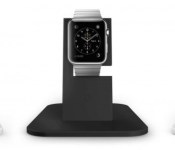
Twelve South on Wednesday unveiled the HiRise for Apple Watch, a brushed metal stand designed to hold all three editions of the wrist-worn device. The stand showcases the entire Apple Watch, allowing you to interact with the screen while it is charging, and features a non-slip rubber base, silicone accents and leather landing pad to keep the smartwatch secure and protected.

HiRise for Apple Watch, similar to the iPhone version of the stand, is slightly angled so that you can easily interact with the Apple Watch from a bedside table or countertop. The watch band tucks away cleanly behind the stand’s metal frame, with the silicone accents preventing any scratches or scuffs. A pop-out disk on the back of the stand keeps the Apple Watch’s magnetic charging cable out of sight.
HiRise for Apple Watch will be released in May for $49.99 on Twelve South’s website, available in silver and gray options. Those interested in the product can sign up to Twelve South’s mailing list with their name, email address and country of residence to receive updates when the product becomes available.
Das Keyboard 4 brings a full-featured mechanical typing experience to the Mac
Mac users looking for a full-featured mechanical keyboard experience have a new option today with the release of the Das Keyboard 4 Professional for Mac.

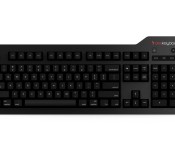
The Das Keyboard 4 Professional is a mechanical keyboard that comes with a lot of the features you’d expect out of a modern keyboard. First up are the dedicated media keys, along with an oversized volume knob for quick and easy access to your media functions. Alongside the media keys, the keyboard also features dedicated function keys to access Mission Control, Launchpad, and display settings.
As for the mechanical parts of the keyboard, it features gold-plated switches, which the company says will provide more tactile feedback than standard keyboards. Finally, the keyboard also features two USB 3.0 ports for fast file transfers, as well as a 6.5-foot long cable to allow some distance between the keyboard and connected Mac.
As for price and availability, you can pick up the Das Keyboard 4 for Mac for $175 in either English or German layouts with your choice of blue (clicky) or brown (soft) switches from the Das Keyboard website.
Press Release:
Introducing the New Das Keyboard 4 Professional for Mac
Metadot, maker of award-winning mechanical keyboards, today announced the new Das Keyboard 4 Professional for Mac, its most significant keyboard update for Mac users since the Model S.
Beginning today, Mac OS power-users, designers, editors, coders, gamers, musicians and enthusiasts alike can experience the best-in-class typing experience available on the market for ultimate speed, performance, style and durability. Das Keyboard 4 Professional for Mac is meticulously engineered with a refined vibration-less enclosure, hex screws, cutting-edge look and oversized HiFi-inspired volume knob to enhance the desktop experience and help unleash personal computing potential like never before.
No detail too small, Das Keyboard 4 Professional for Mac is expertly crafted and fully equipped with an array of premium features including:
-
Unmatched Mechanical Precision: Gold-plated mechanical switches provide more accurate tactile and audible feedback than standard keyboards and create a distinct, satisfying click with each and every keystroke.
-
Exceptional Durability: A new anodized aluminum top panel improves durability and displays a professional, contemporary look and feel on any surface.
-
Quick Media Controls: Over-sized volume knob with dedicated media and function controls enable fast and easy audio adjustments and access to Mission Control, Launchpad and display settings “V without the added hassle of navigating tedious keyboard shortcuts
-
High-Speed File Transfer: SuperSpeed USB 3.0 hub delivers the industry”¦s first two-port 5Gb/s hub for faster high-resolution picture and video file transfers between USB devices.
-
Increased Speed: N-key rollover (NKRO) over USB allows for better, faster gaming, eliminating the need for a PS2 adapter, often required of older keyboards.
-
Energy Savings: Instant sleep button puts the connected Mac into sleep mode to help conserve power during even the shortest computing breaks or gaming intermissions.
-
Extended Range: Extra-long 6.5-foot long cable increases the potential distance between the keyboard and connected Mac device for more space and setup flexibility.
“Das Keyboard 4 for Mac represents our most advanced and significantly updated offering for Mac OS users yet,” said Daniel Guermeur, creator of the Das Keyboard and CEO of Metadot. “The keyboard is and will continue to be the most important tool in many people’s everyday lives, and Das Keyboard 4 for Mac delivers a superior product that is as highly satisfying and enjoyable to use as it is innovative and efficient, providing the best possible typing experience for Mac power-users and enthusiasts alike. It”¦s a difference so extraordinary you really have to feel to believe.”Ø
Pricing and Availability
The new Das Keyboard 4 for Mac starts at $175 (US) and £į179 (Europe) and is available for order in the US beginning today at http://www.daskeyboard.com. It is offered in US English and German layouts with either blue switches for a clicky tangible feel, or brown switches for a softer, more tactile experience. UK and Nordic layouts will also be available in the coming months.
About Das Keyboard
Das Keyboard, a brand of Metadot, makes high-quality mechanical keyboards, along with RFID blocking gear that protects user privacy. Das Keyboard is a privately held technology company headquartered in Austin, Texas dedicated to delivering innovative technology products to increase productivity and lower costs. Developed in 2005, Das Keyboard has been praised by major media outlets, techie magazines, geeks and regular people who use and rely on keyboards to be productive throughout the workday. For more information, please visit http://www.daskeyboard.com.
Sprint starts rolling out Android 5.1 Lollipop update to the Nexus 6
Yesterday was a big day for Google, Android users and the Nexus line. A number of T-Mobile devices started to see the updated tot he latest Android OS, Android 5.1 Lollipop. While the list was long, Nexus 4, Nexus 5 and Nexus 7, it didn’t include the Nexus 6. This morning Verizon announced the Nexus […]
The post Sprint starts rolling out Android 5.1 Lollipop update to the Nexus 6 appeared first on AndroidSPIN.
A few high-end fashion retail stores will also sell the Apple Watch on April 24
Apple stores won’t be the only places consumers can purchase the Apple Watch on April 24. A few high-end fashion stores will also offer the smartwatch to their customers.

Apple clearly wants the Apple Watch to appeal to an audience beyond the typical technology gadget adopters. According to Women’s Wear Daily:
In tandem with the April 24 launch, select specialty stores will sell individually chosen selections of the Apple Watch: Colette in Paris, Dover Street Market in London and Tokyo, Maxfield in Los Angeles and The Corner in Berlin. It is understood 10 Corso Como in Milan will also get the product at a later date. In addition, Hong Kong-based specialty retailer Lane Crawford is to preview the Apple Watch in its personal shopping Platinum Suites from April 10 in Hong Kong, Shanghai, Beijing and Chengdu locations.
The article stated that the Apple Watch will also be made available as a preview experience for shoppers at Galeries Lafayette in Paris, Isetan in Tokyo and Selfridges in London starting on April 10. It added:
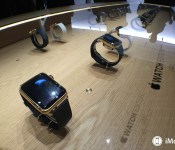
It is understood those stores will host shop-in-shops in high-visibility locations custom-designed to support high service quotients, with Selfridges putting the smartwatch in its Wonder Room, Isetan on its ground floor and Galeries Lafayette on its first floor amid European brands. The size of the installations could not be learned, but are to incorporate bespoke tables that display the watches under glass with special lighting and animations. Sales specialists are to assist customers in discovering and trying on different models, also ensuring the setup so they are fully operational when they leave the shop.
It’s likely that these retail locations will offer the Apple Watch Edition, which will have prices starting at $10,000. Apple has already recruited supermodel Christy Turlington Burns to show how she is using the Apple Watch to help her train for running the Virgin Money London Marathon.
Source: Women’s Wear Daily
<!–*/
<!–*/
<!–*/
.devicebox
background-color: #5CB8DB;
border: 1px solid #E2E9EB;
float: right;
display: block;
margin: 0 0px 10px 10px;
max-width: 350px;
overflow: hidden;
width: 50%;
.devicebox h3
background: #8D98BD;
color: #fff;
font-family: “camptonmedium”,sans-serif;
font-size: 20px;
margin-bottom: 0;
margin-top: 0;
padding: 0;
text-align: center;
.devicebox h3 a
display: block;
line-height: 30px;
padding: 0 10px;
.devicebox h3 a:hover
background: #7e88aa;
text-decoration: none;
.devicebox .video
margin: auto;
border: 0px;
.devicebox p,
.entry-content .devicebox p > img,
.devicebox img
margin: 0px;
padding: 0px;
.devicebox,
.devicebox a,
.devicebox a:active,
.devicebox a:hover,
.devicebox a:link,
.devicebox a:visited,
.devicebox p,
.devicebox ul,
.devicebox ul li,
.devicebox li
color: #fff;
.devicebox a:hover
text-decoration: underline;
.devicebox p,
.devicebox ul,
.devicebox ul li,
.devicebox li
border-width: 0px;
font-family: “camptonlight”,sans-serif;
font-size: 16px;
padding: initial;
.devicebox ul
margin: 0;
padding: 0.5em 1em 1em 30px;
.devicebox ul li
display: list-item;
.devicebox ul,
.devicebox ul li,
.devicebox li
line-height: 24px;
list-style: disc outside none;
.devicebox ul li:before
display: none;
.devicebox ul + p
padding: 0px 15px 15px;
line-height: 1.25;
.field-items p:last-of-type + .devicebox,
.slide p:last-of-type + .devicebox,
.article-body-wrap p:last-of-type + .devicebox
float: none;
margin: 0 auto 30px;
max-width: 700px;
min-height: 225px;
position: relative;
width: 100%;
.field-items p:last-of-type + .devicebox .video,
.slide p:last-of-type + .devicebox .video,
.article-body-wrap p:last-of-type + .devicebox .video
bottom: 0px;
left: 50%;
position: absolute;
right: 0px;
top: 30px;
.field-items p:last-of-type + .devicebox .video_iframe,
.slide p:last-of-type + .devicebox .video_iframe,
.article-body-wrap p:last-of-type + .devicebox .video_iframe
height: 100%;
padding: 0px;
.field-items p:last-of-type + .devicebox ul,
.slide p:last-of-type + .devicebox ul,
.article-body-wrap p:last-of-type + .devicebox ul
width: 43%;
.field-items p:last-of-type + .devicebox h3 + p,
.slide p:last-of-type + .devicebox h3 + p,
.article-body-wrap p:last-of-type + .devicebox h3 + p
bottom: 0;
left: 50%;
position: absolute;
right: 0;
top: 30px;
.field-items p:last-of-type + .devicebox h3 + p img,
.slide p:last-of-type + .devicebox h3 + p img,
.article-body-wrap p:last-of-type + .devicebox h3 + p img
height: auto;
min-height: 100%;
min-width: 100%;
@media all and (max-width: 500px)
.devicebox
float: none;
margin: 0;
max-width: 100%;
width: 100%;
.field-items p:last-of-type + .devicebox .video,
.slide p:last-of-type + .devicebox .video,
.article-body-wrap p:last-of-type + .devicebox .video
left: 0;
position: relative;
top: 0;
.field-items p:last-of-type + .devicebox .video_iframe,
.slide p:last-of-type + .devicebox .video_iframe,
.article-body-wrap p:last-of-type + .devicebox .video_iframe
padding-bottom: 56.25%;
.field-items p:last-of-type + .devicebox h3 + p,
.slide p:last-of-type + .devicebox h3 + p,
.article-body-wrap p:last-of-type + .devicebox h3 + p
left: 0;
position: relative;
top: 0;
.field-items p:last-of-type + .devicebox ul,
.slide p:last-of-type + .devicebox ul,
.article-body-wrap p:last-of-type + .devicebox ul
width: auto;
/*–>*/
/*–>*/
/*–>*/

Microsoft pushes Surface Pro 3 and original Surface RT firmware updates for March

The Surface Pro 3 gets much love from Microsoft, as it should. The company is actively updating apps, firmware and adding features based on user feedback. With that, it is no surprise to find a new update for the firmware today o Patch Tuesday.
Additionally, the old-school Surface RT also has a small firmware update waiting for it as well. This leaves nothing new for the Surface Pro, Surface 2, or Surface Pro 2.
Swatch co-founder predicts quick success for Apple Watch
One of the co-founders of Swatch is predicting that Apple will see rapid success with the Apple Watch, which he expects will cause headaches for Swiss watchmakers.
Elmar Mock, who co-founded Swiss watch brand Swatch, expects the Apple Watch Sport and stainless steel Apple Watch to have the most impact. They will put the most pressure on low-end and mid-tier watches, according to Bloomberg:
“Anything in the price range of 500 francs to 1,000 francs is really in danger,” said Mock, speaking by phone from Biel, Switzerland. “I do expect an Ice Age coming toward us.”
Mock says he’s seeing a lot of arrogance coming from Swiss watchmakers, not only concerning the Apple Watch, but other smartwatches as well. He likens the attitude to what was seen at the beginning of the “quartz crisis,” which saw Swiss mechanical timepieces supplanted in the market by lower-cost quartz watches.
Other watchmakers don’t seem to share Mock’s concern. LVMH watch unit head Jean-Claude Biver said he doesn’t feel that the Apple Watch is a threat to the industry, and might even be good for Swiss manufacturers in the long run:
The Apple Watch may lead more young people to wear watches, and eventually they’ll be more likely to buy mechanical ones, he said. “Considering that Switzerland does not own the same industrial technology and facilities as Silicon Valley or giants like Samsung, Sony and LG, I believe that the Swiss reaction shows huge dynamism and speed.”
We should have a better idea on just how much of a threat the Apple Watch will be to Swiss watchmakers once it goes on sale beginning April 24.
Source: Bloomberg
<!–*/
<!–*/
<!–*/
.devicebox
background-color: #5CB8DB;
border: 1px solid #E2E9EB;
float: right;
display: block;
margin: 0 0px 10px 10px;
max-width: 350px;
overflow: hidden;
width: 50%;
.devicebox h3
background: #8D98BD;
color: #fff;
font-family: “camptonmedium”,sans-serif;
font-size: 20px;
margin-bottom: 0;
margin-top: 0;
padding: 0;
text-align: center;
.devicebox h3 a
display: block;
line-height: 30px;
padding: 0 10px;
.devicebox h3 a:hover
background: #7e88aa;
text-decoration: none;
.devicebox .video
margin: auto;
border: 0px;
.devicebox p,
.entry-content .devicebox p > img,
.devicebox img
margin: 0px;
padding: 0px;
.devicebox,
.devicebox a,
.devicebox a:active,
.devicebox a:hover,
.devicebox a:link,
.devicebox a:visited,
.devicebox p,
.devicebox ul,
.devicebox ul li,
.devicebox li
color: #fff;
.devicebox a:hover
text-decoration: underline;
.devicebox p,
.devicebox ul,
.devicebox ul li,
.devicebox li
border-width: 0px;
font-family: “camptonlight”,sans-serif;
font-size: 16px;
padding: initial;
.devicebox ul
margin: 0;
padding: 0.5em 1em 1em 30px;
.devicebox ul li
display: list-item;
.devicebox ul,
.devicebox ul li,
.devicebox li
line-height: 24px;
list-style: disc outside none;
.devicebox ul li:before
display: none;
.devicebox ul + p
padding: 0px 15px 15px;
line-height: 1.25;
.field-items p:last-of-type + .devicebox,
.slide p:last-of-type + .devicebox,
.article-body-wrap p:last-of-type + .devicebox
float: none;
margin: 0 auto 30px;
max-width: 700px;
min-height: 225px;
position: relative;
width: 100%;
.field-items p:last-of-type + .devicebox .video,
.slide p:last-of-type + .devicebox .video,
.article-body-wrap p:last-of-type + .devicebox .video
bottom: 0px;
left: 50%;
position: absolute;
right: 0px;
top: 30px;
.field-items p:last-of-type + .devicebox .video_iframe,
.slide p:last-of-type + .devicebox .video_iframe,
.article-body-wrap p:last-of-type + .devicebox .video_iframe
height: 100%;
padding: 0px;
.field-items p:last-of-type + .devicebox ul,
.slide p:last-of-type + .devicebox ul,
.article-body-wrap p:last-of-type + .devicebox ul
width: 43%;
.field-items p:last-of-type + .devicebox h3 + p,
.slide p:last-of-type + .devicebox h3 + p,
.article-body-wrap p:last-of-type + .devicebox h3 + p
bottom: 0;
left: 50%;
position: absolute;
right: 0;
top: 30px;
.field-items p:last-of-type + .devicebox h3 + p img,
.slide p:last-of-type + .devicebox h3 + p img,
.article-body-wrap p:last-of-type + .devicebox h3 + p img
height: auto;
min-height: 100%;
min-width: 100%;
@media all and (max-width: 500px)
.devicebox
float: none;
margin: 0;
max-width: 100%;
width: 100%;
.field-items p:last-of-type + .devicebox .video,
.slide p:last-of-type + .devicebox .video,
.article-body-wrap p:last-of-type + .devicebox .video
left: 0;
position: relative;
top: 0;
.field-items p:last-of-type + .devicebox .video_iframe,
.slide p:last-of-type + .devicebox .video_iframe,
.article-body-wrap p:last-of-type + .devicebox .video_iframe
padding-bottom: 56.25%;
.field-items p:last-of-type + .devicebox h3 + p,
.slide p:last-of-type + .devicebox h3 + p,
.article-body-wrap p:last-of-type + .devicebox h3 + p
left: 0;
position: relative;
top: 0;
.field-items p:last-of-type + .devicebox ul,
.slide p:last-of-type + .devicebox ul,
.article-body-wrap p:last-of-type + .devicebox ul
width: auto;
/*–>*/
/*–>*/
/*–>*/

The New MacBook: What it is and what it is not

Monday’s Apple reveal of the new MacBook has some people shaking their heads no. Even if it’s not right for you, Apple’s gonna sell millions. Here’s why.
First of all, if you haven’t already read it, check out Ren and Rene’s first look at the new MacBook:
Like the American Tourister gorilla
I’m hard on portable gear. My boss at Macworld at the time, a clean-shaven fellow from Nova Scotia named Jim Dalrymple, was totally horrified by what I’d done to the company-issued PowerBook G4.
“What the hell did you do to that thing?” Jim asked, incredulously, one day at Macworld Expo. I’d managed to crack the edges of the PowerBook, destroy the screen hinges and scratch the hell out of the wrist area on either side of the trackpad.
In late 2009 I had to get myself a new computer, because my 17-inch MacBook Pro died a premature death (quelle surprise). I scored an excellent deal on a white polycarbonate Mac model at Micro Center: 13-inch screen, 2.26 GHz processor, enough RAM and storage to get the work done.
It was a MacBook.
That MacBook is still with us. My about-to-turn 15 year old uses it. I’ve upgraded the RAM and replaced the hard drive with an SSD, and it’s still pretty zippy.
Not your father’s Oldsmobile
So I have very fond memories of the MacBook line, and still use MacBook hardware. I suspect MacBook is long in the memory of many Mac users like those that visit the Apple reseller I work at on the weekends. Many of them bring theirs in for service when the inevitable accident occurs, or when something needs replacing.
In 2010 Apple made its last MacBook model. Apple repositioned the MacBook Air to be its new consumer model, with the MacBook Pro squarely aimed at customers who wanted more beef. Last year, after a price realignment and some marketing push, Apple sold more MacBook Airs in one quarter than it had, ever.
It’s very fitting that Apple has resurrected the MacBook moniker. They’ve done something very different with the line, however. To borrow an old marketing slogan, it’s not your father’s Oldsmobile.
About the USB-C interface

The most controversial design decision of the new MacBook has nothing to do with the bright, beautiful Retina display, the choice of chassis color or its incredible thinness. It has to do with Apple’s decision to do away with all expansion ports except for a singular USB-C style connection. This marks the first time any Apple device has supported this interface.
USB-C replaces everything. There’s no Thunderbolt port, no USB ports, not even a power port. That doesn’t mean the Mac can’t connect to anything, just that you’re going to have to buy adapters to make it happen. Computer users are going to be seeing a lot of USB-C in the coming years regardless of whether they get Macs or PCs, so get ready.
Regardless, Apple has shown time and time again that it’s willing to inflict some short-term discomfort to users if there will be long-term gain. Just like the floppy drive, just like optical discs. Just like the 30-pin dock connector and Lightning cables. It’s happened before. People have moaned and groaned. And they’ve moved on.
The new MacBook

The new MacBook is not aimed at power users, nor is it aimed at everyone else better outfitted with a MacBook Air. This new MacBook combines the overall practicality and usability of the Mac with, for the first time, the sort of Apple design fetishism we’ve seen in iPhones and iPads for years.
Gold. Gold! You can order your MacBook in gold. Coincidentally, the last Mac you could order in custom colors? The MacBook. For a while you could get your hands on either a white or black-clad plastic version. The black MacBook is still an object of desire for some old-school Mac users.
But what about that Core-M thing?
Inside is an Intel Core-M processor, a new fifth-generation Core chip design based on Intel’s “Broadwell” microprocessor architecture. It’s already been featured inside some new two-in-one convertible laptops and tablets that run Windows. But don’t hold that against it.
The new MacBook’s clock speed is considerably lower than the MacBook Air, but that’s not a meaningful measuring tool for most people shopping for a new computer. They want to know what it can do. Can it check e-mail? Check. Surf the web? Check. Help with homework or the occasional work project? Surely.
The new MacBook isn’t built for speed or horsepower. If you want to do Final Cut edits on your Mac or compile millions of lines of code quickly, stick with heavy iron like the Retina MacBook Pro or the Mac Pro. Even the iMac is a good choice.
Apple still makes computers you “power users” can enjoy. This is not one of them. People are asking a lot of good questions about the MacBook’s overall horsepower and how exactly it can be used. Answers are forthcoming, since the MacBook doesn’t launch until April 10th.
In the interim, rest assured that the arrival of the MacBook doesn’t foretell the death or discontinuation of anything else. Remember, MacBook Airs and MacBook Pros just got a bump too.

Microsoft issues 14 security bulletins, including four for Windows 10 preview

Microsoft has issued 14 security bulletins today for a number of software products, as part of its regular monthly “Patch Tuesday” event. Four of those downloads are to fix issues in the current 9926 preview build of Windows 10 for PCs.
Griffin introduces WatchStand, a charging dock for the Apple Watch
Griffin has announced WatchStand, a charging dock for the Apple Watch, more than six weeks ahead of the device’s launch.
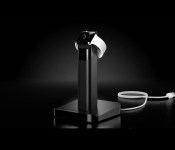
The first in what Griffin says will be a line of products for the Apple Watch, WatchStand features an angled cradle that will securely hold the watch’s magnetic charger. The central post holds the charger’s cable, with excess cable wrapping around the post.
The base of the WatchStand features an angled lip that holds your phone at an angle, letting it rest against the post. Your iPhone will, of course, need its own charger. The stand will be available this summer for $29.99. You can sign up now to be notified when it goes on sale.
Source: Griffin
<!–*/
<!–*/
<!–*/
.devicebox
background-color: #5CB8DB;
border: 1px solid #E2E9EB;
float: right;
display: block;
margin: 0 0px 10px 10px;
max-width: 350px;
overflow: hidden;
width: 50%;
.devicebox h3
background: #8D98BD;
color: #fff;
font-family: “camptonmedium”,sans-serif;
font-size: 20px;
margin-bottom: 0;
margin-top: 0;
padding: 0;
text-align: center;
.devicebox h3 a
display: block;
line-height: 30px;
padding: 0 10px;
.devicebox h3 a:hover
background: #7e88aa;
text-decoration: none;
.devicebox .video
margin: auto;
border: 0px;
.devicebox p,
.entry-content .devicebox p > img,
.devicebox img
margin: 0px;
padding: 0px;
.devicebox,
.devicebox a,
.devicebox a:active,
.devicebox a:hover,
.devicebox a:link,
.devicebox a:visited,
.devicebox p,
.devicebox ul,
.devicebox ul li,
.devicebox li
color: #fff;
.devicebox a:hover
text-decoration: underline;
.devicebox p,
.devicebox ul,
.devicebox ul li,
.devicebox li
border-width: 0px;
font-family: “camptonlight”,sans-serif;
font-size: 16px;
padding: initial;
.devicebox ul
margin: 0;
padding: 0.5em 1em 1em 30px;
.devicebox ul li
display: list-item;
.devicebox ul,
.devicebox ul li,
.devicebox li
line-height: 24px;
list-style: disc outside none;
.devicebox ul li:before
display: none;
.devicebox ul + p
padding: 0px 15px 15px;
line-height: 1.25;
.field-items p:last-of-type + .devicebox,
.slide p:last-of-type + .devicebox,
.article-body-wrap p:last-of-type + .devicebox
float: none;
margin: 0 auto 30px;
max-width: 700px;
min-height: 225px;
position: relative;
width: 100%;
.field-items p:last-of-type + .devicebox .video,
.slide p:last-of-type + .devicebox .video,
.article-body-wrap p:last-of-type + .devicebox .video
bottom: 0px;
left: 50%;
position: absolute;
right: 0px;
top: 30px;
.field-items p:last-of-type + .devicebox .video_iframe,
.slide p:last-of-type + .devicebox .video_iframe,
.article-body-wrap p:last-of-type + .devicebox .video_iframe
height: 100%;
padding: 0px;
.field-items p:last-of-type + .devicebox ul,
.slide p:last-of-type + .devicebox ul,
.article-body-wrap p:last-of-type + .devicebox ul
width: 43%;
.field-items p:last-of-type + .devicebox h3 + p,
.slide p:last-of-type + .devicebox h3 + p,
.article-body-wrap p:last-of-type + .devicebox h3 + p
bottom: 0;
left: 50%;
position: absolute;
right: 0;
top: 30px;
.field-items p:last-of-type + .devicebox h3 + p img,
.slide p:last-of-type + .devicebox h3 + p img,
.article-body-wrap p:last-of-type + .devicebox h3 + p img
height: auto;
min-height: 100%;
min-width: 100%;
@media all and (max-width: 500px)
.devicebox
float: none;
margin: 0;
max-width: 100%;
width: 100%;
.field-items p:last-of-type + .devicebox .video,
.slide p:last-of-type + .devicebox .video,
.article-body-wrap p:last-of-type + .devicebox .video
left: 0;
position: relative;
top: 0;
.field-items p:last-of-type + .devicebox .video_iframe,
.slide p:last-of-type + .devicebox .video_iframe,
.article-body-wrap p:last-of-type + .devicebox .video_iframe
padding-bottom: 56.25%;
.field-items p:last-of-type + .devicebox h3 + p,
.slide p:last-of-type + .devicebox h3 + p,
.article-body-wrap p:last-of-type + .devicebox h3 + p
left: 0;
position: relative;
top: 0;
.field-items p:last-of-type + .devicebox ul,
.slide p:last-of-type + .devicebox ul,
.article-body-wrap p:last-of-type + .devicebox ul
width: auto;
/*–>*/
/*–>*/
/*–>*/

The new MacBook has me most excited about the next-generation MacBook Pro
The new MacBook is an intriguing machine, but despite all of its innovations it has me most excited for the next MacBook Pro.

The Spring Forward event brought us things like pricing and more details on the Apple Watch, but to me the most exciting part was the brand-new Retina MacBook. Not because of what that computer is — and it is an interesting piece of hardware — but for what it means for the future of the MacBook. In particular, the future of the MacBook Pro.
Let’s be perfectly clear: the new MacBook is a specialized forward-looking machine. While I’m certainly lusting after it and keep going back and forth on whether or not I’m going to buy one, it’s not the machine for me. That doesn’t mean it can’t or shouldn’t be your next Mac. For my purposes — working with a large external monitor, Ethernet, several USB devices, and SD card on a regular basis (and all but the monitor while on the go as well) — it doesn’t suit me. I require more physical input options than the MacBook afford me. And I need more power to do what I do in a timely manner than the Core M processor inside it can offer.
Conversely, I go to the coffee shop and I see people sitting there with their laptops and nothing at all plugged into them, or maybe just a pair of headphones. For them, the ultra-light and ultra-portable MacBook might be the perfect machine. Even with that Core M processor will be adequate — they’re not processing video, rendering 3D models, or even playing games much more intensive than what you’ll find on Facebook.
There’s been a lot of angst about the new MacBook from the “technorati”. A lot of us have MacBook Air computers that aren’t quite powerful enough to do what we ask, or we have a MacBook Pro that has all of the power and a gorgeous screen, but its weight and size makes us lust after those we see pulling Airs out of their bags. I saw it myself at MWC 2015 just last week — I think my first-gen 15-inch MacBook Pro with Retina Display is a fantastic machine, though it’s starting to show its age. I saw my colleagues with their lighter MacBook Airs and wished for the lesser weight on my shoulder, but then all I had to do was look at their screen and watch them try to process video to push myself back from the edge.

In the minds of those that lust for powerful and thin, the long-rumored and much-longed-for Retina MacBook Air was supposed to solve that. But the new MacBook isn’t that computer. It’s a machine of compromises. Getting it as thin and light and long-lasting as it is required opting for a less-powerful processor and cutting out the multitude of ports we’ve grown accustomed to. There’s nothing wrong with that; it just means that the new MacBook is not the computer for me.
But it does set the stage for the future of the MacBook Pro (I’m not certain about the future of the Air, since this new MacBook is both thinner and lighter than the current Air and I don’t know what Apple could possibly do to make an even thinner and lighter computer right now). I look at the new MacBook and I imagine the design innovations that went into it — the slimmer keyboard, the terraced battery cells, the thinner display — going into the next-generation MacBook Pro.
The MacBook isn’t designed for people who need power and ports, and in retrospect it was rather insane of us to project those expectations onto even a MacBook Air with Retina display. The next MacBook Pro is the computer I want. Alongside the introduction of the new MacBook, Apple refreshed the internals of the current MacBook Pro design with a new set of fifth-generation Intel Core “Broadwell” processors and faster memory. These are better computers than the one I own, yes, but merely in that they’re more powerful and get a longer battery life.
I’ve resigned myself to wait. The new MacBook isn’t for me, and the updated MacBook Pro line isn’t enough of an update over what I have today. I’m waiting for the next generation Pro, with an Intel Skylake processor and a design that follows the lead of the new MacBook, all while retaining things that I need to accomplish my job like a Thunderbolt port and an SD card slot. I hope it will have those, but maybe it won’t.
I’m a pro user and I use my Pro computer as a pro ought. I push it to the brink and make use of nearly everything it has to offer. I run live video conferencing for hours on end, I do 3D modeling and video rendering, I hook up a multitude of peripherals (with just one plug thanks to a Thunderbolt dock), I pluck my SD card out of my high-powered camera and slip it into my computer.
All of these things mean that the new MacBook isn’t for me. And that’s okay. Just in the same way that an entry-level Moto G is not the smartphone for me or a single taco is not enough taco for me. It can be the computer for somebody else, and I’ll gaze longingly at its slim profile and effortless weight while pondering for the umpteenth time if I could get away with using it as my primary machine (and eventually dismissing that thought after realizing all of the adapters I’d have to carry around).
And that’s okay. I’ll wait for the computer that is for me, and to my friends that take photos with their iPhone and never do any heavy lifting with their computer but with it wasn’t as heavy to lift, I’ll recommend the new MacBook without hesitation, but with the caveats that it comes with. It’s first computer to head down Apple’s new computing design and philosophy. A lot of it’s ahead of its time, some of it might be rolled back.
For now I’ll just sit here and dream about my lighter, slimmer, SD card slot-bearing, future MacBook Pro.
 AIVAnet