



Here’s the first commercial for the Apple Watch


During its Spring Forward event, Apple showed off the first commercial for the Apple Watch, and it’s now available to watch online.
The minute-long commercial shows off a number of apps running on the watch’s face as it switches between a myriad of different design and band combinations.
Apple revealed today that pre-orders for the Apple Watch will start on April 10, with the official shipping date set for April 24. Prices for the watch will start at $349 for the Sport version, and run all the way up to $17,000 for the highest-end configuration of the Watch Edition. Of course, that means there’s plenty of customization options available, so be sure to take a gander our detailed rundown on the cost of each configuration.
<!–*/
.video-frame padding-bottom: 56.25%; height: 0; width: 100%; position: relative; margin-bottom: 25px;
.video-frame video, .article-body .video-frame .video width:100%; height: 100%; position: absolute; top: 0; left: 0; margin: 0
/*–>*/
Source: Apple
<!–*/
<!–*/
<!–*/
.devicebox
background-color: #5CB8DB;
border: 1px solid #E2E9EB;
float: right;
display: block;
margin: 0 0px 10px 10px;
max-width: 350px;
overflow: hidden;
width: 50%;
.devicebox h3
background: #8D98BD;
color: #fff;
font-family: “camptonmedium”,sans-serif;
font-size: 20px;
margin-bottom: 0;
margin-top: 0;
padding: 0;
text-align: center;
.devicebox h3 a
display: block;
line-height: 30px;
padding: 0 10px;
.devicebox h3 a:hover
background: #7e88aa;
text-decoration: none;
.devicebox .video
margin: auto;
border: 0px;
.devicebox p,
.entry-content .devicebox p > img,
.devicebox img
margin: 0px;
padding: 0px;
.devicebox,
.devicebox a,
.devicebox a:active,
.devicebox a:hover,
.devicebox a:link,
.devicebox a:visited,
.devicebox p,
.devicebox ul,
.devicebox ul li,
.devicebox li
color: #fff;
.devicebox a:hover
text-decoration: underline;
.devicebox p,
.devicebox ul,
.devicebox ul li,
.devicebox li
border-width: 0px;
font-family: “camptonlight”,sans-serif;
font-size: 16px;
padding: initial;
.devicebox ul
margin: 0;
padding: 0.5em 1em 1em 30px;
.devicebox ul li
display: list-item;
.devicebox ul,
.devicebox ul li,
.devicebox li
line-height: 24px;
list-style: disc outside none;
.devicebox ul li:before
display: none;
.devicebox ul + p
padding: 0px 15px 15px;
line-height: 1.25;
.field-items p:last-of-type + .devicebox,
.slide p:last-of-type + .devicebox,
.article-body-wrap p:last-of-type + .devicebox
float: none;
margin: 0 auto 30px;
max-width: 700px;
min-height: 225px;
position: relative;
width: 100%;
.field-items p:last-of-type + .devicebox .video,
.slide p:last-of-type + .devicebox .video,
.article-body-wrap p:last-of-type + .devicebox .video
bottom: 0px;
left: 50%;
position: absolute;
right: 0px;
top: 30px;
.field-items p:last-of-type + .devicebox .video_iframe,
.slide p:last-of-type + .devicebox .video_iframe,
.article-body-wrap p:last-of-type + .devicebox .video_iframe
height: 100%;
padding: 0px;
.field-items p:last-of-type + .devicebox ul,
.slide p:last-of-type + .devicebox ul,
.article-body-wrap p:last-of-type + .devicebox ul
width: 43%;
.field-items p:last-of-type + .devicebox h3 + p,
.slide p:last-of-type + .devicebox h3 + p,
.article-body-wrap p:last-of-type + .devicebox h3 + p
bottom: 0;
left: 50%;
position: absolute;
right: 0;
top: 30px;
.field-items p:last-of-type + .devicebox h3 + p img,
.slide p:last-of-type + .devicebox h3 + p img,
.article-body-wrap p:last-of-type + .devicebox h3 + p img
height: auto;
min-height: 100%;
min-width: 100%;
@media all and (max-width: 500px)
.devicebox
float: none;
margin: 0;
max-width: 100%;
width: 100%;
.field-items p:last-of-type + .devicebox .video,
.slide p:last-of-type + .devicebox .video,
.article-body-wrap p:last-of-type + .devicebox .video
left: 0;
position: relative;
top: 0;
.field-items p:last-of-type + .devicebox .video_iframe,
.slide p:last-of-type + .devicebox .video_iframe,
.article-body-wrap p:last-of-type + .devicebox .video_iframe
padding-bottom: 56.25%;
.field-items p:last-of-type + .devicebox h3 + p,
.slide p:last-of-type + .devicebox h3 + p,
.article-body-wrap p:last-of-type + .devicebox h3 + p
left: 0;
position: relative;
top: 0;
.field-items p:last-of-type + .devicebox ul,
.slide p:last-of-type + .devicebox ul,
.article-body-wrap p:last-of-type + .devicebox ul
width: auto;
/*–>*/
/*–>*/
/*–>*/

All the Apple Watch apps you’ll want to have!

The Apple Watch is going to ship with a ton of apps, including the ones already announced, and the many more that are being finished right now.
Apple reportedly worked with a hundred or so developers to help make sure some of the best and most popular apps would be ready and polished for the Apple Watch’s launch. They run the gamut from news and information services to sport and leisure activities to education and entertainment to social networking and communication to, well, pretty much every category the App Store offers.
You’ll be able to get them on your Apple Watch by downloading them to your iPhone first. In some cases that’ll mean updates to the existing apps you already have, in others it’ll mean all new apps to love!
It’s still early, and we won’t know for sure how well they work, and which will be the all-stars, until we get them on our wrists, but here are the ones we’re looking forward to the most!
MLB At Bat

The MLB At Bat app allows you to follow all your favorite sports teams and keep up with scores, events, and news. The Apple Watch can show you the scores for your favorite team without even having to unlock your iPhone.

If you tweet regularly, the Twitter app can let you check out your mentions and interact with your Twitter account right on your wrist. While we can’t be sure yet, we can assume that you’ll also be able to respond to tweets right on your wrist with dictation as well!
Fandango

Fandango lets you view upcoming movies, check showtimes, and even buy tickets. The Apple Watch extension will let you interact with your tickets and view info without having to even unlock your iPhone.
Dark Sky

Dark Sky is the app to beat when it comes to up to the minute weather info. Set alerts for your home area and get notified instantly if you need to grab an umbrella or a rain jacket. We’d guess Apple Watch support means those notifications will show up on your wrist too.
Uber

Uber lets you get around cities all over the world by requesting a Uber car or taxi right from your iPhone. Now you can receive Uber notifications and updates right to your Apple Watch.
Shazam

With Shazam you can tag music you hear so you can remember to download it later from iTunes or add it to your favorite streaming service. With the Apple Watch, no longer do you have to fuss with pulling your iPhone out before the song ends, instead just tag a song right on your wrist!
CNN

CNN already provides breaking news right to your iPhone or iPad, with the Apple Watch, you can receive breaking news notifications right on your wrist. You can then expand the article and read it right on your wrist, or save it for later.
American Airlines

The American Airlines app will let you pull up all your boarding passes right in Passbook just like you already can on your iPhone. You can even bring up bar codes and have security scan them instead of having to print out boarding passes, all from your wrist.
SPG

Starwood lets you access room keys and reservations right on your iPhone for their hotel properties. The same kind of functionality will also be available right on your Apple Watch.
More apps!
These are the Apple Watch apps that we think are going to be early favorites, but thousands and thousands of incredibly talented iOS designers and developers have been working with WatchKit for months to fine-tune their looks, glances, and apps. That means there absolutely will be even more amazing Apple Watch apps coming our way — a lot more!
And we’ll keep adding the best ones right here!
<!–*/
<!–*/
<!–*/
.devicebox
background-color: #5CB8DB;
border: 1px solid #E2E9EB;
float: right;
display: block;
margin: 0 0px 10px 10px;
max-width: 350px;
overflow: hidden;
width: 50%;
.devicebox h3
background: #8D98BD;
color: #fff;
font-family: “camptonmedium”,sans-serif;
font-size: 20px;
margin-bottom: 0;
margin-top: 0;
padding: 0;
text-align: center;
.devicebox h3 a
display: block;
line-height: 30px;
padding: 0 10px;
.devicebox h3 a:hover
background: #7e88aa;
text-decoration: none;
.devicebox .video
margin: auto;
border: 0px;
.devicebox p,
.entry-content .devicebox p > img,
.devicebox img
margin: 0px;
padding: 0px;
.devicebox,
.devicebox a,
.devicebox a:active,
.devicebox a:hover,
.devicebox a:link,
.devicebox a:visited,
.devicebox p,
.devicebox ul,
.devicebox ul li,
.devicebox li
color: #fff;
.devicebox a:hover
text-decoration: underline;
.devicebox p,
.devicebox ul,
.devicebox ul li,
.devicebox li
border-width: 0px;
font-family: “camptonlight”,sans-serif;
font-size: 16px;
padding: initial;
.devicebox ul
margin: 0;
padding: 0.5em 1em 1em 30px;
.devicebox ul li
display: list-item;
.devicebox ul,
.devicebox ul li,
.devicebox li
line-height: 24px;
list-style: disc outside none;
.devicebox ul li:before
display: none;
.devicebox ul + p
padding: 0px 15px 15px;
line-height: 1.25;
.field-items p:last-of-type + .devicebox,
.slide p:last-of-type + .devicebox,
.article-body-wrap p:last-of-type + .devicebox
float: none;
margin: 0 auto 30px;
max-width: 700px;
min-height: 225px;
position: relative;
width: 100%;
.field-items p:last-of-type + .devicebox .video,
.slide p:last-of-type + .devicebox .video,
.article-body-wrap p:last-of-type + .devicebox .video
bottom: 0px;
left: 50%;
position: absolute;
right: 0px;
top: 30px;
.field-items p:last-of-type + .devicebox .video_iframe,
.slide p:last-of-type + .devicebox .video_iframe,
.article-body-wrap p:last-of-type + .devicebox .video_iframe
height: 100%;
padding: 0px;
.field-items p:last-of-type + .devicebox ul,
.slide p:last-of-type + .devicebox ul,
.article-body-wrap p:last-of-type + .devicebox ul
width: 43%;
.field-items p:last-of-type + .devicebox h3 + p,
.slide p:last-of-type + .devicebox h3 + p,
.article-body-wrap p:last-of-type + .devicebox h3 + p
bottom: 0;
left: 50%;
position: absolute;
right: 0;
top: 30px;
.field-items p:last-of-type + .devicebox h3 + p img,
.slide p:last-of-type + .devicebox h3 + p img,
.article-body-wrap p:last-of-type + .devicebox h3 + p img
height: auto;
min-height: 100%;
min-width: 100%;
@media all and (max-width: 500px)
.devicebox
float: none;
margin: 0;
max-width: 100%;
width: 100%;
.field-items p:last-of-type + .devicebox .video,
.slide p:last-of-type + .devicebox .video,
.article-body-wrap p:last-of-type + .devicebox .video
left: 0;
position: relative;
top: 0;
.field-items p:last-of-type + .devicebox .video_iframe,
.slide p:last-of-type + .devicebox .video_iframe,
.article-body-wrap p:last-of-type + .devicebox .video_iframe
padding-bottom: 56.25%;
.field-items p:last-of-type + .devicebox h3 + p,
.slide p:last-of-type + .devicebox h3 + p,
.article-body-wrap p:last-of-type + .devicebox h3 + p
left: 0;
position: relative;
top: 0;
.field-items p:last-of-type + .devicebox ul,
.slide p:last-of-type + .devicebox ul,
.article-body-wrap p:last-of-type + .devicebox ul
width: auto;
/*–>*/
/*–>*/
/*–>*/
<!–*/
.imageleft
float: left;
margin: 0 25px 0 0;
.imageright
float: right
margin: 0 0 0 25px;
.screenshot-16×9
height: auto;
width: 88.97%;
.screenshot-16×9.imageleft,
.screenshot-16×9.imageright
width: 50%;
.screenshot-4×3
height: auto;
width: 66.66%;
.screenshot-4×3.imageleft,
.screenshot-4×3.imageright
width: 50%;
/*–>*/

Apple Watch Battery Life: 18 Hours Mixed Usage, Up to 72 Hours on Power Reserve
 Apple has outlined specific information about Apple Watch battery life on its website, claiming that the wrist-worn device gets all-day battery life of 18 hours on a single charge based on mixed usage, and up to 72 hours in Power Reserve mode. The battery testing was conducted in March using a preproduction Apple Watch paired with an iPhone running preproduction software.
Apple claims that the Apple Watch has a battery life of up to 3 hours for talk time, 6.5 hours for audio playback over Bluetooth, up to 7 hours during a workout session with the heart rate sensor on and up to 48 hours for timekeeping. Apple Watch charging times are listed as about 1.5 hours from 0% to 80% and 2.5 hours from 0% to 100% using the included MagSafe inductive charger.
Apple’s claim of all-day battery life is based on using the Apple Watch for 90 time checks, 90 notifications, 45 minutes of app use, and a 30-minute workout with music playback via Bluetooth over the course of 18 hours. Apple used a 38mm Apple Watch for testing and claims that the 42mm will generally experience longer battery life. Additional magnetic chargers are available on Apple’s bands and accessories page, costing $29 for a 1-meter cable and $39 for a 2-meter cable.

Want some apps for that Apple Watch? You’ll need iOS 8.2

We already got the big Apple Watch reveal last fall. But today, Tim Cook took the stage at the Yerba Buena Center in San Francisco to let us all know what wonders that very Apple smartwatch can perform, like make and receive calls! Oh yes, and there’s also a host of apps to take advantage of Apple Watch, but to get them, first you’ll need to download the new iOS 8.2 software update for your iPhone. Good thing it’s available today.
iOS 8.2 adds the Apple Watch app to your iPhone, so you can pair it to your Watch. A crucial thing you’ll need to unlock the pricey power of the multi-tasking watch on your wrist. It also adds a specific section to the App Store dedicated to the Apple Watch where users will find tailored versions of apps from the likes of Uber, Instagram, MLB and Shazam to name a few. You’ll have to wait until Apple Watch goes on sale in April to see them action. So for now, content yourselves with the demo shots below.

Uber


SPG/W Hotel

Filed under: Cellphones, Tablets, Software, Mobile, Apple

Samsung expands Milk Music streaming service to the web

In celebration of Samsung’s Milk Music turning one year old today, the company has just announced it is expanding the streaming service beyond mobile platforms. Starting today, you can stream Milk Music through your computer’s web browser, for free, without the need to own a Samsung device.
If you’ve used the service in the past, you’ll be right at home with the the web interface. The background is still a big photo of the album artwork, and you can easily favorite tracks, change songs, and get new information on the song that’s currently playing. Towards the bottom of the player is a handy station tuner for quick access to switching channels.

The service is still generally the same through and through. It’s powered by Slacker, so you’ll have access to millions of songs, thousands of artists and much more. Just like its mobile counterpart, you’ll need a Samsung account to use the service on the web. Once you set up your account, you can instantly start streaming music and creating as many playlists as you’d like.
What’s more, you won’t even need to pay a dime to use the web service. So if you’re currently paying for Google Play Music, Spotify or any others, switching to this service might be a good way to save a few bucks per month. If you’re interested in trying out the new web interface, head to milk.samsung.com to give it a try.
Now that Milk Music is a free alternative streaming service on the web, are you planning to use it?
New port brings HTC BlinkFeed to all Android 4.4+ devices

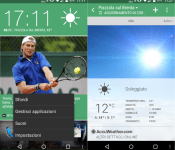
The XDA developer community has been ever active with regards to bringing features from one devices to the rest of the pack. Popular XDA developer, xpirt, has done something similar today by bringing the HTC BlinkFeed app to all Android 4.4 running devices.
It’s as simple as installing apks uploaded by the developer and you’re good to go. BlinkFeed essentially gives you a quick peek of all your social feeds in one glance, rather than having to individually open them. This has been one of the highlights of HTC smartphones over the past couple of years and starting now, non-HTC device owners can get this feature on their devices as well.
There are a series of four apks that need to be installed in order for this to work. You can find them here. After sideloading and installing these apks, you will have to install the necessary plugins for Google+, Facebook, Instagram, Twitter or LinkedIn. You can choose to have some or all of these plugins installed. Find them here.
Make sure you head over to the XDA forums for more details on how to make this feature work on your Android 4.4+ running smartphone.
Source: XDA Forums
Come comment on this article: New port brings HTC BlinkFeed to all Android 4.4+ devices
T-Mobile’s March 18 Uncarrier event could have business implications
Late last week, T-Mobile sent out invites for a New York City event on March 18.
TMoNews has received information over time that T-Mobile is planning to bring its Un-carrier focus to the business market. A recent email to staff and some comments made by executives during a couple of earnings calls also suggest the company’s interest in this market. Therefore, it is likely that this event will cater to it.
The event begins at 1PM ET once again on March 18.
The post T-Mobile’s March 18 Uncarrier event could have business implications appeared first on AndroidGuys.
Apple to Release iOS 8.2 Today With Support for Upcoming Apple Watch [iOS Blog]
 During its big “Spring Forward” Apple Watch event, Apple announced that it will release iOS 8.2 to the public today, with support for the upcoming Apple Watch and a range of bug fixes. iOS 8.2 was first seeded to developers along with the WatchKit SDK back in November, allowing them to begin preparing apps for the device.
iOS 8.2 is available today as an over-the-air download.
Apple is already working on the next update to iOS, iOS 8.3, and iOS 8.4 is also said to be in the works.

What is Google+, and who actually uses it?

Google’s plans for total web domination have been scaled back to a simple, powerful social network with no shortage of killer features.

Social behavior is a strangely integral part of the Internet as we know and use it today, and in many ways it has been from the very beginning. Message boards, IRC channels, image hosting sites, and email have always existed as important social components to the Internet. And in much the same way smartphones have pulled together many different single-purpose technologies into a single thought, social networks have come to exist as massive communication hubs that act for many people as the homepage of the Internet.
Google’s efforts in social networking are many, and while none of them has seen the kind of global acceptance that its search, video, and email services have enjoyed, Google’s most recent efforts in this space have advanced the state of the market in some unique ways. Google+ is, first and foremost, a platform focused on bringing all of Google together for users to enjoy. Whether that also means it’s a social network for everyone is for you to decide for yourself.
VSCO Cam version 3.2 update brings Copy + Paste photo editing functionality
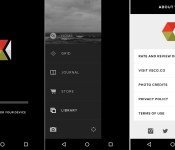
VSCO Cam, the widely popular photo editing tool on Android and iOS, is receiving an update to version 3.2 today. The new update brings a few really handy features, including Copy + Paste batch photo editing capabilities, TIFF image support and a handful of bug fixes.
The biggest part of this update is the addition of Copy + Paste editing functionality. Before this update, if you had multiple photos to edit, you’d need to make changes to each one individually. Now you can copy and paste the exact edits you made to a single photo, and apply that to as many other photos as you’d like. If you’ve never used this feature in the past, it may take a little getting used to. So, here is a step-by-step walkthrough on how to make bulk edits in VSCO Cam:
- In Library, select the image that contains the edits you wish to duplicate.
- Tap the Copy + Paste button to copy the edit stack.
- Select Copy Edit.
- Select the photo or photos to which you want to apply the edits.
- Tap the Copy + Paste button to apply the edit stack to your selected photo(s).
- Select Paste Edit.
- That’s it!

The VSCO Cam team also says editing times are dramatically decreased in this new update, so we’re sure all of these new improvements will be welcomed by fans of the photo editing service. If you’d like to try out the new features for yourself, head to the Google Play link below.

 AIVAnet