


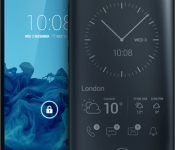
Yota Devices inks partnerships for YotaPhone 2, white variant also on the way

There is excitement building around the upcoming YotaPhone 2 because of its unique design. The handset, which features two displays, offers possibilities not seen anywhere else. Yota Devices has announced multiple partnerships that will enhance the experience of the YotaPhone 2 and make it more valuable to consumers. Partnerships include Psy(x) Audio for adaptive audio technology through Earprint and Instant from Emberify to quantify everything in your life. Also, Yota Devices will offer a white variant of the handset in the coming months alongside accessories such as a bumper and wireless power bank.
The YotaPhone 2 will be sold to consumers in North America through Indiegogo next month.
Hit the break for the full press release.
Two Fronts, Countless Fans: YOTAPHONE2 Continues to Wow the Mobile Industry
One year after YOTAPHONE2 was first introduced at MWC, Yota Devices announces new partnerships for more experience
Barcelona (PRWEB) March 05, 2015
Following a successful market launch at the end of 2014, YOTAPHONE2, the smartphone with the two fronts, keeps adding new chapters to its success story. Within the next months, YOTAPHONE2 will be available with Android 5 Lollipop, a white variant will be generally available at the end of March as well as new accessory offerings from Yota Devices including bumpers and a wireless power bank. Moreover, Yota Devices announces several global alliances to provide its customers with more services and enhanced experience for their smartphone.
New apps and services exclusively developed for the “always on” YotaPhone EPD are in development and will soon be available to users thanks to the following partnerships:
- Spritz: The ongoing integration of their focused reading technology will help readers get their email, books and notifications faster, with less effort on the ‘always on’ EPD display.
- Psy(x) Audio: Using a proprietary neural process, the customized “always on” Earprint application is the world’s only universal adaptive audio technology that improves your hearing and reduces listening fatigue from compressed audio up to 192kHz.
- StayTuned: This app concierge will add context awareness to YotaPhone by automatically organizing the user’s apps and displaying the most relevant apps and services, depending on where they are, time and personal habits. The solution learns from the user behavior in different contexts and is able to predict the user needs, providing a real-time personalized mobile experience.
- Graphite Software: Secure Spaces increases choice and security for businesses and users to dedicate each screen for multiple possible environments – work, personal, kids, gaming.
- Everypost: The easiest way to create, customize, schedule and post content to Facebook, Twitter, Google+, LinkedIn and many other social network.
- Emberify: A start-up working on contextual technologies, developing Instant, the most comprehensive Quantified Self platform for tracking app/device usage, fitness & travel.
Decorated with multiple awards at CES 2015, including the Envisioneering’s Innovation & Design Award for ShowStoppers, CES 2015 “Top Picks” from Android Authority and GeekBeatTV YOTAPHONE2 proved again that the market is ready for change. ”We are prepared to move into new markets so even more smartphone users can benefit from the mobile revolution,” Vlad Martynov adds. In addition to all the new alliances, there is powerful support for the next step: Still within the first quarter of the year, YOTAPHONE2 will be launched in China with the help of telecom giant Potevio, one of the largest distributors in the Chinese market. Next in line will be the sales kick-off in the US. Right now, the number of YOTAPHONE2 enthusiasts in 20 markets across Europe, the Middle East, Africa and Asia is growing. Traditional smartphone users love the choice between the high-definition 1080p AMOLED screen and the fully touch-enabled always-on electronic paper display in one device. Renowned carriers such as Vodafone, Hutchison and Congstar recently included YOTAPHONE2 in their portfolio in selected markets.
About Yota Devices
Yota Devices is a private international company dedicated to the development and production of high-tech consumer LTE electronics such as smartphones, modems and routers. Its latest product, YotaPhone 2, is the world’s first “two-fronts” smartphone with the Yota Always-On Display. Yota has been recognised for its innovation with numerous awards at GSM Mobile World Congress 2014 and the Golden Lion in the Innovations category at the international festival Cannes Lions. The company has offices in Europe, Asia, Middle East and North America. Please visit the company website for more information: http://www.yotaphone.com and CEO’s Facebook account https://www.facebook.com/VladislavMartynovrus
Come comment on this article: Yota Devices inks partnerships for YotaPhone 2, white variant also on the way
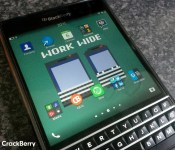
Set app icons just where you want them with these apps

After one of my accessory review posts, there were plenty of questions on how I managed to have two rows of icons along the bottom of the Home screen. We’ve actually looked at a few apps that give you this functionality but I thought I would round them up here and you can choose whichever one tickles your fancy. Take your pick.
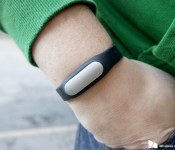
Third party Windows Phone app for the Xiaomi MiBand in the works

Xiaomi is a pretty interesting manufacturer, in that it makes phones, software, accessories but also a ton of other items including headphones, wearables and even an air purifier. It’s the wearables in focus here, though, with news surfacing of a third-party developer working on a Windows Phone companion app for the Xiaomi MiBand. The MiBand is a pretty basic fitness tracker, not close to the Microsoft Band in terms of features, but with one massive positive: its price. Officially it only supports Android and more recently, iOS, which isn’t all that surprising, especially given Xiaomi’s focus as an Android phone maker.
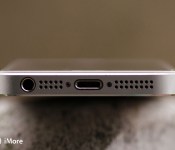
How to replace your iPhone’s dock connector: The ultimate guide

Everything you need to know to DIY repair a broken dock connector in your iPhone
There are lots of things that can go wrong with the dock connector in your iPhone. Bad chargers can cause pins to break off, water or moisture can leave your iPhone unable to charge, among many other issues that could arise. No matter what the issue is, replacing the dock connector assembly should fix the problem. A DIY iPhone repair will also cost you far less than the price of a new iPhone. So if you think it’s worth a shot, follow along and we’ll walk you through fixing your dock connector step by step!
How to replace the dock connector in an iPhone 5s
The iPhone 5s introduced Touch ID to the iPhone and therefore changed the dock assembly, but only slightly. A dock replacement in an iPhone 5s is no more difficult than its predecessors and can still be done in under an hour. If your iPhone 5s isn’t charging, you’re experiencing issues with the headphone jack, or your computer won’t recognize your iPhone, you most likely need a dock replacement.
How to replace the dock connector in an iPhone 5c

The iPhone 5c is very much like the iPhone 5 in terms of specifications and performance. Internally however there are a few difference when it comes to DIY repair. That being said, a dock replacement isn’t horribly difficult and only requires about an hour of your time, maybe less if you’re DIY inclined. It’ll cost you less than $40 all in and can solve issues such as your iPhone not charging, headphone jack not working, or your computer not recognizing your iPhone 5c. Obviously the latter you’ll want to rule out software by performing a restore. If it still doesn’t work, we can walk you through every single step of replacing the dock component on your own.
How to replace the dock connector in an iPhone 5

The iPhone 5 brought with it the first radical change to the way we charge our iPhones. It dropped the standard 30-pin dock that Apple had been using for many years in iPhones, iPads, and classic iPods. The Lightning dock brought with it a charger that could be inserted either way making it more convenient. It also has less moving parts and pins in the actual assembly. Unfortunately, that doesn’t mean debris buildup can’t cause corrosion or other damage. If your iPhone 5 won’t recognize a charger at all and you’ve tried numerous cables and outlets, it may be time to replace the Lightning dock.
How to replace the dock connector in an iPhone 4S

The dock connector in the iPhone 4S is actually not that hard to replace. While we haven’t seen many defects with the iPhone 4S dock connector related to actual charging functionality, we have seen sound issues arise that can range from system sounds not working but music will actually play when in the music app. There can also be several variants of sound issues involved. The issue isn’t actually the loud speaker in our experience, but the dock connector assembly.
Whether you’ve got sound issues related to the dock connector or something else such as charging issues or broken pins, a new dock connector replacement will solve all of the above.
How to replace the dock connector in an AT&T/GSM iPhone 4

The iPhone 4 dock connector replacement part is very similar to it’s iPhone 4S sibling. The repair is actually performed very similarly. Issues with the iPhone 4 dock connector can range from not being able to charge to moisture and liquid damage, to not registering to your computer, and more. Many users have also reported that after so much time has passed, the dock connector becomes loose and when plugging in a cable, you’ll have to wiggle it around in order for it to register a charge. A replacement will take care of all of this.
While the iPhone 4S may have more of a reputation for sound issues caused by a faulty or defective dock connector assembly, the iPhone 4 isn’t completely immune either so before you assume it’s the loud speaker, make sure it isn’t the dock connector either.
How to replace the dock connector in a Verizon or Sprint iPhone 4

Much like the GSM/AT&T iPhone 4, the same issues can arise with the Verizon or Sprint variant. Even though you’re experiencing the same issues, the CDMA and GSM iPhone 4’s do have internal differences. Not only that, the part is completely different when it comes to the dock connector assembly.
Issues can range from the inability to charge to your computer or other external device not recognizing your iPhone 4. We don’t see nearly as many sound issues related to the dock connector in the CDMA model, but it can happen.
How to replace the dock connector in an iPhone 3G or iPhone 3GS

The iPhone 3G and iPhone 3GS have been around for several years now but it doesn’t mean they aren’t still perfectly good devices. Symptoms of a bad dock connector in the iPhone 3G or iPhone 3GS can range from the inability to take a charge to pins being broken off causing issues with sound output or device recognition on a computer.
It’s also good to make sure that the battery isn’t the issue. Considering the iPhone 3G and iPhone 3GS have been around for so long, a battery replacement at this point probably isn’t a bad idea as well. Even if you replace both the battery and the dock connector at the same time, it’ll still cost you far less than a new iPhone.
More DIY help and resources
Whether you just aren’t sure if your dock connector is the issue or you run into issus during the course of a repair, we’ve got lots of resources that can help answer your questions. Our jailbreak, unlock, DIY, and mod forums are a great place to start. If you still can’t find the answers you’re looking for or would like to make a suggestion on another DIY repair we don’t currently have a guide for, you can always email us as well!
See also:
- iPhone DIY repair: Ultimate guide to fixing stuck or unresponsive power buttons
- iPhone, iPad, and iPod touch DIY repair: Ultimate guide to replacing broken screens
- iPhone DIY repair: Ultimate guide to replacing broken or unresponsive Home buttons
- iPhone DIY repair: Ultimate guide to replacing the battery in your iPhone
- All DIY repairs and how to’s
Originally published, June 2014. Updated, March 2014
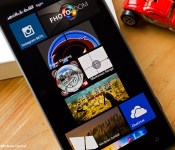
Top Rated Sniper Games in the Windows Phone Store

One of the more popular genres of Windows Phone games are the shooter games. Whether it is a first-person shooter or an arcade styled shooter, these games can be addictive, entertaining and a fantastic way to pass the time with.
With the popularity of the movie American Sniper, we were curious if there were any long distance shooting games available in the Windows Phone Store. For this week’s roundup, we will take a look at some of the top rated shooter games that focus more on your ability to reach out and smack your target from a distance. The games will test your speed, patience and ability to hold your aim steady.
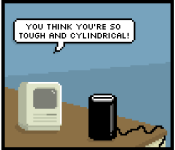
Comic: The much-maligned Mac Pro
Happy Saturday, iMore! Because Rich is awesome, he’s letting us run some of his Mac-themed comics from the Diesel Sweeties archive on weekends. Bonus comics, woo! We hope you enjoy.


Read more comics from the Pixel Project on iMore.com.
<!–*/
<!–*/
.col-main .article-body img.image-xlarge display: inline-block; width: 50%;
.col-main .article-body img.image-xlarge.fullwidth width: 100%;
@media all and (max-width: 500px), only screen and (min-device-width: 1920px) and (max-device-width: 1080px) .col-main .article-body img.image-xlarge width: 100%;
/*–>*/
/*–>*/
Eddy Cue reiterates how Apple Pay and Apple Watch will work together
Apple SVP of Internet Software and Services Eddy Cue reiterated how Apple Pay will work with the Apple Watch at Friday night’s Golden State Warriors game.
Cue talked in some detail about how Apple’s payment service and wearable will work together, though most of this information was previously announced by Apple. The watch will need to be unlocked in order to use Apple Pay, which can be done either through Touch ID on your iPhone, or a passcode on the Apple Watch. Cue also said that you can choose if you’d like to enter your passcode every time you use Apple Pay on the watch, according to CNET:
“You can [type a password] if you want to, but you won’t normally have to,” Cue said. Right now the watch is unlocked, and I could do all of it without having to type any code. If I [took it off and] handed it to you, now you’d have to type in a security code or unlock it from your phone.”
While currently limited to the iPhone 6 and iPhone 6 Plus, Apple Pay will expand to more devices with arrival of the Apple Watch. As Apple has previously announced, the iPhone 5, 5c, and 5s will all be able to use the payment service when connected to the Apple Watch.
We can probably expect Apple to highlight Apple Pay use with the Apple Watch during their “Spring Forward” special event, which will take place this coming Monday, March 9.
Source: CNET
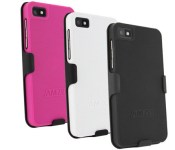
BlackBerry Z10 hard shell case and holster now only $8.95

Made from a durable polycarbonate, this hard case and holster features a unique texture that enhances grip and looks great. The holster sports a swivel belt clip that rotates 180 degrees for optimal comfort. Get yours today in black or white and save 55%
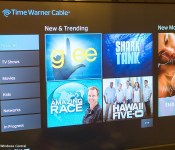
Time Warner Cable’s TWC TV app launches for Xbox One

Time Warner Cable has launched their TWC TV app for the Xbox One. The app lets you access on-demand movies and TV shows when signed in with your Time Warner Cable account. Unlike Time Warner Cable’s app for Xbox 360, this app does not let you view live TV, at least not yet.
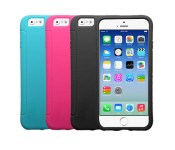
These iPhone 6 skin cases are on sale today for $4.95

Made from a durable silicone, these iPhone 6 skin cases are designed to fit comfortably around your device while adding a little extra grip. There’s complete access to the buttons, ports and camera. Get yours in black, pink or teal today and save 67%
 AIVAnet