


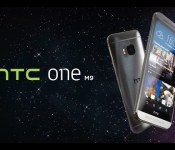
HTC’s latest videos introduce the One M9 and ponder the Oneness of humanity
HTC has rolled out a couple of new promotional videos today, one of which is narrated by none other than Robert Downey Jr.
Between the two videos, we get a good introduction to the look of the HTC One M9, as well as feel-good message about the oneness of humanity.

Harrison Ford injured after his plane crash-lands on a golf course

Actor Harrison Ford (Blade Runner, Indiana Jones, Star Wars — seriously, it’s Harrison Ford) reportedly suffered “moderate injuries” after the P-22 he was flying (solo) crash-landed at a Los Angeles golf course this afternoon. According to the Associated Press, Ford was breathing and conscious when he was taken to the hospital where he is listed in fair to moderate condition. Naturally TMZ is all over the story, with a witness account of seeing a plane “nose dive” into a tee box at the 8th hole, and audio of his contact with the Santa Monica Airport control tower reporting engine failure.
[Image credit: Associated Press]
Filed under: Misc
Source: Associated Press, TMZ, USA Today
[APK Download] Play Services 7.0.87 is rolling out with minor fixes
 A few days back, we made mention of the fact that the new Play Services 7.0 update was released. As such it’s currently rolling out in the Google staged roll out fashion. Besides updated APIs and a partial rollout of trusted voice unlocking, the update has minor bug fixes and performance updates. We have the APK for you here, but you should be mindful of which Services version your phone uses.
Come comment on this article: [APK Download] Play Services 7.0.87 is rolling out with minor fixes
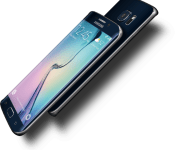
Samsung Galaxy S6 edge claims MWC award for best new device

The GSMA has announced that the Samsung Galaxy S6 edge was awarded the Best New Handset, Tablet or Device award at MWC 2015. Unlike the best of show awards announced earlier recognizing devices and apps from the prior year, this award focuses on hardware that is launched during MWC. In 2014 Samsung won the same award for the Samsung Gear Fit.
Samsung president JK Shin said the company was “honored that the GSMA agree that these are our most elegant and powerful devices so far.” Samsung thinks Galaxy S6 edge provides a great blend of design, usability and functionality, which has led to the recognition their new device is getting.
source: Samsung
Come comment on this article: Samsung Galaxy S6 edge claims MWC award for best new device
Android customization – 2 easy ways to swap Launchers on your Android device

Last week on our Android customization series, we continued to play with photography by shooting time lapse videos using the app called Framelapse, we are changing gears completely this week, taking a look at one of the basics of Android, how to change your Launcher.
Full disclosure, this piece is for those of you that are beginners on the topic. If you are a proud user of Aviate, Nova, Apex, the Google Now Launcher or other, there is not much for you to learn here today, so you best just head over to our list of Best Launchers for Android and make sure that something better hasn’t come along.
Before we get started
You do not necessarily need to install a new Launcher before we get started today, as the process to do so is actually one of the ways to swap Launchers on your Android device. However, I am not going to spend much time explaining what a Launcher is, nor which you should try out, that has already been covered on this site a few times.

I would have you look through the next two steps as your primer for today, see what a Launcher is and identify one that you think you’d like to try out. Hint, after today, you’ll be able to try them all with relative ease, so don’t be too concerned with choosing the best one right out the gate.
What is a Launcher?
Although we do not have a dedicated article specifically explaining what exactly a Launcher is, I think you can get the idea by checking out a few of our more recent articles about Launchers. If I had to describe a launcher in just a few words, I would call it your main and default user interface on your Android device, including your Homescreen and app drawer.
- Action Launcher 3.2 brings lots of new features
- Yahoo’s Aviate Launcher updated with new Search functionality
- Google Now Launcher update brings Material Design tweaks to KitKat and Jelly Bean
- Apex Launcher 3.0 updates UI with Material Design
- Nova Launcher 3.3 brings Lollipop-style app drawer cards
- Lollipop Launcher – Indie app of the day
- Chainfire’s Sideload Launcher makes it easier to launch sideloaded apps
What Launcher should I use?
This is a tough question, and the answer will be different for each and every one of you. There is no better way for you to choose a Launcher than to try a Launcher. Try them all! Here is our list of the best Launchers for Android, check it out, report back here when you think you’ve got one you’d like to try.
How to swap Launchers on your Android device
There are two main ways to swap Launchers on your Android device. I will be working off of a vanilla Android 5.0.2 Lollipop device today, you may experience slight differences on your older or manufacture skinned devices, but the concept remains the same.
Method 1: Install a Launcher
I hope you didn’t think this would be complicated? The first method to swapping Launchers is to simply install a new launcher on your device.

Two things will happen here, first, once the Launcher is installed and opened, it will likely ask you if you want to set it as your default Home application. Follow the prompts and you will be in good shape moving forward. There is no limit here, go ahead and install a few Launchers and make them all default one at a time when you open them up from your app drawer.

Method 2: Manual Settings
Method two is a little more in your control, and just as easy.

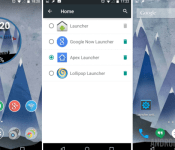
Open your main system Settings.
Find and open Home.
Choose your preferred default Launcher.
Hit your system Home button and enjoy, it’s really that easy.
What’s next
Each and every Launcher offers you a different experience on your Android device. Most Launchers add functionality typically not found in the stock Launchers from Google or your device manufacturer.
Of the added functionality, many devices bring gesture control, such as swiping up on the Homescreen to access a settings menu, or your quick settings. These features may or may not be handy to you, like a swipe down gesture that opens the notification bar… however, install a protective case on your device, and that top edge becomes really hard to hit, and then the swipe down gesture becomes a life saver.

Each Launcher offers different tools, choosing the one that works best for you will be a matter of trial and error, have fun!
Next week
A number of the Launchers we’ve seen in this week’s Android customization post include the ability to apply a custom icon pack, with a set of icons that display throughout the system. It is there that we will point our attention next week, again, we’ve covered tons of icon packs on the site, but stay tuned next week to see how to install and setup a custom pack.
There are so many Launchers out there for Android, which is your favorite?

Here is what Cortana’s new Showtimes + Trailers feature looks like (Update)

At the end of February, we reported that Cortana had picked up a few more Interests for users to select optionally. One of those was Showtimes + Trailers, which as the name implies has to do with movies playing nearby.
When we wrote that article, the feature itself was not live, but today we noticed that information had finally started to percolate into our Cortana feed.
myTube update brings product key recovery system, bug fixes
Third-party YouTube player myTube scored an update today that brings loads of bug fixes, along with a way for users who lost their paid status after the 2.0 update to request a new product key.
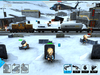
GDC 2015: Warfriends give you an excuse to shoot your buddies
The fun doesn’t stop at the Game Developer Conference this week, as we’re taking a look at an upcoming duck-and-cover shooter from Chillingo and About Fun Games called Warfriends.


Simply enough, you need to run behind cover, call in back-up, take out enemy troops, and eventually weather down the opposing commander at the other end of the battlefield. Before the match starts, you pick up to three cards which provide temporary buffs or bonuses. You’ll have to keep whittling away at the enemy’s backup in order to increase your energy reserve and haul in your own troops. Dynamic stages and quickly moving characters can making hitting your targets especially tricky. A cooperative campaign mode is also available if you’d rather fight alongside your buddies rather than against them.
Many of the characters throughout Warfriends have a tongue-in-cheek Team Fortress look to them, and that’s totally fine. The big bobble heads and overall silly feel make for a very easygoing feeling for something that’s really quite competitive. Warfriends will be free to play when it hits the App Store this summer.
Deal: Last chance to save 92% on The White Hat Hacker Bundle

Become a web security expert and take your career to the next level with the ultimate bundle to learn about protecting your WordPress projects, web apps, local networks and Mac desktops. Learn from experts in the know with over 40 hours of video as they take you through the ins and outs of ethical hacking, penetration testing, web scraping, using the Linux command line and more.
The White Hat Hacker Bundle includes 6 professional courses from Udemy that you watch online on any desktop, and learn at your own pace. Get the training you need to improve security on your next project. Here are all of the included courses in the bundle:
- Web Scraping for Sales & Growth Hackers – Get The Data You Need in Minutes, No Coding Necessary
- The Basics of Ethical Hacking & Penetration Testing Course – Be An Ethical Hacker & Penetration Tester from Scratch
- Advanced White Hat Hacking & Penetration Testing Tutorial – Test & Protect Your Network w/ Ethical Hacking and Penetration Testing Techniques
- Advanced Mac OS X: Technical & Security Skills Course – Unlock The Power of Your Mac: Learn to Secure, Fix & Administrate
- WordPress Security Course – Protect Your WordPress from Hackers
- Mastering The Linux Command Line Course – Master The Linux Command Line & Customize The Linux Bash Shell
Over at the Android Authority Deals Store, we’ve got the entire bundle, valued at $622, at an amazing 92% off! Order now for just $49, and get unlimited access to these courses today! But you better hurry. This deal is only available for a short amount of time, ending today, so follow the link below if you’re interested!
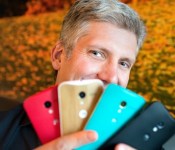
Motorola’s Rick Osterloh says no fingerprint scanner on next Moto X and no e-ink on next Moto 360

Motorola was one of the first companies to slap a fingerprint scanner on a smartphone, but they are reluctant to do it now. The original Atrix from 2011 had one, but Motorola President Rick Osterloh says the technology is still too inconsistent for their devices.
Osterloh thinks it’s just as fast to tap your finger to unlock a device as it is to swipe for a fingerprint. He also said that when the reader fails, the customer is turned off and that “All of the fingerprint readers are unreliable.” That’s pretty bold when you consider that Apple’s Touch ID works very well, Of course, it remains to be seen how well Samsung’s new touch sensor on the Galaxy S6 and Galaxy S6 Edge work in everyday life, but early reports are that it’s pretty promising.
As to the Moto 360, it was heralded as the best of the best for smartwatches for a while, but new offerings from Huawei and LG are changing that. Even Pebble is stepping up their game with the Pebble Time Steel. How does Motorola plan to stay at the top? Osterloh said that they will invest heavily in software and experiences. One such app is Moto Body, which helps users with fitness and diet tracking. They will also bring Moto Maker customizations to the Moto 360 by the end of March. Lastly, don’t expect an e-ink version of the Moto 360 anytime soon. Just get rid of the flat tire and give me an Always On display with proper battery life, and all we be well.
source: CNet
Come comment on this article: Motorola’s Rick Osterloh says no fingerprint scanner on next Moto X and no e-ink on next Moto 360
 AIVAnet


